
Back to: C#.NET Tutorials For Beginners and Professionals
Angular Training Course
Angular is one of the most widely used frameworks for building modern web applications. But before learning how to use Angular, it is important to understand what Angular actually is, why it exists, and how we should learn it correctly.
Whether you are a complete beginner, a student, or an experienced developer, this will help you see the bigger picture and follow a structured roadmap that builds your confidence from fundamentals to advanced concepts.
New Batch: 19th January, 2026, 8:30-10:00 PM, IST
Course Details:
Course Duration: 2 Months (Monday to Friday)
Fees: 6000 INR or 80 USD
Course Registration Link: https://forms.gle/TgJFRTx1psU96vhH6
Join our Telegram Group for more information: https://telegram.me/dotnettutorials
Mobile / WhatsApp Number: +91 70218 01173
Demo Zoom Credentials:
Demo Sessions: 19, 20, and 21st January, 2026
Join Zoom Meeting: https://us06web.zoom.us/j/87572410051?pwd=xcEUcSX0xtukeEQwCdykKrEZtDdSwm.1
Meeting ID: 875 7241 0051
Passcode: 449702
What Exactly is Angular?
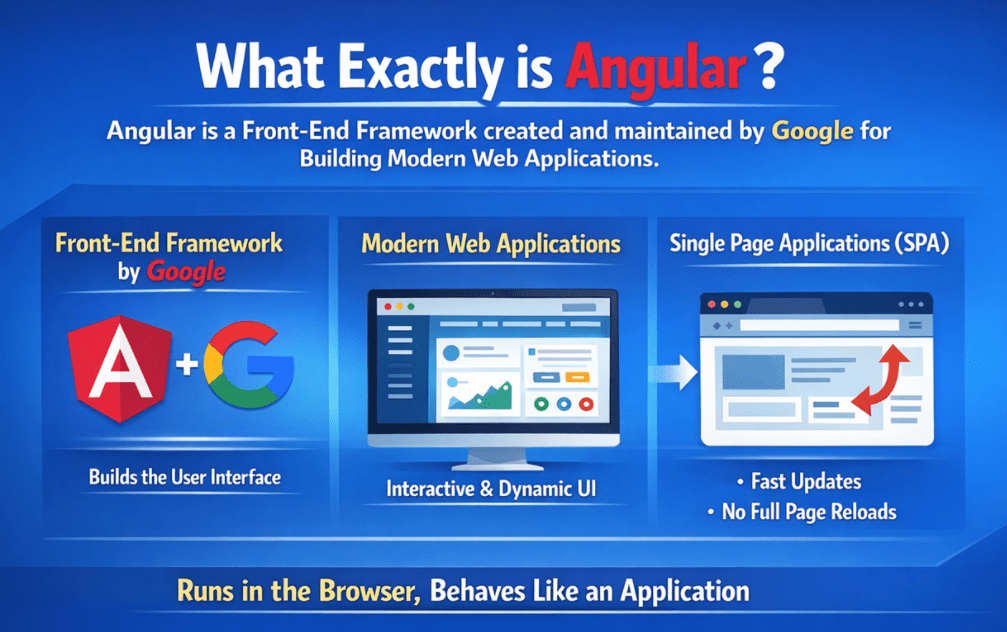
Angular is a Front-End Framework created and maintained by Google. When I say Front-End, I am talking about the part of an application that the user sees and interacts with buttons, forms, pages, menus, dashboards, and everything that runs in the browser.
The main purpose of Angular is to help us build Modern Web Applications in a clean, structured way. For a better understanding, please look at the image below:
Angular is used to build Single Page Applications (SPA):
Angular is commonly used to build something called a Single Page Application, or SPA. On a traditional website, when we click something, like a menu item or link, the browser loads a new page.
But in an SPA, the application loads once, and after that, it updates only the required part of the screen without reloading the entire page. That is why SPAs feel fast and smooth, almost like mobile apps.
Runs inside the browser, but behaves like a software application:
This is a very important point: Angular applications run in the browser, but they behave more like a software application than just a static website. Meaning:
- You can have screens that update instantly
- Data changes can be reflected immediately in the UI
- You can have complex forms and validations
- You can maintain user state without reloading
So, it feels like you are using an app, but it’s actually running inside your browser.
Why Companies Choose Angular:
Companies choose Angular because it makes large applications easier to build and easier to manage. As an application grows, code can quickly become messy without proper structure. Angular gives a clear framework and rules, so the project stays organized even after months or years. Companies prefer Angular because:
- It helps organize large applications into clear, manageable parts
- It enforces a structured way of writing code, making it easier to read, see, and maintain
- It is well-suited for long-term and enterprise-level projects that run for many years
- It allows multiple developers to work together smoothly without creating confusion or inconsistent code
Angular is not just about making screens look good. It is about building applications that remain stable, scalable, and maintainable even as new features and teams are added over time.
Where is Angular used in real life:
Angular is widely used in real projects where the user interface is complex, and the application has many screens, features, and users. These are not simple “one-page” websites. These are systems that must remain structured and scalable because they keep evolving. Some common real-world use cases include:
- Admin Dashboards: Used by admins to manage users, orders, products, reports, analytics, and system settings from a single interface.
- Banking & Financial Portals: Used to check transactions, manage accounts, view statements, apply for services, and handle secure financial operations in a structured and safe environment.
- E-commerce Admin Panels: Used for product management, order processing, inventory tracking, refunds, offers, pricing rules, and customer support dashboards.
- ERP / CRM Systems: Large enterprise applications used to manage employees, sales leads, customer data, billing, operations, workflows, and internal business processes.
These types of applications continue to grow over time. New features are added, more users join, and teams expand. Angular is popular in such systems because it provides a clear, structured way to build, manage, and maintain large applications without code becoming messy or unmanageable.
Why Angular Exists: The Evolution from Traditional Websites to Modern Web Apps
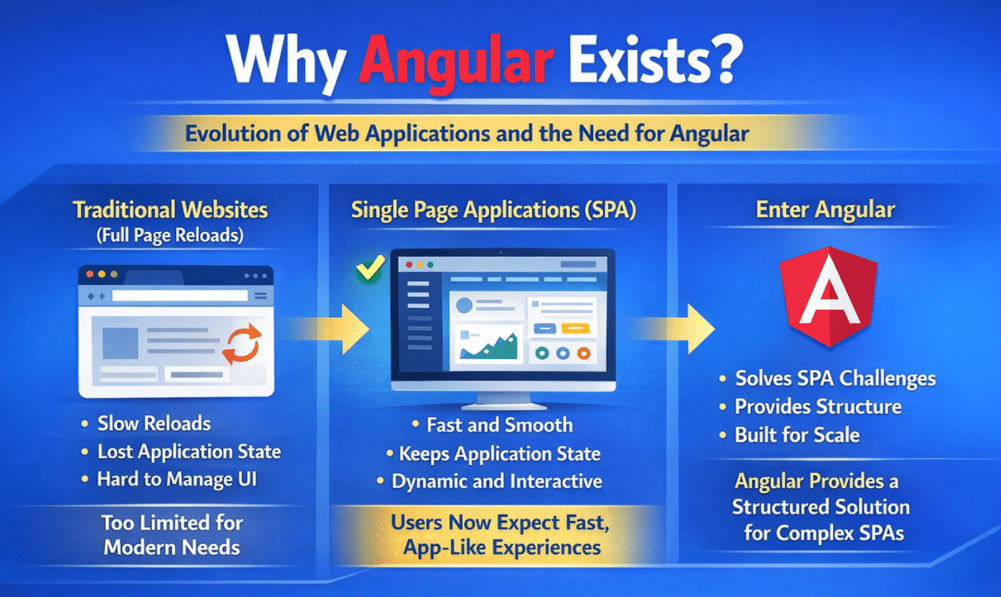
To truly understand Angular, we first need to understand how web applications evolved over time. Angular did not appear randomly. It exists because traditional websites (HTML, CSS, JavaScript, or server-side pages) are no longer enough. For a better understanding, please look at the image below:
So, let’s start from the beginning.
Traditional Websites (Page Reload on Every Click)
In the beginning, and even today in many simple websites, the web works like this:
- You open a page.
- You click on a link or a button.
- The browser sends a request to the server.
- The server returns a new HTML page.
- The browser reloads the entire page.
So, essentially, every click loads a New Page. This approach is perfectly fine for simple websites like:
- Static Informational Sites
- Basic Company Websites
- Blogs
- Simple Pages Where Interaction is Minimal
Problems with Traditional Websites (When apps become complex)
But as web applications started becoming bigger, like banking apps, admin dashboards, ERP systems, this Full Page Reload approach started creating real problems. Here are the most common issues:
Problem 1: Slow and Disrupted User Experience
- Every action triggers a full reload.
- The screen flashes, reloads, and feels slow.
- The user experience is not smooth.
Problem 2: Losing the Application State
Let’s say a user:
- Filled part of a form,
- Applied a filter,
- Opened a panel,
- Selected something on the screen
After a page reload, many of these things can get reset, unless you manage everything manually.
Problem 3: UI Becomes Harder to Manage
Modern applications need things like:
- Live UI Updates
- Dynamic Lists
- Instant Search Suggestions
- Filters Without Reload
- Validations While Typing
With the traditional approach, doing all this becomes messy and inconsistent.
Problem 4: Code Becomes Unorganized as the App Grows
In large projects, you need structure. Otherwise:
- Code gets scattered
- Changes become risky
- Debugging becomes hard
- Teamwork becomes difficult
So, the conclusion was clear: Traditional websites are good for simple sites, but not ideal for app-like experiences.
Why SPAs Exist (What Problem SPAs Solve)
That’s where SPAs came in. SPA means Single Page Application. In an SPA:
- The application loads once initially
- After that, the page doesn’t reload completely
- Only the required part of the screen updates
So, the experience becomes:
- Fast
- Smooth
- App-like
This is why applications like:
- Gmail
- YouTube
- Modern Dashboards
Feel like software apps, even though they run in a browser. So, SPAs exist because users now expect the web to behave like an application, not like a collection of pages.
How Angular Solves the Core SPA Problems
Now, building an SPA sounds great, but it’s not easy if you do it in an unstructured way. This is exactly where Angular becomes useful. Angular solves key challenges of SPA development:
a) Solves Page Reloads
Angular applications do not reload the entire page for navigation or UI changes. Instead:
- Angular updates the required UI section
- Navigation happens inside the application
- The user gets a smoother experience
So, you get “multiple screens” without a full page reload.
b) Helps with State Management
In real applications, you always have a state like:
- Logged-in user details
- Shopping cart items
- Selected filters
- Selected tabs
- Form values
- Screen selections
In traditional apps, state can easily be lost during reloads. Angular encourages structured ways to manage state:
- Services
- Shared data flow
- And later in the advanced level, dedicated state management patterns
So, the application can “remember” what the user is doing.
c) Handles UI Updates Smoothly
In modern UIs, data changes constantly:
- New items appear
- List updates
- Totals recalculate
- Errors display instantly
- Validations happen while typing
Angular is designed for dynamic UI:
- When data changes, UI updates automatically in a predictable way
- The developer doesn’t manually “refresh” the UI each time
That’s why Angular is well-suited for dashboards and real-time admin panels.
d) Keeps Code Organized for Large Applications
This is the most important reason Angular is used in enterprises. Angular is not just for UI. It provides structure so that large applications remain manageable.
It encourages:
- Breaking UI into reusable parts
- Keeping responsibilities separate
- Writing maintainable code that teams can work on for years
So, when an application grows from 5 screens to 200 screens, the code does not collapse.
So overall: SPAs exist because users want fast, app-like experiences. And Angular exists because building large SPAs without structure becomes difficult. That’s why Angular is not optional for large applications. It is a structured solution for real-world, scalable web apps.
Angular vs React vs Vue:
Let me answer this in a very simple and honest way. There is No Single Best Framework, just like there is No Single Best Vehicle.
- A Bike is best for short travel
- A Car is best for family travel
- A Truck is best for a heavy load
Similarly, Angular, React, and Vue are tools. The right choice depends on what you are building, how big it is, how many developers are working, and how long the project will run. So, this comparison is Not About Choosing a Winner. It is about choosing the Right Fit. For a better understanding, please look at the image below:

Now imagine you want to build a house. There are three different ways you can do it.
Angular: A Complete Ready-Made House System (Full Framework)
Angular is a Complete Front-End Framework, meaning it comes with a full set of built-in solutions. Think of Angular like a Fully Planned, Fully Furnished Apartment System:
- The blueprint is already decided
- Rooms are predefined
- Wiring and plumbing rules are standard
- Everything connects in a structured way
When you move in, you already get:
- Kitchen
- Bedroom
- Bathroom
- Electricity
- Water connection
- Furniture
You don’t decide where to put walls, pipes, or wiring. Everything is already planned and structured. So, you don’t waste time deciding the basic structure again and again. The system guides you.
What this means in real projects:
- Everyone in the team follows the same patterns
- The codebase remains consistent
- Maintenance becomes easier for years
- Large applications stay organized
That’s why big companies like Angular. They want:
- Structure
- Discipline
- Predictability
- Long-term stability
Angular is best when:
- The project is big
- Many developers work together
- The project will run for years (enterprise apps)
Angular = “Follow the system, and things won’t break.”
React: A Library (mainly for UI), Not a Framework
React is not a full framework. It is mainly a UI library, focused on building UI components. Think of React like buying an empty plot of land. You get the land, but now you must decide everything:
- Where to build rooms
- Where to put the kitchen
- How to design the structure
- Which materials to use
React gives you Excellent UI Building Blocks, but for:
- Routing
- State management
- Architecture
- Project Structure
You must choose additional tools and decide how everything fits together.
What this means in real projects:
- React gives high flexibility
- Two React projects may look completely different
- If the team designs well, the result is excellent
- If the design decisions are weak, the project becomes messy
React is best when:
- The team is Very Experienced.
- The project needs High Flexibility.
- Custom Architecture is required.
React = “Powerful, but depends heavily on who is building it.”
Vue: Flexible and Easier to Start
Vue is popular because it is:
- Simple
- Beginner-friendly
- Easy to start
- Flexible
Think of Vue like a small, ready-to-use house:
- Easy to enter
- Easy to understand
- Easy to start living in
Vue works great for:
- Small to medium projects
- Faster development
- Simpler applications
But when the project becomes:
- Very large
- Long-term
- Built by many developers
Lack of strict rules can create confusion. That’s where Angular usually has an advantage.
Vue = “Easy to start, but large projects need discipline.”
So… Which One Is Better?
Now, the key point you should say clearly:
- None of them is better.
- Each one fits a different situation.
So:
- Small/experimental projects → React or Vue works well
- Large / enterprise / long-term projects → Angular shines
Who Can Attend This Angular Training?
Before we go deeper into Angular, I want to clearly answer a very common question: Is this Angular training really suitable for me? So let me clearly explain who can attend this training and who this course is designed for. For a better understanding, please look at the image below:
1) Complete Beginners (Yes, you can attend)
If you are completely new to Angular or even new to web development, you can confidently attend this training as long as you are willing to learn step by step. You do not need to know everything from Day 1. This course is designed to start from the basics and gradually build your understanding without overwhelming you.
What you need is:
- Interest and willingness to learn
- Basic logical thinking (if-else, loops, basic function concepts)
- Consistency in attending sessions and practicing regularly
Since the course is structured from fundamentals, beginners are not thrown directly into advanced topics, making the learning journey smooth and confidence-building.
2) Students (College / Final Year / Freshers)
If you are a student and want to build strong, job-oriented front-end skills with a clear roadmap, Angular is an excellent choice because it teaches structured, professional development practices. Instead of learning random topics, you learn how real-world applications are built in companies.
You will learn:
- How professional, real-world applications are designed and developed
- How to organize code in a clean and maintainable way
- How to build UI that works with real APIs and real data
This structured learning approach helps you with both academic projects and technical interviews.
3) Backend Developers (Who want to become Full Stack Developers)
If you are already working as a backend developer (ASP.NET Core, Java, Node.js, etc.) and want to become a full-stack developer, this training fits perfectly into your growth path. You already understand APIs, authentication, databases, and business logic. Angular helps you complete the front-end side of the application.
You already have an advantage because you understand:
- How real applications are architected
- How backend APIs and data flow work
- How security, authentication, and business logic fit together
This course helps you add a structured, enterprise-ready front-end so you can confidently build and understand applications end to end.
4) Working Professionals
If you are already working in IT, whether in support, testing, development, or related roles, and want to move into front-end development or upgrade your skills, this course is very suitable. Working professionals benefit especially because the training focuses on understanding concepts rather than just writing code.
The course emphasizes:
- Why something is done a certain way
- When to use one approach over another
- Common real-world mistakes and industry best practices
This makes learning practical, efficient, and directly applicable to real-world environments.
5) Career Switchers / Non-IT background
If you are from a non-IT background and want to transition into software development, you can attend this training; many learners successfully do. However, it is important to be realistic and patient during the initial phase of learning.
You should be prepared for:
- Being patient during the first few weeks
- Practicing regularly, even in small amounts
- Avoiding comparisons between your Day 1 and someone else’s Year 2
If you stay consistent and follow the course roadmap, the structure of the training will support your transition step by step.
6) Who Should NOT Join
This training may not be the right fit if your expectations do not align with structured learning. Angular is not about shortcuts; it rewards proper understanding and disciplined practice. This course may not suit you if:
- You are looking for “Angular in 7 days” or quick shortcuts
- You cannot spend at least some time practicing between sessions
- You are interested only in certificates, not in a deep understanding
Angular requires patience and structured learning, and this course follows that philosophy.
How This Course Is Structured?
Many people start Angular from random videos, one topic today, another topic tomorrow, and after a few weeks, they feel confused. Not because Angular is impossible, but because the learning order is wrong. So let me clearly explain how this course is structured and why this structure makes learning easier. For a better understanding, please look at the image below:
The course is divided into modules (Fundamentals → Advanced). This training is not a collection of random topics. It is a step-by-step roadmap. We begin with the Fundamentals, and then we slowly move towards Advanced concepts.
So even if you are a beginner, you will not be forced into advanced concepts suddenly. Everything is built like a staircase, one step at a time. Along with modules, we will apply everything in a real-world project mindset, so you don’t just learn topics, you learn how to build applications end-to-end.
Module 1: Fundamentals & Environment Setup (Strong foundation first)
This module is all about building a strong base so you don’t feel confused later. Think of it like understanding the road and getting your vehicle ready before you start driving. Before we write Angular code, it’s important to understand how modern web applications work, why SPAs exist, and how an Angular project is created and structured in real companies. In this module, we start slowly and clearly, assuming you are a beginner.
You will learn:
- How traditional websites work (full page reloads) and how modern Single Page Applications (SPAs) work (no full reloads).
- Why companies prefer SPAs and why Angular is chosen for large, long-term applications.
- How to set up everything needed for Angular development: Node.js, npm, Angular CLI, and understanding the project folder structure.
- Why Angular uses TypeScript and how it helps write safer, cleaner, and more maintainable code.
- How Angular CLI helps you create, run, build, and generate features, and what key project files mean (package.json, angular.json, environments).
- How an Angular application starts running (bootstraps): what main.ts does, what the root component is, and how Angular loads the application behind the scenes.
Outcome after Module 1: Even if you are a complete beginner, you will stop feeling “lost” because you will clearly understand how an Angular project is created, structured, and started.
Module 2: Core Building Blocks (How Angular UI is actually built)
Once the foundation is clear, this module teaches you how Angular builds the user interface. Think of Angular UI like building a house with blocks: one for the header, one for the menu, one for the product list, and one for the footer. Instead of writing everything in one place, you will learn to break the UI into small, reusable parts and connect HTML (templates) with TypeScript (logic) cleanly.
You’ll learn:
- What components are, and why every Angular app is made of components.
- How templates display data on the screen (Angular HTML).
- How data moves between the component and the UI (data binding).
- How user actions work (event handling, like clicks, inputs, etc.).
- How Angular handles component styles (scoped styles), and how to structure UI layout cleanly.
- How Angular shows/hides or repeats elements using directives like *ngIf and *ngFor.
- How pipes format and transform data inside templates (date, currency, text, and even custom pipes).
Outcome after Module 2: You will be able to design clean, reusable UI blocks instead of messy copy-paste code, just like real Angular developers do.
Module 3: Services, Dependency Injection & Navigation (Make it multi-page + scalable)
After building UI blocks, the next step is building a real application with multiple screens and shared logic. In real projects, business logic should not be contained within components. This module teaches you how Angular keeps code clean by moving logic into services, properly sharing data using Dependency Injection, and creating multiple screens within a Single Page Application (SPA) without a full-page reload.
You’ll learn:
- What services are and why they are used for business logic and shared data.
- How Dependency Injection (DI) helps Angular automatically create and provide services.
- How routing works to create multiple “pages” inside an SPA (routerLink, router-outlet, route parameters).
- How to protect pages using guards (login, roles, permissions).
- How resolvers can load required data before a page opens (so the page doesn’t feel empty).
- Common routing patterns used in real apps (feature-based routes, child routes, and simple 404 handling).
- Lazy loading loads only what is needed, improving performance for large applications.
Outcome after Module 3: You will be able to build real, multi-page Angular applications, such as dashboards, admin panels, and enterprise portals.
Module 4: Forms & User Input Management (Most important for real projects)
Forms are the backbone of almost every real application, including login, registration, adding or editing products, payments, profile updates, and admin screens. This module focuses on capturing user input in a clean, professional way, handling validations properly, and managing real-world form scenarios as companies expect.
You’ll learn:
- How to build simple forms quickly using template-driven forms
- How to build powerful and scalable forms using reactive forms (FormGroup, FormControl, FormArray)
- How validations work, including required fields, patterns, custom checks, and async validation
- How to handle file uploads and downloads with validation, progress tracking, and secure handling
- How real applications manage form data safely and cleanly
Outcome after Module 4: You will be confident in building real-world forms with validation and file handling, exactly as companies expect.
Module 5: Communication, State & Reactivity (RxJS, Signals, NgRx)
This module is where Angular starts to feel industry-grade. Real applications are not just about showing UI screens; they continuously communicate with backend APIs, share data between components, and react smoothly when data changes. This module takes you from beginner level to professional level by teaching you how Angular handles data flow in a clean, scalable, and professional way.
You’ll learn:
- How Angular communicates with backend APIs using HTTP (CRUD operations, headers, query parameters, loading, and error handling).
- How components communicate with each other (parent-child communication, shared services, and basic communication patterns).
- How Angular updates the UI when data changes, and why understanding change detection matters.
- How to manage subscriptions safely and when to use the async pipe to reduce manual subscription handling.
- RxJS basics and common real-world patterns (handling async data, search with debounce, switching API calls, avoiding memory leaks).
- Signals: A simpler and modern way to manage local reactive state in Angular.
- NgRx: How large applications manage shared global state in a predictable way (Store, Actions, Reducers, Effects, DevTools).
Outcome after Module 5: You will be able to manage complex data flow and application state confidently, without confusion, even as the application grows.
Module 6: Robustness, Error Handling & Networking (Enterprise Reliability)
In real applications, things don’t always go perfectly. APIs can fail, the internet can be slow, tokens can expire, and unexpected errors can happen. A professional application must still behave properly and provide a smooth experience rather than crashing. This module teaches you how to make your Angular application stable, reliable, and predictable, exactly the way companies expect.
You’ll learn:
- How to use HTTP interceptors to handle API requests and responses globally.
- How to automatically attach authentication tokens, add standard headers, show loaders/spinners, and log requests.
- How to show consistent error screens, retry buttons, and fallback UI so users don’t feel stuck.
- How to handle errors in one central place instead of writing error code everywhere.
- How to show user-friendly error messages instead of technical crash screens.
- Basic retry and fallback strategies, so small failures don’t break the entire application.
Outcome after Module 6: You will be able to build applications that behave professionally even when APIs fail. This is crucial in real companies.
Module 7: UI Design & Dynamic Behaviour (Angular Material + Scalable UI)
This module focuses on making your application look professional, consistent, and user-friendly, so it feels like a real product, not a demo project. You will learn how companies build reusable UI components, follow a clean design system, and add dynamic behaviour to improve the user experience.
You’ll learn:
- How to use Angular Material and CDK to build clean, responsive, and consistent UI (tables, dialogs, forms, navigation, layouts)
- How to create reusable UI components and shared libraries, so the same design can be used across multiple screens or apps
- How to load components dynamically (for dialogs, popups, modals, configurable screens)
- How animations and UX improvements make applications feel smooth and user-friendly (route transitions, list animations, small feedback effects)
Outcome after Module 7: Your applications will start looking and behaving like real product-level UI used in companies, not “demo UI.”
Module 8: Security, Optimization & Deployment (Production readiness)
This final module prepares you for real-world production and industry standards. Many people can build an app, but companies expect you to secure it, optimize it, test it, and deploy it properly. This module covers the key considerations when your Angular application goes live with real users.
You’ll learn:
- Security Fundamentals: Protecting Angular apps from common attacks (XSS protection, safe DOM usage, JWT storage risks, route protection, security checklist)
- Performance Optimization: Improving loading speed and responsiveness using AOT vs JIT, Lazy Loading, Bundle Optimization, and profiling with Angular DevTools.
- PWA (Progressive Web Apps): Building offline-capable and installable applications using service workers and caching strategies
- Server-Side Rendering (SSR) with Angular Universal: Improving SEO and first-page load speed using pre-rendering and meta tags
- Environment: How builds work for dev vs production (environments), and how apps are deployed (hosting basics).
- Testing: How Angular apps are tested before release (unit, integration, and E2E testing using Jasmine/Karma, TestBed, Cypress/Playwright basics)
Outcome after Module 8: You will be able to build, secure, optimize, test, and deploy Angular applications like a professional developer.
Step-by-Step Learning – No Skipping
One thing I want to emphasize clearly: This course follows a step-by-step approach. We do not skip fundamentals. We do not rush into advanced topics. Every new concept is introduced only after the previous one is clearly understood. This ensures:
- You don’t feel lost
- You don’t blindly copy code
- You actually understand what you are doing
Real Project Mindset
From the beginning, I will teach you how to think like you are building a real application, not just completing topics. So, the focus is:
- Writing code that others can understand
- Following proper structure
- Thinking about scalability and maintainability
This prepares you for:
- Real Jobs
- Real Projects
- Real Interviews
Why This Structure Works
This structure works because:
- Beginners get clarity instead of confusion
- Working professionals get depth instead of repetition
- Everyone progresses with confidence
So, if you want to learn Angular properly without confusion, with a clear roadmap, and with a real-world mindset, this course is designed exactly for that.
What You Will Be Able to Do After the Course?
Now, many of you will have one important question in mind: After completing this course, what exactly will I be able to do? So let me paint the outcome clearly.
1) You will be able to build full Angular applications
By the end of this training, you will move far beyond small demo examples. You will be capable of building real, complete Angular applications, similar to what companies actually use in production, such as:
- Admin dashboards
- Business and management portals
- Internal company tools
- Feature-based applications with multiple screens and workflows
You will understand how to properly structure an Angular application, including UI layout, navigation, forms, API communication, and clean, maintainable architecture. As a result, your projects will look professional and industry-ready, not like tutorial or practice code.
2) You will be able to understand existing Angular projects
This is a big milestone because many learners can create a small project from scratch, but they struggle when they join a company and see a big Angular codebase already written by others. After this course:
- You will understand how Angular projects are organized (folders, modules, feature structure)
- You will clearly understand how components, services, routing, forms, and state connect together
- You will know how to explore the code, trace a feature, and confidently make changes
So even if you are given an existing Angular project in a company, you won’t feel lost.
3) You will be able to crack Angular interviews confidently
Angular interviews are not just about writing code. Most interview questions focus on concepts, architecture, and decision-making, not just syntax. This course focuses strongly on building that clarity. You will be able to confidently explain topics such as:
- How routing works in Single Page Applications (SPAs)
- How Dependency Injection helps manage code and services in Angular
- When and why to choose different form strategies
- How HTTP communication and error handling work
- Core state management concepts
- Performance and security considerations in real applications
So, you won’t just use Angular, you’ll be able to explain Angular like a professional, which is exactly what interviewers look for.
4) You will be able to work on enterprise-level UI
Enterprise UI is very different from simple or demo UI. In real companies, user interfaces must be:
- Consistent
- Reusable
- Responsive
- Maintainable
- Scalable
After this course, you will have the mindset and skills required to work on such enterprise-level UI, including:
- Structured and scalable UI architecture
- Reusable component-based design
- Professional UI patterns used in real-world applications
This prepares you to contribute meaningfully to large applications, not just small screens or isolated features.
Overall, after the course, you will be able to build complete Angular applications, understand real projects, prepare confidently for interviews, and work professionally on enterprise-grade UI. And if you follow the live sessions consistently and practice step by step, you’ll genuinely feel the transformation week by week.
FAQs:
Is Angular difficult for beginners?
This is one of the most common concerns, and the honest answer is: Angular is not difficult when it is learned in the right order. Angular is actually a very structured framework that helps beginners rather than confusing them. Most people find Angular difficult only because they approach it the wrong way.
Beginners usually struggle in these situations:
- When they skip fundamentals
- When they learn random topics from random sources
- When they jump into advanced concepts too early
In this course, we start from zero and move step by step. We first build your foundation—modern web basics, SPAs, environment setup, and TypeScript, before moving on to components, routing, forms, APIs, RxJS, and advanced topics. If you attend regularly and practice a little, beginners can absolutely learn Angular with confidence.
Do I need JavaScript or TypeScript before joining?
You do not need to be an expert in JavaScript or TypeScript before joining this course. Basic JavaScript knowledge is helpful but not a strict requirement. What matters more is your willingness to learn and think logically.
To get started, it is enough if you understand the basics of any programming language, such as:
- Variables and basic data types
- Conditions (if–else)
- Loops
- Functions and arrays
TypeScript will be taught from scratch in this course, and it will be explained in a way that directly aligns with how Angular uses it in real projects. Always remember: logic matters more than syntax. Syntax can be learned quickly, but logical thinking is what helps you build real applications.
React vs Angular – which is better?
There is no single “best” framework in the real world. The right choice always depends on what you are building, the size of the project, and how long it needs to be maintained. This comparison is not about choosing a winner.
In simple terms:
- Angular is ideal when you need a structured framework for large and enterprise-level applications
- React is a powerful UI library, but teams often need to choose many additional tools around it
- Angular provides a more complete structure by default
This course focuses on Angular because it fosters a professional, structured mindset, which is especially useful in real-world enterprise environments where clarity, consistency, and maintainability matter.
Will you cover real projects or only theory?
This course is not theory-focused. The goal is not to teach definitions or isolated concepts. The goal is to teach you how real Angular applications are actually built and maintained in companies.
In this course:
- Every concept is explained with real-world usage
- You learn how features are used in actual applications
- You understand the reasoning behind architectural decisions
Most importantly, the focus is on WHY something is done, not just HOW to do it. When you understand the “why,” you can handle real projects confidently, even when requirements change.
Is this course suitable for working professionals?
Yes, this course is very suitable for working professionals. The training is designed to be structured, consistent, and progressive, so you don’t feel overwhelmed even if you are learning after a long gap.
The course helps working professionals because:
- Sessions follow a clear sequence
- Concepts are explained from fundamentals
- Learning builds gradually instead of jumping randomly
Additionally, you get Telegram group support for doubts and updates, so you don’t feel disconnected between sessions. This makes it easier to balance learning with work.
Will this help in interviews?
Yes, this course is designed with interviews in mind. Angular interviews are not about memorizing syntax; they are about understanding concepts, architecture, and decision-making. Interviewers usually check whether you understand:
- Components and data flow
- Routing and navigation
- Services and Dependency Injection
- Forms and validations
- HTTP communication and error handling
- Performance and best practices
This course focuses on building exactly this clarity. As a result, you’ll be able to explain Angular confidently, not just write code mechanically.
What if I miss a class?
Missing one session is not a problem, but ignoring it can be. The course is designed so you can recover smoothly if you miss a class. If you miss a session:
- You can use the recordings to catch up
- Review the notes or shared resources
- Identify the parts you didn’t understand
- Join the next session with your doubts
Because the course is step by step, you’ll also be guided on what to revise first, so you can stay on track even if you miss a session occasionally.
Is Angular still in demand?
Yes, Angular is in high demand, especially for enterprise-level applications. Many large systems rely on Angular because it provides structure, scalability, and long-term maintainability. Angular is commonly used in:
- Enterprise dashboards
- Internal business tools
- Large portals and admin systems
Angular also follows a stable release and long-term support strategy, which makes it a trusted choice for long-running projects. If your goal is enterprise front-end development, Angular remains a strong and relevant skill.
Do you cover backend integration?
Yes, backend integration is an important part of this course. Real applications are never just UI; they always communicate with APIs and backend services. In this course, you will learn:
- How Angular communicates with APIs using HTTP
- How data is sent and received
- How to handle errors and loading states
- How to design a clean and professional data flow
So, you won’t just learn how to build screens—you’ll learn how to build complete applications that work with real data.
How is this different from YouTube videos?
YouTube is helpful, but the biggest problem is that learning is often fragmented—one topic today, another topic tomorrow, with no clear order. This is why Angular feels difficult for many learners. In this course, you get:
- A clear, step-by-step learning roadmap
- Live explanations with focus on “why” and “when.”
- Real-time doubt clearing
- A real-world project mindset
So, the difference is not just content. The difference is clarity, sequence, guidance, and correction, which is what truly makes you confident and job-ready.
That’s the roadmap for your Angular journey. If you follow the step-by-step path in the live sessions, you will gain clarity, confidence, and real project experiences, because I will always explain why, when, and the common mistakes people make.
About the Author: Pranaya Rout
Pranaya Rout has published more than 3,000 articles in his 11-year career. Pranaya Rout has very good experience with Microsoft Technologies, Including C#, VB, ASP.NET MVC, ASP.NET Web API, EF, EF Core, ADO.NET, LINQ, SQL Server, MYSQL, Oracle, ASP.NET Core, Cloud Computing, Microservices, Design Patterns and still learning new technologies.