
Back to: ASP.NET Core Web API Tutorials
Fluent API in Entity Framework Core
When we work with Entity Framework Core (EF Core), we are essentially telling EF Core how to map our C# classes (entities) to database tables, columns, keys, relationships, and constraints. EF Core can do a lot automatically using conventions, but real-world applications almost always need additional configuration. EF Core gives us three main ways to configure this mapping:
- Conventions (Default behaviour based on naming)
- Data Annotations (Attributes on properties and classes)
- Fluent API (Code-based configuration using Method Chaining)
Among these, Fluent API is the most powerful and flexible.
What is Fluent API in Entity Framework Core?
In Entity Framework Core (EF Core), the Fluent API is a powerful configuration mechanism that allows developers to precisely control how their C# classes (entities) are mapped to database tables. The term “Fluent” comes from the Fluent Interface Design Pattern, where methods are chained together in a readable, expressive manner.
Unlike Data Annotations, which decorate our entity classes with attributes such as [Required], [MaxLength], or [Key], the Fluent API moves all configuration outside the entity classes and into the OnModelCreating method of our DbContext. This separation helps keep our domain classes clean and focused only on business logic.
Why Fluent API in Entity Framework Core?
While Data Annotations are useful for simple scenarios, they are limited in scope. Fluent API provides:
More flexibility
You can configure things that Data Annotations cannot express, such as:
- Precise control over Cascading Rules
- Default values using SQL
- Value Conversions
- Global model-level configurations
- Table splitting and entity splitting
A single place to manage all database configurations
Keeping configuration inside the OnModelCreating method of the DbContext:
- Centralizes database mapping rules
- Prevents clutter in entity classes
- Avoids mixing domain logic with persistence logic
Ideal for complex enterprise applications
Real-world systems often need advanced configurations such as:
- Setting up indexes
- Controlling delete behaviours
- Mapping relationships with custom foreign keys
- Creating alternate keys
- Defining computed columns
- Using shadow properties
Fluent API is specifically designed to handle these advanced requirements. Because Fluent API provides far more capabilities than Data Annotations, it becomes the Preferred Approach for real-world applications, especially as the project grows in complexity.
What is the Fluent Interface Design Pattern?
The Fluent Interface Design Pattern is a software design approach that focuses on making code more readable, expressive, and natural to write. It does this by allowing us to call multiple methods in a single, continuous chain, rather than writing separate statements for each operation.
At the heart of this pattern lies method chaining, where each method returns the same object (usually this), so the next method in the chain can be called immediately.
Where is the Fluent Interface Pattern Used?
This pattern is extremely popular in modern frameworks and libraries:
- Entity Framework Core Fluent API: .Property().HasMaxLength().IsRequired()
- LINQ: .Where().OrderBy().Select()
- AutoMapper: .ForMember().MapFrom()
- ASP.NET Core Middleware: .UseRouting().UseAuthentication().UseAuthorization()
It is widely used because it improves developer experience and makes configuration-heavy code very easy to read.
Example to Understand Fluent Interface Design Pattern:
The main objective of the Fluent Interface Design Pattern is to apply multiple methods to an object by connecting them with dots (.) without having to re-specify the object name each time. To understand why Fluent Interfaces are useful, let’s begin with a normal C# class. Let’s say we have the following Student class.
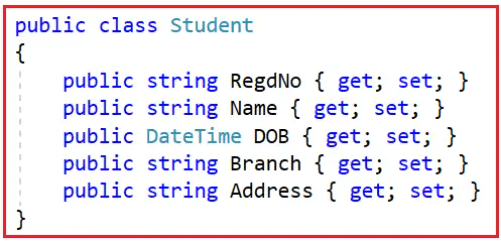
Traditional Way of Setting Values
Now, if you want to consume the above Student, you generally create an instance of it and set its respective properties, as shown in the image below.
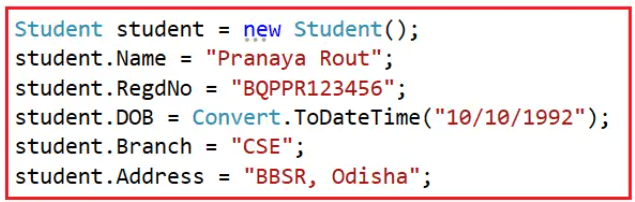
This works, but:
- You must repeat the student. again and again
- The code looks repetitive
- It isn’t very expressive
- It’s not fun to maintain
Fluent Way of Setting Values
The Fluent Interface Design Pattern simplifies our object-consumption code by making it more readable and understandable. Wouldn’t it be nice to set the student object properties as shown in the image below?

This reads almost like an English sentence: This student has registration number X, name Y, born on Z, studying CSE, and stays in Odisha. This is the Fluent Interface Pattern in action. But to achieve this, we must use something called Method Chaining.
What is Method Chaining?
Method Chaining is the core technique that makes fluent interfaces work. In this technique:
- Each method performs an operation
- And then returns the current object itself, usually using return this;
- This allows calling another method on the same object instantly
Implementing Method Chaining Using a Wrapper Class
To implement Fluent Interface and method chaining, we create a wrapper class around the original entity. We don’t modify the Student class. Instead, we build a new class called FluentStudent as shown in the image below.
What the wrapper class does:
- Encapsulates the original entity (Student). Contains a private instance of Student.
- Provides chainable setter methods. Provides fluent methods for each property.
- Each method sets one property.
- Each method returns this, enabling chaining.
Now, the above fluent interface will be consumed by the client. So, with the above FluentStudent wrapper class in place, the client code looks as shown below.
This is:
- Cleaner
- More readable
- More maintainable
- More expressive
This pattern is especially useful when:
- Multiple properties must be set together
- Many configuration options exist
Complete Example Code of Fluent Interface Design Pattern:
Here is the full working console application demonstrating everything we discussed. The following example shows how to implement the Fluent Interface Design Pattern in C#.
namespace FluentInterfaceDemo
{
    public class Program
    {
        static void Main(string[] args)
        {
            // Creating a Student object using Fluent Interface + Method Chaining
            // Every method returns the same FluentStudent instance, enabling continuous chaining.
            Student student = new FluentStudent()
                    .StudentRegedNumber("BQPPR123456")     // Set Registration Number
                    .NameOfTheStudent("Pranaya Rout")      // Set Student Name
                    .BornOn("10/10/1992")                  // Set Date of Birth
                    .StudyOn("CSE")                        // Set Branch
                    .StaysAt("BBSR, Odisha")               // Set Address
                    .Build();                              // Finalize and return Student object

            Console.WriteLine($"{student.Name} - {student.RegdNo}");

            Console.Read();
        }
    }

    // This is a simple Entity/Model class
    public class Student
    {
        public string RegdNo { get; set; } = null!;   // Registration Number
        public string Name { get; set; } = null!;     // Full Name
        public DateTime DOB { get; set; }             // Date of Birth
        public string Branch { get; set; } = null!;   // Branch or Course
        public string Address { get; set; } = null!;  // Residential Address
    }

    // The FluentStudent class acts as a "Wrapper" around the Student class
    // It provides Fluent methods for setting properties using method chaining
    public class FluentStudent
    {
        // Creating an internal Student object that will be populated gradually
        private Student _student = new Student();

        // Sets Registration Number and returns the same FluentStudent object
        public FluentStudent StudentRegedNumber(string RegdNo)
        {
            _student.RegdNo = RegdNo;
            return this;    // Returning 'this' enables method chaining
        }

        // Sets Student Name and returns the same FluentStudent object
        public FluentStudent NameOfTheStudent(string Name)
        {
            _student.Name = Name;
            return this;
        }

        // Sets Date of Birth after converting the input string to DateTime
        public FluentStudent BornOn(string DOB)
        {
            _student.DOB = Convert.ToDateTime(DOB);
            return this;
        }

        // Sets Branch/Course and returns the same FluentStudent object
        public FluentStudent StudyOn(string Branch)
        {
            _student.Branch = Branch;
            return this;
        }

        // Sets Address and returns the same FluentStudent object
        public FluentStudent StaysAt(string Address)
        {
            _student.Address = Address;
            return this;
        }

        // Final Method: Returns the fully populated Student object
        // This method ends the fluent chain
        public Student Build()
        {
            return _student;
        }
    }
}
Now, I hope you understand the Fluent Interface Design Pattern. With this kept in mind, let us proceed and try to understand Fluent API in Entity Framework Core.
Why does EF Core use this pattern?
Because configuring database mappings usually requires linking many related settings together (keys, relationships, precision, property names, constraints, etc.). A fluent, chainable style makes that configuration expressive and easy to follow.
Configuring Fluent API in Entity Framework Core:
To configure the Fluent API in EF Core, we need to override the OnModelCreating method of the DbContext class and use the ModelBuilder to define configurations for Entities, Properties, Relationships, etc., as shown in the image below. As you can see, we call many methods on the same modelBuilder object using the dot (.) operator, which is method chaining.
Configuration Precedence in EF Core
EF Core applies configuration in this order:
- Conventions (Defaults)
- Data Annotations
- Fluent API
If there is a conflict, Fluent API wins over Data Annotations, and Data Annotations win over Default Conventions.
Fluent API Configurations in EF Core:
The Fluent API is the most flexible and powerful way to configure EF Core’s model. It allows precise control over how classes, properties, and relationships are mapped to the database. Fluent configurations are organized into three broad categories:
- Model-Wide (Global) Configuration: These settings affect the entire model inside the DbContext. They define global behaviours that apply to all entities and properties unless explicitly overridden.
- Entity Configuration: These focus on configuring entire entity classes, how they map to tables, what their keys are, what relationships they have, etc.
- Property Configuration: These target individual properties within an entity, defining characteristics like data type, constraints, formatting, or conversion rules.
Model-Wide or Global Configurations in EF Core
Model-Wide or Global Configuration refers to settings that apply universally across all entities in a given DbContext. These configurations define cross-cutting concerns and default behaviours that should apply to every table or property unless explicitly overridden.
Global configurations ensure consistency, reduce repetition, and enforce architectural or domain-level rules across the entire model. They are typically defined inside the OnModelCreating method and affect the entire entity graph.
Key Characteristics of Model-Wide Configurations
- They apply to every entity within the DbContext unless overridden.
- They help maintain uniformity in how the database schema is generated.
- They reduce repetitive configuration in each entity.
Key Features of EF Core Fluent API Global Configuration
- Setting a Default Schema: You can define the schema that all tables in the model will be created under. This is useful when working with database schemas such as finance, hr, or sales.
- Setting a Default Decimal Precision: Enforce consistent precision and scale for decimal numbers across all entities to ensure data accuracy and standardization.
- Setting a Default Maximum Length for String Properties: This ensures that all string properties have a uniform maximum length, unless more specific configurations override it.
- Converting Enum Properties to Strings Globally: This ensures that all enums are stored as readable strings rather than integers, improving clarity and reducing errors.
- Configuring Cascade Delete Behaviour Globally: You can enforce how EF Core handles delete across relationships by default, such as restricting cascading deletes or disabling them entirely.
- Adding Global Shadow Properties: Provides properties like CreatedDate or ModifiedDate for all entities without adding them to each class.
Global configurations are powerful because they help enforce architectural standards from the top level without manually configuring every entity.
Entity Configurations in EF Core:
Entity Configuration defines how a specific class maps to a single database table. Each entity in your domain may have unique requirements, and entity-level configurations allow you to fine-tune those specifics.
Entity configurations ensure the structure, relationships, and constraints of a particular entity align with your application’s domain rules and database design.
Key Features of EF Core Fluent API Entity-Level Configuration
- Define Table Names: An entity can be mapped to a specific table name. This is particularly useful when table names differ from class names or follow a custom naming convention.
- Define Primary Keys: EF Core conventions infer primary keys, but explicit configuration ensures accuracy, especially when key names are unconventional.
- Define Composite Primary Keys: When an entity needs more than one column to uniquely identify a row, composite keys must be explicitly configured.
- Configure Indexes: Indexes improve query performance and enforce uniqueness where necessary.
- Define Relationships Between Entities: Entity configuration allows you to define one-to-one, one-to-many, or many-to-many relationships. You can also specify navigation properties and foreign keys.
- Configure Cascade Delete Behaviour for Specific Relationships: Behaviours like cascading deletes or restrict operations can be customized per relationship.
- Ignore Entities: Certain classes should not be mapped to database tables; entity configuration lets you exclude them from the model.
- Configure Alternate Keys (Unique Constraints): These are non-primary keys that need to maintain uniqueness. Entity configuration allows explicit definition of such constraints.
- Configuring Owned Entities: Defines components/owned types that belong to an entity and do not have their own table.
- Configuring Table Splitting: Allows multiple entities to share the same database table with EF handling the mapping.
- Configure Entity Splitting: Allows a single entity to be mapped across multiple tables when data is distributed across different schemas or sources.
Entity-level configuration gives full control over how each table behaves, ensuring the database accurately represents the domain’s structure.
Property Configurations in Entity Framework:
Property Configuration focuses on mapping individual class properties to database columns. Since each property may require different storage, constraints, or data types, property-level configuration provides granular control over how the database represents each field. This level of configuration ensures that each property behaves correctly with respect to data storage, integrity, validation, and consistency.
Key Features of EF Core Fluent API Property Configuration
- Configuring Column Names: Allows you to use custom column names rather than relying on EF Core’s default naming conventions.
- Configuring Data Types: Ensures that each property uses the appropriate database data type. This helps control precision, storage size, and compatibility.
- Configuring Column Order: Allows specifying column order when EF Core generates the table structure.
- Configuring Unicode vs Non-Unicode Columns: Determines whether a string property should be stored as Unicode (NVARCHAR) or non-Unicode (VARCHAR).
- Configuring Default Values: Properties can be given default values that apply when new records are inserted without specifying the value.
- Configuring Fixed-Length Storage: Defines whether a string property should be stored as a fixed-length column (e.g., CHAR instead of VARCHAR).
- Configuring Nullable and Required Properties: Determines whether EF Core should allow NULL values for a property or enforce NOT NULL constraints.
- Configuring Maximum Length: Defines the maximum length for string properties, improving storage efficiency and validation.
- Configuring Precision and Scale: Specifies the number of digits and decimal places for numeric properties, especially important for financial data.
- Configuring Computed Columns: Enables a column’s value to be generated automatically by the database using expressions or formulas.
- Configuring Value Conversions: Allows conversion between .NET types and database types (e.g., storing enums as strings).
- Configuring Concurrency Tokens: Designates properties used to detect conflicting updates and support optimistic concurrency.
- Configuring Shadow Properties: Allows properties to exist in the EF model without being present in the CLR class.
- Configuring Auto-Generated Values: Defines whether a property’s value is automatically generated by the database or the client (e.g., identity columns or computed timestamps).
- Ignoring Properties: Excludes specific class properties from being mapped as database columns.
Property-level configuration gives fine-grained control over how each individual piece of data is stored and validated, ensuring both performance and correctness.