
Back to: ASP.NET Core Web API Tutorials
Transactions in Entity Framework Core
A transaction in any database system represents a logical unit of work, a set of operations that must succeed or fail together. When an application performs multiple related operations (e.g., creating an order, inserting order items, updating stock, creating payment records), these operations must be treated as one atomic process.
In the real world, especially in e-commerce, banking, finance, ERP, and ticket booking systems, transactions ensure data correctness, reliability, and consistency even in the presence of errors, system crashes, or concurrency conflicts.
Entity Framework Core (EF Core) provides powerful transaction management features to control how data is saved, rolled back, or committed. In this session, we will explore Transactions in Entity Framework Core using real-world examples, covering both implicit (automatic) and explicit (manual) transaction management with SQL Server and a .NET 8 Web API.
What is a Transaction in EF Core?
A transaction is one of the most fundamental concepts in relational databases. It represents a single, logical of work that may contain one or more database operations such as:
- INSERT
- UPDATE
- DELETE
- Or a combination of the above
When these operations are wrapped in a transaction, they are treated as a single atomic operation, meaning they must all succeed or fail together. It means:
- If all operations succeed → the transaction commits.
- If any operation fails → the transaction rolls back (undoes all operations).
This ensures that the database never enters a partial, broken, or inconsistent state. To ensure this behaviour, every transaction must adhere to the well-known ACID Principles:
A – Atomicity
Atomicity guarantees that:
- Either all statements inside the transaction succeed, or
- None of them is applied to the database
In case of any error (network failure, constraint violation, exception), the database automatically rolls back all changes made inside the transaction, returning the database to the state before the transaction started.
Real-world Example
During online shopping:
- Order is created
- Order items are inserted
- Payment is captured
If payment fails, none of these actions should be saved. Atomicity ensures you never end up with:
- An order without payment
- Deducted stock without an order
C – Consistency
Consistency ensures that after the transaction:
- The data remains valid
- All constraints, rules, and relationships remain intact
This includes:
- Primary keys
- Foreign keys
- Unique constraints
- Stock must not go negative
- Payment amount must match the total order amount
Example: If your Orders table has a foreign key to Customers, the transaction ensures an order is never saved for a non-existent customer. Even if the application fails or crashes, the database must never enter an invalid or corrupted state.
I – Isolation
Isolation ensures that:
- Multiple transactions can run at the same time
- But they do not interfere with each other
Each transaction operates on the data as if it were the only one executing.
Why is isolation necessary?
Imagine two users buying the last item:
- Transaction A is checking the stock
- Transaction B is checking the stock
Without proper isolation, both may believe stock = 1 and proceed to buy. Isolation ensures that only one transaction succeeds and the other rolls back, maintaining stock accuracy.
D – Durability
Durability means:
- Once a transaction is committed, the changes become permanent
- Even power failures, crashes, or restarts cannot undo these changes
This is typically achieved through database-level logging and recovery mechanisms.
Example: Durability guarantees that once the user receives “Order Confirmed,” the system will never lose that record.
Why Use Transactions in EF Core?
Imagine a customer is ordering a laptop from an e-commerce application. The following actions must happen successfully:
- Create an order
- Insert order item
- Reduce stock from the Product table
- Capture payment
- Update order status
If any one step fails, the entire sequence must be undone.
Without transactions
You may end up with:
- Order created, but payment not captured
- Payment captured, but order not created
- Inventory reduced, butthe order was not stored
- Order stored, but itemsare missing
This leads to:
- Financial loss
- Inventory mismatch
- Duplicate payments
- Unshipped or ghost orders
- Bad customer experience
With transactions
All operations behave like one complete package:
- Everything succeeds → COMMIT
- Any step fails → ROLLBACK
This creates a guarantee of correctness and consistency.
Types of Transactions in Entity Framework Core
EF Core supports two major transaction mechanisms:
- Implicit Transactions: Automatically created by EF Core around each SaveChanges().
- Explicit Transactions: Created manually using BeginTransaction(), Commit(), and Rollback(). We control commit/rollback.
Example to Understand Transaction: E-Commerce
When a customer places an order in a real-time e-commerce system, the following steps must execute 100% atomically:
Order Placement Workflow
- Creating an Order
- Adding Order Items
- Capturing Payment
- Reducing Product Inventory
- Updating Order Status
- Creating Order History Logs
If any step fails:
- Payment should not be captured
- Order items should not exist
- Inventory should not be reduced
Hence, Transactions are mandatory.
Entity Framework Core Transaction in a Real-Time E-Commerce Application
Please create a new ASP.NET Core Web API project named ECommerceApp. Run the following commands in Visual Studio Package Manager Console to install EF Core Packages:
- Install-Package Microsoft.EntityFrameworkCore
- Install-Package Microsoft.EntityFrameworkCore.SqlServer
- Install-Package Microsoft.EntityFrameworkCore.Tools
Domain Enums
Create a folder Enums.
OrderStatus Enum
Create a class file named OrderStatus.cs within the Enums folder, and copy-paste the following code. This enum represents the different stages an order goes through in the e-commerce workflow. It allows the system to track whether an order is still pending, whether payment has been received, and whether the order is being processed, shipped, delivered, or cancelled. Using an enum avoids invalid status values and ensures that all services (Order, Payment, Notification, Reporting) interpret order states consistently.
namespace ECommerceApp.Enums
{
    public enum OrderStatus
    {
        Pending = 1,         // Order created but payment not yet confirmed
        PaymentReceived = 2, // Payment captured successfully
        Processing = 3,      // Seller/Warehouse is preparing the order (packing, quality check)
        Shipped = 4,         // Order has left the warehouse and is in transit with the courier
        Delivered = 5,       // Order has been delivered successfully to the customer
        Cancelled = 6        // Order cancelled (by customer, admin, or due to payment/stock issues)
    }
}
PaymentStatus Enum
Create a class file named OrderStatus.cs within the Enums folder, and copy-paste the following code. This enum defines the life cycle of a payment transaction. It indicates whether a payment is still pending, completed, failed, or refunded. This is essential for financial correctness, payment gateway reconciliation, and ensuring orders are not processed without a valid payment.
namespace ECommerceApp.Enums
{
    public enum PaymentStatus
    {
        Pending = 1,      // Payment initiated
        Paid = 2,         // Payment completed
        Failed = 3,       // Payment failed due to any reason
        Refunded = 4      // Refund processed
    }
}
Creating Entities
Create a new folder: Entities.
Product Entity
Create a class file named Product.cs within the Entities folder, and copy-paste the following code. This class represents a sellable item in the e-commerce platform. It stores product details such as name, SKU, price, discount, final price, and stock, and also maintains relationships with categories and order items. It is essential for inventory management, price calculations, and catalog display.
using Microsoft.EntityFrameworkCore;
namespace ECommerceApp.Entities
{
    public class Product
    {
        public int Id { get; set; }                      // Primary key
        public string Name { get; set; } = null!;
        public string SKU { get; set; } = null!;         // Unique product code
        public string? Description { get; set; }
        [Precision(18, 2)]
        public decimal Price { get; set; }
        [Precision(18, 2)]
        public decimal Discount { get; set; }
        [Precision(18, 2)]
        public decimal FinalPrice { get; set; }          // Price - Discount
        public int StockQuantity { get; set; }
        public bool IsActive { get; set; } = true;
        public DateTime CreatedAt { get; set; } = DateTime.UtcNow;
        public DateTime? UpdatedAt { get; set; }

        // Navigation
        public ICollection<ProductCategory> ProductCategories { get; set; }
            = new List<ProductCategory>();

        public ICollection<OrderItem> OrderItems { get; set; }
            = new List<OrderItem>();
    }
}
Category Entity
Create a class file named Category.cs within the Entities folder, and copy-paste the following code. This class represents a product category such as Electronics, Clothing, or Books. Categories help organize products, improve search and filtering, and build a hierarchical product catalog. It participates in a many-to-many relationship with products.
namespace ECommerceApp.Entities
{
    public class Category
    {
        public int Id { get; set; }
        public string Name { get; set; } = null!;
        public string? Description { get; set; }
        public bool IsActive { get; set; } = true;

        // Many-to-Many
        public ICollection<ProductCategory> ProductCategories { get; set; }
            = new List<ProductCategory>();
    }
}
ProductCategory (Many-to-Many Bridge)
Create a class file named ProductCategory.cs within the Entities folder, and copy-paste the following code. This join entity models the many-to-many relationship between products and categories. It allows a product to belong to multiple categories and vice versa. It also captures additional metadata, such as when the link was created. This is critical for flexible product classification.
namespace ECommerceApp.Entities
{
    // Join entity for many-to-many between Product and Category
    public class ProductCategory
    {
        public int ProductId { get; set; }
        public int CategoryId { get; set; }

        public DateTime LinkedAt { get; set; } = DateTime.UtcNow;

        // Navigation
        public Product Product { get; set; } = null!;
        public Category Category { get; set; } = null!;
    }
}
Customer Entity
Create a class file named Customer.cs within the Entities folder, and copy-paste the following code. This represents the user who places orders on the platform. It stores profile information such as name, contact info, and customer number. It also maintains navigation properties to addresses and orders. This entity serves as the foundation for personalization, order history tracking, and customer-specific operations.
namespace ECommerceApp.Entities
{
    public class Customer
    {
        public int Id { get; set; }
        public string CustomerNumber { get; set; } = null!; // Business identifier
        public string FirstName { get; set; } = null!;
        public string LastName { get; set; } = null!;
        public string Email { get; set; } = null!;
        public string Phone { get; set; } = null!;
        public bool IsActive { get; set; } = true;

        public DateTime CreatedAt { get; set; } = DateTime.UtcNow;

        // Navigation
        public ICollection<Address> Addresses { get; set; }
            = new List<Address>();

        public ICollection<Order> Orders { get; set; }
            = new List<Order>();
    }
}
Address Entity
Create a class file named Address.cs within the Entities folder, and copy-paste the following code. This class stores customer address information for billing and shipping. Each address belongs to a single customer and includes fields such as street, city, state, and zip code. It also tracks whether the address is the customer’s default billing or shipping address. It is essential for checkout, delivery, and taxation.
namespace ECommerceApp.Entities
{
    public class Address
    {
        public int Id { get; set; }

        public int CustomerId { get; set; }
        public Customer Customer { get; set; } = null!;

        public string Line1 { get; set; } = null!;
        public string? Line2 { get; set; }
        public string City { get; set; } = null!;
        public string State { get; set; } = null!;
        public string Country { get; set; } = null!;
        public string ZipCode { get; set; } = null!;
        public bool IsActive { get; set; } = true;
        public bool IsDefaultShipping { get; set; }
        public bool IsDefaultBilling { get; set; }
    }
}
Order Entity
Create a class file named Order.cs within the Entities folder, and copy-paste the following code. This represents a customer’s purchase request. It stores order number, customer details, status, total amount, payment info, and address snapshots. It is the root entity of the order domain and links to OrderItems, Payment, and OrderHistory, enabling a complete transactional workflow.
using ECommerceApp.Enums;
using Microsoft.EntityFrameworkCore;

namespace ECommerceApp.Entities
{
    public class Order
    {
        public long Id { get; set; }
        public string OrderNumber { get; set; } = null!;
        public int CustomerId { get; set; }

        [Precision(18, 2)]
        public decimal TotalAmount { get; set; }
        public OrderStatus OrderStatus { get; set; } = OrderStatus.Pending;
        public DateTime OrderDate { get; set; } = DateTime.UtcNow;

        public string ShippingAddress { get; set; } = null!;
        public string BillingAddress { get; set; } = null!;

        // Navigation
        public Customer Customer { get; set; } = null!;
        public ICollection<OrderItem> OrderItems { get; set; }
            = new List<OrderItem>();
        public Payment? Payment { get; set; }
        public ICollection<OrderHistory> History { get; set; }
            = new List<OrderHistory>();
    }
}
OrderItem Entity
Create a class file named OrderItem.cs within the Entities folder, and copy-paste the following code. This class represents each product within an order. It stores product ID, quantity, final unit price, and total line price. It acts as a snapshot of the product information at the time of purchase, preserving historical pricing even if the product is later updated.
using Microsoft.EntityFrameworkCore;

namespace ECommerceApp.Entities
{
    public class OrderItem
    {
        public long Id { get; set; }

        public long OrderId { get; set; }
        public Order Order { get; set; } = null!;

        public int ProductId { get; set; }
        public Product Product { get; set; } = null!;

        public int Quantity { get; set; }
        [Precision(18, 2)]
        public decimal UnitPrice { get; set; }
        [Precision(18, 2)]
        public decimal TotalPrice { get; set; }
    }
}
Payment Entity
Create a class file named Payment.cs within the Entities folder, and copy-paste the following code. This entity represents the financial transaction related to an order. It stores the amount, payment method, payment status, and transaction identifier. It provides a direct link between the order system and the payment gateway, enabling payment verification and refund operations.
using ECommerceApp.Enums;
using Microsoft.EntityFrameworkCore;
namespace ECommerceApp.Entities
{
    public class Payment
    {
        public long Id { get; set; }

        public long OrderId { get; set; }
        public Order Order { get; set; } = null!;
        [Precision(18, 2)]
        public decimal Amount { get; set; }
        public PaymentStatus PaymentStatus { get; set; } = PaymentStatus.Pending;

        public string PaymentMethod { get; set; } = null!;
        public string? TransactionId { get; set; }
        public DateTime PaymentDate { get; set; } = DateTime.UtcNow;
    }
}
OrderHistory Entity
Create a class file named OrderHistory.cs within the Entities folder, and copy-paste the following code. This entity records the status transitions of an order. Each entry tracks the old and new statuses, remarks, and timestamps. It creates a complete audit trail of how an order progressed (e.g., Pending → PaymentReceived → Processing → Shipped → Delivered). This is important for customer transparency and administrative debugging.
using ECommerceApp.Enums;
namespace ECommerceApp.Entities
{
    public class OrderHistory
    {
        public long Id { get; set; }

        public long OrderId { get; set; }
        public Order Order { get; set; } = null!;

        public OrderStatus OldStatus { get; set; }
        public OrderStatus NewStatus { get; set; }

        public string? Remarks { get; set; }
        public DateTime ChangedAt { get; set; } = DateTime.UtcNow;
    }
}
FailureLog Entity
Create a class file named FailureLog.cs within the Entities folder, and copy-paste the following code. The FailureLog entity stores any error, exception, or failure that occurs anywhere in the application. It helps developers and support teams debug issues more easily by keeping a central history of system failures along with optional references to the related Order, User, or Product. This entity plays a crucial role in auditing, troubleshooting, and monitoring the application’s health.
namespace ECommerceApp.Entities
{
    public class FailureLog
    {
        public long Id { get; set; }

        // Optional helper references
        public long? OrderId { get; set; }
        public long? CustomerId { get; set; }
        public long? ProductId { get; set; }
        public long? PaymentId { get; set; }

        // Failure where occurred
        public string MethodName { get; set; } = string.Empty;   // E.g., "PlaceOrder", "ApplyCoupon"
        public string ClassName { get; set; } = string.Empty;

        // Technical details
        public string ErrorMessage { get; set; } = string.Empty;    // Short description of error
        public string StackTrace { get; set; } = string.Empty;      // Full stack trace for debugging

        // Optional data for debugging / investigation
        public string? RequestPayload { get; set; }                 // JSON payload that caused failure (optional)
        public string Severity { get; set; } = "Error";             // Info / Warning / Error / Critical
        public string? CorrelationId { get; set; }                  // For tracing across services
        public string Environment { get; set; } = "Production";     // Or Development / Staging

        public DateTime LoggedAt { get; set; } = DateTime.UtcNow;
    }
}
Create the DbContext Class:
First, create a folder named Data at the project root directory. Then, create a class file named ECommerceDBContext in the Data folder and paste the following code. This class is the gateway between the e-commerce application and the SQL Server database. It defines DbSet properties for all entities and configures table mappings, relationships, enum string conversions, and seed data. This is the core data layer for the entire system.
using ECommerceApp.Entities;
using Microsoft.EntityFrameworkCore;

namespace ECommerceApp.Data
{
    public class ECommerceDBContext : DbContext
    {
        public ECommerceDBContext(DbContextOptions<ECommerceDBContext> options)
            : base(options)
        {
        }

        // ----------------- DbSet Properties -----------------

        public DbSet<Product> Products { get; set; } = null!;
        public DbSet<Category> Categories { get; set; } = null!;
        public DbSet<ProductCategory> ProductCategories { get; set; } = null!;
        public DbSet<Customer> Customers { get; set; } = null!;
        public DbSet<Address> Addresses { get; set; } = null!;
        public DbSet<Order> Orders { get; set; } = null!;
        public DbSet<OrderItem> OrderItems { get; set; } = null!;
        public DbSet<Payment> Payments { get; set; } = null!;
        public DbSet<OrderHistory> OrderHistories { get; set; } = null!;
        public DbSet<FailureLog> FailureLogs => Set<FailureLog>();

        // ----------------- Model Creation -----------------

        protected override void OnModelCreating(ModelBuilder modelBuilder)
        {
            base.OnModelCreating(modelBuilder);

            modelBuilder.Entity<Order>()
                .Property(o => o.OrderStatus)
                .HasConversion<string>()
                .HasMaxLength(30);

            modelBuilder.Entity<Payment>()
                .Property(p => p.PaymentStatus)
                .HasConversion<string>()
                .HasMaxLength(30);

            modelBuilder.Entity<OrderHistory>()
                .Property(h => h.OldStatus)
                .HasConversion<string>()
                .HasMaxLength(30);

            modelBuilder.Entity<OrderHistory>()
                .Property(h => h.NewStatus)
                .HasConversion<string>()
                .HasMaxLength(30);

            ConfigureProductCategoryMapping(modelBuilder);
            SeedInitialData(modelBuilder);
        }

        private void ConfigureProductCategoryMapping(ModelBuilder modelBuilder)
        {
            modelBuilder.Entity<ProductCategory>()
                .HasKey(pc => new { pc.ProductId, pc.CategoryId });

            modelBuilder.Entity<ProductCategory>()
                .HasOne(pc => pc.Product)
                .WithMany(p => p.ProductCategories)
                .HasForeignKey(pc => pc.ProductId);

            modelBuilder.Entity<ProductCategory>()
                .HasOne(pc => pc.Category)
                .WithMany(c => c.ProductCategories)
                .HasForeignKey(pc => pc.CategoryId);
        }

        private void SeedInitialData(ModelBuilder modelBuilder)
        {
            // 1. Seed Categories
            modelBuilder.Entity<Category>().HasData(
                new Category { Id = 1, Name = "Electronics", Description = "Electronic gadgets and devices", IsActive = true },
                new Category { Id = 2, Name = "Books", Description = "Books and study materials", IsActive = true },
                new Category { Id = 3, Name = "Clothing", Description = "Men and Women apparel", IsActive = true }
            );

            // 2. Seed Products
            modelBuilder.Entity<Product>().HasData(
                new Product
                {
                    Id = 1,
                    Name = "Samsung Smartphone",
                    SKU = "SM-001",
                    Description = "Latest model smartphone",
                    Price = 20000,
                    Discount = 2000,
                    FinalPrice = 18000,
                    StockQuantity = 50,
                    IsActive = true,
                    CreatedAt = new DateTime(2024, 01, 01)
                },
                new Product
                {
                    Id = 2,
                    Name = "Dell Laptop",
                    SKU = "LP-101",
                    Description = "High performance laptop",
                    Price = 60000,
                    Discount = 5000,
                    FinalPrice = 55000,
                    StockQuantity = 20,
                    IsActive = true,
                    CreatedAt = new DateTime(2024, 01, 01)
                },
                new Product
                {
                    Id = 3,
                    Name = "Python Programming Book",
                    SKU = "BK-777",
                    Description = "Beginner to Advanced Python",
                    Price = 800,
                    Discount = 100,
                    FinalPrice = 700,
                    StockQuantity = 100,
                    IsActive = true,
                    CreatedAt = new DateTime(2024, 01, 01)
                }
            );

            // 3. Seed ProductCategory (many-to-many)
            modelBuilder.Entity<ProductCategory>().HasData(
                new ProductCategory { ProductId = 1, CategoryId = 1, LinkedAt = new DateTime(2024, 01, 01) },
                new ProductCategory { ProductId = 2, CategoryId = 1, LinkedAt = new DateTime(2024, 01, 01) },
                new ProductCategory { ProductId = 3, CategoryId = 2, LinkedAt = new DateTime(2024, 01, 01) }
            );

            // 4. Seed Customers
            modelBuilder.Entity<Customer>().HasData(
                new Customer
                {
                    Id = 1,
                    CustomerNumber = "CUST-0001",
                    FirstName = "Pranaya",
                    LastName = "Rout",
                    Email = "pranaya@example.com",
                    Phone = "9999999999",
                    IsActive = true,
                    CreatedAt = new DateTime(2024, 01, 01)
                },
                new Customer
                {
                    Id = 2,
                    CustomerNumber = "CUST-0002",
                    FirstName = "John",
                    LastName = "Doe",
                    Email = "john@example.com",
                    Phone = "8888888888",
                    IsActive = true,
                    CreatedAt = new DateTime(2024, 01, 01)
                }
            );

            // 5. Seed Addresses
            modelBuilder.Entity<Address>().HasData(
                new Address
                {
                    Id = 1,
                    CustomerId = 1,
                    Line1 = "123 Main Street",
                    City = "Bhubaneswar",
                    State = "Odisha",
                    Country = "India",
                    ZipCode = "751024",
                    IsDefaultBilling = true,
                    IsDefaultShipping = true
                },
                new Address
                {
                    Id = 2,
                    CustomerId = 2,
                    Line1 = "MG Road",
                    City = "Bangalore",
                    State = "Karnataka",
                    Country = "India",
                    ZipCode = "560001",
                    IsDefaultBilling = true,
                    IsDefaultShipping = true
                }
            );
        }
    }
}
DTOs for Order Placement:
Create a folder named DTOs and add the following DTO classes.
OrderItemCreateDTO
Create a class file named OrderItemCreateDTO.cs within the DTOs folder, and copy-paste the following code. This DTO represents the product item details sent by the client when placing an order. It includes the product ID and quantity and ensures validation rules, such as minimum quantity. It prevents exposing the internal OrderItem structure to the API consumers.
using System.ComponentModel.DataAnnotations;
namespace ECommerceApp.DTOs
{
    public class OrderItemCreateDTO
    {
        [Required(ErrorMessage = "ProductId is required.")]
        public int ProductId { get; set; }

        [Required]
        [Range(1, 1000, ErrorMessage = "Quantity must be at least 1.")]
        public decimal Quantity { get; set; }
    }
}
PaymentCreateDTO
Create a class file named PaymentCreateDTO.cs within the DTOs folder, and copy-paste the following code. This DTO carries the client’s payment details, payment method, and an optional transaction ID. It ensures proper input validation before creating a Payment entity. It also allows flexibility in supporting COD, Razorpay, Stripe, or other gateways.
using System.ComponentModel.DataAnnotations;
namespace ECommerceApp.DTOs
{
    public class PaymentCreateDTO
    {
        [Required(ErrorMessage = "Payment Method is required.")]
        [StringLength(50, ErrorMessage = "Payment Method is too long.")]
        public string PaymentMethod { get; set; } = null!;   // e.g., "COD", "Razorpay", "Stripe"

        [StringLength(100, ErrorMessage = "TransactionId is too long.")]
        public string? TransactionId { get; set; }   // Optional (we will generate if not provided)
    }
}
OrderCreateDTO
Create a class file named OrderCreateDTO.cs within the DTOs folder, and copy-paste the following code. This is the complete request model for placing an order. It contains customer ID, selected shipping/billing addresses, a list of order items, and payment details. It supports a testing flag, MakeSecondSaveFail, to simulate failures. This DTO enforces clean API input for the checkout operation.
using System.ComponentModel.DataAnnotations;
namespace ECommerceApp.DTOs
{
    public class OrderCreateDTO
    {
        [Required(ErrorMessage = "CustomerId is required.")]
        public int CustomerId { get; set; }

        [Required(ErrorMessage = "ShippingAddressId is required.")]
        [Range(1, int.MaxValue, ErrorMessage = "ShippingAddressId must be a positive value.")]
        public int ShippingAddressId { get; set; }

        [Required(ErrorMessage = "BillingAddressId is required.")]
        [Range(1, int.MaxValue, ErrorMessage = "BillingAddressId must be a positive value.")]
        public int BillingAddressId { get; set; }

        [Required(ErrorMessage = "At least one order item is required.")]
        [MinLength(1, ErrorMessage = "At least one order item is required.")]
        public List<OrderItemCreateDTO> Items { get; set; } = new();

        [Required(ErrorMessage = "Payment details are required.")]
        public PaymentCreateDTO Payment { get; set; } = null!;

        // Use this only for testing implicit transaction behavior
        public bool MakeSecondSaveFail { get; set; } = false;
    }
}
OrderResponseDTO
Create a class file named OrderResponseDTO.cs within the DTOs folder, and copy-paste the following code. This DTO defines the minimal response structure returned after a successful order. It includes order ID, order number, and a success message. It ensures that sensitive internal domain details never leak into the API response.
namespace ECommerceApp.DTOs
{
    public class OrderResponseDTO
    {
        public long OrderId { get; set; }
        public string OrderNumber { get; set; } = null!;
        public string Message { get; set; } = null!;
    }
}
Configure Database Connection String
Please add the database connection string in the appsettings.json file as follows:
{
  "Logging": {
    "LogLevel": {
      "Default": "Information",
      "Microsoft.AspNetCore": "Warning"
    }
  },
  "AllowedHosts": "*",
  "ConnectionStrings": {
    "DefaultConnection": "Server=LAPTOP-6P5NK25R\\SQLSERVER2022DEV;Database=ECommerceDB;Trusted_Connection=True;TrustServerCertificate=True;"
  }
}
Configure DbContext in Program.cs Class
Please modify the Program class as follows.
using ECommerceApp.Data;
using Microsoft.EntityFrameworkCore;

namespace ECommerceApp
{
    public class Program
    {
        public static void Main(string[] args)
        {
            var builder = WebApplication.CreateBuilder(args);

            // Add services to the container.
            builder.Services.AddControllers()
            .AddJsonOptions(options =>
            {
                // Keep JSON property names exactly as defined in the C# models (no camelCase conversion).
                options.JsonSerializerOptions.PropertyNamingPolicy = null;
            });

            builder.Services.AddEndpointsApiExplorer();
            builder.Services.AddSwaggerGen();

            // Register ECommerceDBContext with the dependency injection container
            // and configure it to use SQL Server with the "DefaultConnection" connection string.
            builder.Services.AddDbContext<ECommerceDBContext>(options =>
                options.UseSqlServer(builder.Configuration.GetConnectionString("DefaultConnection")));

            var app = builder.Build();

            // Configure the HTTP request pipeline.
            if (app.Environment.IsDevelopment())
            {
                app.UseSwagger();
                app.UseSwaggerUI();
            }

            app.UseHttpsRedirection();

            app.UseAuthorization();

            app.MapControllers();

            app.Run();
        }
    }
}
Generate and Apply the Migration:
Please execute the following command in the Package Manager Console to generate the Migration and apply the Migration to sync our codebase with the database.
- Add-Migration Mig1
- Update-Database
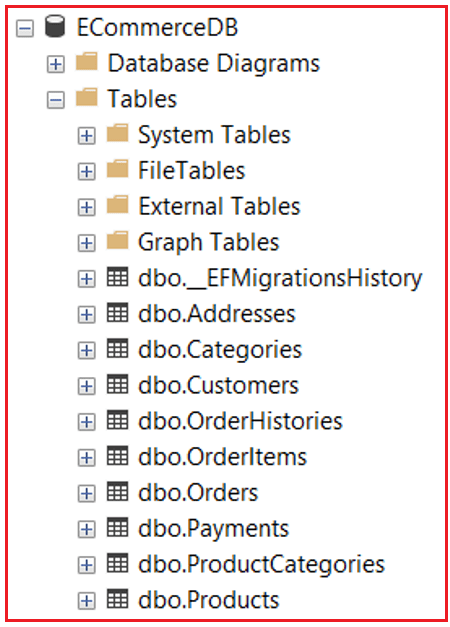
It should create the following database with the required tables.
What Are Implicit Transactions in Entity Framework Core?
In Entity Framework Core, an Implicit Transaction is a transaction that EF Core automatically creates behind the scenes every time we call SaveChanges() or SaveChangesAsync(). Developers do not manually begin, commit, or roll back these transactions; instead, EF Core takes full responsibility for ensuring that the set of operations persisted within that SaveChanges call.
Think of implicit transactions as EF Core’s built-in protection mechanism. Whenever we modify tracked entities and call SaveChanges, EF Core bundles all pending insert, update, and delete commands into one transaction. This ensures that either all changes are saved successfully or none are saved if an error occurs.
EF Core must ensure that the database adheres to the ACID properties (Atomicity, Consistency, Isolation, Durability). This is why even the simplest SaveChanges() implicitly wraps our SQL operations inside:
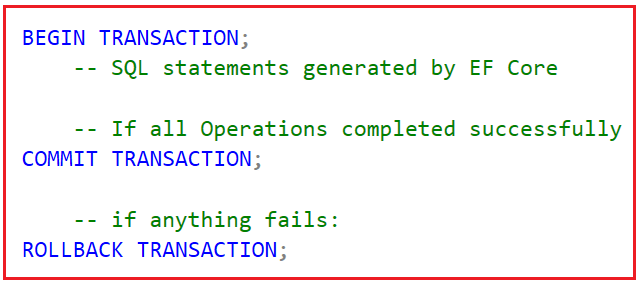
We don’t see any of this in our C# code because EF Core automatically manages it. Implicit transactions are ideal for simple operations that naturally fit into one SaveChanges call, where there is no need for manual control, partial rollbacks, or multi-step workflows involving external systems or multiple DbContexts.
Characteristics of Implicit Transactions
Let us expand each characteristic with theoretical clarity and real-world impact.
Automatically Created by EF Core
Whenever SaveChanges executes, EF Core evaluates all tracked changes and wraps them in a transaction without requiring programmer intervention. This offers the developer:
- Simplicity
- Reduced code repetition
- Automatic safety
The developer focuses only on business logic, not transaction mechanics.
Automatically committed if SaveChanges succeeds.
If all database commands execute without any SQL or connection errors, EF Core commits the transaction automatically. Commit ensures:
- The entire change set becomes permanent
- No other transaction can undo these changes
- The business operation is marked as successful
This “all-or-nothing” commit guarantees atomicity.
Automatically rolled back if SaveChanges fails.
If at least one SQL statement fails (Insert, Update, Delete), EF Core rolls back the entire transaction. Rollback means:
- All changes inside the SaveChanges are discarded
- The database remains untouched
- The system returns to the last stable state
This is crucial for data integrity. Example rollback triggers:
- Violated foreign key constraints
- Duplicate keys
- Required column missing
- SQL timeout
- Lost database connection
Implicit rollback prevents inconsistent or corrupted data.
One SaveChanges = One Transaction
Implicit transactions are scoped to a single SaveChanges call. This means a single call can perform multiple operations, but multiple SaveChanges calls cannot be implicitly merged into a single transaction. This is a limitation of the implicit model.
Cannot span across multiple SaveChanges calls
If you write:
- SaveChanges(); // Transaction A
- SaveChanges(); // Transaction B
Then you get two completely separate transactions, each committed independently. If Transaction B fails, Transaction A cannot be undone. This is why implicit transactions are unsafe for multi-step workflows.
Implementing Order Placement Using EF Core Implicit Transactions
Because EF Core uses ONE transaction per SaveChanges, we must try to complete the workflow with a single SaveChanges() call. This means:
- We create an Order
- Populate OrderItems
- Update Product Stock
- Create Payment
- Create OrderHistory
Everything is added to the DbContext before calling SaveChanges once. This is the correct way to use Implicit Transactions.
OrdersController – Using EF Core Implicit Transactions
Create an API Empty Controller named Orders Controller within the Controllers folder, then copy and paste the following code. This controller relies on EF Core’s automatic transaction handling for each SaveChanges() call, meaning each SaveChanges () call acts like a small, independent atomic operation.
using ECommerceApp.Data;
using ECommerceApp.DTOs;
using ECommerceApp.Entities;
using ECommerceApp.Enums;
using Microsoft.AspNetCore.Mvc;
using Microsoft.EntityFrameworkCore;
using System.Text.Json;

namespace ECommerceApp.Controllers
{
    [ApiController]
    [Route("api/[controller]")]
    public class OrdersController : ControllerBase
    {
        private readonly ECommerceDBContext _context;

        public OrdersController(ECommerceDBContext context)
        {
            _context = context;
        }

        // PLACE ORDER USING IMPLICIT TRANSACTIONS
        [HttpPost("Place")]
        public async Task<IActionResult> PlaceOrderAsync([FromBody] OrderCreateDTO dto)
        {
            try
            {
                // STEP 1: Validate incoming request body
                if (!ModelState.IsValid)
                {
                    var errors = ModelState.Values
                        .SelectMany(v => v.Errors)
                        .Select(e => e.ErrorMessage);

                    return BadRequest(new
                    {
                        Success = false,
                        Message = "Validation failed.",
                        Details = string.Join(" | ", errors)
                    });
                }

                // STEP 2: Load Customer + Address details
                var customer = await _context.Customers
                    .Include(c => c.Addresses)
                    .FirstOrDefaultAsync(c => c.Id == dto.CustomerId && c.IsActive == true);

                if (customer == null)
                {
                    return BadRequest(new
                    {
                        Success = false,
                        Message = "Customer not found or inactive."
                    });
                }

                // Get shipping & billing addresses from customer's saved address list
                var shippingAddress = customer.Addresses.FirstOrDefault(a =>
                    a.Id == dto.ShippingAddressId && a.IsActive == true);

                var billingAddress = customer.Addresses.FirstOrDefault(a =>
                    a.Id == dto.BillingAddressId && a.IsActive == true);

                if (shippingAddress == null || billingAddress == null)
                {
                    return BadRequest(new
                    {
                        Success = false,
                        Message = "Invalid shipping or billing address."
                    });
                }

                // STEP 3: Load all required products in ONE database call
                var productIds = dto.Items.Select(i => i.ProductId).Distinct().ToList();

                var products = await _context.Products
                    .Where(p => productIds.Contains(p.Id) && p.IsActive == true)
                    .ToListAsync();

                if (products.Count != productIds.Count)
                {
                    return BadRequest(new
                    {
                        Success = false,
                        Message = $"Some products do not exist."
                    });
                }

                // STEP 4: Validate stock & prepare OrderItem list
                decimal orderTotal = 0;
                List<OrderItem> orderItems = new();

                foreach (var dtoItem in dto.Items)
                {
                    var product = products.First(p => p.Id == dtoItem.ProductId);

                    if (product.StockQuantity < dtoItem.Quantity)
                    {
                        return BadRequest(new
                        {
                            Success = false,
                            Message = $"Insufficient stock for product: {product.Name}"
                        });
                    }

                    // Calculate price for each line item
                    var lineTotal = product.FinalPrice * dtoItem.Quantity;
                    orderTotal += lineTotal;

                    orderItems.Add(new OrderItem
                    {
                        ProductId = product.Id,
                        Quantity = (int)dtoItem.Quantity,
                        UnitPrice = product.FinalPrice,
                        TotalPrice = lineTotal
                    });

                    // Reduce stock in-memory (DB update happens during SaveChanges)
                    product.StockQuantity -= (int)dtoItem.Quantity;
                }

                // STEP 5: Build Order entity
                var order = new Order
                {
                    CustomerId = customer.Id,
                    OrderNumber = Guid.NewGuid().ToString()[..8].ToUpper(),
                    OrderDate = DateTime.UtcNow,
                    TotalAmount = orderTotal,
                    OrderStatus = OrderStatus.Pending,
                    ShippingAddress =
                        $"{shippingAddress.Line1}, {shippingAddress.City}, {shippingAddress.State}, {shippingAddress.Country}, {shippingAddress.ZipCode}",
                    BillingAddress =
                        $"{billingAddress.Line1}, {billingAddress.City}, {billingAddress.State}, {billingAddress.Country}, {billingAddress.ZipCode}"
                };

                await _context.Orders.AddAsync(order);

                // Attach order items to order
                foreach (var item in orderItems)
                {
                    item.Order = order;
                    await _context.OrderItems.AddAsync(item);
                }

                // STEP 6: Create Payment entry (initially Pending)
                var payment = new Payment
                {
                    Order = order,
                    Amount = orderTotal,
                    PaymentStatus = PaymentStatus.Pending,
                    PaymentMethod = dto.Payment.PaymentMethod,
                    TransactionId = string.IsNullOrWhiteSpace(dto.Payment.TransactionId)
                        ? Guid.NewGuid().ToString()
                        : dto.Payment.TransactionId,
                    PaymentDate = DateTime.UtcNow
                };

                await _context.Payments.AddAsync(payment);

                // STEP 7: Add initial OrderHistory (Pending → Pending)
                await _context.OrderHistories.AddAsync(new OrderHistory
                {
                    Order = order,
                    OldStatus = OrderStatus.Pending,
                    NewStatus = OrderStatus.Pending,
                    Remarks = "Order created successfully"
                });

                // STEP 8: FIRST SaveChanges() → IMPLICIT TRANSACTION #1
                await _context.SaveChangesAsync();

                // STEP 9: Update payment + order status after payment confirmation
                var oldOrderStatus = order.OrderStatus;

                payment.PaymentStatus = PaymentStatus.Paid;
                order.OrderStatus = OrderStatus.PaymentReceived;

                await _context.OrderHistories.AddAsync(new OrderHistory
                {
                    OrderId = order.Id,
                    OldStatus = oldOrderStatus,
                    NewStatus = OrderStatus.PaymentReceived,
                    Remarks = "Payment verified successfully"
                });

                // STEP 10: Teaching scenario — simulate failure
                if (dto.MakeSecondSaveFail)
                {
                    throw new Exception("Simulated failure after first SaveChanges.");
                }

                // STEP 11: SECOND SaveChanges() → IMPLICIT TRANSACTION #2
                await _context.SaveChangesAsync();

                // FINAL SUCCESS RESPONSE
                return Ok(new OrderResponseDTO
                {
                    OrderId = order.Id,
                    OrderNumber = order.OrderNumber,
                    Message = "Order placed successfully using Implicit Transaction."
                });
            }
            catch (Exception ex)
            {
                // STEP 12: Log failure details into database
                try
                {
                    var logEntry = new FailureLog
                    {
                        OrderId = null,
                        MethodName = "PlaceOrderAsync",
                        ClassName = "OrdersController",
                        ErrorMessage = ex.Message,
                        StackTrace = ex.StackTrace ?? "",
                        RequestPayload = JsonSerializer.Serialize(dto),
                        Severity = "Error",
                        CustomerId = dto.CustomerId
                    };

                    _context.FailureLogs.Add(logEntry);
                    await _context.SaveChangesAsync();
                }
                catch
                {
                    // If logging fails we never throw — avoid recursive exceptions
                }

                // STEP 13: Send error response to client
                return StatusCode(500, new
                {
                    Success = false,
                    Message = "An unexpected error occurred while placing the order.",
                    Details = ex.Message
                });
            }
        }
    }
}
Testing the Order Placed Flow:
Request Body for Success Scenario
{
  "CustomerId": 1,
  "ShippingAddressId": 1,
  "BillingAddressId": 1,
  "MakeSecondSaveFail": false,
  "Items": [
    {
      "ProductId": 1,
      "Quantity": 2
    }
  ],
  "Payment": {
    "PaymentMethod": "Razorpay",
    "TransactionId": "PAY_SUCCESS_1001"
  }
}
Expected:
- First SaveChanges → Success
- Second SaveChanges → Success
- Order created
- Order status updated
- Both histories inserted
- Response returns success
Response in Swagger:

Request Body for Failure Scenario
{
  "CustomerId": 1,
  "ShippingAddressId": 1,
  "BillingAddressId": 1,
  "MakeSecondSaveFail": true,
  "Items": [
    {
      "ProductId": 1,
      "Quantity": 1
    }
  ],
  "Payment": {
    "PaymentMethod": "Razorpay",
    "TransactionId": "PAY_FAIL_2001"
  }
}
Expected:
- First SaveChanges → Success (Order, OrderItems, Payment, History persisted)
- Exception thrown before second SaveChanges()
- Order.Status stays Pending
- NO “PaymentReceived” history written
- Response returns failure
- Partial changes persisted → Demonstrating implicit transaction behaviour
Response in Swagger:
When to Use EF Core Implicit Transactions?
Implicit transactions are suitable when your operation is simple, self-contained, and safe to run within a single SaveChanges. Use implicit transactions when:
Your entire business operation fits inside one SaveChanges call
If you can perform all required changes in memory and persist them in a single transaction, implicit transactions are ideal. Examples:
- Registering a new user (insert one record)
- Adding a product to the catalog
- Updating inventory count
- Deleting a single review
All changes are sent to the database at once and kept atomic automatically.
You do NOT need manual control
If you do NOT need:
- to decide when to commit
- to decide when to roll back
- to coordinate multi-step workflows
- to combine SaveChanges across multiple scopes
…then implicit transactions are sufficient.
Performance is essential, and operations are simple
Implicit transactions:
- Create fewer transaction scopes
- Avoid multiple round-trip
- Execute faster
- Reduce overhead
For performance-sensitive, non-critical, one-step operations, implicit transactions are the most efficient option.
When Not to Use Implicit Transactions
Implicit transactions are not suitable for scenarios like:
- Order processing workflows
- Payment + order + inventory deduction
- Multi-SaveChanges operations
- Multi-table workflow requiring consistency
- External API calls that must be atomically combined with DB updates
For those, we need to use Explicit Transactions.
What Are Explicit Transactions in EF Core?
Explicit Transactions in EF Core represent a developer-controlled transactional boundary that wraps one or more database operations (and often one or more SaveChanges calls) into a single logical atomic unit. Unlike implicit transactions, where EF Core automatically handles the transaction lifecycle, explicit transactions require you, the developer, to explicitly declare:
- When the transaction begins
- Which operations belong inside the boundary
- When the transaction should be committed
- When it should be rolled back
- What additional logic (including external non-DB operations) must be included within the atomic unit
This level of control is essential whenever your workflow involves multiple sequential steps, external system interactions, multi-table consistency requirements, or scenarios where failure at any point must undo the entire sequence.
Why Do Explicit Transactions Matter?
Explicit transactions allow us to construct a transactional workflow that mirrors the real-world business operation. A complete order placement workflow includes
- Writing Order
- Writing OrderItems
- Deducting Inventory
- Writing Payment
- Confirming Payment
- Updating Order Status
- Writing OrderHistory
If any step fails:
- Inventory must be restored
- The order must not exist
- The payment must not be captured
- The system must remain fully consistent
Implicit transactions cannot coordinate all these sequential steps across multiple SaveChanges calls, which is why Explicit Transactions become essential.
The Syntax and Its Meaning
Begin Transaction
using var transaction = await _context.Database.BeginTransactionAsync();
This creates a new database transaction. From this moment on, every EF Core SQL operation participates in this transaction until commit or rollback.
Commit Transaction
await transaction.CommitAsync();
Commit means:
- All accumulated changes become permanent
- The database transitions from an intermediate state to a durable state
- Locks are released
- No rollback is possible after commit
Business-wise, this means: The transaction is successful.
Rollback Transaction
await transaction.RollbackAsync();
Rollback means:
- Undo all changes since the transaction started
- Restore the database to the state it was in before the transaction
- Ensure no partial changes corrupt business logic
Business-wise, this means: The transaction failed safely.
OrdersController – Explicit Transaction using EF Core
Please modify the OrdersController as follows. This controller manually controls the transaction so that both SaveChanges calls belong to the same atomic operation. If any step fails, the entire order workflow rolls back completely.
using ECommerceApp.Data;
using ECommerceApp.DTOs;
using ECommerceApp.Entities;
using ECommerceApp.Enums;
using Microsoft.AspNetCore.Mvc;
using Microsoft.EntityFrameworkCore;
using System.Text.Json;

namespace ECommerceApp.Controllers
{
    [ApiController]
    [Route("api/[controller]")]
    public class OrdersController : ControllerBase
    {
        private readonly ECommerceDBContext _context;

        private readonly IServiceScopeFactory _scopeFactory;

        public OrdersController(ECommerceDBContext context, IServiceScopeFactory scopeFactory)
        {
            _context = context;
            _scopeFactory = scopeFactory;
        }

        // PLACE ORDER USING EXPLICIT TRANSACTION
        [HttpPost("Place")]
        public async Task<IActionResult> PlaceOrderAsync([FromBody] OrderCreateDTO dto)
        {
            // STEP 1: Validate input model before starting any DB operation
            if (!ModelState.IsValid)
            {
                var errorMessages = ModelState.Values
                    .SelectMany(v => v.Errors)
                    .Select(e => e.ErrorMessage);

                return BadRequest(new
                {
                    Success = false,
                    Message = "Validation failed.",
                    Details = string.Join(" | ", errorMessages)
                });
            }

            // STEP 2: Begin explicit transaction so all steps behave as ONE atomic unit
            using var transaction = await _context.Database.BeginTransactionAsync();

            try
            {
                // STEP 3: Load customer and their address details
                var customer = await _context.Customers
                    .Include(c => c.Addresses)
                    .FirstOrDefaultAsync(c => c.Id == dto.CustomerId && c.IsActive);

                if (customer == null)
                {
                    return BadRequest(new
                    {
                        Success = false,
                        Message = "Customer not found or inactive."
                    });
                }

                // STEP 4: Validate shipping & billing addresses
                var shippingAddress = customer.Addresses
                    .FirstOrDefault(a => a.Id == dto.ShippingAddressId && a.IsActive);

                var billingAddress = customer.Addresses
                    .FirstOrDefault(a => a.Id == dto.BillingAddressId && a.IsActive);

                if (shippingAddress == null || billingAddress == null)
                {
                    return BadRequest(new
                    {
                        Success = false,
                        Message = "Invalid shipping or billing address."
                    });
                }

                // STEP 5: Load all requested products in a single DB call
                var productIds = dto.Items.Select(i => i.ProductId).Distinct().ToList();

                var products = await _context.Products
                    .Where(p => productIds.Contains(p.Id) && p.IsActive)
                    .ToListAsync();

                if (products.Count != productIds.Count)
                {
                    return BadRequest(new
                    {
                        Success = false,
                        Message = "Invalid Products"
                    });
                }

                // STEP 6: Validate stock & build OrderItems list
                decimal orderTotal = 0;
                List<OrderItem> orderItems = new();

                foreach (var dtoItem in dto.Items)
                {
                    var product = products.First(p => p.Id == dtoItem.ProductId);

                    if (product.StockQuantity < dtoItem.Quantity)
                    {
                        return BadRequest(new
                        {
                            Success = false,
                            Message = $"Insufficient stock for product: {product.Name}"
                        });
                    }

                    var lineTotal = product.FinalPrice * dtoItem.Quantity;
                    orderTotal += lineTotal;

                    orderItems.Add(new OrderItem
                    {
                        ProductId = product.Id,
                        Quantity = (int)dtoItem.Quantity,
                        UnitPrice = product.FinalPrice,
                        TotalPrice = lineTotal
                    });

                    // Reduce inventory (actual DB update happens during SaveChanges)
                    product.StockQuantity -= (int)dtoItem.Quantity;
                }

                // STEP 7: Create Order with initial status = Pending
                var order = new Order
                {
                    CustomerId = customer.Id,
                    OrderNumber = Guid.NewGuid().ToString()[..8].ToUpper(),
                    TotalAmount = orderTotal,
                    OrderDate = DateTime.UtcNow,
                    OrderStatus = OrderStatus.Pending,
                    ShippingAddress =
                        $"{shippingAddress.Line1}, {shippingAddress.City}, {shippingAddress.State}, {shippingAddress.Country}, {shippingAddress.ZipCode}",
                    BillingAddress =
                        $"{billingAddress.Line1}, {billingAddress.City}, {billingAddress.State}, {billingAddress.Country}, {billingAddress.ZipCode}"
                };

                await _context.Orders.AddAsync(order);

                // Attach OrderItems to Order
                foreach (var item in orderItems)
                {
                    item.Order = order;
                    await _context.OrderItems.AddAsync(item);
                }

                // STEP 8: Create Payment with initial status = Pending
                var payment = new Payment
                {
                    Order = order,
                    Amount = orderTotal,
                    PaymentStatus = PaymentStatus.Pending,
                    PaymentMethod = dto.Payment.PaymentMethod,
                    TransactionId = string.IsNullOrWhiteSpace(dto.Payment.TransactionId)
                        ? Guid.NewGuid().ToString()
                        : dto.Payment.TransactionId,
                    PaymentDate = DateTime.UtcNow
                };

                await _context.Payments.AddAsync(payment);

                // STEP 9: Insert first OrderHistory entry
                await _context.OrderHistories.AddAsync(new OrderHistory
                {
                    Order = order,
                    OldStatus = OrderStatus.Pending,
                    NewStatus = OrderStatus.Pending,
                    Remarks = "Order created successfully"
                });

                // FIRST SAVE (Order + Items + Payment + History)
                await _context.SaveChangesAsync();

                // STEP 10: Simulated payment success for teaching purpose
                var oldOrderStatus = order.OrderStatus;

                payment.PaymentStatus = PaymentStatus.Paid;
                order.OrderStatus = OrderStatus.PaymentReceived;

                await _context.OrderHistories.AddAsync(new OrderHistory
                {
                    OrderId = order.Id,
                    OldStatus = oldOrderStatus,
                    NewStatus = OrderStatus.PaymentReceived,
                    Remarks = "Payment verified successfully"
                });

                // Simulated Failure
                if (dto.MakeSecondSaveFail)
                {
                    throw new Exception("Simulated failure occurred before second SaveChanges.");
                }

                // SECOND SAVE (status updates)
                await _context.SaveChangesAsync();

                // STEP 11: Commit the entire explicit transaction
                await transaction.CommitAsync();

                return Ok(new OrderResponseDTO
                {
                    OrderId = order.Id,
                    OrderNumber = order.OrderNumber,
                    Message = "Order placed successfully using Explicit Transaction."
                });
            }
            catch (Exception ex)
            {
                // STEP 12: Rollback entire workflow on ANY exception
                await transaction.RollbackAsync();

                // Dispose transaction before using another DbContext
                await transaction.DisposeAsync();

                // STEP 13: Log the exception into FailureLog table
                try
                {
                    using var scope = _scopeFactory.CreateScope();
                    var loggingContext = scope.ServiceProvider.GetRequiredService<ECommerceDBContext>();

                    var logEntry = new FailureLog
                    {
                        OrderId = null,                 // Order may not exist
                        CustomerId = dto.CustomerId,    // Helps investigation
                        ClassName = "OrdersController",
                        MethodName = "PlaceOrderAsync",
                        ErrorMessage = ex.Message,
                        StackTrace = ex.StackTrace ?? "",
                        RequestPayload = JsonSerializer.Serialize(dto),
                        Severity = "Error",
                        Environment = "Production"
                    };

                    loggingContext.FailureLogs.Add(logEntry);
                    await loggingContext.SaveChangesAsync();
                }
                catch
                {
                    // Never throw again — logging failures should never break API
                }

                return StatusCode(500, new
                {
                    Success = false,
                    Message = "Transaction failed.",
                    Details = ex.Message
                });
            }
        }
    }
}
How Explicit Transactions Work Here
Both SaveChanges() calls belong to ONE transaction because we wrapped them inside:
- using var transaction = await _context.Database.BeginTransactionAsync();
If ANY step fails → entire workflow rolls back
Meaning:
- Order will NOT be created
- The payment record will NOT exist
- Stock will NOT reduce
- History will NOT persist
Ensures full atomicity
- This is exactly how Amazon, Flipkart, Ajio, and Meesho ensure consistency.
Example Request Bodies
Success Scenario
{
  "CustomerId": 1,
  "ShippingAddressId": 1,
  "BillingAddressId": 1,
  "MakeSecondSaveFail": false,
  "Items": [
    {
      "ProductId": 1,
      "Quantity": 1
    }
  ],
  "Payment": {
    "PaymentMethod": "Razorpay",
    "TransactionId": "TXN12345"
  }
}
Failure Scenario (Rollback)
{
  "CustomerId": 1,
  "ShippingAddressId": 1,
  "BillingAddressId": 1,
  "MakeSecondSaveFail": true,
  "Items": [
    {
      "ProductId": 1,
      "Quantity": 1
    }
  ],
  "Payment": {
    "PaymentMethod": "Razorpay",
    "TransactionId": "TXN54321"
  }
}
Expected Result:
- The entire transaction is rolled back
- No order, no items, no payment, no history is saved
- You get a clean JSON error response
Transactions in EF Core ensure that all data we save to the database is saved safely and consistently. Whether we rely on implicit transactions for simple operations or use explicit transactions for multi-step workflows, the goal is the same: to prevent partial updates and protect our data. By grouping related actions into a single unit of work, transactions help maintain reliability and ensure our application behaves correctly even when something goes wrong.
About the Author: Pranaya Rout
Pranaya Rout has published more than 3,000 articles in his 11-year career. Pranaya Rout has very good experience with Microsoft Technologies, Including C#, VB, ASP.NET MVC, ASP.NET Web API, EF, EF Core, ADO.NET, LINQ, SQL Server, MYSQL, Oracle, ASP.NET Core, Cloud Computing, Microservices, Design Patterns and still learning new technologies.