
Back to: ASP.NET Core Web API Tutorials
Entity Framework Core with Stored Procedures
Stored procedures play an essential role in real-world applications that require performance, security, and centralized SQL logic. Even though Entity Framework Core primarily uses LINQ queries, it also provides full support for executing stored procedures. This allows developers to combine the convenience of EF Core with the power and efficiency of SQL Server’s stored procedures, making applications more flexible and production-ready.
What is a Stored Procedure?
A Stored Procedure is a named block of SQL code saved directly inside the SQL Server database. Instead of writing the same SQL statements repeatedly in our application, we write them once in the database and execute them by calling the stored procedure’s name. This makes database logic reusable and centralized.
Stored procedures can accept both input and output parameters, execute complex logic involving loops, conditions, transactions, error handling, and execute multiple SQL commands together, such as inserting records, updating rows, deleting data, or returning result sets.
Because they are precompiled, SQL Server processes them faster. They also improve security because the application does not directly access tables; instead, it only calls the stored procedure.
Key Characteristics
- Precompiled – The SQL code is compiled and optimized once and reused, improving performance.
- Reusable – Stored logic can be executed multiple times from various applications.
- Secure – Direct access to underlying tables can be restricted while allowing access through stored procedures.
- Modular – Logical business rules and data operations can be centralized in the database.
How Does a Stored Procedure Execute in SQL Server?
Understanding the execution flow of a stored procedure helps developers write optimized and efficient SQL code. To understand how a stored procedure is executed in SQL Server, please have a look at the following diagram:
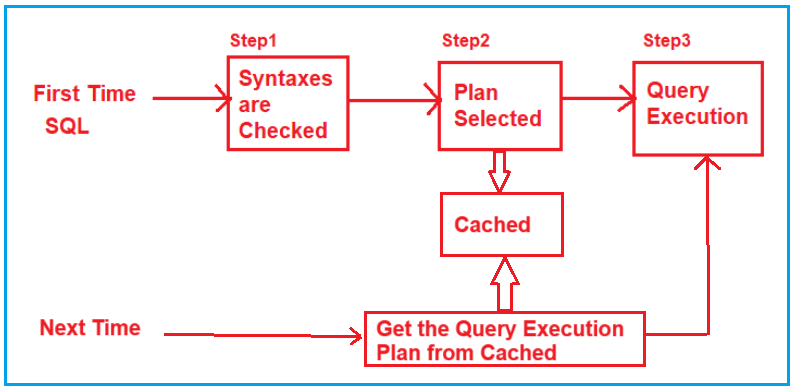
Let us understand what happens when we execute for the first time and what happens for subsequent executions.
First Execution of a Stored Procedure
When a stored procedure runs for the first time:
Step 1: Syntax Check
- When a stored procedure is executed for the first time, SQL Server first performs a syntax validation.
It ensures that all SQL keywords, table names, parameters, and statements inside the procedure are valid. If there is any typo or invalid SQL statement, SQL Server raises an error immediately.
Step 2: Query Plan Compilation
After the syntax passes, SQL Server parses and compiles the SQL statements within the stored procedure. During this process:
- It evaluates indexes, joins, and available statistics.
- It selects the optimal strategy for executing the SQL.
- This plan determines how SQL Server will execute the procedure, including whether to use an index, scan a table, or join two tables.
Step 3: Caching the Query Plan
- Once the execution plan is generated, SQL Server stores it in memory (caches it). This cached plan can be reused in future executions, saving time because SQL Server doesn’t need to recompile the query logic.
Step 4: Query Execution
- Finally, the stored procedure executes according to the plan, fetching or modifying data as required.
Results are returned to the calling application or user.
Subsequent Executions:
On subsequent executions:
- SQL Server first checks if an existing Query Execution Plan is already in the cache.
- If it finds the Query Execution Plan in the Cache, SQL Server skips parsing, compilation, and the Query Generation plan steps.
- The stored procedure proceeds directly to execution using the cached query plan, which speeds up execution.
- This reduces CPU overhead and dramatically improves response time.
Note: Query Plan Caching is one of the biggest reasons stored procedures perform better than ad hoc SQL statements.
Why Do We Need Stored Procedures?
Stored Procedures are an essential part of enterprise-level database design. They offer benefits not only in performance but also in maintainability, scalability, and security.
Performance Improvement
- Since stored procedures are compiled once and stored in the server, execution plans are cached and reused.
- This reduces repeated parsing and compilation time and improves query performance, especially for frequently executed operations such as order creation or stock updates.
Security
- Instead of giving applications direct access to database tables, you can allow only specific stored procedures to be executed.
- This limits exposure and prevents SQL injection attacks.
- You can grant or revoke permissions at the procedure level, keeping sensitive data safe.
Reusability and Maintainability
- All complex logic is stored in one place, the database. Different applications (such as web, mobile, or desktop) can reuse the same stored procedure to enforce a consistent business rule.
- If the logic changes, you only modify the stored procedure once, rather than updating code across multiple applications.
Reduced Network Traffic
- Instead of sending long SQL statements from the application to the database every time, only the stored procedure name and parameters are sent.
- This reduces the amount of data transmitted over the network.
Stored Procedures in Entity Framework Core:
Although EF Core typically focuses on LINQ queries, it fully supports stored procedures. This becomes valuable when:
- You want faster execution.
- You need operations that are hard to express in LINQ.
- You want to centralize complex SQL logic.
- You want to ensure database consistency using SQL transactions.
Stored procedures executed via EF Core still run within the same DbContext, which blends well with the existing application architecture.
Benefits of using Stored Procedures with EF Core:
- Performance Boost: Since stored procedures run entirely inside the database engine, logic executes faster and avoids unnecessary data transfers.
- Advanced SQL Support: Stored procedures can perform loops, conditions, temporary table operations, nested transactions, error handling, and other SQL logic that is either impossible or inefficient in LINQ.
Example to Understand How to Call a Stored Procedure in Entity Framework Core:
In this example, we create a small ASP.NET Core Web API project that performs CRUD operations on the Student table using stored procedures. The steps are:
- Create the Student entity class.
- Configure the DbContext.
- Generate the Students table using EF Core migrations.
- Create the stored procedures manually in SQL Server.
- Call these stored procedures through EF Core.
This example demonstrates how EF Core integrates smoothly with stored procedures while still using DbContext, dependency injection, and entity mapping.
Creating Project and Installing EF Core Packages
So, first create a new ASP.NET Core Web API project and name it StudentAPI. Please install the following packages using Package Manager Console:
- Install-Package Microsoft.EntityFrameworkCore
- Install-Package Microsoft.EntityFrameworkCore.SqlServer
- Install-Package Microsoft.EntityFrameworkCore.Tools
Creating Student Entity:
Create a folder named Entities at the project root directory. Then, create a class file named Student.cs within the Entities folder and then copy-paste the following code.
namespace StudentAPI.Entities
{
    public class Student
    {
        public int StudentId { get; set; }
        public string FirstName { get; set; } = null!;
        public string? LastName { get; set; }
        public string Branch { get; set; } = null!;
        public string Gender { get; set; } = null!;
        public string Email { get; set; } = null!;
        public string Phone { get; set; } = null!;
    }
}
Storing Connection String in AppSettings.json file:
We have added Pricing Rules and a connection string to the appsettings.json file.
{
  "Logging": {
    "LogLevel": {
      "Default": "Information",
      "Microsoft.AspNetCore": "Warning"
    }
  },
  "AllowedHosts": "*",
  "ConnectionStrings": {
    "EcommerceDBConnection": "Server=LAPTOP-6P5NK25R\\SQLSERVER2022DEV;Database=StudentsDB;Trusted_Connection=True;TrustServerCertificate=True;"
  }
}
DbContext Configuration
Create a folder named Data at the project root directory. Then create a class file named StudentDBContext.cs in the Data folder and paste the following code:
using Microsoft.EntityFrameworkCore;
using StudentAPI.Entities;
namespace StudentAPI.Data
{
    public class StudentDBContext : DbContext
    {
        public StudentDBContext(DbContextOptions<StudentDBContext> options)
            : base(options)
        {
        }

        public DbSet<Student> Students { get; set; }
    }
}
Configure DbContext in Program.cs Class
Please modify the Program class as follows.
using Microsoft.EntityFrameworkCore;
using StudentAPI.Data;
namespace StudentAPI
{
    public class Program
    {
        public static void Main(string[] args)
        {
            var builder = WebApplication.CreateBuilder(args);

            // Add services to the container.
            builder.Services.AddControllers()
            .AddJsonOptions(options =>
            {
                options.JsonSerializerOptions.PropertyNamingPolicy = null;
            });

            builder.Services.AddEndpointsApiExplorer();
            builder.Services.AddSwaggerGen();

            // Register StudentDBContext with the dependency injection container
            builder.Services.AddDbContext<StudentDBContext>(options =>
                options.UseSqlServer(builder.Configuration.GetConnectionString("EcommerceDBConnection")));

            var app = builder.Build();

            // Configure the HTTP request pipeline.
            if (app.Environment.IsDevelopment())
            {
                app.UseSwagger();
                app.UseSwaggerUI();
            }

            app.UseHttpsRedirection();

            app.UseAuthorization();

            app.MapControllers();

            app.Run();
        }
    }
}
Generate and Apply Migrations
Please execute the following command in the Package Manager Console to generate the Migration and apply the Migration to sync our codebase with the database.
- Add-Migration Mig1
- Update-Database
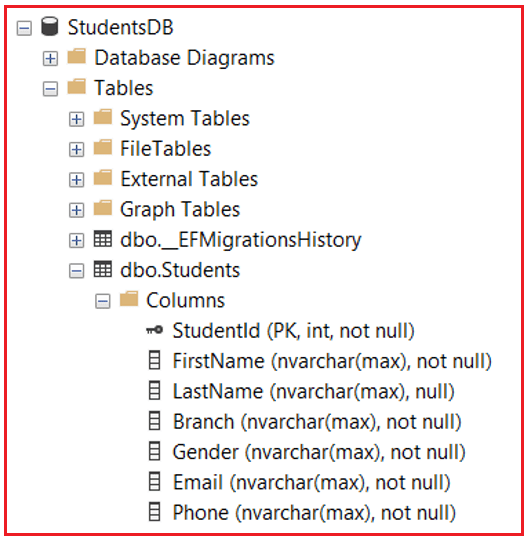
Once you execute the commands above, the database StudentsDB should be created, with the Students table reflecting the Student entity properties, as shown in the image below.
Creating Stored Procedures in SQL Server
Once the database is ready, we can create stored procedures for CRUD operations directly in SQL Server Management Studio (SSMS). These procedures encapsulate database logic for reusability and performance.
We can create separate procedures for INSERT, UPDATE, DELETE, and SELECT operations for the Student table. Each procedure performs a specific operation and encapsulates the SQL logic within the database. The following are the stored procedures for inserting, updating, deleting, and retrieving student records.
Stored Procedure for Inserting a Student:
The following Stored Procedure accepts details of a new student as input parameters. After inserting the record, SQL Server uses SCOPE_IDENTITY() to get the newly generated StudentId and return it through an output parameter. This helps the application immediately know the ID of the newly created record.
-- Insert Student Stored Procedure
CREATE OR ALTER PROCEDURE spInsertStudent
    @FirstName NVARCHAR(100),
    @LastName NVARCHAR(100),
    @Branch NVARCHAR(100),
    @Gender NVARCHAR(50),
    @Email NVARCHAR(200),
    @Phone NVARCHAR(15),
    @StudentId INT OUTPUT
AS
BEGIN
    INSERT INTO Students (FirstName, LastName, Branch, Gender, Email, Phone)
    VALUES (@FirstName, @LastName, @Branch, @Gender, @Email, @Phone);

    -- Retrieve the newly inserted StudentId
    SET @StudentId = SCOPE_IDENTITY();
END
Creating a Stored Procedure for Updating an Existing Student:
The Update Stored Procedure takes the StudentId and updated values and updates the record in the table. It does not return anything. It simply updates the row matching the StudentId.
-- Updates the specified student record based on StudentId.
CREATE OR ALTER PROCEDURE spUpdateStudent
    @StudentId INT,
    @FirstName NVARCHAR(100),
    @LastName NVARCHAR(100),
    @Branch NVARCHAR(100),
    @Gender NVARCHAR(50),
    @Email NVARCHAR(200),
    @Phone NVARCHAR(15)
AS
BEGIN
    UPDATE Students
    SET
         FirstName = @FirstName,
         LastName = @LastName,
         Branch = @Branch,
         Gender = @Gender,
         Email = @Email,
          Phone = @Phone
    WHERE StudentId = @StudentId;
END
Creating a Stored Procedure for Deleting an Existing Student:
This procedure deletes the student record whose StudentId matches the parameter. It performs a simple DELETE operation and returns no value.
-- Delete the specified student record based on StudentId.
CREATE OR ALTER PROCEDURE spDeleteStudent
 @StudentId int
AS
BEGIN
    DELETE FROM Students WHERE StudentId = @StudentId
END
Creating a Stored Procedure to Fetch All Students:
This stored procedure selects all records from the Students table. It returns the complete list of students to the application.
-- Get All Students Stored Procedure
CREATE OR ALTER PROCEDURE spGetAllStudents
AS
BEGIN
    SELECT	StudentId, FirstName, LastName, Branch,
                Gender, Email, Phone
    FROM Students;
END
Creating a Stored Procedure to Fetch a Student by ID:
This stored procedure retrieves one specific student based on the StudentId. It is commonly used when editing or showing student details.
-- Get Student by Student Id
CREATE OR ALTER PROCEDURE spGetStudentByStudentId
 @StudentId INT
AS
BEGIN
    SELECT StudentId, FirstName, LastName, Branch,
           Gender, Email, Phone
    FROM Students
    WHERE StudentId = @StudentId;
END
Verifying the Stored Procedures:
Once the stored procedures are created, you can verify the same within the Programmability/Stored Procedures folder of the StudentsDB database, as shown in the image below:

Calling Stored Procedures in Entity Framework Core
Entity Framework Core (EF Core) is not limited to LINQ queries. It also allows developers to execute Raw SQL Statements and Stored Procedures directly. This is especially useful in real-world enterprise systems where complex business logic resides inside the database, or where you want to use existing stored procedures for performance or security reasons. To do this, EF Core provides four key methods:
- ExecuteSqlRaw
- ExecuteSqlInterpolated
- FromSqlRaw
- FromSqlInterpolated
Each of these serves a specific purpose depending on whether the Raw SQL or the Stored Procedure returns data or not.
ExecuteSqlRaw
The ExecuteSqlRaw() method is used to execute non-query SQL Commands (DML Commands), such as:
- INSERT
- UPDATE
- DELETE
- or a Stored Procedure that does not return a result set.
It executes the SQL command directly against the database using EF Core’s database connection and does not expect any data to be returned.
Syntax: int rowsAffected = _context.Database.ExecuteSqlRaw(“EXEC spDeleteStudent @StudentId = {0}”, 5);
Here, the stored procedure spDeleteStudent is executed with the parameter StudentId = 5. Since parameters are passed separately (not concatenated into a string), EF Core automatically prevents SQL Injection.
How it Works
- EF Core sends the SQL Command directly to SQL Server.
- It executes the Stored Procedure or SQL Statement.
- It returns the number of rows affected (useful for confirming how many rows were updated, inserted, or deleted).
ExecuteSqlInterpolated
The ExecuteSqlInterpolated() is functionally similar to ExecuteSqlRaw(). It means both are used for Non-Query Commands, but this version uses Interpolated Strings (C# String Interpolation $””) to automatically parameterize your SQL safely.
Syntax: int rowsAffected = _context.Database.ExecuteSqlInterpolated($”EXEC spUpdateStudent {studentId}, {firstName}, {lastName}, {branch}, {gender}, {email}, {phone}”);
Here, even though it looks like a plain string interpolation, EF Core internally parameterizes the query to protect against injection attacks.
Why It’s Preferred
- Cleaner and more readable code.
- Automatically handles parameters securely.
- Ideal for dynamic SQL or when variables are involved.
FromSqlRaw
The FromSqlRaw() is used when the SQL Query or Stored Procedure returns a result set (data). It allows EF Core to map the returned records directly to our entity classes.
Syntax:
var students = _context.Students
.FromSqlRaw(“EXEC spGetAllStudents”)
.ToList();
Here, EF Core executes the stored procedure spGetAllStudents and maps each result record to the Student entity.
How it Works
- EF Core runs the SQL command on the database.
- It expects tabular data (like SELECT * FROM Students).
- It reads each row and populates the properties of our entity class accordingly.
Important Notes
- The column names returned by the stored procedure must match the entity property names for proper mapping.
- The query cannot mix entity types; it must return a single consistent entity type.
FromSqlInterpolated
The FromSqlInterpolated() works exactly like FromSqlRaw() but uses interpolated strings for safe parameterization.
Syntax:
var student = _context.Students
.FromSqlInterpolated($”EXEC spGetStudentByStudentId {studentId}”)
.ToList();
Here, the stored procedure returns a single student record matching the studentId provided.
Why It’s Safer
Even though the syntax looks like direct string interpolation, EF Core automatically parameterizes the input, preventing SQL injection.
Note: You must materialize the SQL result immediately using ToListAsync() or AsEnumerable(). You cannot add further SQL translation on top of EXEC, such as FirstOrDefault(). The stored procedure is already final SQL.
ExecuteSqlRaw and ExecuteSqlInterpolated are used for commands that do not return data (e.g., INSERT, UPDATE, DELETE). On the other hand, FromSqlRaw and FromSqlInterpolated are used for queries that return data, mapping results to entity types.
Creating DTOs
Create a new folder named DTOs and add the following files.
StudentCreateDTO.cs
Create a class file named StudentCreateDTO.cs within the DTOs folder, and copy-paste the following code.
using System.ComponentModel.DataAnnotations;

namespace StudentAPI.DTOs
{
    public class StudentCreateDTO
    {
        [Required(ErrorMessage = "First Name is required.")]
        [MaxLength(100, ErrorMessage = "First Name cannot exceed 100 characters.")]
        public string FirstName { get; set; } = null!;

        [MaxLength(100, ErrorMessage = "Last Name cannot exceed 100 characters.")]
        public string? LastName { get; set; }

        [Required(ErrorMessage = "Branch name is required.")]
        [MaxLength(100, ErrorMessage = "Branch name cannot exceed 100 characters.")]
        public string Branch { get; set; } = null!;

        [Required(ErrorMessage = "Gender is required.")]
        [MaxLength(50, ErrorMessage = "Gender cannot exceed 50 characters.")]
        public string Gender { get; set; } = null!;

        [Required(ErrorMessage = "Email address is required.")]
        [EmailAddress(ErrorMessage = "Please enter a valid email address.")]
        public string Email { get; set; } = null!;

        [Required(ErrorMessage = "Phone number is required.")]
        [Phone(ErrorMessage = "Please enter a valid phone number.")]
        public string Phone { get; set; } = null!;
    }
}
StudentUpdateDTO.cs
Create a class file named StudentUpdateDTO.cs within the DTOs folder, and copy-paste the following code.
using System.ComponentModel.DataAnnotations;
namespace StudentAPI.DTOs
{
    public class StudentUpdateDTO
    {
        [Required(ErrorMessage = "StudentId is required for updating a record.")]
        public int StudentId { get; set; }

        [Required(ErrorMessage = "First Name is required.")]
        [MaxLength(100, ErrorMessage = "First Name cannot exceed 100 characters.")]
        public string FirstName { get; set; } = null!;

        [MaxLength(100, ErrorMessage = "Last Name cannot exceed 100 characters.")]
        public string? LastName { get; set; }

        [Required(ErrorMessage = "Branch name is required.")]
        [MaxLength(100, ErrorMessage = "Branch name cannot exceed 100 characters.")]
        public string Branch { get; set; } = null!;

        [Required(ErrorMessage = "Gender is required.")]
        [MaxLength(50, ErrorMessage = "Gender cannot exceed 50 characters.")]
        public string Gender { get; set; } = null!;

        [Required(ErrorMessage = "Email address is required.")]
        [EmailAddress(ErrorMessage = "Please enter a valid email address.")]
        public string Email { get; set; } = null!;

        [Required(ErrorMessage = "Phone number is required.")]
        [Phone(ErrorMessage = "Please enter a valid phone number.")]
        public string Phone { get; set; } = null!;
    }
}
StudentResponseDTO.cs
Create a class file named StudentResponseDTO.cs within the DTOs folder, and copy-paste the following code.
namespace StudentAPI.DTOs
{
    public class StudentResponseDTO
    {
        public int StudentId { get; set; }
        public string FirstName { get; set; } = null!;
        public string? LastName { get; set; }
        public string Branch { get; set; } = null!;
        public string Gender { get; set; } = null!;
        public string Email { get; set; } = null!;
        public string Phone { get; set; } = null!;
    }
}
Student API Controller
The following StudentController demonstrates how to call stored procedures directly from EF Core using four different methods:
- FromSqlRaw
- FromSqlInterpolated
- ExecuteSqlRaw
- ExecuteSqlInterpolated.
Each action method performs CRUD operations by selecting the appropriate EF Core method based on whether the stored procedure returns data. This will help you understand exactly when and how to use each approach. So, create a new API Empty Controller named StudentController.cs inside the Controllers folder and copy-paste the following code:
using Microsoft.AspNetCore.Mvc;
using Microsoft.Data.SqlClient;
using Microsoft.EntityFrameworkCore;
using StudentAPI.Data;
using StudentAPI.DTOs;
using StudentAPI.Entities;

namespace StudentAPI.Controllers
{
    [ApiController]
    [Route("api/[controller]")]
    public class StudentController : ControllerBase
    {
        private readonly StudentDBContext _context;

        public StudentController(StudentDBContext context)
        {
            _context = context;
        }

        // GET: Fetch All Students (Demonstrates FromSqlRaw & FromSqlInterpolated)
        [HttpGet("GetAll")]
        public async Task<IActionResult> GetAllStudents()
        {
            // Approach 1: Using FromSqlRaw (Static SQL - No Parameter)
            // Best suited for stored procedures without parameters.
            // Returns a result set mapped directly to the Students entity.
            var students = await _context.Students
                .FromSqlRaw("EXEC spGetAllStudents")
                .ToListAsync();

            // Approach 2: Using FromSqlInterpolated (Parameterized & Safer)
            // Use this if the stored procedure accepts parameters,
            // or if you want to maintain safer parameterization syntax.
            //var students = await _context.Students
            //    .FromSqlInterpolated($"EXEC spGetAllStudents")
            //    .ToListAsync();

            if (students == null || students.Count == 0)
                return NotFound(new { Success = false, Message = "No students found." });

            return Ok(new
            {
                Success = true,
                Message = "Student records fetched successfully.",
                Data = students
            });
        }

        // GET: Fetch Student By Id (Demonstrates FromSqlInterpolated & FromSqlRaw)
        [HttpGet("GetById/{id}")]
        public async Task<IActionResult> GetStudentById(int id)
        {
            // Approach 1: Using FromSqlInterpolated (Preferred)
            // Automatically parameterizes the query (prevents SQL injection).
            // Ideal when user input or dynamic values are involved.
            var students = await _context.Students
                .FromSqlInterpolated($"EXEC spGetStudentByStudentId {id}")
                .ToListAsync();

            // Approach 2: Using FromSqlRaw (Manual Parameter)
            // Use @p0 style placeholders and pass parameters explicitly.
            // Equivalent to parameterized query, but syntax is less readable.
            //var students = await _context.Students
            //    .FromSqlRaw("EXEC spGetStudentByStudentId @p0", id)
            //    .ToListAsync();

            var student = students.FirstOrDefault();

            if (student == null)
                return NotFound(new { Success = false, Message = $"No student found with ID {id}." });

            return Ok(new
            {
                Success = true,
                Message = "Student record fetched successfully.",
                Data = student
            });
        }

        // POST: Insert a New Student
        // Demonstrates ExecuteSqlInterpolated & ExecuteSqlRaw with OUTPUT parameter
        [HttpPost("Create")]
        public async Task<IActionResult> CreateStudent([FromBody] StudentCreateDTO dto)
        {
            if (!ModelState.IsValid)
            {
                return BadRequest(new
                {
                    Success = false,
                    Message = "Validation failed.",
                    Errors = ModelState.Values.SelectMany(v => v.Errors).Select(e => e.ErrorMessage)
                });
            }

            // Define OUTPUT parameter to capture the newly generated StudentId
            var studentIdParam = new SqlParameter
            {
                ParameterName = "@StudentId",
                SqlDbType = System.Data.SqlDbType.Int,
                Direction = System.Data.ParameterDirection.Output
            };

            // Approach 1: Using ExecuteSqlInterpolated (Preferred)
            // Cleaner syntax with string interpolation and automatic parameterization.
            await _context.Database.ExecuteSqlInterpolatedAsync(
                $"EXEC spInsertStudent {dto.FirstName}, {dto.LastName}, {dto.Branch}, {dto.Gender}, {dto.Email}, {dto.Phone}, {studentIdParam} OUTPUT"
            );

            // Approach 2: Using ExecuteSqlRaw (Classic Style)
            // Use explicit positional parameters {0}, {1}, ... for SQL execution.
            //await _context.Database.ExecuteSqlRawAsync(
            //    "EXEC spInsertStudent @p0, @p1, @p2, @p3, @p4, @p5, @StudentId OUTPUT",
            //    dto.FirstName, dto.LastName!, dto.Branch, dto.Gender, dto.Email, dto.Phone, studentIdParam
            //);

            int newStudentId = (int)studentIdParam.Value;

            return Ok(new
            {
                Success = true,
                Message = "Student created successfully.",
                StudentId = newStudentId
            });
        }

        // PUT: Update an Existing Student
        // Demonstrates ExecuteSqlRaw & ExecuteSqlInterpolated
        [HttpPut("Update")]
        public async Task<IActionResult> UpdateStudent([FromBody] StudentUpdateDTO dto)
        {
            if (!ModelState.IsValid)
            {
                return BadRequest(new
                {
                    Success = false,
                    Message = "Validation failed.",
                    Errors = ModelState.Values.SelectMany(v => v.Errors).Select(e => e.ErrorMessage)
                });
            }

            // Approach 1: Using ExecuteSqlRaw (Positional Parameters)
            // Suitable for static queries; parameters are safely passed to SQL.
            int rowsAffected = await _context.Database.ExecuteSqlRawAsync(
                "EXEC spUpdateStudent @p0, @p1, @p2, @p3, @p4, @p5, @p6",
                dto.StudentId, dto.FirstName, dto.LastName!, dto.Branch,
                dto.Gender, dto.Email, dto.Phone
            );

            // Approach 2: Using ExecuteSqlInterpolated (Cleaner Syntax)
            // Uses string interpolation with automatic parameterization.
            //int rowsAffected = await _context.Database.ExecuteSqlInterpolatedAsync(
            //    $"EXEC spUpdateStudent {dto.StudentId}, {dto.FirstName}, {dto.LastName}, {dto.Branch}, {dto.Gender}, {dto.Email}, {dto.Phone}"
            //);

            if (rowsAffected == 0)
                return NotFound(new { Success = false, Message = "No student found to update." });

            return Ok(new
            {
                Success = true,
                Message = "Student updated successfully.",
                AffectedRows = rowsAffected
            });
        }

        // DELETE: Delete a Student
        // Demonstrates ExecuteSqlRaw & ExecuteSqlInterpolated
        [HttpDelete("Delete/{id}")]
        public async Task<IActionResult> DeleteStudent(int id)
        {
            // Approach 1: Using ExecuteSqlRaw (Traditional)
            // Uses positional parameter placeholders like @p0.
            int rowsAffected = await _context.Database.ExecuteSqlRawAsync(
                "EXEC spDeleteStudent @p0", id);

            // Approach 2: Using ExecuteSqlInterpolated (Simpler Syntax)
            // Safer and more readable when parameters come from user input.
            //int rowsAffected = await _context.Database.ExecuteSqlInterpolatedAsync(
            //    $"EXEC spDeleteStudent {id}"
            //);

            if (rowsAffected == 0)
                return NotFound(new { Success = false, Message = $"No student found with ID {id}." });

            return Ok(new
            {
                Success = true,
                Message = "Student deleted successfully.",
                AffectedRows = rowsAffected
            });
        }
    }
}
Testing Endpoints:
POST: Create Student
Endpoint: POST /api/Student/Create
Request Body:
{
  "FirstName": "Amit",
  "LastName": "Kumar",
  "Branch": "Computer Science",
  "Gender": "Male",
  "Email": "amit.kumar@example.com",
  "Phone": "9876543210"
}
PUT: Update Student
Endpoint: PUT /api/Student/Update
Request Body:
{
  "StudentId": 1,
  "FirstName": "Amit",
  "LastName": "Kumar",
  "Branch": "Information Technology",
  "Gender": "Male",
  "Email": "amit.kumar@updated.com",
  "Phone": "9123456789"
}
Notes:
- StudentId must already exist in the database.
- All fields are required for updating.
GET: Get All Students
Endpoint: GET /api/Student/GetAll
GET: Get Student by Id
Endpoint: GET /api/Student/GetById/1
Path Parameter:
- 1 = StudentId to fetch
DELETE: Delete Student
Endpoint: DELETE /api/Student/Delete/1
Path Parameter:
- 1 = StudentId to delete
Integrating stored procedures with Entity Framework Core provides the best of both worlds: the flexibility and maintainability of EF Core, combined with the performance and security of SQL Server. With just a few EF Core methods, we can safely execute stored procedures for both reading and modifying data. By using stored procedures for critical operations, developers can build robust, scalable, and enterprise-grade applications that maintain a clear separation between database logic and application code.
About the Author: Pranaya Rout
Pranaya Rout has published more than 3,000 articles in his 11-year career. Pranaya Rout has very good experience with Microsoft Technologies, Including C#, VB, ASP.NET MVC, ASP.NET Web API, EF, EF Core, ADO.NET, LINQ, SQL Server, MYSQL, Oracle, ASP.NET Core, Cloud Computing, Microservices, Design Patterns and still learning new technologies.