
Back to: ASP.NET Core Web API Tutorials
Data Annotation Attributes in Entity Framework Core
Data Annotation attributes in EF Core provide a quick and convenient way to configure entities directly inside our model classes. They work very well for simple to moderately complex scenarios, where we need to control table/column names, basic keys, relationships, and validation rules without writing extra configuration code.
What are Data Annotations in EF Core?
In Entity Framework Core, Data Annotations are special attributes we apply directly to our entity classes and their properties to control how EF Core maps them to the database and how they are validated.
Instead of writing configuration code separately, we decorate our model with attributes that override or extend the default conventions. This keeps the configuration close to the domain model and makes the intent of each property easier to understand when reading the class.
EF Core uses default conventions to build our database schema. But these conventions are generic, based on assumptions, and may not always reflect the exact business or database requirements. Data Annotations provide a convenient way to specify schema behaviour, validation rules, relationship configurations, and property characteristics directly in our model classes without writing extra configuration code. Data Annotations allow us to say things like:
- “This property is required.”
- “This string should not exceed 50 characters.”
- “Map this property to a specific column name or data type in the database.”
- “Use this property as the primary key or foreign key.”
- “This field is a concurrency token,” etc.
So, Data Annotations act as a lightweight configuration layer on top of default conventions.
Data Annotation Namespaces in Entity Framework Core
Most of the commonly used Data Annotation attributes in EF Core come from two main namespaces:
System.ComponentModel.DataAnnotations
This namespace provides attributes primarily for validation and metadata. Typical goals here are:
- Indicating that a property is required at the model level (e.g., cannot be empty).
- Limiting the length of a string or the range of a numeric value.
- Providing display names, formatting hints, and other UI-related metadata (useful for ASP.NET Core MVC model binding and validation).
These attributes help enforce business rules and validations directly on the domain model and are usually respected by both EF Core and ASP.NET Core’s model validation pipeline.
System.ComponentModel.DataAnnotations.Schema
This namespace provides attributes for schema mapping at the database level. Typical goals here are:
- Controlling the table name and/or schema used for a given entity.
- Controlling the column name or data type used for a property.
- Marking a property as a primary key or foreign key.
- Ignoring properties that should not be mapped to the database.
These attributes focus on how our entity maps to the database schema, allowing us to refine or override default mappings when needed.
Role of Data Annotations vs Default Conventions
Default EF Core conventions are responsible for the initial, automatic configuration of:
- Table names
- Column names and data types
- Primary keys and foreign keys
- Relationships and cascade behaviours
However, these conventions are generic. They do not know our exact business rules or our database naming standards. Data Annotations are used when:
- The default convention is structurally correct, but we want additional constraints (e.g., required, max length, or range).
- We want to customize the mapping for a specific property or entity without writing separate configuration code.
- We want the configuration to be visible directly in the model, making the entity self-describing.
In short, default conventions give us a good baseline; Data Annotations allow us to fine-tune it with attributes.
Schema-Related Data Annotation Attributes in EF Core
Schema-related Data Annotations are attributes that influence how EF Core builds the database schema. They live in the System.ComponentModel.DataAnnotations.Schema namespace, and are used to control table mapping, column mapping, relationships, indexes, and value generation. They do not change our C# types, but they tell EF Core how those types should appear in the database.
These attributes are especially useful when the default conventions do not match:
- Your organization’s naming standards
- An existing (legacy) database
- Specific schema or column-level requirements
The following are the main schema-related attributes and how they affect EF Core conceptually.
Table Attribute:
The [Table] Attribute maps a class to a specific table name and schema in the database. By default, EF Core uses the class name or DbSet name as the table name (e.g., Student → Students, Teacher → Teachers) and the default schema (e.g., dbo in SQL Server). [Table] lets you override both.
[Table("Students", Schema = "Admin")]
public class Student
{
    // ...
}
Conceptually:
- Name (first parameter) tells EF Core: Use this as the table name instead of the default name.
- Schema tells EF Core: Place this table in a specific schema within the database.
Why it matters:
- Helpful when your database is organized by schemas (e.g., Admin.Students, Academic.Courses).
- Needed when mapping to an existing database where table names or schemas are already fixed.
- Helps keep logical modules separated at the database level (HR, Academics, Finance, etc.).
Column Attribute:
The [Column] Attribute is used to map a property to a specific column name and/or data type in the database. By default, EF Core uses the property name as the column name and chooses the data type from the C# type. [Column] allows us to override that mapping.
[Column("FirstName", Order = 1, TypeName = "varchar(100)")]
public string FirstName { get; set; }
Conceptually:
- Name: Says use this column name instead of the property name.
- Order: Intended to specify the position of the column in the table.
- TypeName: Says use this exact database type for the column (e.g., varchar(100) instead of the default nvarchar(max)).
Why it matters:
- Needed when the database column already has a particular name or type.
- Used when you want more control over the storage type, for example:
- Using varchar(100) for non-Unicode strings.
- Using precise decimal types or fixed-length strings.
Important note on Order:
- In EF Core, column order is not guaranteed, and the Order parameter is not consistently honoured by EF Core as a general column-ordering mechanism.
- In practice, column order is usually determined by the order of properties in the model or by how migrations generate the table, not by Order.
Index Attribute:
The [Index] Attribute is used to create database indexes from the model. Instead of adding indexes only via Fluent API, EF Core allows us to declare them via attributes starting from EF Core 5.0. The [Index] attribute is applied to the class, and it refers to one or more properties by name.
[Index(nameof(Email))]
public class Student
{
    public int StudentId { get; set; }
    public string Email { get; set; } = null!;
}
Conceptually:
- IndexAttribute tells EF Core to create an index on this property (or a combination of properties) in the database.
- By default, the index is:
-
- Non-unique (duplicates allowed) unless you configure it as unique.
- In SQL Server, a non-clustered index is created by default (the primary key index remains clustered).
-
Why it matters:
- Indexes improve query performance, especially when the property is frequently used in WHERE clauses, joins, or sorting (e.g., searching by Email).
- Allows us to express query-driven design at the model level: we make it clear which properties are important for searching/filtering.
ForeignKey Attribute:
The [ForeignKey] Attribute is used to explicitly specify the foreign key property for a navigation property when conventions are insufficient or there is ambiguity.
public class Course
{
    public int CourseId { get; set; }

    public int TeacherId { get; set; }

    [ForeignKey("TeacherId")]
    public Teacher Teacher { get; set; } = null!;
}
Conceptually:
- [ForeignKey(“TeacherId”)] says: This navigation Teacher uses TeacherId as its foreign key.
- It ties the navigation property and the FK scalar property together when EF Core might not infer the relationship correctly (especially when naming conventions are not followed or when there are multiple possible relationships).
Why it matters:
- Removes ambiguity when there are multiple navigation properties between the same two entities.
- Makes the relationship mapping explicit and easier to understand by just reading the entity class.
NotMapped Attribute:
The [NotMapped] Attribute tells EF Core to exclude a class or property from database mapping. This means EF Core will not create a column for that property, and it will not expect that column in the database.
public class Student
{
    public int StudentId { get; set; }

    public string FirstName { get; set; } = null!;

    [NotMapped]
    public string TemporaryData { get; set; } = string.Empty;
}
Conceptually:
- EF Core ignores this property when:
-
- Building the model.
- Creating migrations.
- Generating SQL.
-
Why it matters:
- Useful for computed, temporary, or UI-only properties that you need in your C# model but do not want to store in the database.
- Keeps your entities expressive for business logic without forcing every property to be persisted.
InverseProperty Attribute:
The [InverseProperty] Attribute explicitly specifies which navigation properties are opposites in a relationship, especially when there are multiple navigation properties between the same two types.
public class Teacher
{
    public int TeacherId { get; set; }

    [InverseProperty("OnlineTeacher")]
    public ICollection<Course>? OnlineCourses { get; set; }

    [InverseProperty("OfflineTeacher")]
    public ICollection<Course>? OfflineCourses { get; set; }
}

public class Course
{
    public int CourseId { get; set; }

    public Teacher? OnlineTeacher { get; set; }
    public Teacher? OfflineTeacher { get; set; }
}
Conceptually:
- [InverseProperty(“OnlineTeacher”)] on OnlineCourses says: This collection is the inverse navigation of Course.OnlineTeacher.
- [InverseProperty(“OfflineTeacher”)] on OfflineCourses says: This collection is the inverse navigation of Course.OfflineTeacher.
Why it matters:
- By default, EF Core can become confused when it encounters multiple possible pairs of navigations between the same two entities.
- [InverseProperty] disambiguates and makes it clear which properties form each relationship pair.
DatabaseGenerated Attribute:
The [DatabaseGenerated] Attribute specifies how the value of a property is generated: by the application, by the database on insert, or by the database on insert and update. This affects how EF Core tracks and sends values to the database.
[DatabaseGenerated(DatabaseGeneratedOption.Identity)]
public int Id { get; set; }
The options are:
- DatabaseGeneratedOption.None
-
- The database does not generate the value.
- EF Core expects the application to supply the value before insert.
- Conceptually: This is a normal property; I set it myself.
-
- DatabaseGeneratedOption.Identity
-
- The database generates a new value when a row is inserted.
- Typical example: integer identity columns (IDENTITY(1,1) in SQL Server).
- Conceptually: This value is generated once at insert time, usually for primary keys.
-
- DatabaseGeneratedOption.Computed
-
- The database generates or recomputes the value on insert and/or update.
- Common for computed columns or values updated via triggers (e.g., LastModifiedTime, TotalMarks, calculated fields).
-
Why it matters:
- Controls whether EF Core:
-
- Sends a value to the database, or
- Let’s let the database generate it and then read it back.
-
- Helps EF Core understand when a property’s value might change and whether it should expect updated values after SaveChanges().
Validation-Related Data Annotation Attributes
These attributes live primarily in System.ComponentModel.DataAnnotations, and are used to express rules on your domain model. EF Core understands many of them in two ways:
- As Validation Rules (used by ASP.NET Core model validation), and
- As Hints for Schema Generation (for things like NOT NULL, length, concurrency, etc.).
Key Attribute:
The [Key] Attribute explicitly marks a property as the primary key of the entity. Normally, EF Core uses conventions to find the primary key (e.g., Id or <EntityName>Id). But when:
- Your property name does not follow these patterns, or
- You have more than one candidate, and EF Core cannot decide.
You can put [Key] on the property you want to be the primary key.
[Key]
public int StudentId { get; set; }
Conceptually:
- You are saying: This property uniquely identifies each row in this table.
- EF Core will create a primary key constraint on this column in the database.
- If no other key configuration is present, this becomes the main identity of the entity.
PrimaryKey Attribute:
The [PrimaryKey] Attribute is used to define a composite primary key at the class level (introduced in newer versions of EF Core). A composite primary key is a key made of multiple properties together (e.g., (StudentId, CourseId) in an enrollment entity). EF Core cannot discover composite keys by convention; you must configure them explicitly.
[PrimaryKey(nameof(StudentId), nameof(CourseId))]
public class Enrollment
{
    public int StudentId { get; set; }
    public int CourseId { get; set; }

    // Other properties like Grade, EnrollmentDate, etc.
}
Conceptually:
- You are saying: This entity doesn’t have a single-column ID; the combination of these properties is unique.
- EF Core will create a multi-column primary key in the database using the listed properties.
- This is essential when the entity’s primary key is a composite value rather than a single identity column.
Required Attribute:
The [Required] Attribute indicates that a property must have a value. It applies to both:
- Validation: The property cannot be null or empty in incoming data.
- Schema: EF Core will treat the property as NOT NULL in the database.
[Required]
public string LastName { get; set; } = null!;
Conceptually:
- It expresses a business rule: This field is mandatory.
- EF Core will:
-
- Mark the column as NOT NULL.
- Expect the application always to provide a value.
-
Note with nullable reference types (NRTs):
- In EF Core 5+ with NRTs enabled, a non-nullable reference type is already treated as required by convention.
- Even then, [Required] is still important at the validation layer, especially in ASP.NET Core, where it triggers model validation errors if the value is missing.
MaxLength Attribute:
The [MaxLength] Attribute specifies the maximum allowed length for a string or array property.
[MaxLength(50)]
public string FirstName { get; set; } = null!;
Conceptually:
- For validation: values longer than 50 characters are considered invalid.
- For schema: EF Core will usually generate a column with a length limit (e.g., nvarchar(50) instead of nvarchar(max)).
This helps:
- Protect against unnecessarily large inputs.
- Optimize storage and indexing by not using max when not needed.
MinLength Attributes:
The [MinLength] Attribute specifies the minimum allowed length for validation, but it does not change the database type.
[MinLength(2)]
public string FirstName { get; set; } = null!;
Conceptually:
- It expresses a validation rule: anything shorter than two characters is invalid.
- It does not affect the underlying column definition; other attributes or conventions still control the database length.
Together, [MaxLength] and [MinLength] help define a valid length range for string or array properties.
StringLength Attribute:
The [StringLength] Attribute is similar to [MaxLength] and [MinLength], but it allows us to specify both minimum and maximum in a single attribute.
[StringLength(100, MinimumLength = 5)]
public string Name { get; set; } = null!;
Conceptually:
- For validation:
-
- MinimumLength = 5 means strings with fewer than five characters are invalid.
- 100 (maximum) means strings longer than 100 characters are invalid.
-
- For schema:
-
- The maximum (100) typically influences the column length (e.g., nvarchar(100)).
-
This attribute is useful when you want both validation and schema hints in one place.
ConcurrencyCheck Attribute:
The [ConcurrencyCheck] Attribute marks a property as a concurrency token. That means EF Core will use this property to detect whether a record was modified by another process between the time you read it and the time you attempt to update/delete it.
[ConcurrencyCheck]
public string RowVersion { get; set; } = string.Empty;
Conceptually:
- During an UPDATE or DELETE, EF Core includes this property in the WHERE clause.
- If the row was changed in the meantime (and the value no longer matches), the row count affected by the operation becomes zero.
- EF Core interprets this as a concurrency conflict and can throw a DbUpdateConcurrencyException.
Key idea:
- It supports optimistic concurrency: multiple users can work with the same data, but EF Core will detect when someone else has modified the record since you last loaded it.
Timestamp Attribute:
The [Timestamp] Attribute is a special attribute for optimistic concurrency control, commonly used with a byte[] property mapped to a rowversion or similar type in SQL Server.
[Timestamp]
public byte[] RowVersion { get; set; } = Array.Empty<byte>();
Conceptually:
- The database automatically generates and updates this value whenever the row changes.
- EF Core treats this property as a concurrency token:
-
- Includes it in the WHERE clause on updates/deletes.
- Expects exactly one row to be affected; otherwise, a concurrency conflict is detected.
-
Additional EF Core Mapping Attributes
These are EF Core–specific attributes (not from the classic DataAnnotations namespaces), but they behave like Data Annotations and are very relevant for modern EF Core (6+ / 7+ / 8+ / 9+). They belong to Microsoft.EntityFrameworkCore namespace.
Keyless Attribute
The Keyless Attribute marks an entity type as keyless, meaning it has no primary key and is typically used for database views, raw SQL projections, or read-only reports.
[Keyless]
public class StudentReport
{
    public string StudentName { get; set; } = null!;
    public string CourseName { get; set; } = null!;
    public decimal TotalMarks { get; set; }
}
Conceptually:
- Tells EF Core: This type has no key and should not be tracked like a normal entity.
- Commonly used with:
-
- Database views
- SQL queries using FromSqlRaw / FromSqlInterpolated
- Reporting / read-only projections
-
- EF Core will not expect DbSet<StudentReport> to support insert/update/delete.
Owned Attribute
Marks a type as an owned entity. Owned types are conceptually value objects that don’t have their own identity and always exist inside another entity.
[Owned]
public class ContactInfo
{
    public string Email { get; set; } = null!;
    public string PhoneNumber { get; set; } = null!;
}

public class Teacher
{
    public int TeacherId { get; set; }
    public string FullName { get; set; } = null!;
    public ContactInfo ContactInfo { get; set; } = new ContactInfo();
}
Conceptually:
- EF Core stores owned type columns in the same table as the owner (by default).
- No separate primary key or separate table is required for the owned type.
- Great for modelling small, reusable value objects like Address, Money, ContactInfo, etc.
Precision Attribute
Configures the precision and scale of a property, typically for decimal or DateTime columns.
public class Student
{
    public int StudentId { get; set; }

    [Precision(18, 4)]
    public decimal GPA { get; set; }
}
Conceptually:
- Precision(18, 4) means:
-
- Up to 18 total digits,
- 4 digits after the decimal.
-
- Helps prevent silent truncation and aligns the .NET model with the exact SQL definition.
- Very useful for financial data, scientific measurements, or anything where decimal precision is critical.
Unicode Attribute
Controls whether a string property is mapped as Unicode or non-Unicode (e.g., nvarchar vs varchar in SQL Server).
public class Student
{
    public int StudentId { get; set; }

    [Unicode(false)]
    public string RollNumber { get; set; } = null!;
}
Conceptually:
- [Unicode(false)] tells EF Core to use a non-Unicode data type (like varchar).
- [Unicode(true)] (or omitting the attribute) usually means Unicode (nvarchar).
- Helpful for:
-
- Saving storage space when you know only ASCII / Latin characters are needed.
- Matching existing non-Unicode legacy schemas.
-
Example to Understand Data Annotations with EF Core:
To clearly understand how Data Annotations work in Entity Framework Core, we will extend our existing StudentManagement ASP.NET Core Web API project (which we previously built using only Default Conventions). Instead of starting a new project, we will reuse the same real-world domain, students, teachers, courses, departments, and addresses, and now reconfigure the same model using Data Annotation Attributes.
Enum Setup
Make sure your Gender enum is already in place. This is used across entities (Student, Teacher) and doesn’t depend on anything else.
namespace StudentManagement.Enums
{
    public enum Gender
    {
        Male = 1,
        Female = 2,
        Other = 3
    }
}
Add the Owned Type (ContactInfo)
Represents contact-related value object data (Email, Phone). It doesn’t have its own table; its columns are stored in the owner table (e.g., Teachers) via the [Owned] attribute. Add a new class file named ContactInfo.cs within the Entities folder, then copy-paste the following code.
using System.ComponentModel.DataAnnotations;
using Microsoft.EntityFrameworkCore;

namespace StudentManagement.Entities
{
    // Marks this type as an "owned entity".
    // EF Core will embed its properties into the owner table
    // instead of creating a separate table for ContactInfo.
    [Owned]
    public class ContactInfo
    {
        // Email is required and limited to 100 characters.
        // This will be stored as a column (e.g., ContactInfo_Email) in the owner table.
        [Required]
        [MaxLength(100)]
        public string Email { get; set; } = null!;

        // Phone number is optional, length-limited, and also stored in the owner table.
        [MaxLength(20)]
        public string? PhoneNumber { get; set; }
    }
}
Department Entity
Represents an academic department and demonstrates table mapping, primary key, string length rules, and one-to-many relationships. Department is a core lookup/master entity used by both Teacher and Course. So, please modify the Department Entity as follows:
using System.ComponentModel.DataAnnotations;
using System.ComponentModel.DataAnnotations.Schema;

namespace StudentManagement.Entities
{
    // Mapped to "Departments" table in "Academic" schema.
    [Table("Departments", Schema = "Academic")]
    public class Department
    {
        // Primary key with identity generation.
        [Key]
        [DatabaseGenerated(DatabaseGeneratedOption.Identity)]
        public int DepartmentId { get; set; }

        // Department name is required and length limited.
        [Required]
        [StringLength(100, MinimumLength = 3)]
        public string DepartmentName { get; set; } = null!;

        // One department can have many teachers.
        [InverseProperty(nameof(Teacher.Department))]
        public virtual ICollection<Teacher> Teachers { get; set; } = new List<Teacher>();

        // One department can have many courses.
        [InverseProperty(nameof(Course.Department))]
        public virtual ICollection<Course> Courses { get; set; } = new List<Course>();
    }
}
Teacher Entity
Represents a teacher/lecturer, with a relationship to the Department, Courses, and Addresses. Demonstrates ForeignKey, InverseProperty, indexing, and concurrency usage. So, please modify the Teacher Entity as follows:
using System.ComponentModel.DataAnnotations;
using System.ComponentModel.DataAnnotations.Schema;
using Microsoft.EntityFrameworkCore;
using StudentManagement.Enums;

namespace StudentManagement.Entities
{
    // Maps this entity to the "Teachers" table in the "Academic" schema.
    // Creates a non-unique index on FullName to speed up searches by teacher name.
    [Table("Teachers", Schema = "Academic")]
    [Index(nameof(FullName), Name = "IX_Teachers_FullName")]
    public class Teacher
    {
        // Primary key for the Teachers table.
        // Identity = value generated by the database.
        [Key]
        [DatabaseGenerated(DatabaseGeneratedOption.Identity)]
        public int TeacherId { get; set; }

        // Full name of the teacher.
        // Required and limited to 100 characters.
        [Required]
        [MaxLength(100)]
        public string FullName { get; set; } = null!;

        // Gender of the teacher (enum mapped as INT by default).
        public Gender Gender { get; set; }

        // Date when the teacher was hired.
        // Non-nullable DateTime -> NOT NULL column.
        public DateTime HireDate { get; set; }

        // // Monthly salary of the teacher with explicit precision.
        // [ConcurrencyCheck] marks this property as part of the concurrency token.
        // EF Core will include Salary in the WHERE clause on UPDATE/DELETE to detect conflicts.
        [ConcurrencyCheck]
        [Precision(18, 2)]
        public decimal Salary { get; set; }

        // DEPARTMENT RELATIONSHIP
        // Optional foreign key to Department.
        // NULL -> teacher is not assigned to any department.
        public int? DepartmentId { get; set; }

        // Navigation to the Department this teacher belongs to.
        // [ForeignKey] uses DepartmentId.
        // [InverseProperty] matches Department.Teachers as the inverse navigation.
        [ForeignKey(nameof(DepartmentId))]
        [InverseProperty(nameof(Department.Teachers))]
        public virtual Department? Department { get; set; }

        // OWNED CONTACT INFO
        // Owned value object for contact data (Email, Phone).
        // Its properties will be stored as additional columns in the Teachers table.
        [Required]
        public ContactInfo ContactInfo { get; set; } = new ContactInfo();

        // ONLINE / OFFLINE COURSES
        // Courses where this teacher is assigned as the ONLINE teacher.
        // [InverseProperty] pairs with Course.OnlineTeacher.
        [InverseProperty(nameof(Course.OnlineTeacher))]
        public virtual ICollection<Course> OnlineCourses { get; set; } = new List<Course>();

        // Courses where this teacher is assigned as the OFFLINE teacher.
        // [InverseProperty] pairs with Course.OfflineTeacher.
        [InverseProperty(nameof(Course.OfflineTeacher))]
        public virtual ICollection<Course> OfflineCourses { get; set; } = new List<Course>();

        // ADDRESSES
        // All addresses associated with this teacher (home, office, etc.).
        // [InverseProperty] ties this navigation to Address.Teacher.
        [InverseProperty(nameof(Address.Teacher))]
        public virtual ICollection<Address> Addresses { get; set; } = new List<Address>();
    }
}
Course Entity
Represents a course taught by a teacher in a department. Demonstrates foreign key attributes, inverse properties, and typical scalar configuration. Course depends on both the Teacher and the Department as FKs. So, please modify the Course Entity as follows:
using System.ComponentModel.DataAnnotations;
using System.ComponentModel.DataAnnotations.Schema;

namespace StudentManagement.Entities
{
    // Maps this entity to the "Courses" table in the "Academic" schema.
    [Table("Courses", Schema = "Academic")]
    public class Course
    {
        // Primary key for the Courses table.
        // Identity = value is generated by the database on insert.
        [Key]
        [DatabaseGenerated(DatabaseGeneratedOption.Identity)]
        public int CourseId { get; set; }

        // Name of the course.
        // Required and limited to 100 characters (nvarchar(100)).
        [Required]
        [MaxLength(100)]
        public string CourseName { get; set; } = null!;

        // ONLINE TEACHER RELATIONSHIP
        // Foreign key column for the ONLINE teacher.
        // Nullable: a course may not yet have an online teacher assigned.
        public int? OnlineTeacherId { get; set; }

        // Navigation to the ONLINE teacher for this course.
        // [ForeignKey] tells EF Core to use OnlineTeacherId for this navigation.
        // [InverseProperty] pairs this navigation with Teacher.OnlineCourses.
        [ForeignKey(nameof(OnlineTeacherId))]
        [InverseProperty(nameof(Teacher.OnlineCourses))]
        public virtual Teacher? OnlineTeacher { get; set; }

        // OFFLINE TEACHER RELATIONSHIP
        // Foreign key column for the OFFLINE teacher.
        // Nullable: a course may not yet have an offline teacher assigned.
        public int? OfflineTeacherId { get; set; }

        // Navigation to the OFFLINE teacher for this course.
        // [ForeignKey] tells EF Core to use OfflineTeacherId for this navigation.
        // [InverseProperty] pairs this navigation with Teacher.OfflineCourses.
        [ForeignKey(nameof(OfflineTeacherId))]
        [InverseProperty(nameof(Teacher.OfflineCourses))]
        public virtual Teacher? OfflineTeacher { get; set; }

        // DEPARTMENT RELATIONSHIP
        // Required foreign key to the Department offering this course.
        public int DepartmentId { get; set; }

        // Navigation to the Department.
        // [ForeignKey] uses DepartmentId.
        // [InverseProperty] matches Department.Courses as the other side.
        [ForeignKey(nameof(DepartmentId))]
        [InverseProperty(nameof(Department.Courses))]
        public virtual Department Department { get; set; } = null!;

        // ENROLLMENTS (STUDENTS)
        // Collection of enrollments for this course.
        // One Course -> many Enrollments.
        // [InverseProperty] ties this navigation to Enrollment.Course.
        [InverseProperty(nameof(Enrollment.Course))]
        public virtual ICollection<Enrollment> Enrollments { get; set; } = new List<Enrollment>();
    }
}
Student Entity
Represents a student in the system and demonstrates most of the core Data Annotation attributes: table mapping, indexing, column mapping, validation, concurrency, and not-mapped properties. So, please modify the Student Entity as follows:
using System.ComponentModel.DataAnnotations;
using System.ComponentModel.DataAnnotations.Schema;
using Microsoft.EntityFrameworkCore;
using StudentManagement.Enums;

namespace StudentManagement.Entities
{
    // Map this entity to "Students" table in the "Academic" schema.
    // Create a unique index on Email to prevent duplicate student emails.
    [Table("Students", Schema = "Academic")]
    [Index(nameof(Email), IsUnique = true, Name = "IX_Students_Email")]
    public class Student
    {
        // Primary key column (INT IDENTITY) for the Students table.
        // [Key] marks it as PK, [DatabaseGenerated] configures identity generation.
        [Key]
        [DatabaseGenerated(DatabaseGeneratedOption.Identity)]
        [Column(Order = 0)]
        public int StudentId { get; set; }

        // First name of the student.
        // [Required] -> NOT NULL; [MinLength]/[MaxLength] -> validation + nvarchar(50).
        // [Column] -> explicit column name, order, and data type.
        [Required]
        [MinLength(2)]
        [MaxLength(50)]
        [Column("FirstName", Order = 1, TypeName = "nvarchar(50)")]
        public string FirstName { get; set; } = null!;

        // Last name is optional, but we still control its max length.
        // [StringLength] -> min/max constraints; max part affects column size.
        [StringLength(100, MinimumLength = 3)]
        [Column("LastName", Order = 2, TypeName = "nvarchar(100)")]
        public string? LastName { get; set; }

        // Date of birth is optional. Default conventions will map to datetime2 NULL.
        [Column("DateOfBirth", Order = 3)]
        public DateTime? DateOfBirth { get; set; }

        // GPA stored as decimal with explicit precision.
        // This maps to decimal(4,2) in SQL Server (e.g., 0.00 to 99.99).
        [Precision(4, 2)]
        [Column("GPA", Order = 4)]
        public decimal GPA { get; set; }

        // Required email address.
        // Indexed via [Index] at the class level to enforce uniqueness.
        [Required]
        [MaxLength(100)]
        [Column("Email", Order = 5, TypeName = "nvarchar(100)")]
        public string Email { get; set; } = null!;

        // Gender enum; EF Core maps enums as INT by default.
        [Column("Gender", Order = 6)]
        public Gender Gender { get; set; }

        // A concurrency token used for optimistic concurrency checks.
        // EF Core includes this value in WHERE clause for UPDATE/DELETE.
        [ConcurrencyCheck]
        [MaxLength(50)]
        [Column("ConcurrencyToken", Order = 7, TypeName = "nvarchar(50)")]
        public string ConcurrencyToken { get; set; } = Guid.NewGuid().ToString("N");

        // RowVersion column for optimistic concurrency using database-provided values.
        // [Timestamp] marks this as a special concurrency token (typically rowversion in SQL Server).
        [Timestamp]
        [Column("RowVersion", Order = 8)]
        public byte[] RowVersion { get; set; } = Array.Empty<byte>();

        // Not stored in the database.
        // [NotMapped] ensures EF does not create a column for FullName.
        [NotMapped]
        public string FullName =>
            string.IsNullOrWhiteSpace(LastName) ? FirstName : $"{FirstName} {LastName}";

        // One student can have many addresses.
        // [InverseProperty] ties this navigation to Address.Student.
        [InverseProperty(nameof(Address.Student))]
        public virtual ICollection<Address> Addresses { get; set; } = new List<Address>();

        // One student can enroll in many courses through the Enrollment join entity.
        // [InverseProperty] ties this navigation to Enrollment.Student.
        [InverseProperty(nameof(Enrollment.Student))]
        public virtual ICollection<Enrollment> Enrollments { get; set; } = new List<Enrollment>();
    }
}
Address Entity
Represents contact addresses, which may belong to a student or a teacher. Demonstrates multiple FKs and InverseProperty usage. So, please modify the Address Entity as follows:
using System.ComponentModel.DataAnnotations;
using System.ComponentModel.DataAnnotations.Schema;

namespace StudentManagement.Entities
{
    // Addresses table in a separate schema to show schema control.
    [Table("Addresses", Schema = "Contact")]
    public class Address
    {
        // Primary key with identity.
        [Key]
        [DatabaseGenerated(DatabaseGeneratedOption.Identity)]
        public int AddressId { get; set; }

        // Street, city, and country are required and length-limited.
        [Required]
        [MaxLength(200)]
        public string Street { get; set; } = null!;

        [Required]
        [MaxLength(50)]
        public string City { get; set; } = null!;

        [MaxLength(50)]
        public string? State { get; set; }

        [Required]
        [MaxLength(10)]
        public string PostalCode { get; set; } = null!;

        [Required]
        [MaxLength(50)]
        public string Country { get; set; } = null!;

        // Optional FK to Student.
        public int? StudentId { get; set; }

        // Navigation to Student.
        [ForeignKey(nameof(StudentId))]
        [InverseProperty(nameof(Student.Addresses))]
        public virtual Student? Student { get; set; }

        // Optional FK to Teacher.
        public int? TeacherId { get; set; }

        // Navigation to Teacher.
        [ForeignKey(nameof(TeacherId))]
        [InverseProperty(nameof(Teacher.Addresses))]
        public virtual Teacher? Teacher { get; set; }
    }
}
Enrollment Entity (Composite Primary Key)
Represents the many-to-many relationship between Students and Courses with extra data (e.g., enrollment date). It will demonstrate [PrimaryKey] for composite keys, as well as [ForeignKey] and [InverseProperty]. So, add a new class file named Enrollment.cs within the Entities folder, then copy-paste the following code.
using System.ComponentModel.DataAnnotations.Schema;
using Microsoft.EntityFrameworkCore;

namespace StudentManagement.Entities
{
    // Explicit join entity for Student–Course many-to-many relationship.
    // [PrimaryKey] defines a composite primary key (StudentId, CourseId).
    [PrimaryKey(nameof(StudentId), nameof(CourseId))]
    [Table("Enrollments", Schema = "Academic")]
    public class Enrollment
    {
        // Part of composite primary key, and foreign key to Student.
        public int StudentId { get; set; }

        // Navigation to Student; linked via StudentId.
        [ForeignKey(nameof(StudentId))]
        [InverseProperty(nameof(Student.Enrollments))]
        public virtual Student Student { get; set; } = null!;

        // Part of composite primary key, and foreign key to Course.
        public int CourseId { get; set; }

        // Navigation to Course; linked via CourseId.
        [ForeignKey(nameof(CourseId))]
        [InverseProperty(nameof(Course.Enrollments))]
        public virtual Course Course { get; set; } = null!;

        // Additional data about the enrollment.
        public DateTime EnrolledOn { get; set; }
    }
}
Class-Level [NotMapped] Type
Shows how [NotMapped] can be used at the class level for a model that is used only in business logic / API responses, not in the database. Add a new class file named StudentSummary.cs within the Entities folder, then copy-paste the following code.
using System.ComponentModel.DataAnnotations.Schema;

namespace StudentManagement.Entities
{
    // This model is not tracked by EF Core and has no table in the database.
    // Useful for DTO-like projections or report models.
    [NotMapped]
    public class StudentSummary
    {
        public int StudentId { get; set; }
        public string FullName { get; set; } = null!;
        public string DepartmentName { get; set; } = null!;
        public int TotalCourses { get; set; }
    }
}
Keyless Entity – StudentCourseReport
Represents a read-only report/view that combines student, course, and department information. It does not have a primary key and is not tracked for CRUD, so we mark it with [Keyless]. Add a new class file named StudentCourseReport.cs within the Entities folder, then copy-paste the following code.
using System.ComponentModel.DataAnnotations;
using System.ComponentModel.DataAnnotations.Schema;
using Microsoft.EntityFrameworkCore;

namespace StudentManagement.Entities
{
    // Keyless entity represents a database view or read-only query result.
    // [Keyless] tells EF Core there is NO primary key.
    // [Table] specifies the underlying view or table name and schema.
    [Keyless]
    [Table("vw_StudentCourseReport", Schema = "Reporting")]
    public class StudentCourseReport
    {
        // Student full name coming from a join or projection.
        [Required]
        [MaxLength(150)]
        [Column("StudentName", TypeName = "nvarchar(150)")]
        public string StudentName { get; set; } = null!;

        // Course name.
        [Required]
        [MaxLength(100)]
        [Column("CourseName", TypeName = "nvarchar(100)")]
        public string CourseName { get; set; } = null!;

        // Department name.
        [Required]
        [MaxLength(100)]
        [Column("DepartmentName", TypeName = "nvarchar(100)")]
        public string DepartmentName { get; set; } = null!;

        // Average score or any aggregated metric.
        // Explicit precision to avoid silent truncation (decimal(5,2)).
        [Column("AverageScore", TypeName = "decimal(5,2)")]
        public decimal? AverageScore { get; set; }
    }
}
StudentDbContext Class:
Please modify the StudentDbContext file as follows:
using Microsoft.EntityFrameworkCore;
using StudentManagement.Entities;

namespace StudentManagement.Data
{
    public class StudentDbContext : DbContext
    {
        // DbContext constructor takes options from DI.
        public StudentDbContext(DbContextOptions<StudentDbContext> options)
            : base(options)
        {
        }

        // DbSet for core entities (tables).
        public DbSet<Student> Students { get; set; } = null!;
        public DbSet<Teacher> Teachers { get; set; } = null!;
        public DbSet<Department> Departments { get; set; } = null!;
        public DbSet<Course> Courses { get; set; } = null!;
        public DbSet<Address> Addresses { get; set; } = null!;
        public DbSet<Enrollment> Enrollments { get; set; } = null!;

        // DbSet for keyless entity (view / report).
        // [Keyless] on StudentCourseReport tells EF Core how to treat this.
        public DbSet<StudentCourseReport> StudentCourseReports { get; set; } = null!;

        // NOTE:
        // - ContactInfo is an owned type; it does not need a DbSet.
        // - All configuration for ContactInfo and StudentCourseReport
        //   comes from Data Annotation attributes, so OnModelCreating
        //   can remain empty for this demo.
        protected override void OnModelCreating(ModelBuilder modelBuilder)
        {
            base.OnModelCreating(modelBuilder);
            // No Fluent API configuration required here because
            // all mapping is done via Data Annotations in the entities.
        }
    }
}
Generating and Applying Migrations
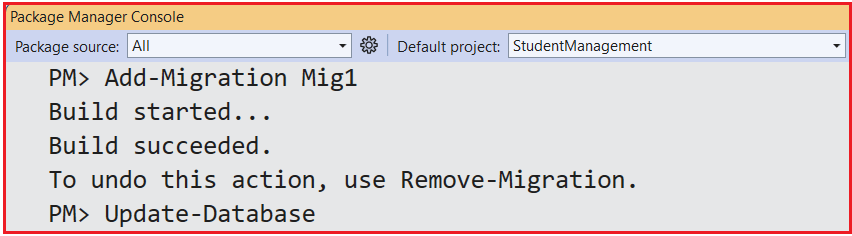
First, delete the existing database and Migration folder, and then regenerate the Migration file and apply it as shown in the image below:
It should generate the following database in SQL Server.

Limitations of Data Annotation Attributes in EF Core
Data Annotations make it easy to configure entities by placing attributes directly on classes and properties, but they cover only a subset of what Entity Framework Core can do. They are intentionally “lightweight” and convenient, not a complete configuration system. As a result, relying solely on Data Annotations introduces several significant limitations.
- Limited Coverage of EF Core Features: Data Annotations only support basic mapping and validation (table/column names, simple keys, simple relationships). They cannot express many advanced EF Core features, such as global query filters, complex value conversions, or provider-specific behaviours.
- Limited Relationship Configuration: They work well for simple 1:1, 1:many, and basic many-to-many mappings. But they cannot fully control cascade rules, advanced optional/required combinations, or complex multi-FK relationships beyond what conventions infer.
- Limited Control Over Database Schema Details: You can influence table/column names and basic types, but not advanced schema elements like computed columns, check constraints, filtered indexes, temporal tables, etc.
- No Support for Cross-Cutting or Centralized Rules: Data Annotations are applied to each property/class individually. You cannot easily define global rules (e.g., “all decimals use precision X, Y”) or apply patterns across the entire model from a single place.
So, Data Annotations are not a complete configuration solution for EF Core. They become limiting when we need advanced mapping, centralized rules, or provider-specific behaviour, and they tightly couple our domain classes to persistence and validation concerns. For simple demos and small projects, they are ideal, but real-world, complex applications usually require combining them with the more powerful and flexible Fluent API.