
Back to: ASP.NET Core Web API Tutorials
Authentication and Authorization in ASP.NET Core Web APIs
In today’s digital world, most applications (banking apps, shopping platforms, learning portals, healthcare systems, etc.) rely on Web APIs to exchange data and perform operations. Mobile applications, web portals, cloud systems, and third-party services continuously communicate with each other using APIs. These APIs often handle highly sensitive information such as personal details, financial data, business records, and administrative operations.
Because Web APIs are accessible over the internet, they become a common target for attackers. If the APIs are not properly secured:
- Sensitive data such as personal information, financial records, or business secrets can be exposed.
- Attackers may perform unauthorized actions, such as deleting records, transferring funds, or changing configurations.
- The overall trust in the application and the organization can be damaged.
So, this makes security not just a technical requirement, but a fundamental responsibility in modern application development. Two core security concepts protect Web APIs from such threats:
- Authentication: This is about identity. It ensures that the system knows who is making the request. For example, when users log in using a username and password, OTP, or biometric data, the system validates their identity.
- Authorization: This is about access. Once the identity is confirmed, authorization decides what that user is allowed to do. It controls which data they can see and which operations they can perform based on their role or permissions (e.g., Admin, Manager, User).
These two concepts work hand in hand. Authentication establishes trust by confirming identity, while authorization enforces boundaries by limiting actions. This two-step approach is essential for maintaining system integrity, protecting sensitive data, preventing misuse, and ensuring that users can only perform actions they are legitimately allowed to perform.
What is Authentication?
Authentication is the first and most crucial step in securing a system. It is the process by which a system confirms the identity of a user, device, or application trying to gain access. In simple words, authentication answers the question: Who are you?
Before any system, whether a bank, school, office, or online service, allows a person inside or grants them access to resources, it must verify their identity. Without authentication, anyone could pretend to be someone else and misuse the system. Examples of authentication methods include:
- Username and password
- Email and password
- Fingerprint scan
- Facial recognition
- OTP (One-Time Password)
Regardless of the method, the goal is always the same: verify identity before granting access. Just as a school checks a student ID before allowing entry, or an ATM asks for your PIN before granting access to your bank account, web systems must authenticate users before allowing them to interact with protected services.
Therefore, authentication acts as the first and most important security barrier. Authentication ensures that:
- Users cannot pretend to be someone else.
- Systems can verify the requester’s identity.
- All actions performed inside the system can be linked to a verified identity.
Without authentication, accountability and security completely collapse.
How Does Authentication Work?
To understand how authentication works, please look at the following diagram.
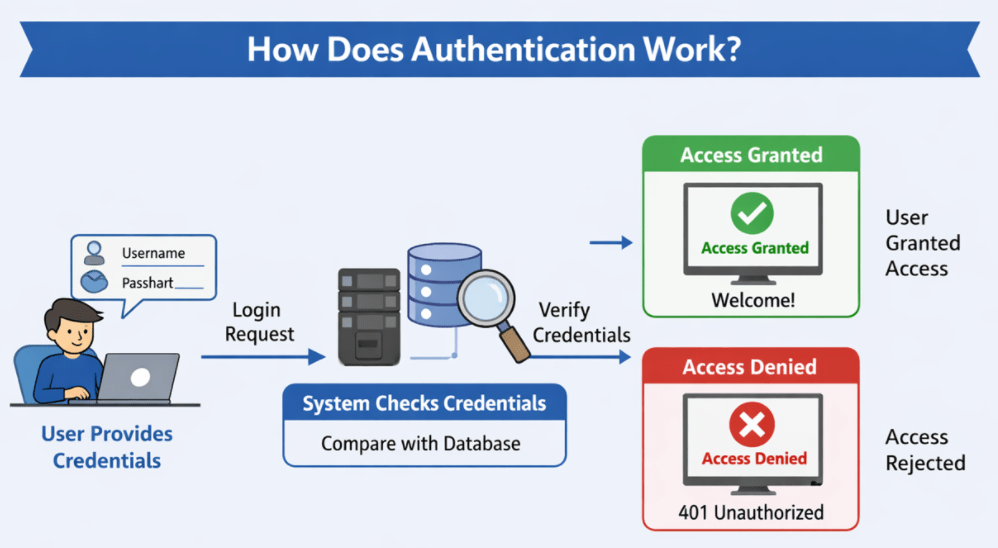
Step-1: User Provides Credentials
When a user wants to access a system (website, mobile app, desktop application, or secure server), they must provide credentials. These credentials are pieces of information used to prove their identity. The most common credentials include:
- Username or Email – Identifies which account they are trying to access.
- Password – A secret known (ideally) only to that user and the system.
In modern systems, additional or alternative credentials may be used, such as:
- One-Time Passwords (OTPs)
- Biometric data (fingerprint, face recognition)
- Security tokens
But the core idea remains the same: the user provides something that proves their identity.
Step-2: System Checks Credentials Against a Data Source
Once the user submits their credentials, the system:
- Takes the provided username/email.
- Looks up the corresponding record in a secure data store, typically a database.
- Compares the given password (usually after hashing it) with the stored encrypted/hashed password.
Important Point: Passwords are not stored in plain text; they are stored in a protected form (hashed).
Step-3: Verification of Identity
The system then decides:
- If the credentials match the stored data:
-
- The system concludes that the user is genuine.
- The user’s identity is considered verified.
-
- If the credentials do not match:
-
- The system concludes that the login attempt is invalid.
- The identity has not been verified, and access is denied.
-
At this point, the system has either:
- Successfully identified the user (authentication succeeded), or
- Rejected the request as an invalid attempt (authentication failed).
Step-4: Access Granted or Denied
Based on the verification:
- If authentication succeeds, the system allows the user to proceed further and access the application or resources. At this stage, the user is recognized as a valid, known identity (e.g., User ID 101, “john@example.com”).
- If authentication fails, the system:
-
- Denies access.
- Often shows a message like “Invalid username or password”.
- May log the failed attempt for security monitoring.
-
Remember, after authentication, the system knows who the user is, but it has not yet decided what they can do; that is the next step: Authorization.
Example to Understand Authentication:
Let us understand Authentication from a layman’s perspective. Imagine a secure office campus of an IT company:
- At the main entrance, there is a biometric scanner.
- Every employee who wants to enter must verify their identity.
- The system has stored biometric data (like fingerprints) for all registered employees.
For a better understanding, please have a look at the following image:
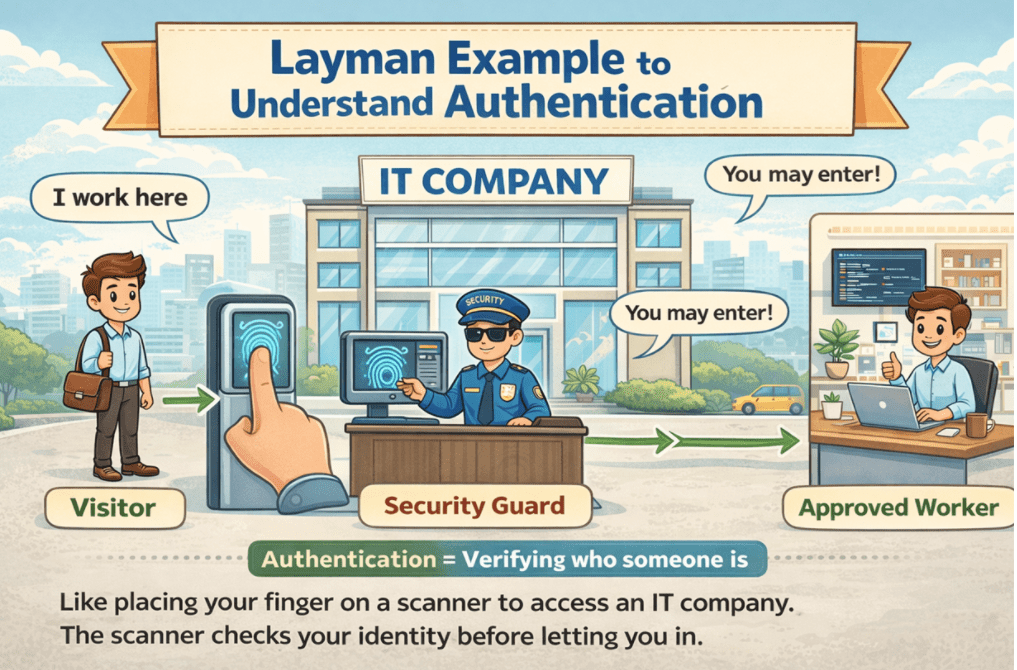
Now, when an employee arrives:
- They place their fingerprint on the scanner.
- The biometric device captures the fingerprint image.
- The system compares this fingerprint with the stored fingerprint data in its database.
- If it matches, the gate opens, and the employee is allowed to enter.
- If it does not match, the gate stays closed, and the person is not allowed inside.
This entire process, comparing a person’s fingerprint against stored records to decide whether they are a valid employee, is authentication.
Linking the Analogy to Web Applications
Inside the company building, there are various rooms, including Reception, HR Room, Accounts Section, Cafeteria, Server Room, and Admin Room. Access to these rooms is controlled separately and depends on the employee’s role and authorization, which is granted later.
But before any of that:
- The first step is to verify who is trying to enter the campus.
- This initial gate check, based on biometric data, is the real-world equivalent of entering a username and password in a web application.
In a web application or system:
- The user provides credentials such as a username and password (or OTP, biometrics, etc.).
- The system validates these credentials against its stored records.
- If the credentials are correct, the user is considered authenticated.
- Only after successful authentication does the system consider what the user is allowed to do (authorization).
So, Authentication is the process of confirming the user’s identity, exactly like proving you are a valid employee to enter the office campus.
What is Authorization?
Authorization is the process that determines what an already authenticated user is permitted to do within a system. Once the system knows who the user is (authentication), authorization decides: What are you allowed to do?
It is all about Permissions and Access Control. Authorization answers questions like:
- Which features can the user use?
- Which pages or APIs can they access?
- Which records can they view, modify, or delete?
Why Is Authorization Needed?
Even after someone has proven their identity, it would be dangerous to let every user:
- Access all data,
- Perform every operation, or
- Use all administrative features.
Different users have different responsibilities and trust levels. For example:
- Administrators may need full access to configuration and management features.
- Managers may need access to reports and certain data that regular employees should not see.
- Regular users should typically only access their own data or limited sections of the system.
Without proper authorization:
- A normal user could act like an admin.
- Sensitive or confidential data could be exposed to everyone.
- Business rules and security policies would be violated.
Thus, authorization ensures that access is controlled and limited by roles, permissions, and business rules, allowing each user to do only what they are supposed to do, and nothing more.
How Does Authorization Work?
To understand how authorization works, please look at the following diagram.

Step-1: Authentication Comes First
Authorization never works on its own. It always assumes that:
- The user has already been authenticated.
- The system knows exactly who is making the request.
For example, the system must first verify credentials (username/password) or validate a security token. Only then can it decide what that user can do.
Step-2: Assigning Roles and Permissions
Each user (or system) is assigned:
- One or more Roles (e.g., Admin, HR, Customer, Guest), and/or
- Specific Permissions (e.g., CanViewSalary, CanEditUser, CanDeleteOrder).
These roles and permissions:
- Are typically defined by Business Requirements.
- Are managed by System Administrators or through configuration.
- Represent the level of access and power a user has within the system.
Step-3: Checking Access Rights for a Resource
When an authenticated user tries to perform an action or access a resource, such as:
- Opening a specific web page,
- Calling an API endpoint,
- Viewing or modifying a piece of data,
The system performs an Authorization Check:
- It looks at the Required Permissions for that resource or action.
- It compares them with the Roles/Permissions assigned to the user.
For example:
- The /admin/users API endpoint may require the “Admin” role.
- Viewing salary details might require “ViewSalaryData” permission.
- Deleting a record may require “DeletePermission” for that entity.
Step-4: Allow or Deny Access
Based on the authorization check:
- If the user has the required permissions:
-
- The system allows the action.
- The requested operation (view, update, delete, etc.) is performed.
-
- If the user does not have the required permissions:
-
- The system denies the action.
- In Web APIs, the response often includes:
-
- 403 Forbidden or
- A message such as “Access Denied” or “You do not have permission to perform this action”.
-
-
In short:
- Authorization is like a guard at every door inside the system.
- The guard examines your “access card” (roles/permissions) and decides whether you can enter.
Example to Understand Authorization:
To understand authorization from a layman’s perspective, let’s continue with the IT company example. For a better understanding, please have a look at the following image:
Consider an IT company building with multiple rooms:
- Reception
- HR Room
- Accounts Section
- Cafeteria
- Server Room
- Admin Room
First, an employee uses biometric authentication at the main gate to enter the campus (authentication step). Once inside, not everyone is allowed to go everywhere. The company uses Access Cards or permissions to control which rooms each employee can enter.
For example:
- Employee 1 (Regular Staff):
-
- Can access Reception and Cafeteria.
- Cannot enter HR Room, Accounts Section, Server Room, or Admin Room.
-
- Employee 2 (Admin or Senior Staff):
-
- Can access the Accounts Section and Admin Room.
- Might also access the Server Room if required by their role.
-
Here:
- Both Employee 1 and Employee 2 have passed Authentication at the gate.
- The difference in where they can go inside the building is due to Authorization.
- Their permissions are determined by their Roles and Responsibilities in the organization.
Mapping the Analogy to Web Applications
In a web application or Web API:
- Authentication ensures that the user is genuine (e.g., they logged in successfully).
- Authorization then decides:
- Which pages can open?
- Which API endpoints can you call?
- Which data records can they view or modify?
For example:
- A Normal User may only view their own profile or order history.
- An Admin User can manage other users, update system settings, or view reports.
Authorization mechanisms ensure that:
- Sensitive resources (such as financial data, administrative configurations, or confidential reports) are accessible only to authorized users.
- Regular users cannot, intentionally or accidentally, perform actions beyond their allowed scope.
In summary, Authorization is the system’s way of saying: You are authenticated, and I know who you are, but based on your role and permissions, you are only allowed to do certain things, and I will strictly enforce those limits.
Why Do We Need Authentication and Authorization in a Web API?
Web APIs (Application Programming Interfaces) are the bridge that allows different applications and services to communicate over the internet. A mobile app, a web application, a third-party integration, or even an IoT device can all send requests to a Web API and receive data or perform actions.
Because APIs often expose important business operations and sensitive data, they become a natural target for misuse and attacks. Without proper security:
- Anyone could call your API and access data they shouldn’t be able to see.
- Malicious users or bots could perform dangerous actions, such as deleting data, making unauthorized transactions, or reading confidential information.
- Third-party systems could misuse your API if they are not properly restricted.
To prevent this, we use:
- Authentication – to be sure who is calling the API.
- Authorization – to ensure that, even after we know who they are, they can only do what they are allowed to do.
Most modern Web APIs follow the REST (Representational State Transfer) architectural style. One of the key principles of REST is statelessness. This means:
- The server does not store user session information between requests.
- Every request must include enough information for the server to understand who is making the request and what they are requesting.
Because of this stateless nature, authentication and authorization cannot rely on server memory. Instead, they must be designed so that each request is independently authenticated and authorized.
Types of Authentications in Web Services:
Different applications have different security requirements. A small internal tool might only need simple username/password authentication, whereas a large customer-facing system might require advanced token-based or third-party login mechanisms. ASP.NET Core Web API provides several authentication methods to meet these varied needs.
Each authentication type has its own advantages, use cases, and security considerations. Understanding these helps developers choose the right approach for their specific scenario. Below are the commonly used authentication methods in Web APIs:
- Basic Authentication: Basic Authentication is one of the simplest authentication mechanisms. The client sends the username and password with every HTTP request, encoded in Base64.
- Token-Based Authentication: Token-based Authentication uses a token (such as a JWT, or JSON Web Token) that the client obtains after the first successful login. This token is then sent with subsequent requests, instead of the username and password.
- OAuth / OpenID Connect: OAuth and OpenID Connect are open standards for authentication and authorization that enable users to authenticate with third-party services such as Google, Facebook, and Microsoft.
Authentication and authorization form the backbone of security in Web APIs, ensuring that only verified users can access the system and that their actions are properly controlled based on their permissions. By implementing these mechanisms correctly, developers can protect sensitive data, maintain system integrity, and provide a seamless yet secure user experience. So, mastering authentication and authorization is crucial for building trustworthy, scalable applications.
Next Session: Basic Authentication in ASP.NET Core Web API
good explanation