
Back to: ASP.NET Core Web API Tutorials
Mapperly Real-time Example in ASP.NET Core Web API
In modern ASP.NET Core Web API applications, mapping between Entities (Domain Models) and DTOs (Data Transfer Objects) is a fundamental requirement. APIs rarely expose database entities directly because entities often contain sensitive fields, navigation properties, audit columns, and internal structures that should not be part of the public contract. DTOs help enforce security, maintain API stability, and control payload size.
Traditionally, developers relied on runtime-based mapping libraries such as AutoMapper. While convenient, these tools depend heavily on reflection and runtime configuration, which can introduce performance overhead, hidden mapping issues, and runtime failures, especially in large or high-traffic applications.
Mapperly addresses these problems by taking a fundamentally different approach. It uses C# Source Generators to generate mapping code at compile time, producing clean, strongly typed, and highly optimized mapping methods. Because mappings are validated during build, issues are detected early, and the generated code is fully transparent and debuggable.
Real-time Example to Understand Mapperly in ASP.NET Core Web API:
Now, we will build a fully functional Order Management System using ASP.NET Core Web API, EF Core, SQL Server, and Mapperly to demonstrate how Mapperly works in a real-time, enterprise-style project.
Our example covers practical mapping scenarios such as:
- Mapping when property names are the same and when they are different
- Converting primitive → complex types and complex → primitive
- Handling enums, computed properties, null-substitution, and fixed/dynamic values
- Ignoring system fields that should be controlled only by business logic or the database
- Splitting responsibilities cleanly between Entities, DTOs, Mappers, Services, and Controllers
By the end of this walkthrough, you will not only understand Mapperly’s core attributes and patterns, but also know how to apply them in a production-ready ASP.NET Core Web API application.
Step-1: Create the Project
We begin by creating an ASP.NET Core Web API project named MapperlyOrderDemo. This project acts as a realistic backend API responsible for managing customers, products, orders, and order items. The goal here is not just CRUD operations, but to demonstrate real mapping requirements that arise in real systems.
Step-2: Install Required NuGet Packages
We need to install the following packages:
- Microsoft.EntityFrameworkCore – EF Core runtime for working with entities and LINQ queries.
- Microsoft.EntityFrameworkCore.SqlServer – SQL Server provider so EF Core can talk to SQL Server.
- Microsoft.EntityFrameworkCore.Tools – Required for migrations (Add-Migration, Update-Database).
- Riok.Mapperly – The core Mapperly package.
Each package plays a specific role:
- EF Core Packages: Handle database persistence, migrations, and querying.
- Mapperly: Watches for [Mapper] classes with partial methods and generates mapping implementations at compile time.
So, please install these packages through the NuGet Package Manager Console by executing the following command:
- Install-Package Microsoft.EntityFrameworkCore -Version 8.0.0
- Install-Package Microsoft.EntityFrameworkCore.SqlServer -Version 8.0.0
- Install-Package Microsoft.EntityFrameworkCore.Tools -Version 8.0.0
- Install-Package Riok.Mapperly
Step-3: Creating Entities
Entities represent the application’s internal data model. They are designed for correctness, relationships, and persistence, not for API exposure. First, create a folder named Entities at the project root, where we will store all our Entities.
Address.cs
Create a class file named Address.cs within the Entities folder and then copy and paste the following code. This class represents a reusable value object that stores address-related information such as street, city, state, and pincode. It is modeled as a complex/owned type so it can be embedded within other entities, such as Customer and Order, without requiring a separate database table.
namespace MapperlyOrderDemo.Entities
{
    public class Address
    {
        public string Line1 { get; set; } = null!;
        public string City { get; set; } = null!;
        public string State { get; set; } = null!;
        public string Pincode { get; set; } = null!;
    }
}
Customer.cs
Create a class file named Customer.cs within the Entities folder and then copy and paste the following code. This class represents a customer domain entity stored in the database. It contains personal details, contact information, an embedded Address, and audit fields. The entity is designed for persistence and relationships, not for API exposure, which is why it is mapped to DTOs before being sent outside.
namespace MapperlyOrderDemo.Entities
{
    public class Customer
    {
        public int Id { get; set; }

        public string FullName { get; set; } = null!;
        public string Mobile { get; set; } = null!;
        public string? Email { get; set; }
        public Address? Address { get; set; }
        public DateTime RegisteredOn { get; set; } = DateTime.UtcNow;
        public bool IsActive { get; set; } = true;

        // Real-world audit/system fields
        public string CreatedBy { get; set; } = "SYSTEM";
        public DateTime CreatedOn { get; set; } = DateTime.UtcNow;
        public DateTime? UpdatedOn { get; set; }

        public List<Order> Orders { get; set; } = new();
    }
}
Product.cs
Create a class file named Product.cs within the Entities folder and then copy and paste the following code. This class represents a product catalog entity with pricing and availability information. It is intentionally simple and focused, serving as a reference entity that can be linked to order items while keeping pricing data centralized and consistent.
using Microsoft.EntityFrameworkCore;
namespace MapperlyOrderDemo.Entities
{
    public class Product
    {
        public int Id { get; set; }
        public string Name { get; set; } = null!;
        [Precision(18, 2)]
        public decimal Price { get; set; }
        public bool IsActive { get; set; } = true;
    }
}
Order.cs
Create a class file named Order.cs within the Entities folder and then copy and paste the following code. This class represents a customer order aggregate root. It holds order-level information such as total amount, payment status, shipping address, and order lifecycle state (OrderStatus). It also maintains customer relationships and order items, making it the system’s core transactional entity.
using Microsoft.EntityFrameworkCore;
namespace MapperlyOrderDemo.Entities
{
    public enum OrderStatus
    {
        Pending = 0,
        Paid = 1,
        Cancelled = 2,
        Shipped = 3,
        Delivered = 4
    }

    public class Order
    {
        public int Id { get; set; }
        public int CustomerId { get; set; }

        public Customer Customer { get; set; } = null!;
        public List<OrderItem> Items { get; set; } = new();

        [Precision(18,2)]
        public decimal TotalAmount { get; set; }
        public bool IsPaid { get; set; }

        // Better than string
        public OrderStatus Status { get; set; } = OrderStatus.Pending;

        // Complex Type
        public Address ShippingAddress { get; set; } = new();

        public DateTime CreatedOn { get; set; } = DateTime.UtcNow;
        public DateTime? UpdatedOn { get; set; }

        // System fields (ignore in DTOs)
        public string CreatedBy { get; set; } = "SYSTEM";
    }
}
OrderItem.cs
Create a class file named OrderItem.cs within the Entities folder and then copy and paste the following code. This class represents a single line item in an order. It connects a product with quantity information and belongs strictly to a parent order. Business calculations, such as totals, are intentionally not stored here to keep the entity normalized.
using Microsoft.EntityFrameworkCore;
namespace MapperlyOrderDemo.Entities
{
    public class OrderItem
    {
        public int Id { get; set; }

        public int OrderId { get; set; }
        public Order Order { get; set; } = null!;

        public int ProductId { get; set; }
        public Product Product { get; set; } = null!;
        [Precision(18, 2)]
        public decimal UnitPrice { get; set; }
        public int Quantity { get; set; }
    }
}
Step-4: Creating DTOs
DTOs define what the API exposes and accepts, not how data is stored. They help us:
- Avoid directly exposing EF Core entities.
- Enforce validation using data annotations.
- Control exactly which fields leave or enter our system.
Create a folder named DTOs in the Project root directory.
CreateCustomerRequestDTO
Create a class file named CreateCustomerRequestDTO.cs within the DTOs folder and then copy and paste the following code. This DTO represents the API input contract for creating a customer. It contains only the fields required from the client and enforces validation rules using data annotations. Its structure is optimized for user input rather than database storage.
using System.ComponentModel.DataAnnotations;
namespace MapperlyOrderDemo.DTOs
{
    public class CreateCustomerRequestDTO
    {
        [Required(ErrorMessage = "Full Name is required.")]
        [StringLength(100, ErrorMessage = "Full Name cannot exceed 100 characters.")]
        public string FullName { get; set; } = null!;

        [Required(ErrorMessage = "Mobile number is required.")]
        [RegularExpression(@"^[6-9]\d{9}$", ErrorMessage = "Mobile must be a valid 10-digit Indian number.")]
        public string Mobile { get; set; } = null!;

        [EmailAddress(ErrorMessage = "Email format is invalid.")]
        public string? Email { get; set; }

        // Primitive fields (Primitive -> Complex Address)
        [Required(ErrorMessage = "Address Line1 is required.")]
        public string AddressLine1 { get; set; } = null!;

        [Required(ErrorMessage = "City is required.")]
        public string City { get; set; } = null!;

        [Required(ErrorMessage = "State is required.")]
        public string State { get; set; } = null!;

        [Required(ErrorMessage = "Pincode is required.")]
        [RegularExpression(@"^\d{6}$", ErrorMessage = "Pincode must be 6 digits.")]
        public string Pincode { get; set; } = null!;
    }
}
CustomerResponseDTO
Create a class file named CustomerResponseDTO.cs within the DTOs folder and then copy and paste the following code. This DTO defines the API output shape for customer data. It intentionally flattens complex types, renames fields, and includes system-generated values, ensuring clients receive clean, readable, and safe data.
namespace MapperlyOrderDemo.DTOs
{
    public class CustomerResponseDTO
    {
        public int Id { get; set; }
        public string FullName { get; set; } = null!;
        public string? Email { get; set; }

        // Different name mapping (Mobile -> PhoneNumber)
        public string PhoneNumber { get; set; } = null!;

        // Complex -> Primitive
        public string City { get; set; } = null!;
        public string State { get; set; } = null!;

        // Fixed/Dynamic mapping examples
        public string SourceSystem { get; set; } = null!;
        public DateTime MappedAtUtc { get; set; }
    }
}
CreateOrderItemRequestDTO
Create a class file named CreateOrderItemRequestDTO.cs within the DTOs folder and then copy and paste the following code. This DTO represents a single order item input from the client. It ensures product selection and quantity validation while keeping the request lightweight and focused on intent rather than internal relationships.
using System.ComponentModel.DataAnnotations;
namespace MapperlyOrderDemo.DTOs
{
    public class CreateOrderItemRequestDTO
    {
        [Range(1, int.MaxValue, ErrorMessage = "ProductId must be valid.")]
        public int ProductId { get; set; }

        [Range(1, 1000, ErrorMessage = "Quantity must be between 1 and 1000.")]
        public int Quantity { get; set; }
    }
}
CreateOrderRequestDTO
Create a class file named CreateOrderRequestDTO.cs within the DTOs folder and then copy and paste the following code. This DTO represents the request payload for creating an order. It captures only what the client is allowed to submit, including customer reference, items, and shipping details, while excluding any system-controlled or calculated fields.
using System.ComponentModel.DataAnnotations;
namespace MapperlyOrderDemo.DTOs
{
    public class CreateOrderRequestDTO
    {
        [Range(1, int.MaxValue, ErrorMessage = "CustomerId must be a valid positive number.")]
        public int CustomerId { get; set; }

        [MinLength(1, ErrorMessage = "At least one order item is required.")]
        public List<CreateOrderItemRequestDTO> Items { get; set; } = new();

        // Primitive -> Complex ShippingAddress
        [Required(ErrorMessage = "Shipping Address Line1 is required.")]
        public string ShippingLine1 { get; set; } = null!;

        [Required(ErrorMessage = "Shipping City is required.")]
        public string ShippingCity { get; set; } = null!;

        [Required(ErrorMessage = "Shipping State is required.")]
        public string ShippingState { get; set; } = null!;

        [Required(ErrorMessage = "Shipping Pincode is required.")]
        [RegularExpression(@"^\d{6}$", ErrorMessage = "Shipping Pincode must be 6 digits.")]
        public string ShippingPincode { get; set; } = null!;
    }
}
OrderItemResponseDTO
Create a class file named OrderItemResponseDTO.cs within the DTOs folder and then copy and paste the following code. This DTO represents a read-only projection of an order item. It flattens product details and exposes calculated values, such as line total, so the client does not need to compute or infer pricing logic.
namespace MapperlyOrderDemo.DTOs
{
    public class OrderItemResponseDTO
    {
        public int ProductId { get; set; }
        public string ProductName { get; set; } = null!;
        public decimal UnitPrice { get; set; }
        public int Quantity { get; set; }
        public decimal LineTotal { get; set; }
    }
}
OrderResponseDTO
Create a class file named OrderResponseDTO.cs within the DTOs folder and then copy and paste the following code. This DTO represents the final order view exposed by the API. It flattens nested entities, converts enums to readable strings, and presents computed values such as totals, making it suitable for UI or client consumption.
namespace MapperlyOrderDemo.DTOs
{
    public class OrderResponseDTO
    {
        public int Id { get; set; }

        // Complex -> primitive flattening
        public string CustomerName { get; set; } = null!;
        public decimal TotalAmount { get; set; }
        public string Status { get; set; } = null!;

        public DateTime CreatedOn { get; set; }

        // ShippingAddress flattening
        public string ShippingCity { get; set; } = null!;
        public string ShippingState { get; set; } = null!;
        public List<OrderItemResponseDTO> Items { get; set; } = new();
    }
}
Step-5: Creating EF Core DbContext
First, create a folder named Data in the project root directory. Then, create a class file named AppDbContext.cs in the Data folder and paste the following code. This class acts as the EF Core database gateway. It defines entity sets, relationships, owned types, and seed data. All database interactions flow through this context, keeping persistence logic centralized and consistent.
using MapperlyOrderDemo.Entities;
using Microsoft.EntityFrameworkCore;
namespace MapperlyOrderDemo.Data
{
    public class AppDbContext : DbContext
    {
        public AppDbContext(DbContextOptions<AppDbContext> options)
            : base(options) { }

        public DbSet<Customer> Customers { set; get; }
        public DbSet<Product> Products { set; get; }
        public DbSet<Order> Orders { set; get; }
        public DbSet<OrderItem> OrderItems { set; get; }

        protected override void OnModelCreating(ModelBuilder modelBuilder)
        {
            // Owned/complex type support: easiest is to store Address as owned types.
            modelBuilder.Entity<Customer>().OwnsOne(c => c.Address);
            modelBuilder.Entity<Order>().OwnsOne(o => o.ShippingAddress);

            var seedUtc = new DateTime(2026, 01, 01, 0, 0, 0, DateTimeKind.Utc);

            // Seed Customers
            modelBuilder.Entity<Customer>().HasData(
                new Customer { Id = 1, FullName = "Ravi Kumar", Mobile = "9876543210", Email = "ravi@test.com", RegisteredOn = seedUtc, CreatedBy = "SEED", CreatedOn = seedUtc },
                new Customer { Id = 2, FullName = "Sita Sharma", Mobile = "9123456789", Email = null, RegisteredOn = seedUtc, CreatedBy = "SEED", CreatedOn = seedUtc }
            );

            modelBuilder.Entity<Customer>().OwnsOne(c => c.Address).HasData(
                new { CustomerId = 1, Line1 = "MG Road", City = "Bengaluru", State = "Karnataka", Pincode = "560001" },
                new { CustomerId = 2, Line1 = "Park Street", City = "Kolkata", State = "West Bengal", Pincode = "700016" }
            );

            // Seed Products
            modelBuilder.Entity<Product>().HasData(
                new Product { Id = 1, Name = "Wireless Mouse", Price = 599 },
                new Product { Id = 2, Name = "Keyboard", Price = 899 },
                new Product { Id = 3, Name = "USB Cable", Price = 199 }
            );

            base.OnModelCreating(modelBuilder);
        }
    }
}
Step-6: Creating Mapperly Mappers
First, create a folder named Mappers at the project root. This is the heart of the application. Mapperly mappers are:
- Declared as partial classes
- Marked with [Mapper]
- Contain only mapping intentions, not implementations
Each attribute applied to mapper methods serves a clear purpose:
- MapProperty handles naming mismatches and flattening.
- MapPropertyFromSource injects computed or system values.
- MapperIgnoreTarget protects system-managed and navigation fields.
- Helper methods explicitly define complex construction logic.
Most importantly, business rules are NOT placed in mappers, only data shape transformations. Before proceeding, we need to understand the important Mapperly attributes we can apply to partial methods. They are as follows:
[MapProperty(source, target)]
It instructs Mapperly to map a source property from the source object to a differently named property in the target object. When your source and target properties don’t have the same name, but you want to map them.
By default, Mapperly only maps properties with the same name and compatible types. This attribute specifies how Mapperly handles mismatched names.
Example:
- [MapProperty(nameof(Customer.Mobile), nameof(CustomerResponseDTO.PhoneNumber))]
- partial CustomerResponseDTO ToDto(Customer customer);
This tells Mapperly: Please map Customer.Mobile to CustomerResponseDTO.PhoneNumber.
[MapPropertyFromSource(target, Use = nameof(SomeMethod))]
It tells Mapperly not to use a source property, but instead call a custom method to get the value for a specific target property.
When to Use:
- To calculate a target property’s value
- To apply custom logic or transformations
- To inject fixed/dynamic values (e.g., timestamps, environment data)
It gives us full control over the value that gets mapped, even if it’s not present in the source object.
Example-1:
- [MapPropertyFromSource(nameof(CustomerResponseDTO.SourceSystem), Use = nameof(GetSourceSystem))]
This line means: Instead of reading from Customer, call the GetSourceSystem(customer) method to set SourceSystem.
Example-2:
- [MapPropertyFromSource(nameof(OrderItemResponseDTO.LineTotal), Use = nameof(CalcLineTotal))]
This line means: Calculate LineTotal using CalcLineTotal(OrderItem).
[MapperIgnoreTarget(nameof(TargetProperty))]
It instructs Mapperly to skip mapping a specific property in the target object. It is used:
- When a property is auto-generated (e.g., Id, CreatedOn)
- When it should be set outside the mapper, e.g., in the Service Layer
- When you want to avoid overwriting important fields
It prevents Mapperly from accidentally setting a property it shouldn’t control, especially system-managed fields or navigations.
Examples:
- [MapperIgnoreTarget(nameof(Order.Customer))]
- [MapperIgnoreTarget(nameof(Order.Status))]
- [MapperIgnoreTarget(nameof(Order.CreatedOn))]
These tell Mapperly: Ignore these properties. They’ll be set in business logic or by the database.
[MapProperty(nameof(Source), nameof(Target), Use = nameof(CustomFunction))]
This is a combo of:
- MapProperty: mapping different-named properties
- Use: apply a custom transformation method
When the property names are different, you want to apply custom logic to convert one to the other. It is ideal for transforming values while mapping, e.g., formatting strings, converting enums, handling fallbacks, etc.
Example:
- [MapProperty(nameof(Order.Status), nameof(OrderResponseDTO.Status), Use = nameof(StatusToString))]
This means: Take Order.Status (enum), convert it to a string using StatusToString, and assign it to OrderResponseDTO.Status.
Mapper – 1: CustomerMapper
Create a class file named CustomerMapper.cs within the Mappers folder, and copy-paste the following code. This class defines compile-time safe mapping rules between Customer entities and customer DTOs using Mapperly. It handles renaming, flattening, null substitution, and value injection while explicitly ignoring system-managed fields to preserve business integrity.
using MapperlyOrderDemo.DTOs;
using MapperlyOrderDemo.Entities;
using Riok.Mapperly.Abstractions;

namespace MapperlyOrderDemo.Mappers
{
    // The [Mapper] attribute tells Mapperly to generate mapping code
    // for all partial mapping methods defined in this class.
    [Mapper]
    public partial class CustomerMapper
    {
        // ENTITY -> DTO MAPPING
        // This method maps:
        //   Customer (Entity) -> CustomerResponseDTO (Response DTO)

        // 1. Different property name mapping
        //    Entity.Mobile  -> DTO.PhoneNumber
        [MapProperty(nameof(Customer.Mobile),
                     nameof(CustomerResponseDTO.PhoneNumber))]

        // 2. Complex -> Primitive flattening
        //    Entity.Address.City  -> DTO.City
        [MapProperty(nameof(Customer.Address.City),
                     nameof(CustomerResponseDTO.City))]

        // 3. Complex -> Primitive flattening
        //    Entity.Address.State -> DTO.State
        [MapProperty(nameof(Customer.Address.State),
                     nameof(CustomerResponseDTO.State))]

        // 4. Fixed value mapping using source-based mapping
        //    This does NOT read from Customer; instead, it calls
        //    GetSourceSystem(Customer) and assigns the returned value
        //    to CustomerResponseDTO.SourceSystem
        [MapPropertyFromSource(nameof(CustomerResponseDTO.SourceSystem),
                               Use = nameof(GetSourceSystem))]

        // 5. Dynamic value mapping
        //    Executes GetMappedAtUtc(Customer) at mapping time
        //    to populate the response with the current UTC timestamp
        [MapPropertyFromSource(nameof(CustomerResponseDTO.MappedAtUtc),
                               Use = nameof(GetMappedAtUtc))]

        // Mapperly will generate the implementation for this method
        // at compile time using the rules defined above.
        public partial CustomerResponseDTO ToDto(Customer customer);

        // Mapperly will generate the implementation for this method
        // at compile time using the rules defined above.
        public partial List<CustomerResponseDTO> ToDtos(List<Customer> customers);

        // DTO -> ENTITY MAPPING (CREATE CUSTOMER)
        // This method maps:
        //   CreateCustomerRequestDTO -> Customer (Entity)
        //
        // Important design decisions:
        // - Only ONE creation mapping is allowed
        // - Business/system fields are ignored
        // - Complex types are constructed explicitly

        // 1. Null substitution mapping
        //    If dto.Email is null or empty, EmailOrEmpty() ensures
        //    the database never receives a null/invalid email value
        [MapProperty(nameof(CreateCustomerRequestDTO.Email),
                     nameof(Customer.Email),
                     Use = nameof(EmailOrEmpty))]

        // 2. Primitive -> Complex mapping
        //    CreateCustomerRequestDTO contains primitive address fields,
        //    but Customer expects a complex Address object.
        //
        //    Mapperly calls ToAddress(dto) to construct Address.
        [MapPropertyFromSource(nameof(Customer.Address),
                               Use = nameof(ToAddress))]

        // 3. Ignore database-generated and system-managed fields
        //    These fields should be set in the Service layer,
        //    NOT inside the mapper.
        [MapperIgnoreTarget(nameof(Customer.Id))]
        [MapperIgnoreTarget(nameof(Customer.RegisteredOn))]
        [MapperIgnoreTarget(nameof(Customer.IsActive))]
        [MapperIgnoreTarget(nameof(Customer.CreatedBy))]
        [MapperIgnoreTarget(nameof(Customer.CreatedOn))]
        [MapperIgnoreTarget(nameof(Customer.UpdatedOn))]
        [MapperIgnoreTarget(nameof(Customer.Orders))]

        // Mapperly generates the implementation for this method.
        public partial Customer ToEntity(CreateCustomerRequestDTO dto);

        // HELPER METHODS USED BY MAPPERLY
        // These methods are NOT called manually.
        // Mapperly invokes them automatically during mapping.

        // Builds the Address complex type from primitive DTO fields
        // Used in Primitive -> Complex mapping.
        private static Address ToAddress(CreateCustomerRequestDTO dto)
        {
            return new Address()
            {
                Line1 = dto.AddressLine1,
                City = dto.City,
                State = dto.State,
                Pincode = dto.Pincode
            };
        }

        // Ensures Email is never null or whitespace
        // Demonstrates null substitution logic
        private static string? EmailOrEmpty(string? email)
        {
            return string.IsNullOrWhiteSpace(email) ? "NA" : email;
        }

        // Returns a fixed source-system identifier
        // Useful in distributed systems / auditing
        private static string GetSourceSystem(Customer _)
        {
            return "MapperlyOrderDemo";
        }

        // Returns the current UTC timestamp at mapping time
        // Demonstrates dynamic value assignment
        private static DateTime GetMappedAtUtc(Customer _)
        {
            return DateTime.UtcNow;
        }
    }
}
Mapper – 2: OrderMapper
Create a class file named OrderMapper.cs within the Mappers folder, and copy-paste the following code. This class defines all order-related mapping logic between entities and DTOs. It supports complex flattening, enum conversion, computed values, and strict separation between mapping and business logic, ensuring predictable, maintainable transformations.
using MapperlyOrderDemo.DTOs;
using MapperlyOrderDemo.Entities;
using Riok.Mapperly.Abstractions;

namespace MapperlyOrderDemo.Mappers
{
    // The [Mapper] attribute instructs Mapperly to generate
    // mapping implementations for all partial methods in this class.
    [Mapper]
    public partial class OrderMapper
    {
        // ENTITY -> DTO MAPPING
        // This method maps:
        //   Order (Entity) -> OrderResponseDTO (API response)

        // 1. Complex -> Primitive flattening
        //    Order.Customer.FullName -> OrderResponseDTO.CustomerName
        [MapProperty(nameof(Order.Customer.FullName),
                     nameof(OrderResponseDTO.CustomerName))]

        // 2. Flatten ShippingAddress.City
        //    Order.ShippingAddress.City -> OrderResponseDTO.ShippingCity
        [MapProperty(nameof(Order.ShippingAddress.City),
                     nameof(OrderResponseDTO.ShippingCity))]

        // 3. Flatten ShippingAddress.State
        //    Order.ShippingAddress.State -> OrderResponseDTO.ShippingState
        [MapProperty(nameof(Order.ShippingAddress.State),
                     nameof(OrderResponseDTO.ShippingState))]

        // 4. Enum -> string conversion
        //    Order.Status (enum) -> OrderResponseDTO.Status (string)
        //    Uses helper method StatusToString
        [MapProperty(nameof(Order.Status),
                     nameof(OrderResponseDTO.Status),
                     Use = nameof(StatusToString))]

        // Mapperly generates the method body automatically
        // using the mapping rules defined above.
        public partial OrderResponseDTO ToDto(Order order);

        // DTO -> ENTITY MAPPING (CREATE ORDER)
        // This method maps:
        //   CreateOrderRequestDTO -> Order (Entity)
        //
        // Design principles:
        // - Only ONE creation mapping (industry standard)
        // - Ignore system and computed fields
        // - Construct complex types explicitly

        // Ignore database-generated identity
        [MapperIgnoreTarget(nameof(Order.Id))]

        // Customer navigation is assigned in service layer
        [MapperIgnoreTarget(nameof(Order.Customer))]

        // Items collection is built in service after validation
        [MapperIgnoreTarget(nameof(Order.Items))]

        // Computed fields (business logic belongs to service)
        [MapperIgnoreTarget(nameof(Order.TotalAmount))]
        [MapperIgnoreTarget(nameof(Order.Status))]
        [MapperIgnoreTarget(nameof(Order.IsPaid))]

        // Audit/system fields
        [MapperIgnoreTarget(nameof(Order.CreatedOn))]
        [MapperIgnoreTarget(nameof(Order.CreatedBy))]

        // Primitive -> Complex mapping
        // CreateOrderRequestDTO has primitive shipping fields,
        // but Order expects a complex ShippingAddress object.
        [MapPropertyFromSource(nameof(Order.ShippingAddress),
                               Use = nameof(ToAddress))]

        // Mapperly generates the mapping implementation
        public partial Order ToEntity(CreateOrderRequestDTO dto);

        // DTO -> ENTITY (ORDER ITEM)
        // This method maps:
        //   CreateOrderItemRequestDTO -> OrderItem
        //
        // Only primitive fields are mapped here.
        // Navigation properties are handled in the service layer.

        // Order navigation set in service
        [MapperIgnoreTarget(nameof(OrderItem.Order))]

        // Product navigation loaded and assigned in service
        [MapperIgnoreTarget(nameof(OrderItem.Product))]

        // Id set in service
        [MapperIgnoreTarget(nameof(OrderItem.UnitPrice))]
        public partial OrderItem ToEntity(CreateOrderItemRequestDTO dto);

        // ENTITY -> DTO (ORDER ITEM RESPONSE)
        // This method maps:
        //   OrderItem -> OrderItemResponseDTO
        //
        // Purpose:
        // - Flatten Product navigation
        // - Compute line total

        // Product.Id -> ProductId
        [MapProperty(nameof(OrderItem.Product.Id),
                     nameof(OrderItemResponseDTO.ProductId))]

        // Product.Name -> ProductName
        [MapProperty(nameof(OrderItem.Product.Name),
                     nameof(OrderItemResponseDTO.ProductName))]

        //// Product.Price -> UnitPrice
        //[MapProperty(nameof(OrderItem.UnitPrice),
        //             nameof(OrderItemResponseDTO.UnitPrice))]

        // Computed field:
        // LineTotal = UnitPrice * Quantity
        [MapPropertyFromSource(nameof(OrderItemResponseDTO.LineTotal),
                               Use = nameof(CalcLineTotal))]

        // Mapperly generates this method
        public partial OrderItemResponseDTO ToDto(OrderItem item);

        // HELPER METHODS
        // These helpers are called by Mapperly during mapping.
        // They are NOT called manually.

        // Converts enum OrderStatus to string for API response
        private static string StatusToString(OrderStatus status)
        {
             return status.ToString();
        }

        // Builds the ShippingAddress complex object
        // from primitive DTO fields
        private static Address ToAddress(CreateOrderRequestDTO dto)
        {
            return new Address()
            {
                Line1 = dto.ShippingLine1,
                City = dto.ShippingCity,
                State = dto.ShippingState,
                Pincode = dto.ShippingPincode
            };
        }

        // Calculates LineTotal for an order item
        // Uses Product.Price and Quantity
        private static decimal CalcLineTotal(OrderItem item)
        {
            return item.UnitPrice * item.Quantity;
        }
    }
}
Step-7: Services Using Mapperly
Services sit between controllers and the DbContext and are responsible for business logic and orchestration. The Service layer orchestrates:
- Validation
- Business rules
- Database interaction
- Mapper usage
Services decide:
- When to map
- Which mapper method to call
- Which system values to apply
First, create a new folder named Services in the project root directory.
ICustomerService
Create a class file named ICustomerService.cs within the Services folder and then copy and paste the following code. This interface defines the contract for customer-related business operations. It allows controllers to depend on abstractions rather than implementations, enabling clean architecture and easier testing.
using MapperlyOrderDemo.DTOs;
namespace MapperlyOrderDemo.Services
{
    public interface ICustomerService
    {
        Task<CustomerResponseDTO> CreateAsync(CreateCustomerRequestDTO dto);
        Task<List<CustomerResponseDTO>> GetAllActiveAsync();
        Task<CustomerResponseDTO?> GetByIdAsync(int id);
    }
}
CustomerService
Create a class file named CustomerService.cs within the Services folder and then copy and paste the following code. This class contains customer-related business logic, including validation, uniqueness checks, auditing, persistence, and mapping orchestration. It acts as the coordinator between the database and Mapperly-generated mappers.
using MapperlyOrderDemo.Data;
using MapperlyOrderDemo.DTOs;
using MapperlyOrderDemo.Mappers;
using Microsoft.EntityFrameworkCore;

namespace MapperlyOrderDemo.Services
{
    public class CustomerService : ICustomerService
    {
        // DbContext for database access
        private readonly AppDbContext _dbContext;

        // Mapperly-generated mapper for Customer mappings
        private readonly CustomerMapper _mapper;

        // Logger for structured logging
        private readonly ILogger<CustomerService> _logger;

        // Constructor injection
        public CustomerService(
            AppDbContext dbContext,
            CustomerMapper mapper,
            ILogger<CustomerService> logger)
        {
            _dbContext = dbContext;
            _mapper = mapper;
            _logger = logger;
        }

        // CREATE CUSTOMER
        // Input  : CreateCustomerRequestDTO (from API)
        // Output : CustomerResponseDTO (to API)
        // Flow:
        // 1. Log request
        // 2. Validate business rules
        // 3. Map DTO -> Entity using Mapperly
        // 4. Set system/business fields
        // 5. Persist to database
        // 6. Map Entity -> Response DTO
        public async Task<CustomerResponseDTO> CreateAsync(CreateCustomerRequestDTO dto)
        {
            try
            {
                // Log Request
                _logger.LogInformation(
                    "Creating customer. Mobile={Mobile}",
                    dto.Mobile);

                // Business validation (service responsibility)
                // Ensure mobile number is unique.
                // This rule belongs in the service, NOT in the mapper.
                var mobileExists = await _dbContext.Customers
                    .AnyAsync(c => c.Mobile == dto.Mobile);

                if (mobileExists)
                    throw new InvalidOperationException(
                        "A customer with the same mobile number already exists.");

                // DTO -> Entity mapping (Mapperly responsibility)
                var entity = _mapper.ToEntity(dto);

                // System / audit fields (service responsibility)
                // These values depend on runtime context and business rules,
                // so they are NOT handled by the mapper.
                entity.IsActive = true;
                entity.RegisteredOn = DateTime.UtcNow;
                entity.CreatedBy = "SYSTEM";
                entity.CreatedOn = DateTime.UtcNow;

                // Persist entity
                _dbContext.Customers.Add(entity);
                await _dbContext.SaveChangesAsync();

                _logger.LogInformation(
                    "Customer created successfully. CustomerId={CustomerId}",
                    entity.Id);

                // Entity -> DTO mapping (Mapperly responsibility)
                return _mapper.ToDto(entity);
            }
            catch (Exception ex)
            {
                // Log full exception details for diagnostics
                _logger.LogError(
                    ex,
                    "Customer create failed. Mobile={Mobile}",
                    dto.Mobile);

                // Re-throw so controller/middleware can handle HTTP response
                throw;
            }
        }

        // GET ALL ACTIVE CUSTOMERS
        // Returns only active customers, sorted by latest registration.
        public async Task<List<CustomerResponseDTO>> GetAllActiveAsync()
        {
            try
            {
                _logger.LogInformation("Fetching active customers.");

                // Query database
                // - Filter: IsActive customers only
                // - Sort: Most recently registered first
                var customers = await _dbContext.Customers
                    .Where(c => c.IsActive)
                    .OrderByDescending(c => c.RegisteredOn)
                    .ToListAsync();

                return _mapper.ToDtos(customers);

                // Map Entity list -> DTO list
                // Mapperly maps each entity individually.
                // return customers
                //    .Select(customer => _mapper.ToDto(customer))
                //    .ToList();
            }
            catch (Exception ex)
            {
                _logger.LogError(
                    ex,
                    "Fetching active customers failed.");

                throw;
            }
        }

        // GET CUSTOMER BY ID
        // Returns null if customer does not exist or is inactive.
        public async Task<CustomerResponseDTO?> GetByIdAsync(int id)
        {
            try
            {
                _logger.LogInformation(
                    "Fetching customer by id. CustomerId={CustomerId}",
                    id);

                // Query single active customer
                var customer = await _dbContext.Customers
                    .FirstOrDefaultAsync(c => c.Id == id && c.IsActive);

                // Map only if entity exists
                return customer == null
                    ? null
                    : _mapper.ToDto(customer);
            }
            catch (Exception ex)
            {
                _logger.LogError(
                    ex,
                    "Fetching customer failed. CustomerId={CustomerId}",
                    id);

                throw;
            }
        }
    }
}
IOrderService
Create a class file named IOrderService.cs within the Services folder and then copy and paste the following code. This interface defines the order management contract, ensuring that order creation and retrieval logic remains consistent and decoupled from controllers.
using MapperlyOrderDemo.DTOs;
namespace MapperlyOrderDemo.Services
{
    public interface IOrderService
    {
        Task<OrderResponseDTO> CreateAsync(CreateOrderRequestDTO dto);
        Task<OrderResponseDTO?> GetByIdAsync(int orderId);
        Task<List<OrderResponseDTO>> GetByCustomerAsync(int customerId);
    }
}
OrderService
Create a class file named OrderService.cs within the Services folder and then copy and paste the following code. This class implements all order processing business rules, including validation, product lookup, total calculation, state management, and controlled use of Mapperly. It ensures that mapping remains structural while business logic stays explicit.
using MapperlyOrderDemo.Data;
using MapperlyOrderDemo.DTOs;
using MapperlyOrderDemo.Entities;
using MapperlyOrderDemo.Mappers;
using Microsoft.EntityFrameworkCore;

namespace MapperlyOrderDemo.Services
{
    public class OrderService : IOrderService
    {
        // DbContext for database access
        private readonly AppDbContext _dbContext;

        // Mapperly-generated mapper for Order mappings
        private readonly OrderMapper _mapper;

        // Logger for logging
        private readonly ILogger<OrderService> _logger;

        // Constructor injection
        public OrderService(
            AppDbContext dbContext,
            OrderMapper mapper,
            ILogger<OrderService> logger)
        {
            _dbContext = dbContext;
            _mapper = mapper;
            _logger = logger;
        }

        // CREATE ORDER
        // Input  : CreateOrderRequestDTO (from API)
        // Output : OrderResponseDTO (to API)
        //
        // High-level flow:
        // 1. Validate request-level rules
        // 2. Validate customer existence
        // 3. Map DTO -> Order entity (base mapping)
        // 4. Load and validate products
        // 5. Build order items and compute total
        // 6. Set system/business fields
        // 7. Persist order
        // 8. Build response DTO
        public async Task<OrderResponseDTO> CreateAsync(CreateOrderRequestDTO dto)
        {
            try
            {
                _logger.LogInformation(
                    "Creating order. CustomerId={CustomerId}",
                    dto.CustomerId);

                // Basic request-level validation
                // Ensure at least one item is present
                if (dto.Items == null || dto.Items.Count == 0)
                    throw new InvalidOperationException(
                        "At least one order item is required.");

                // Ensure all quantities are positive
                if (dto.Items.Any(i => i.Quantity <= 0))
                    throw new InvalidOperationException(
                        "Quantity must be greater than zero.");

                // Validate customer existence and status
                // Orders can be placed only by active customers
                var customer = await _dbContext.Customers
                    .FirstOrDefaultAsync(c => c.Id == dto.CustomerId && c.IsActive);

                if (customer == null)
                    throw new InvalidOperationException(
                        "Customer does not exist or is inactive.");

                // Base mapping: DTO -> Order entity
                // Mapperly maps only simple/structural fields here.
                var order = _mapper.ToEntity(dto);

                // Assign customer relationship explicitly
                order.CustomerId = dto.CustomerId;
                order.Customer = customer;

                // Load and validate products
                // Fetch all required products in ONE database call
                var productIds = dto.Items
                    .Select(i => i.ProductId)
                    .Distinct()
                    .ToList();

                var products = await _dbContext.Products
                    .Where(p => productIds.Contains(p.Id) && p.IsActive)
                    .ToDictionaryAsync(p => p.Id);

                if (productIds.Count != products.Count)
                    throw new InvalidOperationException("Some products do not exist or are inactive");

                // Build order items and calculate total amount
                decimal total = 0m;

                foreach (var itemDto in dto.Items)
                {
                    var product = products[itemDto.ProductId];

                    // Map item DTO -> OrderItem entity
                    var orderItem = _mapper.ToEntity(itemDto);

                    // Assign product relationship
                    // orderItem.ProductId = product.Id;
                    orderItem.UnitPrice = product.Price;
                    orderItem.Product = product;

                    // Attach item to order
                    order.Items.Add(orderItem);

                    // Accumulate total
                    total += product.Price * orderItem.Quantity;
                }

                // System and business fields
                // These values depend on runtime/business rules,
                // so they must NOT be handled by the mapper.
                order.TotalAmount = total;
                order.IsPaid = true;
                order.Status = OrderStatus.Paid;
                order.CreatedOn = DateTime.UtcNow;
                order.CreatedBy = "SYSTEM";

                // Persist order
                _dbContext.Orders.Add(order);
                await _dbContext.SaveChangesAsync();

                _logger.LogInformation(
                    "Order created successfully. OrderId={OrderId}, Total={Total}",
                    order.Id,
                    order.TotalAmount);

                // Build and return response DTO
                return BuildOrderResponse(order);
            }
            catch (Exception ex)
            {
                // Log full exception details for diagnostics
                _logger.LogError(
                    ex,
                    "Order creation failed. CustomerId={CustomerId}",
                    dto.CustomerId);

                // Re-throw so controller/middleware can decide HTTP response
                throw;
            }
        }

        // GET ORDER BY ID
        public async Task<OrderResponseDTO?> GetByIdAsync(int orderId)
        {
            try
            {
                _logger.LogInformation(
                    "Fetching order. OrderId={OrderId}",
                    orderId);

                // Load order with required navigation properties
                var order = await _dbContext.Orders
                    .Include(o => o.Customer)
                    .Include(o => o.Items)
                        .ThenInclude(i => i.Product)
                    .FirstOrDefaultAsync(o => o.Id == orderId);

                // Return null if order does not exist
                if (order == null)
                    return null;

                return BuildOrderResponse(order);
            }
            catch (Exception ex)
            {
                _logger.LogError(
                    ex,
                    "Fetch order failed. OrderId={OrderId}",
                    orderId);

                throw;
            }
        }

        // GET ORDERS BY CUSTOMER
        public async Task<List<OrderResponseDTO>> GetByCustomerAsync(int customerId)
        {
            try
            {
                _logger.LogInformation(
                    "Fetching orders for customer. CustomerId={CustomerId}",
                    customerId);

                // Ensure customer exists and is active
                var active = await _dbContext.Customers
                    .AnyAsync(c => c.Id == customerId && c.IsActive);

                if (!active)
                    throw new InvalidOperationException(
                        "Customer does not exist or is inactive.");

                // Load orders with required navigation properties
                var orders = await _dbContext.Orders
                    .Include(o => o.Customer)
                    .Include(o => o.Items)
                        .ThenInclude(i => i.Product)
                    .Where(o => o.CustomerId == customerId)
                    .OrderByDescending(o => o.CreatedOn)
                    .ToListAsync();

                // Build response DTOs
                return orders
                    .Select(BuildOrderResponse)
                    .ToList();
            }
            catch (Exception ex)
            {
                _logger.LogError(
                    ex,
                    "Fetch customer orders failed. CustomerId={CustomerId}",
                    customerId);

                throw;
            }
        }

        // PRIVATE HELPER: BUILD ORDER RESPONSE DTO
        private OrderResponseDTO BuildOrderResponse(Order order)
        {
            // Base mapping: Order -> OrderResponseDTO
            var dto = _mapper.ToDto(order);

            //foreach (var item in order.Items)
            //{
            //    dto.Items.Add(_mapper.ToDto(item));
            //}

            // Map each OrderItem -> OrderItemResponseDTO explicitly
            //dto.Items = order.Items
            //    .Select(i => _mapper.ToDto(i))
            //    .ToList();

            return dto;
        }
    }
}
Step-8: Configure SQL Server connection
Here we configure the connection string in appsettings.json:
- DefaultConnection points to a local SQL Server instance and a database named MapperlyOrderDemoDB.
- EF Core uses this connection when constructing AppDbContext.
This keeps environment-specific details (server name, DB name, credentials) out of the code and allows easy switching between development, staging, and production. So, please modify the appsettings.json file as follows:
{
  "Logging": {
    "LogLevel": {
      "Default": "Information",
      "Microsoft.AspNetCore": "Warning"
    }
  },
  "AllowedHosts": "*",
  "ConnectionStrings": {
    "DefaultConnection": "Server=LAPTOP-6P5NK25R\\SQLSERVER2022DEV;Database=MapperlyOrderDemoDB;Trusted_Connection=True;TrustServerCertificate=True;"
  }
}
Step-9: Register DbContext, Services, and Mappers
In Program.cs:
- Register controllers and configure JSON serialization to preserve property naming.
- Register AppDbContext with SQL Server provider and the DefaultConnection string.
- Enable Swagger for API exploration.
- Register Mapperly mappers as scoped services:
-
- CustomerMapper
- OrderMapper
-
- Register business services:
-
- ICustomerService → CustomerService
- IOrderService → OrderService
-
This ensures that:
- Each HTTP request gets its own DbContext and mapper instances.
- Controllers receive their dependencies via constructor injection.
- Mapping and business logic are properly resolved by the DI container.
Please modify the Program.cs class as follows. This class configures the application startup pipeline, dependency injection, database connectivity, Swagger, and Mapperly registration.
using MapperlyOrderDemo.Data;
using MapperlyOrderDemo.Mappers;
using MapperlyOrderDemo.Services;
using Microsoft.EntityFrameworkCore;

namespace MapperlyOrderDemo
{
    public class Program
    {
        public static void Main(string[] args)
        {
            var builder = WebApplication.CreateBuilder(args);

            // Add services to the container.
            builder.Services.AddControllers()
                .AddJsonOptions(options =>
                {
                    // Keep original property names during serialization/deserialization.
                    options.JsonSerializerOptions.PropertyNamingPolicy = null;
                });

            // EF Core
            builder.Services.AddDbContext<AppDbContext>(opt =>
            {
                opt.UseSqlServer(builder.Configuration.GetConnectionString("DefaultConnection"));
            });

            builder.Services.AddEndpointsApiExplorer();
            builder.Services.AddSwaggerGen();

            builder.Services.AddScoped<CustomerMapper>();
            builder.Services.AddScoped<OrderMapper>();

            builder.Services.AddScoped<ICustomerService, CustomerService>();
            builder.Services.AddScoped<IOrderService, OrderService>();

            var app = builder.Build();

            // Configure the HTTP request pipeline.
            if (app.Environment.IsDevelopment())
            {
                app.UseSwagger();
                app.UseSwaggerUI();
            }

            app.UseHttpsRedirection();

            app.UseAuthorization();

            app.MapControllers();

            app.Run();
        }
    }
}
Step-10: Creating Controllers
Controllers:
- Validate ModelState
- Call service methods
- Translate exceptions into HTTP responses
They do not:
- Perform mapping
- Apply business rules
- Interact with EF Core directly
This ensures maintainability and testability. We will create two API controllers: CustomerController and OrderController.
CustomerController
Create a class file named CustomerController.cs within the Controllers folder and then copy and paste the following code. This controller exposes customer-related API endpoints. It validates incoming requests, delegates all logic to services, and translates outcomes into proper HTTP responses without containing any business or mapping logic.
using MapperlyOrderDemo.DTOs;
using MapperlyOrderDemo.Services;
using Microsoft.AspNetCore.Mvc;

namespace MapperlyOrderDemo.Controllers
{
    [ApiController]
    [Route("api/customers")]
    public class CustomerController : ControllerBase
    {
        private readonly ICustomerService _service;
        private readonly ILogger<CustomerController> _logger;

        public CustomerController(ICustomerService service, ILogger<CustomerController> logger)
        {
            _service = service;
            _logger = logger;
        }

        // POST: api/customers
        [HttpPost]
        [ProducesResponseType(typeof(CustomerResponseDTO), StatusCodes.Status201Created)]
        [ProducesResponseType(StatusCodes.Status400BadRequest)]
        public async Task<IActionResult> Create([FromBody] CreateCustomerRequestDTO dto)
        {
            if (!ModelState.IsValid)
                return ValidationProblem(ModelState);

            try
            {
                var created = await _service.CreateAsync(dto);

                // Location header points to GET api/customers/{id}
                return CreatedAtAction(nameof(GetById), new { id = created.Id }, created);
            }
            catch (Exception ex)
            {
                _logger.LogError(ex, "Customer create failed.");
                return BadRequest(new { message = ex.Message });
            }
        }

        // GET: api/customers
        [HttpGet]
        [ProducesResponseType(typeof(List<CustomerResponseDTO>), StatusCodes.Status200OK)]
        public async Task<IActionResult> GetAllActive()
        {
            try
            {
                var customers = await _service.GetAllActiveAsync();
                return Ok(customers);
            }
            catch (Exception ex)
            {
                _logger.LogError(ex, "Fetching customers failed.");
                return StatusCode(StatusCodes.Status500InternalServerError,
                    new { message = "Something went wrong while fetching customers." });
            }
        }

        // GET: api/customers/{id}
        [HttpGet("{id:int}")]
        [ProducesResponseType(typeof(CustomerResponseDTO), StatusCodes.Status200OK)]
        [ProducesResponseType(StatusCodes.Status404NotFound)]
        public async Task<IActionResult> GetById([FromRoute] int id)
        {
            try
            {
                var customer = await _service.GetByIdAsync(id);
                if (customer == null)
                    return NotFound(new { message = $"Customer not found. Id={id}" });

                return Ok(customer);
            }
            catch (Exception ex)
            {
                _logger.LogError(ex, "Fetching customer failed. CustomerId={CustomerId}", id);
                return StatusCode(StatusCodes.Status500InternalServerError,
                    new { message = "Something went wrong while fetching the customer." });
            }
        }
    }
}
OrderController
Create a class file named OrderController.cs within the Controllers folder and then copy and paste the following code. This controller exposes order-related API endpoints. It handles request validation, response shaping, and HTTP semantics while relying entirely on services for business decisions.
using MapperlyOrderDemo.DTOs;
using MapperlyOrderDemo.Services;
using Microsoft.AspNetCore.Mvc;

namespace MapperlyOrderDemo.Controllers
{
    [ApiController]
    [Route("api/orders")]
    public class OrderController : ControllerBase
    {
        private readonly IOrderService _service;
        private readonly ILogger<OrderController> _logger;

        public OrderController(IOrderService service, ILogger<OrderController> logger)
        {
            _service = service;
            _logger = logger;
        }

        // POST: api/orders
        [HttpPost]
        [ProducesResponseType(typeof(OrderResponseDTO), StatusCodes.Status201Created)]
        [ProducesResponseType(StatusCodes.Status400BadRequest)]
        public async Task<IActionResult> Create([FromBody] CreateOrderRequestDTO dto)
        {
            if (!ModelState.IsValid)
                return ValidationProblem(ModelState);

            try
            {
                var created = await _service.CreateAsync(dto);
                return CreatedAtAction(nameof(GetById), new { orderId = created.Id }, created);
            }
            catch (Exception ex)
            {
                _logger.LogError(ex, "Order create failed.");
                return BadRequest(new { message = ex.Message });
            }
        }

        // GET: api/orders/{orderId}
        [HttpGet("{orderId:int}")]
        [ProducesResponseType(typeof(OrderResponseDTO), StatusCodes.Status200OK)]
        [ProducesResponseType(StatusCodes.Status404NotFound)]
        public async Task<IActionResult> GetById([FromRoute] int orderId)
        {
            try
            {
                var order = await _service.GetByIdAsync(orderId);
                if (order == null)
                    return NotFound(new { message = $"Order not found. OrderId={orderId}" });

                return Ok(order);
            }
            catch (Exception ex)
            {
                _logger.LogError(ex, "Fetching order failed. OrderId={OrderId}", orderId);
                return StatusCode(StatusCodes.Status500InternalServerError,
                    new { message = "Something went wrong while fetching the order." });
            }
        }

        // GET: api/orders/by-customer/{customerId}
        [HttpGet("by-customer/{customerId:int}")]
        [ProducesResponseType(typeof(List<OrderResponseDTO>), StatusCodes.Status200OK)]
        public async Task<IActionResult> GetByCustomer([FromRoute] int customerId)
        {
            try
            {
                var orders = await _service.GetByCustomerAsync(customerId);
                return Ok(orders);
            }
            catch (Exception ex)
            {
                _logger.LogError(ex, "Fetching orders failed. CustomerId={CustomerId}", customerId);
                return BadRequest(new { message = ex.Message });
            }
        }
    }
}
Step-11: Build the Project and View Generated Mapperly Code
Mapperly generates mapping code during build time. By enabling compiler-generated files, we can inspect the exact C# code Mapperly produces, one of its biggest advantages over runtime mappers. So, to view the generated mapping code, instruct the compiler to emit it to disk by adding this to your .csproj:
<PropertyGroup>
  <EmitCompilerGeneratedFiles>true</EmitCompilerGeneratedFiles>
</PropertyGroup>
Step-12: Create the database (Migrations)
In Package Manager Console, please execute the following commands:
- Add-Migration Mig1
- Update-Database
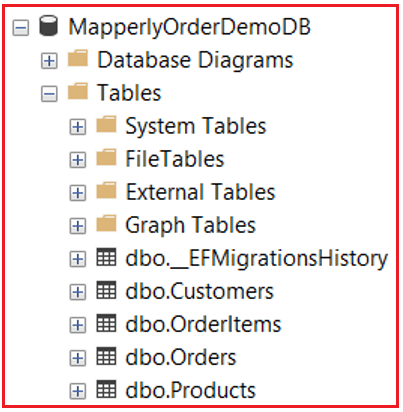
Once you execute the above commands, it should have created the MapperlyOrderDemoDB database with the required tables as shown in the image below:
Testing Endpoints:
Create Customer
POST /api/customers
Request Body
{
  "FullName": "Anil Verma",
  "Mobile": "9876501234",
  "Email": "anil.verma@test.com",
  "AddressLine1": "Sector 21",
  "City": "Noida",
  "State": "Uttar Pradesh",
  "Pincode": "201301"
}
Response Body:
{
  "Id": 3,
  "FullName": "Anil Verma",
  "PhoneNumber": "9876501234",
  "City": "Noida",
  "State": "Uttar Pradesh",
  "SourceSystem": "MapperlyOrderDemo",
  "MappedAtUtc": "2026-01-06T15:39:10.1111798Z"
}
Valid Request Without Email (tests null-substitution mapping)
{
  "FullName": "Priya Sharma",
  "Mobile": "8123456789",
  "Email": null,
  "AddressLine1": "Sector 21",
  "City": "Chandigarh",
  "State": "Chandigarh",
  "Pincode": "160022"
}
Response Body:
{
  "Id": 4,
  "FullName": "Priya Sharma",
  "PhoneNumber": "8123456789",
  "City": "Chandigarh",
  "State": "Chandigarh",
  "SourceSystem": "MapperlyOrderDemo",
  "MappedAtUtc": "2026-01-06T15:40:09.6835775Z"
}
Get All Active Customers
GET /api/customers
No request body
Get Customer By Id
GET /api/customers/1
No request body
Create Order — POST /api/orders
POST /api/orders
Request Body
{
  "CustomerId": 1,
  "Items": [
    {
      "ProductId": 1,
      "Quantity": 2
    },
    {
      "ProductId": 3,
      "Quantity": 1
    }
  ],
  "ShippingLine1": "221B Baker Street",
  "ShippingCity": "London",
  "ShippingState": "UK",
  "ShippingPincode": "560001"
}
Response Body:
{
  "Id": 1,
  "CustomerName": "Ravi Kumar",
  "TotalAmount": 1397,
  "Status": "Pending",
  "CreatedOn": "2026-01-06T15:43:34.5869319Z",
  "ShippingCity": "London",
  "ShippingState": "UK",
  "Items": [
    {
      "ProductId": 1,
      "ProductName": "Wireless Mouse",
      "UnitPrice": 599,
      "Quantity": 2,
      "LineTotal": 1198
    },
    {
      "ProductId": 3,
      "ProductName": "USB Cable",
      "UnitPrice": 199,
      "Quantity": 1,
      "LineTotal": 199
    }
  ]
}
Get Order By Id
GET /api/orders/1
No request body
Get Orders By Customer
GET /api/orders/by-customer/1
No request body
This example demonstrates how Mapperly fits naturally into a real-world ASP.NET Core Web API architecture. Instead of relying on runtime reflection or convention-based magic, Mapperly generates explicit, readable, and highly optimized mapping code at compile time.
Conclusion:
By combining Mapperly with EF Core and a clean service-based architecture, we achieve:
- Strong separation between Domain Models and API Contracts
- Compile-time safety for all mappings
- Better performance with zero runtime overhead
- Clear ownership of responsibilities across layers
- Transparent and debuggable mapping logic
More importantly, this approach scales well. As applications grow in complexity, adding more entities, DTOs, and business rules, Mapperly continues to provide predictable behaviour without hidden surprises.
If you are building modern, performance ASP.NET Core applications and want full control, safety, and clarity in your object mappings, Mapperly is not just an alternative to AutoMapper; it is a better architectural choice.

About the Author: Pranaya Rout
Pranaya Rout has published more than 3,000 articles in his 11-year career. Pranaya Rout has very good experience with Microsoft Technologies, Including C#, VB, ASP.NET MVC, ASP.NET Web API, EF, EF Core, ADO.NET, LINQ, SQL Server, MYSQL, Oracle, ASP.NET Core, Cloud Computing, Microservices, Design Patterns and still learning new technologies.