
Back to: ASP.NET Core Web API Tutorials
Entity Framework Core Inheritance
In modern software development, applications often deal with entities that share common characteristics but differ in certain aspects. Modeling these relationships efficiently is essential for both maintainability and performance. Entity Framework Core (EF Core) provides robust inheritance mapping capabilities that allow developers to align object-oriented class hierarchies with relational database structures, preserving the benefits of OOP design while ensuring optimal database efficiency.
What is Inheritance?
Inheritance is one of the fundamental pillars of Object-Oriented Programming (OOP). It allows a child class (derived class) to inherit properties, fields, and behaviours from a parent class (base class). This promotes:
- Code reuse – Common fields are defined once.
- Extensibility – Derived entities add unique attributes.
- Maintainability – Updates propagate through the hierarchy.
For example:
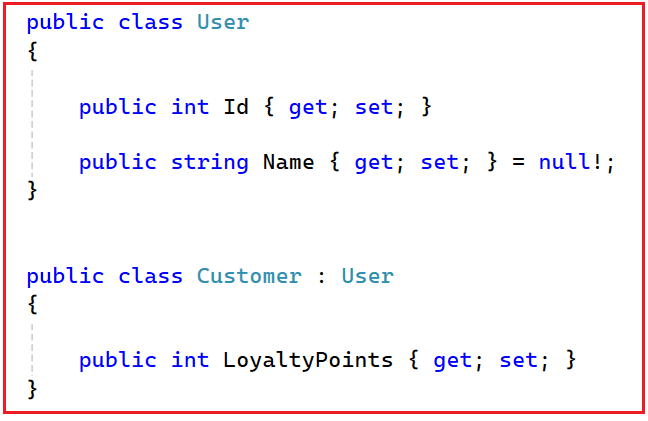
Here, Customer inherits the properties Id and Name from User, while adding its own property LoyaltyPoints.
What is Entity Framework Core Inheritance?
Entity Framework Core Inheritance is the mechanism by which EF Core maps such object-oriented class hierarchies into relational database tables. It enables developers to persist data for both base and derived classes in a structured manner, either in a single table or across multiple related tables. EF Core decides:
- How many tables to create
- How to differentiate derived classes
- How queries across the hierarchy should behave
EF Core provides multiple mapping strategies to handle inheritance:
- Single table for all entities.
- Separate tables for each type.
- Independent tables for concrete entities.
Why EF Core Inheritance?
Entity Framework Core inheritance mapping provides several key benefits:
- Avoids Duplication: Common properties are shared by a base entity. No need to repeat fields in every derived table.
- Improves Structure: Keeps the model clean, organized, extensible, and close to real business models.
- More Maintainable: Changing base class fields updates all derived classes automatically.
- Flexibility: Developers can choose between performance and normalization based on domain needs.
Types of Entity Framework Core Inheritance
EF Core supports three main inheritance mapping strategies: Table Per Hierarchy (TPH), Table Per Type (TPT), and Table Per Concrete Class (TPC). Each approach defines how EF Core maps a class hierarchy to database tables.
- Table Per Hierarchy (TPH) stores all entities in a single table using a discriminator column to differentiate types.
- Table Per Type (TPT) creates a separate table for each entity type, linking them through primary and foreign keys.
- Table Per Concrete Class (TPC) creates independent tables for each concrete entity, duplicating shared properties across tables.
Each strategy has trade-offs between performance and normalization, and selecting the right one depends on the specific use case. The choice of strategy depends on performance needs, data normalization requirements, and the complexity of the hierarchy
Entity Framework Core Inheritance in a Real-Time E-Commerce Application
Let’s apply these inheritance strategies in a real-world E-Commerce Application using EF Core and SQL Server. We will use three hierarchies:
- Payments → TPH (Table Per Hierarchy)
- Users → TPT (Table Per Type)
- Notifications → TPC (Table Per Concrete Class)
Please create a new ASP.NET Core Web API project named ECommerceApp. Run the following commands in Visual Studio Package Manager Console to install EF Core Packages:
- Install-Package Microsoft.EntityFrameworkCore
- Install-Package Microsoft.EntityFrameworkCore.SqlServer
- Install-Package Microsoft.EntityFrameworkCore.Tools
Hierarchy 1: Payments (TPH – Table Per Hierarchy)
Table Per Hierarchy (TPH) is the default inheritance mapping strategy in EF Core. Table Per Hierarchy (TPH) stores all entities in an inheritance hierarchy within a single database table, regardless of their class type.
This table contains columns for all properties, both from the base class and any derived classes. A special column, called the Discriminator Column, identifies which derived type each record belongs to. This strategy provides high performance because no joins are required, and all data is read from one table.
When to Use TPH
- The hierarchy is simple and not deeply nested.
- Derived classes share the most common properties.
- You want maximum read performance and simpler queries.
- Sparse nullable columns are acceptable.
How to Implement Table Per Hierarchy (TPH) Inheritance in Entity Framework Core
We need to follow the steps below to implement TPH inheritance in Entity Framework Core:
- Create a Base Class and Derived Classes: Create a base class for the shared properties and derived classes for specific entities.
- Configure the Discriminator Column (Optional): EF Core automatically adds a discriminator column, but we can customize it using Fluent API.
- Configure TPH using Fluent API: Use the Fluent API to specify how the inheritance mapping should occur. We need to use the HasDiscriminator() method to define the discriminator column and values for each derived class.
Creating Payment Entities:
For simplicity, I am creating all entities in a single file. Create a class file named Payment.cs within the Entities folder and then copy-paste the following code.
namespace ECommerceApp.Entities
{
    public enum PaymentStatus
    {
        Pending = 1,
        Completed = 2,
        Failed = 3,
        Refunded = 4
    }

    // Base entity (non-abstract, common fields)
    public class Payment
    {
        public int Id { get; set; }
        public decimal Amount { get; set; }
        public string Currency { get; set; } = null!;
        public string PaymentGateway { get; set; } = null!;
        public int OrderId { get; set; }
        public string? TransactionId { get; set; }
        public PaymentStatus PaymentStatus { get; set; } = PaymentStatus.Pending;
        public DateTime PaymentDate { get; set; } = DateTime.UtcNow;
        public string? Remarks { get; set; }
        public DateTime? UpdatedAt { get; set; }
    }

    // Derived classes
    public class CardPayment : Payment
    {
        public string CardNumber { get; set; } = null!;
        public string CardHolderName { get; set; } = null!;
        public int ExpiryMonth { get; set; }
        public int ExpiryYear { get; set; }
        public string CVV { get; set; } = null!;
        public string MaskedCard => $"XXXX-XXXX-XXXX-{CardNumber[^4..]}";
    }

    public class UpiPayment : Payment
    {
        public string UpiId { get; set; } = null!;
        public string? AppName { get; set; }
        public string? TransactionRefNo { get; set; }
    }

    public class WalletPayment : Payment
    {
        public string WalletType { get; set; } = null!;
        public decimal WalletBalanceUsed { get; set; }
        public decimal CashbackReceived { get; set; }
    }
}
TPH Fluent API Configuration in Entity Framework Core:
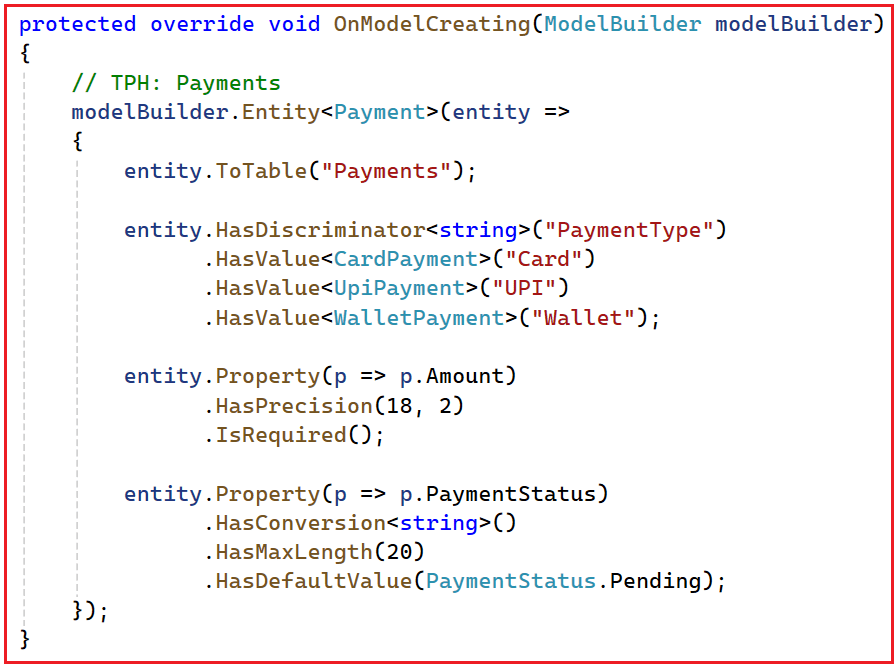
Syntax Explanation
- HasDiscriminator<string>(“PaymentType”): Adds a discriminator column PaymentType to identify the subclass type.
- HasValue<T>(): Maps each subclass to a discriminator value.
- HasConversion<string>(): Stores enum values as strings for readability.
- HasPrecision(18,2): Ensures currency values are accurate.
Why TPH in Payments?
- Payment transactions (Card, UPI, Wallet) share ~80% of fields.
- Queries like SELECT * FROM Payments WHERE OrderId = 123 should be fast and join-free.
- High-volume and frequently queried tables benefit from the single-table approach.
- Ensures simplified reporting and easy maintenance.
Hence, TPH is ideal for Payments, where speed and simplicity matter most.
Hierarchy 2: Users (TPT – Table Per Type):
Table Per Type (TPT) creates separate tables for each class in the hierarchy. The base table holds shared properties, while each derived table holds unique fields. These are connected using Primary-Foreign Key relationships.
When to Use TPT
- Normalization is important.
- Entities have distinct fields (e.g., GSTNumber, LoyaltyPoints, etc.).
- You want to avoid null columns in shared tables.
- You can tolerate minor performance overhead due to joins.
How to Implement Table Per Type (TPT) Inheritance in Entity Framework Core
We need to follow the steps below to implement TPT inheritance in Entity Framework Core:
- Create a Base Class and Derived Classes: Define the base class for shared properties and the derived classes for specific properties.
- Configure TPT using Fluent API: Use the Fluent API to specify that each entity in the hierarchy should map to its own table using the ToTable() method.
Creating User Entities:
For simplicity, I am creating all entities in a single file. Create a class file named User.cs within the Entities folder and then copy-paste the following code.
namespace ECommerceApp.Entities
{
    public abstract class User
    {
        public int Id { get; set; }
        public string Name { get; set; } = null!;
        public string Email { get; set; } = null!;
        public string Username { get; set; } = null!;
        public string PasswordHash { get; set; } = null!;
        public bool IsActive { get; set; } = true;
        public DateTime CreatedAt { get; set; } = DateTime.UtcNow;
        public string? CreatedBy { get; set; } = "System";
    }

    public class Customer : User
    {
        public string? PhoneNumber { get; set; }
        public string? ShippingAddress { get; set; }
        public string? BillingAddress { get; set; }
        public string? ProfilePictureUrl { get; set; }
        public DateTime? DateOfBirth { get; set; }
        public int LoyaltyPoints { get; set; } = 0;
    }

    public class Seller : User
    {
        public string BusinessName { get; set; } = null!;
        public string GSTNumber { get; set; } = null!;
        public string PANNumber { get; set; } = null!;
        public string WarehouseAddress { get; set; } = null!;
        public string? BusinessLicenseNo { get; set; }
        public string? BankAccountNumber { get; set; }
        public bool IsVerified { get; set; } = false;
        public string? SupportPhone { get; set; }
    }

    public class AdminUser : User
    {
        public string RoleName { get; set; } = null!;
        public string Department { get; set; } = null!;
        public string? Permissions { get; set; }
        public string? LoginIpAddress { get; set; }
    }
}
TPT Fluent API Configuration in Entity Framework Core

Syntax Explanation
- ToTable() – Maps each entity type to its respective table.
- EF Core automatically establishes PK–FK relationships between derived and base tables.
- The unique Email index enforces user identity consistency.
Why TPT in Users
- Different user roles (Customer, Seller, Admin) have widely varying attributes.
- Keeping them in a single table would result in many nullable columns.
- TPT ensures:
-
- Normalized schema
- Data integrity
- Ease of extension (e.g., adding DeliveryPartner later)
-
- Ideal for User Management Systems where modularity and clarity matter more than raw performance.
Hierarchy 3: Notifications (TPC – Table Per Concrete Class):
Table Per Concrete Class (TPC) maps each non-abstract derived class to its own table. Each table includes all properties of the base class; there is no shared table or discriminator.
When to Use TPC
- Derived classes have completely different data structures.
- Queries are typically type-specific (e.g., only EmailNotifications).
- Joins are unnecessary or undesirable.
- Polymorphic queries (over all types) are not needed.
How to Implement Table Per Concrete Type (TPC) Inheritance in Entity Framework Core
Implementing TPC inheritance in EF Core involves defining the base and derived classes, configuring the inheritance mapping using the Fluent API, and managing the database schema accordingly. So, we need to follow the steps below to implement TPC Inheritance in EF Core:
- Create the abstract Base Class and Derived Classes: Define the base abstract class for shared properties and derived classes for specific properties.
- Configure TPC Using Fluent API: Use the Fluent API in the OnModelCreating method to specify that each concrete class should map to its own table using the ToTable() method.
- Use the UseTpcMappingStrategy() Method: Call this method on the ModelBuilder to enable TPC mapping on the Base Entity.
Creating Notification Entities:
For simplicity, I am creating all entities in a single file. Create a class file named Notification.cs within the Entities folder and then copy-paste the following code.
namespace ECommerceApp.Entities
{
    public abstract class Notification
    {
        public int Id { get; set; }
        public string Message { get; set; } = null!;
        public DateTime SentAt { get; set; } = DateTime.UtcNow;
        public bool IsDelivered { get; set; }
        public int UserId { get; set; }
        public string Priority { get; set; } = "Normal";
        public string? TemplateId { get; set; }
        public string? SentBy { get; set; }
        public int RetryCount { get; set; } = 0;
        public string? FailureReason { get; set; }
        public string? ResponseCode { get; set; }
    }

    public class EmailNotification : Notification
    {
        public string RecipientEmail { get; set; } = null!;
        public string Subject { get; set; } = null!;
        public string? Cc { get; set; }
        public string? Bcc { get; set; }
        public bool IsHtml { get; set; }
    }

    public class SmsNotification : Notification
    {
        public string RecipientNumber { get; set; } = null!;
        public string SenderId { get; set; } = null!;
        public string Provider { get; set; } = null!;
    }

    public class PushNotification : Notification
    {
        public string DeviceToken { get; set; } = null!;
        public string AppPlatform { get; set; } = null!;
        public string? AppVersion { get; set; }
    }
}
Fluent API Configuration (TPC)
Syntax Explanation
- UseTpcMappingStrategy() – Enables TPC for the hierarchy.
- Each subclass maps to its own full table with all base fields duplicated.
- There is no shared base table, and no joins during queries.
Why TPC in Notifications
- Notification channels (Email, SMS, Push) are independent and managed by different services.
- Data volume and structure differ drastically (e.g., HTML vs. plain text vs. device token).
- TPC provides:
-
- Independent storage
- Fast per-type queries
- Channel-specific optimization
-
- Perfect for distributed systems or microservices where each channel logs separately.
Create the DbContext with TPH, TPT, and TPC Configurations
Create a folder Data and a file ECommerceDBContext.cs.
using ECommerceApp.Entities;
using Microsoft.EntityFrameworkCore;

namespace ECommerceApp.Data
{
    public class ECommerceDBContext : DbContext
    {
        public ECommerceDBContext(DbContextOptions<ECommerceDBContext> options)
            : base(options) { }

        // ---------------------- DbSets ----------------------
        // TPH - Payments
        public DbSet<Payment> Payments { get; set; } = null!;
        public DbSet<CardPayment> CardPayments { get; set; } = null!;
        public DbSet<UpiPayment> UpiPayments { get; set; } = null!;
        public DbSet<WalletPayment> WalletPayments { get; set; } = null!;

        // TPT - Users
        public DbSet<User> Users { get; set; } = null!;
        public DbSet<Customer> Customers { get; set; } = null!;
        public DbSet<Seller> Sellers { get; set; } = null!;
        public DbSet<AdminUser> AdminUsers { get; set; } = null!;

        // TPC - Notifications
        public DbSet<Notification> Notifications { get; set; } = null!;
        public DbSet<EmailNotification> EmailNotifications { get; set; } = null!;
        public DbSet<SmsNotification> SmsNotifications { get; set; } = null!;
        public DbSet<PushNotification> PushNotifications { get; set; } = null!;

        // ---------------------- Configuration ----------------------
        protected override void OnModelCreating(ModelBuilder modelBuilder)
        {
            base.OnModelCreating(modelBuilder);

            // ---------------------- TPH: Payments ----------------------
            modelBuilder.Entity<Payment>(entity =>
            {
                entity.ToTable("Payments");

                // Configure discriminator column
                entity.HasDiscriminator<string>("PaymentType")
                      .HasValue<CardPayment>("Card")
                      .HasValue<UpiPayment>("UPI")
                      .HasValue<WalletPayment>("Wallet");

                // Property configurations
                entity.Property(p => p.Amount)
                      .HasPrecision(18, 2)
                      .IsRequired();

                entity.Property(p => p.Currency)
                      .HasMaxLength(10)
                      .IsRequired();

                entity.Property(p => p.PaymentGateway)
                      .HasMaxLength(50)
                      .IsRequired();

                entity.Property(p => p.PaymentStatus)
                      .HasConversion<string>()
                      .HasMaxLength(20)
                      .IsRequired();

                entity.Property(p => p.TransactionId)
                      .HasMaxLength(100);

                entity.Property(p => p.Remarks)
                      .HasMaxLength(250);
            });

            modelBuilder.Entity<WalletPayment>(entity =>
            {
                entity.Property(w => w.WalletBalanceUsed)
                      .HasPrecision(18, 2)
                      .IsRequired();

                entity.Property(w => w.CashbackReceived)
                      .HasPrecision(18, 2);
            });

            // ---------------------- TPT: Users ----------------------
            modelBuilder.Entity<User>().ToTable("Users");
            modelBuilder.Entity<Customer>().ToTable("Customers");
            modelBuilder.Entity<Seller>().ToTable("Sellers");
            modelBuilder.Entity<AdminUser>().ToTable("AdminUsers");

            // Base user configuration
            modelBuilder.Entity<User>(entity =>
            {
                entity.Property(u => u.Email)
                      .IsRequired()
                      .HasMaxLength(100);

                entity.Property(u => u.Username)
                      .IsRequired()
                      .HasMaxLength(50);

                entity.Property(u => u.PasswordHash)
                      .IsRequired()
                      .HasMaxLength(255);

                entity.HasIndex(u => u.Email)
                      .IsUnique()
                      .HasDatabaseName("IX_Users_Email");
            });

            // Customer-specific configuration
            modelBuilder.Entity<Customer>(entity =>
            {
                entity.Property(c => c.PhoneNumber)
                      .HasMaxLength(15);

                entity.Property(c => c.ProfilePictureUrl)
                      .HasMaxLength(500);

                entity.Property(c => c.ShippingAddress)
                      .HasMaxLength(300);

                entity.Property(c => c.BillingAddress)
                      .HasMaxLength(300);
            });

            // Seller-specific configuration
            modelBuilder.Entity<Seller>(entity =>
            {
                entity.Property(s => s.BusinessName)
                      .HasMaxLength(150)
                      .IsRequired();

                entity.Property(s => s.GSTNumber)
                      .HasMaxLength(20)
                      .IsRequired();

                entity.Property(s => s.PANNumber)
                      .HasMaxLength(20)
                      .IsRequired();

                entity.Property(s => s.WarehouseAddress)
                      .HasMaxLength(300)
                      .IsRequired();

                entity.Property(s => s.BusinessLicenseNo)
                      .HasMaxLength(50);

                entity.Property(s => s.BankAccountNumber)
                      .HasMaxLength(30);
            });

            // AdminUser-specific configuration
            modelBuilder.Entity<AdminUser>(entity =>
            {
                entity.Property(a => a.RoleName)
                      .HasMaxLength(50)
                      .IsRequired();

                entity.Property(a => a.Department)
                      .HasMaxLength(100)
                      .IsRequired();

                entity.Property(a => a.Permissions)
                      .HasColumnType("nvarchar(max)");
            });

            // ---------------------- TPC: Notifications ----------------------
            modelBuilder.Entity<Notification>(entity =>
            {
                entity.UseTpcMappingStrategy();

                entity.Property(n => n.Message)
                      .IsRequired()
                      .HasMaxLength(500);

                entity.Property(n => n.Priority)
                      .HasMaxLength(20)
                      .HasDefaultValue("Normal");

                entity.Property(n => n.SentAt)
                      .HasDefaultValueSql("GETUTCDATE()");

                entity.Property(n => n.SentBy)
                      .HasMaxLength(100);
            });

            // Email Notification
            modelBuilder.Entity<EmailNotification>(entity =>
            {
                entity.ToTable("EmailNotifications");

                entity.Property(e => e.RecipientEmail)
                      .IsRequired()
                      .HasMaxLength(150);

                entity.Property(e => e.Subject)
                      .IsRequired()
                      .HasMaxLength(200);

                entity.Property(e => e.Cc)
                      .HasMaxLength(150);

                entity.Property(e => e.Bcc)
                      .HasMaxLength(150);
            });

            // SMS Notification
            modelBuilder.Entity<SmsNotification>(entity =>
            {
                entity.ToTable("SmsNotifications");

                entity.Property(s => s.RecipientNumber)
                      .IsRequired()
                      .HasMaxLength(15);

                entity.Property(s => s.SenderId)
                      .IsRequired()
                      .HasMaxLength(20);

                entity.Property(s => s.Provider)
                      .IsRequired()
                      .HasMaxLength(50)
                      .IsUnicode(false);
            });

            // Push Notification
            modelBuilder.Entity<PushNotification>(entity =>
            {
                entity.ToTable("PushNotifications");

                entity.Property(p => p.DeviceToken)
                      .IsRequired()
                      .HasMaxLength(250);

                entity.Property(p => p.AppPlatform)
                      .IsRequired()
                      .HasMaxLength(50);

                entity.Property(p => p.AppVersion)
                      .HasMaxLength(20);
            });
        }
    }
}
Configure Database Connection String
Please add the database connection string in the appsettings.json file as follows:
{
  "Logging": {
    "LogLevel": {
      "Default": "Information",
      "Microsoft.AspNetCore": "Warning"
    }
  },
  "AllowedHosts": "*",
  "ConnectionStrings": {
    "DefaultConnection": "Server=LAPTOP-6P5NK25R\\SQLSERVER2022DEV;Database=ECommerceDB;Trusted_Connection=True;TrustServerCertificate=True;"
  }
}
Configure DbContext in Program.cs Class
Please modify the Program class as follows.
using ECommerceApp.Data;
using Microsoft.EntityFrameworkCore;

namespace ECommerceApp
{
    public class Program
    {
        public static void Main(string[] args)
        {
            var builder = WebApplication.CreateBuilder(args);

            // Add services to the container.
            builder.Services.AddControllers()
            .AddJsonOptions(options =>
            {
                // Keep JSON property names exactly as defined in the C# models (no camelCase conversion).
                options.JsonSerializerOptions.PropertyNamingPolicy = null;
            });

            builder.Services.AddEndpointsApiExplorer();
            builder.Services.AddSwaggerGen();

            // Register ECommerceDBContext with the dependency injection container
            // and configure it to use SQL Server with the "DefaultConnection" connection string.
            builder.Services.AddDbContext<ECommerceDBContext>(options =>
                options.UseSqlServer(builder.Configuration.GetConnectionString("DefaultConnection")));

            var app = builder.Build();

            // Configure the HTTP request pipeline.
            if (app.Environment.IsDevelopment())
            {
                app.UseSwagger();
                app.UseSwaggerUI();
            }

            app.UseHttpsRedirection();

            app.UseAuthorization();

            app.MapControllers();

            app.Run();
        }
    }
}
Generate and Apply the Migration:
Please execute the following command in the Package Manager Console to generate the Migration and apply the Migration to sync our codebase with the database.
- Add-Migration Mig1
- Update-Database
It should create the following database with the required tables.
Creating DTOs
First, create a folder named DTOs at the project root, where we will create all our DTOs.
Payment DTOs (TPH)
Create a class file named PaymentDTO.cs within the DTOs folder, and copy-paste the following code.
using System.ComponentModel.DataAnnotations;

namespace ECommerceApp.DTOs
{
    public class PaymentCreateDTO
    {
        // ---------- Common Fields ----------
        [Required(ErrorMessage = "Amount is required.")]
        [Range(1, double.MaxValue, ErrorMessage = "Amount must be greater than zero.")]
        public decimal Amount { get; set; }

        [Required(ErrorMessage = "Currency is required.")]
        [StringLength(10)]
        public string Currency { get; set; } = null!;

        [Required(ErrorMessage = "PaymentGateway is required.")]
        [StringLength(50)]
        public string PaymentGateway { get; set; } = null!;

        [Required(ErrorMessage = "OrderId is required.")]
        public int OrderId { get; set; }

        [StringLength(100)]
        public string? TransactionId { get; set; }

        [Required(ErrorMessage = "PaymentType is required.")]
        [StringLength(20)]
        public string PaymentType { get; set; } = null!;

        // ---------- Card-Specific ----------
        public string? CardNumber { get; set; }
        public string? CardHolderName { get; set; }
        public int? ExpiryMonth { get; set; }
        public int? ExpiryYear { get; set; }
        public string? CVV { get; set; }

        // ---------- UPI-Specific ----------
        public string? UpiId { get; set; }
        public string? AppName { get; set; }
        public string? TransactionRefNo { get; set; }

        // ---------- Wallet-Specific ----------
        public string? WalletType { get; set; }
        public decimal? WalletBalanceUsed { get; set; }
        public decimal? CashbackReceived { get; set; }
    }

    // ---------- DTO for Reading ----------
    public class PaymentReadDTO
    {
        public int Id { get; set; }
        public decimal Amount { get; set; }
        public string Currency { get; set; } = null!;
        public string PaymentGateway { get; set; } = null!;
        public string PaymentStatus { get; set; } = null!;
        public DateTime PaymentDate { get; set; }
        public string PaymentType { get; set; } = null!;
    }
}
User DTOs (TPT)
Create a class file named UserDTO.cs within the DTOs folder, and copy-paste the following code.
using System.ComponentModel.DataAnnotations;

namespace ECommerceApp.DTOs
{
    [ValidateUser]
    public class UserCreateDTO
    {
        [Required]
        [StringLength(100)]
        public string Name { get; set; } = null!;

        [Required, EmailAddress]
        public string Email { get; set; } = null!;

        [Required]
        [StringLength(50)]
        public string Username { get; set; } = null!;

        [Required]
        public string PasswordHash { get; set; } = null!;

        [Required]
        [RegularExpression("Customer|Seller|Admin", ErrorMessage = "Invalid UserType. Allowed values: Customer, Seller, Admin.")]
        public string UserType { get; set; } = null!;

        // ---------- Customer-specific ----------
        public string? PhoneNumber { get; set; }
        public string? ShippingAddress { get; set; }
        public string? BillingAddress { get; set; }

        // ---------- Seller-specific ----------
        public string? BusinessName { get; set; }
        public string? BusinessLicenseNo { get; set; }
        public string? BankAccountNumber { get; set; }
        public string? GSTNumber { get; set; }
        public string? PANNumber { get; set; }
        public string? WarehouseAddress { get; set; }
        public string? SupportPhone { get; set; }
        public bool? IsVerified { get; set; }

        // ---------- Admin-specific ----------
        public string? RoleName { get; set; }
        public string? Department { get; set; }
        public string? Permissions { get; set; }
    }

    public class UserReadDTO
    {
        public int Id { get; set; }
        public string Name { get; set; } = null!;
        public string Email { get; set; } = null!;
        public string Username { get; set; } = null!;
        public string UserType { get; set; } = null!;
    }

    public class ValidateUserAttribute : ValidationAttribute
    {
        protected override ValidationResult? IsValid(object? value, ValidationContext validationContext)
        {
            var dto = (UserCreateDTO)validationContext.ObjectInstance;
            var type = dto.UserType?.ToLower();

            switch (type)
            {
                case "customer":
                    if (string.IsNullOrWhiteSpace(dto.PhoneNumber) ||
                        string.IsNullOrWhiteSpace(dto.ShippingAddress) ||
                        string.IsNullOrWhiteSpace(dto.BillingAddress))
                        return new ValidationResult("Customer must have PhoneNumber, ShippingAddress, and BillingAddress.");
                    break;

                case "seller":
                    if (string.IsNullOrWhiteSpace(dto.BusinessName) ||
                        string.IsNullOrWhiteSpace(dto.BusinessLicenseNo) ||
                        string.IsNullOrWhiteSpace(dto.BankAccountNumber))
                        return new ValidationResult("Seller must have BusinessName, BusinessLicenseNo, and BankAccountNumber.");
                    break;

                case "admin":
                    if (string.IsNullOrWhiteSpace(dto.RoleName) ||
                        string.IsNullOrWhiteSpace(dto.Department))
                        return new ValidationResult("Admin must have RoleName and Department.");
                    break;

                default:
                    return new ValidationResult("Invalid UserType. Allowed values: Customer, Seller, Admin.");
            }

            return ValidationResult.Success;
        }
    }
}
Notification DTOs (TPC)
Create a class file named NotificationDTO.cs within the DTOs folder, and copy-paste the following code.
using System.ComponentModel.DataAnnotations;
namespace ECommerceApp.DTOs
{
    public class NotificationCreateDTO
    {
        [Required]
        public string Message { get; set; } = null!;
        [Required]
        public int UserId { get; set; }
        [Required]
        [RegularExpression("Email|SMS|Push", ErrorMessage = "Invalid NotificationType")]
        public string NotificationType { get; set; } = null!;
        public string? Priority { get; set; }

        // Email
        public string? RecipientEmail { get; set; }
        public string? Subject { get; set; }
        public string? Cc { get; set; }
        public string? Bcc { get; set; }
        public bool? IsHtml { get; set; }

        // SMS
        public string? RecipientNumber { get; set; }
        public string? SenderId { get; set; }
        public string? Provider { get; set; }

        // Push
        public string? DeviceToken { get; set; }
        public string? AppPlatform { get; set; }
        public string? AppVersion { get; set; }
    }

    public class NotificationReadDTO
    {
        public int Id { get; set; }
        public string Message { get; set; } = null!;
        public string NotificationType { get; set; } = null!;
        public DateTime SentAt { get; set; }
        public bool IsDelivered { get; set; }
        public string? Priority { get; set; }
    }
}
API Controllers
Now, we will create the required API Controllers.
UsersController (TPT)
Create an API Empty Controller named UsersController within the Controllers folder, and copy-paste the following code.
using ECommerceApp.Data;
using ECommerceApp.DTOs;
using ECommerceApp.Entities;
using Microsoft.AspNetCore.Mvc;
using Microsoft.EntityFrameworkCore;

namespace ECommerceApp.Controllers
{
    [ApiController]
    [Route("api/[controller]")]
    public class UsersController : ControllerBase
    {
        private readonly ECommerceDBContext _context;
        public UsersController(ECommerceDBContext context)
        {
            _context = context;
        }

        // ---------------- CREATE USER (Unified Endpoint) ----------------
        [HttpPost("Create")]
        public async Task<IActionResult> CreateUser([FromBody] UserCreateDTO dto)
        {
            if (!ModelState.IsValid)
                return BadRequest(ModelState);

            User user = dto.UserType.ToLower() switch
            {
                "customer" => new Customer
                {
                    Name = dto.Name,
                    Email = dto.Email,
                    Username = dto.Username,
                    PasswordHash = dto.PasswordHash,
                    PhoneNumber = dto.PhoneNumber!,
                    ShippingAddress = dto.ShippingAddress!,
                    BillingAddress = dto.BillingAddress!
                },
                "seller" => new Seller
                {
                    Name = dto.Name,
                    Email = dto.Email,
                    Username = dto.Username,
                    PasswordHash = dto.PasswordHash,
                    BusinessName = dto.BusinessName!,
                    BusinessLicenseNo = dto.BusinessLicenseNo!,
                    BankAccountNumber = dto.BankAccountNumber!,
                    GSTNumber = dto.GSTNumber!,
                    PANNumber = dto.PANNumber!,
                    WarehouseAddress = dto.WarehouseAddress!,
                    SupportPhone = dto.SupportPhone,
                    IsVerified = dto.IsVerified ?? false
                },
                "admin" => new AdminUser
                {
                    Name = dto.Name,
                    Email = dto.Email,
                    Username = dto.Username,
                    PasswordHash = dto.PasswordHash,
                    RoleName = dto.RoleName!,
                    Department = dto.Department!,
                    Permissions = dto.Permissions
                },
                _ => throw new Exception("Invalid User Type")
            };

            await _context.Users.AddAsync(user);
            await _context.SaveChangesAsync();

            return Ok(new { Message = $"{dto.UserType} created successfully", UserId = user.Id });
        }

        // ---------------- GET ALL USERS ----------------
        [HttpGet("GetAll")]
        public async Task<IActionResult> GetAll()
        {
            var users = await _context.Users.ToListAsync();
            var result = users.Select(u => new UserReadDTO
            {
                Id = u.Id,
                Name = u.Name,
                Email = u.Email,
                Username = u.Username,
                UserType = u.GetType().Name
            });
            return Ok(result);
        }

        // ---------------- GET BY TYPE ----------------
        [HttpGet("GetByType/{type}")]
        public async Task<IActionResult> GetByType(string type)
        {
            IEnumerable<User> list = type.ToLower() switch
            {
                "customer" => await _context.Customers.ToListAsync(),
                "seller" => await _context.Sellers.ToListAsync(),
                "admin" => await _context.AdminUsers.ToListAsync(),
                _ => new List<User>()
            };
            return Ok(list);
        }
    }
}
Testing Users Controller (TPT)
Create User
URL: POST: /api/Users/Create
Customer
{
  "Name": "John Doe",
  "Email": "john@example.com",
  "Username": "john123",
  "PasswordHash": "securepwd",
  "UserType": "Customer",
  "PhoneNumber": "9876543210",
  "ShippingAddress": "Bhubaneswar, Odisha",
  "BillingAddress": "Bhubaneswar, Odisha"
}
Seller
{
  "Name": "Bright Retailers",
  "Email": "sales@brightretailers.in",
  "Username": "bright",
  "PasswordHash": "securehash123",
  "UserType": "Seller",
  "BusinessName": "Bright Retailers Pvt Ltd",
  "BusinessLicenseNo": "LIC-OR-2025-0098",
  "BankAccountNumber": "123456789012345",
  "GSTNumber": "29ABCDE1234F2Z5",
  "PANNumber": "ABCDE1234F",
  "WarehouseAddress": "Industrial Area, Bhubaneswar, Odisha",
  "SupportPhone": "9876543210",
  "IsVerified": true
}
Admin
{
  "Name": "Admin User",
  "Email": "admin@ecommerce.com",
  "Username": "admin1",
  "PasswordHash": "adminpass",
  "UserType": "Admin",
  "RoleName": "System Administrator",
  "Department": "IT",
  "Permissions": "FullAccess"
}
PaymentsController (TPH)
Create an API Empty Controller named PaymentsController within the Controllers folder, and copy-paste the following code.
using ECommerceApp.Data;
using ECommerceApp.DTOs;
using ECommerceApp.Entities;
using Microsoft.AspNetCore.Mvc;
using Microsoft.EntityFrameworkCore;

namespace ECommerceApp.Controllers
{
    [ApiController]
    [Route("api/[controller]")]
    public class PaymentsController : ControllerBase
    {
        private readonly ECommerceDBContext _context;

        public PaymentsController(ECommerceDBContext context)
        {
            _context = context;
        }

        // ---------------- CREATE PAYMENT (Unified) ----------------
        [HttpPost("Create")]
        public async Task<IActionResult> CreatePayment([FromBody] PaymentCreateDTO dto)
        {
            if (!ModelState.IsValid)
                return BadRequest(ModelState);

            Payment payment;

            switch (dto.PaymentType.ToLower())
            {
                case "card":
                    if (string.IsNullOrWhiteSpace(dto.CardNumber) ||
                        string.IsNullOrWhiteSpace(dto.CardHolderName) ||
                        !dto.ExpiryMonth.HasValue || !dto.ExpiryYear.HasValue ||
                        string.IsNullOrWhiteSpace(dto.CVV))
                        return BadRequest("Card payment requires CardNumber, CardHolderName, ExpiryMonth, ExpiryYear, and CVV.");

                    payment = new CardPayment
                    {
                        Amount = dto.Amount,
                        Currency = dto.Currency,
                        PaymentGateway = dto.PaymentGateway,
                        OrderId = dto.OrderId,
                        TransactionId = dto.TransactionId,
                        PaymentDate = DateTime.UtcNow,
                        PaymentStatus = PaymentStatus.Pending,
                        CardNumber = dto.CardNumber!,
                        CardHolderName = dto.CardHolderName!,
                        ExpiryMonth = dto.ExpiryMonth.Value,
                        ExpiryYear = dto.ExpiryYear.Value,
                        CVV = dto.CVV!
                    };
                    break;

                case "upi":
                    if (string.IsNullOrWhiteSpace(dto.UpiId))
                        return BadRequest("UPI payment requires UpiId.");

                    payment = new UpiPayment
                    {
                        Amount = dto.Amount,
                        Currency = dto.Currency,
                        PaymentGateway = dto.PaymentGateway,
                        OrderId = dto.OrderId,
                        TransactionId = dto.TransactionId,
                        PaymentDate = DateTime.UtcNow,
                        PaymentStatus = PaymentStatus.Pending,
                        UpiId = dto.UpiId!,
                        AppName = dto.AppName,
                        TransactionRefNo = dto.TransactionRefNo
                    };
                    break;

                case "wallet":
                    if (string.IsNullOrWhiteSpace(dto.WalletType))
                        return BadRequest("Wallet payment requires WalletType.");

                    payment = new WalletPayment
                    {
                        Amount = dto.Amount,
                        Currency = dto.Currency,
                        PaymentGateway = dto.PaymentGateway,
                        OrderId = dto.OrderId,
                        TransactionId = dto.TransactionId,
                        PaymentDate = DateTime.UtcNow,
                        PaymentStatus = PaymentStatus.Pending,
                        WalletType = dto.WalletType!,
                        WalletBalanceUsed = dto.WalletBalanceUsed ?? 0,
                        CashbackReceived = dto.CashbackReceived ?? 0
                    };
                    break;

                default:
                    return BadRequest("Invalid PaymentType. Allowed values: Card, UPI, Wallet.");
            }

            await _context.Payments.AddAsync(payment);
            await _context.SaveChangesAsync();

            return Ok(new
            {
                Message = $"{dto.PaymentType} payment created successfully",
                PaymentId = payment.Id
            });
        }

        // ---------------- GET ALL PAYMENTS ----------------
        [HttpGet("GetAll")]
        public async Task<IActionResult> GetAllPayments()
        {
            var payments = await _context.Payments.ToListAsync();

            if (payments.Count == 0)
                return NotFound("No payments found.");

            var result = payments.Select(p => new PaymentReadDTO
            {
                Id = p.Id,
                Amount = p.Amount,
                Currency = p.Currency,
                PaymentGateway = p.PaymentGateway,
                PaymentStatus = p.PaymentStatus.ToString(),
                PaymentDate = p.PaymentDate,
                PaymentType = p.GetType().Name
            }).ToList();

            return Ok(result);
        }

        // ---------------- GET PAYMENT BY ID ----------------
        [HttpGet("GetById/{id:int}")]
        public async Task<IActionResult> GetPaymentById(int id)
        {
            var payment = await _context.Payments.FirstOrDefaultAsync(p => p.Id == id);

            if (payment == null)
                return NotFound($"Payment with ID {id} not found.");

            // Optional: Include type-specific data
            object detailed;
            switch (payment)
            {
                case CardPayment card:
                    detailed = new
                    {
                        card.Id,
                        card.Amount,
                        card.Currency,
                        card.PaymentGateway,
                        card.PaymentStatus,
                        card.PaymentDate,
                        PaymentType = "Card",
                        card.CardHolderName,
                        card.ExpiryMonth,
                        card.ExpiryYear,
                        card.MaskedCard
                    };
                    break;

                case UpiPayment upi:
                    detailed = new
                    {
                        upi.Id,
                        upi.Amount,
                        upi.Currency,
                        upi.PaymentGateway,
                        upi.PaymentStatus,
                        upi.PaymentDate,
                        PaymentType = "UPI",
                        upi.UpiId,
                        upi.AppName,
                        upi.TransactionRefNo
                    };
                    break;

                case WalletPayment wallet:
                    detailed = new
                    {
                        wallet.Id,
                        wallet.Amount,
                        wallet.Currency,
                        wallet.PaymentGateway,
                        wallet.PaymentStatus,
                        wallet.PaymentDate,
                        PaymentType = "Wallet",
                        wallet.WalletType,
                        wallet.WalletBalanceUsed,
                        wallet.CashbackReceived
                    };
                    break;

                default:
                    detailed = payment;
                    break;
            }

            return Ok(detailed);
        }

        // ---------------- GET PAYMENTS BY TYPE ----------------
        [HttpGet("GetByType/{type}")]
        public async Task<IActionResult> GetPaymentsByType(string type)
        {
            type = type.ToLower();

            IEnumerable<Payment> payments = type switch
            {
                "card" => await _context.Payments.OfType<CardPayment>().ToListAsync(),
                "upi" => await _context.Payments.OfType<UpiPayment>().ToListAsync(),
                "wallet" => await _context.Payments.OfType<WalletPayment>().ToListAsync(),
                _ => new List<Payment>()
            };

            if (!payments.Any())
                return NotFound($"No {type} payments found.");

            var result = payments.Select(p => new PaymentReadDTO
            {
                Id = p.Id,
                Amount = p.Amount,
                Currency = p.Currency,
                PaymentGateway = p.PaymentGateway,
                PaymentStatus = p.PaymentStatus.ToString(),
                PaymentDate = p.PaymentDate,
                PaymentType = p.GetType().Name
            }).ToList();

            return Ok(result);
        }
    }
}
Testing Payments Controller (TPH)
Create Payment
URL: POST api/Payments/Create
Request Body Examples:
Example JSON Requests
Card Payment
{
  "Amount": 2500.50,
  "Currency": "INR",
  "PaymentGateway": "Razorpay",
  "OrderId": 1001,
  "TransactionId": "CARD_TXN_1001",
  "PaymentType": "Card",
  "CardNumber": "4111111111111111",
  "CardHolderName": "Amit Verma",
  "ExpiryMonth": 12,
  "ExpiryYear": 2028,
  "CVV": "123"
}
Wallet Payment
{
  "Amount": 1499.99,
  "Currency": "INR",
  "PaymentGateway": "AmazonPay",
  "OrderId": 1003,
  "TransactionId": "WALLET_TXN_0099",
  "PaymentType": "Wallet",
  "WalletType": "AmazonPay",
  "WalletBalanceUsed": 1200.00,
  "CashbackReceived": 50.00
}
UPI Payment
{
  "Amount": 999.00,
  "Currency": "INR",
  "PaymentGateway": "PayU",
  "OrderId": 1002,
  "TransactionId": "UPI_TXN_2025",
  "PaymentType": "UPI",
  "UpiId": "amit@okaxis",
  "AppName": "GooglePay",
  "TransactionRefNo": "GPA1234567"
}
NotificationsController (TPC)
Create an API Empty Controller named NotificationsController within the Controllers folder, and copy-paste the following code.
using ECommerceApp.Data;
using ECommerceApp.DTOs;
using ECommerceApp.Entities;
using Microsoft.AspNetCore.Mvc;
using Microsoft.EntityFrameworkCore;

namespace ECommerceApp.Controllers
{
    [ApiController]
    [Route("api/[controller]")]
    public class NotificationsController : ControllerBase
    {
        private readonly ECommerceDBContext _context;
        public NotificationsController(ECommerceDBContext context) => _context = context;

        [HttpPost("Create")]
        public async Task<IActionResult> CreateNotification([FromBody] NotificationCreateDTO dto)
        {
            if (!ModelState.IsValid) return BadRequest(ModelState);

            Notification notification = dto.NotificationType.ToLower() switch
            {
                "email" => new EmailNotification
                {
                    Message = dto.Message,
                    UserId = dto.UserId,
                    Priority = dto.Priority!,
                    RecipientEmail = dto.RecipientEmail!,
                    Subject = dto.Subject!,
                    Cc = dto.Cc,
                    Bcc = dto.Bcc,
                    IsHtml = dto.IsHtml ?? true,
                    SentAt = DateTime.UtcNow
                },
                "sms" => new SmsNotification
                {
                    Message = dto.Message,
                    UserId = dto.UserId,
                    Priority = dto.Priority!,
                    RecipientNumber = dto.RecipientNumber!,
                    SenderId = dto.SenderId!,
                    Provider = dto.Provider ?? "Twilio",
                    SentAt = DateTime.UtcNow
                },
                "push" => new PushNotification
                {
                    Message = dto.Message,
                    UserId = dto.UserId,
                    Priority = dto.Priority!,
                    DeviceToken = dto.DeviceToken!,
                    AppPlatform = dto.AppPlatform!,
                    AppVersion = dto.AppVersion,
                    SentAt = DateTime.UtcNow
                },
                _ => throw new Exception("Invalid Notification Type")
            };

            await _context.Notifications.AddAsync(notification);
            await _context.SaveChangesAsync();

            return Ok(new { Message = $"{dto.NotificationType} notification created.", Id = notification.Id });
        }

        [HttpGet("GetAll")]
        public async Task<IActionResult> GetAll()
        {
            var notifications = await _context.Notifications.ToListAsync();
            var result = notifications.Select(n => new NotificationReadDTO
            {
                Id = n.Id,
                Message = n.Message,
                NotificationType = n.GetType().Name,
                SentAt = n.SentAt,
                IsDelivered = n.IsDelivered,
                Priority = n.Priority
            });
            return Ok(result);
        }

        [HttpGet("GetByType/{type}")]
        public async Task<IActionResult> GetByType(string type)
        {
            IEnumerable<Notification> list = type.ToLower() switch
            {
                "email" => await _context.EmailNotifications.ToListAsync(),
                "sms" => await _context.SmsNotifications.ToListAsync(),
                "push" => await _context.PushNotifications.ToListAsync(),
                _ => new List<Notification>()
            };
            return Ok(list);
        }
    }
}
Testing Notifications Controller (TPC)
Create Notification
URL: POST /api/Notifications
Request Body Examples:
Email Notification
{
  "Message": "Order Shipped Successfully!",
  "UserId": 501,
  "NotificationType": "Email",
  "Priority": "High",
  "RecipientEmail": "john@example.com",
  "Subject": "Your order #1001 is on the way",
  "Cc": "support@example.com",
  "Bcc": null,
  "IsHtml": true
}
SMS Notification
{
  "Message": "Your OTP is 456789",
  "UserId": 501,
  "NotificationType": "SMS",
  "Priority": "Normal",
  "RecipientNumber": "9876543210",
  "SenderId": "ECOMAPP",
  "Provider": "Twilio"
}
Push Notification
{
  "Message": "Big sale starts now!",
  "UserId": 501,
  "NotificationType": "Push",
  "Priority": "Low",
  "DeviceToken": "abc123xyz",
  "AppPlatform": "Android",
  "AppVersion": "1.5.2"
}
Choosing the Right Strategy Between TPH, TPT, and TPC:
Choosing the right strategy depends on your application’s needs. If query performance and simplicity are key, TPH might be the best fit. However, if you want a clean separation of data, TPT or TPC may be more appropriate. So, consider the following when choosing an inheritance mapping strategy:
- Performance: TPH generally offers better performance due to simpler queries.
- Schema Complexity: TPH results in a simpler schema, while TPT and TPC can increase complexity.
- Data Integrity: TPT provides better data integrity due to normalized tables.
- Data Redundancy: TPC leads to data redundancy.
In Short,
- TPH is useful for shared properties and a simple schema.
- TPT is ideal when you want a normalized database with fewer nullable columns.
- TPC works well when there are highly distinct entities with little shared data.
By combining all three in one E-Commerce application, developers can achieve an optimal balance of speed, clarity, and extensibility. EF Core inheritance elegantly bridges the gap between object-oriented design and relational databases, making systems more maintainable and domain-driven.
About the Author: Pranaya Rout
Pranaya Rout has published more than 3,000 articles in his 11-year career. Pranaya Rout has very good experience with Microsoft Technologies, Including C#, VB, ASP.NET MVC, ASP.NET Web API, EF, EF Core, ADO.NET, LINQ, SQL Server, MYSQL, Oracle, ASP.NET Core, Cloud Computing, Microservices, Design Patterns and still learning new technologies.