
Back to: ASP.NET Core Web API Tutorials
Fluent API Property Configuration in EF Core
In Entity Framework Core, Property Configuration is one of the most important parts of model building. While Global Configurations apply rules to the entire model, the Entity Configurations define table-level and relationship-level rules, and the Property Configuration deals exclusively with how individual properties map to database columns.
Now, we will understand:
- How to configure every major property-level feature in EF Core Fluent API?
- How does Fluent API override Data Annotations?
- How do property rules influence schema generation, validation, performance, and data consistency?
- How to keep our domain entities clean while applying rich database rules
Real-Time E-Commerce Application
We’ll model a minimal but realistic e-commerce domain that covers every property-configuration scenario. Create a new ASP.NET Core Web API project and name it ECommerceApp. Run the following commands in Visual Studio Package Manager Console to install EF Core Packages:
- Install-Package Microsoft.EntityFrameworkCore
- Install-Package Microsoft.EntityFrameworkCore.SqlServer
- Install-Package Microsoft.EntityFrameworkCore.Tools
Creating Enums
First, create a folder named Enums at the project root to store all our Enums.
CustomerType Enum
The CustomerType enum represents different categories of customers in an e-commerce system. This enum helps enforce consistency in customer classification and can be used in providing customized pricing, offers, or service experiences based on customer type. Create a class file named CustomerType.cs within the Enums folder, and copy-paste the following code.
namespace CustomerType.Enums
{
    public enum CustomerType
    {
        Regular = 1,      // Default customer type (normal buyers)
        Premium = 2,      // Customers with premium membership
        VIP = 3           // High-value, frequent buyers, Early access, cashback
    }
}
OrderStatus Enum
The OrderStatus enum defines the various stages an order goes through during its lifecycle. It provides a clear, standardized set of states that make the order pipeline predictable and easier to manage. It helps track the lifecycle of every order for operational visibility. Create a class file named OrderStatus.cs within the Enums folder, and copy-paste the following code.
namespace ECommerceApp.Enums
{
    public enum OrderStatus
    {
        Pending = 1,     // Order placed but not yet confirmed
        Confirmed = 2,   // Payment verified and order accepted
        Shipped = 3,     // Order dispatched to courier
        Delivered = 4,   // Successfully delivered to customer
        Cancelled = 5,   // Cancelled before shipping
        Returned = 6     // Returned after delivery
    }
}
PaymentStatus Enum
The PaymentStatus captures the payment lifecycle of an order. Tracking this status is essential for financial accuracy, refunds, settlement reports, and ensuring that orders move forward only after payment is successful. It ensures every transaction is correctly tracked for accounting and refunds. Create a class file named PaymentStatus.cs within the Enums folder, and copy-paste the following code.
namespace ECommerceApp.Enums
{
    public enum PaymentStatus
    {
        Pending = 1,       // Payment initiated but not completed
        Paid = 2,          // Payment successful
        Failed = 3,        // Payment attempt failed
        Refunded = 4,      // Payment refunded after cancellation
        PartialRefund = 5  // Partial refund issued
    }
}
Creating Entities
First, create a folder named Entities at the project root to store all our Domain Entities.
Customer Entity
The Customer entity represents a registered user in the e-commerce system. It stores the customer’s personal details, contact information, and associated addresses and orders. Create a class file named Customer.cs within the Entities folder, and copy-paste the following code.
using ECommerceApp.Enums;
namespace ECommerceApp.Entities
{
    public class Customer
    {
        public int Id { get; set; }                          // Primary key
        public string CustomerNumber { get; set; } = null!;  // Business identifier (unique code)
        public string FirstName { get; set; } = null!;       // Customer first name
        public string LastName { get; set; } = null!;        // Customer last name
        public string? FullName { get; set; }                // Computed column (FirstName + LastName)
        public string Email { get; set; } = null!;           // Unique email address
        public string PhoneNumber { get; set; } = null!;     // Contact number
        public CustomerType? CustomerType { get; set; }       // Enum indicating customer category
        public bool IsActive { get; set; } = true;           // True if customer account is active
        public DateTime RegisteredAt { get; set; }           // Date when the customer registered
        public bool IsDeleted { get; set; }                  // It is useful for Soft Delete.
        public byte[] RowVersion { get; set; } = null!;       // Concurrency Token
        // Audit columns
        public DateTime CreatedAt { get; set; }
        public DateTime? UpdatedAt { get; set; }

        // Navigation Properties
        public ICollection<Address> Addresses { get; set; } = new List<Address>();  // One customer can have many addresses
        public ICollection<Order> Orders { get; set; } = new List<Order>();         // One customer can have multiple orders
    }
}
Address Entity
The Address entity represents billing and shipping addresses associated with a customer, such as street, city, and postal code. A customer may have multiple saved addresses (e.g., home, office), and orders can reference the appropriate one during checkout. Address data is crucial for delivery, taxation, and location-based pricing. Create a class file named Address.cs within the Entities folder, and copy-paste the following code.
namespace ECommerceApp.Entities
{
    public class Address
    {
        public int Id { get; set; }                        // Primary key

        // Foreign Key & Navigation
        public int CustomerId { get; set; }                // Foreign key linking to Customer
        public Customer Customer { get; set; } = null!;    // Navigation property to Customer
        public string Street { get; set; } = null!;         // House/Flat/Building
        public string City { get; set; } = null!;          // City name
        public string State { get; set; } = null!;         // State or province
        public string Country { get; set; } = null!;       // Country name
        public string ZipCode { get; set; } = null!;       // PIN or ZIP code
        public bool IsDefault { get; set; } = false;       // Marks address as default for delivery
    }
}
Product Entity
The Product entity represents items available for sale. It contains catalog information such as SKU, pricing, stock quantity, category references, and audit fields for creation and updates. Product data is the backbone of an e-commerce platform, influencing searches, listings, orders, and recommendations. Create a class file named Product.cs within the Entities folder, and copy-paste the following code.
namespace ECommerceApp.Entities
{
    public class Product
    {
        public int Id { get; set; }                        // Primary key (auto-generated)
        public string Name { get; set; } = null!;          // Product name
        public string SKU { get; set; } = null!;           // Unique product SKU
        public string? Description { get; set; }           // Optional product description
        public decimal Price { get; set; }                 // Product price with precision
        public decimal Discount { get; set; }              // Product Discount
        public decimal FinalPrice { get; set; }            // Computed column example (Price - Discount)
        public int StockQuantity { get; set; }             // Available quantity
        public bool IsActive { get; set; } = true;         // Indicates if product is listed for sale
        public bool IsDeleted { get; set; } = true;        // Used to Implemen Soft Delete
        public DateTime CreatedAt { get; set; }            // Date when product was added
        public DateTime? UpdatedAt { get; set; }           // Last updated timestamp
        public byte[] RowVersion { get; set; } = null!;    // Concurrency RowVersion

        // Relationships
        public ICollection<ProductCategory> ProductCategories { get; set; } = new List<ProductCategory>(); // Explicit junction table
        public ICollection<OrderItem> OrderItems { get; set; } = new List<OrderItem>(); // Referenced in order items
    }
}
Category Entity
The Category entity helps organize products into logical groups (such as Electronics, Clothing, and Footwear). Category systems support hierarchical filtering, navigation menus, and search accuracy. It helps organize and filter products efficiently. Create a class file named Category.cs within the Entities folder, and copy-paste the following code.
namespace ECommerceApp.Entities
{
    public class Category
    {
        public int Id { get; set; }                         // Primary key
        public string Name { get; set; } = null!;           // Category name
        public string? Description { get; set; }            // Optional description for category
        public bool IsActive { get; set; } = true;          // Indicates if category is active or hidden
        public DateTime CreatedAt { get; set; }
        public DateTime? UpdatedAt { get; set; }

        // Many-to-Many relationship through ProductCategory
        public ICollection<ProductCategory> ProductCategories { get; set; } = new List<ProductCategory>();
    }
}
ProductCategory Entity
The ProductCategory entity represents the many-to-many relationship between Product and Category. It ensures that each product can belong to multiple categories and each category can contain multiple products. This entity also allows adding additional metadata (such as display order or featured status) that helps with product organization and marketing. Create a class file named ProductCategory.cs within the Entities folder, and copy-paste the following code.
namespace ECommerceApp.Entities
{
    public class ProductCategory
    {
        public int ProductId { get; set; }              // Foreign Key to Product
        public int CategoryId { get; set; }             // Foreign Key to Category

        // Relationship properties
        public Product Product { get; set; } = null!;   // Navigation to Product
        public Category Category { get; set; } = null!; // Navigation to Category

        // Additional optional fields for more business flexibility
        public int DisplayOrder { get; set; } = 0;      // Defines order of products within a category
        public bool IsFeatured { get; set; } = false;   // True if product is highlighted in this category
        public DateTime LinkedAt { get; set; } = DateTime.UtcNow; // Date when linked (for tracking)
    }
}
Order Entity
The Order entity represents a customer’s purchase. It aggregates order items, payment information, shipping details, and order status. This entity is central to the business domain and interacts with nearly every other module. Create a class file named Order.cs within the Entities folder, and copy-paste the following code.
using ECommerceApp.Enums;
namespace ECommerceApp.Entities
{
    public class Order
    {
        public long Id { get; set; }                          // Primary key
        public string OrderNumber { get; set; } = null!;      // Unique order reference
        public int CustomerId { get; set; }                   // FK to Customer
        public decimal SubTotal { get; set; }                 // Sum of item prices before tax/discount
        public decimal Discount { get; set; }                 // Total Discount
        public decimal TaxAmount { get; set; }                // Total tax
        public decimal TotalAmount { get; set; }              // Final payable amount
        public OrderStatus? OrderStatus { get; set; }          // Enum: order stage
        public DateTime OrderDate { get; set; }               // Order placement date
        public DateTime? ShippedDate { get; set; }            // Date when shipped
        public bool IsPriority { get; set; } = false;         // Indicates if it's a priority order
        public string? ShippingAddress { get; set; }          // Order Shipping Address
        public string? BillingAddress { get; set; }           // Order Billing Address
        public DateTime? CompletedDate { get; set; }          // Order Completed Date
        public byte[] RowVersion { get; set; } = null!;       // Concurrency Token

        // Audit Columns
        public DateTime CreatedAt { get; set; }               // Set automatically by SQL default
        public DateTime UpdatedAt { get; set; }

        // Navigation Properties
        public Customer Customer { get; set; } = null!;       // Linked customer
        public ICollection<OrderItem> OrderItems { get; set; } = new List<OrderItem>(); // List of order line items
        public Payment? Payment { get; set; }                 // Linked payment (one-to-one)
    }
}
OrderItem Entity
The OrderItem entity represents each product included in an order. It stores quantity and pricing at the time of purchase and belongs to both an order and a product. Line items allow orders to contain multiple products and are essential for invoice generation. Create a class file named OrderItem.cs within the Entities folder, and copy-paste the following code.
namespace ECommerceApp.Entities
{
    public class OrderItem
    {
        public int Id { get; set; }                         // Primary key
        public long OrderId { get; set; }                   // FK to Order
        public int ProductId { get; set; }                  // FK to Product
        public int Quantity { get; set; }                   // Number of units ordered
        public decimal UnitPrice { get; set; }              // Price per unit at order time
        public decimal TaxAmount { get; set; }              // Tax applied on this line
        public decimal LineTotal { get; set; }              // Computed total = (UnitPrice * Qty) + Tax

        // Navigation Properties
        public Order Order { get; set; } = null!;           // Reference to the parent order
        public Product Product { get; set; } = null!;       // Reference to the product
    }
}
Payment Entity
The Payment entity stores information about how an order was paid. It contains details such as provider, transaction reference, status, and amount. This entity enables accurate financial reporting and reconciliation. Create a class file named Payment.cs within the Entities folder, and copy-paste the following code.
using ECommerceApp.Enums;
namespace ECommerceApp.Entities
{
    public class Payment
    {
        public long Id { get; set; }                           // Primary key
        public long OrderId { get; set; }                      // FK to Order
        public decimal Amount { get; set; }                    // Payment amount
        public string Provider { get; set; } = null!;          // Payment provider (Razorpay, Paytm, etc.)
        public string PaymentReference { get; set; } = null!;  // Payment gateway reference or transaction ID
        public PaymentStatus? PaymentStatus { get; set; }       // Enum for payment state
        public DateTime? PaidAt { get; set; }                  // Payment date/time
        public byte[] RowVersion { get; set; } = null!;        // Row version concurrency
        public string? MetadataJson { get; set; }              // Additional metadata (stored as JSON text)
        public DateTime CreatedAt { get; set; }               // Set automatically by SQL default
        public DateTime UpdatedAt { get; set; }
        // Navigation
        public Order Order { get; set; } = null!;           // Linked order
    }
}
AuditLog Entity
The AuditLog entity captures system-wide audit information, including which user performed an action, what was modified, and when. These logs help with compliance, troubleshooting, and security monitoring. It helps administrators and auditors review who made what changes and when. Create a class file named AuditLog.cs within the Entities folder, and copy-paste the following code.
namespace ECommerceApp.Entities
{
    public class AuditLog
    {
        public long Id { get; set; }                        // Primary key
        public string TableName { get; set; } = null!;      // Entity/table that was modified
        public string ActionType { get; set; } = null!;     // Type of action (Insert, Update, Delete)
        public string? OldValues { get; set; }              // Serialized old data (for updates)
        public string? NewValues { get; set; }              // Serialized new data (for updates)
        public string PerformedBy { get; set; } = null!;    // Username or system that performed the action
        public DateTime ActionTime { get; set; }            // When the action occurred
        public string? CorrelationId { get; set; }          // Useful for Batch Tracking
    }
}
Basic Property Configurations in EF Core Fluent API
Basic property configuration in EF Core defines how individual class properties map to SQL columns.
Although EF Core can infer these mappings by convention, real-world enterprise databases often demand explicit control for consistency, naming conventions, data types, and backward compatibility with existing schemas. The Fluent API provides full control over each aspect of a column:
- Naming & Order: HasColumnName() and HasColumnOrder() help match organizational or legacy naming standards.
- Data Type & Encoding: HasColumnType() and IsUnicode() control how data is stored (e.g., varchar vs nvarchar).
- Constraints: IsRequired() and HasMaxLength() enforce nullability and length.
- Metadata & Shadow Columns: HasComment() documents intent; Property<T>() defines “shadow” columns maintained only in the database.
- Exclusions: Ignore() prevents transient or calculated C#-only properties from being persisted.
Together, these configurations ensure predictable, self-documented, and schema-compliant models that align with business rules and database standards.
Example:
protected override void OnModelCreating(ModelBuilder modelBuilder)
{
    modelBuilder.Entity<Customer>(entity =>
    {
        // Primary business identifier
        entity.Property(c => c.CustomerNumber)
            .HasColumnName("Customer_Code")           // Custom SQL column name
            .HasColumnType("varchar(20)")             // Explicit SQL data type
            .HasColumnOrder(1)                        // Column order (EF Core 7+)
            .IsRequired()                             // NOT NULL constraint
            .HasMaxLength(20)                         // Length restriction
            .IsUnicode(false)                         // Uses varchar instead of nvarchar
            .HasDefaultValue("NEW")                   // Static default value added
            .HasComment("Unique customer code assigned by the business");

        // Excluded property (computed in application layer)
        entity.Ignore(c => c.FullName);

        // Shadow property used only for auditing
        entity.Property<DateTime>("LastModified")
            .HasDefaultValueSql("GETUTCDATE()")
            .ValueGeneratedOnAddOrUpdate()            // Auto-updated on changes
            .HasComment("Shadow property for tracking record updates");
    });
}
Code Explanation
- HasColumnName() / HasColumnType() / HasColumnOrder() – Define how the property appears and is structured in SQL Server.
- IsRequired() / HasMaxLength() / IsUnicode() – Enforce data integrity and optimize storage.
- HasDefaultValue(“NEW”) – (Added) Assigns a static default for new inserts even when the app doesn’t supply one.
- Ignore() – Omits FullName from the database since it’s calculated at runtime.
- Property<DateTime>(“LastModified”) – Declares a shadow property absent from the entity class but created in the table.
- HasDefaultValueSql(“GETUTCDATE()”) + ValueGeneratedOnAddOrUpdate() – Ensures SQL Server timestamps are automatically generated and updated.
- HasComment() – Embeds human-readable documentation in the database (visible under Column Properties → Extended Properties → MS_Description).
Default and Computed Values Configuration in EF Core Fluent API
Default and computed values play a crucial role in making our database self-sufficient and consistent. Instead of relying on application code to populate certain fields (like timestamps or derived calculations), EF Core lets SQL Server automatically assign or calculate these values.
There are three major categories:
- Static Defaults (HasDefaultValue) – Fixed constants automatically assigned on record insertion, such as IsActive = true or Status = ‘Pending’.
- Dynamic Defaults (HasDefaultValueSql) – Values generated by SQL functions like GETUTCDATE() or NEWID() for timestamps or GUIDs.
- Computed Columns (HasComputedColumnSql) – Expressions calculated by SQL Server (e.g., FinalPrice = Price – Discount) that can be persisted (stored: true) or virtual (stored: false).
These configurations:
- Reduce redundant application logic,
- Ensure database-driven auditability, and
- Improve performance by delegating computations to the database engine.
Example:
protected override void OnModelCreating(ModelBuilder modelBuilder)
{
    modelBuilder.Entity<Product>(entity =>
    {
        // Static default value for stock quantity
        entity.Property(p => p.StockQuantity)
            .HasDefaultValue(0)                         // Static default
            .HasComment("Initial stock count set to zero for new products");

        // Dynamic default using SQL function
        entity.Property(p => p.CreatedAt)
            .HasDefaultValueSql("GETUTCDATE()")         // Uses UTC timestamp
            .ValueGeneratedOnAdd()                      // Generated on insert
            .HasComment("Timestamp when product was created");

        // Computed column for derived price
        entity.Property(p => p.FinalPrice)
            .HasComputedColumnSql("[Price] - [Discount]", stored: true)
            .HasComment("Final sale price automatically calculated by SQL Server");

        // Default GUID identifier (non-key example)
        entity.Property<Guid>("TrackingId")
            .HasDefaultValueSql("NEWID()")
            .HasComment("Automatically generated unique tracking identifier");
    });
}
Code Explanation
- HasDefaultValue(0) → Assigns a constant default. Useful for fixed initialization values (like quantity = 0, IsActive = true).
- HasDefaultValueSql(“GETUTCDATE()”) → Invokes a SQL function to generate a value automatically.
-
- Prefer GETUTCDATE() for time-zone consistency.
- Use GETDATE() only if your system requires local server time.
-
- ValueGeneratedOnAdd() → Ensures the database, not the application, provides the initial value when inserting rows.
- HasComputedColumnSql(“[Price] – [Discount]”, stored: true) → Defines a computed column that SQL Server maintains.
-
- stored: true → Physically persists value (better for reads).
- stored: false → Calculates value at runtime (saves storage).
-
- HasDefaultValueSql(“NEWID()”) → Automatically generates a GUID for tracking or correlation purposes.
- HasComment() → Adds descriptive metadata to aid database documentation.
By combining static defaults, dynamic SQL defaults, and computed columns, our EF Core models can offload repetitive logic to the database engine, ensuring consistent, auditable, and maintainable enterprise-grade schemas.
Numeric and Decimal Configurations in EF Core Fluent API
Numeric and decimal configurations ensure that financial and quantitative values such as prices, taxes, and totals are stored accurately, consistently, and safely in our database. In large-scale applications such as e-commerce or banking, even a small rounding error can cause significant financial mismatches, so EF Core provides precise control over how numeric fields behave.
The Fluent API allows you to:
- Define precision and scale (HasPrecision) to prevent rounding errors.
- Configure static or SQL-based defaults (HasDefaultValue, HasDefaultValueSql) for initialization or auto-calculated fields.
- Use value generation options (ValueGeneratedOnAdd, ValueGeneratedOnUpdate, ValueGeneratedOnAddOrUpdate) to automate numeric field updates.
- Create computed numeric columns (HasComputedColumnSql) that dynamically calculate totals or derived values (like LineTotal = Quantity * UnitPrice).
Proper numeric configuration ensures:
- Predictable rounding behaviour,
- Consistent arithmetic across modules,
- Database-level enforcement of business logic, and
- Faster query execution for financial analytics.
Example:
protected override void OnModelCreating(ModelBuilder modelBuilder)
{
    modelBuilder.Entity<Order>(entity =>
    {
        // Identity Column (Auto-increment)
        entity.Property(o => o.Id)
            .ValueGeneratedOnAdd()
            .HasComment("Auto-incrementing identity column for each order");

        // Monetary Columns with Precision and Default
        entity.Property(o => o.SubTotal)
            .HasPrecision(18, 2)
            .HasDefaultValue(0.00m)
            .HasComment("Subtotal amount before taxes and discounts");

        entity.Property(o => o.TaxAmount)
            .HasPrecision(10, 3)
            .HasDefaultValueSql("0.000")
            .HasComment("Tax component with higher precision for accurate rounding");

        // Computed Column for Total Amount
        entity.Property(o => o.TotalAmount)
            .HasComputedColumnSql("([SubTotal] + [TaxAmount]) - [Discount]", stored: true)
            .HasComment("Final total calculated automatically by SQL Server");

        // Explicit Non-Auto Generated Business Code
        entity.Property(o => o.OrderNumber)
            .ValueGeneratedNever()
            .HasColumnType("varchar(12)")
            .IsRequired()
            .HasComment("Manually assigned business order number (non-identity)");
    });
}
Code Explanation
- HasPrecision(18, 2) / HasPrecision(10, 3) – Define the total digits and decimal places allowed.
-
- Example: decimal(18,2) → up to 16 digits before the decimal and 2 after.
- Prevents data loss and enforces financial accuracy.
-
- HasDefaultValue(0.00m) / HasDefaultValueSql(“0.000”) – Initialize numeric fields to zero (either statically or using SQL literal).
-
- Prevents null arithmetic issues when calculating totals.
-
- HasComputedColumnSql(“([SubTotal] + [TaxAmount]) – [Discount]”, stored: true) – Creates a computed column that auto-updates totals in SQL Server.
-
- stored: true persists the computed result (recommended for performance).
-
- ValueGeneratedOnAdd() – Marks a numeric field as database-generated during insert (commonly used for IDENTITY columns).
- ValueGeneratedNever() – Prevents EF from automatically generating the value; the application must supply it manually.
-
- Useful for externally generated or business-assigned identifiers.
-
- HasComment() – Adds clear documentation to each numeric field, helping DBAs understand the intent behind computed or generated values.
String Property Configurations in EF Core Fluent API
Strings are everywhere in a modern data model: customer names, email addresses, product SKUs, category titles, and so on. In Entity Framework Core, the Fluent API provides powerful controls to ensure that these textual fields are stored efficiently, consistently, and securely in SQL Server.
Proper string configuration helps achieve:
- Validation and Integrity: restricting nulls, length, and encoding to avoid invalid or oversized data.
- Storage Optimization: choosing between Unicode (nvarchar) for multilingual data or non-Unicode (varchar) for ASCII-only columns.
- Performance Tuning: defining indexes, fixed-length types, and collations to improve search, comparison, and sort operations.
- Consistency with Existing Schemas: customizing column types, lengths, and case-sensitivity rules to align with legacy databases.
Key configuration aspects include:
- Length constraints — HasMaxLength() or explicit HasColumnType(“char(n)”).
- Nullability and requirement — IsRequired().
- Encoding control — IsUnicode(true/false).
- Indexing and uniqueness — HasIndex() / IsUnique().
- Metadata and comments — HasComment() for documentation.
Example:
protected override void OnModelCreating(ModelBuilder modelBuilder)
{
    modelBuilder.Entity<Customer>(entity =>
    {
        // Email – strict and indexed for uniqueness
        entity.Property(c => c.Email)
            .IsRequired()                              // NOT NULL
            .HasMaxLength(150)                         // Limit to 150 chars
            .IsUnicode(false)                          // Uses varchar
            .HasComment("Unique customer email used for login and communication");

        entity.HasIndex(c => c.Email)
            .IsUnique()
            .HasDatabaseName("IX_Customers_Email");

        // PhoneNumber – optional but fixed-length numeric text
        entity.Property(c => c.PhoneNumber)
            .HasColumnType("char(10)")                 // Fixed length (exactly 10)
            .IsUnicode(false)
            .IsRequired(false)
            .HasComment("10-digit mobile number; stored as fixed-length char");

        // Name – multi-language support
        entity.Property(c => c.FullName)
            .HasMaxLength(200)
            .IsUnicode(true)                           // Allows Unicode characters
            .HasComment("Full name supporting multilingual input");

        // CustomerNumber – case-sensitive collation example
        entity.Property(c => c.CustomerNumber)
            .HasColumnType("varchar(12)")
            .IsUnicode(false)
            .HasDefaultValue("N/A")
            .HasComment("Business-assigned code; case-sensitive");

        // Index with included columns (for composite lookups)
        entity.HasIndex(c => new { c.FullName, c.PhoneNumber })
            .HasDatabaseName("IX_Customers_NamePhone")
            .HasAnnotation("SqlServer:Include", new[] { "Email" });
    });
}
Code Explanation
- HasMaxLength(150) / HasColumnType(“char(10)”) – Define text storage size.
-
- HasMaxLength() creates nvarchar/varchar(n) types.
- char(n) enforces fixed-length storage — ideal for PINs, codes, or numeric strings.
-
- IsRequired() / IsRequired(false) – Controls nullability.
-
- Mandatory for login identifiers such as Email.
-
- IsUnicode(true | false) – Determines whether EF creates nvarchar (Unicode) or varchar (non-Unicode) columns.
-
- Use Unicode for multilingual data (e.g., names).
- Use non-Unicode for ASCII-only fields (e.g., codes, emails).
-
- HasIndex() / IsUnique() – Adds indexes to speed up lookups.
-
- The HasAnnotation(“SqlServer:Include”, …) option adds non-key columns for covering indexes.
-
- HasDefaultValue(“N/A”) – Applies a static default for text fields that may not always be provided.
- HasComment() – Provides self-documenting metadata visible in SQL Server Management Studio.
Date and Time Configurations in EF Core Fluent API
Date and time fields form the backbone of audit trails, transaction tracking, and historical analysis in modern applications. In an E-Commerce system, timestamps define when an order was placed, when a payment was confirmed, or when a product was updated. Entity Framework Core provides a rich set of Fluent API configurations to manage these fields effectively.
Key goals of date and time configuration include:
- Consistency across time zones – use UTC (GETUTCDATE()) for distributed systems, or local (GETDATE()) for region-locked deployments.
- Automation of insert and update timestamps – via ValueGeneratedOnAdd, ValueGeneratedOnAddOrUpdate, and SQL defaults.
- Precision control – specify the exact SQL type, such as datetime2, smalldatetime, or date, depending on storage needs.
- Null handling – allow optional timestamps for events such as “ShippedDate” or “CompletedDate”.
- Readability and auditability – add column comments and consistent naming conventions (CreatedAt, UpdatedAt, etc.).
Configuring these aspects ensures reliable, accurate timestamp behavior at both the application and database levels, which is essential for concurrency management, analytics, and audit compliance.
Example:
protected override void OnModelCreating(ModelBuilder modelBuilder)
{
    modelBuilder.Entity<Order>(entity =>
    {
        // CreatedAt – UTC timestamp when order is created
        entity.Property(o => o.CreatedAt)
            .HasColumnType("datetime2")                    // Precise storage type
            .HasDefaultValueSql("GETUTCDATE()")            // UTC default
            .ValueGeneratedOnAdd()                         // Generated at insert
            .HasComment("UTC timestamp when the order was created");

        // UpdatedAt – automatically refreshed on every update
        entity.Property(o => o.UpdatedAt)
            .HasColumnType("datetime2")
            .HasDefaultValueSql("GETUTCDATE()")
            .ValueGeneratedOnAddOrUpdate()                 // Re-evaluated on update
            .HasComment("UTC timestamp auto-updated when the order changes");

        // ShippedDate – optional (nullable) timestamp, uses local server time
        entity.Property(o => o.ShippedDate)
            .HasColumnType("datetime2")
            .HasDefaultValueSql("GETDATE()")               // Local time
            .IsRequired(false)
            .HasComment("Local time when the order is shipped (nullable)");

        // CompletedDate – date-only storage (no time)
        entity.Property(o => o.CompletedDate)
            .HasColumnType("date")                         // Stores only the date portion
            .IsRequired(false)
            .HasComment("Order completion date, date only without time component");

        // LastAccessed – shadow property for audit trail
        entity.Property<DateTime>("LastAccessed")
            .HasDefaultValueSql("GETUTCDATE()")
            .ValueGeneratedOnAddOrUpdate()
            .HasComment("Shadow property: tracks last time the order was accessed");
    });
}
Code Explanation
- HasColumnType(“datetime2”) / HasColumnType(“date”): Controls SQL precision:
-
- datetime2 – accurate to fractions of a second (recommended).
- date – stores only the date (no time), ideal for delivery or expiry fields.
-
- HasDefaultValueSql(“GETUTCDATE()”): Automatically sets the column’s value to the current UTC timestamp when inserting new rows, ensuring global time consistency.
- HasDefaultValueSql(“GETDATE()”): Uses the local SQL Server time zone, suitable when all users are in one geographic region.
- ValueGeneratedOnAdd(): Marks that the timestamp is generated only once, at the time of insertion (e.g., CreatedAt).
- ValueGeneratedOnAddOrUpdate(): Automatically regenerates or updates the timestamp when the record is modified (e.g., UpdatedAt, LastAccessed).
- IsRequired(false): Allows nullable date/time fields (e.g., ShippedDate, CompletedDate) so that they remain empty until specific events occur.
- HasComment(): Adds descriptive metadata, improving SQL Server Management Studio schema readability.
- Shadow Property (Property<DateTime>(“LastAccessed”)): A database column not represented in the entity class, useful for audit tracking without polluting your domain model.
Enum Configurations in EF Core Fluent API
Enums are a clean and type-safe way to represent fixed sets of related constants, for example, an OrderStatus can be Pending, Shipped, or Delivered; a CustomerType may be Regular, Premium, or VIP. In EF Core, enumerations make code expressive while preventing “magic numbers” and hard-coded strings. By default, EF Core stores enum values as integers, but it also supports storing them as strings or even converting them into custom textual or numeric representations.
Example:
protected override void OnModelCreating(ModelBuilder modelBuilder)
{
    // Order entity — stores enum as integer (default)
    modelBuilder.Entity<Order>(entity =>
    {
        entity.Property(o => o.OrderStatus)
            .HasConversion<int>()                         // Explicit integer storage
            .HasDefaultValue(OrderStatus.Pending)         // Default enum value
            .IsRequired()                                 // Non-nullable
            .HasComment("Order lifecycle state: Pending, Confirmed, Shipped, Delivered, Cancelled, Returned");
    });

    // Payment entity — stores enum as string (human-readable)
    modelBuilder.Entity<Payment>(entity =>
    {
        entity.Property(p => p.PaymentStatus)
            .HasConversion<string>()                     // Store as string instead of int
            .HasMaxLength(20)
            .IsUnicode(false)                           // varchar(20)
            .HasDefaultValue(PaymentStatus.Pending)
            .HasComment("Payment state stored as readable string: Pending, Paid, Failed, Refunded, PartialRefund");
    });
}
Code Explanation
- HasConversion<int>() → Explicitly tells EF Core to store the enum’s numeric value.
-
- Ensures compact storage (int = 4 bytes).
- Recommended when performance and storage efficiency matter.
-
- HasConversion<string>() → Stores enum names like “Pending” or “Paid”.
-
- Improves database readability.
- Ideal for reporting or when collaborating with non-.NET systems.
-
- HasDefaultValue(…) → Guarantees every inserted row starts with a valid enum state.
-
- e.g., OrderStatus.Pending or CustomerType.Regular.
-
- HasMaxLength() and IsUnicode(false) → Optimize string-based enum storage (uses varchar).
- HasComment() → Describes the meaning of possible enum values; becomes part of SQL Server’s extended properties.
Value Generation and Identity Settings in EF Core Fluent API
In relational databases, some columns are automatically populated by the database, such as primary keys, timestamps, or computed values. In Entity Framework Core, this behavior is managed through Value Generation Configuration, which controls when and how values are assigned to entity properties.
There are four main modes of value generation:
- ValueGeneratedOnAdd() → value is generated once during insert. Example: Identity columns, GUIDs, CreatedAt timestamps.
- ValueGeneratedOnUpdate() → value is generated each time the record is updated. Example: UpdatedAt timestamp, version counters.
- ValueGeneratedOnAddOrUpdate() → value is generated on both insert and update. Example: Derived metadata, audit revision number.
- ValueGeneratedNever() → EF Core does not auto-generate the value. Example: Business-assigned keys like CustomerNumber or external IDs.
Controlling this behavior ensures predictable data flow, prevents overwriting critical values, and helps maintain consistency between application and database layers.
Example:
protected override void OnModelCreating(ModelBuilder modelBuilder)
{
    modelBuilder.Entity<Customer>(entity =>
    {
        // Auto-generated Identity Key
        entity.Property(c => c.Id)
            .ValueGeneratedOnAdd()   // Auto-incremented identity
            .HasComment("Primary key - auto-generated on insert");

        // Business-assigned unique CustomerNumber
        entity.Property(c => c.CustomerNumber)
            .ValueGeneratedNever()   // Must be assigned manually
            .HasColumnType("varchar(20)")
            .IsUnicode(false)
            .HasComment("Externally controlled unique business code");

        // Automatically generated CreatedAt timestamp
        entity.Property(c => c.CreatedAt)
            .ValueGeneratedOnAdd()
            .HasDefaultValueSql("GETUTCDATE()")  // Default via SQL
            .HasComment("Record creation timestamp (UTC)");

        // Auto-updated timestamp on modification
        entity.Property(c => c.UpdatedAt)
            .ValueGeneratedOnAddOrUpdate()
            .HasDefaultValueSql("GETUTCDATE()")  // Refreshes on update
            .HasComment("Automatically updated each time record is modified");
    });

    modelBuilder.Entity<Order>(entity =>
    {
        // Version tracking for concurrency control
        entity.Property(o => o.RowVersion)
            .IsRowVersion()
            .ValueGeneratedOnAddOrUpdate()  // Version auto-updates on change
            .HasComment("Concurrency token auto-updated on modifications");
    });
}
Code Explanation
- ValueGeneratedOnAdd(): Indicates the database (not the application) generates the value once during insertion.
-
- Common for primary keys (identity columns).
- Works with default SQL functions such as GETUTCDATE() and NEWID().
- Example: Customer.Id, Order.OrderNumber.
-
- ValueGeneratedOnUpdate(): Tells EF Core that the property’s value changes only on updates.
-
- Useful for fields like LastModifiedBy or version counters.
- EF will automatically fetch new values after save.
-
- ValueGeneratedOnAddOrUpdate()
-
- Used for columns that update both on creation and modification.
- Perfect for timestamps (UpdatedAt) or row versions (RowVersion).
-
- ValueGeneratedNever(): Used when the application (not database) must explicitly assign a value.
-
- Ideal for external keys such as CustomerNumber or codes synced from other systems.
- Prevents accidental overwriting by EF Core.
-
- IsRowVersion() with ValueGeneratedOnAddOrUpdate(): Enables SQL Server’s automatic row versioning mechanism for optimistic concurrency. EF automatically updates this field each time a record changes.
Concurrency Tokens and Row Versioning in EF Core Fluent API
In multi-user enterprise systems, it’s common for several users or services to interact with the same data simultaneously. This can lead to data conflicts, such as one user overwriting another’s changes. Entity Framework Core provides two powerful mechanisms to prevent this:
- Concurrency Tokens
- Row Versioning
These mechanisms enable optimistic concurrency control, where EF Core assumes that data conflicts are rare. Before saving changes, EF verifies that the database record hasn’t been modified since it was last fetched. If a conflict is detected, EF throws a DbUpdateConcurrencyException, allowing the application to handle it safely (e.g., retry, refresh, or alert the user).
This approach ensures data integrity and consistency in systems with concurrent transactions, such as when orders are processed, payments are updated, or multiple administrators modify inventory.
Example:
protected override void OnModelCreating(ModelBuilder modelBuilder)
{
    // Product entity with RowVersion-based concurrency
    modelBuilder.Entity<Product>(entity =>
    {
        entity.Property(p => p.RowVersion)
            .IsRowVersion()                   // Enables SQL Server's built-in timestamp/rowversion feature
            .ValueGeneratedOnAddOrUpdate()    // Automatically updated by the database
            .HasComment("Automatically updated for optimistic concurrency control");
    });

    // Order entity with timestamp-based concurrency token
    modelBuilder.Entity<Order>(entity =>
    {
        entity.Property(o => o.UpdatedAt)
            .IsConcurrencyToken()                  // Marks property as concurrency-sensitive
            .HasDefaultValueSql("GETUTCDATE()")    // Auto-updated timestamp
            .ValueGeneratedOnAddOrUpdate()         // Changes tracked automatically
            .HasComment("Prevents multiple users from modifying order simultaneously");
    });

    // Payment entity demonstrating manual concurrency field
    modelBuilder.Entity<Payment>(entity =>
    {
        entity.Property(p => p.RowVersion)
            .IsRowVersion()    // Uses binary(8) timestamp internally
            .HasComment("System-managed concurrency field to prevent double updates");

        entity.Property(p => p.UpdatedAt)
            .IsConcurrencyToken()    // Manual token for logical concurrency check
            .HasDefaultValueSql("GETUTCDATE()")
            .HasComment("Tracks the last update time for conflict detection");
    });
}
Code Explanation
IsRowVersion()
- Maps the property to SQL Server’s rowversion (or timestamp) column type.
- The database automatically updates this binary value whenever the row changes.
- EF Core uses it during SaveChanges() to detect whether the record was modified by another user.
- Ideal for high-traffic tables like Products, Orders, and Payments.
IsConcurrencyToken()
- Marks any property (e.g., UpdatedAt, ModifiedBy) as part of concurrency checks.
- EF Core includes this field in the WHERE clause during updates, ensuring that updates succeed only if the current value matches the original value.
- Prevents silent overwrites when two users modify the same record concurrently.
ValueGeneratedOnAddOrUpdate()
- Ensures that the database automatically updates values, such as timestamps, whenever a row is inserted or modified.
- Keeps UpdatedAt fields in sync without manual code changes.
Index-Level Property Configurations in EF Core Fluent API (EF Core 9+)
Indexes are one of the most critical database optimizations, directly impacting query speed, data retrieval, and constraint enforcement. In EF Core, indexes can be defined using Fluent API to ensure that key fields, such as Email, OrderNumber, or SKU, are uniquely identifiable and efficiently searchable.
From EF Core 9 onwards, you can configure indexes for both:
- At the entity level (traditional approach), and
- Inline at the property level, allowing cleaner, more concise configurations.
Indexes are not just for performance; they also help enforce business rules (e.g., unique email per customer) and optimize query plans for large datasets. You can even define composite indexes, filtered indexes, included columns, and named constraints.
Example:
protected override void OnModelCreating(ModelBuilder modelBuilder)
{
    modelBuilder.Entity<Customer>(entity =>
    {
        entity.HasIndex(c => c.Email)
            .IsUnique()
            .HasDatabaseName("IX_Customers_Email")
            .HasAnnotation("SqlServer:Include", new[] { "PhoneNumber" });

        entity.HasIndex(c => new { c.FirstName, c.LastName })
            .HasDatabaseName("IX_Customers_Name")
            .IsUnique(false);
    });
}
Explanation
- HasIndex() – Defines indexes for fast lookups and constraints.
- IsUnique() – Prevents duplicates.
- HasAnnotation(Include) – Adds non-key columns for performance.
- Composite indexes support multi-column query optimization.
Property Configuration using Fluent API:
Please modify the ECommerceDBContext.cs class file as follows:
using ECommerceApp.Entities;
using ECommerceApp.Enums;
using Microsoft.EntityFrameworkCore;
namespace ECommerceApp.Data
{
public class ECommerceDBContext : DbContext
{
public ECommerceDBContext(DbContextOptions<ECommerceDBContext> options)
: base(options)
{
}
#region DbSets
// Every DbSet below represents a physical table in SQL Server.
// EF Core automatically maps the entity class name to the table name.
public DbSet<Customer> Customers { get; set; }
public DbSet<Address> Addresses { get; set; }
public DbSet<Product> Products { get; set; }
public DbSet<Category> Categories { get; set; }
public DbSet<ProductCategory> ProductCategories { get; set; }
public DbSet<Order> Orders { get; set; }
public DbSet<OrderItem> OrderItems { get; set; }
public DbSet<Payment> Payments { get; set; }
public DbSet<AuditLog> AuditLogs { get; set; }
#endregion
protected override void OnModelCreating(ModelBuilder modelBuilder)
{
#region Customer Configuration
modelBuilder.Entity<Customer>(entity =>
{
// Configure primary key as identity column (INT IDENTITY(1,1) in SQL Server).
entity.Property(c => c.Id)
.ValueGeneratedOnAdd()
.HasComment("Primary key - auto-generated identity");
// Business-facing customer code (separate from Id).
// Stored as non-Unicode varchar(20) with a default static value.
entity.Property(c => c.CustomerNumber)
.HasColumnName("Customer_Code")
.HasColumnType("varchar(20)")
.HasColumnOrder(1)
.IsRequired()
.HasMaxLength(20)
.IsUnicode(false)
.HasDefaultValue("NEW") // Assigned automatically for new customers
.HasComment("Unique customer code assigned by the business");
// Full name supports Unicode characters (e.g., Indian languages, emojis if needed).
entity.Property(c => c.FullName)
.HasMaxLength(200)
.IsUnicode(true) // nvarchar(200)
.HasComment("Full legal name of the customer (supports Unicode)");
// Email is required, non-Unicode, and will be enforced as unique (index below).
entity.Property(c => c.Email)
.IsRequired() // NOT NULL
.HasMaxLength(150) // varchar(150)
.IsUnicode(false)
.HasComment("Unique email address used for login and notifications");
// Unique index on Email for faster lookups and to prevent duplicates.
entity.HasIndex(c => c.Email)
.IsUnique(true)
.HasDatabaseName("IX_Customers_Email");
// Optional 10-digit mobile number stored as char(10) for fixed length.
entity.Property(c => c.PhoneNumber)
.HasColumnType("char(10)")
.IsUnicode(false)
.IsRequired(false) // NULL allowed
.HasComment("10-digit mobile number (no country code).");
// CreatedAt is dynamically set by the database using GETUTCDATE() when record is inserted.
entity.Property(c => c.CreatedAt)
.HasColumnType("datetime2")
.HasDefaultValueSql("GETUTCDATE()") // Dynamic server time (UTC).
.ValueGeneratedOnAdd()
.HasComment("UTC timestamp when the customer record is first created.");
// UpdatedAt automatically gets GETUTCDATE() when record is inserted/updated.
entity.Property(c => c.UpdatedAt)
.HasColumnType("datetime2")
.HasDefaultValueSql("GETUTCDATE()")
.ValueGeneratedOnAddOrUpdate()
.HasComment("UTC timestamp automatically refreshed whenever the record changes.");
// Shadow property (not present in Customer class) but will be a column in DB.
// Useful for internal auditing without polluting the domain model.
entity.Property<DateTime>("LastModified")
.HasDefaultValueSql("GETUTCDATE()")
.ValueGeneratedOnAddOrUpdate()
.HasComment("Shadow property used for internal audit tracking");
// Soft-state flags stored directly in the database.
entity.Property<bool>("IsActive")
.IsRequired()
.HasDefaultValue(true)
.HasComment("Indicates whether the customer account is active");
entity.Property<bool>("IsDeleted")
.IsRequired()
.HasDefaultValue(false)
.HasComment("Soft delete flag for safe record removal");
// Enum to string conversion for readability in DB (Regular/Premium/VIP).
entity.Property(c => c.CustomerType)
.HasConversion<string>() // Stores enum name as string.
.HasMaxLength(20)
.IsUnicode(false)
.HasDefaultValue(CustomerType.Regular)
.HasComment("Customer type: Regular, Premium, or VIP.");
// RowVersion is a special column used for optimistic concurrency checks.
entity.Property(c => c.RowVersion)
.IsRowVersion()
.ValueGeneratedOnAddOrUpdate()
.HasComment("CConcurrency token to prevent conflicting updates");
// Composite index for name + phone with included Email for covering queries.
entity.HasIndex(c => new { c.FullName, c.PhoneNumber })
.HasDatabaseName("IX_Customers_NamePhone")
.HasAnnotation("SqlServer:Include", new[] { "Email" });
});
#endregion
#region Address Configuration
modelBuilder.Entity<Address>(entity =>
{
// Identity primary key for Address table.
entity.Property(a => a.Id)
.ValueGeneratedOnAdd()
.HasComment("Primary key for Address.");
// Human-readable address parts with Unicode support.
entity.Property(a => a.Street)
.HasMaxLength(200)
.IsUnicode(true)
.HasComment("Street and house/flat details.");
entity.Property(a => a.City)
.HasMaxLength(100)
.IsUnicode(true)
.HasComment("City or town name.");
entity.Property(a => a.State)
.HasMaxLength(100)
.IsUnicode(true)
.HasComment("State or province name.");
// Zip/Pin stored as fixed length char(6) to match Indian PIN codes.
entity.Property(a => a.ZipCode)
.HasColumnType("char(6)")
.IsUnicode(false)
.HasComment("Postal/PIN code.");
entity.Property(a => a.Country)
.HasMaxLength(100)
.IsUnicode(true)
.HasComment("Country name.");
// Flag to indicate primary/default address for a customer.
entity.Property(a => a.IsDefault)
.HasDefaultValue(false)
.HasComment("True if this address is used as default shipping/billing");
// Shadow property for audit – created date handled entirely by DB.
entity.Property<DateTime>("CreatedAt")
.HasDefaultValueSql("GETUTCDATE()")
.ValueGeneratedOnAdd()
.HasComment("UTC timestamp when address was created");
});
#endregion
#region Product Configuration
modelBuilder.Entity<Product>(entity =>
{
// Identity primary key for Product.
entity.Property(p => p.Id)
.ValueGeneratedOnAdd()
.HasComment("Primary key - auto identity column for Product.");
// SKU (Stock Keeping Unit) is a business key used in inventory systems.
entity.Property(p => p.SKU)
.HasColumnType("varchar(30)")
.IsUnicode(false)
.IsRequired()
.HasComment("Stock-keeping unit code. Typically unique and used in inventory/barcodes.");
entity.Property(p => p.Name)
.HasMaxLength(150)
.IsUnicode(true)
.IsRequired()
.HasComment("Product display name.");
entity.Property(p => p.Description)
.HasMaxLength(500)
.IsUnicode(true)
.HasComment("Short description shown on product page.");
// Price and Discount with precision ensure proper monetary storage.
entity.Property(p => p.Price)
.HasPrecision(10, 2)
.HasDefaultValue(0.00m)
.HasComment("Base price of the product before any discount.");
entity.Property(p => p.Discount)
.HasPrecision(10, 2)
.HasDefaultValue(0.00m)
.HasComment("Flat discount amount applied on the base price.");
// FinalPrice is computed by SQL Server, persisted as a physical column.
entity.Property(p => p.FinalPrice)
.HasPrecision(10, 2)
.HasComputedColumnSql("[Price] - [Discount]", stored: true)
.HasComment("Persisted computed column: FinalPrice = Price - Discount.");
entity.Property(p => p.StockQuantity)
.HasDefaultValue(0)
.HasComment("Available stock quantity for this product.");
// Audit timestamps maintained by the database.
entity.Property(p => p.CreatedAt)
.HasDefaultValueSql("GETUTCDATE()")
.ValueGeneratedOnAdd()
.HasComment("Timestamp (UTC) when product was created.");
entity.Property(p => p.UpdatedAt)
.HasDefaultValueSql("GETUTCDATE()")
.ValueGeneratedOnAddOrUpdate()
.HasComment("Timestamp (UTC) automatically updated on product changes.");
// Soft-state flags for enabling/disabling products and soft deletes.
entity.Property(p => p.IsActive)
.HasDefaultValue(true)
.HasComment("False means product is hidden from customer view");
entity.Property(p => p.IsDeleted)
.HasDefaultValue(false)
.HasComment("Soft delete for product archiving");
// RowVersion column for optimistic concurrency checks on Product updates.
entity.Property(p => p.RowVersion)
.IsRowVersion()
.HasComment("RowVersion for optimistic concurrency control.");
// Index to quickly fetch active products by SKU,
// including Price and StockQuantity as covered columns.
entity.HasIndex(p => new { p.SKU, p.IsActive })
.HasDatabaseName("IX_Products_ActiveSKU")
.HasAnnotation("SqlServer:Include", new[] { "Price", "StockQuantity" });
});
#endregion
#region Category Configuration
modelBuilder.Entity<Category>(entity =>
{
entity.Property(c => c.Id)
.ValueGeneratedOnAdd()
.HasComment("Primary key for Category.");
entity.Property(c => c.Name)
.HasMaxLength(100)
.IsUnicode(true)
.IsRequired()
.HasComment("Category name (e.g., Electronics, Clothing).");
entity.Property(c => c.Description)
.HasMaxLength(300)
.IsUnicode(true)
.HasComment("Optional description for this category.");
entity.Property(c => c.IsActive)
.HasDefaultValue(true)
.HasComment("Inactive categories are hidden from UI");
// Shadow CreatedAt for audit, fully handled by DB.
entity.Property<DateTime>("CreatedAt")
.HasDefaultValueSql("GETUTCDATE()")
.ValueGeneratedOnAdd()
.HasComment("UTC timestamp when category was created.");
});
#endregion
#region ProductCategory Configuration
modelBuilder.Entity<ProductCategory>(entity =>
{
// Composite primary key for many-to-many join table.
entity.HasKey(pc => new { pc.ProductId, pc.CategoryId });
// When product is linked to category, this timestamp is captured by DB.
entity.Property(c => c.LinkedAt)
.HasDefaultValueSql("GETUTCDATE()")
.HasComment("Timestamp when the product was assigned to this category");
});
#endregion
#region Order Configuration
modelBuilder.Entity<Order>(entity =>
{
entity.Property(o => o.Id)
.ValueGeneratedOnAdd()
.HasComment("Primary key for Order.");
// OrderNumber is a business identifier (e.g., 'ORD20250001') generated by app/service.
// ValueGeneratedNever ensures EF does not try to auto-generate this.
entity.Property(o => o.OrderNumber)
.HasColumnType("varchar(12)")
.IsUnicode(false)
.IsRequired()
.ValueGeneratedNever()
.HasComment("Business-generated order number (not auto-increment)");
// SubTotal, TaxAmount, Discount, TotalAmount are monetary fields.
entity.Property(o => o.SubTotal)
.HasPrecision(18, 2)
.HasDefaultValue(0.00m)
.HasComment("Order subtotal before tax and discount.");
entity.Property(o => o.TaxAmount)
.HasPrecision(10, 2)
.HasDefaultValueSql("0.00")
.HasComment("Total tax applied on this order.");
entity.Property(o => o.Discount)
.HasPrecision(10, 2)
.HasDefaultValueSql("0.00")
.HasComment("Total discount applied at order level.");
// TotalAmount stored as a computed column by SQL Server.
entity.Property(o => o.TotalAmount)
.HasPrecision(10, 2)
.HasComputedColumnSql("([SubTotal] + [TaxAmount]) - [Discount]", stored: true)
.HasComment("Persisted computed total amount: SubTotal + TaxAmount - Discount.");
// CreatedAt – first time order is created.
entity.Property(o => o.CreatedAt)
.HasColumnType("datetime2")
.HasDefaultValueSql("GETUTCDATE()")
.ValueGeneratedOnAdd()
.HasComment("Order creation timestamp (UTC).");
// UpdatedAt also serves as a concurrency token to detect stale updates.
entity.Property(o => o.UpdatedAt)
.HasColumnType("datetime2")
.HasDefaultValueSql("GETUTCDATE()")
.ValueGeneratedOnAddOrUpdate()
.IsConcurrencyToken()
.HasComment("Order last updated timestamp (UTC), also used for concurrency control.");
// ShippedDate is optional and stored as local time using GETDATE().
entity.Property(o => o.ShippedDate)
.HasColumnType("datetime2")
.HasDefaultValueSql("GETDATE()")
.IsRequired(false)
.HasComment("Date and time when order is shipped (server local time).");
// CompletedDate only stores the date part (no time).
entity.Property(o => o.CompletedDate)
.HasColumnType("date")
.IsRequired(false)
.HasComment("Date when order is fully completed/closed.");
// Enum stored as integer for OrderStatus.
entity.Property(o => o.OrderStatus)
.HasConversion<int>()
.HasDefaultValue(OrderStatus.Pending)
.HasComment("Order state: Pending, Confirmed, Shipped, Completed, Cancelled, etc.");
// RowVersion concurrency token separate from UpdatedAt.
entity.Property(o => o.RowVersion)
.IsRowVersion()
.HasComment("Concurrency field to detect conflicting writes");
// Shadow property to track last time this order was accessed/read.
entity.Property<DateTime>("LastAccessed")
.HasDefaultValueSql("GETUTCDATE()")
.ValueGeneratedOnAddOrUpdate()
.HasComment("Shadow property used for audit/reporting");
// Unique index on OrderNumber to prevent duplicates and speed lookups.
entity.HasIndex(o => o.OrderNumber)
.IsUnique()
.HasDatabaseName("IX_Orders_OrderNumber");
});
#endregion
#region OrderItem Configuration
modelBuilder.Entity<OrderItem>(entity =>
{
entity.Property(oi => oi.Id)
.ValueGeneratedOnAdd()
.HasComment("Primary key for OrderItem.");
// Default quantity is 1 to simplify single item additions.
entity.Property(oi => oi.Quantity)
.HasDefaultValue(1)
.HasComment("Number of units of the product in this line item.");
entity.Property(oi => oi.UnitPrice)
.HasPrecision(18, 2)
.HasDefaultValue(0.00m)
.HasComment("Price per unit for this product at the time of order.");
entity.Property(oi => oi.TaxAmount)
.HasPrecision(18, 2)
.HasDefaultValue(0.00m)
.HasComment("Tax amount applied for this line item.");
// LineTotal calculated by SQL Server and persisted for faster reads.
entity.Property(oi => oi.LineTotal)
.HasPrecision(18, 2)
.HasComputedColumnSql("([Quantity] * [UnitPrice]) + [TaxAmount]", stored: true)
.HasComment("Line total = Quantity * UnitPrice + TaxAmount (computed column).");
});
#endregion
#region Payment Configuration
modelBuilder.Entity<Payment>(entity =>
{
entity.Property(p => p.Id)
.ValueGeneratedOnAdd()
.HasComment("Primary key for Payment.");
// PaymentStatus enum stored as string for readability and easier debugging.
entity.Property(p => p.PaymentStatus)
.HasConversion<string>()
.HasMaxLength(20)
.IsUnicode(false)
.HasDefaultValue(PaymentStatus.Pending)
.HasComment("Payment state as text (Pending, Completed, Failed, Refunded, etc.).");
entity.Property(p => p.Amount)
.HasPrecision(18, 2)
.HasComment("Total payment amount processed for the order.");
// PaidAt is nullable since the payment might not be completed yet.
entity.Property(p => p.PaidAt)
.HasColumnType("datetime2")
.IsRequired(false)
.HasComment("Date and time when payment was successfully completed (if any).");
// RowVersion for concurrency – helps avoid conflicting updates.
entity.Property(p => p.RowVersion)
.IsRowVersion()
.ValueGeneratedOnAddOrUpdate()
.HasComment("RowVersion used for optimistic concurrency on payments.");
// UpdatedAt acts as a simple timestamp-based concurrency token.
entity.Property(p => p.UpdatedAt)
.IsConcurrencyToken()
.HasDefaultValueSql("GETUTCDATE()")
.HasComment("Used to detect conflicting updates to payment state");
});
#endregion
#region AuditLog Configuration
modelBuilder.Entity<AuditLog>(entity =>
{
entity.Property(a => a.Id)
.ValueGeneratedOnAdd()
.HasComment("Primary key for AuditLog entries.");
entity.Property(a => a.ActionType)
.HasMaxLength(100)
.IsUnicode(false)
.HasComment("Type of action performed (INSERT, UPDATE, DELETE)");
entity.Property(a => a.TableName)
.HasMaxLength(100)
.IsUnicode(false)
.HasComment("Name of the table/entity affected by the action");
// Defaults to 'System' when no explicit user is supplied.
entity.Property(a => a.PerformedBy)
.HasColumnType("varchar(50)")
.IsUnicode(false)
.HasDefaultValue("System")
.HasComment("Username or system identifier that performed the action.");
// ActionTime is database-generated to ensure reliable auditing.
entity.Property(a => a.ActionTime)
.HasDefaultValueSql("GETUTCDATE()")
.ValueGeneratedOnAdd()
.HasComment("Timestamp when the action was performed");
});
#endregion
}
}
}
Configure Database Connection String
Please add the database connection string in the appsettings.json file as follows:
{
  "Logging": {
    "LogLevel": {
      "Default": "Information",
      "Microsoft.AspNetCore": "Warning"
    }
  },
  "AllowedHosts": "*",
  "ConnectionStrings": {
    "DefaultConnection": "Server=LAPTOP-6P5NK25R\\SQLSERVER2022DEV;Database=ECommerceDB;Trusted_Connection=True;TrustServerCertificate=True;"
  }
}
Configure DbContext in Program.cs Class
Please modify the Program class as follows.
using ECommerceApp.Data;
using Microsoft.EntityFrameworkCore;

namespace ECommerceApp
{
    public class Program
    {
        public static void Main(string[] args)
        {
            var builder = WebApplication.CreateBuilder(args);

            // Add services to the container.
            builder.Services.AddControllers()
            .AddJsonOptions(options =>
            {
                // Keep JSON property names exactly as defined in the C# models (no camelCase conversion).
                options.JsonSerializerOptions.PropertyNamingPolicy = null;
            });

            builder.Services.AddEndpointsApiExplorer();
            builder.Services.AddSwaggerGen();

            // Register ECommerceDBContext with the dependency injection container
            // and configure it to use SQL Server with the "DefaultConnection" connection string.
            builder.Services.AddDbContext<ECommerceDBContext>(options =>
                options.UseSqlServer(builder.Configuration.GetConnectionString("DefaultConnection")));

            var app = builder.Build();

            // Configure the HTTP request pipeline.
            if (app.Environment.IsDevelopment())
            {
                app.UseSwagger();
                app.UseSwaggerUI();
            }

            app.UseHttpsRedirection();

            app.UseAuthorization();

            app.MapControllers();

            app.Run();
        }
    }
}
Generate and Apply the Migration:
Please execute the following command in the Package Manager Console to generate the Migration and apply the Migration to sync our codebase with the database.
- Add-Migration Mig1
- Update-Database
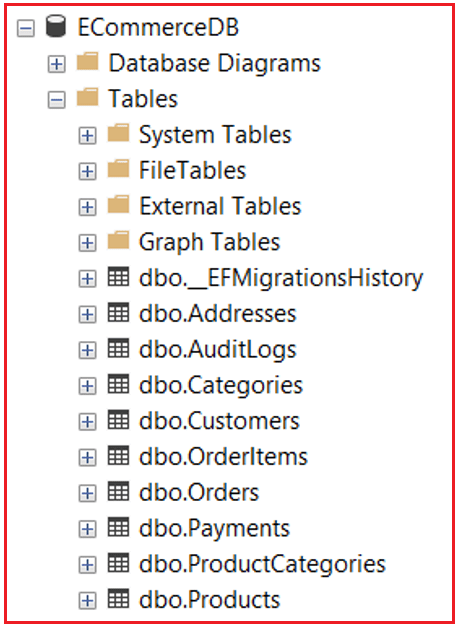
It should create the following database with the required tables.
Benefits of Property Configurations in EF Core
- Full Control: Fluent API provides complete control over how each property is mapped to the database.
- Data Integrity: Ensures that properties have correct data types, lengths, and constraints, enhancing data integrity.
- Database Performance: Properly configuring data types and constraints can improve query performance.
- Business Logic: Ensures that business rules (such as default values and computed columns) are enforced at the database level.
- Separation of Concerns: Keeps entity classes clean by separating configuration from business logic.
Property Configuration is where data integrity meets developer intent. By explicitly defining column behaviours, rather than relying on EF Core conventions, we ensure:
- Consistent database schemas
- Predictable migrations
- Improved performance
- Reduced runtime errors
- Clearer maintainability
In large-scale applications like E-Commerce, Banking, or ERP Systems, mastering these property configurations ensures our EF Core models are precise, scalable, and production-ready.

About the Author: Pranaya Rout
Pranaya Rout has published more than 3,000 articles in his 11-year career. Pranaya Rout has very good experience with Microsoft Technologies, Including C#, VB, ASP.NET MVC, ASP.NET Web API, EF, EF Core, ADO.NET, LINQ, SQL Server, MYSQL, Oracle, ASP.NET Core, Cloud Computing, Microservices, Design Patterns and still learning new technologies.