
Back to: ASP.NET Core Web API Tutorials
Fluent API Entity Configurations in EF Core
In Entity Framework Core, Entity Configurations define how individual entities (tables) and their relationships map to the database using the Fluent API. While Global Configurations set universal rules for all entities, Entity Configurations allow us to customize mappings and relationships at the per-entity level.
We use Entity Configurations when:
- A specific entity requires a custom table name, index, or relationship.
- Some entities need a unique delete behaviour, schema, or column mapping.
- We want to separate entity rules into individual configuration classes for cleaner architecture.
Let us proceed with a real-time example to understand when and how to apply entity-level configurations using the Entity Framework Core Fluent API. We will cover the following Entity Configurations:
- Configuring Table Names and Schema
- Configuring Primary Key
- Configuring Composite Primary Keys
- Configuring One-to-One Relationship
- Configuring One-to-Many Relationship
- Configuring Many-to-Many Relationship
- Configuring Indexes
- Configuring Composite Indexes
- Configuring Include Columns (Covering Query)
- Configuring Cascade Delete Behaviour for Specific Relationships
- Configuring Alternate Keys (Unique Constraints)
- Configuring Composite Alternate Keys (Unique Constraints)
- Configuring Owned Entities
- Configuring Table Splitting
- Configuring Entity Splitting
Creating a new Web API Project and Installing EF Core Packages
Create a new ASP.NET Core Web API project and name it ECommerceApp. Run the following commands in Visual Studio Package Manager Console to install EF Core Packages:
- Install-Package Microsoft.EntityFrameworkCore
- Install-Package Microsoft.EntityFrameworkCore.SqlServer
- Install-Package Microsoft.EntityFrameworkCore.Tools
Domain Enums:
First, create a folder named Enums at the project root, where we will store all our Enums.
OrderStatus Enum
The OrderStatus enum defines the stages an order can go through, including Pending, Confirmed, Shipped, Delivered, and Cancelled. Create a class file named OrderStatus.cs within the Enums folder, and copy-paste the following code.
namespace ECommerceApp.Enums
{
    public enum OrderStatus
    {
        Pending = 1,
        Confirmed = 2,
        Shipped = 3,
        Delivered = 4,
        Cancelled = 5
    }
}
PaymentStatus Enum
The PaymentStatus Enum describes the payment status of an order, including Pending, Paid, Failed, and Refunded. Create a class file named PaymentStatus.cs within the Enums folder, and copy-paste the following code.
namespace ECommerceApp.Enums
{
    public enum PaymentStatus
    {
        Pending = 1,
        Paid = 2,
        Failed = 3,
        Refunded = 4
    }
}
Core E-Commerce Domain Entities:
First, create a folder named Entities at the project root, where we will store all our Domain Entities.
Customer
The Customer entity represents a user’s main profile in the Ecommerce system. It stores essential details such as name, email, phone number, account status, and creation date. It also maintains relationships with orders, addresses, and profile information. Create a class file named Customer.cs within the Entities folder, and copy-paste the following code.
namespace ECommerceApp.Entities
{
    public class Customer
    {
        public int Id { get; set; }
        public string CustomerNumber { get; set; } = null!; // Alternate Key (Business Id)
        public string Email { get; set; } = null!;
        public string PhoneNumber { get; set; } = null!;
        public string FirstName { get; set; } = null!;
        public string LastName { get; set; } = null!;
        public bool IsActive { get; set; } = true;
        public DateTime CreatedAt { get; set; } = DateTime.UtcNow;

        // One customer can have many addresses (shipping/billing)
        public ICollection<Address> Addresses { get; set; } = new List<Address>();

        // Table-splitting: Profile data stored in same table as Customer
        public CustomerProfile? Profile { get; set; }

        // Navigation: One customer has many orders
        public ICollection<Order> Orders { get; set; } = new List<Order>();
    }
}
Address
Address stores customer shipping and billing address details, including address lines, city, state, zip code, and country. It also includes flags such as IsActive, IsDefaultShipping, and IsDefaultBilling, so the system can easily determine where to ship orders or send invoices for each customer. Create a class file named Address.cs within the Entities folder, and copy-paste the following code.
namespace ECommerceApp.Entities
{
    public class Address
    {
        public int Id { get; set; }
        public int CustomerId { get; set; }
        public Customer Customer { get; set; } = null!;
        public string Line1 { get; set; } = null!;
        public string? Line2 { get; set; }
        public string City { get; set; } = null!;
        public string State { get; set; } = null!;
        public string ZipCode { get; set; } = null!;
        public string Country { get; set; } = null!;
        public bool IsActive { get; set; }
        public bool IsDefaultShipping { get; set; } = false;
        public bool IsDefaultBilling { get; set; } = false;
    }
}
CustomerProfile
The CustomerProfile entity stores additional personal and behavioural information of customers, such as date of birth, gender, loyalty points, and last login time. It improves marketing, personalization, and reward programs. Create a class file named CustomerProfile.cs within the Entities folder, and copy-paste the following code.
namespace ECommerceApp.Entities
{
    public class CustomerProfile
    {
        public int CustomerId { get; set; }         // PK and FK to Customer.Id

        // Personal details
        public DateTime? DateOfBirth { get; set; }
        public string? Gender { get; set; }                 // "Male", "Female", "Other", etc.
        public string? ProfilePictureUrl { get; set; }

        // Loyalty & engagement
        public int LoyaltyPoints { get; set; }
        public int TotalOrdersPlaced { get; set; }
        public DateTime? LastOrderDate { get; set; }

        // Verification & trust
        public bool IsEmailVerified { get; set; }
        public bool IsPhoneVerified { get; set; }

        // Activity tracking
        public DateTime? LastLoginAt { get; set; }
        public DateTime? RegisteredAt { get; set; }

        public Customer Customer { get; set; } = null!;
    }
}
PriceDetail
The PriceDetail is a value object owned by Product that holds the detailed pricing breakdown: base price, discount, tax, final price, and currency. It is used to encapsulate price calculations and store clear pricing components in the Products table without treating pricing as a separate entity. Create a class file named PriceDetail.cs within the Entities folder, and copy-paste the following code.
namespace ECommerceApp.Entities
{
    // Value Object - Owned by Product and used in Price Calculations
    public class PriceDetail
    {
        public decimal BasePrice { get; set; }
        public decimal DiscountAmount { get; set; }
        public decimal TaxAmount { get; set; }
        public decimal FinalPrice { get; set; }
        public string Currency { get; set; } = "INR";
    }
}
Product
The Product entity represents items available for sale in the catalog. It stores core information like name, SKU, price, brand, descriptions, and images. It also links to categories and order items. Product data forms the backbone of the entire shopping experience, making it essential for listing, searching, filtering, and ordering. Create a class file named Product.cs within the Entities folder, and copy-paste the following code.
namespace ECommerceApp.Entities
{
    public class Product
    {
        public int Id { get; set; }                         // Primary key

        // Core catalog info
        public string Name { get; set; } = null!;
        public string SKU { get; set; } = null!;            // Alternate key (unique)
        public decimal Price { get; set; }
        public bool IsActive { get; set; } = true;
        public bool IsDeleted { get; set; } = false;        // Soft delete flag
        public DateTime CreatedAt { get; set; } = DateTime.UtcNow;
        public DateTime? UpdatedAt { get; set; }

        // Pricing breakdown - owned type
        public PriceDetail Pricing { get; set; } = null!;

        // Will be split to ProductDetails table
        public string? ShortDescription { get; set; }
        public string? LongDescription { get; set; }
        public string? Brand { get; set; }
        public string? MainImageUrl { get; set; }

        // Navigation
        public ICollection<ProductCategory> ProductCategories { get; set; }
            = new List<ProductCategory>();

        public ICollection<OrderItem> OrderItems { get; set; }
            = new List<OrderItem>();
    }
}
Category
The Category entity helps organize products into logical groups, such as “Electronics,” “Clothing,” or “Books.” It improves product discovery, catalog navigation, filtering, and SEO. Categories make it easier for users to find products and for administrators to manage the catalog hierarchy. Create a class file named Category.cs within the Entities folder, and copy-paste the following code.
namespace ECommerceApp.Entities
{
    public class Category
    {
        public int Id { get; set; }                         // Primary key
        public string Name { get; set; } = null!;
        public string Description { get; set; } = null!;
        public bool IsActive { get; set; } = true;

        public ICollection<ProductCategory> ProductCategories { get; set; }
            = new List<ProductCategory>();
    }
}
ProductCategory
ProductCategory is the many-to-many link table between Product and Category. It stores which product belongs to which category, along with information like the assigned date. This entity enables a flexible catalog where products can appear under multiple categories without duplicating data. Create a class file named ProductCategory.cs within the Entities folder, and copy-paste the following code.
namespace ECommerceApp.Entities
{
    // Join entity for many-to-many between Product and Category
    public class ProductCategory
    {
        public int ProductId { get; set; }
        public int CategoryId { get; set; }
        public DateTime AssignedAt { get; set; } = DateTime.UtcNow;
        public Product Product { get; set; } = null!;
        public Category Category { get; set; } = null!;
    }
}
Order
The Order entity represents a customer purchase. It contains details such as order number, customer ID, date, total amount, status, and related order items. This entity is central to the transaction workflow; it captures what the customer bought, when they bought it, and the current state of the order (Pending, Confirmed, Delivered, etc.). Create a class file named Order.cs within the Entities folder, and copy-paste the following code.
using ECommerceApp.Enums;
namespace ECommerceApp.Entities
{
    public class Order
    {
        public long Id { get; set; }                        // Primary key
        public string OrderNumber { get; set; } = null!;    // Alternate key (unique)
        public int CustomerId { get; set; }
        public DateTime OrderDate { get; set; }
        public decimal TotalAmount { get; set; }
        public bool IsDeleted { get; set; } = false;
        public OrderStatus Status { get; set; }
        // Address snapshots (full text, not FK)
        public string ShippingAddress { get; set; } = null!;
        public string BillingAddress { get; set; } = null!;

        public Customer Customer { get; set; } = null!;
        public ICollection<OrderItem> Items { get; set; } = new List<OrderItem>();
        public Payment? Payment { get; set; }
    }
}
OrderItem
The OrderItem stores the line items of an order, representing each product purchased. It contains quantity, unit price, and the total price for each item. It supports historical price tracking, ensuring orders reflect the correct product price at the time of purchase, even if the price changes later. So, create a class file named OrderItem.cs within the Entities folder, and copy-paste the following code.
namespace ECommerceApp.Entities
{
    public class OrderItem
    {
        public long OrderId { get; set; }
        public int ProductId { get; set; }

        // Product snapshot (optional but very useful)
        public string ProductName { get; set; } = null!;
        public string ProductSKU { get; set; } = null!;
        public string? Brand { get; set; }

        public decimal Quantity { get; set; }

        // Pricing snapshot (per unit at time of order)
        public decimal BasePrice { get; set; }
        public decimal DiscountAmount { get; set; }
        public decimal TaxAmount { get; set; }

        // Final per-unit price that customer effectively pays
        public decimal UnitPrice { get; set; }

        // Total for this line = UnitPrice * Quantity
        public decimal LineTotal { get; set; }

        public Order Order { get; set; } = null!;
        public Product Product { get; set; } = null!;
    }
}
Payment
The Payment entity stores the payment details for an order. It handles payment reference numbers, provider names, amount, status, and payment timestamps. This entity links the order to its payment confirmation and ensures the system can accurately track paid, pending, failed, and refunded transactions. Create a class file named Payment.cs within the Entities folder, and copy-paste the following code.
using ECommerceApp.Enums;
namespace ECommerceApp.Entities
{
    public class Payment
    {
        public long Id { get; set; }
        public long OrderId { get; set; }                   // FK, also unique – 1:1
        public decimal Amount { get; set; }
        public DateTime PaidAt { get; set; }
        public PaymentStatus Status { get; set; }
        public string PaymentReference { get; set; } = null!;   // Alternate key
        public string Provider { get; set; } = null!;
        public Order Order { get; set; } = null!;
    }
}
Should a Product Belong to Multiple Categories?
Yes, absolutely. In real Ecommerce systems (Amazon, Flipkart, Myntra), a product belongs to multiple categories. Example: A Nike running shoe
- Men → Footwear → Running Shoes
- Sports → Shoes
- Brands → Nike
Using a many-to-many relationship between Product and Category is the correct approach.
Configuring Table Names and Schema
By default, EF Core uses the entity name (or DbSet name) as the table name and the default SQL Server schema (dbo). In a real Ecommerce application, we usually organize tables into logical schemas, for example:
- sales → customers, orders, payments
- catalog → products, categories
This makes the database easier to understand and manage.
Syntax
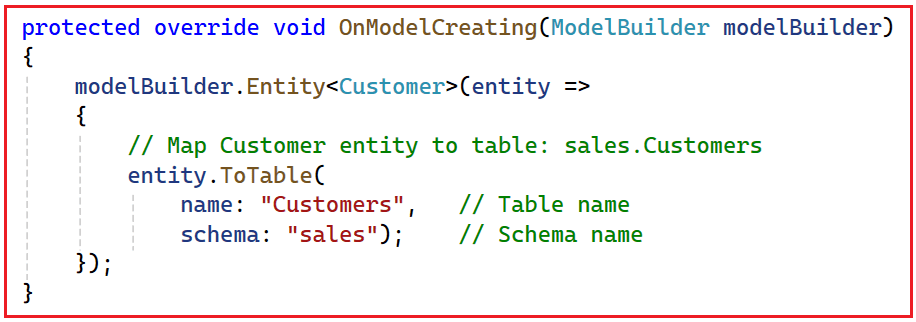
We can use the ToTable method to specify the table name and the schema an entity uses in the database (e.g., sales.Customers instead of dbo.Customers). The syntax is given below:
Configuring Primary Key
By default, EF Core tries to find a key using conventions (e.g., Id or <EntityName>Id). However, it is a good practice to explicitly configure the primary key so that it is clear which property uniquely identifies each row. EF Core uses the primary key to track entities, update data, and generate relationships.
Syntax
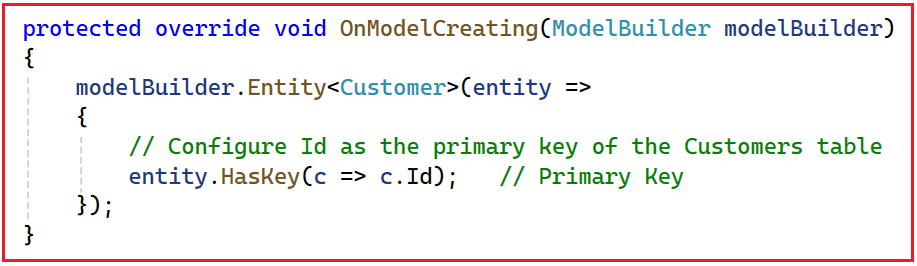
We can use the HasKey method to specify which property serves as the entity’s primary key. The syntax is given below:
Configuring Composite Primary Key
Sometimes a single column is not enough to uniquely identify a row. For join entities like OrderItem, the combination of OrderId and ProductId can act as the unique identifier. In such cases, we use a composite primary key made up of multiple properties.
Syntax
We can use the HasKey method with an anonymous object to configure a composite primary key. The syntax is given below:

Understanding Relationships in EF Core with Fluent API
In Entity Framework Core, relationships are configured using the Fluent API with the following methods:
- HasOne()
- WithOne()
- HasMany()
- WithMany()
- HasForeignKey()
These methods are used together to describe how two entities are related. Before looking at them, remember two key terms:
- Principal Entity: The “Parent” or Main Entity. Its data can exist independently. Example: Customer
- Dependent Entity: The “Child” Entity that depends on the principal and holds the Foreign Key (FK). Example: Order (it has CustomerId)
The Foreign Key column always lives in the Dependent entity’s table.
What HasOne and HasMany Mean
HasOne() and HasMany() are called on the entity type we are currently configuring. They describe what this entity has.
- HasOne() → “This entity has one related entity.”
- HasMany() → “This entity has many related entities (a collection).”
Examples:
- On Order: HasOne(o => o.Customer) → “Each order has one customer.”
- On Customer: HasMany(c => c.Orders) → “Each customer has many orders.”
What WithOne and WithMany Mean
WithOne() and WithMany() describe the Inverse Navigation on the other side of the relationship.
- WithOne() → “The other entity has one of this.”
- WithMany() → “The other entity has many of this.”
Example for Customer ↔ Order:
- entity.HasOne(o => o.Customer) // THIS side (Order) → one Customer
- .WithMany(c => c.Orders); // OTHER side (Customer) → many Orders
Read it:
- HasOne(o => o.Customer) → “Order has one Customer.”
- WithMany(c => c.Orders) → “Customer has many Orders.”
On Which Entity Do We Configure the Relationship?
You can configure the relationship from either side, but in practice:
- For one-to-many:
- We usually start from the Dependent Entity (the one with the FK).
- Example: configure Customer ↔ Orders starting from Order.
- For one-to-one:
- We usually start from the Principal Entity and point the FK to the dependent.
- Example: configure Order ↔ Payment starting from Order, FK in Payment.
Thumb Rule:
- HasOne / HasMany → used on the entity we are configuring to say “what I have”.
- WithOne / WithMany → used to describe “what the other side has”.
- HasForeignKey(…) → always points to the dependent entity, i.e., the one that owns the FK property.
Configuring One-to-One Relationship (Order ↔ Payment)
A one-to-one relationship exists when a row in one table is related to at most one row in another table, and vice versa. In our Ecommerce application:
- One Order can have at most one Payment.
- Each Payment is linked to exactly one Order.
Here:
- Principal Entity: Order
- Dependent Entity: Payment (it holds the OrderId foreign key)
Syntax 1: Configuring from the Principal Entity (Order)
We can use HasOne and WithOne along with HasForeignKey to configure a one-to-one relationship where the foreign key is stored in the dependent entity (Payment). The syntax is given below:
Syntax 2: Configuring from the Dependent Entity (Payment)
We can also start the configuration from the dependent entity (Payment) and still tell EF Core that the foreign key is Payment.OrderId. The syntax is given below:
Key Points
- Principal: Order
- Dependent: Payment (because it owns the OrderId foreign key).
- In Both Syntaxes, the foreign key is in the Dependent (Payment) table.
- HasForeignKey<Payment>(p => p.OrderId) clearly tells EF Core which entity holds the FK.
- HasOne / WithOne can be started from either side.
- In a real project, you should configure this relationship only once (pick either Syntax 1 or Syntax 2, not both).
Configuring One-to-Many Relationship (Customer → Orders)
A one-to-many relationship means that one entity (the principal) is related to many other entities (the dependents). In our Ecommerce application:
- One Customer can place many Orders.
- Each Order belongs to exactly one Customer.
Here:
- Principal Entity: Customer
- Dependent Entity: Order (it holds the CustomerId foreign key)
Syntax 1: Configuring from the Dependent Entity (Order)
We can use HasOne on the dependent side and WithMany on the principal side, and specify the foreign key using HasForeignKey. The syntax is given below:
Syntax 2: Configuring from the Principal Entity (Customer)
We can also start the configuration from the principal entity (Customer) by using HasMany with WithOne, and still point the foreign key to Order.CustomerId. The syntax is given below:
Key Points
- Customer is the Principal Entity (parent).
- Order is the Dependent (it owns the CustomerId foreign key).
- The relationship can be configured from either side:
- Using HasOne / WithMany starting from Order (Dependent).
- Or using HasMany / WithOne starting from Customer (Principal).
- In a real project, you need to configure it only once (pick either Syntax 1 or Syntax 2, not both).
Configuring Many-to-Many Relationship (Product ↔ Category)
A many-to-many relationship allows both sides to have many related records. In our Ecommerce application:
- A Product can belong to many Categories.
- A Category can contain many Products.
We model this using an explicit join entity, ProductCategory. We can configure the join entity with a composite key and two one-to-many relationships (to Product and to Category). The syntax is given below:
Configuring Indexes
Indexes improve read performance by enabling the database to locate rows based on indexed columns quickly. In an Ecommerce system, fields such as Email or SKU are commonly indexed because they are frequently used in search or lookup queries.
Syntax
We can use the HasIndex method to create a database index on one or more properties. The syntax is given below:
Configuring Composite Indexes
Composite indexes are defined on multiple columns and are useful when queries frequently filter or sort using a combination of fields. For example, we might often query Orders by both CustomerId and OrderDate.
Syntax
We can use HasIndex with an anonymous object to define a composite index over multiple properties. The syntax is given below:
Configuring Include Columns (Covering Query)
Include columns (also called a covering index) allow extra properties to be stored in the index so that specific queries can be answered entirely from the index without reading the base table. This is useful for read-heavy reporting queries.
Syntax
We can use the IncludeProperties method on an index to specify additional columns to include. The syntax is given below:
Configuring Cascade Delete Behaviour for Specific Relationships
Delete behaviour defines what happens to dependent rows when a principal row is deleted. For example, when an Order is deleted, we usually want all its OrderItems to be deleted automatically.
Syntax
We can use the OnDelete method on the relationship configuration to specify DeleteBehavior.Cascade or other behaviors. The syntax is given below:
Configuring Alternate Keys (Unique Constraints)
Alternate keys are unique constraints on properties other than the primary key. They are often used for business identifiers like CustomerNumber, SKU, or OrderNumber that must be unique across the system.
Syntax
We can use the HasAlternateKey method to create a unique constraint on a property and optionally give it a name using HasName. The syntax is shown below:
Configuring Composite Alternate Keys
Sometimes, uniqueness is defined by a combination of fields rather than a single property. For example, in Payment, we may want the pair (Provider, PaymentReference) to be unique to avoid duplicate entries from the same payment provider.
Syntax
We can use HasAlternateKey with an anonymous object to configure a composite alternate key. The syntax is given below:
Configuring Owned Entities (PriceDetail as Value Object)
Owned entities are value objects that belong to a parent entity and do not have their own identity or table. In our model, PriceDetail is an owned type of Product and its properties are stored in the Products table.
Syntax
We can use the OwnsOne method to configure an owned entity type and control how its properties are mapped as columns. The syntax is given below:
Configuring Table Splitting (Customer + CustomerProfile in Same Table)
Table splitting allows multiple entity types to share the same table. In our application, Customer and CustomerProfile can both be mapped to the sales.Customers table, with a one-to-one relationship and a shared key (Customer.Id = CustomerProfile.CustomerId).
Syntax
We can map both entities to the same table using ToTable, and configure a shared primary/foreign key for the one-to-one relationship. The syntax is given below:
Configuring Entity Splitting (Product Data Across Multiple Tables)
Entity splitting allows a single entity type to be stored across multiple tables. For example, we might store basic Product information in catalog.Products and extended details (descriptions, images) in the catalog.ProductDetails, while still working with a single Product entity in code.
Syntax
We can use the SplitToTable method to specify which entity properties are mapped to the additional table. The syntax is given below:
DbContext With EF Core Entity Configurations
First, create a folder named Data at the project root directory. Then create a class file named ECommerceDBContext in the Data folder and paste the following code.
using ECommerceApp.Entities;
using Microsoft.EntityFrameworkCore;

namespace ECommerceApp.Data
{
    public class ECommerceDBContext : DbContext
    {
        public ECommerceDBContext(DbContextOptions<ECommerceDBContext> options)
            : base(options)
        {
        }

        // DbSets
        public DbSet<Customer> Customers { get; set; } = null!;
        public DbSet<CustomerProfile> CustomerProfiles { get; set; } = null!;
        public DbSet<Address> Addresses { get; set; } = null!;
        public DbSet<Product> Products { get; set; } = null!;
        public DbSet<Category> Categories { get; set; } = null!;
        public DbSet<ProductCategory> ProductCategories { get; set; } = null!;
        public DbSet<Order> Orders { get; set; } = null!;
        public DbSet<OrderItem> OrderItems { get; set; } = null!;
        public DbSet<Payment> Payments { get; set; } = null!;

        protected override void OnModelCreating(ModelBuilder modelBuilder)
        {
            ConfigureCustomer(modelBuilder);
            ConfigureCustomerProfile(modelBuilder);
            ConfigureAddress(modelBuilder);
            ConfigureProduct(modelBuilder);
            ConfigureCategory(modelBuilder);
            ConfigureProductCategory(modelBuilder);
            ConfigureOrder(modelBuilder);
            ConfigureOrderItem(modelBuilder);
            ConfigurePayment(modelBuilder);

            SeedData(modelBuilder);
        }

        // Customer
        private void ConfigureCustomer(ModelBuilder modelBuilder)
        {
            modelBuilder.Entity<Customer>(entity =>
            {
                // Map to sales.Customers
                entity.ToTable("Customers", "sales");

                // Primary key
                entity.HasKey(c => c.Id);

                // Alternate key (Business Identifier)
                entity.HasAlternateKey(c => c.CustomerNumber)
                      .HasName("AK_Customers_CustomerNumber");

                // Indexes
                entity.HasIndex(c => c.Email)
                      .HasDatabaseName("IX_Customers_Email");

                entity.HasIndex(c => c.PhoneNumber)
                      .HasDatabaseName("IX_Customers_PhoneNumber");

                // One-to-many: Customer → Addresses
                entity.HasMany(c => c.Addresses)
                      .WithOne(a => a.Customer)
                      .HasForeignKey(a => a.CustomerId)
                      .OnDelete(DeleteBehavior.Cascade);

                // One-to-many: Customer → Orders
                entity.HasMany(c => c.Orders)
                      .WithOne(o => o.Customer)
                      .HasForeignKey(o => o.CustomerId)
                      .OnDelete(DeleteBehavior.Restrict);

                // Table splitting mapping (Customer + CustomerProfile)
                entity.HasOne(c => c.Profile)
                      .WithOne(p => p.Customer)
                      .HasForeignKey<CustomerProfile>(p => p.CustomerId);
            });
        }

        // CustomerProfile (Table Splitting)
        private void ConfigureCustomerProfile(ModelBuilder modelBuilder)
        {
            modelBuilder.Entity<CustomerProfile>(entity =>
            {
                // Same table as Customer
                entity.ToTable("Customers", "sales");

                // PK = FK (Shared key between Customer and CustomerProfile)
                entity.HasKey(p => p.CustomerId);
            });
        }

        // Address
        private void ConfigureAddress(ModelBuilder modelBuilder)
        {
            modelBuilder.Entity<Address>(entity =>
            {
                entity.ToTable("Addresses", "sales");

                entity.HasKey(a => a.Id);

                // Basic indexes
                entity.HasIndex(a => new { a.CustomerId, a.IsActive })
                      .HasDatabaseName("IX_Addresses_Customer_Active");
            });
        }

        // Product
        private void ConfigureProduct(ModelBuilder modelBuilder)
        {
            modelBuilder.Entity<Product>(entity =>
            {
                // Main table
                entity.ToTable("Products", "catalog");

                entity.HasKey(p => p.Id);

                // Alternate key (SKU)
                entity.HasAlternateKey(p => p.SKU)
                      .HasName("AK_Products_SKU");

                // Owned value object: PriceDetail
                // EF Core automatically prefixes owned-type columns with the navigation property name (Pricing_)
                // unless we explicitly override each column name.
                // Configure Owned Entity with clean column names
                entity.OwnsOne(p => p.Pricing, owned =>
                {
                    owned.Property(pd => pd.BasePrice)
                         .HasColumnName("BasePrice");

                    owned.Property(pd => pd.DiscountAmount)
                         .HasColumnName("DiscountAmount");

                    owned.Property(pd => pd.TaxAmount)
                         .HasColumnName("TaxAmount");

                    owned.Property(pd => pd.FinalPrice)
                         .HasColumnName("FinalPrice");

                    owned.Property(pd => pd.Currency)
                         .HasColumnName("Currency");
                });

                // Entity splitting: move *description* fields into ProductDetails
                entity.SplitToTable(
                    "ProductDetails",         // Table name
                    "catalog",                // Schema name
                    table =>
                    {
                        table.Property(p => p.Id).HasColumnName("ProductId");
                        table.Property(p => p.ShortDescription);
                        table.Property(p => p.LongDescription);
                        table.Property(p => p.Brand);
                        table.Property(p => p.MainImageUrl);
                    });
            });
        }

        // Category
        private void ConfigureCategory(ModelBuilder modelBuilder)
        {
            modelBuilder.Entity<Category>(entity =>
            {
                entity.ToTable("Categories", "catalog");

                entity.HasKey(c => c.Id);

                entity.HasIndex(c => c.Name)
                      .HasDatabaseName("IX_Categories_Name");
            });
        }

        //  ProductCategory (Join Entity)
        private void ConfigureProductCategory(ModelBuilder modelBuilder)
        {
            modelBuilder.Entity<ProductCategory>(entity =>
            {
                entity.ToTable("ProductCategories", "catalog");

                // Composite key: ProductId + CategoryId
                entity.HasKey(pc => new { pc.ProductId, pc.CategoryId });

                // Many ProductCategory rows point to one Product
                entity.HasOne(pc => pc.Product)
                      .WithMany(p => p.ProductCategories)
                      .HasForeignKey(pc => pc.ProductId)
                      .OnDelete(DeleteBehavior.Cascade);

                // Many ProductCategory rows point to one Category
                entity.HasOne(pc => pc.Category)
                      .WithMany(c => c.ProductCategories)
                      .HasForeignKey(pc => pc.CategoryId)
                      .OnDelete(DeleteBehavior.Cascade);
            });
        }

        // Order
        private void ConfigureOrder(ModelBuilder modelBuilder)
        {
            modelBuilder.Entity<Order>(entity =>
            {
                entity.ToTable("Orders", "sales");

                entity.HasKey(o => o.Id);

                // Alternate key: OrderNumber
                entity.HasAlternateKey(o => o.OrderNumber)
                      .HasName("AK_Orders_OrderNumber");

                // Composite index for reporting
                entity.HasIndex(o => new { o.CustomerId, o.OrderDate })
                      .HasDatabaseName("IX_Orders_Customer_Date");

                // Covering index example
                entity.HasIndex(o => o.OrderDate)
                      .IncludeProperties(o => new { o.TotalAmount, o.CustomerId })
                      .HasDatabaseName("IX_Orders_OrderDate_Covering");

                // One-to-many Customer → Orders
                // Already configured from Customer side – no need to repeat here
                // entity.HasOne(o => o.Customer)
                //       .WithMany(c => c.Orders)
                //       .HasForeignKey(o => o.CustomerId);

                // One-to-one Order → Payment
                entity.HasOne(o => o.Payment)
                      .WithOne(p => p.Order)
                      .HasForeignKey<Payment>(p => p.OrderId);
            });
        }

        // OrderItem
        private void ConfigureOrderItem(ModelBuilder modelBuilder)
        {
            modelBuilder.Entity<OrderItem>(entity =>
            {
                entity.ToTable("OrderItems", "sales");

                // Composite primary key
                entity.HasKey(oi => new { oi.OrderId, oi.ProductId });

                // One-to-many: Order → OrderItems
                entity.HasOne(oi => oi.Order)
                      .WithMany(o => o.Items)
                      .HasForeignKey(oi => oi.OrderId)
                      .OnDelete(DeleteBehavior.Cascade);

                // One-to-many: Product → OrderItems
                entity.HasOne(oi => oi.Product)
                      .WithMany(p => p.OrderItems)
                      .HasForeignKey(oi => oi.ProductId)
                      .OnDelete(DeleteBehavior.Restrict);
            });
        }

        // Payment
        private void ConfigurePayment(ModelBuilder modelBuilder)
        {
            modelBuilder.Entity<Payment>(entity =>
            {
                entity.ToTable("Payments", "sales");

                entity.HasKey(p => p.Id);

                // Alternate key on PaymentReference
                entity.HasAlternateKey(p => p.PaymentReference)
                      .HasName("AK_Payments_PaymentReference");

                // Composite alternate key on (Provider, PaymentReference)
                entity.HasAlternateKey(p => new { p.Provider, p.PaymentReference })
                      .HasName("AK_Payments_Provider_Reference");

                // One-to-one with Order
                // Already configured from Customer side – no need to repeat here
                // entity.HasOne(p => p.Order)
                //       .WithOne(o => o.Payment)
                //       .HasForeignKey<Payment>(p => p.OrderId)
                //       .OnDelete(DeleteBehavior.Cascade);
            });
        }

        private void SeedData(ModelBuilder modelBuilder)
        {
            // Categories
            modelBuilder.Entity<Category>().HasData(
                new Category { Id = 1, Name = "Electronics", Description = "Electronic gadgets and accessories", IsActive = true },
                new Category { Id = 2, Name = "Books", Description = "Books, magazines, and study materials", IsActive = true },
                new Category { Id = 3, Name = "Featured", Description = "Featured and trending products", IsActive = true }
            );

            // Products (includes properties that go to ProductDetails via entity splitting)
            modelBuilder.Entity<Product>().HasData(
                new Product { Id = 1, Name = "Smartphone X", SKU = "ELEC-SPX-001", Price = 20000m, IsActive = true, IsDeleted = false, CreatedAt = new DateTime(2025, 1, 1), UpdatedAt = null, ShortDescription = "Mid-range smartphone with great camera", LongDescription = "Smartphone X comes with 6.5\" display, 128GB storage, and 50MP camera.", Brand = "BrandX", MainImageUrl = "/images/products/smartphone-x.jpg" },
                new Product { Id = 2, Name = "C# Programming Guide", SKU = "BOOK-CSHARP-001", Price = 500m, IsActive = true, IsDeleted = false, CreatedAt = new DateTime(2025, 1, 1), UpdatedAt = null, ShortDescription = "Beginner to advanced C# programming book", LongDescription = "C# Programming Guide covers basics to advanced topics with real-world examples.", Brand = "TechPress", MainImageUrl = "/images/products/csharp-book.jpg" }
            );

            // Owned type: PriceDetail (seeded via OwnsOne)
            modelBuilder.Entity<Product>()
                .OwnsOne(p => p.Pricing)
                .HasData(
                    new { ProductId = 1, BasePrice = 21000m, DiscountAmount = 1000m, TaxAmount = 1890m, FinalPrice = 21890m, Currency = "INR" },
                    new { ProductId = 2, BasePrice = 500m, DiscountAmount = 0m, TaxAmount = 90m, FinalPrice = 590m, Currency = "INR" }
                );

            // ProductCategory (join table) – one product in multiple categories
            modelBuilder.Entity<ProductCategory>().HasData(
                new ProductCategory { ProductId = 1, CategoryId = 1, AssignedAt = new DateTime(2025, 1, 1) }, // Smartphone X → Electronics
                new ProductCategory { ProductId = 1, CategoryId = 3, AssignedAt = new DateTime(2025, 1, 1) }, // Smartphone X → Featured
                new ProductCategory { ProductId = 2, CategoryId = 2, AssignedAt = new DateTime(2025, 1, 1) }, // C# Book → Books
                new ProductCategory { ProductId = 2, CategoryId = 3, AssignedAt = new DateTime(2025, 1, 1) }  // C# Book → Featured
            );

            // Customer
            modelBuilder.Entity<Customer>().HasData(
                new Customer { Id = 1, CustomerNumber = "CUST-0001", Email = "pranaya.rout@example.com", PhoneNumber = "7021801173", FirstName = "Pranaya", LastName = "Rout", IsActive = true, CreatedAt = new DateTime(2025, 1, 1) }
            );

            // CustomerProfile (table-splitting with Customer)
            modelBuilder.Entity<CustomerProfile>().HasData(
                new CustomerProfile { CustomerId = 1, DateOfBirth = new DateTime(1990, 1, 1), Gender = "Male", ProfilePictureUrl = "/images/customers/john-doe.png", LoyaltyPoints = 100, TotalOrdersPlaced = 0, LastOrderDate = null, IsEmailVerified = true, IsPhoneVerified = true, LastLoginAt = null, RegisteredAt = new DateTime(2025, 1, 1) }
            );

            // Address
            modelBuilder.Entity<Address>().HasData(
                new Address { Id = 1, CustomerId = 1, Line1 = "123 Main Street", Line2 = "Near City Mall", City = "Bhubaneswar", State = "Odisha", ZipCode = "751001", Country = "India", IsActive = true, IsDefaultShipping = true, IsDefaultBilling = true }
            );
        }
    }
}
Configure Database Connection String
Please add the database connection string in the appsettings.json file as follows:
{
  "Logging": {
    "LogLevel": {
      "Default": "Information",
      "Microsoft.AspNetCore": "Warning"
    }
  },
  "AllowedHosts": "*",
  "ConnectionStrings": {
    "DefaultConnection": "Server=LAPTOP-6P5NK25R\\SQLSERVER2022DEV;Database=ECommerceDB;Trusted_Connection=True;TrustServerCertificate=True;"
  }
}
Configure DbContext in Program.cs Class
Please modify the Program class as follows.
using ECommerceApp.Data;
using Microsoft.EntityFrameworkCore;

namespace ECommerceApp
{
    public class Program
    {
        public static void Main(string[] args)
        {
            var builder = WebApplication.CreateBuilder(args);

            // Add services to the container.
            builder.Services.AddControllers()
            .AddJsonOptions(options =>
            {
                // Keep JSON property names exactly as defined in the C# models (no camelCase conversion).
                options.JsonSerializerOptions.PropertyNamingPolicy = null;
            });

            builder.Services.AddEndpointsApiExplorer();
            builder.Services.AddSwaggerGen();

            // Register ECommerceDBContext with the dependency injection container
            // and configure it to use SQL Server with the "DefaultConnection" connection string.
            builder.Services.AddDbContext<ECommerceDBContext>(options =>
                options.UseSqlServer(builder.Configuration.GetConnectionString("DefaultConnection")));

            var app = builder.Build();

            // Configure the HTTP request pipeline.
            if (app.Environment.IsDevelopment())
            {
                app.UseSwagger();
                app.UseSwaggerUI();
            }

            app.UseHttpsRedirection();

            app.UseAuthorization();

            app.MapControllers();

            app.Run();
        }
    }
}
Generate and Apply the Migration:
Please execute the following command in the Package Manager Console to generate the Migration and apply the Migration to sync our codebase with the database.
- Add-Migration Mig1
- Update-Database
It should create the following database with the required tables.
DTOs for Placing an Order
Create a folder named DTOs and add the following DTO classes.
OrderItemCreateDTO
Create a class file named OrderItemCreateDTO.cs within the DTOs folder, and copy-paste the following code. This DTO is used when the client sends items for a new order. It only carries the ProductId and Quantity, so the API knows which product the customer wants to buy and how many units to add to the order.
using System.ComponentModel.DataAnnotations;
namespace ECommerceApp.DTOs
{
    public class OrderItemCreateDTO
    {
        [Required(ErrorMessage = "ProductId is required.")]
        public int ProductId { get; set; }

        [Range(1, 1000, ErrorMessage = "Quantity must be at least 1.")]
        public decimal Quantity { get; set; }
    }
}
PaymentCreateDTO
Create a class file named PaymentCreateDTO.cs within the DTOs folder, and copy-paste the following code. This DTO captures payment details when placing an order. It carries the payment provider (like COD, Razorpay, Stripe) and an optional payment reference if the client already has one from a payment gateway.
using System.ComponentModel.DataAnnotations;
namespace ECommerceApp.DTOs
{
    public class PaymentCreateDTO
    {
        [Required(ErrorMessage = "Payment provider is required.")]
        [StringLength(50, ErrorMessage = "Provider name is too long.")]
        public string Provider { get; set; } = null!;   // e.g., "COD", "Razorpay", "Stripe"

        [StringLength(100, ErrorMessage = "Payment reference is too long.")]
        public string? PaymentReference { get; set; }   // Optional (we will generate if not provided)
    }
}
OrderCreateDTO
Create a class file named OrderCreateDTO.cs within the DTOs folder, and copy-paste the following code. This DTO represents the whole request body for placing a new order. It contains the CustomerId, the list of order items (OrderItemCreateDTO), and the payment information (PaymentCreateDTO), so the API has everything it needs to create the Order and Payment records.
using System.ComponentModel.DataAnnotations;
namespace ECommerceApp.DTOs
{
    public class OrderCreateDTO
    {
        [Required(ErrorMessage = "CustomerId is required.")]
        public int CustomerId { get; set; }

        [Required(ErrorMessage = "ShippingAddressId is required.")]
        [Range(1, int.MaxValue, ErrorMessage = "ShippingAddressId must be a positive value.")]
        public int ShippingAddressId { get; set; }

        [Required(ErrorMessage = "BillingAddressId is required.")]
        [Range(1, int.MaxValue, ErrorMessage = "BillingAddressId must be a positive value.")]
        public int BillingAddressId { get; set; }

        [Required(ErrorMessage = "At least one order item is required.")]
        [MinLength(1, ErrorMessage = "At least one order item is required.")]
        public List<OrderItemCreateDTO> Items { get; set; } = new();

        [Required(ErrorMessage = "Payment details are required.")]
        public PaymentCreateDTO Payment { get; set; } = null!;
    }
}
OrderItemResponseDTO
Create a class file named OrderItemResponseDTO.cs within the DTOs folder, and copy-paste the following code. This DTO is used to return individual order item details to the client. It includes product information (name, SKU, brand), quantity, unit price, and line total, so the UI can display a clear breakdown of the order.
namespace ECommerceApp.DTOs
{
    public class OrderItemResponseDTO
    {
        public long OrderId { get; set; }
        public int ProductId { get; set; }
        public string ProductName { get; set; } = null!;
        public string ProductSKU { get; set; } = null!;
        public string? Brand { get; set; }
        public decimal Quantity { get; set; }

        // Pricing snapshot (per unit)
        public decimal BasePrice { get; set; }
        public decimal DiscountAmount { get; set; }
        public decimal TaxAmount { get; set; }
        public decimal UnitPrice { get; set; }     // Final per-unit price after discount + tax
        public decimal LineTotal { get; set; }     // UnitPrice * Quantity
    }
}
PaymentResponseDTO
Create a class file named PaymentResponseDTO.cs within the DTOs folder, and copy-paste the following code. This DTO is used to send payment information in the response. It contains the payment ID, amount, provider, reference, status, and paid date, so the client knows how the payment was processed and its current state.
namespace ECommerceApp.DTOs
{
    public class PaymentResponseDTO
    {
        public long PaymentId { get; set; }
        public decimal Amount { get; set; }
        public string Provider { get; set; } = null!;
        public string PaymentReference { get; set; } = null!;
        public string Status { get; set; } = null!;
        public DateTime PaidAt { get; set; }
    }
}
OrderResponseDTO
Create a class file named OrderResponseDTO.cs within the DTOs folder, and copy-paste the following code. This DTO is used to return complete order details to the client. It includes basic order information, customer details, total amount, status, a list of order items (OrderItemResponseDTO), and payment details (PaymentResponseDTO), providing a complete summary of the order.
namespace ECommerceApp.DTOs
{
    public class OrderResponseDTO
    {
        public long OrderId { get; set; }
        public string OrderNumber { get; set; } = null!;
        public int CustomerId { get; set; }
        public string CustomerName { get; set; } = null!;
        public string CustomerEmail { get; set; } = null!;
        public string CustomerPhone { get; set; } = null!;

        public string ShippingAddress { get; set; } = null!;
        public string BillingAddress { get; set; } = null!;

        public DateTime OrderDate { get; set; }
        public decimal TotalAmount { get; set; }
        public string Status { get; set; } = null!;

        public List<OrderItemResponseDTO> Items { get; set; } = new();
        public PaymentResponseDTO? Payment { get; set; }
    }
}
Order API Controller
Create an API Empty Controller named Orders Controller within the Controllers folder, then copy and paste the following code.
using ECommerceApp.Data;
using ECommerceApp.DTOs;
using ECommerceApp.Entities;
using ECommerceApp.Enums;
using Microsoft.AspNetCore.Mvc;
using Microsoft.EntityFrameworkCore;

namespace ECommerceApp.Controllers
{
    [ApiController]
    [Route("api/[controller]")]
    public class OrdersController : ControllerBase
    {
        private readonly ECommerceDBContext _dbContext;

        public OrdersController(ECommerceDBContext dbContext)
        {
            _dbContext = dbContext;
        }

        // Helper: build a single-line or multi-line address string snapshot from Address entity
        private static string BuildAddressSnapshot(Address address)
        {
            // You can format this however you like (multi-line, comma separated, etc.)
            // Here we keep it simple and readable:
            var parts = new List<string>
            {
                address.Line1
            };

            if (!string.IsNullOrWhiteSpace(address.Line2))
                parts.Add(address.Line2);

            parts.Add($"{address.City}, {address.State} {address.ZipCode}");
            parts.Add(address.Country);

            return string.Join(", ", parts);
        }

        // Places a new order with items and payment details.
        [HttpPost]
        public async Task<ActionResult<object>> PlaceOrder([FromBody] OrderCreateDTO request)
        {
            // DTO-level validation (Required, Range, etc.)
            if (!ModelState.IsValid)
            {
                return BadRequest(ModelState);
            }

            // STEP 1: Validate Customer
            var customer = await _dbContext.Customers
                .AsNoTracking()
                .FirstOrDefaultAsync(c => c.Id == request.CustomerId && c.IsActive);

            if (customer == null)
            {
                return NotFound($"Customer with Id {request.CustomerId} not found or inactive.");
            }

            // STEP 2: Validate Shipping/Billing Address IDs

            // Collect distinct address IDs to fetch in one query
            var addressIds = new[]
            {
                request.ShippingAddressId,
                request.BillingAddressId
            }
            .Distinct()
            .ToList();

            var addresses = await _dbContext.Addresses
                .Where(a =>
                    addressIds.Contains(a.Id) &&
                    a.CustomerId == request.CustomerId &&   // Address must belong to same customer
                    a.IsActive)                             // Only active addresses
                .ToListAsync();

            if (addresses.Count != addressIds.Count)
            {
                return BadRequest("Invalid shipping or billing address for this customer. Make sure both addresses exist, are active, and belong to the customer.");
            }

            var shippingAddress = addresses.Single(a => a.Id == request.ShippingAddressId);
            var billingAddress = addresses.Single(a => a.Id == request.BillingAddressId);

            var shippingSnapshot = BuildAddressSnapshot(shippingAddress);
            var billingSnapshot = BuildAddressSnapshot(billingAddress);

            // STEP 3: Validate and load Products
            var productIds = request.Items
                .Select(i => i.ProductId)
                .Distinct()
                .ToList();

            var products = await _dbContext.Products
                .Where(p => productIds.Contains(p.Id) && p.IsActive && !p.IsDeleted)
                .ToListAsync();

            if (products.Count != productIds.Count)
            {
                return BadRequest("One or more products are invalid, inactive, or deleted.");
            }

            var productLookup = products.ToDictionary(p => p.Id, p => p);

            // STEP 4: Build Order + Items in memory
            var now = DateTime.UtcNow;

            var order = new Order
            {
                CustomerId = request.CustomerId,
                OrderDate = now,
                Status = OrderStatus.Confirmed,
                IsDeleted = false,
                OrderNumber = $"ORD-{Guid.NewGuid():N}".ToUpper().Substring(0, 16),

                // Snapshot the addresses (so future changes to Address table do not affect this order)
                ShippingAddress = shippingSnapshot,
                BillingAddress = billingSnapshot,

                Items = new List<OrderItem>()
            };

            decimal totalAmount = 0m;

            foreach (var itemDto in request.Items)
            {
                var product = productLookup[itemDto.ProductId];

                // Use pricing breakdown from owned PriceDetail (snapshot stored into OrderItem)
                var basePrice = product.Pricing.BasePrice;
                var discount = product.Pricing.DiscountAmount;
                var tax = product.Pricing.TaxAmount;
                var finalUnitPrice = product.Pricing.FinalPrice;

                var lineTotal = finalUnitPrice * itemDto.Quantity;
                totalAmount += lineTotal;

                order.Items.Add(new OrderItem
                {
                    OrderId = 0, // EF will set this after insert
                    ProductId = product.Id,
                    ProductName = product.Name,
                    ProductSKU = product.SKU,
                    Brand = product.Brand,
                    Quantity = itemDto.Quantity,

                    BasePrice = basePrice,
                    DiscountAmount = discount,
                    TaxAmount = tax,
                    UnitPrice = finalUnitPrice,
                    LineTotal = lineTotal
                });
            }

            order.TotalAmount = totalAmount;

            // STEP 5: Build Payment entity
            var paymentReference = string.IsNullOrWhiteSpace(request.Payment.PaymentReference)
                ? $"PAY-{Guid.NewGuid():N}".ToUpper().Substring(0, 16)
                : request.Payment.PaymentReference!;

            var payment = new Payment
            {
                Amount = totalAmount,
                PaidAt = now,
                Status = PaymentStatus.Paid,      // or Pending if integrating with a gateway
                Provider = request.Payment.Provider,
                PaymentReference = paymentReference,
                Order = order
            };

            // STEP 6: Save to database inside a transaction
            using var transaction = await _dbContext.Database.BeginTransactionAsync();

            try
            {
                await _dbContext.Orders.AddAsync(order);
                await _dbContext.Payments.AddAsync(payment);

                await _dbContext.SaveChangesAsync();
                await transaction.CommitAsync();
            }
            catch
            {
                await transaction.RollbackAsync();
                throw;
            }

            // STEP 7: Return minimal response
            return Ok(new
            {
                OrderId = order.Id,
                OrderStatus = order.Status.ToString()
            });
        }

        [HttpGet("{id:long}")]
        public async Task<ActionResult<OrderResponseDTO>> GetOrderById(long id)
        {
            var order = await _dbContext.Orders
                .Include(o => o.Customer)
                .Include(o => o.Items)
                .Include(o => o.Payment)
                .AsNoTracking()
                .FirstOrDefaultAsync(o => o.Id == id);

            if (order == null)
                return NotFound();

            var response = new OrderResponseDTO
            {
                OrderId = order.Id,
                OrderNumber = order.OrderNumber,
                CustomerId = order.CustomerId,
                CustomerName = $"{order.Customer.FirstName} {order.Customer.LastName}",
                CustomerEmail = order.Customer.Email,
                CustomerPhone = order.Customer.PhoneNumber,
                OrderDate = order.OrderDate,
                TotalAmount = order.TotalAmount,
                Status = order.Status.ToString(),
                ShippingAddress = order.ShippingAddress,
                BillingAddress = order.BillingAddress,

                Items = order.Items
                    .Select(oi => new OrderItemResponseDTO
                    {
                        OrderId = oi.OrderId,
                        ProductId = oi.ProductId,
                        ProductName = oi.ProductName,
                        ProductSKU = oi.ProductSKU,
                        Brand = oi.Brand,
                        Quantity = oi.Quantity,
                        BasePrice = oi.BasePrice,
                        DiscountAmount = oi.DiscountAmount,
                        TaxAmount = oi.TaxAmount,
                        UnitPrice = oi.UnitPrice,
                        LineTotal = oi.LineTotal
                    })
                    .ToList(),

                Payment = order.Payment == null
                    ? null
                    : new PaymentResponseDTO
                    {
                        PaymentId = order.Payment.Id,
                        Amount = order.Payment.Amount,
                        Provider = order.Payment.Provider,
                        PaymentReference = order.Payment.PaymentReference,
                        Status = order.Payment.Status.ToString(),
                        PaidAt = order.Payment.PaidAt
                    }
            };

            return Ok(response);
        }
    }
}
Testing:
Order Creation Request Body
{
  "CustomerId": 1,
  "ShippingAddressId": 1,
  "BillingAddressId": 1,
  "Items": [
    {
      "ProductId": 1,
      "Quantity": 2
    },
    {
      "ProductId": 2,
      "Quantity": 1
    }
  ],
  "Payment": {
    "Provider": "Razorpay",
    "PaymentReference": "RZP-ORDER-123456"
  }
}
Entity Configurations in EF Core give us complete control over how our domain models map to the database. By defining table names, keys, indexes, relationships, owned types, and advanced features such as entity splitting and many-to-many mappings, we create a clean, predictable, and well-structured database schema. These configurations ensure consistency, improve performance, and ensure our application follows real-world domain rules accurately.
About the Author: Pranaya Rout
Pranaya Rout has published more than 3,000 articles in his 11-year career. Pranaya Rout has very good experience with Microsoft Technologies, Including C#, VB, ASP.NET MVC, ASP.NET Web API, EF, EF Core, ADO.NET, LINQ, SQL Server, MYSQL, Oracle, ASP.NET Core, Cloud Computing, Microservices, Design Patterns and still learning new technologies.