
Back to: ASP.NET Core Web API Tutorials
Default Conventions in Entity Framework Core
In Entity Framework Core, there are three main ways to configure how your C# classes map to the database: Default Conventions, Data Annotations, and the Fluent API. Now, we will focus on Default Conventions, the rules that EF Core applies automatically when no explicit configuration is provided.
What are Default Conventions in EF Core?
In Entity Framework Core (EF Core), Default Conventions are predefined Rules EF Core uses to determine how entity classes map to database tables and columns. These conventions enable EF Core to Automatically Generate Database Schemas without requiring explicit configuration. This “Convention over Configuration” approach simplifies development by automating tasks like:
- Automatically detect Primary Keys and Foreign Keys properties based on naming conventions.
- Setting up One-To-One, One-To-Many, and Many-To-Many Relationships Between Tables based on the navigation properties defined in the entities.
- Determining Column Data Types based on the .NET data types.
- Determining the Table and Column Names based on default naming conventions.
- Configure Columns as Nullable or Non-Nullable based on the .NET type’s nullability.
- Automatically generate Indexes and Constraints for keys and foreign keys.
- Automatically set up the Default Cascade Delete behaviours based on the relationship types.
While Default Conventions offer a solid starting point, they can be overridden using Data Annotations or the Fluent API for custom configurations, which we will discuss in our upcoming sessions. In this session, let’s focus on understanding the default conventions in detail.
Example to Understand Default Conventions in Entity Framework Core
To understand EF Core Default Convention clearly, we use a simple Student Management system built with ASP.NET Core Web API (.NET 8), EF Core, and SQL Server. We will define the following entities:
- Student
- Teacher
- Course
- Address
- Department
- Gender (Enumeration)
Using this example, we will see how EF Core automatically decides table names, schemas, primary keys, foreign keys, many-to-many join tables, identity columns, cascade behaviours, indexes, column nullability, data types, column order, shadow properties, and navigation-based relationship discovery, without using any Data Annotations or Fluent API.
Creating a new Web API Project and Installing EF Core Packages
Create a new ASP.NET Core Web API project and name it StudentManagement. Then use the NuGet Package Manager or the Package Manager Console to install EF Core Packages. Run the following commands in Visual Studio Package Manager Console:
- Install-Package Microsoft.EntityFrameworkCore
- Install-Package Microsoft.EntityFrameworkCore.SqlServer
- Install-Package Microsoft.EntityFrameworkCore.Tools
Creating Gender Enum
Create a folder named Enums. Then, create a class file named Gender.cs in the Enums folder and paste the following code. This Enum holds the gender constant names. By default, EF Core stores Enums as their underlying integer values in the database.
namespace StudentManagement.Enums
{
    public enum Gender
    {
        Male = 1,
        Female = 2,
        Other = 3
    }
}
Creating Models
Create a folder named Entities, and inside that folder, please create the following models.
Student Entity
The Student Entity represents the core data for a student in the system, including their name, personal details, academic information, and relationships with other entities, such as courses and addresses. This model is central to storing and retrieving student-specific information and serves as the basis for many relationships in the student management system. Create a class file named Student.cs within the Entities folder and then copy and paste the following code.
using StudentManagement.Enums;

namespace StudentManagement.Entities
{
    public class Student
    {
        // Primary key. EF Core will treat this as an INT IDENTITY column.
        public int StudentId { get; set; }

        // Required first name. Non-nullable string => NVARCHAR(MAX) NOT NULL.
        public string FirstName { get; set; } = null!;

        // Optional last name. Nullable string => NVARCHAR(MAX) NULL.
        public string? LastName { get; set; }

        // Optional date of birth. Nullable DateTime => DATETIME2 NULL.
        public DateTime? DateOfBirth { get; set; }

        // Indicates whether the student is currently active. BIT NOT NULL.
        public bool IsActive { get; set; }

        // Optional profile picture stored as binary data. VARBINARY(MAX) NULL.
        public byte[]? ProfilePicture { get; set; }

        // Gender is an enum. EF Core stores it as INT NOT NULL by default.
        public Gender Gender { get; set; }

        // One student can have zero or many addresses.
        public virtual ICollection<Address> Addresses { get; set; } = new List<Address>();

        // Many-to-many: one student can enroll in many courses and vice versa.
        public virtual ICollection<Course> Courses { get; set; } = new List<Course>();
    }
}
Key Points:
- Primary Key Convention: StudentId is the primary key because its name matches the <EntityName>Id pattern.
- Nullability → Column Nullability: Non-nullable types (FirstName, IsActive, Gender) become NOT NULL columns; nullable ones (LastName, DateOfBirth, ProfilePicture) become NULL.
- Enum Mapping: Gender is an enum and is stored as an INT column using its underlying numeric values.
- One-to-Many Relationship: Student.Addresses + Address.StudentId forms a one-to-many relationship (one student, multiple addresses).
- Many-to-Many Relationship: Student.Courses + Course.Students instruct EF Core to create a join table automatically without extra configuration.
Department Entity
The Department Entity serves as a grouping structure for academic or administrative divisions within the institution. It groups teachers and courses logically so that you can easily answer queries like “Which teachers belong to this department?” or “Which courses are offered by this department?”. Create a class file named Department.cs within the Entities folder and then copy and paste the following code.
namespace StudentManagement.Entities
{
    public class Department
    {
        // Primary key for the Department table (INT IDENTITY by convention).
        public int DepartmentId { get; set; }

        // Name of the department (e.g., "Computer Science"). Required column.
        public string DepartmentName { get; set; } = null!;

        // One department can have zero or many teachers.
        public virtual ICollection<Teacher> Teachers { get; set; } = new List<Teacher>();

        // One department can offer zero or many courses.
        public virtual ICollection<Course> Courses { get; set; } = new List<Course>();
    }
}
Key Points:
- Primary Key Convention: DepartmentId is treated as the primary key, following the default naming conventions.
- Required Name: DepartmentName is non-nullable, so EF creates it as NVARCHAR(MAX) NOT NULL.
- One-to-Many with Teachers: Department.Teachers + Teacher.DepartmentId forms a one-to-many relationship (one department, many teachers).
- One-to-Many with Courses: Department.Courses + Course.DepartmentId forms another one-to-many relationship (one department, many courses).
Teacher Entity
The Teacher entity represents a teacher/lecturer in the system. It stores personal and employment-related information along with links to the department they belong to and the courses they teach. EF Core uses this entity to build the schema that ties teachers to departments and courses. Create a class file named Teacher.cs within the Entities folder and then copy and paste the following code.
using StudentManagement.Enums;

namespace StudentManagement.Entities
{
    public class Teacher
    {
        // Primary key for the Teacher table (INT IDENTITY by convention).
        public int TeacherId { get; set; }

        // Full name of the teacher. Required column.
        public string FullName { get; set; } = null!;

        // Gender enum, stored as INT NOT NULL in the database.
        public Gender Gender { get; set; }

        // Date when the teacher was hired. DATETIME2 NOT NULL.
        public DateTime HireDate { get; set; }

        // Monthly salary of the teacher. DECIMAL(18,2) NOT NULL by default.
        public decimal Salary { get; set; }

        // Commenting to Understand Shadow Property
        // Optional foreign key linking to Department. NULL means no department assigned.
        // public int? DepartmentId { get; set; }

        // Navigation to the Department this teacher belongs to.
        public virtual Department? Department { get; set; }

        // One teacher can teach many courses.
        public virtual ICollection<Course> Courses { get; set; } = new List<Course>();

        // One teacher can have zero or many addresses.
        public virtual ICollection<Address> Addresses { get; set; } = new List<Address>();
    }
}
Key Points:
- Primary Key Convention: TeacherId is automatically recognized as the primary key and mapped to an INT IDENTITY column in the Teachers table.
- Enum Storage: Gender is an enum, and EF Core stores it as an INT column using the enum’s underlying numeric values.
- Optional Department Relationship (via Shadow FK): The Department navigation is nullable (Department?), so EF Core treats the relationship as optional. Since there is no DepartmentId property in the class, EF Core creates a shadow foreign key named DepartmentId and still generates the DepartmentId column and FK constraint in the Teachers table.
- One-to-Many with Courses: One Teacher can teach many Courses through the Teacher.Courses, and the Course entity holds the foreign key (TeacherId) for this required relationship.
- One-to-Many with Addresses: Teacher.Addresses plus the TeacherId FK on the Address form an optional one-to-many relationship, where a teacher can have multiple addresses or none at all.
Course Entity
The Course entity represents an academic course offered by the institution. It connects to a department, is taught by a teacher, and can have many students enrolled. EF Core uses this entity to automatically build the necessary foreign keys and a many-to-many relationship with Student. Create a class file named Course.cs within the Entities folder and then copy and paste the following code.
namespace StudentManagement.Entities
{
    public class Course
    {
        // Primary key for the Course table (INT IDENTITY).
        public int CourseId { get; set; }

        // Name of the course (e.g., "C# Fundamentals"). Required column.
        public string CourseName { get; set; } = null!;

        // Required foreign key to the Teacher who teaches this course.
        public int TeacherId { get; set; }

        // Navigation to the Teacher. Even if marked nullable in C#, the non-nullable FK makes it required in the DB.
        public virtual Teacher? Teacher { get; set; }

        // Required foreign key to the Department offering this course.
        public int DepartmentId { get; set; }

        // Navigation to the Department. Again, FK is required at the database level.
        public virtual Department? Department { get; set; }

        // Many-to-many: one course can have many students enrolled, and one student can join many courses.
        public virtual ICollection<Student> Students { get; set; } = new List<Student>();
    }
}
Key Points:
- Primary Key Convention: CourseId is automatically treated as the primary key.
- Required FKs by Type: Because TeacherId and DepartmentId are non-nullable int, EF treats both relationships as required at the database level.
- One-to-Many with Teacher: One teacher can teach many courses (via TeacherId and Teacher.Courses).
- One-to-Many with Department: One department can offer many courses (via DepartmentId and Department.Courses).
- Many-to-Many with Students: Course.Students + Student.Courses tells EF Core to create a hidden join table to link students and courses.
- Automatic FK Indexes: EF automatically creates non-clustered indexes on TeacherId and DepartmentId for performance.
Address Entity
The Address entity represents a physical address that can be associated either with a student or with a teacher (or even remain unused). It decouples address details from the main entities and allows multiple addresses per person, demonstrating optional one-to-many relationships in EF Core. Create a class file named Address.cs within the Entities folder and then copy and paste the following code.
namespace StudentManagement.Entities
{
    public class Address
    {
        // Basic address fields. All required except State.
        public string Street { get; set; } = null!;
        public string City { get; set; } = null!;
        public string PostalCode { get; set; } = null!;
        public string? State { get; set; }
        public string Country { get; set; } = null!;

        // Primary key for the Address table (INT IDENTITY).
        public int AddressId { get; set; }

        // Optional foreign key to Student. NULL means this address is not linked to any student.
        public int? StudentId { get; set; }

        // Navigation to the Student owning this address (if any).
        public virtual Student? Student { get; set; }

        // Optional foreign key to Teacher. NULL means this address is not linked to any teacher.
        public int? TeacherId { get; set; }

        // Navigation to the Teacher owning this address (if any).
        public virtual Teacher? Teacher { get; set; }
    }
}
Key Points:
- Primary Key Convention: AddressId becomes the primary key and an identity column.
- Required vs Optional Columns: Street, City, PostalCode, and Country are required; State is optional due to the nullable type.
- Optional Student Relationship: StudentId is nullable, so a given address may or may not be linked to a student.
- Optional Teacher Relationship: TeacherId is nullable, so an address may or may not be linked to a teacher.
- One-to-Many Relationships:
- One Student → many Address rows via Student.Addresses and Address.StudentId.
- One Teacher → many Address rows via Teacher.Addresses and Address.TeacherId.
- ClientSetNull Behavior: Because both FKs are optional, EF Core uses DeleteBehavior.ClientSetNull by default (attempts to set FK to NULL when principal is deleted).
Adding DbContext Class
The StudentDbContext class is the main bridge between your entity classes and the database. It tells EF Core which entities to track and persist, and it is responsible for managing the database connection, change tracking, and executing queries and commands based on your LINQ operations.
Add a folder named Data at the project root directory. Then create a class file named StudentDbContext in the Data folder and paste the following code.
using Microsoft.EntityFrameworkCore;
using StudentManagement.Entities;

namespace StudentManagement.Data
{
    public class StudentDbContext : DbContext
    {
        // The options (like connection string, provider) are provided by DI in Program.cs.
        public StudentDbContext(DbContextOptions<StudentDbContext> options)
            : base(options)
        {
        }

        // Each DbSet represents a table that EF Core will create and manage.
        public DbSet<Student> Students { get; set; } = null!;
        public DbSet<Teacher> Teachers { get; set; } = null!;
        public DbSet<Course> Courses { get; set; } = null!;
        public DbSet<Address> Addresses { get; set; } = null!;
        public DbSet<Department> Departments { get; set; } = null!;
    }
}
Configure Database Connection String
The connection string in appsettings.json specifies which SQL Server instance and database our application connects to, and how to authenticate. EF Core uses this connection string (through the DbContext configuration) whenever it runs queries, applies migrations, or saves changes to the database, making this the central place for managing database connection details. Please add the database connection string in the appsettings.json file as follows:
{
  "Logging": {
    "LogLevel": {
      "Default": "Information",
      "Microsoft.AspNetCore": "Warning"
    }
  },
  "AllowedHosts": "*",
  "ConnectionStrings": {
    "DefaultConnection": "Server=LAPTOP-6P5NK25R\\SQLSERVER2022DEV;Database=StudentManagementDB;Trusted_Connection=True;TrustServerCertificate=True;"
  }
}
Configure DbContext in Program.cs Class
The DbContext configuration in Program.cs wires up StudentDbContext with ASP.NET Core’s Dependency Injection Container and links it to the connection string defined in appsettings.json. This ensures that whenever our controllers or services request StudentDbContext, they get a properly configured instance that knows how to communicate with SQL Server using EF Core. So, please modify the Program class as follows.
using Microsoft.EntityFrameworkCore;
using StudentManagement.Data;
using System;

namespace StudentManagement
{
    public class Program
    {
        public static void Main(string[] args)
        {
            var builder = WebApplication.CreateBuilder(args);

            // Register controller support and configure JSON serialization.
            builder.Services.AddControllers()
                .AddJsonOptions(options =>
                {
                    // Keep JSON property names exactly as defined in the C# models (no camelCase conversion).
                    options.JsonSerializerOptions.PropertyNamingPolicy = null;
                });

            builder.Services.AddEndpointsApiExplorer();
            builder.Services.AddSwaggerGen();

            // Register StudentDbContext with the dependency injection container
            // and configure it to use SQL Server with the "DefaultConnection" connection string.
            builder.Services.AddDbContext<StudentDbContext>(options =>
                options.UseSqlServer(builder.Configuration.GetConnectionString("DefaultConnection")));

            var app = builder.Build();

            // Configure the HTTP request pipeline.
            if (app.Environment.IsDevelopment())
            {
                app.UseSwagger();
                app.UseSwaggerUI();
            }

            app.UseHttpsRedirection();

            app.UseAuthorization();

            app.MapControllers();

            app.Run();
        }
    }
}
Generating and Applying Migrations
Migrations in EF Core provide a version control system for our database schema. Whenever we change our entity classes (add/remove properties, new entities, relationships, etc.), we create a migration so that EF Core can generate the corresponding SQL to update the database without losing existing data. So, open the Package Manager Console, and then execute the Add-Migration Mig1 command as follows.
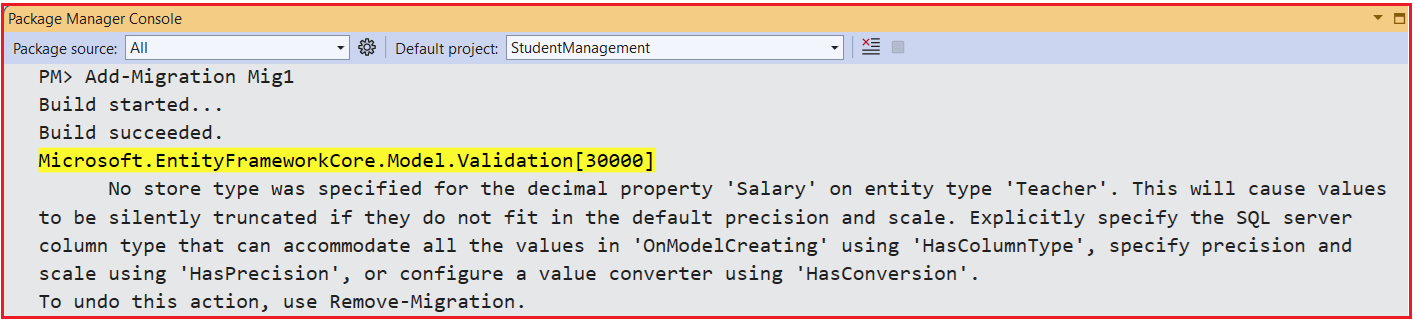
Warning for Decimal Property Precision (Salary)
The warning we see during migration generation is EF Core’s way of telling you, “Please be explicit about how you want decimal values stored in SQL Server, otherwise you may lose precision.” It is a safety alert, not an error. For properties like Salary, this matters because money values often require a well-defined precision and scale.
By default, EF Core maps decimal properties to decimal(18,2) in SQL Server:
- Precision 18 → up to 18 total digits.
- Scale 2 → 2 digits after the decimal point.
This is usually fine for typical currency values (e.g., 50000.75). However, if you try to store a value with more than 2 decimal places (e.g., 12345.98765), SQL Server will round it to 2 decimal places per its rules. This is what EF means by “silently truncated”; the database will accept the value but will trim excess precision, potentially causing a slight loss of precision in the fractional part.
EF Core shows this warning to encourage you to explicitly define the precision when you really care about exact decimal behaviour (for example, financial systems, scientific calculations, etc.). In our upcoming session, we will see how to overcome these warnings by using Data annotation and Fluent API configurations. For now, ignore the warning.
Updating the Database:
Again, open the Package Manager Console and run the Update-Database command. This command applies the pending migrations to the database, creating the necessary tables and schema based on your models. Upon successful execution, EF Core creates the StudentManagementDB database with the configured tables.
What are the Default Entity Framework Core Conventions?
EF Core’s Default Conventions cover a wide range of configurations. Let us understand these Default Entity Framework Core Conventions one by one.
Default Database Schema:
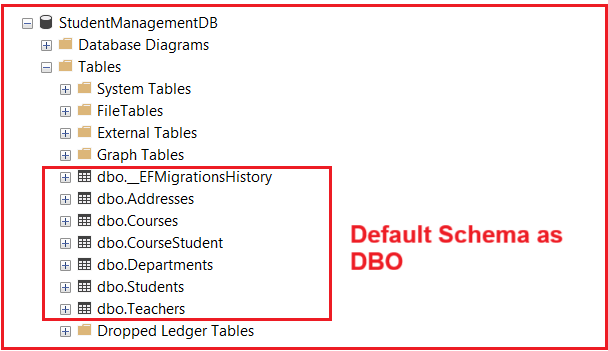
When EF Core creates tables in SQL Server, it places them under a schema. A schema is like a logical container or a folder inside the database that helps organize tables. If no schema is specified, EF Core uses the default schema provided by the database provider. For SQL Server, the default schema is always: dbo (dbo = database owner). So, if you have an entity named Student, EF Core will automatically create the table as: dbo.Students
This is why all your tables, Students, Teachers, Courses, Departments, and the migration history table appear under the dbo schema as shown in the image below.
What is a Schema in a Database?
A schema in a database is used to group and organize objects (tables, views, procedures) inside a single database. It helps you logically structure your database, control permissions, and avoid name conflicts when multiple teams or modules share the same database.
Think of a schema as a “namespace” or “folder” inside your database. Inside that folder, you keep related tables and other objects together. For example, you might have an hr schema for all HR-related tables (HR. Employees, HR. Salaries) and a separate sales schema for sales-related tables (Sales.Orders, Sales.Customers). In SQL Server, every table belongs to exactly one schema, and you always refer to a table by SchemaName.TableName (e.g., dbo.Students).
Schemas are also a common way to manage security. Instead of granting permissions table-by-table, you can grant permissions at the schema level (e.g., “this role can read everything in the reporting schema”).
Default Table Names:
EF Core needs a table name for every entity it maps to the database. By default, it uses the DbSet<TEntity> property name in your DbContext as the table name. If there is no DbSet for that entity, EF Core falls back to the entity class name. This means you control the default table name simply by naming your DbSet properties, without using any Data Annotations or Fluent API. For a better understanding, please have a look at the following image.

The many-to-many join table (for Student ↔ Course) is created automatically by EF Core and typically gets a name like CourseStudent, but notice that you did not create a DbSet<CourseStudent> for it; EF Core generates it internally.
Key Points:
- DbSet Name = Table Name: If a DbSet<TEntity> is defined, EF Core uses the exact name of that property as the table name (e.g., Students → table Students).
- No Automatic Pluralization Logic: EF Core does not try to singularize or pluralize names for you. If you name the DbSet StudentRecords, the table will be StudentRecords.
- Fallback to Entity Name: If there is no DbSet for an entity type, EF Core uses the entity class name as the table name (e.g., an entity AuditLog with no DbSet would map to the table AuditLog).
- Schema + Table: In SQL Server, the full name is SchemaName.TableName. With the default schema dbo, your tables appear as dbo.Students, dbo.Teachers, etc.
- Join Tables (Many-to-Many): For many-to-many relationships (like Student.Courses and Course.Students), EF Core automatically creates a join table (e.g., CourseStudent) even though you don’t have a DbSet or entity class for it.
Default Primary Key Name:
EF Core needs to know which property uniquely identifies each row in a table. Instead of forcing you to configure this manually, EF Core uses simple naming conventions to pick a primary key property for each entity automatically. This is why just writing StudentId, CourseId, or TeacherId is enough to create proper primary keys in the database without any extra configuration.
When EF Core scans your entity classes, it looks for a property whose name matches a known pattern. If it finds a property named Id or <EntityName>Id (for example, StudentId in Student, CourseId in Course, TeacherId in Teacher), it automatically treats that property as the Primary Key of the entity. For a better understanding, please have a look at the following diagram.
Key Points:
- Naming Convention: EF Core automatically selects the primary key based on the property name:
-
- Id
- <EntityName>Id (e.g., StudentId, CourseId, TeacherId)
-
- Precedence: If both Id and <EntityName>Id exist in the same entity, Id takes precedence as the primary key.
- Not Nullable: The primary key property is always configured as NOT NULL, because every row must have a key value.
- Primary Key Constraint: EF Core creates a Primary Key Constraint on that column, and SQL Server creates a corresponding clustered index by default.
- Column Order in UI: In SQL Server Management Studio, the primary key column usually appears at the top of the column list, which makes it easy to spot.
- Missing Key = Error: If EF Core cannot find a key property for an entity, it throws an exception when building the model or generating a migration, because every entity must have a primary key.
Default Foreign Key Column Name in EF Core:
In EF Core, a foreign key (FK) column connects one table (the dependent entity) to another (the principal entity). Instead of forcing you to configure the FK names manually, EF Core follows simple naming conventions to decide what the FK column will be called in the database.
Single Foreign Key (One-to-Many or One-to-One):
When EF Core looks at your entities, it tries to match:
- A Reference Navigation Property (like Student, Teacher, or Department)
- With a Scalar Property that looks like a foreign key (like StudentId, TeacherId, DepartmentId)
If it finds a property named <RelatedEntityName>Id (or <NavigationPropertyName>Id) whose type matches the principal key type, it treats that property as the foreign key.
That’s why, in your tables:
- dbo.Addresses have StudentId and TeacherId
- dbo.Courses have TeacherId and DepartmentId
- dbo.Teachers have DepartmentId
All of these are marked as FK, int, … in SQL Server Management Studio, because EF Core used the property names StudentId, TeacherId, and DepartmentId as foreign keys to Students, Teachers, and Departments, respectively. For a better understanding, please look at the following image:
Composite Foreign Key (Many-to-Many Relationship):
When two entities have a many-to-many relationship (e.g., Student and Course), EF Core automatically creates a third table called a junction table or join table. This table contains no additional data; it simply links the two related tables.
Since both entities participate equally in the relationship, the junction table contains two foreign key columns that together form a composite primary key. This ensures that the same student cannot be added to the same course more than once. In our model, both Student and Course entities have collection navigations as shown in the image below:
EF Core sees Student.Courses and Course.Students automatically, and set up a Many-To-Many relationship. To support this in the database, it creates a junction table named CourseStudent (you did not define this entity or DbSet anywhere), as shown in the image below:
In SQL Server, the generated table looks like this:
- Table: dbo.CourseStudent
-
- CoursesCourseId (PK, FK, int, not null)
- StudentsStudentId (PK, FK, int, not null)
-
Both columns are:
- Foreign keys pointing to the primary keys:
-
- CoursesCourseId → Courses.CourseId
- StudentsStudentId → Students.StudentId
-
- Primary key together (composite key): The combination (CoursesCourseId, StudentsStudentId) uniquely identifies each row, ensuring that the same student–course pair is not inserted twice.
The column names come from the navigation property name + primary key name:
- Courses navigation on Student + CourseId → CoursesCourseId
- Students navigation on Course + StudentId → StudentsStudentId
All of this is done automatically by conventions, without Data Annotations or Fluent API.
Default Constraints in EF Core:
When EF Core creates tables from our entities, it automatically adds constraints to enforce data rules in the database. These constraints make sure that rows are uniquely identified, relationships between tables are valid, and data remains consistent, without you having to write SQL manually.
Based on our model and default conventions, EF Core automatically generates:
- A Primary Key (PK) Constraint for each entity (e.g., Students, Departments, Teachers).
- Foreign Key (FK) Constraints wherever there is a relationship between entities (e.g., TeacherId in Courses).
- Additional constraints (like Unique Constraints) are only applied when you explicitly configure them via Fluent API or Data Annotations (for example, alternate keys or unique indexes).
Primary Key (PK) Constraint Name:
EF Core not only chooses which column is the primary key but also gives the primary key constraint a predictable default name. This naming convention makes it easy to recognize and reference constraints if you ever need to inspect or modify them directly in SQL.
By default, EF Core names the primary key constraint using the pattern: PK_<TableName>. So:
- For the Students table, the primary key constraint is named PK_Students.
- For the Departments table, the primary key constraint is named PK_Departments.
In SQL Server Management Studio, you can expand each table → Keys node to see these constraints:
- dbo.Students → Keys → PK_Students
- dbo.Departments → Keys → PK_Departments
This confirms that EF Core has correctly applied the convention and that each table has a well-defined primary key constraint. For better understanding, please see the image below.
Foreign Key (FK) Constraint Name:
A foreign key constraint specifies which column in the child (dependent) table must match a primary key column in the parent (principal) table. EF Core not only creates these constraints for you, but it also gives them a standard, predictable name, so they are easy to recognize when you inspect the database or write custom SQL scripts.
By default, EF Core follows this naming pattern for foreign key constraints: FK_<DependentTable>_<PrincipalTable>_<ForeignKeyColumn>
Where:
- <DependentTable> = the table that contains the foreign key column.
- <PrincipalTable> = the table that is being referenced.
- <ForeignKeyColumn> = the actual FK column name in the dependent table.
Using our database as an example:
- Addresses table
-
- StudentId → FK to Students(StudentId)
-
- Constraint name: FK_Addresses_Students_StudentId
-
- TeacherId → FK to Teachers(TeacherId)
-
- Constraint name: FK_Addresses_Teachers_TeacherId
-
- StudentId → FK to Students(StudentId)
-
- Courses table
-
- DepartmentId → FK to Departments(DepartmentId)
-
- Constraint name: FK_Courses_Departments_DepartmentId
-
- TeacherId → FK to Teachers(TeacherId)
-
- Constraint name: FK_Courses_Teachers_TeacherId
-
- DepartmentId → FK to Departments(DepartmentId)
-
- CourseStudent (many-to-many join table)
-
- CoursesCourseId → FK to Courses(CourseId)
-
- Constraint name: FK_CourseStudent_Courses_CoursesCourseId
-
- StudentsStudentId → FK to Students(StudentId)
-
- Constraint name: FK_CourseStudent_Students_StudentsStudentId
-
- CoursesCourseId → FK to Courses(CourseId)
-
You can see all of these under the Keys folder of each table in SQL Server Management Studio, as highlighted in the screenshot below.
Default Indexes in EF Core
Indexes help the database Find Rows Faster. When EF Core creates tables, it automatically adds indexes so that common operations, such as looking up a row by its primary key or joining tables via foreign keys, are efficient without you having to configure anything manually.
With SQL Server as the provider, EF Core’s conventions result in:
- A Clustered Index on the Primary Key of each table.
- A Non-Clustered Index on each Foreign Key Column.
So, in our StudentManagementDB database:
- dbo.Students have a clustered index named PK_Students on StudentId.
- dbo.Departments has a clustered index named PK_Departments on DepartmentId.
You can see these under the Indexes node in SQL Server Management Studio. These indexes are created automatically based on the key definitions in your EF Core model.
Primary Key Index in EF Core:
The primary key index is the index used to identify rows in a table uniquely. It is usually implemented as a clustered index, meaning the table’s data is physically ordered by this key, which makes lookups by primary key very fast.
When EF Core defines a primary key constraint (e.g., PK_Students on the Students table), SQL Server automatically creates a clustered index for that primary key, unless another clustered index already exists.
- Table: Students
-
- Primary key constraint: PK_Students on StudentId
- Index: PK_Students (Clustered) under Indexes
-
- Table: Departments
-
- Primary key constraint: PK_Departments on DepartmentId
- Index: PK_Departments (Clustered) under Indexes
-
In other words, the primary key constraint name and the primary key index name are the same by default (e.g., PK_Students).
Foreign Key Index in EF Core:
Indexes on foreign key columns make joins and lookups between related tables much faster. EF Core automatically adds these indexes for you, so common queries like “get all addresses for a student” or “get all courses for a department” run efficiently without any extra configuration.
Whenever EF Core detects a foreign key, it automatically creates a non-clustered index on that foreign key column. The default naming pattern for these indexes is: IX_<TableName>_<ForeignKeyColumn>
For example, in our database:
- Addresses table
-
- Foreign keys: StudentId, TeacherId
- Indexes created:
-
- IX_Addresses_StudentId (Non-Unique, Non-Clustered)
- IX_Addresses_TeacherId (Non-Unique, Non-Clustered)
-
-
- Courses table
-
- Foreign keys: DepartmentId, TeacherId
- Indexes created:
-
- IX_Courses_DepartmentId (Non-Unique, Non-Clustered)
- IX_Courses_TeacherId (Non-Unique, Non-Clustered)
-
-
You can see these under the Indexes node for each table in SQL Server Management Studio, as highlighted in the screenshot below.
Default Null and Not Null Columns in EF Core:
EF Core needs to know whether a column is allowed to store NULL values. It decides this automatically from our C# property types, so we rarely have to configure nullability manually. This behaviour is important because it controls which fields are mandatory and which are optional in our database.
EF Core examines each property in our entity and determines whether it is nullable in C#. Based on that, it generates the corresponding column in SQL Server as either NOT NULL or NULL.
Value Types
- Non-nullable value types (int, bool, decimal, DateTime, enum, etc.) → mapped as NOT NULL columns. EF assumes these values must always be present.
- Nullable value types (int?, bool?, decimal?, DateTime?, Gender?, etc.) → mapped as NULL columns. EF understands that these values are optional and can be missing.
Reference Types (strings, byte[], etc.)
With nullable reference types enabled in C#:
- Non-nullable reference types (string, byte[], etc., without ?) → mapped as NOT NULL columns.
- Nullable reference types (string?, byte[]?) → mapped as NULL columns.
So, our C# nullable annotations (? or no ?) directly control whether EF Core generates NULL or NOT NULL in the database. For a better understanding, please have a look at the image below, which shows the Student Entity and the corresponding Students database table.
Default Database Columns Order in EF Core:
When EF Core generates a table, it also determines the order in which the columns appear in the database. Column order does not affect how EF Core works, but it helps when you open the table in tools like SQL Server Management Studio and want the structure to look readable and predictable.
By convention, EF Core follows two simple rules when generating column order:
- Primary key column is always placed first. Regardless of where you declare the key property in your C# class, EF Core moves that column to the top when creating the table.
- All other properties keep the order in which they are declared in the entity class. After the primary key, columns appear in the same sequence as the properties in your C# model.
For example, the following is our Address entity, where the AddressId appears as the sixth property in the list. If you look at the database table, you will see that the AddressId is moved to the first position, since it is the primary key.
Default Cascade Behaviour in EF Core:
Cascade behaviour defines what happens to dependent rows when you delete a principal row. EF Core sets this up automatically using conventions, so relationships stay consistent without you manually handling every child record.
Default convention in EF Core (for relational providers like SQL Server):
- Required Relationship (FK NOT NULL) → DeleteBehavior.Cascade
-
- Deleting the principal will also delete the dependents.
-
- Optional Relationship (FK NULLABLE) → DeleteBehavior.ClientSetNull
-
- Dependent rows are not automatically deleted; their FK values are set to NULL in the EF change tracker (and you must ensure the database allows this).
-
- Many-to-many join tables → FKs from the join table to each principal use DeleteBehavior.Cascade
-
- Deleting a principal (e.g., a Student) removes its rows in the join table, but not the other principal (Course).
-
Required Relationship:
A required relationship means the dependent row cannot exist without its principal row because the foreign key column is NOT NULL. In such cases, EF Core’s default convention is to configure cascade delete:
If you delete the principal record, the database automatically deletes all related dependent records. In our model:
- The Course is the Dependent entity.
- The Teacher and the Department are Principal entities.
- In Courses, both TeacherId and DepartmentId are non-nullable (int, not int?), indicating required relationships.
How this appears in the database
EF Core configures these required relationships with cascade delete by default. The database script shows this as ON DELETE CASCADE. The generated SQL for the Courses table contains:
What this means in simple terms:
- FK_Courses_Departments_DepartmentId
-
- DepartmentId in Courses must match a valid DepartmentId in Departments.
- ON DELETE CASCADE → If a department is deleted, all courses that belong to that department are also deleted.
-
- FK_Courses_Teachers_TeacherId
-
- TeacherId in Courses must match a valid TeacherId in Teachers.
- ON DELETE CASCADE → If a teacher is deleted, all courses taught by that teacher are also deleted.
-
Optional Relationship (Department–Teacher):
An optional relationship means the dependent row may or may not be linked to a principal row, because the foreign key column is nullable. In EF Core, this usually represents a “soft” relationship: the dependent can survive even if the principal is removed.
In our Teacher model:
- The Teacher is the Dependent Entity.
- Department is the Principal Entity.
- DepartmentId is nullable (int?), so a teacher may be assigned to a department, but it’s not mandatory.
How EF Core configures this
In EF Core, an optional relationship uses DeleteBehavior.ClientSetNull by default. Conceptually, this means:
- When we delete a Department through EF (via DbContext) and call SaveChanges(), EF will:
- Set Teacher.DepartmentId = null in tracked Teacher entities that reference that department.
- Then delete the Department row.
- The teachers are not deleted; they simply lose their department reference.
How this appears in the database
The generated SQL for the Teachers table contains:
Notice that there is no ON DELETE CASCADE clause here.
- On the database side, this means the FK uses SQL Server’s default behaviour, which is effectively NO ACTION:
-
- SQL Server will not automatically delete teachers when a department is deleted.
- If you try to delete a department directly in SQL while teachers still reference it (i.e., DepartmentId is not null), the delete will fail with an FK constraint error.
-
- When you delete via EF Core, the framework first sets DepartmentId to NULL on the related teachers (because the property is nullable) and then issues the delete for the department. This avoids the FK violation and leaves the teachers in place with DepartmentId = NULL.
Many-to-Many Relationship (Students ↔ Courses):
In a many-to-many relationship, each Student can enroll in many Courses, and each Course can have many Students. EF Core represents this by automatically creating a join table (also called a junction table) that holds only the links between the two entities. This join table serves as the dependent in two required relationships: one to Students and one to Courses.
How EF Core handles delete behaviour
For many-to-many relationships, EF Core:
- Creates a join table (in our case, CourseStudent).
- Adds two required foreign keys:
-
- CoursesCourseId → Courses.CourseId
- StudentsStudentId → Students.StudentId
-
- Configures cascade delete from each principal to the join table, but does not cascade deletes across to the other principal.
In simple words:
- Deleting a Student removes only that student’s rows from CourseStudent, not any rows from Courses.
- Deleting a Course removes only that course’s rows from CourseStudent, not any rows from Students.
What you see in the generated SQL
Your CourseStudent table has the following constraints:
This means:
- If a row is deleted from Courses, SQL Server automatically deletes all rows from CourseStudent where CoursesCourseId matches that course.
- If a row is deleted from Students, SQL Server automatically deletes all rows from CourseStudent where StudentsStudentId matches that student.
- Neither operation touches the other principal table. Deleting a student does not delete any courses; deleting a course does not delete any students.
Default Identity Columns in EF Core (SQL Server)
When EF Core creates tables in SQL Server, it also decides how primary key values are generated. For simple integer keys, EF Core’s default convention is to map them to identity columns.
An identity column is an INT (or BIGINT) column where SQL Server automatically generates the next sequential value (e.g., 1, 2, 3, …) whenever a new row is inserted. This means we don’t have to set StudentId, TeacherId, etc. in our code manually. SQL Server handles generating unique key values, and EF Core automatically reads them back after SaveChanges().
How EF Core decides to use Identity
When EF Core builds the model for SQL Server, it applies the following rules by convention:
- If an entity has a single primary key property of a numeric type (usually int or long).
- EF Core configures that property as ValueGeneratedOnAdd, which SQL Server represents as an IDENTITY(1,1) column.
In other words, a property like: public int StudentId { get; set; } recognized as the primary key of Student, will become: StudentId INT IDENTITY(1,1) NOT NULL in the Students table.
Each new Student inserted gets the next identity value automatically (1, 2, 3, …). For composite keys or keys of non-numeric types (for example, the join table CourseStudent where the key is (CoursesCourseId, StudentsStudentId)), EF Core does not use an identity column; instead, the key values come from the related entities.
Examples from our StudentManagementDB
In our model, the following entities have single int primary keys, so EF Core maps them to identity columns by default:
- Student.StudentId → StudentId INT IDENTITY(1,1) NOT NULL in dbo.Students.
- Teacher.TeacherId → TeacherId INT IDENTITY(1,1) NOT NULL in dbo.Teachers.
- Course.CourseId → CourseId INT IDENTITY(1,1) NOT NULL in dbo.Courses.
- Department.DepartmentId → DepartmentId INT IDENTITY(1,1) NOT NULL in dbo.Departments.
- Address.AddressId → AddressId INT IDENTITY(1,1) NOT NULL in dbo.Addresses.
When we call SaveChanges() after adding a new Student, we do not need to set StudentId ourselves. EF Core sends an INSERT without an explicit StudentId, SQL Server generates the next identity value, and EF Core updates the Student.StudentId property with that generated value so that we can use it immediately in our code.
Shadow Properties (Default Shadow Foreign Key Creation)
In Entity Framework Core, a shadow property is a property that exists in the EF Core model but does not exist as a CLR property in our C# entity class. EF Core still maps this shadow property to a real column in the database, but we never see it on the class itself.
A very common place where shadow properties appear is with foreign keys. If we define a navigation property (like Department) but do not define the corresponding FK property (like DepartmentId), EF Core automatically creates a hidden (shadow) FK property for you.
Example: Teacher – Department Optional Relationship
Consider the Teacher entity. The C# class no longer has a DepartmentId property. However, EF Core still needs a foreign key to manage the relationship between Teacher and Department. So, by convention, EF Core:
- Detects the navigation property Department.
- Does not find a matching CLR property named DepartmentId.
- Automatically creates a shadow FK property called DepartmentId of type int? in the model.
When we generate and apply a migration, the Teachers table still contains a DepartmentId column and a foreign key constraint (e.g., FK_Teachers_Departments_DepartmentId), even though DepartmentId is no longer a property in the Teacher class. That column is now mapped to the shadow property in the EF model.
How EF Core Discovers Relationships Without Configuration
One of the most significant advantages of EF Core is that it can discover relationships automatically using only our C# classes and a few simple naming rules. We do not need Data Annotations or Fluent API to tell EF Core “this is a one-to-many” or “this is many-to-many” in most common cases. EF Core examines our navigation properties, foreign key property names, and shadow foreign keys to determine the relationships between entities.
In simple terms: If we name our properties correctly and use collections for “many” sides, EF Core will automatically detect and configure the relationships for us.
Step 1 – EF Core Looks for Navigation Properties
First, EF Core scans all entity types registered in our DbContext and looks for Navigation Properties:
- A reference navigation is a single entity reference: Example: Course.Teacher, Teacher.Department, Address.Student, Address.Teacher.
- A collection navigation is a collection of entities: Example: Teacher.Courses, Department.Teachers, Student.Addresses, Course.Students, Student.Courses.
In our model:
- Teacher has Courses and Addresses.
- Department has Teachers.
- Student has Courses and could have Addresses.
- Course has Teacher, Department, and Students.
- Address has Student and Teacher.
From this, EF Core sees potential relationships like:
- Teacher ↔ Course
- Department ↔ Teacher
- Student ↔ Course
- Student ↔ Address
- Teacher ↔ Address
Even before looking at foreign keys, EF already knows: “these entities are related.”
Step 2 – EF Core Matches Foreign Key Properties
Next, EF Core looks for Scalar Properties that look like foreign keys based on their names and types. The main patterns are:
- <PrincipalEntityName>Id. Example: TeacherId, DepartmentId, StudentId.
- <NavigationPropertyName>Id. Example, CoursesCourseId, StudentsStudentId in the join table for many-to-many.
In our model, some examples:
- Course.TeacherId matches the Teacher.TeacherId is the primary key.
- Course.DepartmentId matches the Department.DepartmentId is the primary key.
- Address.StudentId matches Student.StudentId.
- Address.TeacherId matches Teacher.TeacherId.
- Teacher.DepartmentId matches Department.DepartmentId (when you include it).
- In the join table CourseStudent, EF Core generates:
-
- CoursesCourseId (FK to Course.CourseId)
- StudentsStudentId (FK to Student.StudentId)
-
If EF Core finds a property whose name and type follow these patterns, it treats that property as a foreign key and links it with the corresponding navigation property and principal key.
Step 3 – EF Core Creates Shadow Foreign Keys When Needed
When EF Core finds a navigation property but no matching FK property, it creates a shadow foreign key. The FK exists in the EF model and in the database, but not as a C# property.
For example, if you keep only: public virtual Department? Department { get; set; } on Teacher and remove DepartmentId, EF Core will:
- Create a shadow FK property named DepartmentId in the model.
- Generate a DepartmentId column and a foreign key constraint (FK_Teachers_Departments_DepartmentId) in the Teachers table.
- Still treat Teacher as having an optional relationship to Department.
So, relationships can be discovered:
- From FK + navigation (most explicit).
- From FK only (navigation can be missing).
- From navigation only (EF creates a shadow FK).
All of this happens automatically through conventions, which is why our database schema (tables, keys, FKs, join tables, cascade behaviours) matches our C# model even though we haven’t written a single line of Fluent API or Data Annotation configuration yet.
Limitations of Default EF Core Conventions
Default EF Core conventions are very powerful. They automatically configure table names, primary keys, foreign keys, relationships, data types, identity columns, and cascade behaviours just from your entity classes and property names.
However, real-world applications rarely fit perfectly into these defaults. As business rules become more specific, we quickly reach the limits of what conventions can do on their own. The following are the main limitations of Default Conventions, explained using our Student Management example, and why we need Data Annotations or Fluent API.
Naming Limitations (Tables, Columns, Schemas)
Default conventions:
- Use the entity class name or DbSet name as the table name (Student → Students, Teacher → Teachers).
- Use the property name as the column name (FullName, HireDate, DepartmentId).
- Use the default provider schema (dbo in SQL Server).
Limitations:
- They cannot express organization-specific naming standards (for example, table prefixes like tbl_Student, suffixes like _Master, or different languages).
- They cannot adapt automatically to a legacy database where table and column names may be very different from the C# model.
- They cannot decide that different entities should live in different schemas (for example, academics.Courses, hr.Teachers) based on your business modules.
Data Type and Length Defaults Are Generic
Default conventions:
- Map string to nvarchar(max).
- Map decimal to decimal(18,2).
- Map enums (e.g., Gender) to int.
- Map DateTime to datetime2, byte[] to varbinary(max), etc.
Limitations:
- They do not know our domain constraints:
- A student’s FirstName or teacher’s FullName is unlikely to need nvarchar(max).
- A salary field may need a different precision than decimal(18,2), or we may want more decimal places for GPA.
- They cannot choose more restrictive or more appropriate types based on business semantics (for example, using char(10) for a fixed code, or a smaller decimal range for marks).
Conventions simply pick safe, generic types and sizes; they do not tune the model for correctness or performance.
Limited Expression of “Required vs Optional” Beyond Nullability
Default conventions:
- Use C# nullability to decide NULL vs NOT NULL:
- Non-nullable types (int, decimal, DateTime, string) → NOT NULL.
- Nullable types (int?, decimal?, DateTime?, string?) → NULL.
Limitations:
- They cannot express business-level “required” rules that go beyond type nullability:
- A Student.Email might be required by business rules even if you initially represent it as string?.
- An optional field by domain (e.g., ProfilePicture) might be represented as non-nullable in code for convenience.
- They do not capture validation semantics like “length between 1 and 50”, “must be a valid email”, “must be greater than zero”, etc.
- Nullability is the only aspect they infer automatically.
Primary Keys, Alternate Keys, and Composite Keys
Default conventions:
- Infer a single primary key from Id or <EntityName>Id (e.g., StudentId, TeacherId).
- Expect one simple primary key per entity.
Limitations:
- They do not automatically discover composite primary keys (for example, a key made of multiple properties).
- They do not create alternate keys or unique business keys. For example, they do not know that DepartmentName should be unique, or that RollNumber should uniquely identify a student apart from StudentId.
- They assume a fairly standard “one integer key per entity” model and do not infer more complex key structures on their own.
Indexing: Only Keys and Foreign Keys Are Indexed
Default conventions:
- Create an index for primary keys (as part of the primary key definition).
- Create non-clustered indexes for foreign keys (e.g., IX_Courses_TeacherId, IX_Addresses_StudentId).
Limitations:
- They do not know our query patterns. For example, if we frequently search students by LastName, or teachers by HireDate, conventions will not create indexes for these properties automatically.
- They do not create unique indexes except when they are tied to primary keys.
- They cannot optimize for performance hotspots; they just index what is structurally required (PKs and FKs).
Cascade Behaviour and Delete Rules Are Generic
Default conventions:
- Use cascade delete for required relationships (e.g., Course.TeacherId).
- Use client-set-null / no-action semantics for optional relationships (Teacher.DepartmentId?, Address.StudentId?).
Limitations:
- They cannot adapt to business-specific delete rules:
- In some systems, deleting a teacher should never automatically delete courses, even if the FK is required.
- In other systems, you may want very strict “no delete if any child exists” rules.
- They do not understand safety vs convenience trade-offs:
- Default cascade behaviour might be too aggressive in large, complex graphs.
- Default non-cascade behaviour might be too restrictive for others.
Conventions only provide a generic rule based on FK nullability, not on domain semantics.
Default Conventions Cannot Identify One-to-One Relationships Automatically
Conventions correctly detect:
- One-to-many
- Many-to-many
But one-to-one relationships require explicit clarity, because:
- They look similar to one-to-many
- EF Core cannot determine cardinality from navigation properties alone
- It cannot infer which side owns the FK
- It cannot identify required vs optional ends
Therefore, default conventions often misinterpret one-to-one relationships or fail to configure them properly.
Inheritance and Advanced Mapping Choices
When you introduce inheritance (e.g., a base Person class with Student and Teacher derived types), default conventions:
- Map the hierarchy using Table-Per-Hierarchy (TPH):
- One table for all derived types.
- A discriminator column to distinguish between types.
Limitations:
- They do not support alternative mapping strategies by convention:
- Table-Per-Type (TPT)
- Table-Per-Concrete-Type (TPC)
- They cannot decide which strategy is better for performance, clarity, or compatibility with the existing schema.
Default EF Core Conventions only understand structural patterns, not business rules, domain rules, or advanced database requirements, so they cannot infer custom names, precision, constraints, complex relationships, business logic, or legacy schema mappings.
About the Author: Pranaya Rout
Pranaya Rout has published more than 3,000 articles in his 11-year career. Pranaya Rout has very good experience with Microsoft Technologies, Including C#, VB, ASP.NET MVC, ASP.NET Web API, EF, EF Core, ADO.NET, LINQ, SQL Server, MYSQL, Oracle, ASP.NET Core, Cloud Computing, Microservices, Design Patterns and still learning new technologies.