
Back to: Microsoft Azure Tutorials
Kubernetes and Azure Kubernetes Service (AKS) Fundamentals
In the previous chapters, we learned how to containerize an ASP.NET Core Web API using Docker and deploy it on Azure App Service. This approach works very well for small and medium-sized applications. For example, if we have a single Web API application and want to run it inside a container, Docker and Azure App Service are often sufficient.
However, as applications grow and start handling thousands or millions of users, managing containers manually becomes difficult. Applications may require:
- Multiple Services: Large applications are often divided into smaller services, such as User Service, Product Service, Order Service, and Payment Service, which need to be managed efficiently together.
- High Availability: High availability ensures that the application remains accessible to users even if one server, container, or application instance fails.
- Automatic Scaling: Automatic scaling increases or decreases the number of running application instances based on traffic or resource usage.
- Rolling Updates: Rolling updates allow us to deploy a new version of the application gradually, while the older version continues to serve users until the update is complete.
- Faster Recovery from Failures: Faster recovery means failed containers or application instances can be automatically restarted or replaced without requiring manual intervention.
This is where Kubernetes becomes very important. Kubernetes helps us manage Containerized Applications automatically. It helps with Scaling, Load Balancing, Restarting Failed Containers, Updating Applications Without Downtime, and Managing Communication Between Services.
In this chapter, we will cover fundamental concepts of Kubernetes and Azure Kubernetes Service (AKS). We will first understand:
- Why Kubernetes is needed
- What problems Kubernetes solves
- How Kubernetes works
- What AKS is
- How Docker, Kubernetes, and AKS are connected
What are Containerized Applications?
Containerized applications are software applications that are packaged together with everything they need to run, such as the application code, runtime, libraries, dependencies, and configuration files, inside a lightweight unit called a container. Because the container includes all required components, the application behaves consistently across environments such as a developer’s machine, a testing server, or a production cloud platform. Docker is commonly used to create and run containerized applications.
Why is Kubernetes needed after Docker?
Docker is a very powerful tool that helps us package applications into containers. A Docker container contains:
- Application Code: Application code is the actual source code and compiled files that define what the software does. It is the source code written by developers that contains the application’s business logic and functionality.
- Runtime: Runtime is the environment required to execute the application, such as the .NET runtime for ASP.NET Core applications.
- Dependencies: Dependencies are the external packages, frameworks, or tools that the application needs to function correctly, such as the .NET runtime, ASP.NET Core framework, Entity Framework Core provider for SQL Server, and NuGet packages referenced by the project.
- Libraries: Libraries are reusable collections of prewritten code that help the application perform specific tasks without building everything from scratch, such as Serilog for logging, Mapperly for object mapping, FluentValidation for request validation, or iText7 for PDF generation.
- Configuration: Configuration contains application settings such as database connection strings, API keys, ports, and environment-specific values.
This means the same application can run consistently on:
- Developer Machines: Developer machines are the local computers where developers write, build, and test the application during development.
- Testing Environments: Testing Environments are systems used by QA teams or automated tools to verify that the application works correctly before release.
- Staging Servers: Staging servers are production-like environments where the application is tested one final time before going live.
- Production Servers: Production servers are the live systems where the application runs for real users.
That means Docker is a powerful tool that helps us package an ASP.NET Core Web API into a containerized unit, allowing it to run consistently across different environments.
For small applications, running one or two containers manually is manageable. But problems start when the application grows. For a better understanding, please have a look at the following image.
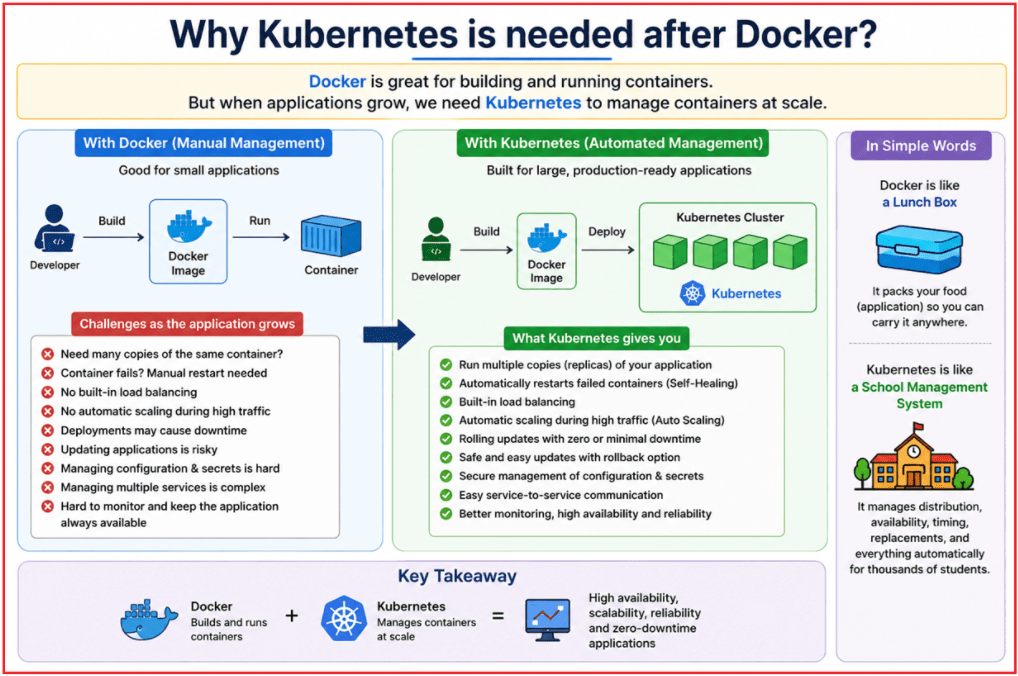
Real-Time Problems in Large Applications
Suppose our ASP.NET Core Web API application becomes widely used and starts receiving heavy traffic. In that case, we may need:
- 10 or 20 copies of the same Web API: Multiple container instances of the same API may be required to handle a large number of user requests smoothly.
- Multiple microservices such as Product Service, Order Service, Payment Service, and Notification Service: A large application may be split into several independent ASP.NET Core Web APIs, and all of them need to run, communicate, and be managed properly.
- Automatic restart when a container fails: If a container crashes due to an unexpected error, the system should automatically restart it without waiting for manual intervention.
- Load balancing between multiple containers: Incoming requests should be distributed across all healthy API containers so that no single container becomes overloaded.
- Deployment with minimal or no downtime: New versions of the Web API should be released without making the application unavailable to users.
- Automatic scaling during high traffic: When request volume increases, more API containers should be started automatically based on configured scaling rules.
- Secure configuration and secret management: Sensitive values such as database passwords, API keys, and connection strings should be stored and supplied securely rather than hardcoded in the application.
Docker is Excellent:
Docker alone cannot automatically manage all these production-level requirements. Docker is excellent for:
- Creating Containers: It helps package an ASP.NET Core Web API into an image.
- Running Containers: It helps start that image as a live container.
However, Docker by itself does not provide a complete system for managing hundreds or thousands of containers in production. As the application grows, we need automation to manage containers continuously and reliably.
We need a system that can:
- Monitor running containers
- Restart failed containers
- Scale applications automatically when autoscaling rules are configured
- Distribute traffic across healthy instances
- Handle application updates safely
- Keep services available even during failures or deployments
That system is Kubernetes.
So:
- Docker packages and runs applications inside containers.
- Kubernetes efficiently manages, scales, monitors, and updates those containers in production.
Real-Life Analogy: Docker and Kubernetes
Think of Docker as a ready-made food packet prepared in a kitchen. Each packet contains everything needed for a complete meal, so it can be sent and served anywhere without needing to be prepared again. Similarly, Docker packages an ASP.NET Core Web API with its application files, runtime, and dependencies, ensuring it runs consistently on any supported machine.
Now imagine a busy railway station food service where thousands of passengers need meals every day. Just preparing food packets is not enough. A proper management system is needed to:
- Decide how many packets are required
- Send packets to the right platforms
- Arrange extra packets when demand increases
- Replace missing or damaged packets
- Ensure service continues smoothly without delay
This management system is like Kubernetes. It manages many Docker containers, keeps them available, replaces failed ones, scales them up or down based on demand, and ensures the application continues to run properly.
Simple Understanding
- Docker prepares and packages the application, like a complete food packet.
- Kubernetes manages many packaged applications at scale, like a railway food service system that efficiently manages thousands of meal packets.
What is Container Orchestration?
Before learning Kubernetes in detail, we should first understand Container Orchestration. The word orchestration means organizing, coordinating, and managing multiple things so that they work together smoothly.
In a small application, we may run only one or two Docker containers, and managing them manually is not difficult. For example, we can manually start, stop, or restart a container as needed.
However, in a large production application, we may have:
- Many containers
- Multiple services
- Containers running on different servers
- Thousands or millions of user requests
- Frequent application updates
- Containers that may fail unexpectedly
Managing all these containers manually becomes Difficult, Time-Consuming, and Error-Prone. Container orchestration solves this problem by automatically managing containerized applications in a reliable and organized way.
What Does Container Orchestration Handle?
Container orchestration helps with:
- Starting containers when the application needs to run.
- Stopping containers when they are no longer required.
- Restarting failed containers automatically.
- Running multiple copies of the same application for better performance and availability.
- Distributing traffic across healthy containers.
- Scaling containers up or down based on demand.
- Updating applications safely with minimal or no downtime.
- Managing configuration values and secrets securely.
Why Container Orchestration Is Needed
Suppose we have an ASP.NET Core Web API application running inside Docker containers.
Initially, we may have:
- 1 Product API container
- 1 Order API container
- 1 Payment API container
This is still manageable.
But as the application grows, we may need:
- 10 Product API containers
- 8 Order API containers
- 5 Payment API containers
- Containers running across multiple servers
- Automatic scaling during high traffic
- Continuous monitoring and recovery
At this stage, manually managing containers is no longer practical. We need a platform that can manage them automatically. That platform is called a Container Orchestration Platform.
How Kubernetes Fits In
Kubernetes is one of the most popular Container Orchestration Platforms. It automatically manages containers and ensures that applications run reliably in large environments. Kubernetes decides:
- Where a container should run — on which server or node.
- How many copies of a container should run — based on application needs.
- What to do if a container crashes or becomes unhealthy — restart or replace it automatically.
- How users should access the application — through services and networking.
- How traffic should be distributed — across multiple container instances.
- How configuration values should be supplied — using configuration objects.
- How secrets should be handled securely — such as passwords, keys, and tokens.
- How updates should be released safely — with rolling deployments and minimal downtime.
In Simple Words
Container Orchestration is the automatic management of containers in a large environment. It provides:
- Automatic Deployment: Container orchestration can automatically start the required application containers on available servers without manual setup.
- Automatic Scaling: It can increase or decrease the number of running containers based on application traffic or resource demand.
- Automatic Recovery: If a container fails or becomes unhealthy, the orchestration system can automatically restart or replace it.
- Automatic Traffic Management: It can distribute incoming user requests across multiple healthy containers to avoid overloading a single instance.
- Automatic Configuration and Secret Handling: It securely provides containers with required settings, connection strings, passwords, API keys, and other sensitive values without hardcoding them.
Kubernetes is one of the most widely used platforms for doing all of this efficiently. For a better understanding, please have a look at the following image:
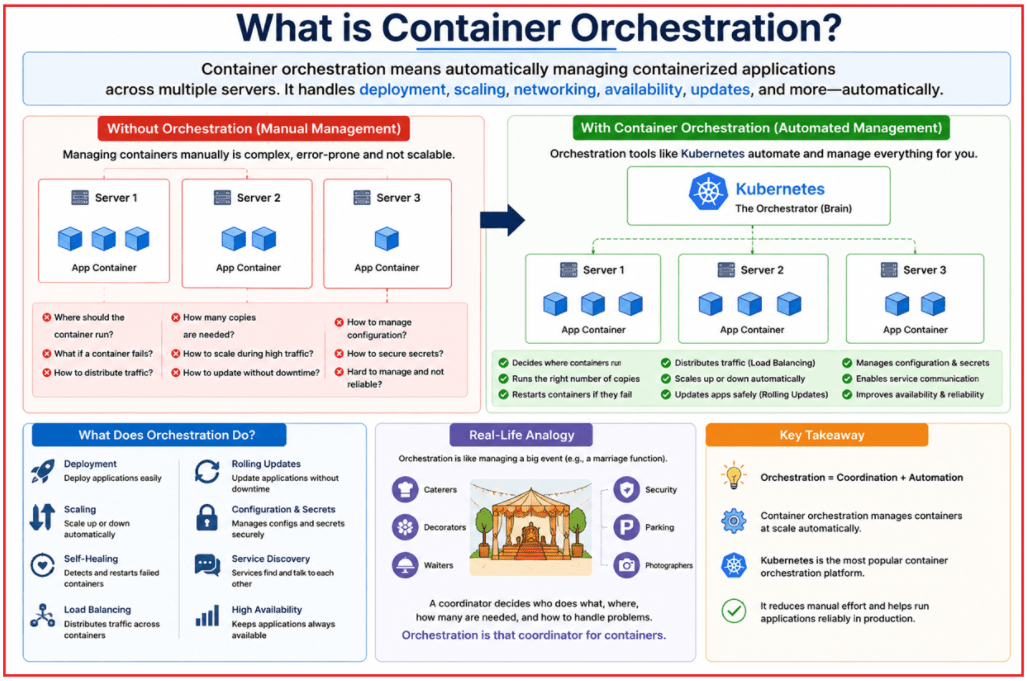
Real-Life Analogy: Event Management Team
Think of a large wedding or college event where many teams are involved:
- Decorators
- Cooks
- Waiters
- Photographers
- Security staff
- Parking staff
- Guest coordinators
If every team works independently without any coordination, the event can quickly become disorganized. Guests may not know where to go, food may be delayed, parking may become crowded, and problems may remain unresolved.
To avoid this, an event manager coordinates everything. The manager decides:
- Which team should work where
- How many waiters are needed in each area
- What to do if food service is delayed
- How to handle a sudden increase in guests
- How parking should be managed
- How guests should be guided properly
In the same way, Kubernetes acts like the event manager for containers. It coordinates containerized applications, determines where they should run, ensures sufficient instances are available, replaces failed containers, manages traffic, and keeps the overall system running smoothly.
Note: Container orchestration is the automatic coordination and management of containers, and Kubernetes is the platform that performs this job at scale.
What is Kubernetes?
Kubernetes, also known as K8s, is an open-source container orchestration platform used to manage containerized applications in a reliable and automated way. In simple words, Kubernetes helps us run, monitor, scale, and maintain application containers in production without managing each container manually.
For example, in an ASP.NET Core Web API application, Kubernetes can make sure that the required number of API containers are always running, replace failed containers, distribute user requests across healthy containers, and safely deploy new application versions with minimal or no downtime.
Kubernetes Helps Us To
- Deploy containerized applications on available servers automatically
- Run multiple copies of an application to handle more users and improve availability
- Restart failed containers if an application instance crashes
- Scale applications by increasing or decreasing running containers as needed
- Distribute traffic across multiple healthy application instances
- Update applications safely using controlled deployment strategies
- Keep applications highly available even when some containers or servers fail
Docker and Kubernetes Work Together
Kubernetes does not create container images. Its job is to run and manage containers based on images that are already created.
For example:
- Docker creates an image of our ASP.NET Core Web API.
- Azure Container Registry (ACR) stores that image in the cloud.
- Kubernetes pulls the image from the registry and runs it as one or more containers.
So, the relationship is simple:
- Docker packages the application into a container image.
- Kubernetes manages how that containerized application runs in production.
How Our Thinking Changes with Kubernetes
When we use Docker alone, we usually think:
- Run one container of my ASP.NET Core Web API.
But when we use Kubernetes, we think in terms of application management:
- I want three copies of my Web API always running.
- If one copy stops, another one should be created automatically.
- If many users send requests, traffic should be shared across all running copies.
- If a new version is released, the update should happen safely without disturbing users.
- If traffic increases, additional copies should be started according to the scaling rules.
This is the key difference: Docker helps us run containers, while Kubernetes helps us manage containers intelligently at scale. For a better understanding, please have a look at the following image.

Simple Example
Suppose we have an ASP.NET Core Web API Docker image stored in Azure Container Registry. Kubernetes can:
- Pull the image from Azure Container Registry
- Run the image as containers inside the Kubernetes cluster
- Create multiple copies of the same Web API container
- Restart or replace containers if they fail
- Expose the application as a service so users can access it
- Distribute traffic between multiple healthy container instances
- Update the application when a new image version is deployed
Because of this, Kubernetes makes it much easier to operate containerized applications in real production environments.
Real-Life Analogy: Kubernetes
Think of a large hotel with many rooms, staff members, guests, and daily operations. The hotel owner may provide the building, rooms, furniture, and facilities, but a hotel manager ensures that everything runs smoothly every day. The manager:
- Make sure enough rooms are available for guests
- Assigns staff where they are needed
- Arranges replacements if a staff member is unavailable
- Handles more guests during busy seasons
- Ensures services continue without disruption
- Coordinates cleaning, security, reception, and maintenance
Similarly:
- Docker prepares the application container, like a fully furnished hotel room ready for use.
- Kubernetes manages many running containers, like a hotel manager ensuring that all services remain available, balanced, and reliable.
Kubernetes does not create the application itself, just as the hotel manager does not build the rooms. Instead, Kubernetes ensures that the application containers are running properly, available to users, and adjusted automatically when conditions change.
What Problems Does Kubernetes Solve?
When an application is small, running one or two Docker containers is usually easy to manage. But in real production environments, applications often run across many containers, multiple servers, and several services. At that stage, manually checking failures, handling traffic, scaling containers, and deploying new versions becomes difficult.
Kubernetes solves these operational problems by automatically managing containerized applications. It helps keep applications available, scalable, stable, and easier to maintain in production.
1. Container Failure and Self-Healing
In production, a container may stop working for many reasons, such as:
- Application crash
- Memory exhaustion
- Server problem
- Wrong configuration
- Network interruption
- Failure of a dependent service
If we manage containers manually, someone must identify the failure and restart the container. This is slow and risky, especially in large applications. Kubernetes handles this automatically. If a container becomes unhealthy, Kubernetes can restart it or replace it with a new one, based on the workload configuration, restart policy, and health checks.
In Simple words, Kubernetes continuously checks whether containers are healthy and takes corrective action when something goes wrong.
2. Scaling Applications
As the number of users increases, a single container may not be able to handle all requests efficiently.
For example, an e-commerce application may receive heavy traffic during:
- Festival sales
- Flash offers
- Product launches
- Special discount campaigns
In such cases, we may need multiple running copies of the same Web API so that the application can serve more users without slowing down. Kubernetes makes this easier by running additional copies of the application when needed. These copies work together to handle more traffic.
In Simple words, Kubernetes helps increase or decrease the number of running application instances based on demand.
3. Load Balancing
Suppose we are running five copies of the same ASP.NET Core Web API. If all user requests go only to one container, that container may become overloaded while the others remain underused. Kubernetes solves this problem by distributing incoming traffic across the available application instances. This helps:
- Reduce overload on a single container
- Improve response time
- Use resources more efficiently
- Increase application availability
In Simple words, Kubernetes sends user requests to available containers in a balanced way instead of overloading only one container.
4. Deployment Management
In real applications, we regularly release new versions for:
- Bug fixes
- New features
- Security patches
- Performance improvements
If we completely stop the old version before starting the new version, users may experience downtime. This is not acceptable for production systems.
Kubernetes supports rolling updates, where it gradually replaces old containers with new ones. Some old instances continue serving users while new instances start running. Once the new version becomes healthy, the remaining old instances are replaced.
In Simple words, Kubernetes helps deploy new application versions safely with minimal or no downtime.
5. High Availability
Production applications should remain accessible as much as possible. Users should not lose access just because one container crashes or one server becomes unavailable. Kubernetes helps maintain high availability by ensuring that the desired number of application instances are always running.
For example, if we configure Kubernetes to keep three copies of our Web API running:
- It keeps three instances active.
- If one instance fails, Kubernetes creates another one.
- The application continues serving users without major interruption.
In Simple words, Kubernetes keeps the required number of application copies running so that the application remains available even during failures.
What Is Azure Kubernetes Service?
Azure Kubernetes Service (AKS) is Microsoft Azure’s managed Kubernetes platform. It allows us to deploy and run containerized applications on Kubernetes without having to build and maintain the entire Kubernetes infrastructure ourselves. In simple terms, AKS provides a ready-to-use Kubernetes environment on Azure, so we can focus more on our applications and less on cluster administration.
Kubernetes itself is powerful, but creating and maintaining a Kubernetes cluster from scratch requires significant infrastructure knowledge. With AKS, Azure handles much of the underlying Kubernetes platform management, while we focus mainly on deploying, scaling, securing, and maintaining our applications.
Why Is Manual Kubernetes Setup Complex?
If we set up Kubernetes manually, we need to plan, configure, and maintain many infrastructure-level components, such as:
- Control plane: The central part of Kubernetes that makes scheduling and management decisions.
- Worker nodes: The virtual machines where our application containers actually run.
- Cluster setup: Installing and configuring all Kubernetes components correctly.
- Networking: Ensuring Pods, Services, and external users can communicate properly.
- Scaling: Increasing or decreasing cluster capacity when workloads change.
- Monitoring: Tracking application health, cluster health, logs, and metrics.
- Cloud integration: Connecting Kubernetes with storage, networking, registries, and other cloud services.
Handling all these tasks manually is possible, but it is time-consuming and complex, especially for application developers.
How AKS Simplifies Kubernetes
AKS reduces much of this operational burden. Azure manages the Kubernetes Control Plane, including its availability and core management, so we do not need to install or maintain it ourselves.
With AKS, we can focus more on:
- Deploying applications
- Managing Pods and Services
- Scaling workloads
- Configuring application settings
- Monitoring application behavior
- Integrating with Azure services
In other words, Kubernetes provides container orchestration, and AKS offers Kubernetes as a managed Azure service.
Why Use AKS?
AKS is useful when we want the power of Kubernetes along with the convenience of Azure-managed infrastructure. It is especially helpful for:
- Microservices-based applications
- Containerized ASP.NET Core Web APIs
- Applications that require high availability
- Applications that need to scale during high traffic
- Applications that require rolling updates
- Cloud-native applications
- Applications that need to integrate with Azure services
For example, an e-commerce platform with separate Product, Order, Payment, and Notification Services can use AKS to deploy, scale, and manage each service independently. For a better understanding, please have a look at the following image:
Real-Life Analogy: AKS as a Managed Office Building
Think of running Kubernetes manually like building and managing your own office campus. You must arrange:
- Security
- Power backup
- Water supply
- Internet infrastructure
- Building maintenance
- Parking
- Emergency systems
- Access control
Only after managing all of that can your team start doing actual business work.
Now think of AKS like renting space in a Professionally Managed Office Building. The building management takes care of much of the underlying infrastructure, while you focus on:
- Your employees
- Your products
- Your customers
- Your day-to-day business operations
Similarly:
- With self-managed Kubernetes, we handle much more of the cluster infrastructure ourselves.
- With AKS, Azure manages much of the Kubernetes platform complexity, allowing us to focus more on deploying, scaling, and operating our applications.
So, AKS is Microsoft Azure’s managed Kubernetes service that helps us run containerized applications on Azure with less infrastructure management and better integration with cloud services.
Docker vs Kubernetes vs AKS
Docker, Kubernetes, and Azure Kubernetes Service (AKS) are closely related technologies, but they solve different problems in the journey of deploying and managing containerized applications. Understanding their roles separately makes the overall container deployment process much easier to understand.
In an ASP.NET Core Web API deployment workflow:
- Docker helps us package an application into a container image and run that image as a container.
- Kubernetes helps us manage many running containers automatically in production environments.
- AKS gives us a managed Kubernetes environment on Microsoft Azure, so we do not have to set up and maintain the full Kubernetes infrastructure ourselves.
Understanding the Difference in Simple Questions
We can understand their roles through three simple questions:
- Docker answers: How do I package my ASP.NET Core Web API and run it inside a container?
- Kubernetes answers: How do I manage many container instances reliably, automatically, and at scale in production?
- AKS answers: How do I use Kubernetes on Azure without manually managing the complete Kubernetes platform?
ASP.NET Core Web API Example
Suppose we have an ASP.NET Core Web API application.
Docker Role
- Docker creates a container image of the Web API.
- That image contains the published application files, the required runtime, and everything needed to start the API.
- Docker can run that image as a container on a machine.
Kubernetes Role
Once the image is available, Kubernetes can:
- Run multiple copies of that Web API container
- Keep the desired number of instances running
- Restart or replace failed containers
- Expose the application using Services
- Distribute user traffic across healthy instances
- Scale the application when demand increases
- Deploy new versions safely using rolling updates
AKS Role
AKS provides the Azure-hosted Kubernetes platform where all of this can run. Instead of manually setting up Kubernetes control plane components, cluster infrastructure, and Azure integration, AKS provides a managed environment, allowing us to focus more on deploying and operating our application.
For a better understanding, please have a look at the following image:
Real-Life Analogy: Restaurant, Restaurant Manager, and Managed Food Court
Let us understand Docker, Kubernetes, and AKS using a simple restaurant example.
Docker: The Food Parcel Box
Docker is like a food parcel box. A parcel box neatly packs food so it can be delivered safely and consistently to different places. Similarly, Docker packages our application with everything it needs to run properly inside a container.
Kubernetes: The Restaurant Manager
Now imagine a busy restaurant receiving hundreds of orders. Packaging food is not enough. Someone must manage the overall operation. The restaurant manager decides:
- How many cooks are required
- How orders should be distributed
- What to do if one cook is unavailable
- How to handle rush-hour demand
- How to keep the service running smoothly
- How to introduce menu changes without disrupting all work
Similarly, Kubernetes manages containers by deciding:
- How many application instances should run
- What to do if one instance fails
- How traffic should be distributed
- When more instances are needed
- How new versions should be rolled out safely
AKS: The Managed Food Court
Now imagine that the restaurant operates inside a managed food court. The food court management handles common infrastructure such as:
- Electricity
- Security
- Cleaning
- Maintenance
- Common facilities
- Basic building operations
Because of this, the restaurant owner can focus more on:
- Food quality
- Customers
- Staff
- Daily business operations
Similarly, AKS handles much of the Kubernetes platform management on Azure, allowing us to focus more on:
- Deploying applications
- Scaling workloads
- Managing releases
- Serving users reliably
So: Docker packages the application, Kubernetes manages it at scale, and AKS provides the managed Azure platform where Kubernetes runs.
FAQs
Question 1: Does Kubernetes replace Docker?
No. Kubernetes does not replace Docker’s core purpose. Docker is commonly used to build and package an application into a container image, while Kubernetes is used to deploy, run, scale, and manage containers in production.
In simple words, Docker prepares the application package, and Kubernetes manages how that packaged application runs at scale.
Question 2: Does Kubernetes create Container Images?
No. Kubernetes does not create container images. Container images are built using tools such as Docker, BuildKit, or cloud-based services such as Azure Container Registry Tasks.
Once an image is available in ACR, Kubernetes can:
- Pull the image
- Start containers from it
- Run multiple instances
- Replace failed instances
- Deploy updated versions safely
Question 3: Is AKS different from Kubernetes?
No. AKS is not a separate container orchestration technology. Azure Kubernetes Service (AKS) is Microsoft Azure’s managed Kubernetes service.
This means AKS provides real Kubernetes capabilities, while Azure handles much of the platform-level infrastructure management, including the managed control plane and Azure integration, so we can focus more on deploying and operating applications.
Question 4: Do we need Kubernetes for every application?
No. Kubernetes is not necessary for every application. For a small ASP.NET Core Web API, a simple deployment using Azure App Service, Azure Container Apps, or even a single Docker container may be sufficient.
Kubernetes becomes useful when an application requires:
- Scaling to handle growing traffic
- High availability with multiple running instances
- Multiple services or microservices
- Automatic recovery from failures
- Rolling updates with minimal downtime
- Production-grade container management
Conclusion
In this chapter, we learned:
- Why Kubernetes is needed after Docker
- What container orchestration means
- What Kubernetes is
- What problems Kubernetes solves
- What Azure Kubernetes Service (AKS) is
- The difference between Docker, Kubernetes, and AKS
In simple words: Docker packages the application, Kubernetes manages the containers, and AKS makes Kubernetes easier to run on Microsoft Azure.
About the Author: Pranaya Rout
Pranaya Rout has published more than 3,000 articles in his 11-year career. Pranaya Rout has very good experience with Microsoft Technologies, Including C#, VB, ASP.NET MVC, ASP.NET Web API, EF, EF Core, ADO.NET, LINQ, SQL Server, MYSQL, Oracle, ASP.NET Core, Cloud Computing, Microservices, Design Patterns and still learning new technologies.
If you want a complete practical understanding of Kubernetes and Azure Kubernetes Service (AKS) Fundamentals with real-time examples, container orchestration concepts, scaling, self-healing, load balancing, Docker vs Kubernetes vs AKS, and production deployment concepts, then watch the complete step-by-step video tutorial here:
🎥 Watch the Complete Kubernetes & AKS Video Tutorial: https://youtu.be/t2mjkWP58xw
This video will help you build a strong foundation in Kubernetes and AKS before moving to advanced real-time deployments and microservices architecture on Microsoft Azure.