
Back to: Microsoft Azure Tutorials
Create a Complete ASP.NET Core Web API Project with SQL Server Using EF Core
In this chapter, we will build a complete, working ASP.NET Core Web API project from scratch in Visual Studio using .NET 8, SQL Server, and Entity Framework Core. We will create a controller-based API, connect it to SQL Server via EF Core, generate the database schema using migrations, and test all CRUD endpoints via Swagger.
What We Are Going to Build
We will build a simple but real-time Product Management API. It will support the following operations:
- Get all products
- Get product by ID
- Create a new product
- Update an existing product
- Delete a product
We will use the following layered structure:
- Controllers → Receive HTTP requests
- Services → Contain business logic
- Repositories → Interact with the database
- DbContext → EF Core bridge between code and SQL Server
- SQL Server → Stores the data permanently
Software Required
Before starting, make sure you have the following installed:
- Visual Studio 2022
- .NET 8 SDK
- SQL Server
- SQL Server Management Studio (SSMS)
Step 1: Create the Project in Visual Studio
Open Visual Studio 2022. Then follow these steps:
- Click Create a new project
- Search for ASP.NET Core Web API
- Select ASP.NET Core Web API
- Click Next
Now enter the following:
- Project Name: ProductManagementApi
- Solution Name: ProductManagementApi
- Location: choose your preferred folder
Click Next.
In the additional information screen, select:
- Framework: .NET 8.0
- Keep Use controllers checked
- Keep Enable OpenAPI support checked
Then click Create.
Step 2: Run the Project Once
Before changing anything, run the project once.
Press:
- Ctrl + F5 or F5
The browser should open Swagger.
This confirms that:
- The Web API project was created successfully
- The ASP.NET Core runtime is working
- The initial template is fine
Now stop the application.
Step 3: Delete the Template Sample Files
The project is created with sample files such as WeatherForecast.
Delete these files:
- WeatherForecast.cs
- Controllers/WeatherForecastController.cs
We are removing them because we want to build our own real project from scratch.
Step 4: Install Required NuGet Packages
Now we need EF Core packages for SQL Server and migrations.
Open: Tools → NuGet Package Manager → Package Manager Console
Run these commands:
- Install-Package Microsoft.EntityFrameworkCore.SqlServer -Version 8.0.0
- Install-Package Microsoft.EntityFrameworkCore.Tools -Version 8.0.0
Why these packages?
- Microsoft.EntityFrameworkCore.SqlServer allows EF Core to work with SQL Server.
- Microsoft.EntityFrameworkCore.Tools give us migration commands such as Add-Migration and Update-Database.
Step 5: Create the Project Folders
Now, create the following folders in the project:
- Models
- DTOs
- Data
- Repositories
- Services
Your project structure will now look like this:
- Controllers
- Data
- DTOs
- Models
- Repositories
- Services
- Program.cs
- appsettings.json
This structure is simple, clean, and very suitable for a beginner-level real-time project.
Step 6: Create the Product Entity
Inside the Models folder, create a class named Product.cs.
using System.ComponentModel.DataAnnotations;
namespace ProductManagementApi.Models
{
    public class Product
    {
        public int Id { get; set; }

        [Required]
        [StringLength(100)]
        public string Name { get; set; } = null!;

        [StringLength(500)]
        public string? Description { get; set; }

        [Range(0.01, 1000000)]
        public decimal Price { get; set; }

        [Range(0, 100000)]
        public int StockQuantity { get; set; }

        [Required]
        [StringLength(50)]
        public string Category { get; set; } = null!;

        public bool IsActive { get; set; } = true;

        public DateTime CreatedOn { get; set; } = DateTime.UtcNow;
    }
}
Explanation
This class represents the Products table in SQL Server. Each property becomes a database column:
- Id → primary key
- Name → product name
- Description → optional details
- Price → product price
- StockQuantity → available quantity
- Category → product category
- IsActive → active/inactive flag
- CreatedOn → creation date
Step 7: Create DTO Classes
DTO means Data Transfer Object. DTOs are used to control what data enters and leaves the API. Instead of exposing the database entity directly everywhere, we use DTOs for cleaner API contracts.
Create ProductCreateDto.cs
Inside the DTOs folder, create a class named ProductCreateDto.cs. This DTO is used to receive the product details from the client when creating a new product.
using System.ComponentModel.DataAnnotations;
namespace ProductManagementApi.DTOs
{
    public class ProductCreateDto
    {
        [Required(ErrorMessage = "Product Name is required.")]
        [StringLength(100, MinimumLength = 2, ErrorMessage = "Product Name must be between 2 and 100 characters.")]
        public string Name { get; set; } = null!;

        [StringLength(500, ErrorMessage = "Description cannot exceed 500 characters.")]
        public string? Description { get; set; }

        [Range(0.01, 1000000, ErrorMessage = "Price must be greater than 0 and cannot exceed 10,00,000.")]
        public decimal Price { get; set; }

        [Range(0, 100000, ErrorMessage = "Stock Quantity must be between 0 and 100000.")]
        public int StockQuantity { get; set; }

        [Required(ErrorMessage = "Category is required.")]
        [StringLength(50, MinimumLength = 2, ErrorMessage = "Category must be between 2 and 50 characters.")]
        public string Category { get; set; } = null!;
    }
}
Create ProductUpdateDto.cs
Inside the DTOs folder, create a class named ProductUpdateDto.cs. This DTO is used to receive the updated product details from the client when modifying an existing product.
using System.ComponentModel.DataAnnotations;
namespace ProductManagementApi.DTOs
{
    public class ProductUpdateDto
    {
        [Required(ErrorMessage = "Product Id is required.")]
        public int Id { get; set; }

        [Required(ErrorMessage = "Product Name is required.")]
        [StringLength(100, MinimumLength = 2, ErrorMessage = "Product Name must be between 2 and 100 characters.")]
        public string Name { get; set; } = null!;

        [StringLength(500, ErrorMessage = "Description cannot exceed 500 characters.")]
        public string? Description { get; set; }

        [Range(0.01, 1000000, ErrorMessage = "Price must be greater than 0 and cannot exceed 10,00,000.")]
        public decimal Price { get; set; }

        [Range(0, 100000, ErrorMessage = "Stock Quantity must be between 0 and 100000.")]
        public int StockQuantity { get; set; }

        [Required(ErrorMessage = "Category is required.")]
        [StringLength(50, MinimumLength = 2, ErrorMessage = "Category must be between 2 and 50 characters.")]
        public string Category { get; set; } = null!;

        public bool IsActive { get; set; }
    }
}
Create ProductResponseDto.cs
Inside the DTOs folder, create a class named ProductResponseDto.cs. This DTO is used to send product details from the API back to the client in a structured format.
namespace ProductManagementApi.DTOs
{
    public class ProductResponseDto
    {
        public int Id { get; set; }
        public string Name { get; set; } = null!;
        public string? Description { get; set; }
        public decimal Price { get; set; }
        public int StockQuantity { get; set; }
        public string Category { get; set; } = null!;
        public bool IsActive { get; set; }
        public DateTime CreatedOn { get; set; }
    }
}
Why Are We Using DTOs?
Because:
- Request data can be validated separately
- Response shape can be controlled
- Future changes become easier
- Sensitive or unnecessary entity fields can be hidden
- Reduce over-posting and under-posting problems
This is a very good habit from the beginning.
Step 8: Create the DbContext Class
Inside the Data folder, create ApplicationDbContext.cs. The ApplicationDbContext is the main EF Core class that manages database interaction.
using Microsoft.EntityFrameworkCore;
using ProductManagementApi.Models;

namespace ProductManagementApi.Data
{
    public class ApplicationDbContext : DbContext
    {
        // Pass DbContext options to the base DbContext class
        public ApplicationDbContext(DbContextOptions<ApplicationDbContext> options)
            : base(options)
        {
        }

        // Represents the Products table in the SQL Server database
        public DbSet<Product> Products { get; set; }

        // Configure model rules and seed initial data
        protected override void OnModelCreating(ModelBuilder modelBuilder)
        {
            // Call the base class implementation first
            base.OnModelCreating(modelBuilder);

            // Configure Price column precision as decimal(18,2)
            modelBuilder.Entity<Product>()
                .Property(p => p.Price)
                .HasPrecision(18, 2);

            // Seed initial product data into the Products table
            modelBuilder.Entity<Product>().HasData(
                new Product { Id = 1, Name = "Wireless Mouse", Description = "2.4 GHz wireless optical mouse", Price = 799.00m, StockQuantity = 25, Category = "Electronics", IsActive = true, CreatedOn = new DateTime(2026, 1, 1, 0, 0, 0, DateTimeKind.Utc) },
                new Product { Id = 2, Name = "Notebook", Description = "200-page ruled notebook", Price = 120.00m, StockQuantity = 100, Category = "Stationery", IsActive = true, CreatedOn = new DateTime(2026, 1, 2, 0, 0, 0, DateTimeKind.Utc) }
            );
        }
    }
}
Explanation
DbContext is the main EF Core class that manages database interaction.
It helps with:
- Querying data
- Inserting data
- Updating data
- Deleting data
- Mapping classes to tables
EF Core is the ORM layer that lets .NET developers work with the database using .NET objects instead of writing all data access code manually.
Step 9: Create the Repository Layer
Now we create the repository layer that will talk to the database.
Create IProductRepository.cs
Inside the Repositories folder, create IProductRepository.cs. This interface defines the contract for Product data access operations
using ProductManagementApi.Models;
namespace ProductManagementApi.Repositories
{
    public interface IProductRepository
    {
        // Returns all products from the database
        Task<List<Product>> GetAllAsync();

        // Returns a single product based on the given Id
        Task<Product?> GetByIdAsync(int id);

        // Adds a new product to the DbContext
        Task AddAsync(Product product);

        // Marks an existing product as modified
        void Update(Product product);

        // Marks a product for deletion
        void Delete(Product product);

        // Saves all pending changes to the database
        Task SaveAsync();
    }
}
Create ProductRepository.cs
Inside the Repositories folder, create ProductRepository.cs. This class implements the product-related database operations.
using Microsoft.EntityFrameworkCore;
using ProductManagementApi.Data;
using ProductManagementApi.Models;

namespace ProductManagementApi.Repositories
{
    public class ProductRepository : IProductRepository
    {
        // Private field to access the EF Core DbContext
        private readonly ApplicationDbContext _context;

        // Logger instance used to log repository-level activities
        private readonly ILogger<ProductRepository> _logger;

        // Constructor injection to receive the ApplicationDbContext instance
        public ProductRepository(ApplicationDbContext context, ILogger<ProductRepository> logger)
        {
            _context = context;
            _logger = logger;
        }

        // Returns all products from the database in descending order of Id
        public async Task<List<Product>> GetAllAsync()
        {
            try
            {
                _logger.LogInformation("Fetching all products from the database.");

                return await _context.Products
                    .AsNoTracking() // Improves performance for read-only operations
                    .OrderByDescending(p => p.Id)
                    .ToListAsync();
            }
            catch (Exception ex)
            {
                _logger.LogError(ex, "Error occurred while fetching all products from the database.");
                throw;
            }
        }

        // Returns a single product matching the specified Id
        public async Task<Product?> GetByIdAsync(int id)
        {
            try
            {
                _logger.LogInformation("Fetching product with Id {ProductId} from the database.", id);

                return await _context.Products
                    .FirstOrDefaultAsync(p => p.Id == id);
            }
            catch (Exception ex)
            {
                _logger.LogError(ex, "Error occurred while fetching product with Id {ProductId}.", id);
                throw;
            }
        }

        // Adds a new product to the DbContext
        public async Task AddAsync(Product product)
        {
            try
            {
                _logger.LogInformation("Adding product named {ProductName} to the DbContext.", product.Name);

                await _context.Products.AddAsync(product);
            }
            catch (Exception ex)
            {
                _logger.LogError(ex, "Error occurred while adding product named {ProductName}.", product.Name);
                throw;
            }
        }

        // Marks the given product as updated in the DbContext
        public void Update(Product product)
        {
            try
            {
                _logger.LogInformation("Updating product with Id {ProductId} in the DbContext.", product.Id);

                _context.Products.Update(product);
            }
            catch (Exception ex)
            {
                _logger.LogError(ex, "Error occurred while updating product with Id {ProductId}.", product.Id);
                throw;
            }
        }

        // Marks the given product for deletion from the DbContext
        public void Delete(Product product)
        {
            try
            {
                _logger.LogInformation("Deleting product with Id {ProductId} from the DbContext.", product.Id);

                _context.Products.Remove(product);
            }
            catch (Exception ex)
            {
                _logger.LogError(ex, "Error occurred while deleting product with Id {ProductId}.", product.Id);
                throw;
            }
        }

        // Saves all inserted, updated, or deleted changes to the database
        public async Task SaveAsync()
        {
            try
            {
                _logger.LogInformation("Saving changes to the database.");

                await _context.SaveChangesAsync();

                _logger.LogInformation("Database changes saved successfully.");
            }
            catch (DbUpdateException ex)
            {
                _logger.LogError(ex, "Database update error occurred while saving changes.");
                throw;
            }
            catch (Exception ex)
            {
                _logger.LogError(ex, "Unexpected error occurred while saving changes to the database.");
                throw;
            }
        }
    }
}
What this repository does
This class contains only data access logic.
- It does not decide business rules.
- It only performs database-related work.
Step 10: Create the Service Layer
Now we create the service layer that will contain business logic.
Create IProductService.cs
Inside the Services folder, create IProductService.cs. This interface defines the business operations for Product management.
using ProductManagementApi.DTOs;

namespace ProductManagementApi.Services
{
    public interface IProductService
    {
        // Returns all products as response DTOs
        Task<List<ProductResponseDto>> GetAllProductsAsync();

        // Returns a single product as response DTO based on the given Id
        Task<ProductResponseDto?> GetProductByIdAsync(int id);

        // Creates a new product using the incoming create DTO
        Task<ProductResponseDto> CreateProductAsync(ProductCreateDto dto);

        // Updates an existing product based on the update DTO
        Task<bool> UpdateProductAsync(ProductUpdateDto dto);

        // Deletes an existing product based on the given Id
        Task<bool> DeleteProductAsync(int id);
    }
}
Create ProductService.cs
Inside the Services folder, create ProductService.cs. This class contains the business logic for Product operations.
using ProductManagementApi.DTOs;
using ProductManagementApi.Models;
using ProductManagementApi.Repositories;

namespace ProductManagementApi.Services
{
    public class ProductService : IProductService
    {
        // Repository instance used to perform database operations
        private readonly IProductRepository _repository;

        // Logger instance used to log service-level activities
        private readonly ILogger<ProductService> _logger;

        // Constructor injection to receive the repository dependency
        public ProductService(IProductRepository repository, ILogger<ProductService> logger)
        {
            _repository = repository;
            _logger = logger;
        }

        // Returns all products after converting them into response DTOs
        public async Task<List<ProductResponseDto>> GetAllProductsAsync()
        {
            try
            {
                _logger.LogInformation("Service call started for fetching all products.");

                // Get all product entities from the database through the repository
                var products = await _repository.GetAllAsync();

                // Create an empty list to store the converted DTO objects
                var productDtos = new List<ProductResponseDto>();

                // Loop through each product entity
                foreach (var product in products)
                {
                    // Convert the Product entity into ProductResponseDto
                    var dto = MapToResponseDto(product);

                    // Add the converted DTO to the final list
                    productDtos.Add(dto);
                }

                // Return the list of ProductResponseDto objects
                return productDtos;
            }
            catch (Exception ex)
            {
                _logger.LogError(ex, "Service error occurred while fetching all products.");
                throw;
            }
        }

        // Returns a single product by Id after converting it into response DTO
        public async Task<ProductResponseDto?> GetProductByIdAsync(int id)
        {
            try
            {
                _logger.LogInformation("Service call started for fetching product with Id {ProductId}.", id);

                var product = await _repository.GetByIdAsync(id);

                // Return null if product is not found
                if (product == null)
                    return null;

                return MapToResponseDto(product);
            }
            catch (Exception ex)
            {
                _logger.LogError(ex, "Service error occurred while fetching product with Id {ProductId}.", id);
                throw;
            }
        }

        // Creates a new Product entity from the create DTO and saves it to the database
        public async Task<ProductResponseDto> CreateProductAsync(ProductCreateDto dto)
        {
            try
            {
                _logger.LogInformation("Service call started for creating a new product named {ProductName}.", dto.Name);

                var product = new Product
                {
                    Name = dto.Name,
                    Description = dto.Description,
                    Price = dto.Price,
                    StockQuantity = dto.StockQuantity,
                    Category = dto.Category,
                    IsActive = true, // New product is active by default
                    CreatedOn = DateTime.UtcNow // Store the product creation time in UTC
                };

                // Add the new product to the database
                await _repository.AddAsync(product);

                // Persist the changes
                await _repository.SaveAsync();

                // Return the created product as response DTO
                return MapToResponseDto(product);
            }
            catch (Exception ex)
            {
                _logger.LogError(ex, "Service error occurred while creating product named {ProductName}.", dto.Name);
                throw;
            }
        }

        // Updates an existing product if found
        public async Task<bool> UpdateProductAsync(ProductUpdateDto dto)
        {
            try
            {
                _logger.LogInformation("Service call started for updating product with Id {ProductId}.", dto.Id);

                var existingProduct = await _repository.GetByIdAsync(dto.Id);

                // Return false if the product does not exist
                if (existingProduct == null)
                    return false;

                // Update product properties with new values
                existingProduct.Name = dto.Name;
                existingProduct.Description = dto.Description;
                existingProduct.Price = dto.Price;
                existingProduct.StockQuantity = dto.StockQuantity;
                existingProduct.Category = dto.Category;
                existingProduct.IsActive = dto.IsActive;

                // Mark the entity as updated
                _repository.Update(existingProduct);

                // Save changes to the database
                await _repository.SaveAsync();

                return true;
            }
            catch (Exception ex)
            {
                _logger.LogError(ex, "Service error occurred while updating product with Id {ProductId}.", dto.Id);
                throw;
            }
        }

        // Deletes an existing product if found
        public async Task<bool> DeleteProductAsync(int id)
        {
            try
            {
                _logger.LogInformation("Service call started for deleting product with Id {ProductId}.", id);

                var existingProduct = await _repository.GetByIdAsync(id);

                // Return false if the product does not exist
                if (existingProduct == null)
                    return false;

                // Mark the entity for deletion
                _repository.Delete(existingProduct);

                // Save changes to the database
                await _repository.SaveAsync();

                return true;
            }
            catch (Exception ex)
            {
                _logger.LogError(ex, "Service error occurred while deleting product with Id {ProductId}.", id);
                throw;
            }
        }

        // Converts Product entity into ProductResponseDto
        private static ProductResponseDto MapToResponseDto(Product product)
        {
            return new ProductResponseDto
            {
                Id = product.Id,
                Name = product.Name,
                Description = product.Description,
                Price = product.Price,
                StockQuantity = product.StockQuantity,
                Category = product.Category,
                IsActive = product.IsActive,
                CreatedOn = product.CreatedOn
            };
        }
    }
}
What this service does
This class contains business logic.
For example:
- How product data is mapped
- What should happen before saving
- How the update logic should work
- What response should be returned
This makes the controller thin and clean.
Step 11: Configure the Connection String in appsettings.json
Open appsettings.json and replace it with this:
{
  "ConnectionStrings": {
    "DefaultConnection": "Server=LAPTOP-6P5NK25R\\SQLSERVER2022DEV;Database=ProductManagementDB;Trusted_Connection=True;TrustServerCertificate=True;MultipleActiveResultSets=true"
  },
  "Logging": {
    "LogLevel": {
      "Default": "Information",
      "Microsoft.AspNetCore": "Warning"
    }
  },
  "AllowedHosts": "*"
}
Step 12: Configure Services in Program.cs
Now open Program.cs and replace it with the following:
using Microsoft.EntityFrameworkCore;
using ProductManagementApi.Data;
using ProductManagementApi.Repositories;
using ProductManagementApi.Services;

namespace ProductManagementApi
{
    public class Program
    {
        public static void Main(string[] args)
        {
            var builder = WebApplication.CreateBuilder(args);

            // Clear default logging providers
            builder.Logging.ClearProviders();

            // Add Console logging provider
            builder.Logging.AddConsole();

            // Add Debug logging provider
            builder.Logging.AddDebug();

            // Add controller support to the dependency injection container
            builder.Services.AddControllers()
             .AddJsonOptions(options =>
             {
                 // Disable camelCase so JSON property names remain the same as C# property names
                 options.JsonSerializerOptions.PropertyNamingPolicy = null;
             });

            builder.Services.AddEndpointsApiExplorer();
            builder.Services.AddSwaggerGen();

            // Register ApplicationDbContext and configure it to use SQL Server
            builder.Services.AddDbContext<ApplicationDbContext>(options =>
                options.UseSqlServer(builder.Configuration.GetConnectionString("DefaultConnection")));

            // Register repository and service classes for dependency injection
            builder.Services.AddScoped<IProductRepository, ProductRepository>();
            builder.Services.AddScoped<IProductService, ProductService>();

            var app = builder.Build();

            // Enable Swagger middleware for all environment
            app.UseSwagger();
            app.UseSwaggerUI();
            //if (app.Environment.IsDevelopment())
            //{
            //    app.UseSwagger();
            //    app.UseSwaggerUI();
            //}

            // Redirect all HTTP requests to HTTPS
            app.UseHttpsRedirection();

            // Adds authorization middleware to the request pipeline
            app.UseAuthorization();

            // Maps controller endpoints to incoming HTTP requests
            app.MapControllers();

            // Starts the application
            app.Run();
        }
    }
}
What this code does
This file is the application’s startup entry point.
It does the following:
- Adds controller support
- Enables OpenAPI / Swagger
- Reads the connection string from the configuration
- Registers the DbContext
- Registers repository and service classes with dependency injection
- Maps controllers
Step 13: Create Products Controller
Inside the Controllers folder, create ProductsController.cs.
using Microsoft.AspNetCore.Mvc;
using ProductManagementApi.DTOs;
using ProductManagementApi.Services;

namespace ProductManagementApi.Controllers
{
    // Defines the base route for this controller as: api/products
    [Route("api/[controller]")]

    // Enables automatic model validation and API-specific behaviors
    [ApiController]
    public class ProductsController : ControllerBase
    {
        // Service instance used to handle product-related business logic
        private readonly IProductService _service;

        // Logger instance used to log controller-level activities
        private readonly ILogger<ProductsController> _logger;

        // Constructor injection to receive the product service dependency
        public ProductsController(IProductService service, ILogger<ProductsController> logger)
        {
            _service = service;
            _logger = logger;
        }

        // Handles HTTP GET request to return all products
        [HttpGet]
        public async Task<ActionResult<IEnumerable<ProductResponseDto>>> GetProducts()
        {
            try
            {
                _logger.LogInformation("HTTP GET request received for fetching all products.");

                // Call the service layer to fetch all products
                var products = await _service.GetAllProductsAsync();

                // Return 200 OK response with the product list
                return Ok(products);
            }
            catch (Exception ex)
            {
                _logger.LogError(ex, "Error occurred while processing GET all products request.");
                return StatusCode(500, "An error occurred while fetching products.");
            }
        }

        // Handles HTTP GET request to return a single product by Id
        [HttpGet("{id:int}")]
        public async Task<ActionResult<ProductResponseDto>> GetProductById(int id)
        {
            try
            {
                _logger.LogInformation("HTTP GET request received for fetching product with Id {ProductId}.", id);

                // Call the service layer to fetch the product by Id
                var product = await _service.GetProductByIdAsync(id);

                // Return 404 Not Found if the product does not exist
                if (product == null)
                    return NotFound($"Product with Id {id} not found.");

                // Return 200 OK response with the product data
                return Ok(product);
            }
            catch (Exception ex)
            {
                _logger.LogError(ex, "Error occurred while processing GET product by Id request for Id {ProductId}.", id);
                return StatusCode(500, $"An error occurred while fetching product with Id {id}.");
            }
        }

        // Handles HTTP POST request to create a new product
        [HttpPost]
        public async Task<ActionResult<ProductResponseDto>> CreateProduct(ProductCreateDto dto)
        {
            try
            {
                _logger.LogInformation("HTTP POST request received for creating a product named {ProductName}.", dto.Name);

                // Call the service layer to create the product
                var createdProduct = await _service.CreateProductAsync(dto);

                // Return 201 Created response with location header and created product data
                return CreatedAtAction(
                    nameof(GetProductById),
                    new { id = createdProduct.Id },
                    createdProduct);
            }
            catch (Exception ex)
            {
                _logger.LogError(ex, "Error occurred while processing CREATE product request for product {ProductName}.", dto.Name);
                return StatusCode(500, "An error occurred while creating the product.");
            }
        }

        // Handles HTTP PUT request to update an existing product by Id
        [HttpPut("{id:int}")]
        public async Task<IActionResult> UpdateProduct(int id, ProductUpdateDto dto)
        {
            try
            {
                _logger.LogInformation("HTTP PUT request received for updating product with Id {ProductId}.", id);

                if (id != dto.Id)
                {
                    _logger.LogInformation("Id Missmatch, Id: {ProductId} and Dto.Id {Dto.Id}", id, dto.Id);
                    return BadRequest("Id Missmatch");

                }

                // Call the service layer to update the product
                var updated = await _service.UpdateProductAsync(dto);

                // Return 404 Not Found if the product does not exist
                if (!updated)
                    return NotFound($"Product with Id {id} not found.");

                // Return 204 No Content when update is successful
                return NoContent();
            }
            catch (Exception ex)
            {
                _logger.LogError(ex, "Error occurred while processing UPDATE product request for Id {ProductId}.", id);
                return StatusCode(500, $"An error occurred while updating product with Id {id}.");
            }
        }

        // Handles HTTP DELETE request to remove an existing product by Id
        [HttpDelete("{id:int}")]
        public async Task<IActionResult> DeleteProduct(int id)
        {
            try
            {
                _logger.LogInformation("HTTP DELETE request received for deleting product with Id {ProductId}.", id);

                // Call the service layer to delete the product
                var deleted = await _service.DeleteProductAsync(id);

                // Return 404 Not Found if the product does not exist
                if (!deleted)
                    return NotFound($"Product with Id {id} not found.");

                // Return 204 No Content when deletion is successful
                return NoContent();
            }
            catch (Exception ex)
            {
                _logger.LogError(ex, "Error occurred while processing DELETE product request for Id {ProductId}.", id);
                return StatusCode(500, $"An error occurred while deleting product with Id {id}.");
            }
        }
    }
}
Step 14: Create Health Check Controller
Inside the Controllers folder, create HealthController.cs.
using Microsoft.AspNetCore.Mvc;
namespace ProductManagementApi.Controllers
{
    [Route("api/[controller]")]
    [ApiController]
    public class HealthController : ControllerBase
    {
        private readonly ILogger<HealthController> _logger;
        public HealthController(ILogger<HealthController> logger)
        {
            _logger = logger;
        }

        [HttpGet]
        public IActionResult Get()
        {
            _logger.LogInformation("Health check endpoint was called successfully.");

            return Ok(new
            {
                Status = "Healthy",
                Message = "Product Management API is running successfully."
            });
        }
    }
}
Step 15: Create the Database with Migrations
Now we will generate the SQL Server database from our model classes. Open Package Manager Console and run:
- Add-Migration InitialCreate
- Update-Database
What these commands do
- Add-Migration InitialCreate creates migration files based on your current model
- Update-Database applies those migrations and creates the database
What should happen now
After these commands run successfully:
- A database named ProductManagementDB will be created
- A Products table will be created
- Seed data will be inserted
- A Migrations folder will appear in the project
Step 16: Verify the Database in SQL Server
Open SQL Server Management Studio or SQL Server Object Explorer in Visual Studio. Look for the database:
- ProductManagementDB
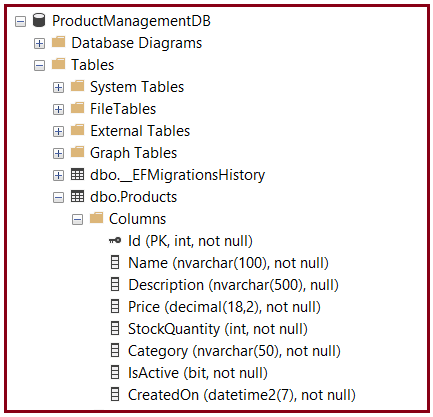
Inside that database, you should see:
- Products table
- __EFMigrationsHistory table
That confirms your API model is now connected to a real SQL Server database.
Step 17: Run the Application
Now run the application again.
Press:
- F5 or
- Ctrl + F5
Swagger should open automatically.
Step 18: Test the API Endpoints in Swagger
Now test each endpoint.
Test GET All Products
GET /api/products
You should see the seeded products.
Test GET Product By Id
GET /api/products/1
You should get one product.
Test POST Create Product
POST /api/products
Request body:
{
  "Name": "Office Chair",
  "Description": "Ergonomic office chair",
  "Price": 5500,
  "StockQuantity": 15,
  "Category": "Furniture"
}
You should get:
- 201 Created
- The newly created product
- A Location header pointing to the product URL
Test PUT Update Product
PUT /api/products/1
Request body:
{
  "Id": 1,
  "Name": "Wireless Mouse Updated",
  "Description": "Updated description",
  "Price": 899,
  "StockQuantity": 30,
  "Category": "Electronics",
  "IsActive": true
}
You should get:
- 204 No Content
Test DELETE Product
DELETE /api/products/2
You should get:
- 204 No Content
Then call:
GET /api/products
to confirm deletion.
Step 19: Understand the Complete Flow of This Application
Now, let us understand how the request flows internally. Suppose the client sends: POST /api/products with product data.
The flow will be:
- Request reaches ProductsController
- Controller receives the request
- Controller calls ProductService
- Service creates a Product entity
- Service calls ProductRepository
- The repository uses ApplicationDbContext
- ApplicationDbContext sends SQL operations to SQL Server
- SQL Server saves the record
- The response comes back to the controller
- Controller returns 201 Created
This is exactly the kind of architecture you must understand before moving to cloud deployment.
Conclusion:
In this chapter, we created a complete working ASP.NET Core Web API project using .NET 8, SQL Server, and Entity Framework Core. We started from project creation in Visual Studio, installed the required EF Core packages, created the entity, DTOs, DbContext, repository, service, and controller, configured the connection string, and used migrations to create the SQL Server database.

About the Author: Pranaya Rout
Pranaya Rout has published more than 3,000 articles in his 11-year career. Pranaya Rout has very good experience with Microsoft Technologies, Including C#, VB, ASP.NET MVC, ASP.NET Web API, EF, EF Core, ADO.NET, LINQ, SQL Server, MYSQL, Oracle, ASP.NET Core, Cloud Computing, Microservices, Design Patterns and still learning new technologies.
👉 Want a clear and practical understanding of Cloud Computing and Microsoft Azure?
In this video, we have explained everything step-by-step in a simple and real-world manner — from deployment basics to cloud concepts like IaaS, PaaS, SaaS, and how ASP.NET Core Web API fits into real production environments.
🎯 If you are a beginner or someone preparing for real-time project development or interviews, this video will give you a strong foundation.
📺 Watch the full video here:
https://youtu.be/TQdIYkcdPi8