
Back to: Microsoft Azure Tutorials
Introduction to Deployment, Cloud Computing, and Microsoft Azure
When beginners build an ASP.NET Core Web API on their laptop, everything looks perfect. The API runs locally, Swagger opens, the database connection works, and all endpoints respond properly. At that stage, many freshers feel that the application is complete.
But in real-world development, building the application is only one part of the job. The second and equally important part is making that application available to real users. That process is called deployment. A project is useful only when it is hosted properly, accessible over the internet or an internal network, secure, stable, and able to handle real traffic.
In this chapter, you will understand:
- What is Deployment?
- Local Environment vs Production Environment
- What is Cloud Computing?
- Traditional Hosting vs Cloud Hosting
- Types of Cloud Services: IaaS, PaaS, and SaaS
- Why Companies Prefer Cloud Hosting?
- What is Microsoft Azure?
What is Deployment?
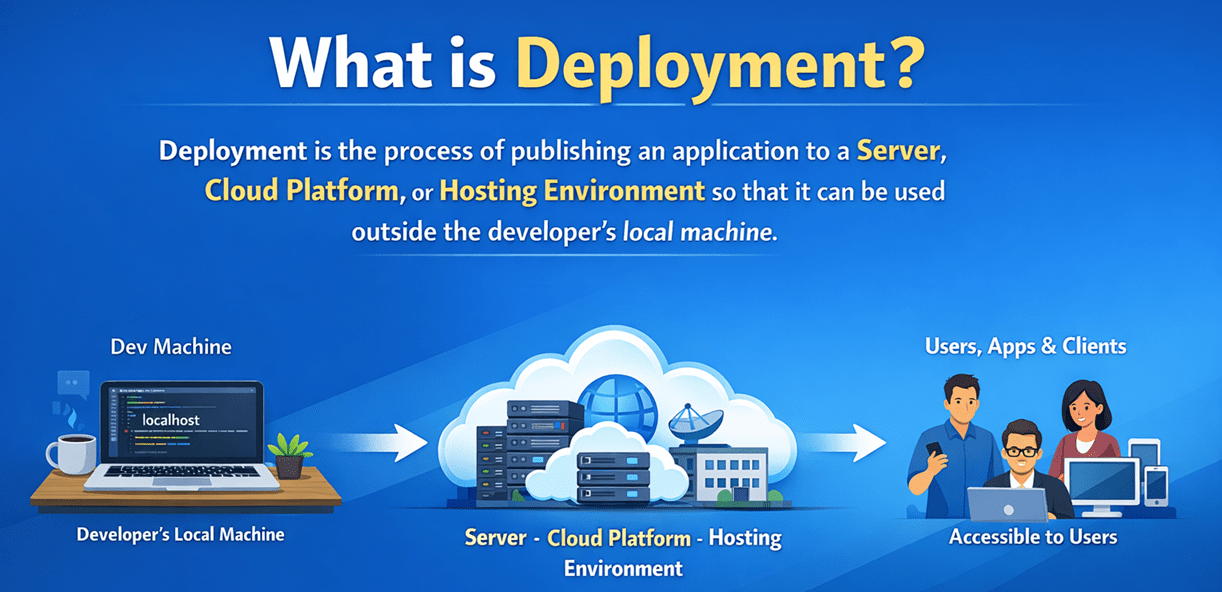
Deployment means moving an application from the development environment to production for actual use. In simple words, when we develop an ASP.NET Core Web API on our machine, only we can access it. But when we deploy it, the application is hosted on a server or cloud platform, and other users, client applications, mobile apps, frontend applications, or other systems can access it.
Real-Time Example
Suppose you built an ASP.NET Core Web API for an online shopping system.
On your machine:
- You can run the project
- You can test it in Swagger
- You can connect to your local SQL Server
- You can check all API endpoints
But your users cannot access it because:
- It is running only on your system
- Your machine is not meant to serve production traffic
- Your local SQL Server is not publicly available
So, to make the shopping API available to customers, you need to deploy it to a proper hosting environment such as Microsoft Azure.
Local Environment vs Production Environment
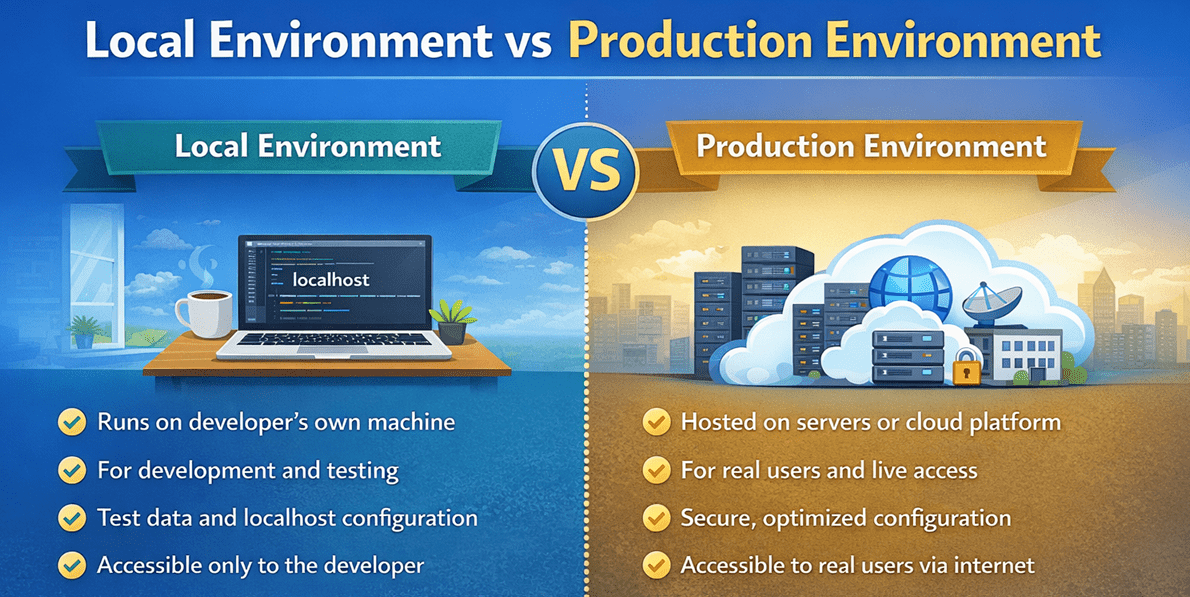
A very important topic to understand is the difference between local and production environments. For a better understanding, please look at the image below.
What is a Local Environment?
A local environment is the developer’s own machine where the application is built, tested, and debugged.
This usually includes:
- Visual Studio or VS Code
- ASP.NET Core project running on localhost
- Local SQL Server instance
- Test data
- Developer tools like Swagger, Postman, and SQL Server Management Studio
This environment is mainly used for:
- Writing code
- Fixing bugs
- Testing features
- Running the application during development
What is a Production Environment?
A production environment is the actual live environment where the application is deployed for real users.
This usually includes:
- Hosted ASP.NET Core Web API
- Production database
- Secure connection strings
- Real domain or public URL
- Security, backups, scaling, and uptime considerations
What is Cloud Computing?
Cloud computing means using computing resources such as Servers, Storage, Databases, Network, and Software over the internet instead of managing everything on your own local infrastructure (on-premise). In simple words, instead of buying and maintaining your own physical servers, you rent resources from a cloud provider like Microsoft Azure, Amazon Web Services, or Google Cloud.

So, Cloud computing is the delivery of computing services over the internet on demand. These services can include:
- Virtual Machines: Virtual machines are software-based computers in the cloud that work like physical computers and can run applications, operating systems, and services.
- Databases: Cloud databases store and manage data online, allowing applications to save, retrieve, and update information easily.
- Web Hosting: Cloud-based web hosting enables websites and web applications to be published and accessed over the internet.
- Storage: Cloud storage provides online space to securely store files, images, videos, backups, and application data.
- Networking: Cloud networking connects your applications, users, and services securely over the internet or private cloud networks.
- Security Tools: Cloud security tools protect applications, data, and users through features such as encryption, firewalls, identity management, and threat detection.
- Container Services: Container services help developers deploy, run, and manage applications in lightweight, portable containers.
Real-Life Analogy
Think of cloud computing as eating at a restaurant rather than cooking at home.
- Traditional (On-Premise):
-
- You buy groceries, cook food, clean utensils, and maintain the kitchen.
- This is like buying servers, maintaining infrastructure, handling updates, and security.
-
- Cloud Computing:
-
- You go to a restaurant, order food, eat, and pay only for what you consume.
- The restaurant handles everything: cooking, infrastructure, staff, and maintenance.
-
Mapping Example:
- Kitchen = Data Center
- Chef = Cloud Provider
- Food = Applications/Services
- Bill = Pay-as-you-go pricing
Cloud computing means using IT resources over the internet on demand, just like using a service when needed instead of owning and maintaining everything yourself.
What Cloud Computing Solves?
Cloud computing solves many traditional hosting problems:
- No need to buy expensive hardware
- No need to maintain physical servers
- No need to worry about hardware failure alone
- Easier to scale resources when demand increases
- Faster deployment
- Better backup and disaster recovery options
- Better availability
Types of Cloud Services: IaaS, PaaS, and SaaS
This is one of the most important concepts in cloud computing. Different cloud services offer different levels of control and responsibility. The three main service models are:
- IaaS
- PaaS
- SaaS
Let us understand each service in the simplest possible way.
IaaS – Infrastructure as a Service
In this model, the cloud provider gives you the infrastructure, but you are responsible for managing the operating system, application runtime, software installation, and your application. For a better understanding, please have a look at the image below.
In this model, the cloud service provider manages the underlying infrastructure, such as:
- Virtualization: Virtualization is the technology that allows a single physical server to be divided into multiple virtual machines, each operating like an independent computer with its own operating system and resources.
- Storage: Storage is the cloud-based space used to save files, databases, backups, and other application data.
- Servers: Computing machines that provide processing power and resources to run applications and services.
- Networking: Networking connects servers, users, and services so they can communicate over the internet or private networks.
However, you or your organization are responsible for managing the upper layers, such as:
- Operating system: The operating system is the main software that manages the server hardware and allows other software and applications to run.
- Middleware: Middleware is the software layer between the operating system and applications, services, or components that helps them communicate and work together.
- Runtime: Runtime is the environment in which your application code executes, such as .NET, Java, or Node.js.
- Data: Data is the information your application stores, processes, and uses, such as user details, transactions, and files.
- Applications: Applications are the software programs or services that you build, deploy, and run for end users.
In simple words, IaaS gives you a virtual server in the cloud. The cloud provider provides a hardware-like environment, but you must install, configure, and manage everything required to run your application.
Real-time Analogy:
IaaS is like renting an empty house. The house is provided to you, but you arrange and manage everything inside based on your needs. In the same way, the cloud provider gives you a virtual machine and the required infrastructure, and you decide:
- Which OS to use
- Which software to install
- How to configure the environment
- How to deploy and host your application
Example
In Microsoft Azure, Azure Virtual Machine is a good example of IaaS. With an Azure VM, you can manually install and manage:
- Windows Server or Linux
- SQL Server
- IIS, Nginx, or Docker
- Your own application
Best For
IaaS is useful when:
- You want more control over the environment
- You need a custom server setup
- You are migrating an existing system that depends on server-level configuration
PaaS – Platform as a Service
In this model, the cloud provider gives you a ready-to-use platform for building, deploying, and running applications, so you do not need to manage the underlying infrastructure yourself. For a better understanding, please have a look at the image.
The cloud service provider manages the lower and middle layers, such as:
- Runtime
- Middleware
- Operating System
- Virtualization
- Storage
- Servers
- Networking
However, you or your organization are mainly responsible for managing:
- Applications
- Data
In simple terms, PaaS provides a complete platform in the cloud where you can deploy your application directly without worrying about server setup, OS installation, runtime configuration, or infrastructure maintenance.
Real-time Analogy:
PaaS is like renting a Fully Furnished Office. The building, electricity, internet, furniture, and basic maintenance are already arranged by the owner. You do not need to worry about setting up the office infrastructure. You simply bring your team, your documents, and start working.
In the same way, in PaaS, the cloud provider gives you a ready platform, and you mainly focus on:
- Your application code
- Your data
- Your business logic
- Your application configuration
Example
In Microsoft Azure, Azure App Service is a good example of PaaS. If you host an ASP.NET Core Web API in Azure App Service:
- You do not manage the server manually
- You do not patch the operating system
- You do not configure the runtime from scratch
- You do not worry about the base infrastructure
- You simply deploy and run your application
Best For
PaaS is useful when:
- You want faster application deployment
- You want less infrastructure management
- You want to focus more on development than server administration
SaaS – Software as a Service
SaaS provides complete software applications over the internet, so users can access and use them without worrying about installation, maintenance, or infrastructure management. For a better understanding, please have a look at the image below.
In this model, the cloud service provider manages almost everything, such as:
- Applications
- Data storage and availability
- Runtime
- Middleware
- Operating System
- Virtualization
- Storage
- Servers
- Networking
As a user, you simply use the software through a web browser or app, without managing the underlying platform or infrastructure. In simple words, SaaS gives you a fully ready-to-use software solution. You do not need to build the application, deploy it, install updates, manage servers, or maintain the system. You just sign in and start using the software.
Real-Life Analogy:
SaaS is like staying in a hotel. The building, furniture, electricity, housekeeping, security, and maintenance are all managed by the hotel staff. You do not worry about setting up or managing anything. You simply use the room and the services provided. Similarly, in SaaS, the cloud provider manages the entire software and supporting environment, and you simply use the application.
Examples:
Some common examples of SaaS are:
- Gmail
- Microsoft 365
- Google Docs
- Zoom
- Dropbox
With these services, you do not install or manage the underlying infrastructure or platform. You just open the application and use it.
Best For
SaaS is useful when:
- You want ready-made software
- You do not want to build or manage the product
- You simply want to use the service without handling the technical setup
Why Companies Prefer Cloud Hosting?
Today, most companies prefer cloud hosting over relying solely on local servers because cloud platforms offer a more flexible, reliable, and cost-effective way to run modern applications. For a better understanding, please have a look at the image.
Let us understand the main reasons.
Cost Efficient:
Cloud hosting reduces the need for heavy upfront investment in physical servers, networking devices, storage, and maintenance. Instead of spending a large amount upfront, companies can start with fewer resources and expand as needed.
Pay-as-You-Go:
In cloud hosting, companies usually pay only for the resources they actually use. This helps avoid unnecessary expenses and makes cost management easier, especially for new or growing businesses.
Faster Setup:
With cloud platforms, servers, databases, storage, and other services can be created and configured within minutes. There is no need to buy hardware, wait for delivery, or perform lengthy physical installation.
Managed Services:
Cloud providers handle many infrastructure-related tasks such as hardware maintenance, updates, monitoring, and service availability. This allows companies to spend less time on server management and more time on application development and business growth.
Easy Scalability:
If application traffic increases, cloud resources can be scaled much more easily than physical infrastructure. For example, a company can increase:
- More CPU
- More memory
- More storage
- More application instances
This makes cloud hosting particularly useful for applications whose workloads change over time.
Better Reliability:
Cloud providers build their platforms with greater redundancy, backup support, and failover options, which help applications achieve higher uptime and stability than relying on a single local server.
Global Reach:
Cloud platforms allow applications to be deployed in multiple geographic regions, helping companies serve users from different locations with better speed and performance.
Better Security and Compliance Support:
Major cloud providers invest heavily in security and offer built-in tools for identity management, monitoring, encryption, backup, and compliance support. Although security is still a shared responsibility, cloud hosting provides a strong foundation for protecting applications and data.
Support for Modern Application Architecture:
Modern applications often depend on technologies such as:
- APIs
- Microservices
- Containers
- Kubernetes
- CI/CD pipelines
- Distributed databases
Cloud platforms are designed to efficiently support these modern architectures, making development, deployment, and maintenance much easier.
So, companies prefer cloud hosting because it offers faster setup, lower initial cost, easy scalability, better reliability, managed services, global reach, and strong support for modern applications.
What is Microsoft Azure?
Microsoft Azure is Microsoft’s cloud computing platform that offers a wide range of cloud services for building, deploying, managing, and scaling applications over the internet using Microsoft-managed datacenters. Instead of setting up and maintaining physical servers on your own, Azure allows you to use cloud resources whenever needed.
In simple words, Microsoft Azure is a cloud platform where developers and organizations can host applications, store data, create virtual machines, manage databases, configure networking, run containers, monitor systems, and use many other services from a single platform.
It supports services such as:
- Application hosting
- Databases
- Storage
- Networking
- Virtual machines
- Containers
- Monitoring
Why is Microsoft Azure widely used?
Now, let us explore the benefits of Azure.
Scalability
Scalability means the ability of an application or platform to handle increasing load by adjusting resources. In simple terms, if more users start using our API, the hosting platform should be able to handle the increased traffic.
Types of Scaling
There are 2 types of scaling.
Vertical Scaling
Increasing the power of the same machine:
- More CPU
- More RAM
- More Storage
Horizontal Scaling
- Adding more instances of the application so multiple servers or containers handle requests together.
Real-Time Example
Suppose your ASP.NET Core Web API is used by 100 users today, but next month, 10,000 users start using it after a marketing campaign. Azure helps you scale resources so the application can continue to perform properly.
Availability
Availability means the application is accessible and working when users need it. In simple words, Availability means keeping the application live and reachable as much as possible.
Why Availability Matters
If your application is down:
- Users cannot log in
- Orders cannot be placed
- APIs cannot respond
- Business operations get affected
Local Hosting Problem
On a local machine:
- The system can shut down
- Internet can disconnect
- Hardware can fail
Managed Services
Managed services are offerings in which the cloud provider handles much of the infrastructure management for you. This is one of the biggest advantages of Azure.
Example 1: Azure App Service
If you host an ASP.NET Core Web API using Azure App Service:
- Azure manages the underlying server setup
- Azure handles many infrastructure-level concerns
- You mainly focus on deploying your application
Example 2: Azure SQL Database
If you use Azure SQL Database:
- You do not manually maintain a full local SQL Server machine in the same way
- Many platform-level tasks are simplified
- You focus more on your schema, data, and application integration
Pay-as-You-Go Pricing
This is another major reason cloud platforms are popular. Pay-as-you-go means you pay for the resources you use rather than buying expensive infrastructure upfront.
Why This is Useful
For small companies, startups, and growing businesses:
- No need for heavy initial investment
- Start with smaller resources
- Upgrade when needed
- Stop or reduce services when not needed
Real-Time Example
Suppose you are testing a small ASP.NET Core Web API project. You can start with a low-cost Azure setup. Later, as your traffic increases, you can upgrade to a larger plan. This makes cloud adoption practical and flexible.
Summary
In this chapter, we understood that building an application is only the first part of software development. To make the application useful for real users, it must be deployed properly. We learned the difference between local and production environments and saw why local hosting is not suitable for real-world applications.
We also learned the basics of cloud computing and understood the three main cloud service models: IaaS, PaaS, and SaaS. Finally, we introduced Microsoft Azure and understood why it is widely used to host modern applications, particularly for its scalability, availability, managed services, and flexible pricing model.
About the Author: Pranaya Rout
Pranaya Rout has published more than 3,000 articles in his 11-year career. Pranaya Rout has very good experience with Microsoft Technologies, Including C#, VB, ASP.NET MVC, ASP.NET Web API, EF, EF Core, ADO.NET, LINQ, SQL Server, MYSQL, Oracle, ASP.NET Core, Cloud Computing, Microservices, Design Patterns and still learning new technologies.
👉 Want a clear and practical understanding of Cloud Computing and Microsoft Azure?
In this video, we have explained everything step-by-step in a simple and real-world manner — from deployment basics to cloud concepts like IaaS, PaaS, SaaS, and how ASP.NET Core Web API fits into real production environments.
🎯 If you are a beginner or someone preparing for real-time project development or interviews, this video will give you a strong foundation.
📺 Watch the full video here:
https://youtu.be/TQdIYkcdPi8