
Back to: C#.NET Programs and Algorithms
Buzz Number Program in C# with Examples
In this article, I am going to discuss Buzz Number Program in C# with Examples. Please read our previous article where we discussed the Twisted Prime Number in C#. Here, in this article, first, we will learn what is a Buzz Number and then we will see how to implement the Buzz Number Program in C#. And finally, we will see how to print all the Buzz numbers between a range of numbers like between 1 to 100 or 100 to 1000, etc.
What is a Buzz Number?
A number is said to be Buzz Number if it ends with 7 OR is divisible by 7. The task is to check whether the given number is a buzz number or not. Or, for being a buzz number there are two conditions either of which must be true.
- The number should end with digit 7 e.g., 27, 657, etc.
- The number should be divisible by 7 e.g., 63, 49, etc.
Examples:
Input: 63
Output: Buzz Number
Explanation: 63 is divisible by 7, one of the conditions is satisfied.
Input: 72
Output: Not a Buzz Number
Explanation: 72 is neither divisible by 7 nor it ends with 7, so it is not a Buzz Number.
Input: 27
Output: Buzz Number
Explanation: 27 ends with 7, one of the conditions is satisfied.
To implement the Buzz Number, we are going to use the below two operators: –
Modulus %: Modulus Operator will calculate the remainder after an integer division.
Example: 97 % 10 = 7
43 % 10 = 3
Divides /: Divides numerator by de-numerator
Example: 97 / 10 = 9
43 / 10 = 4
How to Implement Buzz Number Program in C#?
We need to follow the below approach to implementing the Buzz Number Program in C#.
- Input the number to check for the condition
- Check whether the number is ending with digit 7 or divisible by 7
- If the condition holds true print it’s a buzz number
- If the condition doesn’t hold true print it’s not a buzz number
Example: Buzz Number in C#
using System;
public class BuzzNumberProgram
{
    public static void Main ()
    {
        Console.WriteLine ("Enter a number");
        int number = Convert.ToInt32 (Console.ReadLine ());

        if (number % 10 == 7 || number % 7 == 0)
            Console.WriteLine ("Buzz Number");
        else
            Console.WriteLine ("Not a Buzz Number");
    }
}
Output
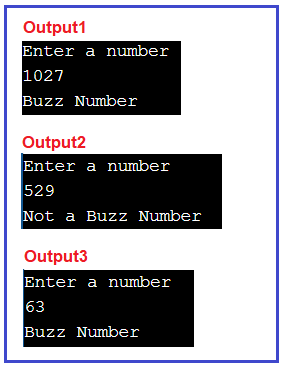
Time Complexity: O(1) as there are atomic statements and no loops.
Buzz Number in between from 1 to 100
The following C# Program prints all the Buzz numbers between 1 to 100. As we know 1, 2, 3, 4, 5, and 6 are not Buzz Numbers, so, we started the for loop directly from 7.
using System;
public class BuzzNumberProgram
{
    public static void Main ()
    {
        Console.WriteLine ("Buzz Number Brom 1 to 100 :");
        for (int number = 7; number <= 100; number++)
        {
         if (number % 10 == 7 || number % 7 == 0)
             Console.Write (number + " ");
        }
    }
}
Output:
 ’
’
In the next article, I am going to discuss How to Implement the Strong Number Program in C#. Here, in this article, I try to explain How to Implement the Buzz Number Program in C# with Examples and I hope you enjoy this Buzz Number Program in the C# article.

About the Author: Pranaya Rout
Pranaya Rout has published more than 3,000 articles in his 11-year career. Pranaya Rout has very good experience with Microsoft Technologies, Including C#, VB, ASP.NET MVC, ASP.NET Web API, EF, EF Core, ADO.NET, LINQ, SQL Server, MYSQL, Oracle, ASP.NET Core, Cloud Computing, Microservices, Design Patterns and still learning new technologies.