
Back to: Angular Tutorials For Beginners and Professionals
HTML Attribute VS DOM Property with Example
In this article, I will discuss the difference between HTML Attributes and DOM Properties with an example. One of the most common sources of confusion for beginners in web development is the lack of clarity between HTML and the DOM (Document Object Model). Concepts such as elements, attributes, properties, styles, classes, and events are often explained together without clearly identifying what belongs to HTML and what belongs to the DOM.
This confusion becomes even more problematic when learning modern frameworks such as Angular or React, where incorrect assumptions about attributes and properties lead to incorrect data binding, unexpected UI behaviour, and misunderstandings of how browsers work internally.
To build a strong foundation, it is essential to understand how a browser processes HTML, how DOM objects are created, and how HTML attributes differ from DOM properties. By the end of this chapter, you will understand the following pointers:
- What HTML attributes actually do
- What DOM properties really represent
- Why they are NOT the same
- How the browser converts static HTML intoa dynamic UI
- Why frameworks prefer DOM properties over attributes
This clarity becomes the foundation for understanding Angular data binding.
What is DOM?
The DOM stands for Document Object Model. When a browser loads a web page, then the browser creates the Document Object Model (DOM) for that page. For example, let’s say we have a page with the following HTML.
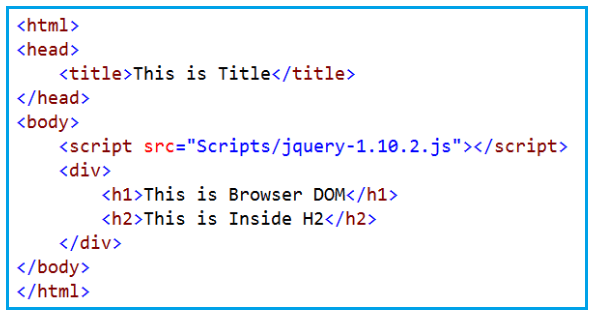
When the above HTML is loaded by the browser, it creates the Document Object Model (DOM) as shown in the image below.
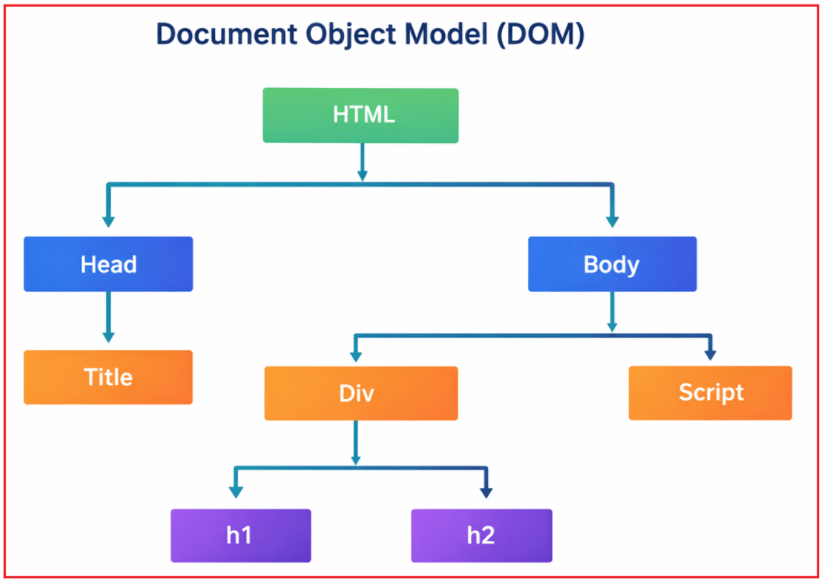
With this kept in mind, let us proceed and understand HTML Attributes vs DOM Properties in detail with an example.
Creating an HTML file
To understand HTML Attributes and DOM Properties, we begin with a simple HTML file. Open your notepad, copy and paste the following code exactly as it is, and then save it as dom-basics.html. This file serves as static input that the browser parses and converts into runtime objects.
<!DOCTYPE html>
<html>
<head>
  <title>DOM Basics for Freshers</title>

  <style>
    .primary {
      background-color: blue;
      color: white;
      padding: 10px;
      border: none;
      cursor: pointer;
    }

    .disabled {
      background-color: gray;
    }
  </style>
</head>
<body>

  <h2 id="title">Welcome</h2>

  <input id="nameInput" type="text" value="Pranaya">

  <br><br>

  <button id="btn" class="primary">Click Me</button>

  <p id="output"></p>

  <script>
    const input = document.getElementById("nameInput");
    const button = document.getElementById("btn");
    const output = document.getElementById("output");

    button.addEventListener("click", function () {

      // DOM Property (Live Value)
      const domPropertyValue = input.value;

      // HTML Attribute (Initial Value)
      const htmlAttributeValue = input.getAttribute("value");

      output.innerHTML = `
        <strong>DOM Property Value:</strong> ${domPropertyValue}<br>
        <strong>HTML Attribute Value:</strong> ${htmlAttributeValue}
      `;

      // UI state changes
      button.classList.add("disabled");
      button.style.cursor = "not-allowed";
      button.disabled = true;
    });
  </script>

</body>
</html>
The HTML file itself is only text. It does not contain UI elements, DOM objects, or behaviour. This file contains:
- HTML elements
- CSS styles
- JavaScript logic
- Event handling
- Dynamic UI updates
We will use this same file to explain every concept.
How a Browser Processes HTML?

Let us understand this step by step:
Step-1: HTML as Plain Text
An HTML file is, at its core, plain text. When a browser loads an HTML file, it does not immediately display UI elements or create interactive components. Instead, the browser performs a structured internal process to convert HTML text into a dynamic runtime model. At this stage:
- No UI exists
- No Input Box exists
- No JavaScript objects exist
- No DOM exists
HTML text by itself has no behaviour or structure until the browser processes it.
Step-2: HTML Parsing
Parsing is the process by which the browser converts raw HTML text into a structured internal DOM representation. Parsing means three actions together:
- Reading the HTML text character by character.
- Understanding what each tag represents.
- Converting it into browser-usable objects.
So, in one simple sentence: Parsing = Reading + Understanding + Converting
For example, when the browser encounters:
- <input id=”nameInput” type=”text” value=”Pranaya”>
It understands that:
- An input element must be created
- The element has attributes (id, type, value)
- These attributes provide configuration data for element creation
At this stage, attributes are treated strictly as HTML metadata.
Step-3: Creation of DOM Objects
After parsing, the browser creates JavaScript objects in memory to represent each HTML element. These objects form the Document Object Model (DOM), which is not part of the developer’s JavaScript code in our HTML or JavaScript files.
Important points:
- DOM objects are created by the browser, not by developer-written JavaScript.
- JavaScript code can only access and manipulate these objects.
- The browser’s HTML parser performs this conversion internally.
Each element becomes a DOM object with properties such as id, value, disabled, and others.
From this HTML:
<input id=”nameInput” type=”text” value=”Pranaya”>
The browser internally creates a JavaScript object in memory (DOM Object), similar to:
HTMLInputElement {
  id: "nameInput",
  type: "text",
  value: "Pranaya",
  disabled: false
}
What is DOM?
DOM stands for Document Object Model. The DOM is a tree-like structure of JavaScript objects, created by the browser, that represents the entire HTML page in memory.
Let’s break this down:
- Tree-like structure → Elements are nested (parent/child)
- JavaScript objects → Real objects, not text
- Created by browser → Not by you
- Represents the HTML page → One object per element
- Stored in memory → Used for rendering and updates
For our example, the browser will create the following DOM:
Why DOM Exists?
The browser needs:
- Fast UI Updates
- Event Handling
- Styling Changes Dynamically
- Script Access
- Dynamic Behaviour
HTML text cannot do this.
Step-4: Browser Renders UI from DOM (Not from HTML)
After parsing, the browser never looks at HTML again. This is because:
- HTML is static text
- DOM objects are dynamic
- UI changes happen through objects
What are HTML Elements?
An HTML Element is the runtime result of HTML parsing. It is created by the browser when an HTML tag is parsed and converted into a DOM object. In simple terms, an HTML Element is a browser-created entity that represents an HTML tag, is rendered as a user interface component, and is exposed as a DOM object.
An HTML element has Two Representations:
- Visual Representation (UI) – what the user sees and interacts with
- DOM Object Representation – the JavaScript object stored in memory
These are not separate entities. There are two views of the same element, managed by the browser.
Example of an HTML Element
Consider the following line from our HTML file:
<button id=”btn” class=”primary”>Click Me</button>
When the browser parses this line, it creates one HTML element. This element:
- Appears as a Button on the screen
- Exists as a DOM object (a JavaScript object) in memory
Therefore, we can say: HTML Element = UI Representation + DOM Object Representation
Element Structure
For the HTML:
<button id=”btn” class=”primary”>Click Me</button>
This single line creates one HTML element. Let us break it down into its structural parts:
- <button>: This defines the Element Type. It tells the browser what kind of element to create and determines:
- Default behavior
- Default styling
- The type of DOM object created (HTMLButtonElement)
- id=”btn”: This is an HTML Attribute. It provides initial configuration information and allows the element to be uniquely identified in the DOM.
- class=”primary”: This is an HTML Attribute. It provides initial configuration for styling during element creation.
- Click Me: This is the content of the element. It is rendered as visible text within the button and stored as part of the DOM.
Once the HTML element is created:
- The browser no longer relies on the HTML source.
- All interaction, styling changes, and behaviour are controlled exclusively through the DOM.
- JavaScript operates on the DOM object, not on the HTML text.
What are HTML Attributes (Initial Instructions)?
An HTML Attribute is a piece of metadata written in HTML markup that provides initial configuration information to the browser during element creation.
HTML attributes:
- Are defined by the HTML specification
- Exist in the HTML source code
- Are read only during HTML parsing
- Are used to initialize corresponding DOM properties
- Are not designed to represent runtime or interactive state
Attributes describe how an element should be created, not how it should behave after creation.
Attribute Processing
Consider the following HTML:
<input id=”nameInput” type=”text” value=”Pranaya”>
Here, the browser encounters three HTML attributes:
- id=”nameInput”
- type=”text”
- value=”Pranaya”
All three are HTML attributes, not DOM properties.
What Happens During Parsing?
During HTML parsing, the browser performs the following steps:
- The browser reads each attribute from the HTML source.
- The browser creates a DOM object representing the <input> element (an instance of HTMLInputElement).
- The browser initializes corresponding DOM properties using the attribute values.
- The attribute’s role ends once the DOM object is fully initialized.
After this step, attributes are no longer involved in execution or state tracking.
Key Concept: HTML attributes are used only to configure the DOM object at creation time. They do not participate in runtime behaviour.
What are DOM Properties (Live State)?
A DOM property is a JavaScript Property of a DOM object that represents the current runtime state of an HTML element.
DOM properties:
- Exist in memory
- Are created by the browser as part of the DOM
- Reflect user interaction and script updates
- Directly drive UI rendering
Runtime Behaviour of DOM Properties
When JavaScript accesses: input.value
It reads:
- The current value of the input element
- Not the HTML attribute value
- A value that changes continuously as the user types
This value exists only in the DOM, not in the HTML source.
HTML Attributes vs DOM Properties
HTML attributes and DOM properties serve different roles at different stages of a page’s lifecycle.
Attribute Characteristics
HTML attributes define how an element is created.
- Read once
- Used during HTML parsing
- Provide initial configuration for the DOM
- Do not track runtime state
Property Characteristics
DOM properties define how an element behaves at runtime.
- Exist at runtime
- Continuously updated
- Reflect user interaction
- Control UI behaviour
Key Differences
- Attributes are defined by HTML, whereas properties are defined by the DOM.
- Attributes initialize DOM properties during element creation (DOM Object Creation).
- Once DOM initialization is complete, attributes have no further role.
- DOM property values can change, whereas HTML attribute values remain static unless explicitly modified.
- Runtime behaviour is managed exclusively by DOM properties.
Understanding the DOM Object
Let us now clearly understand what the DOM object is and what changes when you interact with the page, using the same dom-basics.html file.
Step 1: Load the HTML File in the Browser
- Open Notepad
- Paste the HTML code
- Save the file as: dom-basics.html
- Double-click the file
The file opens in Google Chrome.
What the Browser Does at This Moment
When the file opens, the browser performs the following internally:
- It reads the HTML file as plain text
- It parses the HTML source code
- It creates DOM objects in memory
- It renders the UI from those DOM objects
At this stage, you see the following UI on the screen:
- A Welcome heading
- An input box with the value Pranaya
- A Click Me button
Important: The value Pranaya appears because the browser read the HTML attribute: value=”Pranaya” and used it to initialize the DOM property: input.value = “Pranaya”
Step 2: Update the Input Box Value
Now, change the input value from Pranaya to Rout by typing in the input box.
What Happens Internally
- The browser updates the DOM property: input.value = “Rout”
- The browser does NOT update the HTML attribute
- The UI immediately reflects the new value
At this point:
- DOM Property Value → Rout
- HTML Attribute Value → Pranaya
This is intentional browser behaviour.
Step 3: Click the “Click Me” Button
When you click the Click Me button, the JavaScript code executes and displays:
DOM Property Value: Rout
HTML Attribute Value: Pranaya
Why the DOM Property Changes but the Attribute Does Not?
HTML Attribute
- Exists in the HTML source
- Read only once during parsing
- Used for initial configuration
- Does not track user interaction
Example: value=”Pranaya”
This value never changes unless explicitly modified using JavaScript.
DOM Property
- Exists in memory as part of the DOM object
- Represents the current state of the UI
- Updates automatically when the user types
Example: input.value
This always reflects what the user sees right now.
HTML attributes define how an element starts. DOM properties define how an element is currently rendered. The browser never synchronizes property changes back to attributes, because attributes are not meant to represent runtime state.
In the next article, I will discuss Data Binding in Angular Applications. In this article, I explain the difference between HTML Attributes and DOM Properties with examples. I would like to have your feedback. Please post your feedback, questions, or comments about this article.
About the Author: Pranaya Rout
Pranaya Rout has published more than 3,000 articles in his 11-year career. Pranaya Rout has very good experience with Microsoft Technologies, Including C#, VB, ASP.NET MVC, ASP.NET Web API, EF, EF Core, ADO.NET, LINQ, SQL Server, MYSQL, Oracle, ASP.NET Core, Cloud Computing, Microservices, Design Patterns and still learning new technologies.
Great Work!🤩
I have been working with html for quite a while (it’s not my ‘core-business’, I am back-end developer), but I never knew this.
Very clear explanation! Well done!
Very good article.
very nice…
This in not true. If you change a property from DOM Object (like adding a class to “classList” attribute), you can see from the console that also the HTML “class” property is changed.
wheter you execute “.getAttribute(‘class’)” and “.classList.value” you’ll see the same.
No, it is true I followed codes of yourComment it gives me the changed value , maybe be you access your code before setting the code.
Great Work!🤩
This is just the kind of thing which makes you a pro
Thank you so much
very Nicely explained
Very Nice and well explained article.
Please integrate UPI payment gateway with you website. It’s easy for Indian to buy coffee for you
This concept becomes crystal clear when you see it in action.
In our YouTube video, we explain HTML Attributes vs DOM Properties using Angular template bindings and runtime behavior.
The visual demo helps you avoid common mistakes developers make in Angular templates.
👉 Watch the full video here: https://youtu.be/64sujzqpeko