
Back to: Angular Tutorials For Beginners and Professionals
Modern web development is no longer just about creating “pages”. Today, companies build web applications that behave like software, fast, interactive, and feature-rich. In this chapter, you’ll understand how modern apps work, why SPAs became popular, and why Angular is widely used in enterprise projects. By the end of this post, you won’t feel like Angular is “magic”. You’ll see it as a logical system made for real-world application development.
- What Is Modern Web Development?
- Frontend vs Backend: Who Does What?
- Client–Server Architecture: How Web Apps Communicate?
- Web Apps vs Multi-Page Websites (MPA): What’s the Difference?
- Single Page Applications (SPA): Meaning, Benefits, and Challenges
- Where Angular Fits in a Full-Stack Application?
- What Is Angular?
- Why Angular Is Chosen by Companies?
- Core Angular Building Blocks
- Where Angular Is Used in Real Life?
- Angular vs React vs Vue
What Is Modern Web Development?
Modern web development is about building Web Applications, not just simple Websites. Earlier, most websites were mainly for showing information. Today, users expect websites to behave like mobile apps, fast, smooth, and interactive. For a better understanding, please look at the image below:
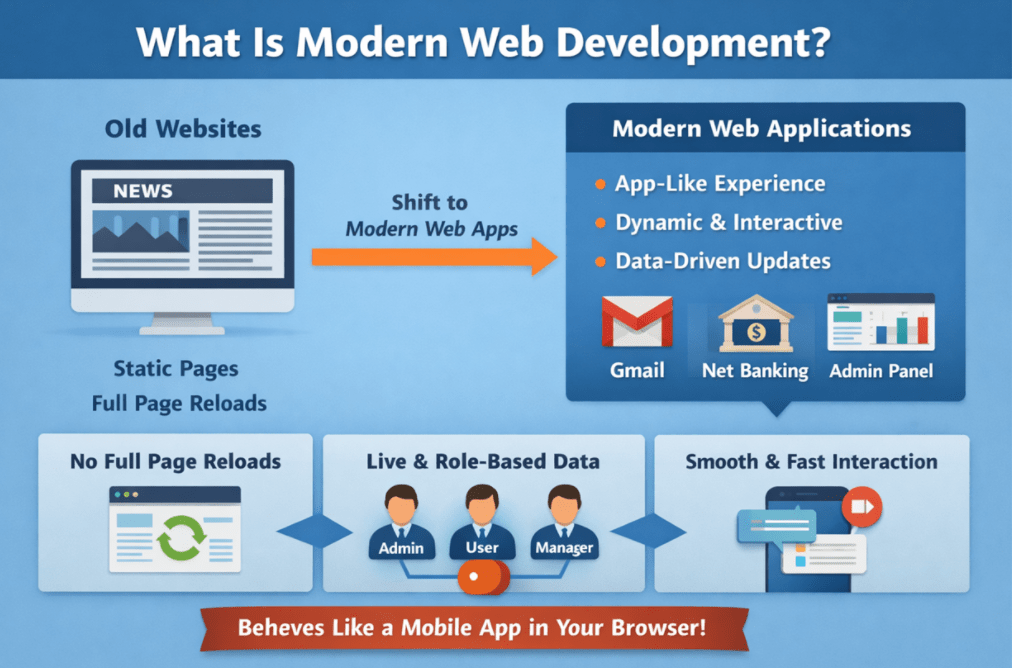
For example, when you use Gmail, Net Banking, or an Admin Panel, the whole page does not reload after every click. Instead, only the required part of the screen updates instantly as you interact. This “app-like” experience is what modern web development focuses on.
- Modern apps are Data-Driven (always working with live data).
- They are often Role-Based (Admin, Customer, Manager see different screens.
- They must handle Large Users and Heavy Traffic, so the structure becomes important.
Because these applications are complex, developers use frameworks like Angular to build them in an organized and maintainable way.
Key Characteristics of Modern Web Applications
- Fast and smooth user experience
- No full page reloads for most actions
- Dynamic content updates based on user input
- App-like behaviour (menus, tabs, popups, workflows)
- Heavy use of APIs to fetch and update data
Modern frameworks like Angular exist to manage these features in a structured way, especially when projects grow big and teams work together.
Frontend vs Backend: Who Does What?
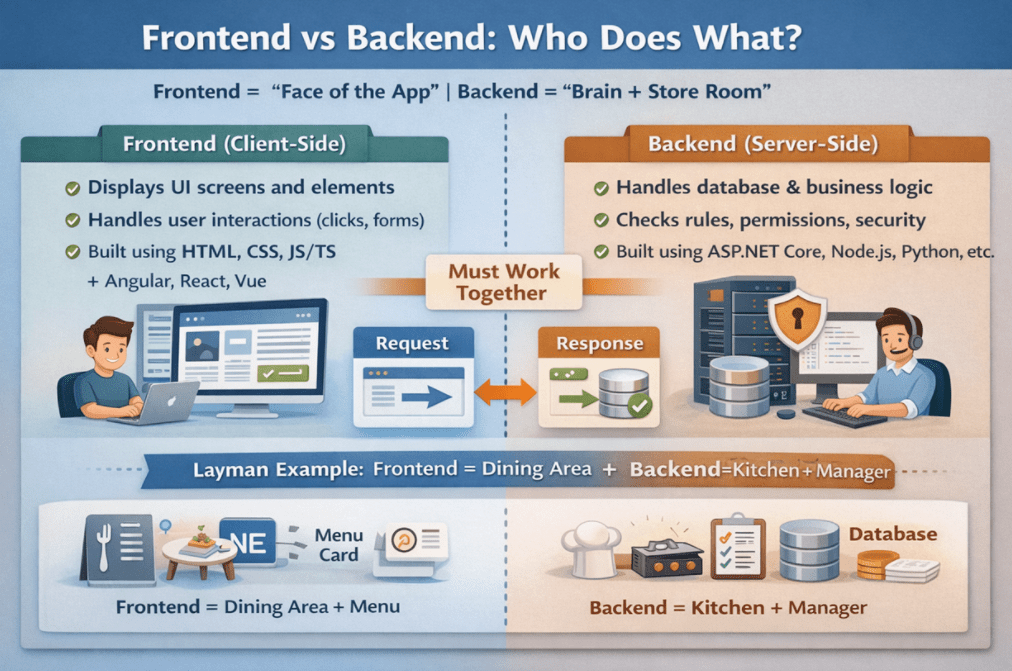
When you use any website or web app, you are actually using a system made of two parts working together: Frontend and Backend. The frontend is what you directly see and interact with on the screen, while the backend is the hidden part that stores data, enforces rules, and ensures everything happens correctly and securely. A simple way to think about it is: the frontend is the “Face” of the app, and the backend is the “Brain + Store Room” behind it.
- Frontend and backend Must Work Together for every real feature (login, search, order, payment).
- The frontend focuses on User Experience; the backend focuses on Correctness and Security.
- The frontend usually communicates with the backend via APIs (request → response).
So whenever you click a button, and something happens (data loads, an order is placed, a profile updates), it’s the frontend and backend working as a team behind the scenes. For a better understanding, please look at the image below:
Frontend (Client-Side)
The frontend is the part of the application that runs in the browser or mobile device and directly interacts with the user. Everything you click, type, or view on the screen belongs to the frontend. Its main purpose is to make the application easy to use, visually clear, and responsive.
Frontend responsibilities include:
- Displaying UI screens such as pages, dashboards, and pop-ups
- Showing buttons, forms, menus, tables, charts, and lists
- Handling user interactions like clicks, typing, and navigation
- Built using HTML, CSS, JavaScript/TypeScript, and frameworks like Angular, React, or Vue
The frontend does not decide business rules or permanently store data. Instead, it focuses on providing a smooth and friendly user experience. A good frontend makes the application feel fast, simple, and comfortable to use, even if the system behind it is very complex.
Backend (Server-Side)
The backend is the part of the application that runs on the server and performs the actual work. Users usually never see the backend directly, but every important operation depends on it. The backend ensures that data is correct, secure, and processed properly.
Backend responsibilities include:
- Authenticating users (login, permissions, roles)
- Applying business rules and validations
- Reading and writing data to databases
- Handling security, transactions, and data integrity
- Built using technologies like ASP.NET Core, Node.js, Java, Python, etc.
The backend acts as the decision-maker of the application. Even if the frontend sends a request, the backend decides whether the action is allowed and how it should be processed. Without a backend, an application would look nice but would not function reliably or securely.
Layman Example
Imagine you are in a restaurant:
- Frontend = Dining Area + Menu Card: You see the menu, choose items, tell the waiter, and get updates (like “your order is confirmed”).
- Backend = Kitchen + Manager: The kitchen checks ingredients, cooks the food, follows rules, and prepares the final dish correctly.
- Database = Store Room / Inventory Register: It holds ingredients stock and records (what is available, what is used).
So, when you place an order:
- Frontend takes your selection and sends it
- Backend checks rules (availability, pricing, offers), updates the records, and returns the result
- Frontend shows the confirmation on your screen
That’s exactly how real apps work: frontend handles the experience, backend handles the truth (rules, security, data).
In short, Frontend is responsible for presentation and interaction, while Backend is responsible for logic, security, and data. Real applications need both, because a good UI without a correct backend is unsafe, and a strong backend without a clear UI is unusable.
What is a Website:
A website is a collection of web pages primarily meant to Provide Information. The user mostly reads/consumes content. Interaction is limited (maybe a contact form, basic search, newsletter signup).
Examples
- Company “About / Services / Contact” site
- Blog / News Site
- Portfolio Site
- Tutorials Site (mostly reading)
What is a Web Application:
A web application (web app) is a software application that runs in the browser and is meant to Perform Tasks and Solve User Problems. Users perform actions such as logging in, creating/updating data, making payments, managing workflows, etc.
Examples
- Gmail, Google Drive
- Online banking
- E-commerce admin panel
- Social media dashboard
- CRM / ERP systems
- Food delivery ordering + tracking system
A website mainly displays information, while a web application allows users to perform actions, interact with data, and work inside the system like software.
Client–Server Architecture: How Web Apps Communicate
Most modern web applications work using a client–server model. The client is the device or app you use (browser/mobile), and the server is the system running in the background that stores data and makes decisions. The client is primarily responsible for the user experience, while the server handles correctness, security, and data processing. They communicate via requests and responses, typically via APIs.
- Client and server work like a team: one handles the screen, the other handles the system
- Every real action (login, search, payment, report) is a client request → server response
- The “bridge” between them is usually an API
In short, client–server architecture explains who does what and how data moves in a modern application. For a better understanding of Client-Server architecture and to understand how they work, please look at the image below:

Client (Browser / App): What the User Interacts With
The client is responsible for everything the user can see and interact with. It runs in the browser or on a mobile device and focuses on presenting information clearly and in a user-friendly way. The client does not make final decisions; instead, it asks the server for data and actions.
What the client does:
- Displays UI screens such as pages, dashboards, and forms
- Takes user input like login details, search text, or order information
- Sends requests to the server when an action is performed
- Shows results or responses returned by the server
The client’s main goal is to provide a smooth, responsive user experience. It makes the application feel fast and interactive, but it always depends on the server for real data and final validation.
Server (Backend): Where the Real Work Happens
The server runs on a remote machine and handles everything that must be secure, correct, and consistent. Users usually never see the server directly, but every important operation passes through it. The server acts as the brain of the application.
What the server does:
- Receives requests sent by the client
- Validates data and checks user permissions
- Applies business rules such as pricing, offers, and limits
- Reads data from and writes data to the database
- Sends a response back to the client
The server ensures that users cannot break rules, access unauthorized data, or manipulate information incorrectly. Without the server, an application would be unsafe and unreliable.
How Client–Server Communication Works
Client–server communication follows a simple and repeatable pattern. Every user action triggers a request, and every request results in a response. This happens continuously while you use a web application.
Basic communication flow:
- The client sends a request to the server
- The server processes the request
- The server sends a response back
- Client updates the UI based on the response
This process usually takes milliseconds, which is why modern web apps feel instant and smooth to users.
Real-Time Example: Net Banking “View Statement”
Let’s understand this using a real-life net banking example. When you click a button in a banking app, many things happen behind the scenes, even though it feels simple to you.
Step-by-step flow:
- You click “View Statement” on the screen (client action)
- The server checks whether you are logged in and authorized
- The server fetches your transaction data from the database
- The server sends the statement data back
- The UI displays your transactions instantly
Even though you see only one screen update, both client and server are working together to make it happen securely.
Once you understand client–server architecture, Angular becomes much easier to understand. You can clearly see that Angular primarily runs on the client side, handling screens and user interactions. Whenever data or decisions are needed, Angular communicates with the server using APIs and then updates the UI based on the server’s response.
Web Apps vs Multi-Page Websites (MPA): What’s the Difference?
At first glance, traditional websites and modern web applications may look similar because both open inside a web browser. However, the way they work behind the scenes is very different. Traditional websites follow a page-based approach where each user action loads a completely new page from the server. Modern web applications, on the other hand, are designed to minimize page reloads and update only the parts of the screen that need refreshing, making them feel faster and more interactive. This difference becomes very important as applications grow in size and complexity. For a better understanding, please have a look at the image below:
Traditional Multi-Page Websites (MPA)
A Multi-Page Application (MPA) is built using separate HTML pages for different sections of the website. Every time the user clicks a link or submits a form, the browser requests a new page from the server and reloads the entire screen.
Key characteristics of MPAs:
- Each user action loads a new HTML page from the server
- Full-page refresh happens frequently
- Simpler structure with minimal client-side logic
- Best suited for content-focused websites such as:
-
- Company profile websites
- Blogs and news articles
- Static service or informational pages
-
MPAs are easy to build and work well when users are mostly reading information. However, as interaction increases, frequent page reloads can make the experience feel slow and disconnected.
Modern Web Applications
A Modern Web Application behaves more like software running inside the browser. Instead of loading a new page for every action, it updates the screen dynamically by fetching data in the background. This results in a smoother and more responsive experience for users.
Key characteristics of modern web applications:
- Works like software inside the browser
- Most user actions update the screen without a full reload
- Relies heavily on APIs to fetch and update data
- Best suited for interactive systems such as:
-
- Admin dashboards
- Customer or employee portals
- Order management and reporting systems
-
Modern web applications are ideal when users are performing tasks rather than just reading content. They allow faster workflows, better usability, and real-time updates.
In real companies, MPAs are still commonly used for marketing websites because they are simple and focused on content. But most business systems are built as modern web applications because users are not just reading, they are working: managing orders, tracking reports, creating invoices, handling customers, and updating data regularly. That is why frameworks like Angular are widely used for enterprise web applications.
Single Page Applications (SPA): Meaning, Benefits, and Challenges
A Single Page Application (SPA) is a modern approach to building web applications in which the browser loads the main application initially, and subsequent screen changes occur without reloading the entire page. Instead of refreshing the entire page, the application updates only the required part of the screen and fetches data in the background using APIs. This is why SPAs feel faster, smoother, and more responsive than traditional websites.
It is important to understand that SPA does not mean only one HTTP request or no navigation. Even though the page does not reload, the application still makes many API requests in the background to load data, submit forms, and update the UI dynamically.
Real-time Examples
Single-page applications are common in applications where users frequently interact with the system.
- Gmail (Web): Opening emails, searching, deleting messages, and switching folders happen without full page reloads.
- Google Drive: Browsing files, previewing documents, uploading files, and updating the screen smoothly without refresh.
- YouTube (Web): Searching for videos, opening video pages, loading comments, and recommendations mostly happen without full reloads.
- Company Admin Dashboards: Managing users, orders, reports, analytics, and settings without refreshing the page again and again.
- Online Banking or Finance Portals: Navigating between accounts, transactions, statements, and services smoothly inside the same app shell.
- Facebook / LinkedIn Web: Scrolling feed, liking, commenting, opening profiles without refreshing.
These applications feel more like software than traditional websites because navigation is instant and continuous.
Benefits of SPAs
Single-page applications offer several practical advantages, especially for interactive and data-driven systems.
- Faster Navigation and Better User Experience: Since only parts of the screen update, users experience smooth transitions instead of repeated page reloads.
- Highly Dynamic and Interactive UI: SPAs work extremely well for features such as:
-
- Filters, Sorting, and Pagination
- Live search and auto-suggestions
- Real-time dashboards, charts, and reports
-
- Better Separation of Responsibilities: Frontend and backend can be developed independently:
-
- The UI team focuses on screens, layout, and interactions.
- The API team focuses on business logic, validation, and data.
-
- Reduced Server Load: After the initial load, most interactions involve lightweight API calls instead of full HTML page reloads.
- Application-Like Feel: SPAs behave more like desktop or mobile applications, making them ideal for long user sessions.
Challenges of SPAs
While SPAs are powerful, they also come with challenges that developers must plan for.
- Heavier Initial Load: The browser downloads more JavaScript at the beginning, which can slightly slow down the first load if not optimized.
- SEO Requires Extra Planning: Since content is loaded dynamically, search engines may not easily crawl it unless techniques like Server-Side Rendering (SSR) or prerendering are used.
- Application Complexity Can Grow Quickly: As features increase, SPAs can become difficult to manage without proper structure, clear architecture, and coding discipline.
- State Management Becomes Important: Managing shared data across screens requires careful design, especially in large applications.
Why Angular Fits Well for Large SPAs
SPAs are powerful, but large SPAs need a clean structure to avoid becoming messy. This is where Angular becomes very useful. Angular provides a Disciplined Framework with clear patterns for components, services, routing, dependency injection, and state handling. This helps teams build large single-page applications that remain Organized, Scalable, and Maintainable even as they grow over time.
Where Angular Fits in a Full-Stack Application
In a real-world application, the system is usually divided into multiple layers, each with a clear responsibility. Angular is mainly used to build the frontend layer of a full-stack application. It focuses on showing screens, handling user interaction, and communicating with the backend. Angular does not store business data permanently or make final business decisions. Instead, it works closely with backend APIs to get and update data. This clear separation helps applications remain organized, scalable, and easy to maintain as they grow.
Where Angular Sits in the Architecture
A typical full-stack application is divided into layers, and Angular belongs to the client side.
- Angular → Client / UI layer (runs in the browser)
- Backend (e.g., ASP.NET Core Web API) → Business logic and data access layer
- Database (SQL Server, etc.) → Permanent data storage
Each layer has a specific role, and none of them replace the others.
Full-Stack Flow:
In a full-stack application, user actions follow a simple, repeatable flow. Angular starts the process, but the backend completes it.
- Angular displays screens and collects user input
- Angular sends requests to backend APIs using HTTP
- Backend validates input, applies rules, and communicates with the database
- Backend sends a response back
- Angular updates the UI based on the response
This flow continues as users interact with the application.
Real-Time Example: E-Commerce Application
Let’s understand this using a simple e-commerce example that users are familiar with.
- The Angular Products Page loads in the browser.
- Angular calls API: GET /api/products.
- Backend fetches product data from the database.
- Angular displays the product list on the screen.
- You click “Place Order”.
- Angular calls API: POST /api/orders.
- Backend checks stock, creates the order, saves it, and returns success.
Even though the user interacts only with Angular, the backend does the critical work behind the scenes.
Why This Separation Is Useful
Separating frontend and backend responsibilities provides major advantages in real projects.
- UI can change without affecting the backend logic much
- Backend can scale independently to handle more users
- Different teams can work in parallel (UI team and API team)
- The system remains clean and manageable as it grows
Angular is the part of the application that makes it interactive, responsive, and user-friendly. It handles screens and user actions, while the backend ensures security, correctness, and data management. Together, they form a complete full-stack application, with Angular playing a critical role on the client side.
What Is Angular?
Angular is a front-end framework developed and maintained by Google for building real-world web applications, not just simple web pages. In modern companies, most web projects are not static websites – they are working systems where users log in, manage data, submit forms, approve requests, generate reports, and follow business workflows. Angular is designed specifically to handle this level of complexity in a structured and disciplined way.
Angular helps developers build applications that have:
- Many screens (dashboards, lists, reports, settings)
- Complex forms with validations (login, registration, KYC, approvals)
- Continuous interaction with backend APIs
- Long user sessions with frequent data updates
Instead of letting the application grow in an unorganized way, Angular enforces a clear structure and set of rules from the beginning. This makes the application easier to understand, extend, and maintain as it grows over time. In simple terms: Angular is not for building “a few pages”; it is used for building full-fledged web applications.
Why Angular Is Chosen by Companies?
Companies choose Angular because real-world applications do not stop at version 1. They grow continuously – new features are added, rules change, users increase, and teams expand. In such long-running projects, structure and stability matter more than quick setup. Angular is built to solve the problems companies face in large, long-term applications.
Key Reasons Companies Prefer Angular
- Strong Structure from Day One: Angular provides a clear way to organize code (components, services, modules). This prevents chaos when the project becomes large.
- Built-In Features Reduce Guesswork: Teams do not have to assemble everything from scratch. Angular already includes:
-
- Routing (navigation between screens)
- Forms and validation
- HTTP communication with APIs
- Dependency Injection
-
- TypeScript Improves Code Quality: Angular uses TypeScript by default, helping catch errors early and making large codebases safer and easier to maintain.
- Designed for Team Development: Angular works well when many developers are working on the same project. Clear patterns reduce confusion and conflicts.
- Ideal for Long-Term, Enterprise Projects: Applications that run for years, ERP systems, Banking Portals, Admin Dashboards – benefit from Angular’s disciplined approach.
Angular allows teams to focus on Business Features instead of constantly fixing architectural problems caused by unstructured code.
Why Angular Is Ideal for Enterprise Applications
Angular fits especially well when:
- The application has Many Screens (dashboards, reports, management pages)
- The application relies heavily on Forms and Validations
- Multiple teams work on different modules
- The project is expected to grow and evolve for Years
That is why Angular is commonly seen in Enterprise Systems, internal company portals, and admin dashboards rather than simple marketing websites.
Layman Example
Think of Angular like a Planned Building System. Before construction starts:
- The layout is defined
- Floors and rooms are planned
- Rules are set for wiring, plumbing, and structure
Because of this planning, the building does not become messy later – even if new floors or rooms are added. Angular works the same way. It enforces planning and structure early on, so the application stays clean as it grows.
Real-World Example
Consider an E-Commerce Admin Panel with screens such as:
- Products
- Orders
- Customers
- Payments
- Reports
Each feature grows independently over time. Angular helps keep:
- Product logic is separate from Orders
- Reports isolated from Customers
- New features added without breaking existing ones
This separation makes the system stable and easy to extend.
Core Angular Building Blocks
Before writing any Angular code, it is important to understand what Angular gives you conceptually. These building blocks form the foundation of every Angular application. You will see them again and again in real projects. When you understand why they exist and what problem they solve, learning Angular code later becomes much easier and more logical.
Components
Components are the basic building blocks of an Angular application’s UI. Every screen you see in an Angular app is made by combining multiple small components. Each component is responsible for a specific part of the user interface, making the application easier to design, understand, and maintain.
Key points about components:
- Each component handles a specific part of the UI
- Components are reusable across different screens
- Multiple components work together to form a complete page
Example: Navbar component, Product List component, Order Details component. By breaking the UI into components, Angular prevents large, messy screens. Instead of a single large file, the UI is divided into small, manageable pieces that are easy to update and reuse.
Modules
Modules are used to group related features of an application together. As applications grow, managing everything in one place becomes difficult. Modules help organize the application logically, especially in large enterprise systems.
Key points about modules:
- Group related components, services, and features
- Make large applications easier to understand
- Improve maintainability and scalability
Example: AdminModule, OrdersModule, ReportsModule. Using modules ensures the application remains clean and structured even when many developers work on it.
Dependency Injection (DI)
Dependency Injection is Angular’s built-in way to automatically provide shared services wherever they are needed. Instead of creating the same object repeatedly, Angular creates it once and shares it across the application.
Key points about DI:
- Services are created once and reused
- Reduces duplicate code
- Makes components less dependent on each other
Example: A single OrderService used by multiple components to manage orders. DI helps keep the application efficient, testable, and easy to change without breaking existing code.
Routing
Routing allows users to move between different screens in a Single-Page-Application without reloading the browser. It makes navigation smooth and keeps the application fast and responsive.
Key points about routing:
- Enables screen navigation without full page reloads
- Keeps URLs meaningful and shareable
- Improves user experience in SPAs
Example: /login, /dashboard, /orders, /reports. Routing helps Angular applications feel like real software instead of traditional websites.
Forms
Forms handle user input, validation, and step-by-step workflows. Almost every real application needs forms for login, registration, payments, or data entry.
Key points about forms:
- Capture and validate user input
- Support both simple and complex workflows
- Provide built-in validation features
Example: User registration forms, multi-step checkout forms, KYC forms. Angular forms ensure that user data is collected correctly and validated before it is sent to the backend.
HTTP
The HTTP feature allows Angular to communicate with backend APIs. This is how Angular fetches data, sends user actions, and stays connected with the server.
Key points about HTTP:
- Sends requests to backend APIs
- Receives data from the server
- Connects frontend UI with backend logic
Example: Fetching product lists, placing orders, loading reports. Without HTTP communication, Angular would be just a static UI with no real data.
RxJS
RxJS is used to manage Asynchronous Data and Event Streams. In modern applications, data does not arrive instantly; it comes over time. RxJS helps Angular handle this cleanly and efficiently.
Key points about RxJS:
- Handles data that arrives over time
- Manages events like user actions and API responses
- Keeps asynchronous code clean and predictable
Example: Live search, auto-refresh dashboards, handling API response flows. RxJS is especially useful for handling real-time updates and complex data flows.
If you understand these Angular building blocks at a high level now, you will clearly know why each feature exists and where it fits in real projects when you start writing code later. This approach makes Angular easier to learn, reduces confusion for beginners, and builds a strong foundation for professional development.
Where Angular Is Used in Real Life?
Angular is primarily used in large, feature-rich, long-term applications. It is not meant for simple one-page websites. Angular is a good choice for applications with many screens, multiple user roles, complex workflows, and continuous growth. In such systems, structure and maintainability are more important than quick setup, and Angular provides that structure. That’s why Angular is commonly seen in professional company projects rather than small demo or marketing websites.
E-commerce Applications
E-commerce systems are not just product pages. A real e-commerce platform includes multiple modules, roles, and workflows such as cart, checkout, payments, orders, returns, refunds, delivery tracking, promotions, and customer support. Angular fits well when the application grows over time and needs a clear structure.
Where Angular fits well:
- Multi-role portals (Customer, Seller, Admin)
- Complex product management (variants, stock, pricing rules)
- Checkout flows with validations (address, payment, coupons)
- Order lifecycle workflows (cancel, return, refund, tracking)
Real-Time Example: An Amazon/Flipkart-like system where the seller panel and admin dashboard manage catalog, orders, delivery updates, and analytics. Angular works well here because these panels keep evolving and must stay organized.
ERP / CRM Systems
ERP and CRM systems are used inside companies to manage core business operations. These systems are large and usually used daily by employees across departments.
Where Angular fits well:
- Managing sales leads, customers, and billing
- Handling employees, approvals, and workflows
- Connecting multiple departments through one system
Real-time example: A single internal application used by a company to manage staff details, sales data, finance, and operational workflows. Angular helps keep such large systems structured and maintainable over time.
Banking and Finance Portals
Banking and finance applications require Strict Structure, Validation, and Security. Even small mistakes can cause serious issues, so the UI must follow clear rules and flows.
Where Angular fits well:
- Account dashboards and transaction history
- Bank statements, loan services, and KYC processes
- Step-by-step user flows with strong validation
Because Angular enforces structure, it is well-suited for applications where correctness and stability matter more than flexibility.
Social Media Applications
Social media apps are large and continuously evolving. They include dynamic feeds, real-time notifications, messaging, media uploads, and role-based moderation/admin systems. Angular can be used effectively where workflows are complex and a structured UI is needed.
Where Angular fits well:
- Profile management, settings, privacy controls
- Real-time notifications and activity dashboards
- Messaging modules and chat admin/moderation tools
- Content reporting, moderation, and user management portals
Real-Time Example: A social platform where users create posts, follow others, receive notifications, chat, and where moderators/admins manage reports and user actions. Angular fits well because multiple teams can work on different modules while maintaining a consistent structure.
Enterprise Portals
Enterprise portals are applications designed for Different Types of Users within the same system. Each role sees different screens and features.
Where Angular fits well:
- Customer portals
- Employee portals
- Vendor or partner portals
An admin sees management controls, while a customer sees only their own data and allowed actions. Angular makes it easier to manage such role-based screens cleanly.
Real-time Example: Think of a school or college management system that includes:
- Student module
- Teacher module
- Fees and attendance
- Exams and reports
Every year, new rules, features, and reports are added. Angular fits well here because the system keeps growing, and the code must remain organized even after many updates.
Angular fits best in systems that become Complex Over Time and must remain Organized, Stable, and Maintainable, even after thousands of changes and multiple developers working together. This is why Angular is widely used in real company projects where long-term success matters more than quick setup.
Angular vs React vs Vue
In real life, there is no single winner. Companies choose Angular, React, or Vue based on project size, team style, and long-term needs. A simple way to understand this is: all three can build modern web apps, but they differ in the amount of structure they provide and the level of freedom they allow.
- If a project needs a strict structure and long-term stability, teams lean toward Angular.
- If a project needs high UI flexibility and fast product iteration, teams often choose React.
- If a team wants simplicity and quick development, Vue is a common pick.
So instead of asking “best framework”, think: best fit for the situation.
Angular (Framework)
Angular is a complete framework that comes with a ready structure and many features already included. This is why it is popular in large company projects where the codebase must remain organized even when multiple teams work on it for years.
- Best when
-
- Building large enterprise applications (admin panels, portals, ERP/CRM)
- Many developers are working together and need a common structure
- Long-term maintainability and consistency are more important than quick hacks
-
- Why teams like it
-
- Strong structure and predictable patterns (less confusion in big teams)
- Many built-in features: routing, forms, DI, HTTP
- TypeScript-first: reduces bugs and improves maintainability in large codebases
-
Angular feels a little bigger to learn at first, but it pays off when projects grow large and must stay clean for years.
React (Library)
React mainly focuses on building the UI layer. It does not force a single fixed structure across the entire application. Teams choose additional tools for routing and state management based on their needs. This flexibility is a big reason why React is widely used.
- Best when
-
- Building UI-heavy products with highly customized interfaces
- Teams want freedom to choose their tools and architecture
- Startups or product teams want to move fast and evolve quickly
-
- Why teams like it
-
- Flexible ecosystem (you pick what you need)
- Huge community and third-party libraries
- Great for modern UI experiences and component-driven development
-
React can be excellent, but because it gives more freedom, large projects need good team discipline to avoid a messy structure.
Vue (Progressive Framework)
Vue is known for being easy to start with and very developer-friendly. It provides structure, but not as heavy as Angular, and it feels simpler for beginners. Many teams use Vue when they want speed and simplicity.
- Best when
-
- Small-to-medium applications or quick MVP development
- Teams want a simpler learning curve and faster onboarding
- Projects need a good balance of structure and flexibility
-
- Why teams like it
-
- Easy to learn and clean syntax
- Lightweight feel, quick development experience
- Balanced approach: offers structure without feeling too heavy
-
Vue is often seen as a friendly entry point, especially for teams that want productivity with less complexity.
If your goal is Enterprise Jobs and Long-Term Projects, Angular is a very strong choice. Many companies use Angular for Large, Maintainable Applications and expect developers to follow structured patterns. React and Vue are excellent tools too, but Angular stands out when Scale, Structure, and Team Collaboration matter the most.
In the next article, I will discuss the Angular Environment Setup step by step. Here, in this article, I give a brief Introduction to Modern Web Development & Angular. I hope you enjoy this article.
Really nyc I thinks great …
It’s very simple explanation …
Thank you so much
super’b
Sir Kindly Upload TypeScript tutorial
very simple and brief explanation.
brother, hats off to you , what a great explanation by you
Great…..
Great article
Really good explained in simply way. Thanks
Awesome page!!!