
Back to: Angular Tutorials For Beginners and Professionals
Angular Template-Driven Forms
In this article, I will discuss Angular Template-Driven Forms in detail. Please read our previous article on the basics of Angular Forms. Template-Driven Forms are the most beginner-friendly way to work with forms in Angular. They rely heavily on HTML templates rather than TypeScript code, making them ideal for beginners who are just getting comfortable with Angular concepts.
They allow building fully functional forms using familiar HTML syntax, while Angular quietly handles the form model, validation, and state management behind the scenes. This provides an excellent starting point for developers new to Angular or even to frontend frameworks.
What are Template-Driven Forms in Angular?
Template-Driven Forms are a simple way to create forms in Angular, where HTML plays the main role. That means we define the input fields, connect them to data, add validations, and show error messages mostly inside the template (HTML), not in TypeScript.
In this approach, we design the form directly in the template using standard HTML elements and Angular directives such as ngForm and ngModel. Angular reads this template and automatically understands which inputs belong to the form, how data is bound, and which validation rules apply.
Angular scans our HTML, finds the <form> (using ngForm), and finds each input that uses ngModel. Then it creates an internal “form structure” that helps Angular track everything, such as values, validity, touched/untouched, dirty/pristine, etc.
Angular internally creates these objects:
- NgForm: Represents the full form (the parent container).
- NgModel: Created for each input using ngModel (each one becomes a form control).
So, a Template-Driven Form is a form where the Template Defines Everything: form controls, bindings, validation rules, and error display logic.
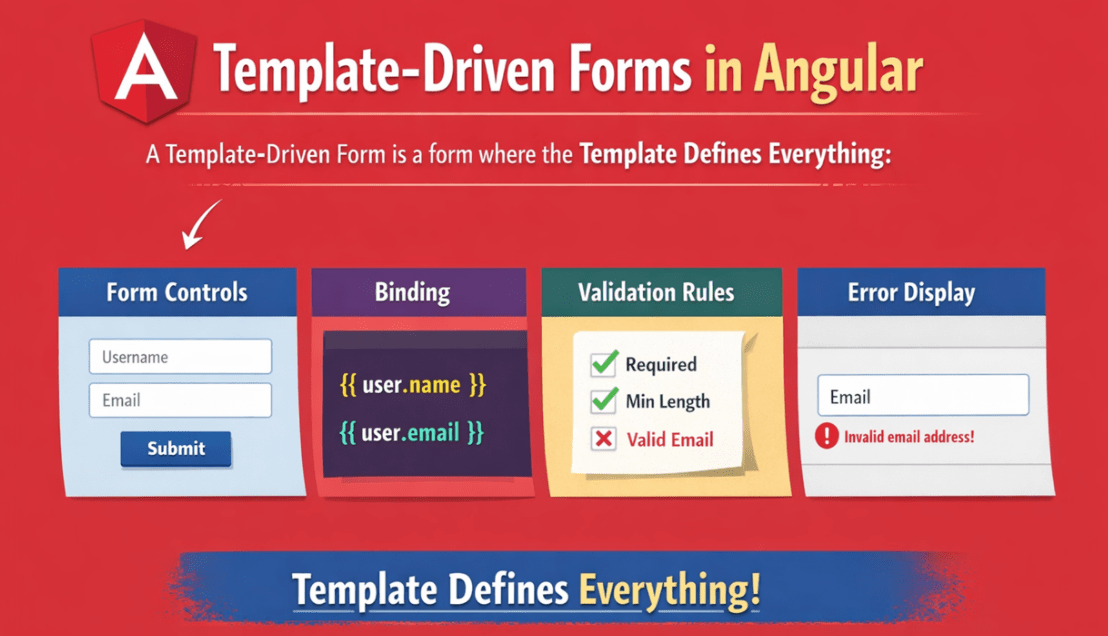
Key Points to Remember:
- Template-Driven = HTML-First Approach
- Uses ngForm to recognize the form
- Uses ngModel to recognize and create controls
- Angular automatically tracks:
-
- Field values
- Validation status
- Touched/Untouched
- Dirty/Pristine
-
Why Template-Driven Forms Are Beginner-Friendly?
Template-Driven Forms feel very close to traditional HTML forms, which is why beginners grasp them quickly. They are beginner-friendly because:
- Very close to plain HTML forms
- Minimal TypeScript is required
- Avoid manual form model creation
- Validation rules look like plain HTML attributes
- Easy to read and visually understand
If you already know basic HTML forms, Template-Driven Forms feel like an upgrade rather than a completely new concept. Here, we focus on the form’s appearance and how users interact with it, not on complex abstractions.
Importing and Configuring FormsModule
Angular does not enable forms by default. Template-driven forms work only when Angular has the FormsModule. This module provides the directives we use in HTML, like ngModel and ngForm. In modern Angular (standalone approach), we typically import FormsModule in the component. In module-based apps, we import it in the NgModule.
Once imported:
- Angular recognizes ngModel and ngForm
- Angular enables two-way data binding
- Activates template-based validation
- Enables form state tracking
Without FormsModule, template-driven forms will not work at all. FormsModule is mandatory because it provides ngModel and the template-driven form directives.
Using ngModel for Two-Way Data Binding
ngModel is the heart of Template-Driven Forms.
It enables:
- Reading data from the component into the template.
- Writing user input back into the component from templae.
- Two-way binding using the [(ngModel)] syntax
This two-way flow ensures that:
- The UI and data stay in sync
- Angular automatically tracks changes
- Validation state updates instantly
Angular listens to user input events and updates the model instantly, while also reflecting model changes back into the UI.
What are template reference variables?
Template reference variables (like #email=”ngModel”, #dob=”ngModel”) give us direct access to a control’s state in HTML. This is extremely useful for showing validation errors only when appropriate (for example, after the user touches the field).
You can check:
- Valid / Invalid – A form or control is valid when all its validation rules pass, and invalid when at least one validation rule fails.
- Touched / Untouched – A control is touched after the user focuses on it and then leaves it, and is untouched if the user has never interacted with it.
- Dirty / Pristine – A control is dirty when its value is changed by the user, and pristine when the value remains unchanged from its initial state.
Template reference variables let you read control state directly in HTML to show clean validation feedback. They act as local handles to Angular-generated form controls and help you control UI behaviour without touching TypeScript
How Angular auto-creates the form model?
In Angular, a form model is the internal object structure that represents the form. It stores each control’s current value, validation rules, validation errors, and state (like touched/dirty). Angular uses this model to know whether the form is valid, what the user typed, and which fields have problems.
One of the biggest advantages of Template-Driven Forms is the automatic creation of the form model. In Template-Driven Forms, we don’t manually create FormGroup and FormControl. Angular creates them automatically when it sees:
- A <form> element (Angular attaches ngForm)
- Inputs using ngModel with a name attribute
So, Angular automatically creates the form object and controls at runtime based on our HTML structure using ngModel and name.
Built-in Validation Attributes
Angular integrates common HTML validation attributes into its form validation system. That means required, minlength, pattern, etc., are automatically part of Angular’s validation pipeline.
- Required: Ensures the field must have a value before submission.
- Minlength / Maxlength: Restricts input length and helps enforce data consistency.
- Email: Validates email format automatically using Angular’s built-in email validator.
- Pattern: Allows defining custom regular expressions for advanced validation rules, such as:
-
- Only numbers
- Only letters
- Alphanumeric formats
- Custom IDs or codes
-
Displaying Validation Error Messages Using Form State
A professional form does not show errors immediately. Angular tracks multiple form states automatically:
- Valid / Invalid
- Touched / Untouched
- Dirty / Pristine
- Submitted
By combining these states:
- Errors are shown only when needed
- User experience remains clean
- Validation feels responsive and professional
This avoids showing errors too early and improves user experience. Use control state (touched/dirty/invalid) to show validation messages at the right time for a clean UX.
Template-Driven Forms in Angular: Real-Time Application
We will build a small User Account Portal with 3 template-driven forms:
- Register (Covers All Controls + Validations)
- Login (Email/Password + Remember Me)
- Edit Profile (Modifying Form, Prefilled Data, Reset, Validation States)
Each form will demonstrate all required controls (textbox, textarea, password, radio, dropdown, checkbox) with Proper Validations, plus form/control states:
- Valid / Invalid
- Touched / Untouched
- Dirty / Pristine
- Submitted
Register Page:
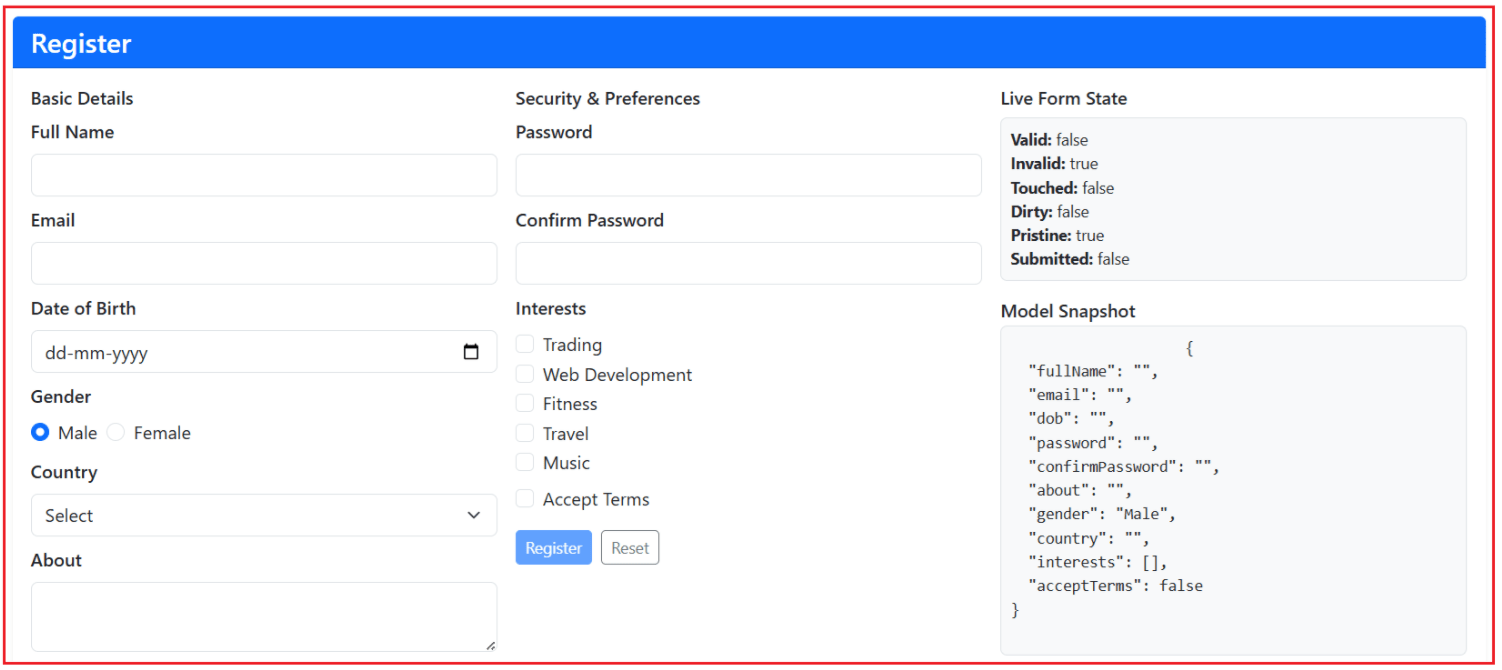
Login Page:

Edit Profile Page:
Step 1: Create a New Angular Project
Run the following commands:
- ng new user-management
- cd user-management
- ng serve
Step 2: Add Bootstrap CDN
Open src/index.html and copy-paste the following code.
<!doctype html>
<html lang="en">
<head>
  <meta charset="utf-8">
  <title>User Management</title>
  <base href="/">
  <meta name="viewport" content="width=device-width, initial-scale=1">
  <link rel="icon" type="image/x-icon" href="favicon.ico">
    <link
      href="https://cdn.jsdelivr.net/npm/bootstrap@5.3.3/dist/css/bootstrap.min.css"
      rel="stylesheet" />

</head>
<body>
  <app-root></app-root>
  <script src="https://cdn.jsdelivr.net/npm/bootstrap@5.3.3/dist/js/bootstrap.bundle.min.js"></script>
</body>
</html>
Step 3: Create Folder Structure
Inside src/app, create:
- models/
- services/
- pages/
Step 4: Generate Standalone Pages
Run the following commands:
- ng g c pages/register
- ng g c pages/login
- ng g c pages/profile
- ng g c pages/home
Step 5: Add Routes
Open the src/app/app.routes.ts file and copy-paste the following code:
import { Routes } from '@angular/router';
import { Register } from './pages/register/register';
import { Login } from './pages/login/login';
import { Profile } from './pages/profile/profile';
import { Home } from './pages/home/home';

export const routes: Routes = [
   { path: '', component: Home },
  { path: 'register', component: Register },
  { path: 'login', component: Login },
  { path: 'profile', component: Profile },
  { path: '**', redirectTo: 'register' }
];
Step 6: Create Models
Models define the data structure for each form. Create a TypeScript file named user.ts within the src/app/models folder, and copy-paste the following code.
export type Gender = 'Male' | 'Female' | 'Other';

export interface RegisteredUser {
  id: number;
  fullName: string;
  email: string;
  password: string;      // stored as plain for demo (in real apps hash it)
  dob: string;           // ISO date string: yyyy-MM-dd
  about: string;
  gender: Gender;
  country: string;
  interests: string[];
  acceptTerms: boolean;
  isActive: boolean;
}

export interface RegisterModel {
  fullName: string;
  email: string;
  dob: string;
  password: string;
  confirmPassword: string;
  about: string;
  gender: Gender;
  country: string;
  interests: string[];
  acceptTerms: boolean;
}

export interface LoginModel {
  email: string;
  password: string;
  rememberMe: boolean;
}

export interface ProfileModel {
  fullName: string;
  email: string;
  dob: string;
  about: string;
  gender: Gender;
  country: string;
  interests: string[];
}
Step 7: Create Services (Fake Backend)
Create a TypeScript file named account.service.ts within the src/app/services folder, and copy-paste the following code.
import { Injectable } from '@angular/core';
import { LoginModel, ProfileModel, RegisterModel, RegisteredUser } from '../models/user';

@Injectable({ providedIn: 'root' })
export class AccountService {
  // Static dataset (acts like a fake DB)
  private users: RegisteredUser[] = [
    {
      id: 1,
      fullName: 'Amit Sharma',
      email: 'amit@test.com',
      password: 'Test@123',          // demo only
      dob: '1996-04-12',
      about: 'I love Angular and Trading.',
      gender: 'Male',
      country: 'India',
      interests: ['Trading', 'Web Development'],
      acceptTerms: true,
      isActive: true
    },
    {
      id: 2,
      fullName: 'Sarah Johnson',
      email: 'sarah@test.com',
      password: 'Sarah@123',
      dob: '1998-09-20',
      about: 'Fitness + travel enthusiast.',
      gender: 'Female',
      country: 'USA',
      interests: ['Fitness', 'Travel'],
      acceptTerms: true,
      isActive: true
    }
  ];

  // Logged-in user tracking (simple session)
  private currentUserId: number | null = null;

  // ---------- Helpers ----------
  private normalizeEmail(email: string): string {
    return email.trim().toLowerCase();
  }

  private passwordMeetsPolicy(password: string): boolean {
    // Minimum 8 chars, at least 1 letter, 1 number, 1 special char
    const re = /^(?=.*[A-Za-z])(?=.*\d)(?=.*[@$!%*#?&]).{8,}$/;
    return re.test(password);
  }

  // ---------- Public APIs ----------
  getCountries(): string[] {
    return ['India', 'USA', 'UK', 'Canada', 'Australia'];
  }

  getInterests(): string[] {
    return ['Trading', 'Web Development', 'Fitness', 'Travel', 'Music'];
  }

  register(model: RegisterModel): { success: boolean; message: string } {
    // Server-side validations (even though template has validations too)
    const email = this.normalizeEmail(model.email);

    if (!model.fullName.trim()) return { success: false, message: 'Full Name is required.' };
    if (!email) return { success: false, message: 'Email is required.' };
    if (!model.dob) return { success: false, message: 'Date of Birth is required.' };

    if (!model.password) return { success: false, message: 'Password is required.' };
    if (!this.passwordMeetsPolicy(model.password)) {
      return { success: false, message: 'Password must be 8+ chars and include letter, number, and special character.' };
    }
    if (model.password !== model.confirmPassword) {
      return { success: false, message: 'Password and Confirm Password do not match.' };
    }

    if (!model.country) return { success: false, message: 'Country is required.' };
    if (model.interests.length === 0) return { success: false, message: 'Select at least one interest.' };
    if (!model.acceptTerms) return { success: false, message: 'You must accept Terms & Conditions.' };

    const exists = this.users.some(u => this.normalizeEmail(u.email) === email);
    if (exists) return { success: false, message: 'Email already registered.' };

    const nextId = Math.max(...this.users.map(x => x.id)) + 1;

    const user: RegisteredUser = {
      id: nextId,
      fullName: model.fullName.trim(),
      email,
      password: model.password,
      dob: model.dob,
      about: model.about?.trim() ?? '',
      gender: model.gender,
      country: model.country,
      interests: [...model.interests],
      acceptTerms: model.acceptTerms,
      isActive: true
    };

    this.users.push(user);
    return { success: true, message: 'Registration successful! Now you can login.' };
  }

  login(model: LoginModel): { success: boolean; message: string } {
    const email = this.normalizeEmail(model.email);

    if (!email) return { success: false, message: 'Email is required.' };
    if (!model.password) return { success: false, message: 'Password is required.' };

    const user = this.users.find(u => this.normalizeEmail(u.email) === email);

    if (!user) return { success: false, message: 'User not found. Please register first.' };
    if (!user.isActive) return { success: false, message: 'Your account is deactivated. Contact admin.' };
    if (user.password !== model.password) return { success: false, message: 'Invalid email or password.' };

    this.currentUserId = user.id;
    return { success: true, message: model.rememberMe ? 'Login successful (Remember Me enabled).' : 'Login successful.' };
  }

  logout(): void {
    this.currentUserId = null;
  }

  isLoggedIn(): boolean {
    return this.currentUserId !== null;
  }

  getCurrentProfile(): ProfileModel | null {
    if (this.currentUserId === null) return null;

    const user = this.users.find(u => u.id === this.currentUserId);
    if (!user) return null;

    return {
      fullName: user.fullName,
      email: user.email,
      dob: user.dob,
      about: user.about,
      gender: user.gender,
      country: user.country,
      interests: [...user.interests]
    };
  }

  updateProfile(model: ProfileModel): { success: boolean; message: string } {
    if (this.currentUserId === null) return { success: false, message: 'Please login first.' };

    const userIndex = this.users.findIndex(u => u.id === this.currentUserId);
    if (userIndex < 0) return { success: false, message: 'User session invalid.' };

    const email = this.normalizeEmail(model.email);

    // Validations
    if (!model.fullName.trim()) return { success: false, message: 'Full Name is required.' };
    if (!email) return { success: false, message: 'Email is required.' };
    if (!model.dob) return { success: false, message: 'Date of Birth is required.' };
    if (!model.country) return { success: false, message: 'Country is required.' };
    if (model.interests.length === 0) return { success: false, message: 'Select at least one interest.' };

    // Email uniqueness (except current user)
    const emailTaken = this.users.some(u => u.id !== this.currentUserId && this.normalizeEmail(u.email) === email);
    if (emailTaken) return { success: false, message: 'This email is already used by another user.' };

    // Update record
    const existing = this.users[userIndex];
    this.users[userIndex] = {
      ...existing,
      fullName: model.fullName.trim(),
      email,
      dob: model.dob,
      about: model.about?.trim() ?? '',
      gender: model.gender,
      country: model.country,
      interests: [...model.interests]
    };

    return { success: true, message: 'Profile updated successfully!' };
  }

  changePassword(newPassword: string, confirmPassword: string): { success: boolean; message: string } {
    if (this.currentUserId === null) return { success: false, message: 'Please login first.' };
    if (!newPassword) return { success: false, message: 'New Password is required.' };
    if (!this.passwordMeetsPolicy(newPassword)) {
      return { success: false, message: 'Password must be 8+ chars and include letter, number, and special character.' };
    }
    if (newPassword !== confirmPassword) return { success: false, message: 'New Password and Confirm Password do not match.' };

    const userIndex = this.users.findIndex(u => u.id === this.currentUserId);
    if (userIndex < 0) return { success: false, message: 'User session invalid.' };

    this.users[userIndex] = { ...this.users[userIndex], password: newPassword };
    return { success: true, message: 'Password updated successfully!' };
  }
}
Step 8: Adding Navigation Menus
Root Component
Open the src/app/app.ts file, and copy-paste the following code.
import { Component } from '@angular/core';
import { RouterLink, RouterLinkActive, RouterOutlet, Router } from '@angular/router';
import { AccountService } from './services/account.service';

@Component({
  selector: 'app-root',
  standalone: true,
  imports: [RouterOutlet, RouterLink, RouterLinkActive],
  templateUrl: './app.html'
})
export class App {
  constructor(public account: AccountService, private router: Router) {}

  logout() {
    this.account.logout();
    this.router.navigateByUrl('/');
  }
}
Root Template
Open the src/app/app.html file, and copy-paste the following code.
<nav class="navbar navbar-expand-lg navbar-dark bg-dark border-bottom border-secondary">
  <div class="container">

    <!-- Brand -->
    <a class="navbar-brand fw-semibold d-flex align-items-center gap-2" routerLink="/">
      <span>User Management</span>
    </a>

    <!-- Toggler (mobile) -->
    <button class="navbar-toggler" type="button" data-bs-toggle="collapse" data-bs-target="#topNav"
            aria-controls="topNav" aria-expanded="false" aria-label="Toggle navigation">
      <span class="navbar-toggler-icon"></span>
    </button>

    <!-- Links -->
    <div class="collapse navbar-collapse" id="topNav">
      <!-- Left side: Home always -->
      <ul class="navbar-nav me-auto mb-2 mb-lg-0">
        <li class="nav-item">
          <a class="nav-link"
             routerLink="/"
             routerLinkActive="active"
             [routerLinkActiveOptions]="{ exact: true }">
            Home
          </a>
        </li>
      </ul>

      <!-- Right side: Actions -->
      <div class="d-flex align-items-center gap-2">

        @if (!account.isLoggedIn()) {
          <a class="btn btn-outline-light btn-sm px-3"
             routerLink="/register"
             routerLinkActive="active">
            Register
          </a>

          <a class="btn btn-primary btn-sm px-3"
             routerLink="/login"
             routerLinkActive="active">
            Login
          </a>
        } @else {
          <a class="btn btn-outline-light btn-sm px-3"
             routerLink="/profile"
             routerLinkActive="active">
            Profile
          </a>

          <button class="btn btn-danger btn-sm px-3" type="button" (click)="logout()">
            Logout
          </button>
        }

      </div>
    </div>

  </div>
</nav>

<div class="container my-4">
  <router-outlet></router-outlet>
</div>
Step 9: Register Form (All Controls + Validations + States)
Register Component
Open the src/app/pages/register/register.ts file, and copy-paste the following code.
import { Component } from '@angular/core';
import { CommonModule } from '@angular/common';
import { FormsModule, NgForm } from '@angular/forms';
import { AccountService } from '../../services/account.service';
import { RegisterModel } from '../../models/user';
import { Router } from '@angular/router';

@Component({
  selector: 'app-register',
  standalone: true,
  imports: [CommonModule, FormsModule],
  templateUrl: './register.html'
})
export class Register {
  submitted = false;
  message = '';

  countries: string[] = [];
  availableInterests: string[] = [];

  model: RegisterModel = {
    fullName: '',
    email: '',
    dob: '',
    password: '',
    confirmPassword: '',
    about: '',
    gender: 'Male',
    country: '',
    interests: [],
    acceptTerms: false
  };

  constructor(private account: AccountService, private router: Router) {
    this.countries = this.account.getCountries();
    this.availableInterests = this.account.getInterests();
  }

  // Template helper for confirm password mismatch
  get passwordMismatch(): boolean {
    return !!this.model.password && !!this.model.confirmPassword && this.model.password !== this.model.confirmPassword;
  }

  toggleInterest(interest: string, checked: boolean) {
    if (checked) {
      if (!this.model.interests.includes(interest)) this.model.interests.push(interest);
    } else {
      this.model.interests = this.model.interests.filter(x => x !== interest);
    }
  }

  onSubmit(form: NgForm) {
    this.submitted = true;
    this.message = '';

    // Template validations
    if (form.invalid || this.passwordMismatch || this.model.interests.length === 0) {
      this.message = 'Please fix the validation errors and try again.';
      return;
    }

    // Service validations (acts like server validations)
    const result = this.account.register(this.model);
    this.message = result.message;

    if (result.success) {
      form.resetForm({
        fullName: '',
        email: '',
        dob: '',
        password: '',
        confirmPassword: '',
        about: '',
        gender: 'Male',
        country: '',
        interests: [],
        acceptTerms: false
      });
      this.submitted = false;

      // Redirect to Home
      this.router.navigateByUrl('/');
    }
  }
}
Register Template
Open the src/app/pages/register/register.html file, and copy-paste the following code.
<div class="row justify-content-center">
  <div class="col-12">

    <div class="card shadow-sm border-0">
      <div class="card-header bg-primary text-white">
        <h4 class="mb-0">Register</h4>
      </div>

      <div class="card-body p-3">

        <!--Template-Driven Forms:
            #regForm="ngForm"
            Angular automatically creates a Form Model (NgForm)
            and binds it to this template reference variable. -->
        <form #regForm="ngForm" (ngSubmit)="onSubmit(regForm)" novalidate>

          <div class="row g-3">

            <!-- SECTION 1: BASIC DETAILS -->
            <div class="col-lg-4">

              <h6 class="fw-semibold mb-2">Basic Details</h6>

              <!-- Full Name -->
              <div class="mb-2">
                <label class="form-label fw-semibold">Full Name</label>

                <!-- Template-Driven Control:
                     name="fullName" is mandatory to register this input inside NgForm
                     [(ngModel)] binds the input value to model.fullName (two-way binding)
                     #fullName="ngModel" gives access to control state: valid/invalid/touched/errors -->
                <input type="text" class="form-control"
                       name="fullName"
                       [(ngModel)]="model.fullName"
                       #fullName="ngModel"
                       required minlength="3" maxlength="50"
                       pattern="^[A-Za-z ]+$" />

                <!--Validation:
                    These states come from NgModel
                    Angular tracks them automatically
                    Show message only when invalid and user touched OR form submitted -->
                @if (fullName.invalid && (fullName.touched || submitted)) {
                  <div class="text-danger small">
                    @if (fullName.errors?.['required']) { Full Name is required }
                    @if (fullName.errors?.['minlength']) { Min 3 characters }
                    @if (fullName.errors?.['pattern']) { Alphabets only }
                  </div>
                }
              </div>

              <!-- Email -->
              <div class="mb-2">
                <label class="form-label fw-semibold">Email</label>

                <!-- Built-in validator: email + required
                     Angular automatically converts them into validators -->
                <input type="email" class="form-control"
                       name="email"
                       [(ngModel)]="model.email"
                       #email="ngModel"
                       required email />

                @if (email.invalid && (email.touched || submitted)) {
                  <div class="text-danger small">
                    Invalid email address
                  </div>
                }
              </div>

              <!-- DOB -->
              <div class="mb-2">
                <label class="form-label fw-semibold">Date of Birth</label>

                <!-- Date input also becomes an NgModel control because it has name + ngModel -->
                <input type="date" class="form-control"
                       name="dob"
                       [(ngModel)]="model.dob"
                       #dob="ngModel"
                       required />
              </div>

              <!-- Gender -->
              <div class="mb-2">
                <label class="form-label fw-semibold d-block">Gender</label>

                <!-- Radio buttons:
                     All radios share same name="gender"
                     So Angular treats them as ONE control (model.gender) -->
                <div class="d-flex gap-2">
                  <div class="form-check">
                    <input class="form-check-input" type="radio" name="gender"
                           [(ngModel)]="model.gender" value="Male">
                    <label class="form-check-label">Male</label>
                  </div>
                  <div class="form-check">
                    <input class="form-check-input" type="radio" name="gender"
                           [(ngModel)]="model.gender" value="Female">
                    <label class="form-check-label">Female</label>
                  </div>
                </div>
              </div>

              <!-- Country -->
              <div class="mb-2">
                <label class="form-label fw-semibold">Country</label>

                <!-- Select dropdown as NgModel control -->
                <select class="form-select"
                        name="country"
                        [(ngModel)]="model.country"
                        #country="ngModel"
                        required>
                  <option value="" disabled>Select</option>

                <!--@for loop just renders options
                    Form logic is handled by ngModel -->
                  @for (c of countries; track c) {
                    <option [value]="c">{{ c }}</option>
                  }
                </select>
              </div>

              <!-- About -->
              <div class="mb-2">
                <label class="form-label fw-semibold">About</label>

                <!-- Textarea is also a form control due to name + ngModel -->
                <textarea class="form-control" rows="2"
                          name="about"
                          [(ngModel)]="model.about"
                          maxlength="200"></textarea>
              </div>
            </div>

            <!-- SECTION 2: SECURITY & PREFERENCES -->
            <div class="col-lg-4">

              <h6 class="fw-semibold mb-2">Security & Preferences</h6>

              <!-- Password -->
              <div class="mb-2">
                <label class="form-label fw-semibold">Password</label>

                <!-- pattern + minlength are built-in validators
                     Pattern validation is automatically enforced
                     Angular adds pattern error if it fails -->
                <input type="password" class="form-control"
                       name="password"
                       [(ngModel)]="model.password"
                       #password="ngModel"
                       required minlength="8"
                       pattern="^(?=.*[A-Za-z])(?=.*[0-9])(?=.*[@$!%*#?&]).{8,}$" />
              </div>

              <!-- Confirm Password -->
              <div class="mb-2">
                <label class="form-label fw-semibold">Confirm Password</label>

                <!-- Cross-field validation
                     password mismatch) is handled manually in component logic -->
                <input type="password" class="form-control"
                       name="confirmPassword"
                       [(ngModel)]="model.confirmPassword"
                       required />

                <!-- Custom mismatch validation (not built-in):
                     We show message when mismatch and either submitted or password touched -->
                @if ((submitted || password.touched) && passwordMismatch) {
                  <div class="text-danger small">Passwords do not match</div>
                }
              </div>

              <!-- Interests -->
              <div class="mb-2">
                <label class="form-label fw-semibold d-block">Interests</label>

                <!--
                    Checkboxes are NOT bound with ngModel directly
                    We manually update the array
                -->
                @for (i of availableInterests; track i) {
                  <div class="form-check">
                    <input class="form-check-input" type="checkbox"
                           [checked]="model.interests.includes(i)"
                           (change)="toggleInterest(i, $any($event.target).checked)">
                    <label class="form-check-label">{{ i }}</label>
                  </div>
                }
              </div>

              <!-- Accept Terms -->
              <div class="form-check mt-2">
                <!-- Required checkbox:
                     If unchecked, it makes the whole form invalid -->
                <input class="form-check-input" type="checkbox"
                       name="acceptTerms"
                       [(ngModel)]="model.acceptTerms"
                       required>
                <label class="form-check-label">Accept Terms</label>
              </div>

              <!-- Buttons -->
              <div class="mt-3 d-flex gap-2">
                <!-- Disable button based on form validity and custom mismatch rule -->
                <button class="btn btn-primary btn-sm"
                        type="submit"
                        [disabled]="regForm.invalid || passwordMismatch">
                  Register
                </button>

                <!-- resetForm() clears values + validation state (pristine/untouched) -->
                <button class="btn btn-outline-secondary btn-sm"
                        type="button"
                        (click)="regForm.resetForm(); submitted=false">
                  Reset
                </button>
              </div>
            </div>

            <!-- SECTION 3: LIVE STATE + SNAPSHOT -->
            <div class="col-lg-4">

              <h6 class="fw-semibold mb-2">Live Form State</h6>

              <!-- These are NgForm properties (form-level state) -->
              <div class="p-2 bg-light border rounded small">
                <div><strong>Valid:</strong> {{ regForm.valid }}</div>
                <div><strong>Invalid:</strong> {{ regForm.invalid }}</div>
                <div><strong>Touched:</strong> {{ regForm.touched }}</div>
                <div><strong>Dirty:</strong> {{ regForm.dirty }}</div>
                <div><strong>Pristine:</strong> {{ regForm.pristine }}</div>
                <div><strong>Submitted:</strong> {{ regForm.submitted }}</div>
              </div>

              <h6 class="fw-semibold mt-3 mb-1">Model Snapshot</h6>

              <!-- Model snapshot shows values (data), not control states -->
              <pre class="small bg-light border rounded p-2 mb-0">
                    {{ model | json }}
              </pre>

              <!-- CONTROL-LEVEL DEBUG -->
              <div class="mt-2 p-2 bg-light border rounded small">
                <div class="fw-semibold mb-1">Controls Debug (which one is invalid?)</div>

                <!-- regForm.controls contains all controls
                     created using name + ngModel -->
                @for (item of regForm.controls | keyvalue; track item.key) {
                  <div class="border-bottom py-1" [class.text-success]="item.value.valid" [class.text-danger]="item.value.invalid">
                    <strong>{{ item.key }}</strong>
                    → valid={{ item.value.valid }},
                    invalid={{ item.value.invalid }},
                    errors={{ item.value.errors | json }}
                  </div>
                }
              </div>
            </div>

          </div>
        </form>
      </div>
    </div>

  </div>
</div>
Step 10: Login Page
Login Component
Open the src/app/pages/login/login.ts file, and copy-paste the following code.
import { Component } from '@angular/core';
import { CommonModule } from '@angular/common';
import { FormsModule, NgForm } from '@angular/forms';
import { AccountService } from '../../services/account.service';
import { LoginModel } from '../../models/user';
import { Router } from '@angular/router';

@Component({
  selector: 'app-login',
  standalone: true,
  imports: [CommonModule, FormsModule],
  templateUrl: './login.html'
})
export class Login {
  submitted = false;
  message = '';

  model: LoginModel = {
    email: '',
    password: '',
    rememberMe: false
  };

  constructor(private account: AccountService, private router: Router) {}

  onSubmit(form: NgForm) {
    this.submitted = true;
    this.message = '';

    if (form.invalid) {
      this.message = 'Fix errors and try again.';
      return;
    }

    const result = this.account.login(this.model);
    this.message = result.message;

    if (result.success) {
      this.router.navigateByUrl('/');
    }
  }
}
Login Template
Open the src/app/pages/login/login.html file, and copy-paste the following code.
<div class="row justify-content-center">
  <div class="col-lg-10">

    <div class="card shadow-sm border-0">
      <div class="card-header bg-success text-white">
        <h4 class="mb-0">Login</h4>
      </div>

      <div class="card-body p-4">

        <!-- Template-Driven Form:
             #loginForm="ngForm" gives you the NgForm instance (form model)
             Angular auto-creates form controls when it sees name + ngModel -->
        <form #loginForm="ngForm" (ngSubmit)="onSubmit(loginForm)" novalidate>

          <div class="row g-4">

            <!-- SECTION 1: LOGIN FORM -->
            <div class="col-lg-6">

              <h6 class="fw-semibold mb-3">Login Details</h6>

              <!-- Email -->
              <div class="mb-3">
                <label class="form-label fw-semibold">Email</label>

                <!-- name="email" is mandatory to register this control inside NgForm
                     [(ngModel)] enables two-way binding with model.email
                     #email="ngModel" exposes control state: valid/invalid/touched/errors -->
                <input
                  type="email"
                  class="form-control"
                  name="email"
                  [(ngModel)]="model.email"
                  #email="ngModel"
                  required
                  email />

                <!-- Validation UI:
                     show errors only when user touched OR form submitted -->
                @if (email.invalid && (email.touched || submitted)) {
                  <div class="text-danger small mt-1">
                    @if (email.errors?.['required']) { <div>Email is required.</div> }
                    @if (email.errors?.['email']) { <div>Enter a valid email.</div> }
                  </div>
                }
              </div>

              <!-- Password -->
              <div class="mb-3">
                <label class="form-label fw-semibold">Password</label>

                <!-- minlength + required are built-in validators
                     #password="ngModel" lets us read password.errors, touched, valid, etc. -->
                <input
                  type="password"
                  class="form-control"
                  name="password"
                  [(ngModel)]="model.password"
                  #password="ngModel"
                  required
                  minlength="6" />

                @if (password.invalid && (password.touched || submitted)) {
                  <div class="text-danger small mt-1">
                    @if (password.errors?.['required']) { <div>Password is required.</div> }
                    @if (password.errors?.['minlength']) { <div>Minimum 6 characters required.</div> }
                  </div>
                }
              </div>

              <!-- Remember Me -->
              <div class="form-check mb-3">
                <!-- Checkbox becomes a form control because it has name + ngModel -->
                <input
                  class="form-check-input"
                  type="checkbox"
                  name="rememberMe"
                  [(ngModel)]="model.rememberMe" />
                <label class="form-check-label">Remember Me</label>
              </div>

              <!-- Actions -->
              <div class="d-flex gap-2">
                <!-- Disable login button until NgForm is valid -->
                <button
                  class="btn btn-success px-4"
                  type="submit"
                  [disabled]="loginForm.invalid">
                  Login
                </button>
              </div>

              <!-- Message from TS/service:
                   Use @if instead of deprecated *ngIf -->
              @if (message) {
                <div class="alert mt-3"
                     [class.alert-success]="message.includes('successful')"
                     [class.alert-danger]="!message.includes('successful')">
                  {{ message }}
                </div>
              }

            </div>

            <!-- SECTION 2: FORM STATE -->
            <div class="col-lg-6">

              <!-- These are NgForm-level states (whole form state) -->
              <div class="p-3 bg-light border rounded small">
                <h6 class="fw-semibold mb-3">Live Form State</h6>
                <div><strong>Valid:</strong> {{ loginForm.valid }}</div>
                <div><strong>Invalid:</strong> {{ loginForm.invalid }}</div>
                <div><strong>Touched:</strong> {{ loginForm.touched }}</div>
                <div><strong>Dirty:</strong> {{ loginForm.dirty }}</div>
                <div><strong>Pristine:</strong> {{ loginForm.pristine }}</div>
                <div><strong>Submitted:</strong> {{ loginForm.submitted }}</div>
              </div>

              <!-- Model Snapshot:
                   Shows form values (data), not validation/touched states -->
              <div class="mt-3 p-3 bg-light border rounded">
                <div class="fw-semibold mb-2">Model Snapshot</div>
                <pre class="mb-0 small">{{ model | json }}</pre>
              </div>

            </div>

          </div>
        </form>
      </div>
    </div>

  </div>
</div>
Step 11: Profile Edit Form (Modify Existing Data + Reset State)
Profile Component
Open the src/app/pages/profile/profile.ts file, and copy-paste the following code.
import { Component, OnInit } from '@angular/core';
import { CommonModule } from '@angular/common';
import { FormsModule, NgForm } from '@angular/forms';
import { AccountService } from '../../services/account.service';
import { ProfileModel } from '../../models/user';

@Component({
  selector: 'app-profile',
  standalone: true,
  imports: [CommonModule, FormsModule],
  templateUrl: './profile.html'
})
export class Profile implements OnInit {
  submitted = false;

  // separate messages
  successMessage = '';
  errorMessage = '';

  countries: string[] = [];
  availableInterests: string[] = [];

  model: ProfileModel = {
    fullName: '',
    email: '',
    dob: '',
    about: '',
    gender: 'Male',
    country: '',
    interests: []
  };

  constructor(private account: AccountService) {
    this.countries = this.account.getCountries();
    this.availableInterests = this.account.getInterests();
  }

  ngOnInit(): void {
    const profile = this.account.getCurrentProfile();
    if (!profile) {
      this.errorMessage = 'Please login first to edit your profile.';
      return;
    }
    this.model = profile;
  }

  toggleInterest(interest: string, checked: boolean) {
    if (checked) {
      if (!this.model.interests.includes(interest)) this.model.interests.push(interest);
    } else {
      this.model.interests = this.model.interests.filter(x => x !== interest);
    }
  }

  onSubmit(form: NgForm) {
    this.submitted = true;

    // clear old messages
    this.successMessage = '';
    this.errorMessage = '';

    if (form.invalid || this.model.interests.length === 0) {
      this.errorMessage = 'Fix the errors before saving.';
      return;
    }

    const result = this.account.updateProfile(this.model);

    if (result.success) {
      this.successMessage = result.message;      // show success on page
      form.form.markAsPristine();
    } else {
      this.errorMessage = result.message;        // show error on page
    }
  }

  resetToLoaded(form: NgForm) {
    const profile = this.account.getCurrentProfile();
    if (!profile) return;

    form.resetForm(profile);
    this.submitted = false;

    // clear messages
    this.successMessage = '';
    this.errorMessage = '';
  }
}
Profile Template
Open the src/app/pages/profile/profile.html file, and copy-paste the following code.
<div class="row justify-content-center">
  <div class="col-12">

    <div class="card shadow-sm border-0">

      <!-- Header -->
      <div class="card-header bg-info text-white">
        <h4 class="mb-0">Edit Profile</h4>
      </div>

      <div class="card-body p-3">

        <!-- If user is not logged in, show info message and link to Login -->
        @if (errorMessage && errorMessage.includes('login')) {
          <div class="alert alert-info mb-0">
            {{ errorMessage }}
            <div class="mt-2">
              <a class="btn btn-sm btn-dark" routerLink="/login">Go to Login</a>
            </div>
          </div>

        } @else {

          <!-- Template-Driven Form:
               #profileForm="ngForm" exposes the NgForm instance (auto-created by Angular)
               Angular registers controls when it sees: name + ngModel -->
          <form #profileForm="ngForm"
                (ngSubmit)="onSubmit(profileForm)"
                novalidate>

            <!-- TOP MESSAGES -->
            <!-- Closable success message (uses Bootstrap dismiss UI; we clear the variable on click) -->
            @if (successMessage) {
              <div class="alert alert-success alert-dismissible fade show mb-3" role="alert">
                {{ successMessage }}
                <button type="button"
                        class="btn-close"
                        aria-label="Close"
                        (click)="successMessage=''">
                </button>
              </div>
            }

            <!-- Closable error message (shown only when it is NOT the login-required message) -->
            @if (errorMessage && !errorMessage.includes('login')) {
              <div class="alert alert-danger alert-dismissible fade show mb-3" role="alert">
                {{ errorMessage }}
                <button type="button"
                        class="btn-close"
                        aria-label="Close"
                        (click)="errorMessage=''">
                </button>
              </div>
            }

            <div class="row g-3">

              <!-- SECTION 1: PROFILE DETAILS -->
              <div class="col-lg-4">

                <h6 class="fw-semibold mb-2">Profile Details</h6>

                <!-- Full Name -->
                <div class="mb-2">
                  <label class="form-label fw-semibold">Full Name</label>

                  <!-- Template-driven control:
                       name is mandatory for registering control in NgForm
                       [(ngModel)] binds input value to model.fullName (two-way binding)
                       #fullName="ngModel" gives control state: valid/invalid/touched/errors -->
                  <input class="form-control"
                         name="fullName"
                         [(ngModel)]="model.fullName"
                         #fullName="ngModel"
                         required minlength="3"
                         pattern="^[A-Za-z ]+$" />

                  <!-- show validation messages using modern @if -->
                  @if (fullName.invalid && (fullName.touched || submitted)) {
                    <div class="text-danger small mt-1">
                      @if (fullName.errors?.['required']) { <div>Full Name is required.</div> }
                      @if (fullName.errors?.['minlength']) { <div>Minimum 3 characters required.</div> }
                      @if (fullName.errors?.['pattern']) { <div>Only alphabets and spaces allowed.</div> }
                    </div>
                  }

                </div>

                <!-- Email -->
                <div class="mb-2">
                  <label class="form-label fw-semibold">Email</label>

                  <!-- Built-in validators: required + email -->
                  <input type="email"
                         class="form-control"
                         name="email"
                         [(ngModel)]="model.email"
                         #email="ngModel"
                         required email />

                  <!-- Optional: show email validation-->
                  @if (email.invalid && (email.touched || submitted)) {
                    <div class="text-danger small mt-1">
                      @if (email.errors?.['required']) { <div>Email is required.</div> }
                      @if (email.errors?.['email']) { <div>Enter a valid email.</div> }
                    </div>
                  }

                </div>

                <!-- DOB -->
                <div class="mb-2">
                  <label class="form-label fw-semibold">Date of Birth</label>

                  <!-- Date input is also a control because it has name + ngModel -->
                  <input type="date"
                         class="form-control"
                         name="dob"
                         [(ngModel)]="model.dob"
                         #dob="ngModel"
                         required />
                </div>

                <!-- Country -->
                <div class="mb-2">
                  <label class="form-label fw-semibold">Country</label>

                  <!-- Select is a control (name + ngModel), required validator -->
                  <select class="form-select"
                          name="country"
                          [(ngModel)]="model.country"
                          #country="ngModel"
                          required>
                    <option value="" disabled>Select</option>

                    <!-- Modern loop (@for) instead of deprecated *ngFor -->
                    @for (c of countries; track c) {
                      <option [value]="c">{{ c }}</option>
                    }
                  </select>
                </div>

                <!-- About -->
                <div class="mb-2">
                  <label class="form-label fw-semibold">About</label>

                  <!-- Textarea is also a control (name + ngModel); maxlength is HTML validation -->
                  <textarea class="form-control"
                            rows="2"
                            name="about"
                            [(ngModel)]="model.about"
                            maxlength="200"></textarea>
                </div>

              </div>

              <!-- SECTION 2: PREFERENCES -->
              <div class="col-lg-4">

                <h6 class="fw-semibold mb-2">Preferences</h6>

                <!-- Gender -->
                <div class="mb-2">
                  <label class="form-label fw-semibold d-block">Gender</label>

                  <!-- Radio group:
                       same name="gender" means Angular treats this as ONE control -->
                  <div class="d-flex gap-3">
                    <div class="form-check">
                      <input class="form-check-input"
                             type="radio"
                             name="gender"
                             [(ngModel)]="model.gender"
                             value="Male">
                      <label class="form-check-label">Male</label>
                    </div>
                    <div class="form-check">
                      <input class="form-check-input"
                             type="radio"
                             name="gender"
                             [(ngModel)]="model.gender"
                             value="Female">
                      <label class="form-check-label">Female</label>
                    </div>
                  </div>
                </div>

                <!-- Interests -->
                <div class="mb-2">
                  <label class="form-label fw-semibold d-block">Interests</label>
                  @for (i of availableInterests; track i) {
                    <div class="form-check">
                      <input class="form-check-input"
                             type="checkbox"
                             [checked]="model.interests.includes(i)"
                             (change)="toggleInterest(i, $any($event.target).checked)">
                      <label class="form-check-label">{{ i }}</label>
                    </div>
                  }

                  <!-- Custom rule UI: show message if no interest selected on submit -->
                  @if (model.interests.length === 0 && submitted) {
                    <div class="text-danger small mt-1">
                      Please select at least one interest.
                    </div>
                  }
                </div>

                <!-- Buttons -->
                <div class="d-flex gap-2 mt-3">

                  <!-- Disable Save until:
                       1) All registered controls are valid (profileForm.invalid is false)
                       2) At least 1 interest is selected (custom rule) -->
                  <button class="btn btn-info btn-sm"
                          type="submit"
                          [disabled]="profileForm.invalid || model.interests.length === 0">
                    Save
                  </button>

                  <!-- resetToLoaded restores original profile values + resets form state -->
                  <button class="btn btn-outline-secondary btn-sm"
                          type="button"
                          (click)="resetToLoaded(profileForm)">
                    Reset
                  </button>
                </div>

              </div>

              <!-- SECTION 3: FORM STATE + MODEL SNAPSHOT -->
              <div class="col-lg-4">

                <h6 class="fw-semibold mb-2">Live Form State</h6>

                <!-- Form state is NgForm-level (whole form), not individual control -->
                <div class="p-2 bg-light border rounded small mb-3">
                  <div><strong>Valid:</strong> {{ profileForm.valid }}</div>
                  <div><strong>Invalid:</strong> {{ profileForm.invalid }}</div>
                  <div><strong>Touched:</strong> {{ profileForm.touched }}</div>
                  <div><strong>Dirty:</strong> {{ profileForm.dirty }}</div>
                  <div><strong>Pristine:</strong> {{ profileForm.pristine }}</div>
                  <div><strong>Submitted:</strong> {{ profileForm.submitted }}</div>
                </div>

                <!-- Model snapshot shows only values (data), not validation states -->
                <h6 class="fw-semibold mb-1">Model Snapshot</h6>
                <pre class="small bg-light border rounded p-2 mb-0">
                    {{ model | json }}
                </pre>

              </div>

            </div>
          </form>
        }

      </div>
    </div>

  </div>
</div>
Step 12: Home Page
Home Component
Open the src/app/pages/home/home.ts file, and copy-paste the following code.
import { Component } from '@angular/core';
import { CommonModule } from '@angular/common';
import { RouterLink } from '@angular/router';
import { AccountService } from '../../services/account.service';

@Component({
  selector: 'app-home',
  standalone: true,
  imports: [CommonModule, RouterLink],
  templateUrl: './home.html'
})
export class Home {
  constructor(public account: AccountService) {}
}
Home Template
Open the src/app/pages/home/home.html file, and copy-paste the following code.
<div class="card shadow-sm border-0">
  <div class="card-body p-4">
    <h3 class="fw-bold mb-2">User Management Portal</h3>
    <p class="text-muted mb-4">
      This is a simple template-driven forms demo app (Register, Login, Profile Update).
    </p>

    @if (account.isLoggedIn()) {
      <div class="alert alert-success">
        You are logged in. You can update your profile now.
      </div>

      <div class="d-flex flex-wrap gap-2">
        <a class="btn btn-primary" routerLink="/profile">Go to Profile</a>
        <a class="btn btn-outline-secondary" routerLink="/register">Register Another User</a>
      </div>
    } @else {
      <div class="alert alert-info">
        You are not logged in.
      </div>

      <div class="d-flex flex-wrap gap-2">
        <a class="btn btn-primary" routerLink="/login">Login</a>
        <a class="btn btn-outline-primary" routerLink="/register">Register</a>
      </div>
    }
  </div>
</div>
Form State vs Model Snapshot in Template-Driven Forms
Form State is about the Angular form object (NgForm) that Angular auto-creates for our <form>. It tells us the overall condition of the form—whether it’s valid, whether any controls were touched, whether the user changed anything, and whether the submit happened.
Model Snapshot is not about control states. It’s simply the data object we are binding to (our model)—the current values of the fields. It shows what the user entered, not whether each control is valid/touched/dirty.
Form State (regForm.*) = Whole Form
- regForm.valid/invalid → overall validation result of all registered controls
- regForm.touched/untouched → whether any control has been touched
- regForm.dirty/pristine → whether any control value changed
- regForm.submitted → whether the form has been submitted
Model Snapshot (model) = Values Only
- Shows current values like fullName, email, dob, etc.
- Does not show validation/touched/dirty info by itself
- It’s your “data payload” that you send to the service/API
So, Form State is the overall status of the entire form, while Model Snapshot is just the current data values—not the validation/state of individual controls.
When to Use Template-Driven Forms in Real-Time Applications?
Template-driven forms are best suited when:
- The form is simple or medium-sized
- Validation rules are straightforward
- The form does not need dynamic control creation
- You want faster development with less code
Typical real-time usage includes:
- Login forms
- Registration forms (basic)
- Contact forms
- Feedback forms
- Profile update forms
They are not ideal for:
- Highly dynamic forms
- Complex conditional validations
- Large enterprise-scale forms
- Forms requiring deep programmatic control
For very complex, dynamic, or highly testable forms, reactive forms are usually a better choice, but template-driven forms still dominate many production apps.
Conclusion:
Template-Driven Forms in Angular provide the simplest, most beginner-friendly way to build forms by defining the structure and validation directly in the HTML template, with Angular handling everything behind the scenes.
In the next article, I will discuss the Limitations of Angular Template-Driven Forms and why we need Reactive Forms. In this article, I explain Angular Template-Driven Forms in detail, and I hope you enjoy it. I would like to have your feedback. Please post your feedback, questions, or comments about this article.
In Angular 14
RegisterStudent(studentForm: NgForm): void {
debugger;
var firstName=studentForm.value.firstName;
var lastName=studentForm.value.lastName;
var FirstName=studentForm.value.email;
console.log(studentForm.value);
}
Thanks, great article!