
Back to: Angular Tutorials For Beginners and Professionals
Angular Structural Directives with Examples
In this article, I will discuss Angular Structural Directives with Examples. Please read our previous article, where we discussed the basics of Angular Directives. Structural Directives are one of the most powerful features of Angular. They decide what appears on the screen and what doesn’t. In modern Angular applications, especially with standalone components (Angular 17+), understanding Structural Directives is non-negotiable. In this chapter, we will understand what, why, when, and how—with a real-time UI example, modern syntax, and Bootstrap styling.
What are Angular Structural Directives?
Angular Structural Directives are special directives that change the structure of the DOM—meaning they can dynamically add, remove, or repeat elements based on a condition or collection. In real-time applications, they help us build screens like:
- Show this banner only if the user is an admin.
- Render this list of orders.
- Display one UI for Pending and another for Delivered.
Historically, Angular did this using directives like *ngIf, *ngFor, and *ngSwitch. In modern Angular (v17+), Angular introduced built-in control flow blocks: @if, @for, and @switch, which provide cleaner syntax and don’t require importing CommonModule. And starting with Angular v20, Angular officially deprecated *ngIf, *ngFor, and *ngSwitch and encourages everyone to use the new built-in control flow. Angular also notes that these deprecated directives can be removed starting around v22, per their deprecation policy.
Modern Syntax (Angular 21) — Recommended
@if — Show/Hide UI Sections Based on a Condition
@if renders one block when a condition is true and optionally renders another block using @else. Angular evaluates the condition:
- If true → it creates the HTML nodes inside the @if block.
- If false → it removes those nodes and creates the nodes in @else (if present).
This is important: Angular isn’t just hiding elements with CSS—it’s controlling whether they exist in the DOM at all.
Example:
@if (isLoading) {
  <div>Loading...</div>
} @else {
  <div>Loaded!</div>
}
So, use @if whenever you need conditional UI, such as:
- Empty state vs data state
- Modal visible vs hidden
- Permissions-based sections
@for — Render Lists Efficiently
@for loops over a list and generates repeated DOM blocks (like table rows, cards, dropdown options). So, use @for whenever you render collections:
- Orders list
- Products list
- Notifications
- Menu items
- Pagination buttons
Example:
@for (item of items; track item.id) {
  <div>{{ item.name }}</div>
} @empty {
  <div>No items found</div>
}
Why track is important?
The track expression is how Angular knows which item is which when the list changes.
Without tracking
When data changes (sorting, filtering, pagination, API refresh), Angular may treat the list as “new” and:
- Destroy many DOM nodes
- Recreate them again
- Lose focus/state of input fields
- Causes unnecessary rendering
With tracking (track item.id)
Angular uses your track key (like id) to identify the row. So, when the list updates, Angular can:
- Keep the same DOM row for the same record
- Update only what changed
- Improve performance significantly
@empty block
@empty is the modern equivalent of writing a separate @if(items.length === 0). It improves readability because the empty state is tied directly to the loop.
@switch
@switch is used to select one UI block from multiple options based on a value. So, use @switch when you have a finite set of known states, like:
- Order Status: Pending / Confirmed / Shipped / Delivered / Cancelled
- Payment Status: Paid / Unpaid / Refunded
- Delivery Status: NotDispatched / InTransit / OutForDelivery / Delivered
Example:
@switch (status) {
  @case ('Pending') { <span>Pending</span> }
  @case ('Delivered') { <span>Delivered</span> }
  @default { <span>Unknown</span> }
}
Real-time Application to Understand Angular Structural Directives
In a real-time application, an Admin (or Support Executive) needs a single screen where they can quickly monitor orders, search for customers, filter by status, navigate between pages, and open full order details without leaving the dashboard. That’s exactly what the Orders Dashboard represents. For clarity, please see the following image.
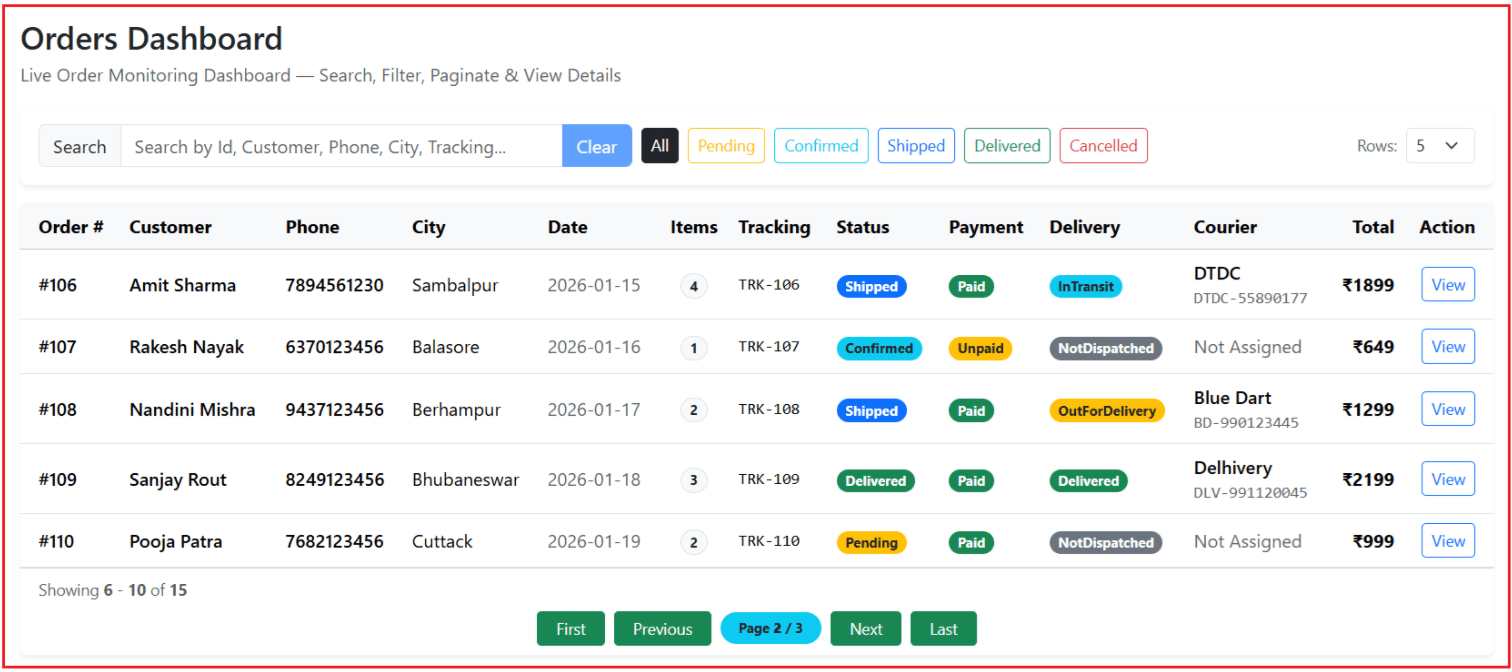
This screen looks and behaves like a real production dashboard:
- It shows orders in a professional table layout (easy to scan).
- It provides search and status filters so the admin can quickly find the exact order.
- It supports pagination, so even if there are 10,000 orders, the UI stays fast and clean.
- It provides a detailed modal pop-up that lets the admin view full order information instantly.
The dashboard contains four major areas:
1: Dashboard Title + Tagline
This is the top context area. It tells the admin what this screen is for: to monitor and manage orders in real time.
2: Filters Row (Search + Status chips + Page size)
This is where the admin controls what data appears in the table:
- Search box: filters by Order Id / Customer / Phone / City / Tracking Id (fast lookup).
- Status chips: one-click filtering like Pending / Confirmed / Shipped / Delivered / Cancelled.
- Rows dropdown: controls how many results appear per page (e.g., 5 / 10 / 15 / 20).
3: Orders Table (Header + Rows)
A professional dashboard always uses a table for such data because it’s compact and easy to scan. The table shows key columns at a glance:
- Order Id, Customer, Phone, City, Date
- Items count
- Tracking Id
- Order Status, Payment Status, Delivery Status
- Courier Partner (and AWB)
- Total Amount
- Action button (View)
4: Pagination Footer
Instead of showing everything on one long page, the admin gets:
- Showing X – Y of Z information
- Buttons: First, Previous, Current Page Indicator, Next, Last. This is the most common pagination style used in real dashboards.
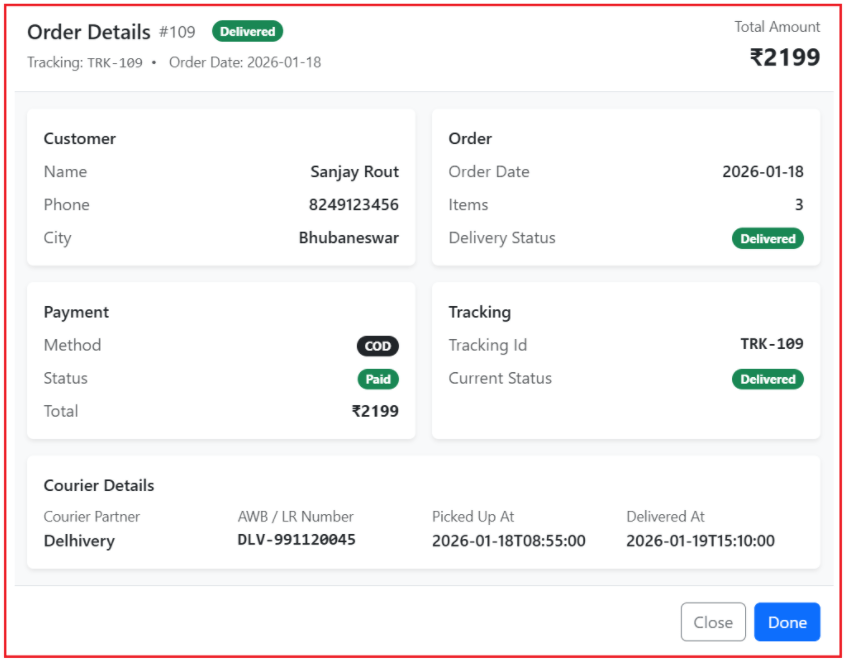
What happens when View is clicked?
When the admin clicks the View button for an order row:
- A modal popup opens (no page navigation)
- The modal shows all details grouped in clean sections:
- Customer details
- Order details
- Payment details
- Tracking details
- Courier details (including pickup + delivered timestamps)
This is a real-time pattern because it lets admins check everything instantly without leaving the dashboard. For clarity, please see the following image.
Creating a New Angular Project and Component
ng new order-dashboard
- This command creates a complete Angular workspace (project folder, configuration, and a default app).
- Angular CLI creates:
-
- A fully configured application shell
- A build system
- A development server
- A project structure that Angular understands
-
- By using ng new, we ensure:
- Correct folder structure
- Correct TypeScript configuration
- Correct Angular compiler setup
cd order-dashboard
This simply moves us into the project root so that:
- All future commands
- All file paths are resolved relative to this application.
Angular CLI commands must run inside the project workspace.
ng generate component orders-dashboard
- This generates a new UI component quickly (TS + HTML + CSS files).
- Angular CLI also automatically wires up the required files (depending on how your project is configured).
Adding Bootstrap via CDN
Bootstrap gives us:
- Consistent spacing
- Professional layout
- Responsive behaviour
- Standard UI language
So, we can focus on: Structural Directives + Data Flow + State Management
Why CDN Instead of NPM Package?
We use CDN because:
- No Angular dependency
- No build configuration changes
- Instant availability
- Perfect for learning and demos
CDN means: Load CSS directly from the browser, not Angular.
Get the Bootstrap CDN:
Get the Bootstrap CDN from the official website: https://getbootstrap.com/

Update index.html to Include Bootstrap CDN
index.html is:
- The only static HTML file
- Loaded once
- Shared by the entire application
Adding Bootstrap here ensures:
- Every component can use Bootstrap classes
- No repeated imports
- No performance penalty
This matches how global styles should be handled. So, open src/index.html and add the Bootstrap CSS CDN inside <head>. Bootstrap official docs provide these CDN links.
<!doctype html>
<html lang="en">
<head>
  <meta charset="utf-8">
  <title>OrderDashboard</title>
  <base href="/">
  <meta name="viewport" content="width=device-width, initial-scale=1">
  <link rel="icon" type="image/x-icon" href="favicon.ico">
  <!-- Bootstrap CSS (CDN) -->
  <link href="https://cdn.jsdelivr.net/npm/bootstrap@5.3.8/dist/css/bootstrap.min.css"
        rel="stylesheet"
        integrity="sha384-sRIl4kxILFvY47J16cr9ZwB07vP4J8+LH7qKQnuqkuIAvNWLzeN8tE5YBujZqJLB"
        crossorigin="anonymous">
</head>
<body>
  <app-root></app-root>
</body>
</html>
Creating Shared Order Model:
Angular applications deal with data, not random objects. A model defines:
- Shape of data
- Allowed values
- Business meaning
This file becomes the single source of truth for order data. First, create a folder named models within the src/app folder. Then, inside the models folder, create a ts file named order.model.ts and copy-paste the following code.
export type OrderStatus = 'Pending' | 'Confirmed' | 'Shipped' | 'Delivered' | 'Cancelled';
export type PaymentMethod = 'UPI' | 'Card' | 'COD';
export type PaymentStatus = 'Paid' | 'Unpaid' | 'Refunded';
export type DeliveryStatus = 'NotDispatched' | 'Shipped' | 'InTransit' | 'OutForDelivery' | 'Delivered';
export type DeliveryPartner = 'Delhivery' | 'Blue Dart' | 'DTDC' | 'Ecom Express' | 'India Post';

export interface Order {
  id: number;
  customerName: string;
  customerPhone: string;
  city: string;
  orderDate: string;
  itemsCount: number;
  trackingId: string;
  status: OrderStatus;
  paymentMethod: PaymentMethod;
  paymentStatus: PaymentStatus;
  deliveryStatus: DeliveryStatus;
  totalAmount: number;

  //Note: ? means optional. So Pending/Confirmed orders can skip it.
  deliveryPartner?: DeliveryPartner;
  awbNumber?: string;      // Courier Tracking Number
  pickedUpAt?: string;     // When the courier picked the Order
  deliveredAt?: string;    // Set only when deliveryStatus === 'Delivered'
}
Why use type instead of enums?
export type OrderStatus = ‘Pending’ | ‘Confirmed’ | …
Union types:
- Are lightweight
- Are compile-time only
- Do not exist at runtime
- Are perfect for UI state modeling
This is ideal for dashboards where:
- Status values are fixed
- UI behaviour depends on exact strings
Modifying orders-dashboard.ts
This component acts as a mini state machine. It manages four major concerns. Open the orders-dashboard.ts file and copy and paste the following code.
import { Component } from '@angular/core';
import { Order, OrderStatus } from '../models/order.model';

@Component({
  selector: 'app-orders-dashboard',
  standalone: true,
  templateUrl: './orders-dashboard.html'
})
export class OrdersDashboard {

  // FILTER STATE (Search + Status)
  // Search box text. We match this against a few main columns:
  // Order Id, Customer Name, Phone, City, Tracking Id.
  searchText = '';

  // Selected status .
  // any value from OrderStatus (i.e., 'Pending' | 'Confirmed' | 'Shipped' | 'Delivered' | 'Cancelled')
  // OR the special value 'All'
  selectedStatus: OrderStatus | 'All' = 'All';

  // PAGINATION STATE
  // Dropdown options shown in UI: "Rows per page"
  pageSizeOptions = [5, 10, 15, 20];

  // Default rows per page
  pageSize = 5;

  // Default Current page number
  currentPage = 1;

  // MODAL STATE
  // When user clicks "View", we store the selected row here.
  // If this is not null -> modal appears with full order details.
  selectedOrder: Order | null = null;

  // DUMMY DATA (15 HARDCODED RECORDS)
  orders: Order[] = [
    { id: 101, customerName: 'Ravi Kumar', customerPhone: '9876543210', city: 'Bhubaneswar', orderDate: '2026-01-10', itemsCount: 2, trackingId: 'TRK-101', status: 'Pending', deliveryStatus: 'NotDispatched', paymentMethod: 'COD', paymentStatus: 'Unpaid', totalAmount: 1499 },
    { id: 102, customerName: 'Anita Das', customerPhone: '9123456789', city: 'Cuttack', orderDate: '2026-01-11', itemsCount: 1, trackingId: 'TRK-102', status: 'Confirmed', deliveryStatus: 'NotDispatched', paymentMethod: 'UPI', paymentStatus: 'Paid', totalAmount: 799 },
    { id: 103, customerName: 'John Paul', customerPhone: '9988776655', city: 'Puri', orderDate: '2026-01-12', itemsCount: 3, trackingId: 'TRK-103', status: 'Shipped', deliveryStatus: 'Shipped', paymentMethod: 'Card', paymentStatus: 'Paid', totalAmount: 2599, deliveryPartner: 'Delhivery', awbNumber: 'DLV-784512369', pickedUpAt: '2026-01-12T16:10:00' },
    { id: 104, customerName: 'Suman Jena', customerPhone: '9090909090', city: 'Bhubaneswar', orderDate: '2026-01-13', itemsCount: 1, trackingId: 'TRK-104', status: 'Delivered', deliveryStatus: 'Delivered', paymentMethod: 'COD', paymentStatus: 'Paid', totalAmount: 499, deliveryPartner: 'Ecom Express', awbNumber: 'ECOM-11002457', pickedUpAt: '2026-01-13T10:05:00', deliveredAt: '2026-01-14T18:25:00' },
    { id: 105, customerName: 'Priya Singh', customerPhone: '7008123456', city: 'Rourkela', orderDate: '2026-01-14', itemsCount: 2, trackingId: 'TRK-105', status: 'Cancelled', deliveryStatus: 'NotDispatched', paymentMethod: 'Card', paymentStatus: 'Refunded', totalAmount: 999 },

    { id: 106, customerName: 'Amit Sharma', customerPhone: '7894561230', city: 'Sambalpur', orderDate: '2026-01-15', itemsCount: 4, trackingId: 'TRK-106', status: 'Shipped', deliveryStatus: 'InTransit', paymentMethod: 'UPI', paymentStatus: 'Paid', totalAmount: 1899, deliveryPartner: 'DTDC', awbNumber: 'DTDC-55890177', pickedUpAt: '2026-01-15T14:25:00' },
    { id: 107, customerName: 'Rakesh Nayak', customerPhone: '6370123456', city: 'Balasore', orderDate: '2026-01-16', itemsCount: 1, trackingId: 'TRK-107', status: 'Confirmed', deliveryStatus: 'NotDispatched', paymentMethod: 'COD', paymentStatus: 'Unpaid', totalAmount: 649 },
    { id: 108, customerName: 'Nandini Mishra', customerPhone: '9437123456', city: 'Berhampur', orderDate: '2026-01-17', itemsCount: 2, trackingId: 'TRK-108', status: 'Shipped', deliveryStatus: 'OutForDelivery', paymentMethod: 'Card', paymentStatus: 'Paid', totalAmount: 1299, deliveryPartner: 'Blue Dart', awbNumber: 'BD-990123445', pickedUpAt: '2026-01-17T09:40:00' },
    { id: 109, customerName: 'Sanjay Rout', customerPhone: '8249123456', city: 'Bhubaneswar', orderDate: '2026-01-18', itemsCount: 3, trackingId: 'TRK-109', status: 'Delivered', deliveryStatus: 'Delivered', paymentMethod: 'COD', paymentStatus: 'Paid', totalAmount: 2199, deliveryPartner: 'Delhivery', awbNumber: 'DLV-991120045', pickedUpAt: '2026-01-18T08:55:00', deliveredAt: '2026-01-19T15:10:00' },
    { id: 110, customerName: 'Pooja Patra', customerPhone: '7682123456', city: 'Cuttack', orderDate: '2026-01-19', itemsCount: 2, trackingId: 'TRK-110', status: 'Pending', deliveryStatus: 'NotDispatched', paymentMethod: 'UPI', paymentStatus: 'Paid', totalAmount: 999 },

    { id: 111, customerName: 'Kiran Das', customerPhone: '9556123456', city: 'Puri', orderDate: '2026-01-20', itemsCount: 1, trackingId: 'TRK-111', status: 'Confirmed', deliveryStatus: 'NotDispatched', paymentMethod: 'UPI', paymentStatus: 'Paid', totalAmount: 399 },
    { id: 112, customerName: 'Deepak Behera', customerPhone: '8895123456', city: 'Rourkela', orderDate: '2026-01-21', itemsCount: 4, trackingId: 'TRK-112', status: 'Shipped', deliveryStatus: 'InTransit', paymentMethod: 'COD', paymentStatus: 'Unpaid', totalAmount: 2799, deliveryPartner: 'India Post', awbNumber: 'IP-OD-77219011', pickedUpAt: '2026-01-21T12:30:00' },
    { id: 113, customerName: 'Manas Panda', customerPhone: '9337123456', city: 'Sambalpur', orderDate: '2026-01-22', itemsCount: 2, trackingId: 'TRK-113', status: 'Shipped', deliveryStatus: 'Shipped', paymentMethod: 'Card', paymentStatus: 'Paid', totalAmount: 1599, deliveryPartner: 'Ecom Express', awbNumber: 'ECOM-77890120', pickedUpAt: '2026-01-22T17:05:00' },
    { id: 114, customerName: 'Ritika Sahu', customerPhone: '7077123456', city: 'Balasore', orderDate: '2026-01-23', itemsCount: 1, trackingId: 'TRK-114', status: 'Cancelled', deliveryStatus: 'NotDispatched', paymentMethod: 'COD', paymentStatus: 'Unpaid', totalAmount: 549 },
    { id: 115, customerName: 'Alok Mohanty', customerPhone: '9861123456', city: 'Berhampur', orderDate: '2026-01-24', itemsCount: 3, trackingId: 'TRK-115', status: 'Delivered', deliveryStatus: 'Delivered', paymentMethod: 'Card', paymentStatus: 'Paid', totalAmount: 1999, deliveryPartner: 'DTDC', awbNumber: 'DTDC-88001429', pickedUpAt: '2026-01-24T09:15:00', deliveredAt: '2026-01-25T13:40:00' }
  ];

  // FILTER ACTIONS (UI EVENTS)
  // When user clicks a status:
  //   1) update selectedStatus
  //   2) reset page to 1
  setStatus(status: OrderStatus | 'All') {
    this.selectedStatus = status;
    this.currentPage = 1;
  }

  // Clears search and resets page when the use click on the Clear button
  clearSearch() {
    this.searchText = '';
    this.currentPage = 1;
  }

  // Runs on typing in search box; resets page
  onSearchChange(value: string) {
    this.searchText = value;
    this.currentPage = 1;
  }

  // MODAL ACTIONS
  // Open the Model
  openModal(order: Order) {
    this.selectedOrder = order;
  }

  // Close the Model
  closeModal() {
    this.selectedOrder = null;
  }

  // FILTERING with PAGINATION
  // In TypeScript, get means we are creating a getter property
  // filteredOrders looks like a variable, but it’s actually a method that runs automatically when you access it.

  // What it does:
  // 1) Search Filter:
  //    - If searchText is empty => allow all records
  //    - Otherwise => match searchText against key columns:
  //      OrderId, CustomerName, Phone, City, TrackingId
  //
  // 2) Status Filter:
  //    - If selectedStatus is 'All' => allow all statuses
  //    - Otherwise => keep only orders matching the selected status
  //
  // Output:
  // - Returns a new array containing only matching orders.
  // - Pagination later takes this filtered array and slices it per page.
  get filteredOrders(): Order[] {
    const text = this.searchText.trim().toLowerCase();

    return this.orders.filter(o => {
      // Search match:
      // true if search is empty OR any field contains the typed text
      const matchesText =
        !text ||
        String(o.id).includes(text) ||
        o.customerName.toLowerCase().includes(text) ||
        o.customerPhone.includes(text) ||
        o.city.toLowerCase().includes(text) ||
        o.trackingId.toLowerCase().includes(text);

      // Status match:
      // true if user selected 'All' OR order status equals selectedStatus
      const matchesStatus =
        this.selectedStatus === 'All' || o.status === this.selectedStatus;

      // Order is included only if it matches BOTH search + status criteria
      return matchesText && matchesStatus;
    });
  }

  // PAGINATION (CALCULATIONS USED BY UI)

  // Total records AFTER applying search + status filter
  get totalRecords(): number {
    return this.filteredOrders.length;
  }

  // Total pages AFTER applying filters:
  // Example: 12 records, pageSize 5 => ceil(12/5) = 3 pages
  get totalPages(): number {
    return Math.max(1, Math.ceil(this.totalRecords / this.pageSize));
  }

  // Start index for label: "6 - 10 of 15"
  //
  // Explanation:
  // - (currentPage - 1) * pageSize = how many records are skipped before this page
  // - + 1 = UI numbering starts from 1, not 0
  //
  // Example (pageSize=5):
  // - Page 1 => (1-1)*5 + 1 = 1
  // - Page 2 => (2-1)*5 + 1 = 6
  get startRecordIndex(): number {
    if (this.totalRecords === 0) return 0;
    return ((this.currentPage - 1) * this.pageSize) + 1;
  }

  // End index for label: "6 - 10 of 15"
  //
  // Normally: currentPage * pageSize
  // But on the last page we may not have full records,
  // so Math.min keeps end index within totalRecords.
  //
  // Example (totalRecords=12, pageSize=5):
  // - Page 3 => min(3*5, 12) = 12
  get endRecordIndex(): number {
    return Math.min(this.currentPage * this.pageSize, this.totalRecords);
  }

  // Returns only the rows to display on the CURRENT page.
  get pagedOrders(): Order[] {
    const start = (this.currentPage - 1) * this.pageSize;

    // slice() is an array method used to extract a part of an array and return it as a new array.
    return this.filteredOrders.slice(start, start + this.pageSize);
  }

  // When user changes "Rows per page", reset to page 1
  changePageSize(size: number) {
    this.pageSize = Number(size);
    this.currentPage = 1;
  }

  // PAGINATION BUTTON
  get isFirstPage(): boolean {
    return this.currentPage <= 1;
  }

  get isLastPage(): boolean {
    return this.currentPage >= this.totalPages;
  }

  firstPage() {
    this.currentPage = 1;
  }

  lastPage() {
    this.currentPage = this.totalPages;
  }

  prevPage() {
    if (!this.isFirstPage) this.currentPage--;
  }

  nextPage() {
    if (!this.isLastPage) this.currentPage++;
  }

  // BADGE HELPERS (BOOTSTRAP COLORS)
  getStatusBadgeClass(status: string): string {
    switch (status) {
      case 'Pending':   return 'text-bg-warning text-dark';
      case 'Confirmed': return 'text-bg-info text-dark';
      case 'Shipped':   return 'text-bg-primary';
      case 'Delivered': return 'text-bg-success';
      case 'Cancelled': return 'text-bg-danger';
      default:          return 'text-bg-secondary';
    }
  }

  getPaymentBadgeClass(paymentStatus: string): string {
    switch (paymentStatus) {
      case 'Paid': return 'text-bg-success';
      case 'Unpaid': return 'text-bg-warning text-dark';
      case 'Refunded': return 'text-bg-secondary';
      default: return 'text-bg-dark';
    }
  }

  getDeliveryBadgeClass(deliveryStatus: string): string {
    switch (deliveryStatus) {
      case 'NotDispatched': return 'text-bg-secondary';
      case 'Shipped': return 'text-bg-primary';
      case 'InTransit': return 'text-bg-info text-dark';
      case 'OutForDelivery': return 'text-bg-warning text-dark';
      case 'Delivered': return 'text-bg-success';
      default: return 'text-bg-secondary';
    }
  }
}
Modifying orders-dashboard.html
Our template uses Angular 21 modern control flow.
@if
We use @if to show:
- “No orders found” message
- Modal block only when selectedOrder is not null
- Courier details conditions (NotDispatched vs assigned)
This is modern Angular control flow syntax.
@for
We use @for to render:
- Page size dropdown options
- Rows of orders in the table
Example concept:
- Instead of manually writing 15 rows, you loop through pagedOrders
Angular recommends track … to avoid unnecessary DOM re-rendering when items change.
@switch
We are using @switch for the payment status inside the modal:
@switch (selectedOrder.paymentStatus) {
  @case ('Paid') { ... }
  ...
}
Open the orders-dashboard.html file and paste the following code.
<div class="container py-4">
<!-- Header -->
<div class="d-flex flex-wrap justify-content-between align-items-start gap-2 mb-3">
<div>
<h3 class="mb-1">Orders Dashboard</h3>
<div class="text-muted">
Live Order Monitoring Dashboard — Search, Filter, Paginate & View Details
</div>
</div>
</div>
<!-- Filters -->
<div class="card border-0 shadow-sm mb-3">
<div class="card-body">
<div class="row g-2 align-items-center">
<!-- Search -->
<div class="col-12 col-lg-5">
<div class="input-group">
<span class="input-group-text">Search</span>
<input class="form-control"
[value]="searchText"
(input)="onSearchChange(($any($event.target)).value)"
placeholder="Search by Id, Customer, Phone, City, Tracking..." />
<button class="btn btn-primary"
type="button"
(click)="clearSearch()"
[disabled]="!searchText.trim()">
Clear
</button>
</div>
</div>
<!-- Status filter -->
<div class="col-12 col-lg-5">
<div class="d-flex flex-wrap gap-2">
<button class="btn btn-sm"
[class]="selectedStatus==='All' ? 'btn-dark' : 'btn-outline-dark'"
(click)="setStatus('All')">All</button>
<button class="btn btn-sm"
[class]="selectedStatus==='Pending' ? 'btn-warning' : 'btn-outline-warning'"
(click)="setStatus('Pending')">Pending</button>
<button class="btn btn-sm"
[class]="selectedStatus==='Confirmed' ? 'btn-info' : 'btn-outline-info'"
(click)="setStatus('Confirmed')">Confirmed</button>
<button class="btn btn-sm"
[class]="selectedStatus==='Shipped' ? 'btn-primary' : 'btn-outline-primary'"
(click)="setStatus('Shipped')">Shipped</button>
<button class="btn btn-sm"
[class]="selectedStatus==='Delivered' ? 'btn-success' : 'btn-outline-success'"
(click)="setStatus('Delivered')">Delivered</button>
<button class="btn btn-sm"
[class]="selectedStatus==='Cancelled' ? 'btn-danger' : 'btn-outline-danger'"
(click)="setStatus('Cancelled')">Cancelled</button>
</div>
</div>
<!-- Page size -->
<div class="col-12 col-lg-2">
<div class="d-flex justify-content-lg-end align-items-center gap-2">
<span class="text-muted small">Rows:</span>
<select class="form-select form-select-sm w-auto"
[value]="pageSize"
(change)="changePageSize(($any($event.target)).value)">
@for (s of pageSizeOptions; track s) {
<option [value]="s">{{ s }}</option>
}
</select>
</div>
</div>
</div>
</div>
</div>
<!-- Table -->
<div class="card border-0 shadow-sm">
<div class="card-body p-0">
<div class="table-responsive">
<table class="table table-hover align-middle mb-0">
<thead class="table-light">
<tr>
<th class="ps-3">Order #</th>
<th>Customer</th>
<th>Phone</th>
<th>City</th>
<th>Date</th>
<th class="text-center">Items</th>
<th>Tracking</th>
<th>Status</th>
<th>Payment</th>
<th>Delivery</th>
<th>Courier</th>
<th class="text-end">Total</th>
<th class="text-end pe-3">Action</th>
</tr>
</thead>
<tbody>
@if (pagedOrders.length === 0) {
<tr>
<td colspan="13" class="text-center py-4 text-muted">
No orders found.
</td>
</tr>
} @else {
@for (pagedOrder of pagedOrders; track pagedOrder.id) {
<tr>
<td class="ps-3 fw-semibold">#{{ pagedOrder.id }}</td>
<td><div class="fw-semibold">{{ pagedOrder.customerName }}</div></td>
<td><div class="fw-semibold">{{ pagedOrder.customerPhone }}</div></td>
<td>{{ pagedOrder.city }}</td>
<td class="text-muted">{{ pagedOrder.orderDate }}</td>
<td class="text-center">
<span class="badge rounded-pill text-bg-light border text-dark">
{{ pagedOrder.itemsCount }}
</span>
</td>
<td class="font-monospace small">{{ pagedOrder.trackingId }}</td>
<td>
<span class="badge rounded-pill" [class]="getStatusBadgeClass(pagedOrder.status)">
{{ pagedOrder.status }}
</span>
</td>
<td>
<span class="badge rounded-pill" [class]="getPaymentBadgeClass(pagedOrder.paymentStatus)">
{{ pagedOrder.paymentStatus }}
</span>
</td>
<td>
<span class="badge rounded-pill" [class]="getDeliveryBadgeClass(pagedOrder.deliveryStatus)">
{{ pagedOrder.deliveryStatus }}
</span>
</td>
<!-- Courier Column (New) -->
<td>
@if (pagedOrder.deliveryStatus === 'NotDispatched') {
<span class="text-muted">Not Assigned</span>
} @else {
<div class="fw-semibold">{{ pagedOrder.deliveryPartner }}</div>
<div class="text-muted small font-monospace">{{ pagedOrder.awbNumber }}</div>
}
</td>
<td class="text-end fw-bold">₹{{ pagedOrder.totalAmount }}</td>
<td class="text-end pe-3">
<button class="btn btn-sm btn-outline-primary"
(click)="openModal(pagedOrder)">
View
</button>
</td>
</tr>
}
}
</tbody>
</table>
</div>
</div>
<!-- Pagination Footer -->
<div class="card-footer bg-white">
<!-- Row 1: Showing info -->
<div class="d-flex justify-content-between align-items-center flex-wrap gap-2 mb-2">
<div class="text-muted small">
Showing <strong>{{ startRecordIndex }}</strong> - <strong>{{ endRecordIndex }}</strong>
of <strong>{{ totalRecords }}</strong>
</div>
</div>
<!-- Row 2: Centered pagination -->
<div class="d-flex justify-content-center align-items-center gap-2">
<button class="btn btn-sm btn-success px-3"
(click)="firstPage()"
[disabled]="isFirstPage">First</button>
<button class="btn btn-sm btn-success px-3"
(click)="prevPage()"
[disabled]="isFirstPage">Previous</button>
<span class="badge rounded-pill text-bg-info text-dark px-3 py-2">
Page <strong>{{ currentPage }}</strong> / {{ totalPages }}
</span>
<button class="btn btn-sm btn-success px-3"
(click)="nextPage()"
[disabled]="isLastPage">Next</button>
<button class="btn btn-sm btn-success px-3"
(click)="lastPage()"
[disabled]="isLastPage">Last</button>
</div>
</div>
</div>
</div>
<!-- MODAL (Details View) -->
@if (selectedOrder) {
<!-- Modal -->
<div class="modal fade show d-block" tabindex="-1" role="dialog" aria-modal="true">
<div class="modal-dialog modal-lg modal-dialog-centered">
<div class="modal-content border-0 shadow-lg">
<!-- Header -->
<div class="modal-header bg-white">
<div class="w-100">
<div class="d-flex flex-wrap justify-content-between align-items-start gap-2">
<div>
<div class="d-flex align-items-center gap-2">
<h5 class="modal-title mb-0">Order Details</h5>
<span class="text-muted">#{{ selectedOrder.id }}</span>
<span class="badge rounded-pill ms-2" [class]="getStatusBadgeClass(selectedOrder.status)">
{{ selectedOrder.status }}
</span>
</div>
<div class="text-muted small mt-1">
Tracking:
<span class="font-monospace">{{ selectedOrder.trackingId }}</span>
<span class="mx-2">•</span>
Order Date: {{ selectedOrder.orderDate }}
</div>
</div>
<div class="text-end">
<div class="text-muted small">Total Amount</div>
<div class="fs-4 fw-bold mb-0">₹{{ selectedOrder.totalAmount }}</div>
</div>
</div>
</div>
</div>
<!-- Body -->
<div class="modal-body bg-light">
<div class="row g-3">
<!-- Customer -->
<div class="col-12 col-lg-6">
<div class="card border-0 shadow-sm h-100">
<div class="card-body">
<div class="fw-semibold mb-2">Customer</div>
<div class="d-flex justify-content-between">
<div class="text-muted">Name</div>
<div class="fw-semibold">{{ selectedOrder.customerName }}</div>
</div>
<div class="d-flex justify-content-between mt-2">
<div class="text-muted">Phone</div>
<div class="fw-semibold">{{ selectedOrder.customerPhone }}</div>
</div>
<div class="d-flex justify-content-between mt-2">
<div class="text-muted">City</div>
<div class="fw-semibold">{{ selectedOrder.city }}</div>
</div>
</div>
</div>
</div>
<!-- Order -->
<div class="col-12 col-lg-6">
<div class="card border-0 shadow-sm h-100">
<div class="card-body">
<div class="fw-semibold mb-2">Order</div>
<div class="d-flex justify-content-between">
<div class="text-muted">Order Date</div>
<div class="fw-semibold">{{ selectedOrder.orderDate }}</div>
</div>
<div class="d-flex justify-content-between mt-2">
<div class="text-muted">Items</div>
<div class="fw-semibold">{{ selectedOrder.itemsCount }}</div>
</div>
<div class="d-flex justify-content-between mt-2">
<div class="text-muted">Delivery Status</div>
<div>
<span class="badge rounded-pill" [class]="getDeliveryBadgeClass(selectedOrder.deliveryStatus)">
{{ selectedOrder.deliveryStatus }}
</span>
</div>
</div>
</div>
</div>
</div>
<!-- Payment -->
<div class="col-12 col-lg-6">
<div class="card border-0 shadow-sm h-100">
<div class="card-body">
<div class="fw-semibold mb-2">Payment</div>
<div class="d-flex justify-content-between">
<div class="text-muted">Method</div>
<div>
<span class="badge rounded-pill text-bg-dark">{{ selectedOrder.paymentMethod }}</span>
</div>
</div>
<!-- <div class="d-flex justify-content-between mt-2">
<div class="text-muted">Status</div>
<div>
<span class="badge rounded-pill" [class]="getPaymentBadgeClass(selectedOrder.paymentStatus)">
{{ selectedOrder.paymentStatus }}
</span>
</div>
</div> -->
<div class="d-flex justify-content-between mt-2">
<div class="text-muted">Status</div>
<div>
@switch (selectedOrder.paymentStatus) {
@case ('Paid') {
<span class="badge rounded-pill text-bg-success">Paid</span>
}
@case ('Unpaid') {
<span class="badge rounded-pill text-bg-warning text-dark">Unpaid</span>
}
@case ('Refunded') {
<span class="badge rounded-pill text-bg-secondary">Refunded</span>
}
@default {
<span class="badge rounded-pill text-bg-dark">Unknown</span>
}
}
</div>
</div>
<div class="d-flex justify-content-between mt-2">
<div class="text-muted">Total</div>
<div class="fw-bold">₹{{ selectedOrder.totalAmount }}</div>
</div>
</div>
</div>
</div>
<!-- Tracking -->
<div class="col-12 col-lg-6">
<div class="card border-0 shadow-sm h-100">
<div class="card-body">
<div class="fw-semibold mb-2">Tracking</div>
<div class="d-flex justify-content-between">
<div class="text-muted">Tracking Id</div>
<div class="fw-semibold font-monospace">{{ selectedOrder.trackingId }}</div>
</div>
<div class="d-flex justify-content-between mt-2">
<div class="text-muted">Current Status</div>
<div>
<span class="badge rounded-pill" [class]="getStatusBadgeClass(selectedOrder.status)">
{{ selectedOrder.status }}
</span>
</div>
</div>
</div>
</div>
</div>
<!-- Courier Details -->
<div class="col-12">
<div class="card border-0 shadow-sm">
<div class="card-body">
<div class="fw-semibold mb-2">Courier Details</div>
@if (selectedOrder.deliveryStatus === 'NotDispatched') {
<div class="text-muted">
Courier not assigned yet. This order is not picked up by any partner.
</div>
} @else {
<div class="row g-3">
<div class="col-12 col-md-3">
<div class="text-muted small">Courier Partner</div>
<div class="fw-semibold">{{ selectedOrder.deliveryPartner }}</div>
</div>
<div class="col-12 col-md-3">
<div class="text-muted small">AWB / LR Number</div>
<div class="fw-semibold font-monospace">{{ selectedOrder.awbNumber }}</div>
</div>
<div class="col-12 col-md-3">
<div class="text-muted small">Picked Up At</div>
<div class="fw-semibold">{{ selectedOrder.pickedUpAt }}</div>
</div>
<!-- Show Delivered date ONLY if deliveryStatus is Delivered -->
@if (selectedOrder.deliveryStatus === 'Delivered') {
<div class="col-12 col-md-3">
<div class="text-muted small">Delivered At</div>
<div class="fw-semibold">{{ selectedOrder.deliveredAt }}</div>
</div>
}
</div>
<!-- Optional fallback: if Delivered but deliveredAt missing -->
@if (selectedOrder.deliveryStatus === 'Delivered' && !selectedOrder.deliveredAt) {
<div class="text-muted small mt-2">
Delivered time not available.
</div>
}
}
</div>
</div>
</div>
</div>
</div>
<!-- Footer -->
<div class="modal-footer bg-white">
<button class="btn btn-outline-secondary" (click)="closeModal()">Close</button>
<button class="btn btn-primary" (click)="closeModal()">Done</button>
</div>
</div>
</div>
</div>
}
Modifying Root Component
We need to import OrdersDashboard inside the App component. So, Open app.ts file, and copy-paste the following code.
import { Component } from '@angular/core';
import { OrdersDashboard } from '../app/orders-dashboard/orders-dashboard';

@Component({
  selector: 'app-root',
  standalone: true,
  imports: [OrdersDashboard],
  templateUrl: './app.html',
})
export class App { }
Modifying Root Template
Open the app.html file, and copy-paste the following code.
<app-orders-dashboard></app-orders-dashboard>
Now run the application; it should work as expected.
Conclusion: Why Angular Structural Directives Matter?
In this chapter, we learned that Angular Structural Directives (modern control flow like @if, @for, and @switch) make real dashboards dynamic—they decide what to show, when to show it, and how many times to repeat it —without manually writing or hiding HTML. Using a real-time Orders Dashboard example built with Bootstrap, we saw how cleanly we can handle empty states, looped order rows, a status-based UI, and modal visibility in a production-like screen.
In the next article, I will discuss Angular Attribute Directives with Examples. In this article, I explain Angular Structural Directives with Examples. I would like to have your feedback. Please post your feedback, questions, or comments about this article.
How to determine the first or last what basic ?
Its good to understand *ngfor structural directives