
Back to: Angular Tutorials For Beginners and Professionals
Angular Reactive Forms: What, Why, When, and How?
Forms are a very important part of any real-world application. Almost every application needs forms to collect data such as Login Details, Registration Information, Profile Updates, Feedback, Orders, and Payments. Angular provides Two Different Approaches to handle forms, and Reactive Forms is the more powerful and professional one.
Why Angular Introduced Reactive Forms?
Before understanding Reactive Forms, we must first understand the problem they solve.
In simple forms:
- A few input fields. For example, a login form that has only an email field and a password field
- Simple validations. For example, checking whether the email field is empty or the password has at least 6 characters.
- No dynamic behaviour. For example, the same fields are always shown, and nothing changes based on user selection.
Template-Driven Forms work fine.
But in real-time applications:
- Validation rules depend on business logic. For example, the GST Number becomes required only if the user selects “Business Account.”
- Fields appear or disappear dynamically. For example, if the user selects “Married,” then a “Spouse Name” field should appear.
- Multiple fields depend on each other. For example, the “Confirm Password” field must match the value entered in the “Password” field.
- Validation logic becomes complex. For example, validating PAN, Aadhaar, or GST numbers using specific formats and conditions. A password must contain uppercase letters, numbers, and special characters together.
At this point, HTML-based form logic becomes messy.
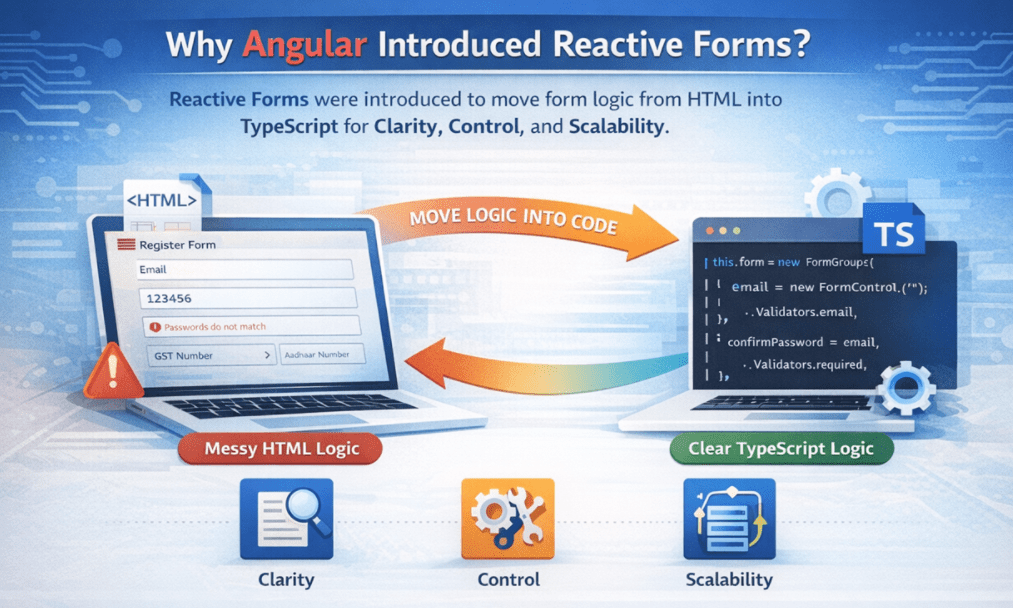
Reactive Forms were introduced to move form logic from HTML into TypeScript, where it can be:
- Clearly Written: For example, all validation rules are written in one place inside the component class instead of being scattered across HTML.
- Easily Controlled: For example, we can disable a field from code when a checkbox is unchecked
- Properly Tested: For example, we can write unit tests to verify that “Confirm Password mismatch” gives an error.
- Reused and Maintained: For example, the same PAN/GST validator function can be reused across multiple forms and updated once when rules change.
What Are Angular Reactive Forms?
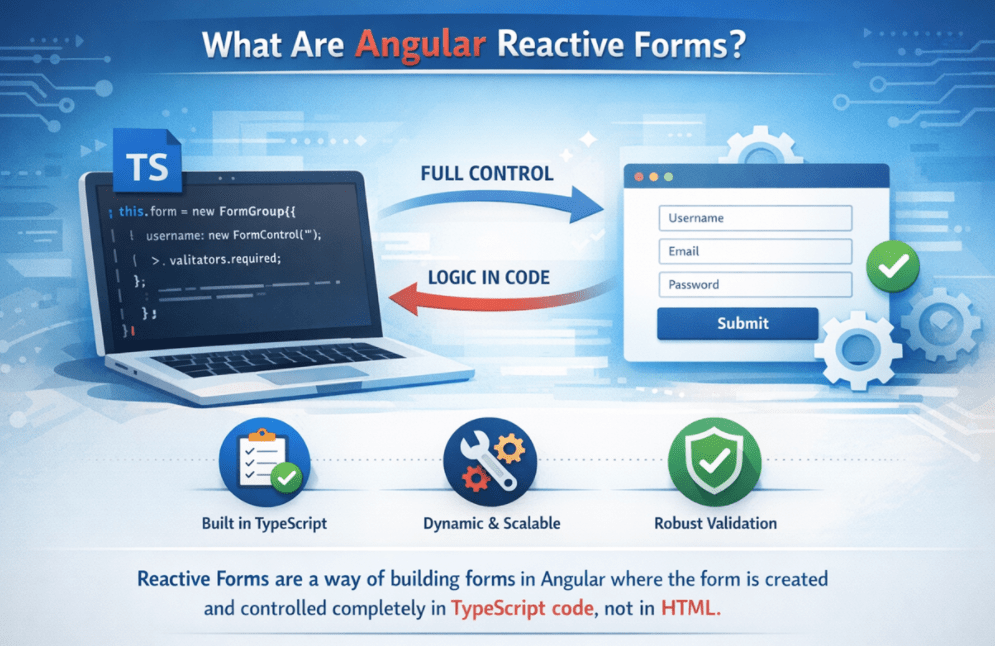
Reactive Forms are a way to build forms in Angular where the form is created and controlled entirely in TypeScript code, not in HTML.
This means:
- We create the form structure in code.
- We define all validation rules in code.
- We control form behaviour in code.
- The template only displays the form,
So, instead of an HTML template telling Angular what the form looks like, TypeScript tells Angular what the form is, and HTML just shows it.
Key Idea: Code First, Template Second
This is the most important idea you have to remember. In Reactive Forms:
- TypeScript Comes First
- HTML Comes Later
The form already exists before the page is rendered. That means:
- HTML does not create the form.
- HTML only connects to an already-created form.
This is exactly the opposite of Template-Driven Forms.
The Reactive Form Model
Angular represents every Reactive Form using a Form Model. This form model is a tree-like structure created in TypeScript that Angular uses to manage form data, validation, and state. Instead of relying on HTML, Angular understands the form by reading this model.
The form model is built using the following objects:
- FormControl → Represents a single field.
- FormGroup → Represents a group of fields (a form/section).
- FormArray → Represents a dynamic list of fields/groups.
Example: A Registration form is a FormGroup. Inside it, Name and Email are FormControls. If the user can add multiple phone numbers, they are stored in a FormArray.
This entire model lives in TypeScript, which means developers have full control over how the form behaves at runtime.

FormControl – Understanding a Single Field
A FormControl represents one input field in a form, such as a textbox, dropdown, or checkbox. It stores important information about that field, including:
- The current value of the field
- Whether the value is valid or invalid
- Which validation rules apply
- Whether the user has interacted with the field (touched)
- Whether the value has changed (dirty)
Example: If a user types an email address into an email input box, Angular updates the corresponding FormControl with the new value and checks whether the email format is valid.
So, whenever a user interacts with an input field, Angular is actually updating and tracking a FormControl object behind the scenes, not just the HTML input.
FormGroup – Understanding the Whole Form
A FormGroup is a collection of FormControls that work together as one unit. You can think of it as:
- One Complete Form (Login form, Registration form)
- One section of a form (Address block inside Registration)
- One logical group of related fields (Payment details block)
Example 1 (Login Form):
The login form is a FormGroup that contains:
- Email (FormControl)
- Password (FormControl)
Example 2 (Address Section):
The address section is a FormGroup that contains:
- City (FormControl)
- State (FormControl)
- PIN (FormControl)
FormGroup helps Angular to:
- Validate multiple fields together (e.g., Password + Confirm Password match check)
- Track the overall form state (is the whole form valid? is it touched?)
- Submit all values at once (get all field values in one object)
Example: When a user submits a login form, Angular checks the FormGroup to ensure that both the email and password are valid before allowing the submission.
FormArray – Understanding Dynamic Fields
A FormArray is used when the number of fields is not fixed, meaning the user can add or remove fields dynamically at runtime. This is common in real applications.
Examples of FormArray usage:
- Multiple phone numbers (Add Phone button)
- List of skills (Add Skill button)
- Multiple addresses (Add Address section)
- Dynamic product rows in invoice (Add Product row)
Example (Multiple Phone Numbers):
A user initially sees one Phone input.
- If they click Add Phone, a new Phone input appears.
- If they click Remove, that phone input disappears.
All these phone controls are stored in a FormArray.
Instead of hardcoding “Phone1, Phone2, Phone3”, FormArray allows Angular to:
- Add controls dynamically
- Remove controls dynamically
- Validate them as a group (e.g., at least one phone number must be entered)
Why this matters:
Template-Driven Forms can handle dynamic fields, but they often become messy because the structure is driven by HTML. Reactive Forms make it clean because the dynamic structure is controlled in TypeScript.
If FormGroup Creates a Form, Why Use FormGroup for a Section?
FormGroup is not only used to represent a complete form; it is also used to logically group related FormControls. In real-world applications, forms are not flat structures. They are divided into meaningful sections such as personal details, address details, and payment information.
Using FormGroup for a section allows us to treat multiple related fields as a single unit. This makes it easier to apply validation at the section level, enable or disable a section, reset a section, and manage complex business rules. If we use only FormControls, all fields remain at the same level, which becomes difficult to manage as the form grows.
From a design perspective, FormGroup improves readability, maintainability, and scalability of large forms. It also produces a clean and structured data object that matches real-world models, such as an address object inside a user profile.
Importing ReactiveFormsModule – Why It Is Required
Angular does not support Reactive Forms by default. To use Angular Reactive Forms, we must import ReactiveFormsModule. This module provides all the core building blocks for creating and managing reactive forms.
This module provides:
- FormGroup: It allows us to group multiple related form controls and treat them as a single form or section, for example, grouping email and password fields in a login form
- FormControl: It represents an individual input field and tracks its value and validation state, for example, tracking the value and validity of an email input box
- FormArray: It allows us to manage a dynamic list of form controls, for example, adding or removing multiple phone numbers in a profile form.
- Built-in validators: They help us apply common validation rules, such as required, minlength, or email, ensuring that a password field is not empty and meets the minimum length.
- Directives like formGroup and formControlName: These directives connect the form model created in TypeScript with the HTML template, for example, binding a FormGroup to a <form> tag and linking an input field to its FormControl.
Without this module:
- Angular will not recognizethe reactive form syntax
- The form will not work
ReactiveFormsModule is mandatory because it enables Angular to understand, create, and connect reactive form models with the UI.
Validators in Reactive Forms
Validators are rules that check whether a value is correct.
In Reactive Forms:
- Validators are written in TypeScript
- They are attached when the form is created
- They run automatically when values change
Examples of what validators check:
- Is the field empty?
- Is the value too short?
- Does the email format look correct?
- Does the value match a pattern?
Because validation logic lives in code:
- It is reusable
- It is readable
- It is testable
Custom Validation – A Major Advantage
Real-world applications rarely depend only on simple validation rules like required or minimum length. Business requirements often demand validations that involve multiple fields, custom logic, or conditional checks.
Examples:
- Password and Confirm Password must match: This validation requires comparing the two fields, not just checking a single field.
- Age must be 18 or older: The entered date of birth must be converted to age and validated against business rules.
- PAN / Aadhaar / GST format validation: These fields must follow specific government-defined formats and cannot be validated using basic HTML attributes.
- Conditional validation based on user role: Certain fields may be mandatory only for specific users, such as admin or premium users.
Reactive Forms allow developers to write custom validation functions in TypeScript to handle complex rules in a clean, structured way. Managing this type of logic inside HTML templates quickly becomes messy and difficult to maintain, which is why enterprise applications strongly prefer Reactive Forms.
Form State – Understanding What Angular Tracks
Angular does not track only the values entered by the user. It also tracks the state of each form control and the entire form, which helps Angular understand how the user is interacting with the form.
For each control and form, Angular tracks:
- Valid or Invalid: Indicates whether the current value satisfies all validation rules.
- Touched or Untouched: Indicates whether the user has focused on the field and then moved away from it.
- Dirty or Pristine: Indicates whether the field value has been changed from its initial value.
- Disabled or Enabled: Indicates whether the field is active or temporarily unavailable for user input.
- Pending (async validation): Indicates that an asynchronous validation, such as a server-side check, is currently in progress.
This entire form state is available directly in TypeScript, not just in the HTML template, giving developers full programmatic control.
This makes it easier to:
- Control submit buttons: Example: Disable the submit button until the form becomes valid.
- Show error messages correctly: Example: Display validation errors only after the user touches a field.
- Debug form behaviour: Example: Quickly identify which field is invalid during development.
What are Observable Streams in Angular?
Observable streams in Angular represent a continuous flow of data over time that components can subscribe to and react to. They are used to handle asynchronous events, such as user input, HTTP responses, and changes to form values or validation. Observables enable Angular applications to respond dynamically whenever data changes, rather than relying on one-time values.
valueChanges and statusChanges – Reactive Power
Reactive Forms are called “reactive” because they can automatically react to user input and validation changes in real time, without waiting for form submission.
Angular exposes two important observable streams:
- valueChanges: This event fires whenever the value of a form control or the form changes, for example, when a user types into a text box or selects a dropdown value.
- statusChanges: This event fires whenever the validation status of a form or control changes, for example, when a field becomes valid or invalid after applying validation rules.
This allows:
- Live validation: Example: Showing password strength feedback while the user is typing.
- Auto-save features: Example: Automatically saving form data after every few changes without clicking a save button.
- API calls based on input: Example: Checking username availability while the user is entering a username.
- Dynamic form behaviour: Example: Enabling or disabling form fields based on entered values. For example, if the user selects “Business Account,” instantly display and enable the GST field, and apply the required validation.
This level of control is difficult to manage inside templates, but becomes very powerful and clean when handled in TypeScript code.
Conclusion:
Reactive Forms may feel complex initially because they require thinking in terms of form models rather than just HTML inputs. But once understood, they provide clarity, confidence, and control that template-based forms cannot match in large applications.
Reactive Forms let Angular developers build powerful, scalable, and fully controlled forms by defining everything clearly in TypeScript.