
Back to: Angular Tutorials For Beginners and Professionals
Angular Class Binding with Examples
In this article, I will discuss Angular Class Binding with Examples. So far, we have learned Angular Interpolation, Property Binding, and Attribute Binding, which allow us to display data, control DOM properties, and dynamically work with HTML attributes. However, modern web applications are not just about data and behaviour, they are also about Visual Feedback and User Experience.
In real-world applications, the UI must visually communicate states such as:
- Success or failure
- Active or inactive
- Selected or unselected
- Paid or pending
- Valid or invalid
Angular Class Binding is designed to solve exactly this problem by allowing us to add or remove CSS classes dynamically based on application data.
What is Angular Class Binding?
Angular Class Binding is a one-way data binding technique that allows us to dynamically apply CSS classes to HTML elements based on conditions defined in the component. It enables the UI to visually react to application state without writing manual DOM manipulation code. So, class binding is not about “adding styles”. It is about making the UI state-driven: the component is the source of truth, and the template reflects it.
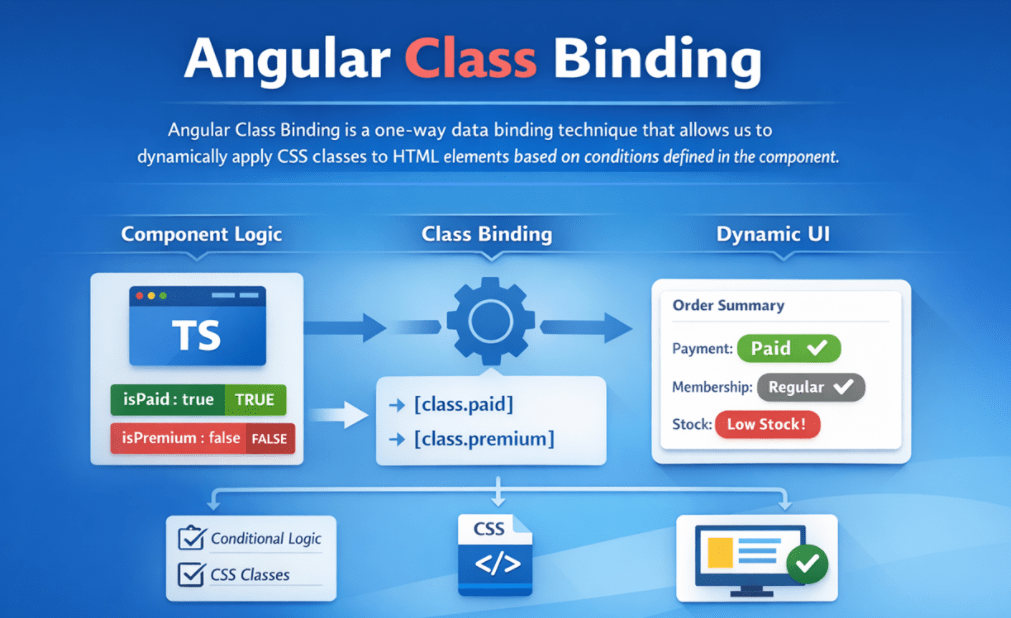
In a real application, an element’s CSS class list is not random styling. It is a visual representation of meaning:
- “Paid” means payment is completed.
- “Error” means something is wrong.
- “Active” means currently selected.
- “Disabled” means the user cannot interact.
Class binding lets you express this idea as a rule: Given the current state of my component, Angular should ensure the correct classes exist on the element.
So instead of manually telling the browser add this class now, remove that class later, you declare the relationship once and let Angular keep it correct automatically.
What is a CSS Class?
A CSS class is a reusable styling definition that allows developers to apply the same visual appearance to multiple HTML elements. It represents a named set of CSS rules that control how elements look, such as color, spacing, borders, or emphasis. CSS classes help separate presentation from structure by keeping styling logic out of HTML and ensuring a consistent, maintainable UI.
Why are CSS classes used?
- They promote Reusability, allowing the same style to be applied in multiple places.
- They ensure Consistency across the user interface.
- They help maintain the Separation of Concerns between HTML structure and visual styling.
- They make applications Easier to maintain and Scale, since changes are made in one place.
- They support State-Based Styling, which is essential in modern frameworks like Angular and React.
- They improve Team Collaboration, allowing designers and developers to work independently.
So, CSS classes are essential because they provide a clean, reusable, and scalable way to manage UI styling. They are a foundational concept in professional web development and play a key role in building consistent, maintainable, and data-driven user interfaces.
Why Do We Need Angular Class Binding?
Modern applications are State-Driven Systems. State changes constantly due to:
- User Interaction
- Backend Responses
- Validation Results
- Business Workflows
Each state must be clearly communicated visually. The real challenge is not adding styles, but keeping the UI appearance in sync with state changes over time.
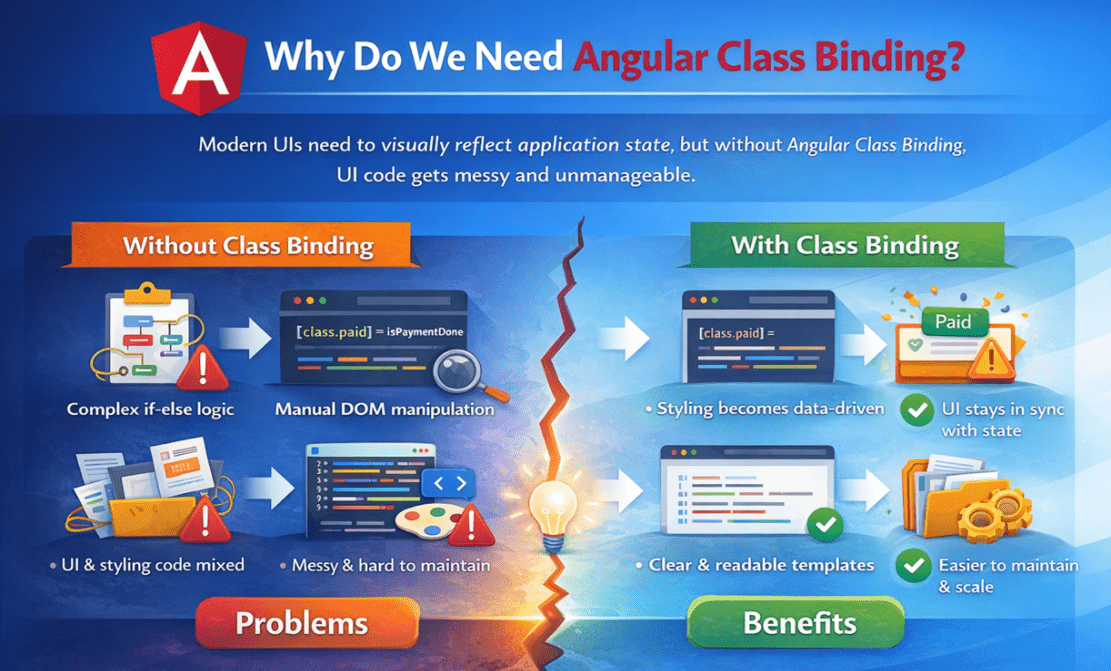
Without Angular Class Binding
If you don’t use class binding, you end up controlling the UI in an imperative way, meaning: When X happens, manually do Y to the DOM. For example:
- “If payment is done, find the element, add class.”
- “If payment becomes pending again, remove clas.s”
- “If validation fails, add error cla.ss”
- etc.
This leads to several architectural issues:
- Complex Conditional Logic: Styling decisions spread across multiple if-else blocks
- Manual DOM Manipulation: Developers add/remove classes directly.
- Mixed Responsibilities: Business logic, UI logic, and styling logic overlap
- Low Maintainability: Easy to forget to remove a class, and the UI can fall out of sync with the data.
With Angular Class Binding
With class binding, the UI becomes a predictable outcome of state. This fundamentally improves application design:
- Styling Becomes Data-Driven: You don’t “manage classes”; you manage state, and classes follow automatically.
- UI Stays in Sync: Whenever state or data changes, Angular recomputes bindings and updates the DOM accordingly.
- Clear Separation of Concerns
-
- Component → State
- Template → Presentation Rules
- CSS → Visual Design
-
- Predictable behaviour: Same input state always results in the same UI
Angular Class Binding Syntax
Angular Class Binding means: Bind a CSS class of an element to a condition or value coming from the component.
Syntax: [class.CLASS_NAME]=”expression”
Here:
- class → Tells Angular we are binding a CSS class.
- CLASS_NAME → The name of the CSS class we want to control.
- expression → A boolean value or expression from the component.
Angular evaluates the expression and:
- Adds the class when the expression is true.
- Removes the class when the expression is false.
The class always reflects the component’s current state. Angular Class Binding allows us to dynamically add or remove CSS classes based on component state, ensuring the UI always reflects the current data.
How Angular Class Binding Works Internally?
Angular Class Binding relies on Change Detection, Angular’s mechanism for keeping the UI in sync with application data.
Step 1: Component instance is created
Angular creates your component class and initializes values like:
- isPaymentDone = false
Step 2: The template is compiled with binding instructions
Angular doesn’t treat your template as plain HTML. It compiles it into instructions like:
- This element has a class binding.
- Evaluate this expression during change detection.
- If it changes, update the DOM.
Step 3: During rendering, Angular evaluates bindings
For [class.paid]=”isPaymentDone”, Angular evaluates isPaymentDone.
- If the result is true → it updates the DOM to include paid
- If the result is false → it updates the DOM to remove paid
Step 4: Change Detection keeps it updated
When anything changes in the component (user action, API response, timer, etc.), Angular runs change detection:
- It re-evaluates binding expressions
- Compares the new value with the old value
- Updates the DOM only if there is a difference
So, Angular does not “Continuously Repaint”. It does: Evaluate → Compare → Update only when needed. That’s why it stays efficient even when many bindings exist.
Real-World Scenario to Understand Angular Class Binding
In real applications, data is not only shown as text. Users also expect Visual Signals to quickly understand the status—without having to read everything. Let’s look at the business meaning behind the example states:
Payment Status (Paid / Pending)
Payment status is a business-critical state.
- Paid usually means the order is confirmed, and processing can continue.
- Pending means the order is incomplete and may require action.
A visual indicator (green vs yellow) allows:
- Customers need to know instantly whether the order is confirmed
- Support teams to identify problematic orders
- Admins to prioritize follow-ups
This is not a cosmetic feature — it is operational clarity.
Membership Status (Premium / Regular)
Membership defines user privilege and entitlement. Premium users may receive:
- Discounts
- Faster Delivery
- Priority Support
Displaying this visually:
- Reinforces value to the customer
- Helps support and sales teams immediately identify high-value users
- Prevents mistakes during manual handling
This is a classic example of business rules translated into UI signals.
Stock Warning (Low Stock)
Inventory is a time-sensitive constraint.
Low stock means:
- Customers should act quickly
- Admins may need to reorder
- Sales strategies may change
Highlighting low stock visually:
- Creates urgency
- Prevents missed opportunities
- Reduces reliance on reading numbers carefully
This is an example of risk awareness through UI.
Priority Orders (Highlighted Card)
Some orders are more important than others:
- VIP Customers
- High-Value Transactions
- Time-Critical Deliveries
Highlighting these orders visually:
- Helps operations teams focus first
- Reduces Human Error
- Improves Workflow Efficiency
This reflects business prioritization expressed visually.
Creating a New Angular Application to Understand Class Binding
Let us create a new Angular application to understand this concept.
Step 1: Create a New Angular App
- ng new class-binding-demo
Choose:
- Stylesheet → CSS
- SSR / SSG → No
- AI tools → None
Step 2: Navigate and Run the App
- cd class-binding-demo
- ng serve
Open:
- http://localhost:4200
Step 3: Add CSS Styles (style.cs)
The styles.css file represents Visual Design Rules, not logic. Meaning:
- It defines what visual states exist
- It does not decide when they apply
In professional applications:
- Developers write business logic in components
- Designers define visual rules using CSS classes
- Angular connects the two using binding
This separation ensures:
- Clean architecture
- Reusable styles
- Easy UI changes without touching Angular logic
This file contains reusable CSS classes that define the visual behaviour of our Angular application. Angular Class Binding dynamically applies or removes these classes based on component data. Classes written here can be used in any component template. So, please update the src/styles.css file as follows:
/* ------------------------------------------------------------
   Main page wrapper
   - Provides consistent font and spacing across the page
   ------------------------------------------------------------ */
.page {
  font-family: Arial, sans-serif; /* Simple, readable font for beginners */
  padding: 16px;                  /* Space around the whole content */
}

/* ------------------------------------------------------------
   Card Layout (Order summary box)
   Real-time purpose:
   - Shows order details inside a bordered, rounded "card"
   - This is the main UI block that we visually highlight later
   - Used to visually group related information.
   ------------------------------------------------------------ */
.card {
  border: 1px solid #d0d0d0; /* Light border to separate card from background */
  border-radius: 10px;         /* Rounded corners for modern UI look */
  padding: 14px;               /* Inner spacing so text doesn't touch the border */
  max-width: 650px;            /* Keeps content readable (not full-width on large screens) */
  margin-top: 12px;            /* Gap between heading and card */
}

/* ------------------------------------------------------------
   Priority border
   Real-time purpose:
   - Applied only when an order is marked as high priority.
   - Angular adds this class conditionally using Class Binding.
     [class.priority-border]="isHighPriorityOrder"
   ------------------------------------------------------------ */
.priority-border {
  border: 2px solid #d10000; /* Strong red border to grab attention */
}

/* ------------------------------------------------------------
   Card title
   - Used for product or section headings inside the card.
   ------------------------------------------------------------ */
.title {
  margin-top: 0;         /* Avoids extra space above the title */
  margin-bottom: 10px;   /* Adds space below title before other details */
}

/* ----------------------------------------------------
   Badge Base Class
   Common styling for all status badges.
   Specific colors are applied using additional classes
   like .paid, .pending, .premium, etc.
----------------------------------------------------- */
.badge {
  display: inline-block;          /* Makes span behave like a badge */
  padding: 4px 10px;              /* Inner spacing for readability */
  border-radius: 999px;           /* Fully rounded pill shape */
  font-size: 13px;                /* Smaller text for badge look */
  margin-left: 6px;               /* Space from label text */
}

/* ----------------------------------------------------
   Payment Status Styles
   These classes visually represent payment state.
   Angular toggles these classes dynamically.
    [class.paid]="isPaymentDone"
    [class.pending]="!isPaymentDone"
----------------------------------------------------- */

/* Applied when payment is completed successfully */
.paid {
  background: #1c7c1c; /* Green background indicates success */
  color: white;        /* White text for readability */
}

/* Applied when payment is still pending */
.pending {
  background: #ffcc00; /* Yellow indicates warning/pending state */
  color: #222;         /* Dark text improves contrast on yellow */
}

/* ------------------------------------------------------------
   Membership Status Styles
   Used to visually differentiate customer types.
     [class.premium]="isPremiumCustomer"
     [class.regular]="!isPremiumCustomer"
   ------------------------------------------------------------ */

/* Applied to premium customers */
.premium {
  background: #0057d8; /* Blue often represents premium / special access */
  color: white;        /* White text for contrast */
}

/* Applied to regular customers */
.regular {
  background: #6c757d; /* Gray indicates normal/regular category */
  color: white;        /* White text for readability */
}

/* ------------------------------------------------------------
   Low stock highlight
   Highlights the stock number when inventory is low
   ------------------------------------------------------------ */
.low-stock {
  color: #d10000;      /* Red indicates urgency/attention */
  font-weight: bold;     /* Bold makes the stock number noticeable */
}

/* ------------------------------------------------------------
   Low stock warning label
   Warning label shown next to low stock value
   ------------------------------------------------------------ */
.stock-warning {
  margin-left: 10px;      /* Adds spacing between stock number and warning label */
  color: #d10000;      /* Red warning text */
  font-weight: bold;     /* Bold for emphasis */
}

/* ------------------------------------------------------------
   Hidden class
   Used to hide elements using Class Binding
   This avoids ngIf and keeps the element in the DOM
   ------------------------------------------------------------ */
.hidden {
  display: none; /* Completely hides the element from the page layout */
}

/* ------------------------------------------------------------
   Note message spacing
   Standard note text below order details
   ------------------------------------------------------------ */
.note {
  margin-top: 10px; /* Space between content and the note message */
}

/* ------------------------------------------------------------
   Muted note styling
   Applied when payment is pending to de-emphasize text
   ------------------------------------------------------------ */
.muted-note {
  color: #777;        /* Gray text indicates “inactive/informational” message */
  font-style: italic;   /* Italic makes it look like a note */
}

/* ------------------------------------------------------------
Helper / Tip Text
   Used to guide users or students during demos.
   ------------------------------------------------------------ */
.tip {
  margin-top: 14px;    /* Space above the tip */
  color: #666;       /* Muted gray color to avoid dominating the UI */
  font-size: 13px;     /* Slightly smaller font for helper text */
}
Step 4: Update the Root Component (app.ts)
The component class serves as the data holder and decision-maker for the template. In real apps, these values normally come from:
- API response
- Database
- Logged-in user session
- Admin configuration
For example:
- isPaymentDone reflects payment confirmation status
- isPremiumCustomer reflects customer membership
- stockLeft reflects the inventory count
- isHighPriorityOrder reflects business rules
Importantly, the component does not decide how things look. It only exposes the current state. So, please update src/app/app.ts file as follows:
import { Component } from '@angular/core';

@Component({
  selector: 'app-root',
  templateUrl: './app.html',
})
export class App {
  // Real-time data (normally comes from API)
  customerName: string = 'Pranaya Rout';
  orderId: string = 'ORD-10021';
  productName: string = 'Angular Course - Full Stack Bundle';

  // Real-time flags
  isPaymentDone: boolean = false;
  isPremiumCustomer: boolean = true;

  // Inventory data (real-time)
  stockLeft: number = 3;

  // Business rule: priority order gets special highlight
  isHighPriorityOrder: boolean = true;

  // Returns status label
  getPaymentLabel(): string {
    return this.isPaymentDone ? 'Paid' : 'Pending';
  }

  getMembershipLabel(): string {
    return this.isPremiumCustomer ? 'Premium' : 'Regular';
  }
}
Step 5: Update the Root Template (app.html)
The template is where Class Binding translates data into visuals. Instead of writing conditional JavaScript or inline styles, we declare rules such as:
- If payment is done, apply the paid class.
- If the stock is low, highlight the number.
- If order is high priority, add a red border.
- If payment is pending, mute the note text.
Angular automatically:
- Adds the class when the condition is true
- Removes the class when the condition becomes false
This makes the UI:
- Reactive
- Predictable
- Easy to debug
So, please update src/app/app.html file as follows:
<div class="page">
  <h2>Order Summary (Class Binding Demo)</h2>

  <!-- Card container: static class + conditional class -->
  <div class="card" [class.priority-border]="isHighPriorityOrder">
    <h3 class="title">{{ productName }}</h3>

    <p><b>Customer:</b> {{ customerName }}</p>
    <p><b>Order Id:</b> {{ orderId }}</p>

    <hr />

    <!-- 1) Payment badge: apply one class or another -->
    <p>
      <b>Payment Status:</b>
      <span
        class="badge"
        [class.paid]="isPaymentDone"
        [class.pending]="!isPaymentDone"
      >
        {{ getPaymentLabel() }}
      </span>
    </p>

    <!-- 2) Membership badge -->
    <p>
      <b>Membership:</b>
      <span
        class="badge"
        [class.premium]="isPremiumCustomer"
        [class.regular]="!isPremiumCustomer"
      >
        {{ getMembershipLabel() }}
      </span>
    </p>

    <!-- 3) Low stock: highlight stock number + show warning text -->
    <p>
      <b>Stock Left:</b>
      <span [class.low-stock]="stockLeft <= 5">
        {{ stockLeft }}
      </span>

      <!-- No ngIf: we control visibility using class binding -->
      <span class="stock-warning" [class.hidden]="stockLeft > 5">
        Low Stock
      </span>
    </p>

    <!-- 4) Note message: muted look when payment is pending -->
    <p class="note" [class.muted-note]="!isPaymentDone">
      Note: Invoice will be available after payment is confirmed.
    </p>
  </div>

  <p class="tip">
    Tip: Change values like <b>isPaymentDone</b> or <b>stockLeft</b> inside <code>app.ts</code>
    and save. You will see styles update automatically.
  </p>
</div>
Output:

Why Class Binding Is Preferred Over Inline Styles?
Inline styles:
- Mix design with logic
- Are hard to reuse
- Make templates unreadable
- Break the collaboration between developers and designers
Class binding:
- Centralizes styling
- Encourages reuse
- Keeps templates clean
- Matches industry workflows
That’s why real Angular projects almost never use inline styles for state-based UI.
Conclusion: Why is Class Binding Important?
Angular Class Binding is one of the most powerful tools for building real-world, user-friendly interfaces. It allows applications to visually communicate state changes such as success, warnings, priority, and status without writing complex logic or manual DOM manipulation. By using Class Binding:
- Business rules stay in the component
- Visual meaning stays in CSS
- Templates remain clean and readable
- UI automatically reacts to data changes
Angular Class Binding allows Angular applications to express visual states declaratively, keeping UI appearance perfectly synchronized with application data through change detection—without manual DOM manipulation.
In the next article, I will discuss Angular Style Binding with Examples. In this article, I explain Angular Class Binding with examples. I would like to have your feedback. Please post your feedback, questions, or comments about this article.
About the Author: Pranaya Rout
Pranaya Rout has published more than 3,000 articles in his 11-year career. Pranaya Rout has very good experience with Microsoft Technologies, Including C#, VB, ASP.NET MVC, ASP.NET Web API, EF, EF Core, ADO.NET, LINQ, SQL Server, MYSQL, Oracle, ASP.NET Core, Cloud Computing, Microservices, Design Patterns and still learning new technologies.
thank you, very good
if i am using class in place of [ngClass] like :-
Click Me
then it is also doing the same thing.
then what is the difference between both techniques.
please help.
[class]=’ApplyCssClasses()’ in place of [ngclass]=’ApplyCssClasses()’
[class]=’ApplyCssClasses()’ in place of [ngclass]=’ApplyCssClasses()’ doing the same thing.
Then what is the difference between both.
please help.
[class]=’ApplyCssClasses()’ – this is class blinding
[ngclass]=’ApplyCssClasses()’ – using Angular Directives [ngclass]
If you’re learning Angular and want to visually understand how Class Binding works in real-time, don’t miss this hands-on video 👇
🎥 Watch Now: Master Angular Class Binding with Real Examples
In just a few minutes, you’ll learn how to:
Dynamically add or remove CSS classes using [class.className]
Reflect component state changes in the UI
Build clean, maintainable, state-driven Angular components
This video brings everything from this page to life — with code walkthroughs, real-world styling examples, and clear explanations!