
Back to: Angular Tutorials For Beginners and Professionals
Angular Attribute Directives
In this article, I will discuss Angular Attribute Directives with Examples. Please read our previous article on Angular Structural Directives with Examples. Structural directives decide whether an element exists in the DOM (create/remove/repeat). Attribute directives do not change the DOM structure. Instead, they change the appearance or behavior of an existing element by updating its attributes, classes, or styles at runtime. In real applications, most UI “Signals” (Warning, Success, Disabled, Highlight, Priority, Progress) are built using Attribute Directives. In this chapter, we will understand what, why, when, and how—with a real-time UI example.
What are Angular Attribute Directives?
Angular Attribute Directives are directives that work on an existing HTML element and change its appearance or behaviour by updating:
- CSS classes
- Inline styles
- Element attributes
The important point is: Attribute Directives do not change the DOM structure. They do not create/remove elements. They only update how an element looks/behaves. In day-to-day Angular UI work, the most commonly used built-in attribute directives are:
- NgClass – Add or remove CSS classes dynamically
- NgStyle – Apply inline styles dynamically
- NgModel –
Structural vs Attribute Directives
Think like this:
- Structural Directives decide whether an element exists in the DOM (show/hide/repeat). Example: @if, @for
- Attribute Directives decide how an existing element looks/behaves. Example: NgClass, NgStyle
So:
- If you want Conditional or Repeated Rendering → Use Structural Directives
- If you want Dynamic Styling/Visual Feedback → Use Attribute Directives
Why Attribute Directives Matter in Real Applications?
Real applications are full of states like:
- Priority changes (Low / Medium / High / Critical)
- SLA breach / SLA near breach
- Resolved vs Active records
- Enabled vs Disabled actions
- Progress indicators
Attribute Directives help the UI communicate these states clearly:
- Highlight urgent rows
- Dim resolved items
- Change badge colors
- Apply a warning background when something is overdue
- Show progress using dynamic width
NgClass – Dynamic Class Binding
NgClass is used when your UI needs to apply CSS classes based on conditions or computed values.
Common Patterns
- Object Syntax: Add a class when a condition is true.
- Array Syntax: Apply a list of classes.
- String Syntax: Apply one computed class name.
Examples
<!-- Object syntax -->
<div [ngClass]="{ 'border-danger': isOverdue, 'opacity-50': isResolved }"> ... </div>

<!-- Array syntax -->
<div [ngClass]="['card', priorityClass]"> ... </div>

<!-- String syntax -->
<span [ngClass]="badgeClass"> ... </span>
When to Prefer NgClass?
Use NgClass when:
- You are switching between pre-defined CSS classes.
- Your UI needs different “Modes” (Danger/Warning/Success).
- You want clean templates and to reuse styling rules.
NgStyle – Dynamic Inline Styles
NgStyle lets you bind CSS styles dynamically. So, NgStyle is used when style values are data-driven (e.g., width, border color, opacity).
Examples
<!-- Inline style object -->
<div [ngStyle]="{ 'border-left': '6px solid ' + color, 'background-color': bg }"> ... </div>

<!-- Dynamic width for a progress bar -->
<div class="progress-bar" [ngStyle]="{ width: percent + '%' }"></div>
When to Prefer NgStyle?
Use NgStyle when:
- Style values come from data (like a Percentage, Dynamic Color, Pixel Size)
- You need inline styling for Small, Dynamic UI Parts
- You are building dashboards with Progress Indicators
Real-time Application to Understand Angular Attribute Directive: Support Tickets – SLA Board
An SLA (Service Level Agreement) is a formal, measurable commitment between a Service Provider (support team/company) and a Customer/Business that defines the level of service to be delivered and the time limits within which it will be delivered. In a ticketing system, SLA specifies time-based targets such as:
- First Response Time: How quickly support must acknowledge/respond after a ticket is created.
- Resolution Time: How quickly the issue must be fixed and the ticket closed.
These targets are usually defined based on:
- Priority (Critical/High/Medium/Low)
- Impact (Single User Vs Many Users)
- Customer tier (VIP/Regular)
- Support hours (24×7 vs business hours)
In a real-time support environment, speed + clarity matter more than anything. Support executives should quickly know:
- Which tickets are most urgent
- Which tickets are close to SLA breach
- Which tickets have already breached SLA
- Which tickets are resolved (so they don’t waste time on them)
For clarity, please see the following image.
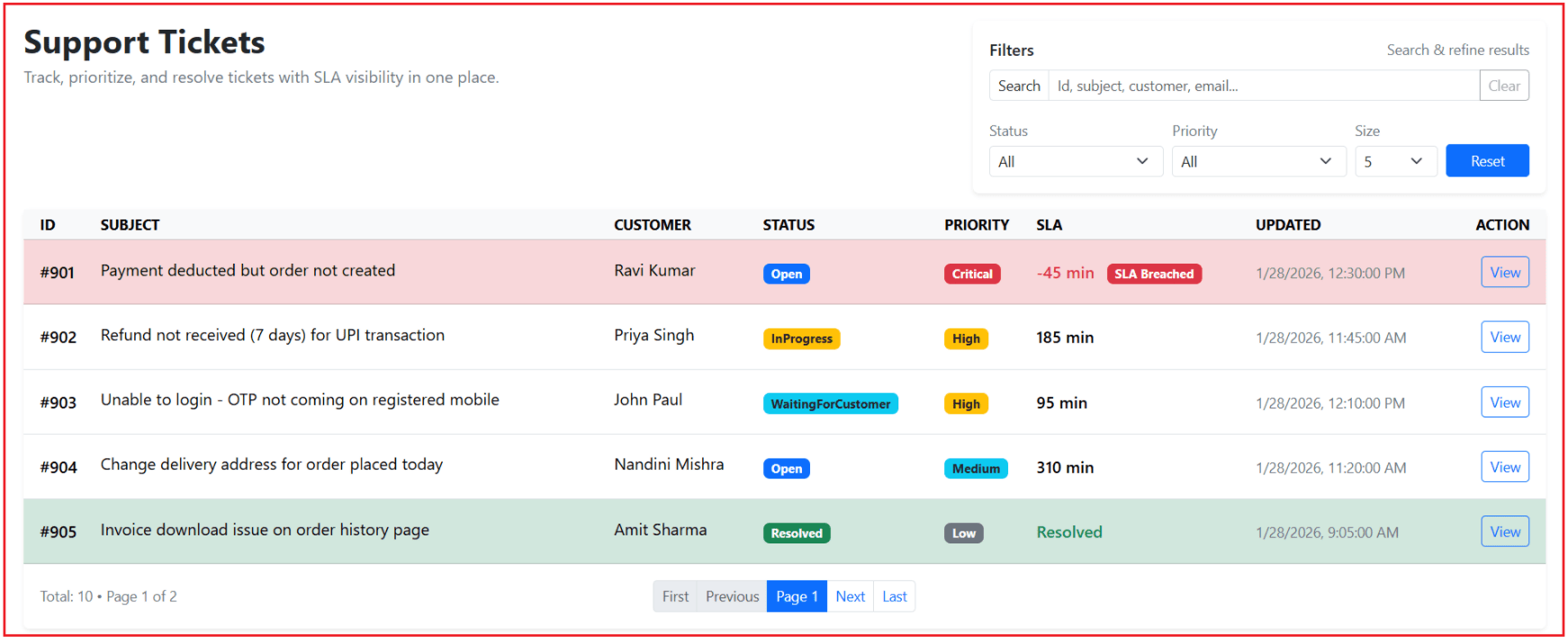
This screen works like a real production dashboard:
- It shows tickets in a clean, scan-friendly table (single-line rows for speed).
- It provides a professional Filters Panel for fast searching and narrowing results.
- It visually highlights Priority + SLA breach using NgClass and NgStyle.
- It supports pagination (First, Previous, Current Page, Next, Last) for handling many tickets.
- It disables actions like Assign when a ticket is already resolved.
When you click on the View button, it will open the full ticket details inside a Bootstrap-style modal (shown/hidden by Angular) as shown in the below image.
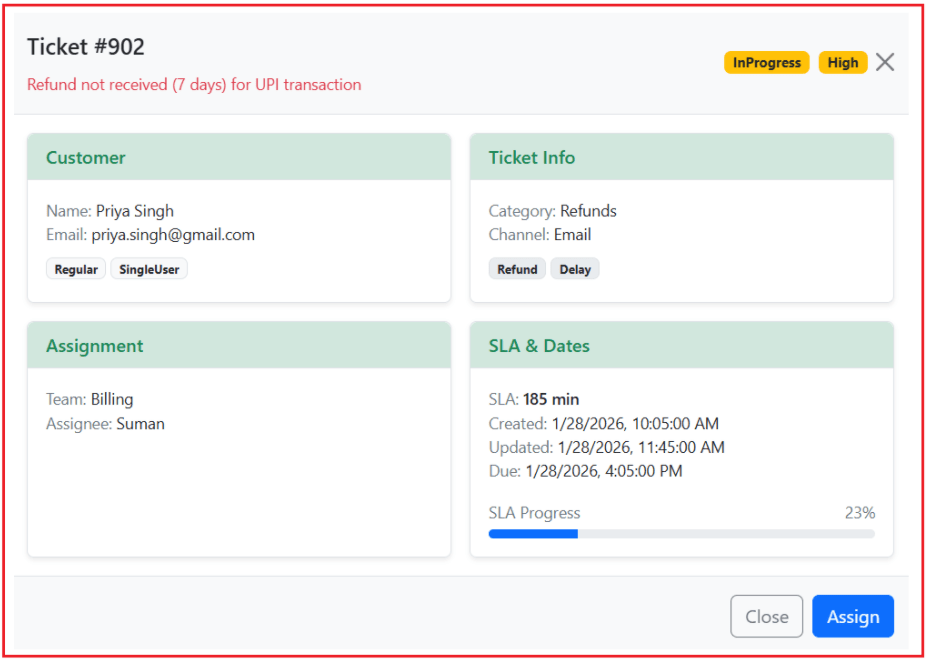
The following are the important sections:
1: Dashboard Title + Tagline
Shows the screen’s purpose at a glance: this page is used to monitor, prioritize, and manage support tickets with SLA visibility.
2: Filters Panel
Let’s the support executive quickly narrow down tickets using:
- Search (Id/subject/customer/email)
- Status and Priority filters
- Page Size selection
- Reset to clear all filters instantly
3: Tickets Table
Displays tickets in a clean, single-row table layout so users can scan fast. Each row shows the Id, Subject, Customer, Status, Priority, SLA, Updated time, and a View button.
4: SLA Indicators
Makes urgency visible:
- Shows minutes left or negative minutes for breached tickets
- Highlights breached rows and shows the SLA Breached badge
- Marks resolved tickets clearly as Resolved
5: Modal Popup (Ticket Details)
Opens full ticket information in a Bootstrap-style modal to keep the table clean. It shows Customer, Ticket Info, Assignment, SLA & Dates, tags, and SLA progress bar.
6: Pagination Footer
Helps handle large ticket volumes by providing First, Previous, Current Page, Next, Last navigation, along with Total tickets and current page info.
Creating a New Angular Project and Component
- ng new support-tickets
- cd support-tickets
- ng generate component tickets-board
This creates:
- A fully configured Angular app
- A component to build our real-time dashboard UI
Adding Bootstrap via CDN
Add Bootstrap CSS once in index.html, so every component can use Bootstrap classes:
<!doctype html>
<html lang="en">
<head>
  <meta charset="utf-8">
  <title>OrderDashboard</title>
  <base href="/">
  <meta name="viewport" content="width=device-width, initial-scale=1">
  <link rel="icon" type="image/x-icon" href="favicon.ico">
  <!-- Bootstrap CSS (CDN) -->
  <link href="https://cdn.jsdelivr.net/npm/bootstrap@5.3.8/dist/css/bootstrap.min.css"
        rel="stylesheet"
        integrity="sha384-sRIl4kxILFvY47J16cr9ZwB07vP4J8+LH7qKQnuqkuIAvNWLzeN8tE5YBujZqJLB"
        crossorigin="anonymous">
</head>
<body>
  <app-root></app-root>
</body>
</html>
Creating a Shared Ticket Model
First, create a folder named models within the src/app folder. Then, create src/app/models/ticket.model.ts and copy-paste the following code:
// Priority indicates how urgent the ticket is.
// It is usually decided based on business impact, customer tier (VIP/Regular), and SLA rules.
export type TicketPriority = 'Low' | 'Medium' | 'High' | 'Critical';

// Status represents the current stage of the ticket in the support workflow.
export type TicketStatus = 'Open' | 'InProgress' | 'WaitingForCustomer' | 'Resolved';

// Channel tells where the ticket came from (source of communication).
// This helps support teams track and respond using the same channel if needed.
export type TicketChannel = 'Email' | 'Phone' | 'Chat' | 'WhatsApp';

// Impact shows how many users are affected by the issue.
// This is a key input for deciding priority and SLA.
export type TicketImpact = 'SingleUser' | 'MultipleUsers' | 'AllUsers';

// CustomerTier helps support teams apply different SLAs and service rules.
// Example: VIP customers may have faster SLAs and higher priority handling.
export type CustomerTier = 'Regular' | 'VIP';

export interface Ticket {
  // Unique ticket number used for tracking and searching (e.g., #901).
  id: number;

  // Short summary/title of the problem (single-line in table, full in modal).
  subject: string;

  // Customer name who raised the ticket.
  customer: string;

  // Customer email used for communication and verification.
  customerEmail: string;

// Customer Phone used for communication and verification.
  customerPhone: string;

  // Source channel from where the ticket was created (Email/Chat/Phone/WhatsApp).
  channel: TicketChannel;

  // High-level classification of the ticket (e.g., Payments, Login, Delivery, Refunds).
  // Used for reporting and routing tickets to the right team.
  category: string;

  // Additional keywords for quick filtering/searching.
  // Example: ["Refund", "Delay", "UPI"] helps identify similar issues faster.
  tags: string[];

  // Urgency level of the ticket.
  // Drives SLA duration and escalation rules.
  priority: TicketPriority;

  // Current state of the ticket in the resolution process.
  status: TicketStatus;

  // Indicates how widely the issue affects users (single user vs many vs system-wide).
  // Helps in deciding escalation and incident handling.
  impact: TicketImpact;

  // Customer service tier (Regular or VIP) to apply different handling rules.
  customerTier: CustomerTier;

  // The team currently responsible for handling this ticket (e.g., Billing, Tech, Operations).
  // Used for routing and workload tracking.
  assignedTeam: string;

  // The person currently assigned to work on this ticket.
  // May be empty/unknown until assignment happens in real systems.
  assignee: string;

  // Ticket creation date/time.
  // Used for reporting, sorting, and calculating SLA timelines.
  createdAt: string;

  // Last updated date/time.
  // Helpful for sorting by freshness and showing recency on dashboard.
  lastUpdatedAt: string;

  // SLA due date/time (deadline).
  // Used to compute SLA minutes left / breached status.
  dueAt: string;
}
TicketsBoard Component
This component holds:
- Search + status filter state (Bindings)
- Data list
- Helper methods that compute classes/styles for NgClass and NgStyle
Note: For NgClass and NgStyle in a standalone component, import them in imports.
Open src/app/tickets-board/tickets-board.ts and copy-paste the following code:
import { Component } from '@angular/core';
import { NgClass, NgStyle } from '@angular/common';
import { Ticket, TicketPriority, TicketStatus } from '../models/ticket.model';

@Component({
  selector: 'app-tickets-board',

  // Standalone component: no need to declare this in any Angular module.
  // We import NgClass and NgStyle because our UI uses them for SLA highlighting and progress bar styling.
  standalone: true,
  imports: [NgClass, NgStyle],

  // Template file that renders the dashboard (table + filters + modal + pagination).
  templateUrl: './tickets-board.html'
})
export class TicketsBoard {

  // FILTER STATE (Controls what tickets appear in the table)
  // Text typed in the Search box.
  // Used to filter tickets by Id / Subject / Customer / Email.
  searchText = '';

  // Current selected Status filter.
  // 'All' means "do not filter by status".
  selectedStatus: TicketStatus | 'All' = 'All';

  // Current selected Priority filter.
  // 'All' means "do not filter by priority".
  selectedPriority: TicketPriority | 'All' = 'All';

  // Dropdown options shown in the Status filter.
  // Kept in one place so template can render options using @for.
  statusOptions: Array<TicketStatus | 'All'> = [
    'All', 'Open', 'InProgress', 'WaitingForCustomer', 'Resolved'
  ];

  // Dropdown options shown in the Priority filter.
  priorityOptions: Array<TicketPriority | 'All'> = [
    'All', 'Low', 'Medium', 'High', 'Critical'
  ];

  // PAGINATION STATE (Controls page navigation at bottom)
  // Available page sizes (records shown per page).
  pageSizeOptions = [5, 10, 20];

  // Current page size selected by user.
  pageSize = 5;

  // Current page number (1-based index for user friendly display).
  currentPage = 1;

  // MODAL STATE (Controls ticket details popup)
  // When user clicks "View", we store the selected ticket here.
  // Template uses @if(selectedTicket) to show the Bootstrap modal UI.
  selectedTicket: Ticket | null = null;

  // DATA SOURCE (Dummy data)
  // In real applications this data comes from an API.
  // Here, each object represents one ticket record.
  tickets: Ticket[] = [
    { id: 901, subject: 'Payment deducted but order not created', customerPhone:'1234567890', customer: 'Ravi Kumar', customerEmail: 'ravi.kumar@gmail.com', channel: 'WhatsApp', category: 'Payments', tags: ['PaymentFailed', 'Deduction', 'OrderNotCreated'], priority: 'Critical', status: 'Open', impact: 'MultipleUsers', customerTier: 'VIP', assignedTeam: 'Billing', assignee: 'Anita', createdAt: '2026-01-28T09:15:00', lastUpdatedAt: '2026-01-28T12:30:00', dueAt: '2026-01-28T12:15:00' },
    { id: 902, subject: 'Refund not received (7 days) for UPI transaction', customerPhone:'1234567890', customer: 'Priya Singh', customerEmail: 'priya.singh@gmail.com', channel: 'Email', category: 'Refunds', tags: ['Refund', 'Delay'], priority: 'High', status: 'InProgress', impact: 'SingleUser', customerTier: 'Regular', assignedTeam: 'Billing', assignee: 'Suman', createdAt: '2026-01-28T10:05:00', lastUpdatedAt: '2026-01-28T11:45:00', dueAt: '2026-01-28T16:05:00' },
    { id: 903, subject: 'Unable to login - OTP not coming on registered mobile', customerPhone:'1234567890', customer: 'John Paul', customerEmail: 'john.paul@gmail.com', channel: 'Chat', category: 'Login', tags: ['OTP', 'LoginIssue'], priority: 'High', status: 'WaitingForCustomer', impact: 'SingleUser', customerTier: 'Regular', assignedTeam: 'Tech', assignee: 'Kiran', createdAt: '2026-01-28T10:35:00', lastUpdatedAt: '2026-01-28T12:10:00', dueAt: '2026-01-28T14:35:00' },
    { id: 904, subject: 'Change delivery address for order placed today', customerPhone:'1234567890', customer: 'Nandini Mishra', customerEmail: 'nandini.mishra@gmail.com', channel: 'Phone', category: 'Delivery', tags: ['AddressChange'], priority: 'Medium', status: 'Open', impact: 'SingleUser', customerTier: 'VIP', assignedTeam: 'Operations', assignee: 'Deepak', createdAt: '2026-01-28T11:10:00', lastUpdatedAt: '2026-01-28T11:20:00', dueAt: '2026-01-28T18:10:00' },
    { id: 905, subject: 'Invoice download issue on order history page', customerPhone:'1234567890', customer: 'Amit Sharma', customerEmail: 'amit.sharma@gmail.com', channel: 'Email', category: 'Invoices', tags: ['InvoiceDownload'], priority: 'Low', status: 'Resolved', impact: 'SingleUser', customerTier: 'Regular', assignedTeam: 'Tech', assignee: 'Ritika', createdAt: '2026-01-28T08:40:00', lastUpdatedAt: '2026-01-28T09:05:00', dueAt: '2026-01-28T20:40:00' },
    { id: 906, subject: 'Double charged for subscription renewal - need reversal', customerPhone:'1234567890', customer: 'Suresh Nayak', customerEmail: 'suresh.nayak@gmail.com', channel: 'Email', category: 'Payments', tags: ['Subscription', 'DoubleCharge'], priority: 'Critical', status: 'InProgress', impact: 'MultipleUsers', customerTier: 'VIP', assignedTeam: 'Billing', assignee: 'Anita', createdAt: '2026-01-28T09:50:00', lastUpdatedAt: '2026-01-28T12:40:00', dueAt: '2026-01-28T13:20:00' },
    { id: 907, subject: 'Order stuck in processing for 3 hours', customerPhone:'1234567890', customer: 'Meera Das', customerEmail: 'meera.das@gmail.com', channel: 'Chat', category: 'Orders', tags: ['Processing', 'Delay'], priority: 'High', status: 'Open', impact: 'SingleUser', customerTier: 'Regular', assignedTeam: 'Operations', assignee: 'Deepak', createdAt: '2026-01-28T10:20:00', lastUpdatedAt: '2026-01-28T12:05:00', dueAt: '2026-01-28T15:20:00' },
    { id: 908, subject: 'App crash on checkout screen (Android 14)', customerPhone:'1234567890', customer: 'Rahul Verma', customerEmail: 'rahul.verma@gmail.com', channel: 'WhatsApp', category: 'Technical', tags: ['Crash', 'Checkout'], priority: 'High', status: 'InProgress', impact: 'MultipleUsers', customerTier: 'Regular', assignedTeam: 'Tech', assignee: 'Kiran', createdAt: '2026-01-28T09:05:00', lastUpdatedAt: '2026-01-28T12:15:00', dueAt: '2026-01-28T13:05:00' },
    { id: 909, subject: 'OTP delayed - arrives after 2 minutes', customerPhone:'1234567890', customer: 'Sweta Patra', customerEmail: 'sweta.patra@gmail.com', channel: 'Phone', category: 'Login', tags: ['OTP', 'Delay'], priority: 'Medium', status: 'WaitingForCustomer', impact: 'SingleUser', customerTier: 'Regular', assignedTeam: 'Tech', assignee: 'Ritika', createdAt: '2026-01-28T11:35:00', lastUpdatedAt: '2026-01-28T12:25:00', dueAt: '2026-01-28T17:35:00' },
    { id: 910, subject: 'Need cancellation and refund for prepaid order', customerPhone:'1234567890', customer: 'Kunal Jain', customerEmail: 'kunal.jain@gmail.com', channel: 'Email', category: 'Refunds', tags: ['Cancel', 'Refund'], priority: 'High', status: 'Open', impact: 'SingleUser', customerTier: 'VIP', assignedTeam: 'Billing', assignee: 'Suman', createdAt: '2026-01-28T11:00:00', lastUpdatedAt: '2026-01-28T12:35:00', dueAt: '2026-01-28T16:00:00' }
  ];

  // UI ACTIONS (Triggered by user interactions in the template)
  // Runs whenever user types in the search box.
  // We reset currentPage to 1 so results always start from first page after a filter change.
  onSearchChange(value: string) {
    this.searchText = value ?? '';
    this.currentPage = 1;
  }

  // Runs when user changes Status filter.
  // Resets to first page because filtered data count changes.
  setStatus(value: TicketStatus | 'All') {
    this.selectedStatus = value;
    this.currentPage = 1;
  }

  // Runs when user changes Priority filter.
  setPriority(value: TicketPriority | 'All') {
    this.selectedPriority = value;
    this.currentPage = 1;
  }

  // Clears all filters and resets the board to default view.
  // NOTE: keep default values consistent with what you want to show on load.
  clearFilters() {
    this.searchText = '';
    this.selectedStatus = 'All';
    this.selectedPriority = 'All';
    this.pageSize = 5; // default page size after reset
    this.currentPage = 1;
  }

  // Runs when user changes page size (5/10/20).
  // We also reset current page to 1 to avoid landing on an invalid page.
  onPageSizeChange(value: number) {
    this.pageSize = value;
    this.currentPage = 1;
  }

  // MODAL OPEN/CLOSE
  // Opens ticket details modal by setting selectedTicket.
  // Template shows modal using @if(selectedTicket).
  openTicketModal(ticket: Ticket) {
    this.selectedTicket = ticket;
  }

  // Closes modal by clearing selectedTicket.
  closeTicketModal() {
    this.selectedTicket = null;
  }

  // FILTERING LOGIC (Computed list based on Search + Filters)
  // Returns tickets after applying:
  // 1) Search text match
  // 2) Status filter match
  // 3) Priority filter match
  get filteredTickets(): Ticket[] {
    const text = this.searchText.trim().toLowerCase();

    return this.tickets.filter(t => {
      // Search is applied across multiple fields for better real-world usability.
      const matchesText =
        !text ||
        String(t.id).includes(text) ||
        t.subject.toLowerCase().includes(text) ||
        t.customer.toLowerCase().includes(text) ||
        t.customerEmail.toLowerCase().includes(text);

      // Filter by status if user selected anything other than 'All'.
      const matchesStatus = this.selectedStatus === 'All' || t.status === this.selectedStatus;

      // Filter by priority if user selected anything other than 'All'.
      const matchesPriority = this.selectedPriority === 'All' || t.priority === this.selectedPriority;

      return matchesText && matchesStatus && matchesPriority;
    });
  }

  // PAGINATION LOGIC (Computed list for current page)
  // Total tickets after filters (used for footer "Total: X").
  get totalItems(): number {
    return this.filteredTickets.length;
  }

  // Total pages based on filtered total and selected page size.
  // Math.max(1, ...) ensures we never return 0 pages even when list is empty.
  get totalPages(): number {
    return Math.max(1, Math.ceil(this.totalItems / this.pageSize));
  }

  // Tickets shown in the table for the selected page.
  // slice() returns only the required part of the array.
  get pagedTickets(): Ticket[] {
    const start = (this.currentPage - 1) * this.pageSize;
    return this.filteredTickets.slice(start, start + this.pageSize);
  }

  // Pagination actions (wired with First/Previous/Next/Last buttons).
  goToFirst() { this.currentPage = 1; }
  goToLast() { this.currentPage = this.totalPages; }
  goToPrevious() { if (this.currentPage > 1) this.currentPage--; }
  goToNext() { if (this.currentPage < this.totalPages) this.currentPage++; }

  // SLA HELPERS (Used for SLA minutes, breach state, progress)
  // "Now" time used for SLA calculations.
  // We keep it fixed for demo so output doesn't change on every refresh.
  // In real application, use: return Date.now();
  private now(): number {
    return new Date('2026-01-28T13:00:00').getTime();
  }

  // Calculates how many minutes are left until SLA due time.
  // Positive => still within SLA
  // Negative => SLA already breached
  minutesLeft(t: Ticket): number {
    const due = new Date(t.dueAt).getTime();
    return Math.round((due - this.now()) / 60000);
  }

  // SLA is breached when minutesLeft is 0 or negative AND ticket is not resolved.
  // Resolved tickets are not treated as breached even if due time is in the past.
  isBreached(t: Ticket): boolean {
    return this.minutesLeft(t) <= 0 && t.status !== 'Resolved';
  }

  // A ticket is resolved when its status is "Resolved".
  // Used to disable action buttons and show green row highlighting.
  isResolved(t: Ticket): boolean {
    return t.status === 'Resolved';
  }

  // Calculates SLA progress percentage (0..100) for progress bar.
  // This is a simplified demo approach:
  // - totalMinutes is assumed as 240 min window
  // - "used" increases as due time approaches
  slaPercent(t: Ticket): number {
    const totalMinutes = 240;
    const used = totalMinutes - this.minutesLeft(t);
    const pct = Math.round((used / totalMinutes) * 100);
    return Math.max(0, Math.min(100, pct));
  }

  // BOOTSTRAP CLASS MAPPERS (Used with [ngClass])
  // Returns Bootstrap badge class based on priority.
  // Keeps template clean and avoids repeated switch logic inside HTML.
  priorityBadgeClass(p: TicketPriority): string {
    switch (p) {
      case 'Critical': return 'text-bg-danger';
      case 'High': return 'text-bg-warning text-dark';
      case 'Medium': return 'text-bg-info text-dark';
      case 'Low': return 'text-bg-secondary';
      default: return 'text-bg-dark';
    }
  }

  // Returns Bootstrap badge class based on status.
  statusBadgeClass(status: TicketStatus): string {
    switch (status) {
      case 'Open': return 'text-bg-primary';
      case 'InProgress': return 'text-bg-warning text-dark';
      case 'WaitingForCustomer': return 'text-bg-info text-dark';
      case 'Resolved': return 'text-bg-success';
      default: return 'text-bg-secondary';
    }
  }

  // Returns progress bar class based on SLA situation.
  // - Resolved => green
  // - Breached => red
  // - Nearing breach (>=80%) => warning
  // - Otherwise => blue
  progressBarClass(t: Ticket): string {
    if (this.isResolved(t)) return 'bg-success';
    if (this.isBreached(t)) return 'bg-danger';
    const pct = this.slaPercent(t);
    return pct >= 80 ? 'bg-warning' : 'bg-primary';
  }

  // Formats ISO date string into local readable format for UI.
  formatDate(iso: string): string {
    return new Date(iso).toLocaleString();
  }
}
TicketsBoard Template (NgClass + NgStyle in Action)
This template uses:
- Structural directives: @if, @for (rendering and list)
- Attribute directives: NgClass, NgStyle (styling and UI feedback)
- Bindings: [value], (input), (click), [disabled], interpolation {{ }}
Open src/app/tickets-board/tickets-board.html and copy-paste the following code:
<!-- tickets-board.html -->
<div class="container-fluid py-4 px-4">
<!-- =========================================================
DASHBOARD HEADER (Title + Tagline)
---------------------------------------------------------
Bindings used:
- No Angular bindings here (pure static UI text)
Directives used:
- None
========================================================= -->
<div class="d-flex flex-wrap align-items-start justify-content-between gap-3 mb-3">
<!-- Heading -->
<div>
<h2 class="fw-bold mb-1">Support Tickets</h2>
<div class="text-secondary">
Track, prioritize, and resolve tickets with SLA visibility in one place.
</div>
</div>
<!-- =========================================================
FILTERS PANEL (Search + Status/Priority/PageSize + Reset)
---------------------------------------------------------
Bindings used:
- [value] -> property binding for input/select current values
- (input) -> event binding for live search text updates
- (change) -> event binding when dropdown selection changes
- (click) -> event binding for Clear/Reset actions
- [disabled] -> property binding to disable Clear button conditionally
Directives used:
- @for -> structural directive to render dropdown options lists
========================================================= -->
<div class="card shadow-sm border-0" style="min-width: 560px;">
<div class="card-body p-3">
<div class="d-flex justify-content-between align-items-center mb-2">
<div class="fw-semibold">Filters</div>
<div class="small text-secondary">Search & refine results</div>
</div>
<!-- Search -->
<div class="input-group input-group-sm mb-3">
<span class="input-group-text bg-white">Search</span>
<input class="form-control"
[value]="searchText"
(input)="onSearchChange(($any($event.target)).value)"
placeholder="Id, subject, customer, email..." />
<button class="btn btn-outline-secondary"
type="button"
(click)="onSearchChange('')"
[disabled]="!searchText.trim()">
Clear
</button>
</div>
<!-- Dropdowns row -->
<div class="row g-2">
<!-- Status filter -->
<div class="col-12 col-md-4">
<label class="form-label small text-secondary mb-1">Status</label>
<select class="form-select form-select-sm"
[value]="selectedStatus"
(change)="setStatus(($any($event.target)).value)">
@for (s of statusOptions; track s) {
<option [value]="s">{{ s }}</option>
}
</select>
</div>
<!-- Priority filter -->
<div class="col-12 col-md-4">
<label class="form-label small text-secondary mb-1">Priority</label>
<select class="form-select form-select-sm"
[value]="selectedPriority"
(change)="setPriority(($any($event.target)).value)">
@for (p of priorityOptions; track p) {
<option [value]="p">{{ p }}</option>
}
</select>
</div>
<!-- Page size filter -->
<div class="col-12 col-md-2">
<label class="form-label small text-secondary mb-1">Size</label>
<select class="form-select form-select-sm"
[value]="pageSize"
(change)="onPageSizeChange(+$any($event.target).value)">
@for (ps of pageSizeOptions; track ps) {
<option [value]="ps">{{ ps }}</option>
}
</select>
</div>
<!-- Reset button -->
<div class="col-12 col-md-2 d-grid">
<label class="form-label small text-secondary mb-1"> </label>
<button class="btn btn-sm btn-primary" type="button" (click)="clearFilters()">
Reset
</button>
</div>
</div>
</div>
</div>
</div>
<!-- =========================================================
TICKETS TABLE (List View)
---------------------------------------------------------
Bindings used:
- Interpolation {{ }} -> show ticket data in cells
- [title] -> tooltip for truncated fields
- (click) -> open modal on View button
- [disabled] -> can be used to disable actions (if needed)
- [ngClass] -> attribute directive to apply Bootstrap classes dynamically
(row highlight, badges colors, pagination disabled states)
Directives used:
- @if -> structural directive for conditional rendering (empty state, SLA logic)
- @else -> alternate block when list has data
- @for -> structural directive to render rows
========================================================= -->
<div class="card shadow-sm border-0">
<div class="card-body p-0">
@if (pagedTickets.length === 0) {
<!-- Empty state (shown when no records match filters) -->
<div class="p-4 text-center text-secondary">
<div class="fw-semibold mb-1">No tickets found</div>
<div class="small">Try different filters or search keywords.</div>
</div>
} @else {
<div class="table-responsive">
<table class="table table-hover table-sm align-middle mb-0">
<!-- Table header is static (no Angular bindings) -->
<thead class="table-light">
<tr class="small text-uppercase text-secondary text-nowrap">
<th class="ps-3">Id</th>
<th>Subject</th>
<th>Customer</th>
<th>Status</th>
<th>Priority</th>
<th>SLA</th>
<th>Updated</th>
<th class="text-end pe-3">Action</th>
</tr>
</thead>
<tbody>
@for (t of pagedTickets; track t.id) {
<!-- Row highlight based on SLA state (NgClass) -->
<tr [ngClass]="{ 'table-danger': isBreached(t), 'table-success': isResolved(t) }">
<td class="ps-3 py-3 fw-semibold text-nowrap">#{{ t.id }}</td>
<td class="py-3 text-nowrap">
<span class="d-inline-block text-truncate"
style="max-width: 520px;"
[title]="t.subject">
{{ t.subject }}
</span>
</td>
<td class="py-3 text-nowrap">
<span class="d-inline-block text-truncate"
style="max-width: 240px;"
[title]="t.customer + ' • ' + t.customerEmail">
{{ t.customer }}
</span>
</td>
<!-- Badge color based on status (NgClass) -->
<td class="py-3 text-nowrap">
<span class="badge" [ngClass]="statusBadgeClass(t.status)">{{ t.status }}</span>
</td>
<!-- Badge color based on priority (NgClass) -->
<td class="py-3 text-nowrap">
<span class="badge" [ngClass]="priorityBadgeClass(t.priority)">{{ t.priority }}</span>
</td>
<!-- SLA cell uses @if to show Resolved vs minutes left -->
<td class="py-3 text-nowrap">
<span class="fw-semibold"
[ngClass]="{ 'text-danger': isBreached(t), 'text-success': isResolved(t) }">
@if (isResolved(t)) {
Resolved
} @else {
{{ minutesLeft(t) }} min
}
</span>
@if (isBreached(t)) {
<span class="badge text-bg-danger ms-2">SLA Breached</span>
}
</td>
<td class="py-3 text-nowrap">
<span class="small text-secondary">{{ formatDate(t.lastUpdatedAt) }}</span>
</td>
<!-- View opens the ticket details modal -->
<td class="py-3 text-end pe-3 text-nowrap">
<button class="btn btn-sm btn-outline-primary" (click)="openTicketModal(t)">
View
</button>
</td>
</tr>
}
</tbody>
</table>
</div>
}
</div>
<!-- =========================================================
PAGINATION FOOTER
---------------------------------------------------------
Bindings used:
- Interpolation {{ }} -> show Total and Page numbers
- (click) -> First/Prev/Next/Last navigation
- [disabled] -> disable buttons on first/last page
- [ngClass] -> add 'disabled' class to page-item dynamically
Directives used:
- None (pagination buttons are always visible)
========================================================= -->
<div class="card-footer bg-white border-0 py-3">
<div class="row align-items-center g-2">
<div class="col-12 col-md-4">
<div class="small text-secondary">
Total: {{ totalItems }} • Page {{ currentPage }} of {{ totalPages }}
</div>
</div>
<div class="col-12 col-md-4">
<nav class="d-flex justify-content-center" aria-label="Tickets pagination">
<ul class="pagination pagination-sm mb-0">
<li class="page-item" [ngClass]="{ 'disabled': currentPage === 1 }">
<button class="page-link" type="button" (click)="goToFirst()" [disabled]="currentPage === 1">
First
</button>
</li>
<li class="page-item" [ngClass]="{ 'disabled': currentPage === 1 }">
<button class="page-link" type="button" (click)="goToPrevious()" [disabled]="currentPage === 1">
Previous
</button>
</li>
<li class="page-item active" aria-current="page">
<span class="page-link">Page {{ currentPage }}</span>
</li>
<li class="page-item" [ngClass]="{ 'disabled': currentPage === totalPages }">
<button class="page-link" type="button" (click)="goToNext()" [disabled]="currentPage === totalPages">
Next
</button>
</li>
<li class="page-item" [ngClass]="{ 'disabled': currentPage === totalPages }">
<button class="page-link" type="button" (click)="goToLast()" [disabled]="currentPage === totalPages">
Last
</button>
</li>
</ul>
</nav>
</div>
<div class="col-12 col-md-4"></div>
</div>
</div>
</div>
<!-- =========================================================
MODAL POPUP (Ticket Details)
---------------------------------------------------------
Bindings used:
- @if(selectedTicket) -> show/hide modal
- Interpolation {{ }} -> display selected ticket fields
- (click) -> close modal (X / Close button / backdrop)
- [ngClass] -> badge styling and SLA color
- [ngStyle] -> SLA progress bar width
Directives used:
- @if -> show modal only when selectedTicket is not null
- @for -> render tags list
- NgClass (attribute directive)
- NgStyle (attribute directive)
========================================================= -->
@if (selectedTicket) {
<div class="modal fade show d-block" tabindex="-1" aria-modal="true" role="dialog">
<div class="modal-dialog modal-lg modal-dialog-centered">
<!-- Strong visual separation using border + shadow -->
<div class="modal-content border border-3 border-primary shadow-lg">
<!-- Slight background so modal doesn't blend with the page -->
<div class="modal-header bg-light">
<div class="w-100">
<div class="d-flex flex-wrap align-items-center justify-content-between gap-2">
<div>
<h5 class="modal-title mb-2">Ticket #{{ selectedTicket.id }}</h5>
<div class="small text-danger">{{ selectedTicket.subject }}</div>
</div>
<div class="d-flex flex-wrap gap-2">
<span class="badge" [ngClass]="statusBadgeClass(selectedTicket.status)">
{{ selectedTicket.status }}
</span>
<span class="badge" [ngClass]="priorityBadgeClass(selectedTicket.priority)">
{{ selectedTicket.priority }}
</span>
@if (isBreached(selectedTicket)) {
<span class="badge text-bg-danger">SLA Breached</span>
}
</div>
</div>
</div>
<button type="button" class="btn-close" aria-label="Close" (click)="closeTicketModal()"></button>
</div>
<div class="modal-body bg-white">
<div class="row g-3">
<!-- ===================== Customer ===================== -->
<div class="col-12 col-md-6">
<div class="border rounded shadow-sm h-100">
<div class="px-3 py-2 border-bottom bg-success-subtle text-success fw-semibold rounded-top">
Customer
</div>
<div class="p-3">
<div class="small"><span class="text-secondary">Name:</span> {{ selectedTicket.customer }}</div>
<div class="small"><span class="text-secondary">Email:</span> {{ selectedTicket.customerEmail }}</div>
<div class="small"><span class="text-secondary">Phone:</span> {{ selectedTicket.customerPhone }}</div>
<div class="small mt-2">
<span class="badge bg-light text-dark border">{{ selectedTicket.customerTier }}</span>
<span class="badge bg-light text-dark border ms-1">{{ selectedTicket.impact }}</span>
</div>
</div>
</div>
</div>
<!-- ===================== Ticket Info ===================== -->
<div class="col-12 col-md-6">
<div class="border rounded shadow-sm h-100">
<div class="px-3 py-2 border-bottom bg-success-subtle text-success fw-semibold rounded-top">
Ticket Info
</div>
<div class="p-3">
<div class="small"><span class="text-secondary">Category:</span> {{ selectedTicket.category }}</div>
<div class="small"><span class="text-secondary">Channel:</span> {{ selectedTicket.channel }}</div>
<div class="small mt-2">
@for (tag of selectedTicket.tags; track tag) {
<span class="badge bg-body-secondary text-dark border me-1 mb-1">{{ tag }}</span>
}
</div>
</div>
</div>
</div>
<!-- ===================== Assignment ===================== -->
<div class="col-12 col-md-6">
<div class="border rounded shadow-sm h-100">
<div class="px-3 py-2 border-bottom bg-success-subtle text-success fw-semibold rounded-top">
Assignment
</div>
<div class="p-3">
<div class="small"><span class="text-secondary">Team:</span> {{ selectedTicket.assignedTeam }}</div>
<div class="small"><span class="text-secondary">Assignee:</span> {{ selectedTicket.assignee }}</div>
</div>
</div>
</div>
<!-- ===================== SLA & Dates ===================== -->
<div class="col-12 col-md-6">
<div class="border rounded shadow-sm h-100">
<div class="px-3 py-2 border-bottom bg-success-subtle text-success fw-semibold rounded-top">
SLA & Dates
</div>
<div class="p-3">
<div class="small">
<span class="text-secondary">SLA:</span>
<span class="fw-semibold"
[ngClass]="{ 'text-danger': isBreached(selectedTicket), 'text-success': isResolved(selectedTicket) }">
@if (isResolved(selectedTicket)) {
Resolved
} @else {
{{ minutesLeft(selectedTicket) }} min
}
</span>
</div>
<div class="small"><span class="text-secondary">Created:</span> {{ formatDate(selectedTicket.createdAt) }}</div>
<div class="small"><span class="text-secondary">Updated:</span> {{ formatDate(selectedTicket.lastUpdatedAt) }}</div>
<div class="small"><span class="text-secondary">Due:</span> {{ formatDate(selectedTicket.dueAt) }}</div>
@if (!isResolved(selectedTicket)) {
<div class="mt-3">
<div class="d-flex justify-content-between small text-secondary mb-1">
<span>SLA Progress</span>
<span>{{ slaPercent(selectedTicket) }}%</span>
</div>
<div class="progress" style="height: 8px;">
<div class="progress-bar"
[ngClass]="progressBarClass(selectedTicket)"
[ngStyle]="{ width: slaPercent(selectedTicket) + '%' }"></div>
</div>
</div>
}
</div>
</div>
</div>
</div>
</div>
<div class="modal-footer bg-light">
<button class="btn btn-outline-secondary" type="button" (click)="closeTicketModal()">
Close
</button>
<button class="btn btn-primary" type="button" [disabled]="isResolved(selectedTicket)">
Assign
</button>
</div>
</div>
</div>
</div>
}
</div>
Modifying Root Component and Template
Import TicketsBoard in the root component and render it. So, Open app.ts file, and copy-paste the following code.
import { Component } from '@angular/core';
import { TicketsBoard } from './tickets-board/tickets-board';

@Component({
  selector: 'app-root',
  standalone: true,
  imports: [TicketsBoard],
  templateUrl: './app.html',
})
export class App { }
Modifying Root Template
Open the app.html file, and copy-paste the following code.
<app-tickets-board></app-tickets-board>
Can we consider ngClass and NgStyle alternatives to class and style bindings in Angular?
Yes, ngClass and ngStyle are alternatives to class and style bindings in Angular, as both are used to apply dynamic styles and classes. However, class and style binding are more explicit and preferred for simple cases, while ngClass and ngStyle are attribute directives used when multiple classes or styles need to be managed together.
- One or two classes/styles → Use class/style binding
- Many dynamic styles together → Use ngClass / ngStyle
Conclusion: Why Angular Attribute Directives Matter?
Attribute Directives are the fastest way to make a dashboard communicate state visually. In the Support Tickets SLA Board, NgClass highlighted SLA breach and resolved states, while NgStyle drove priority border colors and SLA progress width—without creating or removing DOM elements. This is exactly how real production dashboards remain readable, scannable, and action-focused.
In the next article, I will discuss Custom Angular Directives with Examples. In this article, I explain the Angular Attribute Directives with Examples, and I hope you enjoy it and understand the different ways to use them in Angular applications.
Can you please post some more articles on Angular directives.