
Back to: Angular Tutorials For Beginners and Professionals
Angular Forms: Template vs Reactive
In any real-world application, a form is the bridge between the user and your system. Whenever a user logs in, registers, searches, places an order, or updates a profile, they are interacting with a form. In Angular, forms are not just HTML elements; they are structured mechanisms for capturing, validating, tracking, and processing user input in a predictable and scalable way. Before we learn and implement template-driven or reactive forms, we need a strong conceptual understanding of what Angular is really doing behind the scenes.
What is a Form in Angular?
A Form in Angular is a structured way to:
- Capture values from inputs such as text boxes, checkboxes, drop-downs, and radios.
- Track the status of each field
- Validate input rules (required, min length, email format, custom rules)
- Submit data in a controlled and safe way
For a better understanding, please have a look at the following image.
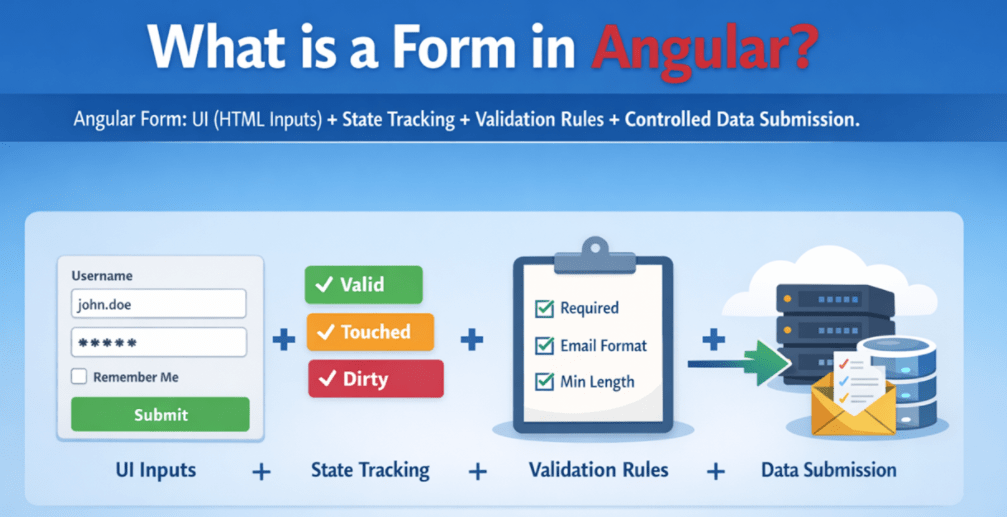
So, Angular form is basically: UI (HTML Inputs) + State Tracking + Validation Rules + Controlled Data Submission. In Angular, a form answers questions like:
- What is the current value?
- Is the value valid?
- Has the user interacted with this field?
- Has the value changed from its original state?
How Angular Handles User Input Internally?
Angular uses Form Directives (like ngModel, formControlName) along with a Control Value Accessor (CVA) to connect HTML input elements to Angular’s form control model. When the user types or changes a selection, Angular updates the form control value. When your code updates the control programmatically, Angular updates the UI as well.
Because of this two-way connection, Angular always knows:
- What is the current value of every field?
- Whether the value came from user interaction or was set programmatically.
- Whether the field has been touched (typically after focus + blur) and whether it has been edited.
Angular does all this without requiring you to manually track DOM events in your code. Think of Angular as a quiet observer watching every keypress, checkbox click, or dropdown selection and keeping the form state updated behind the scenes.
Form States in Angular
Angular maintains multiple states for every form control. These states apply to both controls and the entire form.
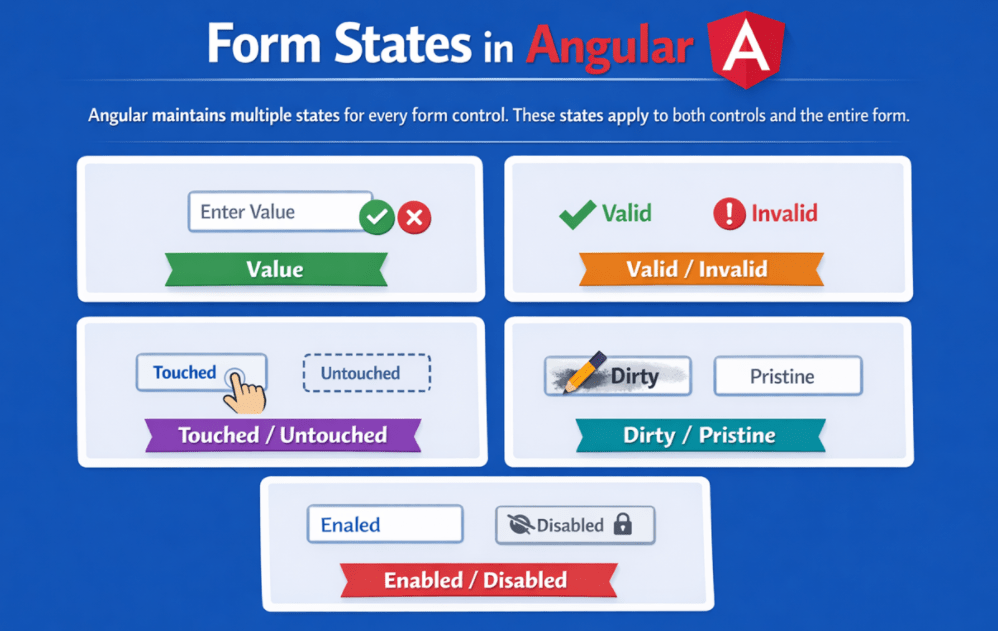
Understanding these is absolutely essential:
- Value
- Valid / Invalid
- Touched / Untouched
- Dirty / Pristine
- Enabled / Disabled
Value:
Value means the actual data currently present in a form control.
- For a single input: email = “abc@gmail.com”
- For a full form: { name: “A”, email: “abc@gmail.com” }
Angular always maintains the latest value, so you can submit it confidently.
Valid / Invalid:
Indicates whether the control meets all validation requirements. So, Angular checks validation rules and marks:
- valid → all rules are satisfied
- invalid → at least one rule is broken
Example:
- Email is required but empty → invalid
- Password minimum length is 6, but the user typed 3 → invalid
This status helps you decide:
- Should the submit button be enabled?
- Should an error message be shown?
- Should the API call be blocked?
Touched / Untouched:
A control becomes touched when the user focuses and leaves the field. It remains untouched if the user never interacts with it.
- untouched → User has not clicked/focused the input yet.
- touched → User focused the input and then left it (blur)
Why this matters in real apps:
We usually do not show validation errors immediately on page load. We need to show errors after the user interacts. Example:
- On load: don’t show “Email is required.”
- After the user touches and leaves the email empty, show the error
This makes the UI more user-friendly.
Dirty / Pristine:
A control becomes dirty when its value is changed by the user. It stays pristine if no value has been modified since initial rendering. That means it tracks whether the field value has changed from the original value.
- pristine → Value not changed since form load/reset.
- dirty → User changed the value at least once.
Why does this matter?
- Show the Save button only when the user changed something.
- Warn user: You have unsaved changes.
- Avoid unnecessary API calls if nothing changed
Example:
- Edit Profile page: if the user didn’t change anything, no need to enable Save.
Enabled / Disabled:
A control can be enabled or disabled based on the application’s requirement. When a control is disabled, the user cannot interact with it, and Angular ignores it during validation and usually excludes it from the form’s value.
- enabled → The user can type/select a value, and Angular validates it normally.
- disabled → The field is read-only/non-editable, Angular skips its validation, and it is not included in the form’s submitted value.
Why does this matter?
- Disable fields based on role, step, or business rules (example: lock Email after verification).
- Disable submit until prerequisites are met (example: enable “Pay Now” only after terms are accepted).
- Prevent wrong edits while still showing the information (example: show UserId but don’t allow changes).
Together, these Angular Form States help us decide when to show error messages, when to enable submit buttons, and how to evaluate form completeness.
Why Angular Needs Form Modules?
Angular uses form modules to keep the core lightweight and enable forms only when required. Forms in Angular are not enabled by default because:
- Not all applications need forms
- Forms add complexity and processing overhead
Angular provides form features via dedicated modules so developers can:
- Opt-in only when needed
- Choose the form style appropriate for the use case
- Keep applications lightweight and modular
Angular separates form features from its core framework using dedicated modules:
- FormsModule for Template-Driven Forms
- ReactiveFormsModule for Reactive Forms
This modularization ensures that:
- Applications include only what they need (better performance)
- Developers choose the form handling style that suits the project
Types of Forms in Angular: Template vs Reactive
Angular supports two major approaches because real projects have different needs. Angular does not force one approach. It lets developers choose based on complexity and control needs.

Template-Driven Forms
Form logic is mostly written inside an HTML template.
- Simple to start
- Less TypeScript code
- Works well for small forms
Best for:
- Login form
- Simple contact form
- Basic small admin forms
Main style:
- Uses ngModel and template directives
- Angular automatically builds the form model behind the scenes
Reactive Forms
Form is created and controlled in TypeScript (component class).
- More structured and scalable
- Best for complex forms
- Easier to test and maintain
- Supports dynamic form building better
Best for:
- Large registration forms
- Dynamic forms (add/remove fields)
- Enterprise-grade apps needing strict control
Main style:
- Uses FormControl, FormGroup, FormArray
- We build the form model explicitly
Angular provides both approaches so developers can choose between simplicity and structure depending on the scenario.
When Angular Forms Are Required in Real-Time Applications?
In real applications, forms are everywhere—because most apps are about user input + validation + saving data. Angular forms become essential when:
- Validation must happen instantly
- Forms are dynamic (add/remove fields)
- Business rules control user input
- UX depends on form state (disable buttons, show errors)
- Data integrity is critical (banking, e-commerce, admin panels)
Real-time Scenarios:
- Login / Signup (validate email/password)
- Profile Update (track dirty/pristine, show Save only when changed)
- Checkout & Payment (multi-step validation + dynamic rules)
- Admin Dashboards (create/edit products, users, categories)
- Search Filters (form controls drive API calls)
- File Upload Forms (upload documents/images with restrictions)
- Complex Business Forms (GST details, bank info, KYC, address forms)
In short, if the user is entering data and your app needs correctness and a good UX, Angular forms are the standard. In the next article, I am going to discuss Template Driven Forms in Angular with examples. Here, in this article, I try to explain what are Angular Forms and their types and when to use Template Driven Forms over Reactive Forms and vice-verse. I hope you enjoy this article.
About the Author: Pranaya Rout
Pranaya Rout has published more than 3,000 articles in his 11-year career. Pranaya Rout has very good experience with Microsoft Technologies, Including C#, VB, ASP.NET MVC, ASP.NET Web API, EF, EF Core, ADO.NET, LINQ, SQL Server, MYSQL, Oracle, ASP.NET Core, Cloud Computing, Microservices, Design Patterns and still learning new technologies.
Please add notes of angular Web API
please add remaining topics of angular
Handling events when the components are distinct until changed. what is the meaning of this