
Back to: Angular Tutorials For Beginners and Professionals
Dependency Injection in Angular Application
In this article, I will discuss Dependency Injection in Angular Applications. Please read our previous article, where we discussed Angular Services with Examples. Dependency Injection (DI) is one of the most important architectural concepts in Angular. Almost everything in Angular — Components, Services, Guards, Interceptors, Pipes — works because of Dependency Injection.
The Dependency Injection (DI) system in Angular is built-in, hierarchical, and highly optimized, which makes applications scalable, testable, and maintainable. In this chapter, we will cover:
- What is Dependency Injection?
- Why Angular relies heavily on Dependency Injection?
- How does the Dependency Injection system work in Angular?
- Different Lifetimes / Scopes of dependency objects in Angular?
- How to Register Services with different scopes?
- When to use Which Scope in real-world applications?
- One Real-time Application to Understand Dependency Injection in Angular.
What is Dependency Injection in Angular?
Dependency Injection (DI) is a Design Pattern used to achieve Loose Coupling between objects in a software system. In this pattern, an object does not create the dependencies it requires to perform its work. Instead, those dependencies are supplied to the object by an external mechanism. The core idea of Dependency Injection is the separation of responsibility:
- A class is responsible for using a dependency
- It is not responsible for creating or managing that dependency
Core Principles Behind Dependency Injection
At its heart, Dependency Injection is based on the following principles:
- A class often depends on other classes to perform its operations
- Creating dependencies directly using new tightly binds the class to a specific implementation
- Tight coupling makes code harder to:
-
- Change
- Extend
- Test
- Maintain
-
Dependency Injection removes this coupling by externalizing dependency creation.
In Simple Terms
Dependency Injection means:
- A class declares what it needs
- It does not decide how to create it
- The responsibility of creating and supplying dependencies is moved outside the class
In frameworks like Angular, this responsibility is handled automatically.
Without Dependency Injection (Tightly Coupled Design)
class OrderComponent {
  private service = new OrderService();
}
In this design, the component creates its own dependency.
Problems with This Approach
- The component is tightly coupled to OrderService
- Changing the implementation requires modifying the component code
- Replacing the dependency with a mock or a fake for testing is difficult
- The component now has two responsibilities:
-
- UI logic
- Dependency creation
-
This violates the Single Responsibility Principle.
With Dependency Injection (Loosely Coupled Design)
class OrderComponent {
  constructor(private service: OrderService) {}
}
In this design:
- The component declares its dependency
- It does not create the dependency itself
- The framework supplies the required instance
Why This Is Better
- The component depends on behaviour, not creation logic
- The dependency can be easily replaced with another implementation
- Testing becomes simpler because mocks or stubs can be injected
- The component remains focused only on its primary responsibility
The Role of the Framework in Dependency Injection
In a Dependency Injection–based system:
- The framework controls object creation
- The framework decides when and how dependencies are instantiated
- The framework manages:
-
- Lifetime
- Scope
- Reuse of dependencies
-
The Angular Dependency Injection system automatically:
- Creates service instances
- Supplies them to the requesting classes
- Reuses or recreates them based on the configuration
So, Dependency Injection is a design pattern in which an object receives its dependencies from an external source rather than creating them itself. This promotes loose coupling, improves testability, and leads to more maintainable and flexible software design.
Why Dependency Injection in Angular?
Angular applications are built to scale. As features, teams, and codebases grow, managing object creation manually quickly leads to tight coupling and duplicated logic. Dependency Injection solves these problems by separating dependency usage from dependency creation. Angular uses Dependency Injection as a core architectural mechanism to keep applications flexible, maintainable, and testable as they grow in complexity.
Loose Coupling
Dependency Injection ensures that components and services are not tightly bound to concrete implementations.
With DI:
- Components do not know how a service is created
- They only declare what service they need
- Creation logic and implementation details are hidden from consumers
This separation allows the system to evolve without breaking dependent code.
As a result:
- Code can be refactored without widespread changes
- Implementations can be swapped without modifying components
- Application structure remains clean and modular
Loose coupling is the foundation of maintainable Angular architecture.
Reusability
Dependency Injection enables services to be reused consistently across the application. Because services are created and managed centrally:
- The same service can be injected into:
-
- Multiple components
- Multiple modules
- Lazy-loaded features
-
- Instances can be shared or isolated based on scope
This prevents duplication of logic and ensures consistent behaviour across different parts of the application.
Testability
One of the strongest reasons Angular relies on Dependency Injection is testability.
With DI:
- Dependencies are not hard-coded
- Real implementations can be replaced with mocks or stubs
- Components and services can be tested in isolation
This makes unit testing:
- Simpler to write
- Faster to execute
- More reliable
Because dependencies are injected rather than constructed, testing focuses on behaviour rather than on setup complexity.
Centralized Object Creation
Angular takes full control of object creation through its Dependency Injection system. Instead of developers manually creating services, Angular:
- Creates instances when they are needed
- Manages their lifecycle
- Controls their scope and reuse
- Destroys them when appropriate
This centralization removes boilerplate and complexity from application code. As a result, developers can focus on:
- Business logic
- Application behaviour
- User experience
Rather than worrying about object wiring and lifetime management.
Performance Optimization
Dependency Injection in Angular also contributes directly to performance. Angular optimizes service creation by:
- Creating services lazily (only when first requested)
- Reusing instances based on their configured scope
- Avoiding unnecessary object creation
In large applications, this significantly reduces:
- Memory usage
- Startup overhead
- Runtime object churn
Performance benefits emerge naturally from the DI system, without requiring manual optimization from developers.
Dependency Object Lifetimes (Scopes) in Angular
Angular controls how service instances are created, shared, and destroyed through Dependency Injection scopes. The lifetime of a dependency determines:
- How long does an instance lives
- How many instances are created
- Who shares that instance
Choosing the correct scope is critical for predictable behaviour and clean architecture.
Root Scope (Application-wide Singleton)
When a service is provided in the root scope, Angular creates a single instance for the entire application. This instance is shared across all components, services, and modules. The service is created only when it is first requested and remains alive until the application is destroyed.
- Only one instance exists for the whole application
- Shared across all modules and components
- Managed by the root injector
- Lives for the entire application lifetime
Syntax
@Injectable({
  providedIn: 'root'
})
export class AuthService{}
When to Use Root Scope
Root scope should be used for services that represent global application concerns and shared state. These services act as centralized coordinators that multiple unrelated parts of the application depend on.
Use root scope when:
- The data or behaviour must be shared across the entire application
- Multiple features need access to the same service instance
- The service represents cross-cutting infrastructure
Typical examples include:
- Authentication and authorization services
- User session management
- Application configuration
- Logging and monitoring
- Caching and shared in-memory stores
Module Scope (Module-level Singleton)
When a service is provided at the module level, Angular creates one instance per module. That instance is shared only among the components and services in the same module. Different modules receive different instances of the same service.
- One instance per module
- Shared only within that module
- Different modules get different instances
- Managed by the module’s injector
Syntax
@NgModule({
  providers: [ProductService]
})
export class ProductModule{}
When to Use Module Scope?
Module scope is ideal for feature-specific services where isolation is important. It allows each feature to manage its own state without affecting other parts of the application.
Use module scope when:
- The service belongs to a specific feature or domain
- The feature should remain isolated from the rest of the app
- You want separate instances per feature
Typical examples include:
- Admin module services
- Reporting or analytics services
- Feature-specific business logic
- Services inside lazy-loaded feature modules
Component Scope (Component-level Instance)
When a service is provided at the component level, Angular creates a new instance for each component instance. This instance is shared with the component’s child components and is destroyed when the component is destroyed.
- A new instance per component instance
- Shared with child components
- Short-lived and automatically destroyed
- Managed by the component’s injector
Syntax
@Component({
  selector: 'app-cart',
  providers: [CartService]
})
export class CartComponent{}
When to Use Component Scope?
Component scope is best suited for temporary, UI-specific state that should not be shared beyond a particular component tree.
Use component scope when:
- The service holds a component-specific or temporary state
- Each component instance must be isolated
- Sharing the service globally would cause incorrect behaviour
Typical examples include:
- Multi-step wizards
- Form state and validation context
- Temporary UI workflows
- Component-specific calculations
How to Decide Which Scope to Use?
Ask these questions:
- Does this data need to be shared across the app? → Use Root Scope
- Is this logic limited to a feature or module? → Use Module Scope
- Is this state temporary or UI-specific? → Use Component Scope
Real-Time Example: Login Session (Root Scope) + Registration Form Draft (Component Scope)
In a real Angular application, not every service should live for the same amount of time. Some data must remain available throughout the whole application, while other data should exist only for a short period and only inside a single screen. This example is designed to clearly show the difference by using two very familiar situations: login session state and a registration form draft.
- Login Session (Root Scope): Once a user logs in, the application needs to remember that user everywhere—on the header, home page, profile page, and any secured screens. If each screen created its own login state, the user would appear logged in on one page and logged out on another, which is incorrect and confusing. That’s why login/session information is typically stored in a root-scoped service, so a single shared instance is reused across the entire application.
- Registration Form Draft (Component Scope): A registration form is usually a temporary activity. The user might start typing, then decide to cancel, navigate away, or reopen the registration page later. In such cases, the old partially typed data should not automatically reappear and confuse the user. That’s why the form “draft” is best stored in a component-scoped service, so the state belongs only to that particular screen instance and is discarded when the component is destroyed.
What the app will do
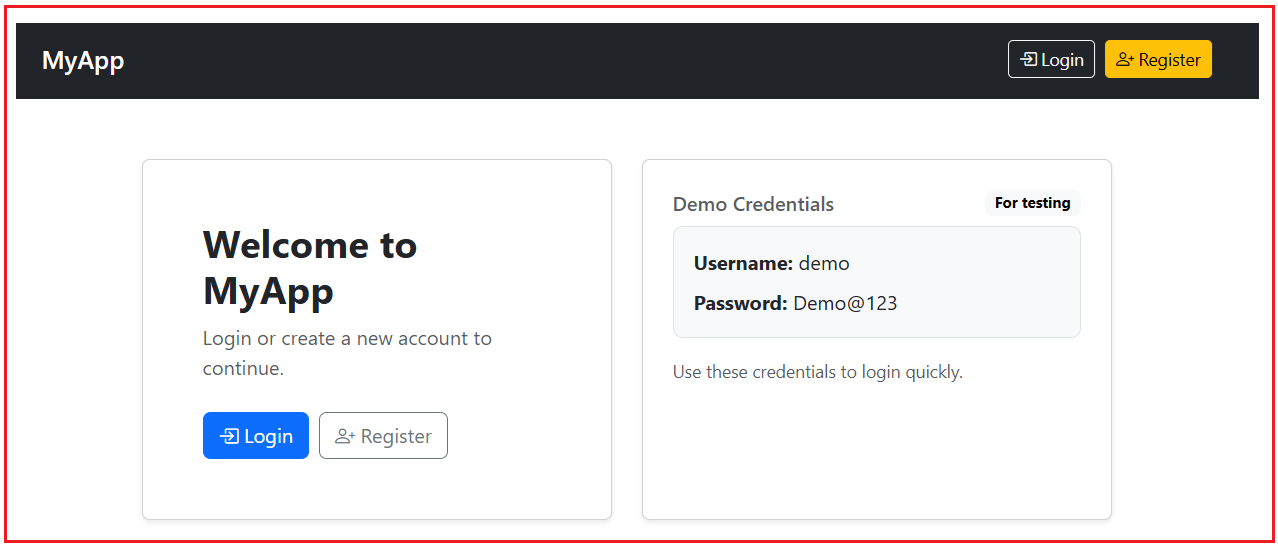
To demonstrate root scope and component scope in a practical way, we will create three standalone pages:
Home Screen
- Displays whether the user is logged in
- Shows the current user name when logged in
- Uses a root-scoped service, so the login status remains consistent even when you navigate to other pages
Please have a look at the following page.
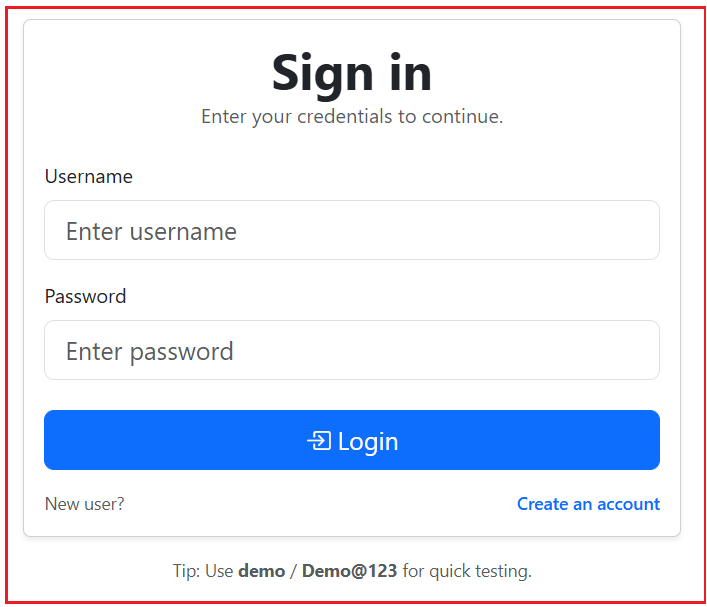
Login Screen
- Provides a simple login form (Username and Password).
- Sends the entered credentials to the authentication service.
- On successful login, it redirects the user to the Home page while keeping the session active through the root-scoped service.
Please have a look at the following page.
Registration Screen
- Shows a registration form using two-way binding.
- Stores the entered values in a component-scoped service as a draft.
- When you navigate away from the registration page and return, the form draft resets because a new component instance is created, and therefore, a new service instance is created.
Please have a look at the following page.

Step 1: Create a project
- ng new di-scope-demo
- cd di-scope-demo
- ng serve -o
Step 2: Add Bootstrap
Open: src/index.html and copy-paste the following code.
<!doctype html>
<html lang="en">
<head>
  <meta charset="utf-8">
  <title>DiScopeDemo</title>
  <base href="/">
  <meta name="viewport" content="width=device-width, initial-scale=1">
  <link rel="icon" type="image/x-icon" href="favicon.ico">
  <link href="https://cdn.jsdelivr.net/npm/bootstrap@5.3.3/dist/css/bootstrap.min.css" rel="stylesheet">
  <link href="https://cdn.jsdelivr.net/npm/bootstrap-icons@1.11.3/font/bootstrap-icons.min.css" rel="stylesheet">

</head>
<body>
  <app-root></app-root>

  <script src="https://cdn.jsdelivr.net/npm/bootstrap@5.3.3/dist/js/bootstrap.bundle.min.js"></script>
</body>
</html>
Step 3: Create Folder Structure
Inside src/app, create folders:
- services
- home
- register
- login
- models
Step 4: Create Shared Models
Models are simple TypeScript structures that define the shape of data used in an application. They help ensure consistency and type safety when data is passed between components, services, and templates. Models do not contain business logic; they exist only to represent and organize data clearly and predictably.
Login Model
Create a TypeScript file named login.model.ts within the src/app/models folder, and copy-paste the following code. This file defines the LoginModel interface, which represents the structure of login input data. It ensures that username and password values are handled consistently and type-safely throughout the application. Using a model, the login component and authentication service can communicate via a clearly defined data contract.
export interface LoginModel {
  userName: string;
  password: string;
}
Registration Model
Create a TypeScript file named registration.model.ts within the src/app/models folder, and copy-paste the following code. This file defines the RegistrationModel interface, which represents the data entered in the registration form. It includes all temporary fields required during user registration, including confirmation fields. This model is especially useful for demonstrating component-scoped services, as it represents short-lived, UI-specific state.
export interface RegistrationModel {
  fullName: string;
  email: string;
  phone: string;
  userName: string;
  password: string;
  confirmPassword: string;
}
User Model
Create a TypeScript file named user.model.ts within the src/app/models folder, and copy-paste the following code. This file defines the User interface, which represents a registered user stored in the application. Unlike the registration model, this model contains only finalized and valid user data. It serves as the domain model for backend-like services, such as the user store and authentication service.
export interface User {
  fullName: string;
  email: string;
  phone: string;
  userName: string;
  password: string;
}
Step 5: Creating Services
Services are reusable classes in Angular that contain business logic, data access, or shared functionality that should not be placed inside components. They help keep components lightweight by handling operations such as data processing, state management, and communication with other services. Services are typically provided through Angular’s Dependency Injection system, allowing them to be shared, reused, and managed efficiently across the application.
Logger Service
Create a TypeScript file named logger.service.ts within the src/app/services folder, and copy-paste the following code. This service provides centralized logging functionality for the application. It is registered in the root scope, making it a shared singleton service. Other services use this logger to record informational messages, warnings, and errors without implementing their own logging logic, demonstrating service-to-service dependency injection.
// Import Injectable decorator to allow Angular to manage this class via DI
import { Injectable } from '@angular/core';

// Mark this class as a service that can be injected
// providedIn: 'root' registers the service with the root injector
// This makes LoggerService a singleton shared across the application
@Injectable({
    providedIn: 'root'
})
export class LoggerService {

  // Logs general informational messages
  // Used for normal application flow tracking
  info(message: string): void {
    console.log(`[INFO] ${message}`);
  }

  // Logs warning messages
  // Used for non-critical issues that need attention
  warn(message: string): void {
    console.warn(`[WARN] ${message}`);
  }

  // Logs error messages
  // Optional 'err' parameter allows logging of exception details
  error(message: string, err?: unknown): void {
    console.error(`[ERROR] ${message}`, err);
  }
}
Users Store Service
Create a TypeScript file named users-store.service.ts within the src/app/services folder, and copy-paste the following code. This service acts as an in-memory backend store for user data. It is responsible for storing registered users, checking username availability, validating login credentials, and registering new users. Being root-scoped, it ensures a single shared user repository across the entire application.
// Import Injectable decorator so Angular can manage this service via Dependency Injection
import { Injectable } from '@angular/core';

// Import User model that defines the structure of user data
import { User } from '../models/user.model';

// Register this service with the root injector
// This makes UsersStoreService a singleton shared across the application
@Injectable({
    providedIn: 'root'
})
export class UsersStoreService {

  // In-memory list of registered users
  // Acts as a temporary data store for demo purposes
  private users: User[] = [
    {
      fullName: 'Demo User',
      email: 'demo@example.com',
      phone: '9999999999',
      userName: 'demo',
      password: 'Demo@123'
    }
  ];

  // Checks whether a given username already exists
  // Returns true if the username is already taken
  isUserNameTaken(userName: string): boolean {
    // Normalize the username by trimming spaces and converting to lowercase
    const u = userName.trim().toLowerCase();

    // Check if any stored user matches the given username
    return this.users.some(x => x.userName.toLowerCase() === u);
  }

  // Registers a new user by adding it to the in-memory store
  register(user: User): void {
    this.users.push(user);
  }

  // Validates login credentials
  // Returns the matching User if credentials are valid, otherwise null
  validateLogin(userName: string, password: string): User | null {
    // Normalize the username for comparison
    const u = userName.trim().toLowerCase();

    // Find a user matching both username and password
    const found = this.users.find(
      x => x.userName.toLowerCase() === u && x.password === password
    );

    // Return the user if found, otherwise return null
    return found ?? null;
  }
}
Authentication Service
Create a TypeScript file named auth.service.ts within the src/app/services folder, and copy-paste the following code. This service manages authentication and login session state for the application. It coordinates with the user store to validate credentials and uses the logger service to record login and logout events. Because the authentication state must be consistent across all screens, this service is registered in the root scope.
// Import Injectable decorator so Angular can manage this service via Dependency Injection
import { Injectable } from '@angular/core';

// Import LoggerService for centralized logging
import { LoggerService } from './logger.service';

// Import UsersStoreService to validate user credentials
import { UsersStoreService } from './users-store.service';

// Import LoginModel which represents login input data
import { LoginModel } from '../models/login.model';

// Register this service with the root injector
// This makes AuthService a singleton shared across the application
@Injectable({
  providedIn: 'root'
})
export class AuthService {

  // Stores the username of the currently logged-in user
  // Null indicates that no user is logged in
  private currentUserName: string | null = null;

  // Inject LoggerService and UsersStoreService
  // Angular resolves and provides these dependencies automatically
  constructor(
    private logger: LoggerService,
    private usersStore: UsersStoreService
  ) {}

  // Attempts to log in a user using the provided credentials
  // Returns true if login is successful, otherwise false
  login(model: LoginModel): boolean {

    // Validate credentials against the user store
    const user = this.usersStore.validateLogin(
      model.userName,
      model.password
    );

    // If validation fails, log a warning and stop login
    if (!user) {
      this.logger.warn('Login failed: invalid credentials.');
      return false;
    }

    // Store the logged-in user's username
    this.currentUserName = user.userName;

    // Log successful login
    this.logger.info(`Login success. User = ${user.userName}`);

    return true;
  }

  // Logs out the current user and clears session state
  logout(): void {
    this.logger.info(`Logout. User = ${this.currentUserName ?? '(none)'}`);
    this.currentUserName = null;
  }

  // Indicates whether a user is currently logged in
  isLoggedIn(): boolean {
    return this.currentUserName !== null;
  }

  // Returns the username of the logged-in user
  // Returns an empty string if no user is logged in
  getUserName(): string {
    return this.currentUserName ?? '';
  }
}
Registration Service
Create a TypeScript file named registration.service.ts within the src/app/services folder, and copy-paste the following code. This service manages the draft temporary registration form. It stores user-entered registration data while the registration screen is active and clears it when the component is destroyed. Since it is provided at the component level, a new instance is created for each registration screen, demonstrating component-scoped dependency injection.
// Import RegistrationModel which defines the structure of registration data
import { RegistrationModel } from '../models/registration.model';

// This service manages temporary registration form data
// It is intentionally NOT decorated with @Injectable
// and is expected to be provided at the component level
export class RegistrationService {

  // Holds the draft registration data entered by the user
  // This data exists only for the lifetime of the component
  private draft: RegistrationModel = {
    fullName: '',
    email: '',
    phone: '',
    userName: '',
    password: '',
    confirmPassword: ''
  };

  // Returns the current registration draft
  // Components use this to bind form fields via two-way binding
  get(): RegistrationModel {
    return this.draft;
  }

  // Resets the registration draft to its initial empty state
  // Typically called after successful registration or component cleanup
  reset(): void {
    this.draft = {
      fullName: '',
      email: '',
      phone: '',
      userName: '',
      password: '',
      confirmPassword: ''
    };
  }
}
Note: No @Injectable annotation is required here, as we will provide it in the component.
Step 6: Creating Home Screen
Home Component
Create a TypeScript file named home.ts within the src/app/home folder, and copy-paste the following code. This standalone component represents the application’s home screen. It consumes the authentication service to display login status and user information. The component itself does not manage authentication logic; instead, it relies entirely on a root-scoped service provided through Angular’s Dependency Injection system.
// Import Component decorator to define an Angular component
import { Component } from '@angular/core';

// Import CommonModule for common structural directives and pipes
import { CommonModule } from '@angular/common';

// Import RouterLink directive for navigation
import { RouterLink } from '@angular/router';

// Import AuthService to access authentication state
import { AuthService } from '../services/auth.service';

@Component({
  // Selector used to render this component in templates
  selector: 'app-home',

  // Standalone component (does not belong to any NgModule)
  standalone: true,

  // Import required Angular modules and directives for this component
  imports: [CommonModule, RouterLink],

  // External HTML template for the component
  templateUrl: './home.html'
})
export class Home {

  // Inject AuthService using Angular Dependency Injection
  // Marked as public so it can be accessed directly in the template
  constructor(public auth: AuthService) {}
}
Home Template
Create an HTML file named home.html within the src/app/home folder, and copy-paste the following code. This template defines the UI for the home screen. It displays login status, user information, and navigation options based on authentication state. The template binds directly to data and methods exposed by the injected authentication service, showing how services drive UI behaviour without embedding business logic in the template.
<div class="container py-5">
  <div class="row g-4 justify-content-center align-items-stretch">

    <!-- Left card: Welcome / Authentication actions -->
    <div class="col-12 col-md-10 col-lg-5">
      <div class="card shadow-sm h-100">
        <div class="card-body p-4 p-md-5">

          <!-- Page heading -->
          <h2 class="fw-bold mb-2">Welcome to MyApp</h2>

          <!-- Supporting description text -->
          <p class="text-muted mb-4">
            Login or create a new account to continue.
          </p>

          <!-- Angular control flow: shown when user is logged in -->
          @if (auth.isLoggedIn()) {

            <!-- Success alert showing logged-in user information -->
            <div class="alert alert-success d-flex align-items-center gap-2 mb-4" role="alert">
              <i class="bi bi-check-circle-fill"></i>
              <div>
                You are signed in as <b>{{ auth.getUserName() }}</b>.
              </div>
            </div>

            <!-- Navigation link to create another account -->
            <a class="btn btn-primary" routerLink="/register">
              <i class="bi bi-person-plus"></i> Create another account
            </a>

          } @else {

            <!-- Action buttons shown when user is not logged in -->
            <div class="d-flex gap-2">
              <a class="btn btn-primary" routerLink="/login">
                <i class="bi bi-box-arrow-in-right"></i> Login
              </a>

              <a class="btn btn-outline-secondary" routerLink="/register">
                <i class="bi bi-person-plus"></i> Register
              </a>
            </div>
          }
        </div>
      </div>
    </div>

    <!-- Right card: Demo credentials information -->
    <div class="col-12 col-md-10 col-lg-5">
      <div class="card shadow-sm h-100">
        <div class="card-body p-4">

          <!-- Header section with title and badge -->
          <div class="d-flex align-items-center justify-content-between mb-2">
            <h6 class="text-muted mb-0">Demo Credentials</h6>
            <span class="badge text-bg-light">For testing</span>
          </div>

          <!-- Highlighted credentials block -->
          <div class="border rounded-3 p-3 bg-light">
            <div class="mb-2"><b>Username:</b> demo</div>
            <div><b>Password:</b> Demo@123</div>
          </div>

          <!-- Helper text -->
          <div class="small text-muted mt-3">
            Use these credentials to login quickly.
          </div>
        </div>
      </div>
    </div>

  </div>
</div>
Step 7: Creating Registration Screen
Register Component
Create a TypeScript file named register.ts within the src/app/register folder, and copy-paste the following code. This standalone component implements the user registration workflow. It injects a root-scoped user store service and a component-scoped registration service. The component demonstrates how Angular automatically creates and destroys component-level service instances, ensuring that registration draft data does not persist beyond the lifetime of the screen.
// Import Component decorator to define a standalone Angular component
import { Component } from '@angular/core';

// Import CommonModule for common directives like *ngIf, *ngFor, etc.
import { CommonModule } from '@angular/common';

// Import FormsModule for template-driven forms and two-way binding
import { FormsModule } from '@angular/forms';

// Import Router services for navigation and router links
import { Router, RouterLink } from '@angular/router';

// Import UsersStoreService to manage registered users (root-scoped service)
import { UsersStoreService } from '../services/users-store.service';

// Import RegistrationService to manage temporary registration draft data
// This service will be provided at the component level
import { RegistrationService } from '../services/registration.service';

// Import RegistrationModel which represents registration form data
import { RegistrationModel } from '../models/registration.model';

// Import User model representing a registered user
import { User } from '../models/user.model';

@Component({
  // Selector used to render this component
  selector: 'app-register',

  // Standalone component (no NgModule required)
  standalone: true,

  // Import required Angular modules and directives
  imports: [CommonModule, FormsModule, RouterLink],

  // External HTML template for the registration page
  templateUrl: './register.html',

  // Provide RegistrationService at component scope
  // A new instance is created for each Register component
  providers: [RegistrationService]
})
export class Register {

  // Holds the registration form model
  // Initialized in the constructor after RegistrationService is available
  model!: RegistrationModel;

  // Holds validation or business error messages
  error = '';

  // Holds success message after successful registration
  success = '';

  // Inject required services using Angular Dependency Injection
  constructor(
    private usersStore: UsersStoreService, // Root-scoped user store service
    private router: Router,                // Angular Router for navigation
    private draft: RegistrationService     // Component-scoped registration draft service
  ) {
    // Initialize the form model from the component-scoped draft service
    this.model = this.draft.get();
  }

  // Handles registration form submission
  submit(): void {

    // Clear previous messages
    this.error = '';
    this.success = '';

    // Basic validation checks
    if (!this.model.fullName.trim()) return this.setError('Full Name is required.');
    if (!this.model.email.trim()) return this.setError('Email is required.');
    if (!this.model.phone.trim()) return this.setError('Phone is required.');
    if (!this.model.userName.trim()) return this.setError('Username is required.');
    if (!this.model.password.trim()) return this.setError('Password is required.');

    // Check password confirmation
    if (this.model.password !== this.model.confirmPassword) {
      return this.setError('Password and Confirm Password must match.');
    }

    // Check if username already exists
    if (this.usersStore.isUserNameTaken(this.model.userName)) {
      return this.setError('This username is already taken.');
    }

    // Create a User object from the validated registration model
    const user: User = {
      fullName: this.model.fullName.trim(),
      email: this.model.email.trim(),
      phone: this.model.phone.trim(),
      userName: this.model.userName.trim(),
      password: this.model.password
    };

    // Register the user in the global user store
    this.usersStore.register(user);

    // Display success message
    this.success = 'Registration successful! Redirecting to login...';

    // Clear component-scoped registration draft data
    this.draft.reset();

    // Rebind a fresh draft model for safety
    this.model = this.draft.get();

    // Navigate to login page after a short delay
    setTimeout(() => this.router.navigateByUrl('/login'), 700);
  }

  // Clears the form and all messages
  clear(): void {
    this.draft.reset();
    this.model = this.draft.get();
    this.error = '';
    this.success = '';
  }

  // Sets an error message (helper method)
  private setError(message: string): void {
    this.error = message;
  }
}
Register Component
Create an HTML file named register.html within the src/app/register folder, and copy-paste the following code. This template renders the registration form UI using two-way data binding. It binds form fields to the registration model stored in the component-scoped service. Validation messages and success feedback are displayed based on component state, while all business logic remains in the component class and services.
<div class="container py-4">
  <div class="row justify-content-center">
    <div class="col-lg-8 col-xl-7">
      <div class="card shadow-sm">
        <div class="card-body p-4">
          <div class="d-flex justify-content-between align-items-center mb-2">
            <h4 class="mb-0">Create account</h4>
          </div>
          <p class="text-muted mb-4">Fill the details below to register.</p>

          @if (error) {
            <div class="alert alert-danger py-2">{{ error }}</div>
          }

          @if (success) {
            <div class="alert alert-success py-2">{{ success }}</div>
          }

          <div class="row g-3">
            <div class="col-md-6">
              <label class="form-label">Full Name</label>
              <input class="form-control" [(ngModel)]="model.fullName" placeholder="Enter full name">
            </div>

            <div class="col-md-6">
              <label class="form-label">Phone</label>
              <input class="form-control" [(ngModel)]="model.phone" placeholder="Enter phone">
            </div>

            <div class="col-12">
              <label class="form-label">Email</label>
              <input class="form-control" [(ngModel)]="model.email" placeholder="Enter email">
            </div>

            <div class="col-md-6">
              <label class="form-label">Username</label>
              <input class="form-control" [(ngModel)]="model.userName" placeholder="Choose a username">
            </div>

            <div class="col-md-6">
              <label class="form-label">Password</label>
              <input class="form-control" type="password" [(ngModel)]="model.password" placeholder="Create password">
            </div>

            <div class="col-md-6">
              <label class="form-label">Confirm Password</label>
              <input class="form-control" type="password" [(ngModel)]="model.confirmPassword" placeholder="Confirm password">
            </div>
          </div>

          <div class="d-flex gap-2 mt-4">
            <button class="btn btn-primary" (click)="submit()">Register</button>
            <button class="btn btn-outline-secondary" (click)="clear()">Clear</button>
          </div>

          <div class="text-center mt-3 small">
            Already have an account?
            <a routerLink="/login">Login</a>
          </div>
        </div>
      </div>
    </div>
  </div>
</div>
Step 8: Creating Login Screen
Login Component
Create a TypeScript file named login.ts within the src/app/login folder, and copy-paste the following code. This standalone component handles user login. It injects the authentication service and delegates credential validation to it. The component itself remains focused on UI interaction and navigation, illustrating clean separation of concerns enabled by Dependency Injection.
// Import Component decorator to define an Angular component
import { Component } from '@angular/core';

// Import CommonModule for common structural directives
import { CommonModule } from '@angular/common';

// Import FormsModule for template-driven forms and two-way binding
import { FormsModule } from '@angular/forms';

// Import Router and RouterLink for navigation
import { Router, RouterLink } from '@angular/router';

// Import AuthService to handle authentication logic
import { AuthService } from '../services/auth.service';

// Import LoginModel which represents login input data
import { LoginModel } from '../models/login.model';

@Component({
  // Selector used to render this component
  selector: 'app-login',

  // Standalone component (no NgModule required)
  standalone: true,

  // Import required Angular modules and directives
  imports: [CommonModule, FormsModule, RouterLink],

  // External HTML template for the login page
  templateUrl: './login.html'
})
export class Login {

  // Holds login form data (username and password)
  model: LoginModel = { userName: '', password: '' };

  // Holds validation or login error message
  error = '';

  // Inject AuthService and Router using Angular Dependency Injection
  constructor(
    private auth: AuthService,   // Root-scoped authentication service
    private router: Router       // Angular Router for navigation
  ) {}

  // Handles login form submission
  submit(): void {

    // Clear any previous error message
    this.error = '';

    // Basic validation to ensure required fields are provided
    if (!this.model.userName.trim() || !this.model.password.trim()) {
      this.error = 'Username and password are required.';
      return;
    }

    // Attempt login using AuthService
    const ok = this.auth.login(this.model);

    // If login fails, show error message
    if (!ok) {
      this.error = 'Invalid username or password.';
      return;
    }

    // Navigate to home page on successful login
    this.router.navigateByUrl('/');
  }
}
Login Template
Create an HTML file named register.html within the src/app/login folder, and copy-paste the following code. This template defines the login screen UI. It collects user credentials, displays validation errors, and triggers login actions. The template relies entirely on component-bound data and contains no authentication logic.
<div class="container py-3">
  <div class="row justify-content-center">
    <div class="col-md-8 col-lg-5">
      <div class="card shadow-sm">
        <div class="card-body p-4 p-md-3">
          <div class="text-center mb-4">
            <div class="display-6 fw-bold">Sign in</div>
            <div class="text-muted">Enter your credentials to continue.</div>
          </div>

          @if (error) {
            <div class="alert alert-danger d-flex align-items-center gap-2 py-2" role="alert">
              <i class="bi bi-exclamation-triangle-fill"></i>
              <div>{{ error }}</div>
            </div>
          }

          <div class="mb-3">
            <label class="form-label">Username</label>
            <input class="form-control form-control-lg"
                   [(ngModel)]="model.userName"
                   placeholder="Enter username" />
          </div>

          <div class="mb-3">
            <label class="form-label">Password</label>
            <input class="form-control form-control-lg"
                   type="password"
                   [(ngModel)]="model.password"
                   placeholder="Enter password" />
          </div>

          <button class="btn btn-primary btn-lg w-100 mt-2" (click)="submit()">
            <i class="bi bi-box-arrow-in-right"></i> Login
          </button>

          <div class="d-flex justify-content-between mt-3 small">
            <span class="text-muted">New user?</span>
            <a routerLink="/register" class="text-decoration-none fw-semibold">Create an account</a>
          </div>
        </div>
      </div>

      <div class="text-center text-muted small mt-3">
        Tip: Use <b>demo</b> / <b>Demo@123</b> for quick testing.
      </div>
    </div>
  </div>
</div>
Step 9: Set up Routes
Open src/app/app.routes.ts, and copy-paste the following code. This file defines the application’s routing configuration. It maps URL paths to standalone components and enables navigation between home, login, and registration screens.
// Import Routes type to define application route configuration
import { Routes } from '@angular/router';

// Import standalone components used in routing
import { Login } from './login/login';
import { Register } from './register/register';
import { Home } from './home/home';

// Define application routes
export const routes: Routes = [

  // Default route: loads Home component
  { path: '', component: Home },

  // Route for login page
  { path: 'login', component: Login },

  // Route for registration page
  { path: 'register', component: Register },

  // Wildcard route: redirects any unknown path to Home
  { path: '**', redirectTo: '' }
];
Step 10: Set the Root Component
Open src/app/app.ts, and copy-paste the following code. This file defines the application’s root component. It injects the authentication service to display the global login status and handle logout. Because this component lives for the entire application lifetime, it naturally consumes root-scoped services.
// Import Component decorator to define the root Angular component
import { Component } from '@angular/core';

// Import RouterOutlet for rendering routed components
// Import RouterLink for navigation links
import { RouterLink, RouterOutlet } from '@angular/router';

// Import CommonModule for common Angular directives
import { CommonModule } from '@angular/common';

// Import AuthService to access authentication state and logout functionality
import { AuthService } from './services/auth.service';

@Component({
  // Selector used to bootstrap the root component
  selector: 'app-root',

  // Standalone root component (no NgModule required)
  standalone: true,

  // Import required Angular modules and router directives
  imports: [CommonModule, RouterOutlet, RouterLink],

  // External HTML template for the root layout
  templateUrl: 'app.html'
})
export class App {

  // Inject AuthService using Angular Dependency Injection
  // Marked as public so it can be accessed in the template
  constructor(public auth: AuthService) {}

  // Logs out the currently authenticated user
  logout(): void {
    this.auth.logout();
  }
}
Step 11: Set the Root Template
Open src/app/app.html, and copy-paste the following code. This template defines the application’s global layout, including the navigation bar and router outlet. It reacts to the authentication state provided by the injected service and renders navigation options accordingly.
<!-- Top navigation bar -->
<nav class="navbar navbar-dark bg-dark">
  <div class="container py-1">
    <a class="navbar-brand fw-semibold" routerLink="/">MyApp</a>
    <div class="d-flex align-items-center gap-2">

      <!-- Angular control flow: shown when user is logged in -->
      @if (auth.isLoggedIn()) {

        <!-- Display currently logged-in user's name -->
        <span class="text-white-50 small">
          Signed in as <b class="text-white">{{ auth.getUserName() }}</b>
        </span>

        <!-- Logout button -->
        <button class="btn btn-outline-light btn-sm" (click)="logout()">
          <i class="bi bi-box-arrow-right"></i> Logout
        </button>

      } @else {

        <!-- Login link shown when user is not logged in -->
        <a class="btn btn-outline-light btn-sm" routerLink="/login">
          <i class="bi bi-box-arrow-in-right"></i> Login
        </a>

        <!-- Register link for new users -->
        <a class="btn btn-warning btn-sm" routerLink="/register">
          <i class="bi bi-person-plus"></i> Register
        </a>
      }

    </div>
  </div>
</nav>

<!-- Router outlet where routed components are rendered -->
<router-outlet></router-outlet>
How Angular Services Work Internally with the Dependency Injection System?
Angular Services use the Dependency Injection (DI) system, which creates, manages, and provides service instances throughout the application. Developers do not manually create or destroy service instances. Instead, Angular takes full responsibility for creating, storing, reusing, and supplying services wherever they are needed. This mechanism is what makes Angular services efficient, consistent, and scalable.
Dependency Injection as the Foundation
Angular uses Dependency Injection to manage services. Rather than a class creating its own dependencies, it simply declares what it needs, and Angular provides those dependencies automatically. This design decouples classes from concrete implementations, allowing services to be easily shared, replaced, or tested. Services are therefore requested rather than constructed directly.
The Injector and Its Responsibilities
An injector is the internal system that manages service instances. An injector is responsible for:
- Creating service instances when required
- Storing created instances for future reuse
- Supplying the correct instance to requesting components or services
When a component or another service declares a dependency, Angular asks the injector whether an instance already exists within the relevant scope. If it does, that instance is reused. If not, the injector creates the service instance, stores it, and then supplies it.
Lazy Instantiation
Angular follows a Lazy Instantiation model for services.
- A service is not created at application startup.
- It is created only when it is first requested by a component or another service.
This approach improves performance and memory usage, especially in large applications with many services. Only the services that are used during a given execution path are instantiated
Singleton Behaviour and Instance Reuse
Most Angular services are singletons by default.
- A service provided at the application (root) level is created once.
- The same instance is shared across all components and services.
This makes services ideal for shared state, caching, and centralized coordination logic. Singleton behaviour is a result of how and where the service is registered, not a special feature of the service itself.
Provider Scope and Service Lifetime
The lifetime of a service is determined by where it is provided:
- Application-level (root) scope: One instance exists for the entire lifetime of the application.
- Feature or module-level scope: A new instance exists for that module or feature and is destroyed when the module is unloaded.
- Component-level scope: A new instance is created for each component instance and destroyed when that component is destroyed.
Angular automatically manages these lifetimes; developers do not manually destroy services.
Service Composition and Dependency Graph
Angular Services can depend on other services. This creates an internal Dependency Graph in which each service focuses on a specific responsibility, such as data access, authentication, configuration, or caching.
Angular resolves this graph automatically and injects everything in the correct order. This composition enables clean layering (Auth → API → Caching → Business Rules), but it also requires careful design to avoid issues such as circular dependencies.
Conclusion: Why Dependency Injection Matters in Angular Applications?
This application demonstrates how Angular’s Dependency Injection system helps create clean, modular, and maintainable code. By using root-scoped services for shared application logic and component-scoped services for temporary UI state, Angular ensures proper separation of responsibilities and controlled service lifetimes. Dependency Injection allows components and services to focus on their core purpose while Angular manages object creation and dependency management behind the scenes.
In the next article, I will discuss Dependency Injection in Interface-Based Services with Real-time Angular applications. In this article, I explain what Dependency Injection is and how it works in Angular.
About the Author: Pranaya Rout
Pranaya Rout has published more than 3,000 articles in his 11-year career. Pranaya Rout has very good experience with Microsoft Technologies, Including C#, VB, ASP.NET MVC, ASP.NET Web API, EF, EF Core, ADO.NET, LINQ, SQL Server, MYSQL, Oracle, ASP.NET Core, Cloud Computing, Microservices, Design Patterns and still learning new technologies.
Very Nice Articles. I went through all the topics in angular. All are so good and clear. thanks
Very nice article. its very helpful to understand the concept.
observables and promise concept
lazy loading concept
auth guard
exception handing
debugging in angular
authentication
intercerceptor
injectable
subject and behavioir subject
nice article, clearly explained concepts
Understood Very Clear. Nice Article.
Can you please post some more articles of Angular like Advanced concepts.
Thank you for the explaining angular routing and services. looking forward to the advanced lectures
Could you plz upload Angular Singleton Service and other Chapters related to this…
mainly hooks with explanation is missing.
Can u please post detail learning for angular observables and how to use them..
Till now whatever explain in complete course is very much simpler and easy to understand stuff..
Thanks alot for the content…