
Back to: Angular Tutorials For Beginners and Professionals
In this article, I will discuss the File and Folder Structure of an Angular Application in detail. Please read our previous article, which discusses creating an Angular project with the Angular CLI and Visual Studio.
Creating a New Angular Application (Using Visual Studio Code)
Before understanding the file and folder structure of an Angular application, it is important to know how that structure is created in the first place. Angular applications are not created manually by writing folders and files one by one. Instead, Angular provides a powerful tool called Angular CLI that creates a complete, production-ready project structure for us in a few simple steps. Let us go step by step and understand how to create a brand-new Angular application using Visual Studio Code.
Step 1: Open Visual Studio Code
Now open Visual Studio Code. VS Code is just an editor. Angular does not depend on VS Code, but VS Code makes Angular development easier.
Step 2: Open Terminal in Visual Studio Code
Inside VS Code:
- Click Terminal → New Terminal
- This opens a terminal inside VS Code itself
All Angular commands will be executed here. The terminal is where you give instructions to Angular CLI.
Step 3: Navigate to the Folder Where You Want to Create the App
Use the cd command to move to the desired folder.
- Example: cd D:\AngularProjects
This is the location where your Angular project folder will be created.
Step 4: Create a New Angular Application Using Angular CLI
Now run the following command:
- ng new my-first-angular-app
Angular CLI will ask a few questions:
- Which stylesheet system would you like to use? → CSS
- Do you want to enable Server-Side Rendering (SSR) and Static Site Generation (SSG/Prerendering)? → N
- Which AI tools do you want to configure with Angular best practices? → None
Angular CLI now does the following automatically:
- Creates project folders and files
- Installs required dependencies
- Sets up TypeScript and build configuration
This may take a few minutes.
Step 5: Open the Project Folder in VS Code
Once the process is complete:
- Go to File → Open Folder
- Select the folder my-first-angular-app
- Click Open
Now you can see the complete Angular project structure inside VS Code.
Step 6: Run the Angular Application
To start the application, run:
- cd my-first-angular-app
Then, once you are in the project folder, run the following command:
- ng serve
Angular CLI will:
- Compile the application
- Start a local development server
Once you see a message like: Application bundle generation complete. Open your browser and visit:
- http://localhost:4200
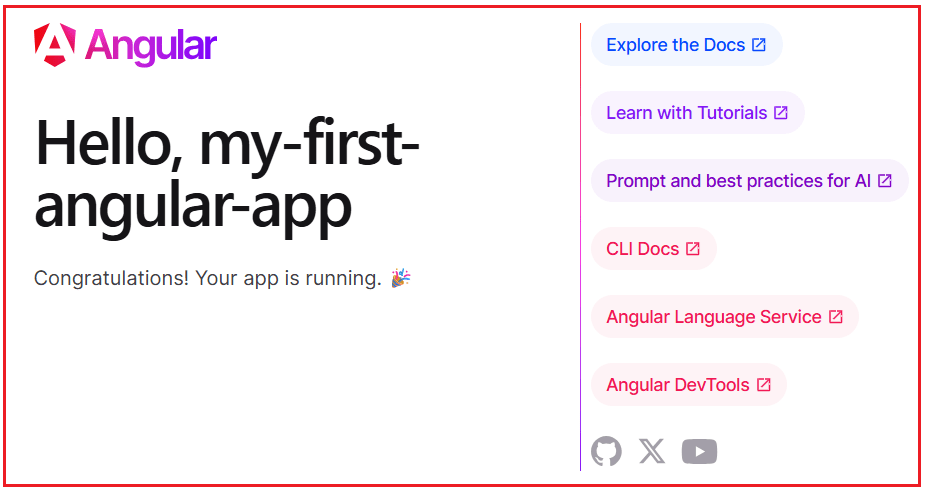
You will see the default Angular welcome screen. ng serve is like pressing the “Start” button to make your application come alive.
File and Folder Structure of Angular Application
When you create an Angular application using Angular CLI, it automatically generates a well-organized file and folder structure. At first glance, this structure may look large and confusing, especially for beginners, but every file and folder serves a clear, important purpose. Angular applications are not simple websites. They are real-world applications that grow over time, involve multiple developers, and require scalability, maintainability, and performance. That is why Angular enforces a structured layout from day one.
Before diving into individual files, remember this one key idea: You are not expected to understand everything immediately. Angular CLI creates many files to support present and future needs. Let us now understand the structure step by step. For a better understanding, please have a look at the following image.
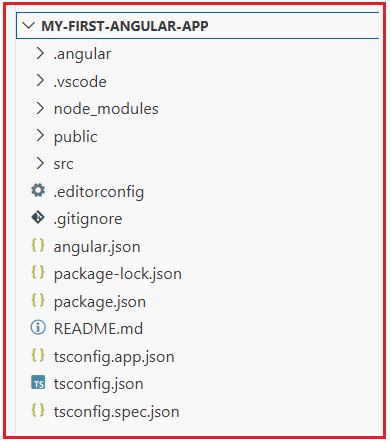
Let us understand each file and folder.
.vscode Folder – Editor Configuration (For Developer Convenience)
The .vscode folder is only for developers, not for the Angular app itself. This folder stores only Visual Studio Code settings. What it usually stores:
- How code should be formatted
- How debugging should work
- Which extensions are recommended
Important Points:
- This folder is not part of the Angular runtime
- Code inside this folder is never executed
- It only improves developer experience
Simple Analogy: Think of .vscode as chair height and monitor position in an office. It helps developers work comfortably but does not affect the actual product.
node_modules Folder – Libraries Used by Angular
This folder contains all external libraries and dependencies required by Angular. These are automatically downloaded by npm. It includes:
- Angular framework packages
- TypeScript
- RxJS
- Build and testing tools
Key Points:
- This folder can be very large (thousands of files)
- You should never modify files inside it
- If deleted, it can be recreated using npm install
- Usually excluded from Git
Simple Analogy: node_modules is like a toolbox. You use the tools, but you don’t build or modify them.
public Folder – Static Files (No Angular Processing)
The public folder is used for files that must be served exactly as they are, without Angular compilation or optimization.
Common use cases:
- Verification files for Google, Facebook, and payment gateways
- SEO files like robots.txt, ads.txt, sitemap.xml
Why Angular does not process these files:
- Filenames and content must remain unchanged
- External systems expect exact paths
Simple Analogy: Think of the public folder as a sealed envelope. Angular delivers it, but never opens or alters it.
src Folder – Heart of the Angular Application
The src folder is the most important folder in the entire project. This is where:
- Components are created
- Application logic lives
- Routing is configured
- UI is designed
Whenever someone says “I’m working on an Angular app”, they are almost always working inside the src folder.
Simple Analogy: src is the kitchen. Everything users finally consume is prepared here.
.editorconfig – Code Formatting Rules
Different developers use different editors and preferences. This can lead to inconsistent formatting. The .editorconfig file ensures:
- Consistent indentation
- Consistent line endings
- Cleaner Git history
Why it matters:
- Avoids unnecessary conflicts
- Keeps code readable
- Improves team collaboration
Simple Analogy: It’s like a dress code—everyone follows the same style.
.gitignore File – Files Git Should Ignore
Not everything created during development should be stored in version control. The .gitignore file tells Git what not to track, such as:
- node_modules
- Build output
- Temporary system files
Benefits:
- Smaller repositories
- Faster cloning
- Cleaner version history
Simple Analogy: It’s like deciding what not to pack when moving houses.
angular.json – Angular CLI Configuration File
This file controls how Angular CLI behaves. Angular CLI reads this file when you run commands like:
- ng new
- ng build
- ng serve
It defines:
- Build settings
- Output folders
- Environment configurations
Simple Analogy: angular.json is the instruction manual for Angular CLI.
package.json – Project Identity and Dependencies
The package.json file describes the project and its dependencies. It contains:
- Project name
- Angular version
- External libraries
- npm scripts
Simple Analogy: This is the ID card of the Angular project.
package-lock.json – Exact Dependency Versions
While package.json defines allowed versions, package-lock.json locks exact versions. Why this matters:
- Same behaviour on all machines
- Stable builds
- No work on my machine issues
Simple Analogy: It’s like freezing recipe ingredients to maintain the same taste every time.
tsconfig.json – Global TypeScript Rules
Angular uses TypeScript, not plain JavaScript. This file defines:
- Type safety rules
- Language features
- Compilation behaviour
It applies to all TypeScript code. It does not care whether the code is:
- App Code
- Test Code
Simple Analogy: This is the grammar rulebook for the entire project.
tsconfig.app.json – TypeScript Rules for App Code
This file applies TypeScript rules only to application code, excluding test files. Used when:
- Running the app
- Building the app for production
Simple Analogy: These are the grammar rules for the final published book.
.angular Folder – Angular CLI Internal Data
This folder is used internally by Angular CLI for caching and metadata.
Key Points:
- Developers rarely interact with it
- Improves CLI performance
Simple Analogy: Temporary memory for tools, not humans.
dist Folder – Final Build Output
This folder is created after running:
- ng build
It contains:
- Compiled HTML
- Optimized JavaScript
- Final CSS
Important Notes:
- This is not source code
- This is what gets deployed
- Never edit manually
Simple Analogy: src is the factory, dist is the packaged product.
README.md File – Project Explanation
This is the human-readable documentation. It explains:
- What the project does
- How to run it
- How to set it up
Simple Analogy: It’s the user manual of the project.
Now that the development environment is fully set up and an Angular project has been created and run successfully, the next step is to understand TypeScript Fundamentals. In the next article, I will explain TypeScript Fundamentals, which is required to write Angular code.

About the Author: Pranaya Rout
Pranaya Rout has published more than 3,000 articles in his 11-year career. Pranaya Rout has very good experience with Microsoft Technologies, Including C#, VB, ASP.NET MVC, ASP.NET Web API, EF, EF Core, ADO.NET, LINQ, SQL Server, MYSQL, Oracle, ASP.NET Core, Cloud Computing, Microservices, Design Patterns and still learning new technologies.
Hi Team Thank you so much posting Angular tutorial.
I didn’t find any e2e Folder in my projected can you help on this.
good work
Please Explain module and component in more details