
Back to: Angular Tutorials For Beginners and Professionals
FormArray in Angular Reactive Forms
Reactive Forms in Angular are designed to handle complex, real-world forms where the number of input fields is not always fixed. So far, we have seen FormControl (a single field) and FormGroup (a fixed set of fields). But what if the form needs to handle a dynamic list of controls, where users can add or remove inputs at runtime? That’s exactly where FormArray comes in.
What is FormArray?
A FormArray is a special Reactive Forms structure that represents an ordered list of form controls or form groups. Each item inside a FormArray can be:
- A FormControl (simple value)
- A FormGroup (complex object)
- Even another FormArray (nested dynamic structures)
Unlike FormGroup, which uses fixed keys, a FormArray uses indexes, making it ideal for repeating or dynamic form sections.
In simple terms:
- FormArray: Used when the number of form fields is not known in advance.
- FormArray: Repeat this input/group as many times as the user wants.
Why Do We Need FormArray?
In real applications, forms are rarely static. Many business scenarios require users to add or remove items dynamically.
Real-World Scenarios Where FormArray Is Essential
- Add multiple phone numbers or email IDs
- Add/remove skills in a resume form
- Add multiple addresses
- Add multiple family members in KYC
- Add dynamic education history
Trying to handle these cases using only FormGroup leads to:
- Hard-coded fields
- Repetitive code
- Poor scalability
- Ugly template logic
FormArray solves this cleanly and professionally.
FormArray Syntax in Angular Reactive Forms
The FormArray object manages a dynamic list of controls. Those controls can be simple values or complex grouped values. In Angular Reactive Forms, FormArray supports two very common patterns:
- FormArray with simple FormControl
- FormArray with FormGroup
We will look at both syntaxes first, then understand them with one real example.
Syntax: FormArray with a Simple FormControl
import { FormArray, FormControl, Validators } from '@angular/forms';

// FormArray containing simple FormControls
skills: FormArray = new FormArray([
  new FormControl('Angular', Validators.required),
  new FormControl('TypeScript', Validators.required)
]);
Explanation
- skills is a FormArray
- Each item inside the array is a FormControl (single field)
- Each item inside the FormArray is just one value
Common Operations:
// Add a new control
this.skills.push(new FormControl('', Validators.required));

// Remove by index
this.skills.removeAt(0);

// Read values (string[])
console.log(this.skills.value);
When to Use This
Use FormArray with FormControl when:
- Each item has only one value
- No grouping is required
- Examples:
-
- Skills list
- Tags
- Phone numbers
- Email IDs
-
Syntax: FormArray with a FormGroup
import { FormBuilder, FormArray, FormGroup, Validators } from '@angular/forms';

constructor(private fb: FormBuilder) {}

// Main FormGroup with a FormArray of FormGroups (Address rows)
profileForm = this.fb.group({
  fullName: ['', Validators.required],
  addresses: this.fb.array([]) // FormArray
});

// Create one Address row (FormGroup)
createAddressRow(): FormGroup {
  return this.fb.group({
    addressType: ['Home', Validators.required], // Home / Office etc.
    street: ['', [Validators.required, Validators.minLength(5)]],
    city: ['', Validators.required],
    state: ['', Validators.required],
    pinCode: ['', [Validators.required, Validators.pattern('^[0-9]{6}$')]],
    isPrimary: [false]
  });
}

// Add a row
addAddressRow(): void {
  (this.profileForm.get('addresses') as FormArray).push(this.createAddressRow());
}
Explanation
- addresses is a FormArray
- Each item inside the addresses is a FormGroup (multiple fields per address)
- Best for row-based data like:
-
- Address (street, city, state, pin)
- Multiple addresses in Profile / KYC forms
- Shipping + Billing addresses in E-Commerce
-
Common Operations:
const addressesArray = this.profileForm.get('addresses') as FormArray;

// Add row
addressesArray.push(this.createAddressRow());

// Remove row
addressesArray.removeAt(1);

// Read values (array of address objects)
console.log(addressesArray.value);
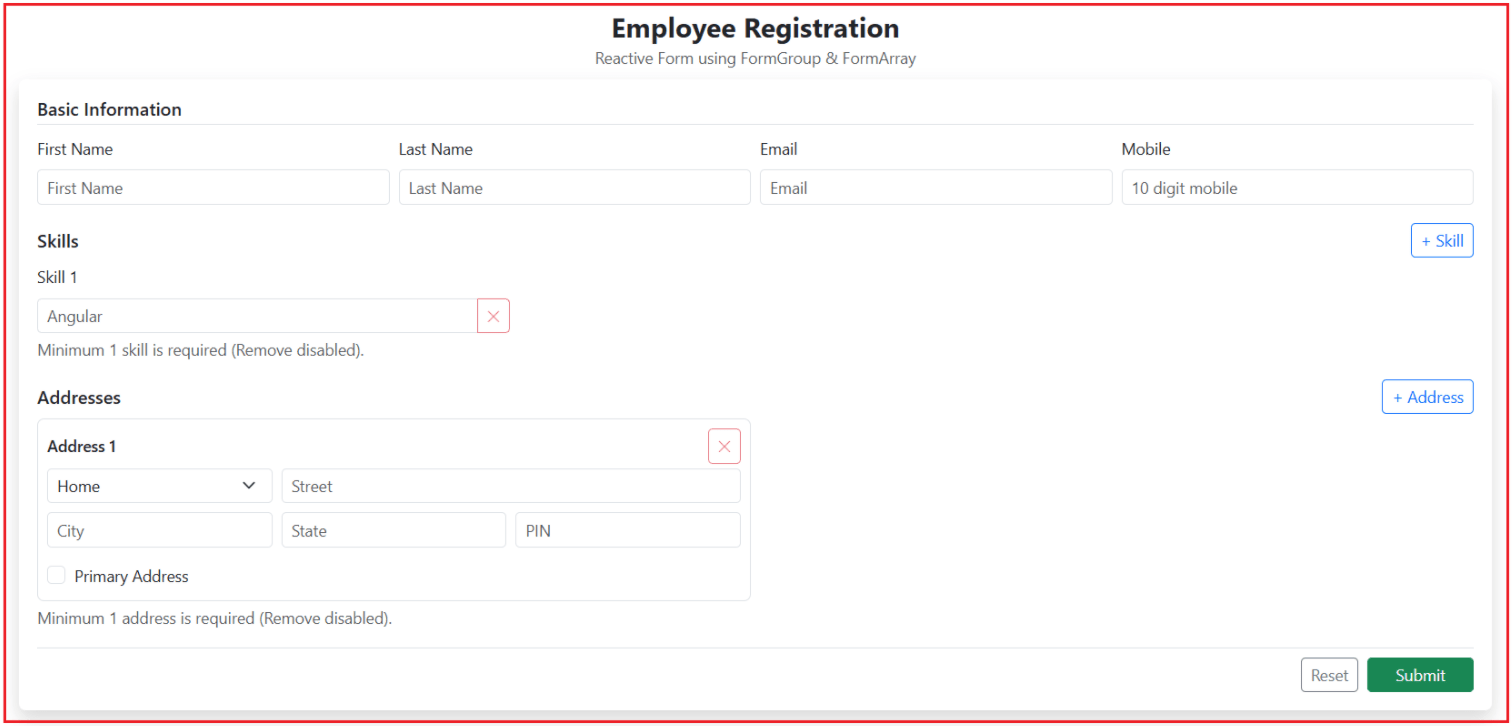
Employee Reactive Form with Basic Info + Skills + Addresses
Now, we will develop a real-world form where Basic Info is fixed, but Skills and Addresses are dynamic using FormArray. One Employee form (FormGroup) containing two dynamic sections: skills (FormArray of FormControl) and addresses (FormArray of FormGroup).
Create an Angular Project
Run the following commands:
- ng new FormArrayDemo
- cd FormArrayDemo
Adding Bootstrap CDN
Open the src/index.html file, and copy-paste the following code.
<!doctype html>
<html lang="en">
<head>
  <meta charset="utf-8">
  <title>Form Array Demo</title>
  <base href="/">
  <meta name="viewport" content="width=device-width, initial-scale=1">
  <link rel="icon" type="image/x-icon" href="favicon.ico">
  <!-- Bootstrap CSS -->
  <link href="https://cdn.jsdelivr.net/npm/bootstrap@5.3.3/dist/css/bootstrap.min.css" rel="stylesheet">
</head>
<body>
  <app-root></app-root>
</body>
</html>
Modify the Root Component:
Open the src/app/app.ts file, and copy-paste the following code.
// Angular core: provides the Component decorator to define an Angular component
import { Component } from '@angular/core';

// CommonModule: gives access to common directives/pipes/json
import { CommonModule } from '@angular/common';

// Reactive Forms APIs
import {
  // Base type for all form controls (FormControl, FormGroup, FormArray)
  // Useful when you want to write generic helper methods like showError(control: AbstractControl)
  AbstractControl,

  // Represents an array of controls (dynamic list of inputs)
  // Example: Skills list, Addresses list
  FormArray,

  // Helps build FormGroup / FormControl / FormArray with less code
  // Example: this.formBuilder.group({ ... })
  FormBuilder,

  // Represents a single form input
  // Example: one Skill textbox (string value)
  FormControl,

  // Represents a group of related controls (object-like structure)
  // Example: Basic Information group or a single Address block
  FormGroup,

  // Module that enables Reactive Forms features like formGroup, formControlName, formArrayName
  // Must be imported in standalone component imports: [ReactiveFormsModule]
  ReactiveFormsModule,

  // Built-in validators (required, minlength, pattern, email, etc.)
  Validators
} from '@angular/forms';

@Component({
  selector: 'app-root',
  standalone: true,
  imports: [CommonModule, ReactiveFormsModule],
  templateUrl: './app.html'
})
export class App {

  // Main Reactive Form (Root FormGroup)
  // This contains:
  //  1) employeeBasicInformation (FormGroup)
  //  2) employeeSkills (FormArray of FormControl)
  //  3) employeeAddresses (FormArray of FormGroup)
  employeeRegistrationForm: FormGroup;

  // Controls when validation errors should be displayed on UI.
  // We do NOT want to show errors immediately on page load.
  // Errors should show when:
  //  - User touches a control, OR
  //  - User clicks Submit (submit attempt)
  isSubmitAttempted = false;

  // Demo only:
  // After successful submit, we store the form value here
  // and show it in the UI using JSON.
  // (In real projects, you send this to an API)
  submittedEmployeeData: any = null;

  constructor(private formBuilder: FormBuilder) {

    // STEP 1: Create the complete form structure
    this.employeeRegistrationForm = this.formBuilder.group({

      // A) Basic Information (Fixed fields)
      // FormGroup is perfect here because these fields are NOT dynamic.
      employeeBasicInformation: this.formBuilder.group({
        firstName: ['', [Validators.required, Validators.minLength(2)]],
        lastName: ['', [Validators.required, Validators.minLength(2)]],
        email: ['', [Validators.required, Validators.email]],
        mobile: ['', [Validators.required, Validators.pattern('^[0-9]{10}$')]]
      }),

      // B) Skills (Dynamic list)
      // Example: Angular, TypeScript, SQL etc.
      // We use FormArray because user can add/remove skills.
      // Each row is a simple text input -> FormControl.
      employeeSkills: this.formBuilder.array([]),

      // C) Addresses (Dynamic list of objects)
      // We use FormArray because user can add/remove address blocks.
      // Each row has multiple fields -> FormGroup.
      employeeAddresses: this.formBuilder.array([])
    });

    // STEP 2: Add one default row in Skills and Addresses
    // Why?
    //  - Business rule: At least 1 skill and 1 address must exist.
    //  - Better UX: user sees inputs immediately without clicking Add.
    this.addEmployeeSkill();
    this.addEmployeeAddress();
  }

  // GETTERS: Shortcuts for FormArrays (clean and readable)
  // Returns the Skills FormArray.
  // Each item inside this array is a FormControl.
  get employeeSkillsFormArray(): FormArray {
    return this.employeeRegistrationForm.get('employeeSkills') as FormArray;
  }

  // Returns the Addresses FormArray.
  // Each item inside this array is a FormGroup (address object).
  get employeeAddressesFormArray(): FormArray {
    return this.employeeRegistrationForm.get('employeeAddresses') as FormArray;
  }

  // SKILLS: FormArray of FormControl
  // Adds a new Skill input row.
  // Skill is required, so we attach Validators.required.
  addEmployeeSkill(): void {
    const skillFormControl = new FormControl('', Validators.required);
    this.employeeSkillsFormArray.push(skillFormControl);
  }

  // Removes a Skill row by index.
  // Rule: At least 1 skill must remain.
  // So when there is only 1 skill left, we do nothing.
  removeEmployeeSkill(index: number): void {
    if (this.employeeSkillsFormArray.length === 1)
      return; // keep minimum 1
    this.employeeSkillsFormArray.removeAt(index);
  }

  // ADDRESSES: FormArray of FormGroup
  // Adds a new Address block.
  // Each address is a FormGroup because it contains multiple fields.
  // All fields are required, and pinCode must be 6 digits.
  addEmployeeAddress(): void {
    // Create a new Address FormGroup (one address "row")
    const addressFormGroup = this.formBuilder.group({
      addressType: ['Home', Validators.required],
      street: ['', Validators.required],
      city: ['', Validators.required],
      state: ['', Validators.required],
      pinCode: ['', [Validators.required, Validators.pattern('^[0-9]{6}$')]],
      isPrimary: [false] // optional checkbox
    });

    // Push it into the FormArray
    this.employeeAddressesFormArray.push(addressFormGroup);
  }

  // Removes an Address block by index.
  // Rule: At least 1 address must remain.
  removeEmployeeAddress(index: number): void {
    if (this.employeeAddressesFormArray.length === 1)
      return; // keep minimum 1
    this.employeeAddressesFormArray.removeAt(index);
  }

  // VALIDATION DISPLAY POLICY (Component-driven)
  // Returns true when validation error UI should be shown for a control.
  // We show errors when:
  //  - control is invalid AND user has touched it, OR
  //  - control is invalid AND user has clicked Submit
  // This prevents showing red errors immediately when page loads.
  showError(control: AbstractControl | null): boolean {
    if (!control)
      return false;

    return control.invalid && (control.touched || this.isSubmitAttempted);
  }

  // SUBMIT
  // Submit handler:
  // 1) Mark submit attempt true => errors become visible
  // 2) If form is invalid => mark all controls touched and stop
  // 3) If valid => store form data (demo) / send to API (real app)
  onSubmitEmployeeForm(): void {

    this.submittedEmployeeData = null;
    this.isSubmitAttempted = true;

    // If invalid, show errors and prevent submission
    if (this.employeeRegistrationForm.invalid) {
      this.employeeRegistrationForm.markAllAsTouched();
      return;
    }

    // Valid form: collect data
    this.submittedEmployeeData = this.employeeRegistrationForm.value;
  }

  // RESET
  // Reset handler:
  // 1) Clears submitted output
  // 2) Turns off submit attempt flag (so errors disappear)
  // 3) Resets form values
  // 4) Clears dynamic FormArrays (skills & addresses)
  // 5) Adds back 1 default row in each (minimum 1 rule + better UX)

  onResetEmployeeForm(): void {

    this.submittedEmployeeData = null;
    this.isSubmitAttempted = false;

    // Reset all form fields
    this.employeeRegistrationForm.reset();

    // Clear dynamic lists
    this.employeeSkillsFormArray.clear();
    this.employeeAddressesFormArray.clear();

    // Add back 1 default row each
    this.addEmployeeSkill();
    this.addEmployeeAddress();
  }
}
Modify Root Template
Open the src/app/app.html file, and copy-paste the following code.
<div class="container-fluid min-vh-100 d-flex justify-content-center align-items-start py-4">
<div class="container">
<div class="text-center mb-2">
<h4 class="fw-bold mb-0">Employee Registration</h4>
<small class="text-muted">
Reactive Form using FormGroup & FormArray
</small>
</div>
<div class="card shadow border-0">
<div class="card-body p-3">
<!--
[formGroup] binds the HTML <form> to the root FormGroup (employeeRegistrationForm).
(ngSubmit) calls component method when user submits the form.
novalidate: Do not run the browser’s built-in HTML5 validation.
-->
<form [formGroup]="employeeRegistrationForm"
(ngSubmit)="onSubmitEmployeeForm()"
novalidate>
<!-- BASIC INFO (FormGroup)
formGroupName binds this block to employeeBasicInformation FormGroup.
formControlName binds each input to a FormControl inside that FormGroup. -->
<div class="mb-3">
<h6 class="fw-semibold border-bottom pb-1 mb-2">
Basic Information
</h6>
<div formGroupName="employeeBasicInformation" class="row g-2">
<!-- First Name -->
<div class="col-md-3">
<label class="form-label small">First Name</label>
<input class="form-control form-control-sm"
formControlName="firstName"
placeholder="First Name"
[class.is-invalid]="showError(employeeRegistrationForm.get('employeeBasicInformation.firstName'))" />
<!-- Show validation messages only when showError(...) is true -->
@if (showError(employeeRegistrationForm.get('employeeBasicInformation.firstName'))) {
@if (employeeRegistrationForm.get('employeeBasicInformation.firstName')?.errors?.['required']) {
<div class="invalid-feedback d-block small">First Name is required.</div>
}
@if (employeeRegistrationForm.get('employeeBasicInformation.firstName')?.errors?.['minlength']) {
<div class="invalid-feedback d-block small">Minimum 2 characters required.</div>
}
}
</div>
<!-- Last Name -->
<div class="col-md-3">
<label class="form-label small">Last Name</label>
<input class="form-control form-control-sm"
formControlName="lastName"
placeholder="Last Name"
[class.is-invalid]="showError(employeeRegistrationForm.get('employeeBasicInformation.lastName'))" />
@if (showError(employeeRegistrationForm.get('employeeBasicInformation.lastName'))) {
@if (employeeRegistrationForm.get('employeeBasicInformation.lastName')?.errors?.['required']) {
<div class="invalid-feedback d-block small">Last Name is required.</div>
}
@if (employeeRegistrationForm.get('employeeBasicInformation.lastName')?.errors?.['minlength']) {
<div class="invalid-feedback d-block small">Minimum 2 characters required.</div>
}
}
</div>
<!-- Email -->
<div class="col-md-3">
<label class="form-label small">Email</label>
<input class="form-control form-control-sm"
formControlName="email"
placeholder="Email"
[class.is-invalid]="showError(employeeRegistrationForm.get('employeeBasicInformation.email'))" />
@if (showError(employeeRegistrationForm.get('employeeBasicInformation.email'))) {
@if (employeeRegistrationForm.get('employeeBasicInformation.email')?.errors?.['required']) {
<div class="invalid-feedback d-block small">Email is required.</div>
}
@if (employeeRegistrationForm.get('employeeBasicInformation.email')?.errors?.['email']) {
<div class="invalid-feedback d-block small">Enter a valid email.</div>
}
}
</div>
<!-- Mobile -->
<div class="col-md-3">
<label class="form-label small">Mobile</label>
<input class="form-control form-control-sm"
formControlName="mobile"
placeholder="10 digit mobile"
[class.is-invalid]="showError(employeeRegistrationForm.get('employeeBasicInformation.mobile'))" />
@if (showError(employeeRegistrationForm.get('employeeBasicInformation.mobile'))) {
@if (employeeRegistrationForm.get('employeeBasicInformation.mobile')?.errors?.['required']) {
<div class="invalid-feedback d-block small">Mobile is required.</div>
}
@if (employeeRegistrationForm.get('employeeBasicInformation.mobile')?.errors?.['pattern']) {
<div class="invalid-feedback d-block small">Mobile must be 10 digits.</div>
}
}
</div>
</div>
</div>
<div class="mb-3">
<div class="d-flex justify-content-between align-items-center mb-1">
<h6 class="fw-semibold mb-0">Skills</h6>
<!-- Calls component method to push a new FormControl into the FormArray -->
<button type="button"
class="btn btn-sm btn-outline-primary"
(click)="addEmployeeSkill()">
+ Skill
</button>
</div>
<!-- SKILLS (FormArray of FormControl)
- formArrayName binds this block to employeeSkills FormArray
- Each skill is a FormControl (string)
- @for loops over controls.
- @for renders controls dynamically
- [formControlName] uses index ($index) to bind each input to a FormControl inside FormArray -->
<div formArrayName="employeeSkills" class="row g-2">
@for (skillControl of employeeSkillsFormArray.controls; track $index) {
<div class="col-md-4">
<label class="form-label small">Skill {{ $index + 1 }}</label>
<div class="input-group input-group-sm">
<input class="form-control"
[formControlName]="$index"
placeholder="Angular"
[class.is-invalid]="showError(skillControl)" />
<!-- Removes the FormControl at the given index from the FormArray -->
<button type="button"
class="btn btn-outline-danger"
title="Remove Skill"
(click)="removeEmployeeSkill($index)"
[disabled]="employeeSkillsFormArray.length === 1">
✕
</button>
</div>
@if (showError(skillControl)) {
@if (skillControl.errors?.['required']) {
<div class="invalid-feedback d-block small">Skill is required.</div>
}
}
</div>
}
</div>
@if (employeeSkillsFormArray.length === 1) {
<div class="text-muted small mt-1">Minimum 1 skill is required (Remove disabled).</div>
}
</div>
<div class="mb-3">
<div class="d-flex justify-content-between align-items-center mb-1">
<h6 class="fw-semibold mb-0">Addresses</h6>
<!-- Calls component method to push a new Address FormGroup into the FormArray -->
<button type="button"
class="btn btn-sm btn-outline-primary"
(click)="addEmployeeAddress()">
+ Address
</button>
</div>
<!-- ADDRESSES (FormArray of FormGroup)
formArrayName binds this block to employeeAddresses FormArray.
@for loops over address FormGroups.
[formGroupName]="$index" binds the block to the FormGroup at that index.
formControlName binds fields inside that address FormGroup. -->
<div formArrayName="employeeAddresses" class="row g-2">
@for (addressGroup of employeeAddressesFormArray.controls; track $index) {
<div class="col-md-6">
<div class="border rounded p-2" [formGroupName]="$index">
<div class="d-flex justify-content-between align-items-center mb-1">
<small class="fw-semibold">
Address {{ $index + 1 }}
</small>
<!-- Removes the FormGroup at the given index from the FormArray -->
<button type="button"
class="btn btn-sm btn-outline-danger"
title="Remove Address"
(click)="removeEmployeeAddress($index)"
[disabled]="employeeAddressesFormArray.length === 1">
✕
</button>
</div>
<div class="row g-2">
<!-- Address Type -->
<div class="col-4">
<select class="form-select form-select-sm"
formControlName="addressType"
[class.is-invalid]="showError(addressGroup.get('addressType'))">
<option value="Home">Home</option>
<option value="Office">Office</option>
<option value="Other">Other</option>
</select>
@if (showError(addressGroup.get('addressType'))) {
@if (addressGroup.get('addressType')?.errors?.['required']) {
<div class="invalid-feedback d-block small">Type is required.</div>
}
}
</div>
<!-- Street -->
<div class="col-8">
<input class="form-control form-control-sm"
formControlName="street"
placeholder="Street"
[class.is-invalid]="showError(addressGroup.get('street'))" />
@if (showError(addressGroup.get('street'))) {
@if (addressGroup.get('street')?.errors?.['required']) {
<div class="invalid-feedback d-block small">Street is required.</div>
}
}
</div>
<!-- City -->
<div class="col-4">
<input class="form-control form-control-sm"
formControlName="city"
placeholder="City"
[class.is-invalid]="showError(addressGroup.get('city'))" />
@if (showError(addressGroup.get('city'))) {
@if (addressGroup.get('city')?.errors?.['required']) {
<div class="invalid-feedback d-block small">City is required.</div>
}
}
</div>
<!-- State -->
<div class="col-4">
<input class="form-control form-control-sm"
formControlName="state"
placeholder="State"
[class.is-invalid]="showError(addressGroup.get('state'))" />
@if (showError(addressGroup.get('state'))) {
@if (addressGroup.get('state')?.errors?.['required']) {
<div class="invalid-feedback d-block small">State is required.</div>
}
}
</div>
<!-- PIN -->
<div class="col-4">
<input class="form-control form-control-sm"
formControlName="pinCode"
placeholder="PIN"
[class.is-invalid]="showError(addressGroup.get('pinCode'))" />
@if (showError(addressGroup.get('pinCode'))) {
@if (addressGroup.get('pinCode')?.errors?.['required']) {
<div class="invalid-feedback d-block small">PIN is required.</div>
}
@if (addressGroup.get('pinCode')?.errors?.['pattern']) {
<div class="invalid-feedback d-block small">PIN must be 6 digits.</div>
}
}
</div>
<!-- Primary -->
<div class="col-12">
<div class="form-check mt-1">
<input class="form-check-input"
type="checkbox"
formControlName="isPrimary"
id="primary{{$index}}">
<label class="form-check-label small" for="primary{{$index}}">
Primary Address
</label>
</div>
</div>
</div>
</div>
</div>
}
</div>
@if (employeeAddressesFormArray.length === 1) {
<div class="text-muted small mt-1">Minimum 1 address is required (Remove disabled).</div>
}
</div>
<!-- ACTION BUTTONS
- Submit triggers ngSubmit
- Reset calls component method to reset FormGroup and rebuild arrays -->
<div class="d-flex justify-content-end gap-2 border-top pt-2">
<button type="button"
class="btn btn-sm btn-outline-secondary"
(click)="onResetEmployeeForm()">
Reset
</button>
<button type="submit"
class="btn btn-sm btn-success px-4">
Submit
</button>
</div>
</form>
</div>
</div>
<!-- Demo output:
- Uses Angular Control Flow @if
- Shows JSON only after valid submit when submittedEmployeeData is set -->
@if (submittedEmployeeData) {
<div class="card mt-2">
<div class="card-body p-2">
<pre class="small mb-0">{{ submittedEmployeeData | json }}</pre>
</div>
</div>
}
</div>
</div>
Conclusion
FormArray is a powerful feature of Angular Reactive Forms that allows us to handle dynamic form sections with variable input counts. By using FormArray with simple FormControl for flat lists (like skills) and FormGroup for structured data (like addresses), we can build flexible, scalable, and real-world forms with clean validation and better user experience. Understanding FormArray is essential for building professional Angular applications that go beyond static forms and effectively handle real business requirements.

About the Author: Pranaya Rout
Pranaya Rout has published more than 3,000 articles in his 11-year career. Pranaya Rout has very good experience with Microsoft Technologies, Including C#, VB, ASP.NET MVC, ASP.NET Web API, EF, EF Core, ADO.NET, LINQ, SQL Server, MYSQL, Oracle, ASP.NET Core, Cloud Computing, Microservices, Design Patterns and still learning new technologies.