
Back to: Angular Tutorials For Beginners and Professionals
Eager vs Lazy Loading in Angular Routing
In this post, we will discuss Eager vs Lazy Loading in Angular Routing with One Real-time ECommerce Application. In this app, we are separating the application into two real user journeys: Public Browsing and Account Usage. Public browsing pages (Home, Products) must open instantly for everyone, so we keep them Eager Loaded. Account pages (Login, Profile, Orders, Logout) are used only by logged-in users, so we keep them Lazy Loaded to avoid increasing the initial bundle size.
This approach makes the app feel faster because Angular downloads only what is necessary at startup. The user can browse products immediately, and Angular loads the account-related pages only when the user actually clicks Login/Profile/Orders. It is a clean, real-world pattern used in most e-commerce and user-portal applications.
Two areas of the app
- Public Area: Home + Products (available to all users)
- Account Area: Login + Profile + Orders + Logout (only when needed)
Eager Loaded – Core User Flow (Always Needed)
These pages (Home and Products) are part of the initial bundle, so the app feels fast from the first second:
- Best for pages that are always visited first
- Improves first load time and first impression
Lazy Loaded – User-Specific Flow (Loaded When Needed)
These pages (Login + Profile + Orders + Logout) are downloaded only when the user navigates to them
- Best for features not required for every visitor
- Reduces initial JS download and speeds up startup
Why Login/Logout Should Be Lazy
- Not every visitor will log in
- So, keeping it lazy improves overall performance
Eager-load Home/Products for fast startup and lazy-load Login/Profile/Orders, so account features load only when the user needs them.
Pages to be Developed:
Each page in UserShop is designed around user behavior, with public pages loading immediately and user-specific pages loading only when needed, ensuring both performance and usability. We will develop the following pages:
Home Page:
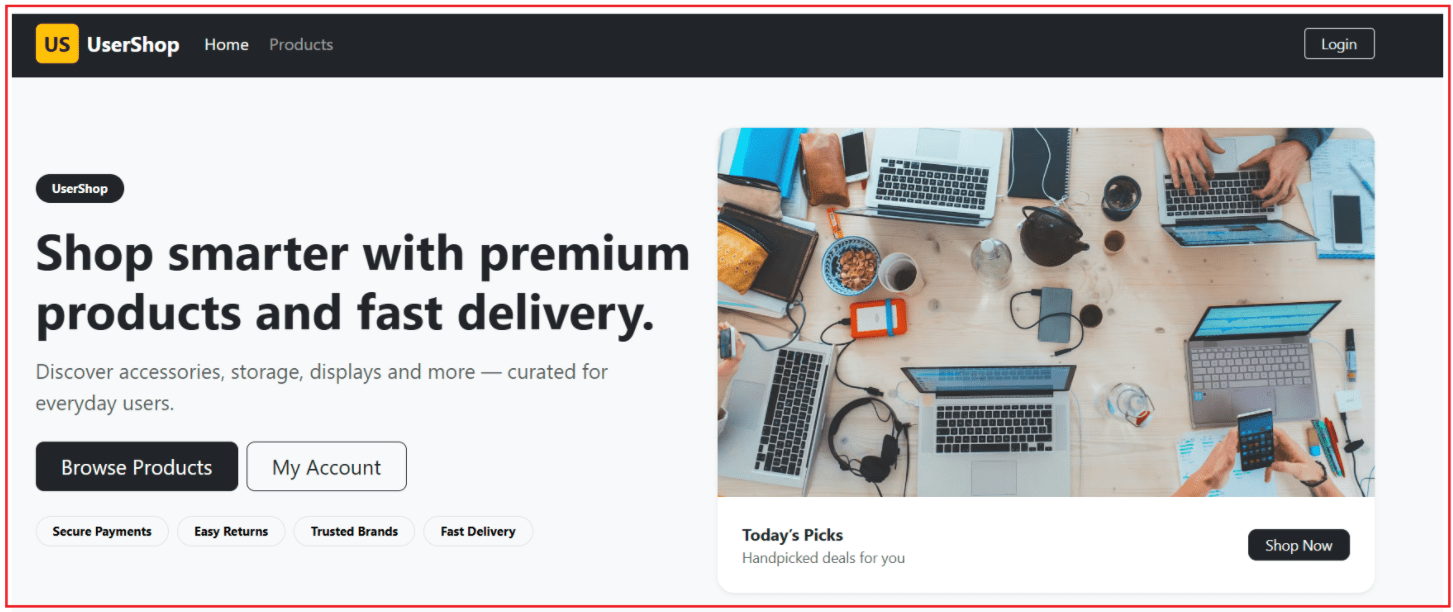
The Home page is the public landing screen of the UserShop app. It gives users a clean first impression with a quick overview and clear navigation to browse products. Since every visitor needs this page first, it is eagerly loaded to speed up startup.
Key Points to Remember:
- First page most users see
- Public page (no login required)
- Eagerly loaded for the best initial performance
- Provides navigation to Products
Products Page:
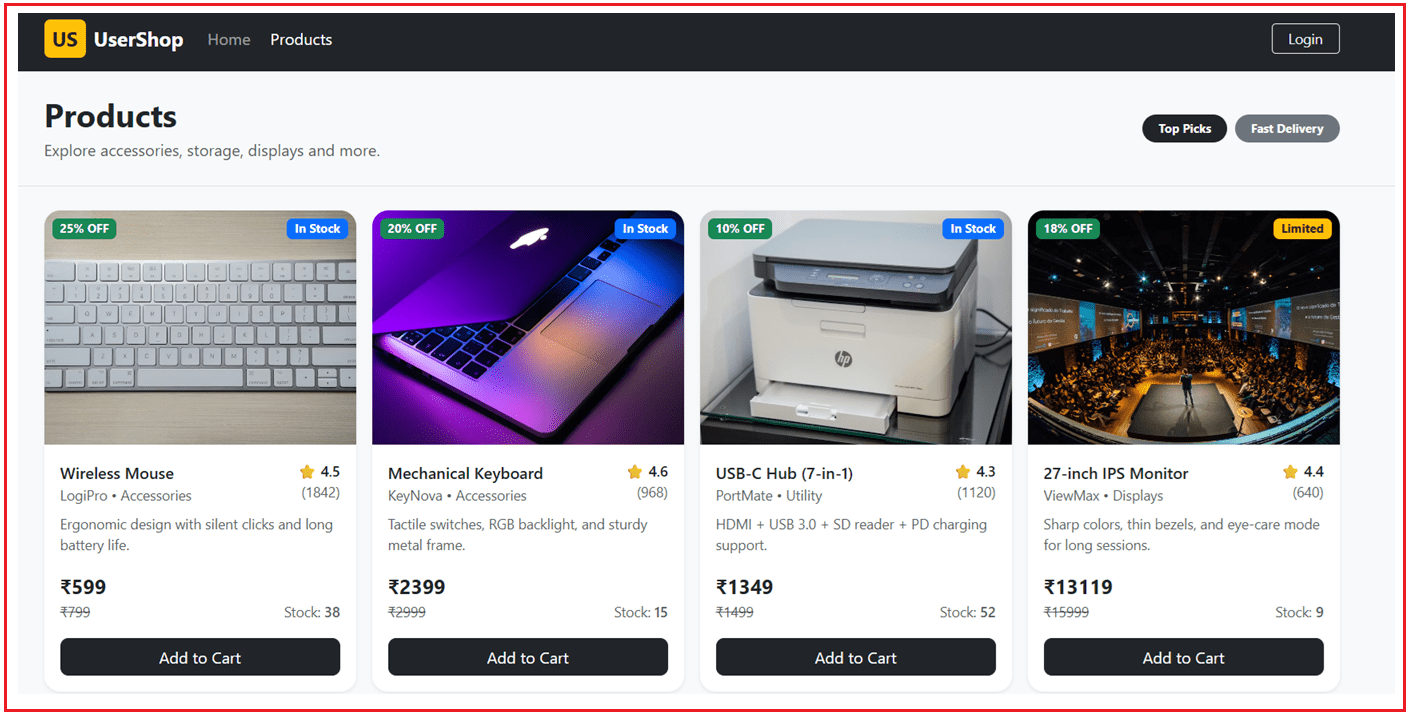
The Products page displays the in-memory product catalog in a professional grid layout using Bootstrap. Users can browse product images, prices, discounts, ratings, and stock information in one place. It is also eagerly loaded because product browsing is a core flow even before login.
Key Points to Remember:
- Public browsing page
- Uses ProductService in-memory data
- Shows pricing + discount + rating + stock
- Eagerly loaded for quick access
Login Page:
The Login page allows the user to sign in using demo credentials and creates an in-memory login session. After a successful login, the user is redirected to Profile (a common real-world flow). Because not every visitor will log in, this page is lazy-loaded.

Key Points to Remember:
- User-only page
- Uses AuthService to set the session
- Redirects to Profile on success
- Lazy loaded to keep the startup light
Profile Page:
The Profile page displays the logged-in user’s personal information, such as name, email, phone, address, membership details, and loyalty points. It reads data from AuthService and is protected using a guard so only logged-in users can access it. Since it is user-specific, it is lazy-loaded.
Key Points to Remember:
- Protected route (authGuard)
- Reads user details from AuthService
- Shows profile and address details
- Lazy loaded for performance
Order History Page:
The Order History page shows all orders placed by the logged-in user in a clean grid-style layout. It fetches the user’s orders from OrderService using the userId from AuthService. Because orders are only relevant after login, this page is lazy-loaded and protected by the guard.
Key Points to Remember:
- Protected route (authGuard)
- Uses OrderService to load orders by userId
- Grid-style history for quick scanning
- Lazy loaded because it’s user-only
Order Details Modal Popup:
The Order Details modal popup opens when the user clicks “View Details” in the Order History grid. It shows full order information like delivery date, payment method, shipping address, item list, and totals in a compact, professional layout. Using a modal keeps the user on the same page while viewing detailed information, improving usability.
Key Points to Remember:
- Bootstrap modal popup
- Shows complete order details without page navigation
- Displays items + totals in a compact layout
- Improves user experience in the order history flow
Step 1: Create the Angular Project
In this step, we create a new Angular application using the Angular CLI. The generated project already uses the latest standalone component architecture, and routing is configured by default using app.routes.ts. Running the application confirms that the setup is correct and the base app loads successfully in the browser.
Run these commands:
- ng new UserShop
- cd UserShop
- ng serve
What happens here:
- You get a standalone Angular app
- Routing is already set up with app.routes.ts
- App opens in the browser
Step 2: Add Bootstrap CDN
Here, we add Bootstrap via a CDN in index.html, so the application gets professional styling without installing any additional packages. This approach keeps the setup simple while allowing us to build responsive layouts, cards, navbars, and forms across all pages. Open, src/index.html and copy-paste the following code.
<!doctype html>
<html lang="en">
<head>
  <meta charset="utf-8">
  <title>User Shop</title>
  <base href="/">
  <meta name="viewport" content="width=device-width, initial-scale=1">
  <link rel="icon" type="image/x-icon" href="favicon.ico">
  <!-- Add Bootstrap CDN  -->
  <link
    href="https://cdn.jsdelivr.net/npm/bootstrap@5.3.3/dist/css/bootstrap.min.css"
    rel="stylesheet" />

</head>
<body>
  <app-root></app-root>

  <!-- Add Bootstrap JS  -->
  <script src="https://cdn.jsdelivr.net/npm/bootstrap@5.3.3/dist/js/bootstrap.bundle.min.js"></script>
</body>
</html>
Step 3: Create Components Using Angular CLI
In this step, we create all the required pages using Angular CLI. Each page is a standalone component and follows a clean folder structure under pages/. These components represent real user flows such as Home, Products, Login, Profile, and Orders. Run these commands:
- ng g c pages/home
- ng g c pages/products
- ng g c pages/login
- ng g c pages/profile
- ng g c pages/orders
Step 4: Create In-Memory Data Services
This step introduces in-memory services for authentication, products, and orders. Instead of calling APIs or databases, data is stored directly inside services. This makes the application easy to understand while still behaving like a real-world system with users, products, and orders. Create a folder named services inside the src/app folder, where we will create all our services.
auth.service.ts
The Auth Service is responsible for managing user authentication and login state across the application. It stores the currently logged-in user in memory and exposes simple methods to check whether the user is authenticated, log in, and log out. Other parts of the app, such as guards and components, rely on this service to make decisions based on the user’s login status. Create a typescript file named auth.service.ts within the src/app/services folder, and copy-paste the following code.
import { Injectable } from '@angular/core';

// Defines the structure of a logged-in user (used in Profile + Navbar)
export type User = {
  id: number;
  fullName: string;
  email: string;

  phone: string;
  gender: 'Male' | 'Female' | 'Other'; // fixed options for consistency
  dob: string;                 // yyyy-mm-dd (date of birth)
  memberSince: string;         // yyyy-mm-dd (when user joined)
  lastLogin: string;           // yyyy-mm-dd HH:mm (last login time)
  loyaltyPoints: number;       // points earned from purchases

  // User address details grouped in one object
  address: {
    line1: string;
    line2?: string;            // optional line2 (may be empty)
    city: string;
    state: string;
    pincode: string;
    country: string;
  };
};

@Injectable({ providedIn: 'root' })
export class AuthService {

  // Stores the current logged-in user in memory (no DB/API in this demo)
  private _currentUser: User | null = null;

  // Exposes the logged-in user to components (Profile, Orders, App navbar)
  get currentUser(): User | null {
    return this._currentUser;
  }

  // Quick flag used for UI checks and route guards
  get isLoggedIn(): boolean {
    return this._currentUser !== null;
  }

  // Validates credentials and sets the user session in memory
  login(email: string, password: string): boolean {
    // Demo login check (hardcoded)
    if (email === 'user@demo.com' && password === '1234') {

      // If credentials are valid, store the user object
      this._currentUser = {
        id: 101,
        fullName: 'Pranaya Rout',
        email: 'user@demo.com',

        phone: '+91 98765 43210',
        gender: 'Male',
        dob: '1993-08-12',
        memberSince: '2024-04-01',
        lastLogin: '2026-02-17 10:25',
        loyaltyPoints: 1280,

        address: {
          line1: 'Plot No. 21, Saheed Nagar',
          line2: 'Near Central Park',
          city: 'Bhubaneswar',
          state: 'Odisha',
          pincode: '751007',
          country: 'India'
        }
      };

      return true; // login success
    }

    return false; // login failed
  }

  // Clears the user session (logout)
  logout(): void {
    this._currentUser = null;
  }
}
Key Points to Remember:
- Manages the current logged-in user
- Provides a simple login and logout mechanism
- Exposes an isLoggedIn check for guards and UI logic
- Acts as a single source of truth for the authentication state
- Uses in-memory data to simulate real authentication
product.service.ts
The Product Service provides the product data required by public pages such as Home and Products. It stores a list of products in memory and exposes helper methods to calculate derived values such as discounted prices. This service represents how real applications fetch and manage catalog data from an API. Create a typescript file named product.service.ts within the src/app/services folder, and copy-paste the following code.
import { Injectable } from '@angular/core';

// Product contract used across UI (Products + Home featured list)
export type Product = {
  id: number;
  name: string;
  price: number;            // MRP / original price
  category: string;
  brand: string;
  rating: number;           // 0 - 5
  reviews: number;          // total reviews count
  stock: number;            // available quantity
  discountPercent: number;  // discount in %
  imageUrl: string;         // product image link
  shortDesc: string;        // quick description shown on card
};

@Injectable({ providedIn: 'root' })
export class ProductService {

  // In-memory product list (no API / DB) used for demo app
  products: Product[] = [
    { id: 1, name: 'Wireless Mouse', price: 799, category: 'Accessories', brand: 'LogiPro', rating: 4.5, reviews: 1842, stock: 38, discountPercent: 25, imageUrl: 'https://images.unsplash.com/photo-1587829741301-dc798b83add3', shortDesc: 'Ergonomic design with silent clicks and long battery life.' },
    { id: 2, name: 'Mechanical Keyboard', price: 2999, category: 'Accessories', brand: 'KeyNova', rating: 4.6, reviews: 968, stock: 15, discountPercent: 20, imageUrl: 'https://images.unsplash.com/photo-1517336714731-489689fd1ca8', shortDesc: 'Tactile switches, RGB backlight, and sturdy metal frame.' },
    { id: 3, name: 'USB-C Hub (7-in-1)', price: 1499, category: 'Utility', brand: 'PortMate', rating: 4.3, reviews: 1120, stock: 52, discountPercent: 10, imageUrl: 'https://images.unsplash.com/photo-1612815154858-60aa4c59eaa6', shortDesc: 'HDMI + USB 3.0 + SD reader + PD charging support.' },
    { id: 4, name: '27-inch IPS Monitor', price: 15999, category: 'Displays', brand: 'ViewMax', rating: 4.4, reviews: 640, stock: 9, discountPercent: 18, imageUrl: 'https://images.unsplash.com/photo-1587825140708-dfaf72ae4b04', shortDesc: 'Sharp colors, thin bezels, and eye-care mode for long sessions.' },
    { id: 5, name: 'Noise Cancelling Headphones', price: 5499, category: 'Audio', brand: 'SoundArc', rating: 4.5, reviews: 723, stock: 21, discountPercent: 22, imageUrl: 'https://images.unsplash.com/photo-1585386959984-a4155224a1ad', shortDesc: 'Active noise cancellation with deep bass and clear vocals.' },
    { id: 6, name: 'Webcam (1080p)', price: 2199, category: 'Work From Home', brand: 'CamSwift', rating: 4.2, reviews: 510, stock: 30, discountPercent: 15, imageUrl: 'https://images.unsplash.com/photo-1593642532973-d31b6557fa68', shortDesc: 'Crisp video, built-in mic, and plug-and-play setup.' },
    { id: 7, name: 'External SSD (1TB)', price: 8999, category: 'Storage', brand: 'FlashX', rating: 4.7, reviews: 1460, stock: 14, discountPercent: 12, imageUrl: 'https://images.pexels.com/photos/3394661/pexels-photo-3394661.jpeg', shortDesc: 'Fast transfers, durable build, and compact pocket size.' },
    { id: 8, name: 'Laptop Stand (Aluminum)', price: 1299, category: 'Ergonomics', brand: 'ErgoLift', rating: 4.4, reviews: 390, stock: 60, discountPercent: 8, imageUrl: 'https://images.unsplash.com/photo-1615751072497-5f5169febe17', shortDesc: 'Improves posture and airflow with adjustable angles.' }
  ];

  // Returns the selling price after applying discountPercent
  getFinalPrice(p: Product): number {
    const discount = (p.price * p.discountPercent) / 100;
    return Math.round(p.price - discount);
  }
}
Key Points to Remember:
- Stores the product catalog in one place
- Supplies data to multiple components
- Includes helper logic like final price calculation
- Easily replaceable with a real backend API later
order.service.ts
The Order Service manages user order history and order-related data. It holds a list of orders in memory and provides methods to fetch orders for a specific user. This service is primarily used by protected pages, such as Orders and the Order Details modal. Create a typescript file named order.service.ts within the src/app/services folder, and copy-paste the following code.
import { Injectable } from '@angular/core';

// Each item inside an order (simple in-memory structure)
export type OrderItem = { productName: string; qty: number; unitPrice: number; };

// Order model used by Orders page + Order Details modal
export type Order = {
  orderId: string;
  userId: number; // helps filter orders per logged-in user
  orderDate: string; // yyyy-mm-dd
  status: 'Placed' | 'Shipped' | 'Delivered';
  paymentMethod: 'UPI' | 'Card' | 'NetBanking' | 'COD';
  items: OrderItem[];
  shippingAddress: string;
  expectedDelivery: string; // yyyy-mm-dd
  subtotal: number;  // sum of items (before discount/tax)
  discount: number;  // saved amount
  tax: number;       // tax amount
  totalAmount: number; // final payable amount
};

@Injectable({ providedIn: 'root' })
export class OrderService {

  // In-memory orders (no DB/API) for demo application
  private orders: Order[] = [
    { orderId: 'ORD-1001', userId: 101, orderDate: '2026-02-01', status: 'Delivered', paymentMethod: 'UPI', items: [{ productName: 'Wireless Mouse', qty: 1, unitPrice: 599 }, { productName: 'USB-C Hub (7-in-1)', qty: 1, unitPrice: 999 }], shippingAddress: 'Saheed Nagar, Bhubaneswar, Odisha - 751007', expectedDelivery: '2026-02-04', subtotal: 1598, discount: 100, tax: 400, totalAmount: 1898 },
    { orderId: 'ORD-1002', userId: 101, orderDate: '2026-02-08', status: 'Shipped', paymentMethod: 'Card', items: [{ productName: 'Laptop Stand (Aluminum)', qty: 1, unitPrice: 1299 }], shippingAddress: 'Saheed Nagar, Bhubaneswar, Odisha - 751007', expectedDelivery: '2026-02-12', subtotal: 1299, discount: 200, tax: -100, totalAmount: 999 },
    { orderId: 'ORD-1003', userId: 101, orderDate: '2026-02-14', status: 'Placed', paymentMethod: 'NetBanking', items: [{ productName: 'External SSD (1TB)', qty: 1, unitPrice: 8999 }], shippingAddress: 'Saheed Nagar, Bhubaneswar, Odisha - 751007', expectedDelivery: '2026-02-18', subtotal: 8999, discount: 800, tax: 600, totalAmount: 8799 },
    { orderId: 'ORD-1004', userId: 101, orderDate: '2026-02-16', status: 'Delivered', paymentMethod: 'UPI', items: [{ productName: 'Noise Cancelling Headphones', qty: 1, unitPrice: 5499 }, { productName: 'Webcam (1080p)', qty: 1, unitPrice: 2199 }], shippingAddress: 'Saheed Nagar, Bhubaneswar, Odisha - 751007', expectedDelivery: '2026-02-19', subtotal: 7698, discount: 700, tax: 500, totalAmount: 7498 }
  ];

  // Returns only orders of a specific user (used in Orders page)
  getOrdersByUser(userId: number): Order[] {
    return this.orders.filter(o => o.userId === userId);
  }
}
Key Points to Remember:
- Maintains order history data
- Filters orders by logged-in user
- Supplies data to the Orders page and modal
- Mimics real-world backend order APIs
- Keeps order-related logic centralized and reusable
Step 5: Add Route Protection (Guard) for Profile/Orders
Here, we add a route guard to protect user-specific pages, such as Profile and Orders. The guard checks whether the user is logged in before allowing navigation. If the user is not logged in, they are redirected to the Login page, ensuring secure access to private routes.
Create a folder named guards inside the src/app folder. Then, create a TypeScript file named auth.guard.ts within the src/app/guards folder, and copy-paste the following code. This guard protects routes by allowing access only when the user is logged in; otherwise, it redirects to Login.
import { CanActivateFn, Router } from '@angular/router';
import { inject } from '@angular/core';
import { AuthService } from '../services/auth.service';

// Functional route guard
export const authGuard: CanActivateFn = () => {

  // Get AuthService instance (to check login status)
  const auth = inject(AuthService);

  // Get Router instance (to redirect user if not logged in)
  const router = inject(Router);

  // If user is logged in, allow navigation to the requested route
  if (auth.isLoggedIn) return true;

  // If user is NOT logged in, redirect them to Login page
  router.navigateByUrl('/login');

  // Block navigation to the protected route
  return false;
};
Key Points to Remember:
- This guard runs before the route navigation
- It checks auth.isLoggedIn to allow/deny access
- If not logged in, it redirects to /login
- inject() is used because this is a functional guard
Step 6: Configure Routing
In this step, we define how pages are loaded. Home and Products are eagerly loaded because they are public and required immediately. Login, Profile, and Orders are lazy-loaded, so Angular loads them only when the user navigates to those routes, improving initial load performance.
Open src/app/app.routes.ts file, and copy-paste the following code. This routing setup eagerly loads public pages and lazily loads user pages, with guard protection for secure navigation.
import { Routes } from '@angular/router';
import { authGuard } from './guards/auth.guard';

// EAGER loaded pages (imported directly, included in initial bundle)
import { Home } from './pages/home/home';
import { Products } from './pages/products/products';

export const routes: Routes = [

  // EAGER LOADING (Public pages)
  // Loads immediately on app start → best for first-time users
  { path: '', pathMatch: 'full', component: Home },     // Home page route: /
  { path: 'products', component: Products },            // Products page route: /products

  // LAZY LOADING (User-related pages)
  // These components are downloaded only when user visits the route

  {
    path: 'login',
    // Loads Login component only when /login is visited
    loadComponent: () => import('./pages/login/login').then(m => m.Login)
  },
  {
    path: 'profile',
    // Guard protects the route (only logged-in users can access)
    canActivate: [authGuard],
    // Loads Profile component only when /profile is visited
    loadComponent: () => import('./pages/profile/profile').then(m => m.Profile)
  },
  {
    path: 'orders',
    // Guard protects the route (only logged-in users can access)
    canActivate: [authGuard],
    // Loads Orders component only when /orders is visited
    loadComponent: () => import('./pages/orders/orders').then(m => m.Orders)
  },

  // Fallback route
  // If user enters an unknown URL, send them to Home
  { path: '**', redirectTo: '' }
];
Key Points to Remember:
- Home + Products are eager because they are public and should load fast
- Login + Profile + Orders are lazy, so they load only when needed
- Profile + Orders are protected using authGuard
- loadComponent() is the recommended standalone lazy-loading approach
Step 7: Update Root App Layout
This step defines the application’s global layout using the root component. The navbar, footer, and <router-outlet> are placed here. The root component also reacts to the authentication state to dynamically display Login or Logout options.
Open src/app/app.ts file, and copy-paste the following code. This is the root component for the application. This root component controls global layout (navbar/footer), exposes the auth state to the UI, and handles logout and redirects.
import { Component } from '@angular/core';
import { RouterLink, RouterOutlet, Router, RouterLinkActive } from '@angular/router';
import { AuthService } from './services/auth.service';

@Component({
  selector: 'app-root',              // Root selector used in index.html
  standalone: true,                  // Standalone component (no NgModule)
  imports: [
    RouterOutlet,                    // Required to render routed pages
    RouterLink,                      // Enables [routerLink] navigation in template
    RouterLinkActive                 // Enables active link highlighting in navbar
  ],
  templateUrl: './app.html'         // External template (you prefer no inline HTML)
})
export class App {

  // Used for footer copyright year (auto-updates every year)
  year = new Date().getFullYear();

  // auth: used in app.html to show Login button / Logout button conditionally
  // router: used to redirect user after logout
  constructor(public auth: AuthService, private router: Router) {}

  // Logout handler (called from navbar button)
  logoutNow(): void {
    this.auth.logout();              // Clear in-memory logged-in user
    this.router.navigateByUrl('/');  // Redirect to Home after logout
  }
}
Key Points to Remember:
- App is the root component that hosts the navbar + <router-outlet>
- AuthService is injected to show the Login/Logout UI conditionally
- Router is injected to redirect after logout
- year is used for the footer display
App Template
Open src/app/app.html file, and copy-paste the following code. This is the root layout template containing the <router-outlet> placeholder.
<div class="min-vh-100 d-flex flex-column">

  <!-- NAVBAR -->
  <nav class="navbar navbar-expand-lg navbar-dark bg-dark border-bottom border-dark">
    <div class="container">
      <a class="navbar-brand fw-bold d-flex align-items-center gap-2" [routerLink]="''">
        <span class="bg-warning text-dark rounded px-2 py-1 fw-bold">US</span>
        <span>UserShop</span>
      </a>

      <button class="navbar-toggler" type="button" data-bs-toggle="collapse" data-bs-target="#topNav"
              aria-controls="topNav" aria-expanded="false" aria-label="Toggle navigation">
        <span class="navbar-toggler-icon"></span>
      </button>

      <div class="collapse navbar-collapse" id="topNav">
        <ul class="navbar-nav me-auto mb-2 mb-lg-0 gap-lg-1">
          <li class="nav-item">
            <a class="nav-link"
               [routerLink]="''"
               routerLinkActive="active"
               [routerLinkActiveOptions]="{ exact: true }">
              Home
            </a>
          </li>

          <li class="nav-item">
            <a class="nav-link"
               [routerLink]="'/products'"
               routerLinkActive="active">
              Products
            </a>
          </li>

          @if (auth.isLoggedIn) {
            <li class="nav-item">
              <a class="nav-link"
                 [routerLink]="'/profile'"
                 routerLinkActive="active">
                Profile
              </a>
            </li>

            <li class="nav-item">
              <a class="nav-link"
                 [routerLink]="'/orders'"
                 routerLinkActive="active">
                Orders
              </a>
            </li>
          }
        </ul>

        <div class="d-flex align-items-center gap-2">
          @if (auth.isLoggedIn && auth.currentUser) {
            <div class="d-none d-lg-flex align-items-center text-white-50 me-2">
              <span class="me-2">Hi,</span>
              <span class="text-white fw-semibold">{{ auth.currentUser!.fullName }}</span>
            </div>

            <button class="btn btn-warning btn-sm px-3" (click)="logoutNow()">Logout</button>
          } @else {
            <a class="btn btn-outline-light btn-sm px-3" [routerLink]="'/login'">Login</a>
          }
        </div>
      </div>
    </div>
  </nav>

  <!-- MAIN CONTENT -->
  <main class="flex-grow-1 bg-light">
    <router-outlet></router-outlet>
  </main>

  <!-- FOOTER -->
  <footer class="bg-white border-top mt-auto">
    <div class="container py-3 d-flex flex-column flex-md-row justify-content-between align-items-center gap-2">
      <div class="text-muted small">
        © {{ year }} UserShop. All rights reserved.
      </div>
      <div class="text-muted small d-flex gap-3">
        <span>Privacy</span>
        <span>Terms</span>
        <span>Support</span>
      </div>
    </div>
  </footer>

</div>
Step 8: Page Implementations
In this step, each page is implemented with real UI and data binding. Home and Products display public content using eager loading, while Login, Profile, and Orders display user-specific data using lazy loading. All pages use Bootstrap for a clean, professional appearance.
Home Component (Eager)
Open src/app/pages/home/home.ts file, and copy-paste the following code. The Home component is a standalone routed page that displays data from the ProductService and supports navigation using the RouterLink.
import { Component } from '@angular/core';
import { RouterLink } from '@angular/router';
import { ProductService } from '../../services/product.service';

@Component({
  standalone: true,              // Standalone component (no NgModule needed)
  imports: [RouterLink],         // Needed because home.html uses [routerLink]
  templateUrl: './home.html'     // External template file
})
export class Home {

  // Inject ProductService so the Home page can display products (in-memory list)
  // public = accessible directly in home.html (example: productService.products)
  constructor(public productService: ProductService) {}
}
Key Points to Remember:
- This is a standalone page component (no module)
- RouterLink is imported because the template uses [routerLink]
- ProductService is injected, so Home can show featured products using in-memory data
- public productService lets you access it directly in home.html
Home Template
Open src/app/pages/home/home.html file, and copy-paste the following code.
<!-- Hero -->
<div class="bg-light border rounded-4">
  <div class="container py-5">
    <div class="row align-items-center g-4">
      <div class="col-lg-6">
        <span class="badge text-bg-dark rounded-pill px-3 py-2 mb-3">UserShop</span>

        <h1 class="fw-bold display-5 mb-3">
          Shop smarter with premium products and fast delivery.
        </h1>

        <p class="text-muted fs-5 mb-4">
          Discover accessories, storage, displays and more — curated for everyday users.
        </p>

        <div class="d-flex flex-column flex-sm-row gap-2">
          <a class="btn btn-dark btn-lg rounded-3 px-4" [routerLink]="'/products'">
            Browse Products
          </a>

          @if (!productService.products || productService.products.length === 0) {
            <button class="btn btn-outline-dark btn-lg rounded-3 px-4" type="button" disabled>
              Loading...
            </button>
          } @else {
            <a class="btn btn-outline-dark btn-lg rounded-3 px-4" [routerLink]="'/profile'">
              My Account
            </a>
          }
        </div>

        <div class="d-flex flex-wrap gap-2 mt-4">
          <span class="badge text-bg-light border rounded-pill px-3 py-2">Secure Payments</span>
          <span class="badge text-bg-light border rounded-pill px-3 py-2">Easy Returns</span>
          <span class="badge text-bg-light border rounded-pill px-3 py-2">Trusted Brands</span>
          <span class="badge text-bg-light border rounded-pill px-3 py-2">Fast Delivery</span>
        </div>
      </div>

      <div class="col-lg-6">
        <div class="card border-0 shadow-sm rounded-4 overflow-hidden">
          <div class="ratio ratio-16x9 bg-body-secondary">
            <img
              class="w-100 h-100 object-fit-cover"
              src="https://images.unsplash.com/photo-1519389950473-47ba0277781c?auto=format&fit=crop&w=1400&q=60"
              alt="Shopping banner"
            />
          </div>
          <div class="card-body p-4">
            <div class="d-flex justify-content-between align-items-center">
              <div>
                <div class="fw-bold">Today’s Picks</div>
                <div class="text-muted small">Handpicked deals for you</div>
              </div>
              <a class="btn btn-sm btn-dark rounded-3 px-3" [routerLink]="'/products'">Shop Now</a>
            </div>
          </div>
        </div>
      </div>

    </div>
  </div>
</div>

<!-- Why Choose Us -->
<div class="container py-5">
  <div class="d-flex justify-content-between align-items-end mb-3">
    <div>
      <h3 class="fw-bold mb-1">Why UserShop</h3>
      <div class="text-muted">A simple, reliable shopping experience.</div>
    </div>
  </div>

  <div class="row g-3">
    <div class="col-md-6 col-lg-3">
      <div class="card border-0 shadow-sm rounded-4 h-100">
        <div class="card-body p-4">
          <div class="rounded-circle bg-dark text-white d-flex align-items-center justify-content-center mb-3"
               style="width:44px;height:44px;">
            <span class="fw-bold">✓</span>
          </div>
          <div class="fw-bold mb-1">Quality Products</div>
          <div class="text-muted small">Curated items from reliable brands.</div>
        </div>
      </div>
    </div>

    <div class="col-md-6 col-lg-3">
      <div class="card border-0 shadow-sm rounded-4 h-100">
        <div class="card-body p-4">
          <div class="rounded-circle bg-dark text-white d-flex align-items-center justify-content-center mb-3"
               style="width:44px;height:44px;">
            <span class="fw-bold">⚡</span>
          </div>
          <div class="fw-bold mb-1">Fast Delivery</div>
          <div class="text-muted small">Quick shipping with clear ETA updates.</div>
        </div>
      </div>
    </div>

    <div class="col-md-6 col-lg-3">
      <div class="card border-0 shadow-sm rounded-4 h-100">
        <div class="card-body p-4">
          <div class="rounded-circle bg-dark text-white d-flex align-items-center justify-content-center mb-3"
               style="width:44px;height:44px;">
            <span class="fw-bold">₹</span>
          </div>
          <div class="fw-bold mb-1">Best Value</div>
          <div class="text-muted small">Deals, discounts, and honest pricing.</div>
        </div>
      </div>
    </div>

    <div class="col-md-6 col-lg-3">
      <div class="card border-0 shadow-sm rounded-4 h-100">
        <div class="card-body p-4">
          <div class="rounded-circle bg-dark text-white d-flex align-items-center justify-content-center mb-3"
               style="width:44px;height:44px;">
            <span class="fw-bold">★</span>
          </div>
          <div class="fw-bold mb-1">Rated & Reviewed</div>
          <div class="text-muted small">Choose confidently using ratings.</div>
        </div>
      </div>
    </div>
  </div>
</div>

<!-- Featured Products -->
<div class="container py-5">
  <div class="d-flex justify-content-between align-items-end mb-3">
    <div>
      <h3 class="fw-bold mb-1">Featured Products</h3>
      <div class="text-muted">Popular picks from our catalog.</div>
    </div>
    <a class="btn btn-outline-dark btn-sm rounded-3 px-3" [routerLink]="'/products'">
      View All
    </a>
  </div>

  <div class="row g-3">
    @for (p of productService.products.slice(0, 4); track p.id) {
      <div class="col-sm-6 col-lg-3">
        <div class="card border-0 shadow-sm rounded-4 h-100 overflow-hidden">
          <div class="ratio ratio-4x3 bg-body-secondary">
            <img
              class="w-100 h-100 object-fit-cover"
              [src]="p.imageUrl + '?auto=format&fit=crop&w=900&q=60'"
              alt="Product"
            />
          </div>

          <div class="card-body p-3 d-flex flex-column">
            <div class="fw-bold text-truncate" title="{{ p.name }}">{{ p.name }}</div>
            <div class="text-muted small">{{ p.brand }} • {{ p.category }}</div>

            <div class="d-flex justify-content-between align-items-center mt-2">
              <div class="fw-bold">₹{{ productService.getFinalPrice(p) }}</div>
              <span class="badge text-bg-light border rounded-pill px-3 py-2">
                ⭐ {{ p.rating }}
              </span>
            </div>

            <button class="btn btn-dark w-100 mt-3 rounded-3" type="button">
              Add to Cart
            </button>
          </div>
        </div>
      </div>
    }
  </div>
</div>

<!-- Simple Footer CTA -->
<div class="container pb-5">
  <div class="card border-0 shadow-sm rounded-4 overflow-hidden">
    <div class="card-body p-4 p-md-5 bg-dark text-white">
      <div class="row align-items-center g-3">
        <div class="col-md-8">
          <h4 class="fw-bold mb-1">Ready to shop?</h4>
          <div class="text-white-50">
            Open products page and explore your next purchase.
          </div>
        </div>
        <div class="col-md-4 text-md-end">
          <a class="btn btn-warning btn-lg rounded-3 px-4" [routerLink]="'/products'">
            Start Shopping
          </a>
        </div>
      </div>
    </div>
  </div>
</div>
Products Component (Eager)
Open src/app/pages/products/products.ts file, and copy-paste the following code. The Products component reads in-memory products and exposes a helper to compute the discounted final price for the UI.
import { Component } from '@angular/core';
import { ProductService } from '../../services/product.service';

@Component({
  standalone: true,                 // Standalone component (no NgModule)
  templateUrl: './products.html'    // External template for the Products page
})
export class Products {

  // Inject ProductService to access the in-memory product list on this page
  // public = can be used directly inside products.html (productService.products)
  constructor(public productService: ProductService) {}

  // Helper method: returns the final discounted price for a given product id
  // Used when the template only has productId and not the full product object
  finalPrice(id: number): number {
    // Find the product by id from the in-memory list
    const p = this.productService.products.find(x => x.id === id);

    // If product exists, return discounted selling price, otherwise return 0
    return p ? this.productService.getFinalPrice(p) : 0;
  }
}
Key Points to Remember:
- This is a standalone Products page
- ProductService provides the in-memory product list
- finalPrice() is a helper method used from the template to show the discounted price
Products Template
Open src/app/pages/products/products.html file, and copy-paste the following code.
<div class="bg-light border-bottom">
  <div class="container py-4">
    <div class="d-flex flex-column flex-md-row justify-content-between align-items-start align-items-md-center gap-2">
      <div>
        <h2 class="fw-bold mb-1">Products</h2>
        <div class="text-muted">Explore accessories, storage, displays and more.</div>
      </div>
      <div class="d-flex gap-2">
        <span class="badge text-bg-dark rounded-pill px-3 py-2">Top Picks</span>
        <span class="badge text-bg-secondary rounded-pill px-3 py-2">Fast Delivery</span>
      </div>
    </div>
  </div>
</div>

<div class="container py-4">
  <div class="row g-3">
    @for (p of productService.products; track p.id) {
      <div class="col-sm-6 col-md-4 col-lg-3">
        <div class="card h-100 shadow-sm border-0 rounded-4 overflow-hidden">

          <!-- Image with consistent height using Bootstrap ratio -->
          <div class="position-relative">
            <div class="ratio ratio-4x3 bg-body-secondary">
              <img
                class="w-100 h-100 object-fit-cover"
                [src]="p.imageUrl + '?auto=format&fit=crop&w=900&q=60'"
                alt="Product"
              />
            </div>

            @if (p.discountPercent > 0) {
              <span class="badge text-bg-success position-absolute top-0 start-0 m-2">
                {{ p.discountPercent }}% OFF
              </span>
            }

            @if (p.stock <= 10) {
              <span class="badge text-bg-warning text-dark position-absolute top-0 end-0 m-2">
                Limited
              </span>
            } @else {
              <span class="badge text-bg-primary position-absolute top-0 end-0 m-2">
                In Stock
              </span>
            }
          </div>

          <div class="card-body d-flex flex-column p-3">
            <!-- Title + Rating -->
            <div class="d-flex justify-content-between align-items-start gap-2">
              <div>
                <div class="fw-semibold text-truncate" title="{{ p.name }}">{{ p.name }}</div>
                <div class="text-muted small text-truncate">
                  {{ p.brand }} • {{ p.category }}
                </div>
              </div>

              <div class="text-end">
                <div class="fw-semibold small">⭐ {{ p.rating }}</div>
                <div class="text-muted small">({{ p.reviews }})</div>
              </div>
            </div>

            <!-- Short description -->
            <div class="text-muted small mt-2" style="min-height: 40px;">
              {{ p.shortDesc }}
            </div>

            <!-- Price row -->
            <div class="d-flex justify-content-between align-items-end mt-3">
              <div>
                <div class="fw-bold fs-5">₹{{ productService.getFinalPrice(p) }}</div>

                @if (p.discountPercent > 0) {
                  <div class="text-muted small text-decoration-line-through">
                    ₹{{ p.price }}
                  </div>
                }
              </div>

              <div class="text-muted small">
                Stock: <span class="fw-semibold">{{ p.stock }}</span>
              </div>
            </div>

            <!-- CTA -->
            <button class="btn btn-dark w-100 mt-3 rounded-3">
              Add to Cart
            </button>
          </div>

        </div>
      </div>
    }
  </div>
</div>
Login Component (Lazy)
Open src/app/pages/login/login.ts file, and copy-paste the following code. This Login component uses template-driven forms to validate demo credentials, store login state via AuthService, and redirect to the Profile page.
import { Component } from '@angular/core';
import { FormsModule } from '@angular/forms';
import { Router } from '@angular/router';
import { AuthService } from '../../services/auth.service';

@Component({
  standalone: true,               // Standalone component (no NgModule)
  imports: [FormsModule],         // Required for [(ngModel)] in the template
  templateUrl: './login.html'     // External template file
})
export class Login {

  // Default demo credentials shown in the input boxes
  email = 'user@demo.com';
  password = '1234';

  // Used to show an error alert in the UI when login fails
  errorMessage = '';

  // Inject AuthService to perform login and Router to redirect after success
  constructor(private auth: AuthService, private router: Router) {}

  // Called when user clicks the "Sign In" button
  loginNow(): void {

    // Clear old error message before attempting a fresh login
    this.errorMessage = '';

    // Try login using the entered values
    const ok = this.auth.login(this.email, this.password);

    // If login fails, show message and stop further execution
    if (!ok) {
      this.errorMessage = 'Invalid credentials. Use user@demo.com / 1234';
      return;
    }

    // If login succeeds, redirect user to Profile page (common real-world flow)
    this.router.navigateByUrl('/profile');
  }
}
Key Points to Remember:
- FormsModule is needed for [(ngModel)] in login.html
- AuthService.login() sets the in-memory user session
- On success, redirect to /profile
- errorMessage is used to show validation feedback in UI
Login Template
Open the src/app/pages/login/login.html file, and copy-paste the following code.
<div class="container py-5" style="max-width: 520px;">
  <div class="card shadow-sm">
    <div class="card-body p-4">
      <h3 class="fw-bold mb-2">Sign In</h3>
      <p class="text-muted mb-4">Use your account to view profile and orders.</p>

      <div class="mb-3">
        <label class="form-label">Email</label>
        <input class="form-control" [(ngModel)]="email" placeholder="Enter your email" />
      </div>

      <div class="mb-3">
        <label class="form-label">Password</label>
        <input class="form-control" type="password" [(ngModel)]="password" placeholder="Enter your password" />
      </div>

      @if (errorMessage) {
        <div class="alert alert-danger">{{ errorMessage }}</div>
      }

      <button class="btn btn-dark w-100" (click)="loginNow()">Login</button>
    </div>
  </div>
</div>
Profile Component (Lazy and Protected)
Open src/app/pages/profile/profile.ts file, and copy-paste the following code. The Profile component is a standalone page that displays the logged-in user’s details by reading them from AuthService.
import { Component } from '@angular/core';
import { AuthService } from '../../services/auth.service';

@Component({
  standalone: true,
  templateUrl: './profile.html',
  styleUrl: './profile.css'
})
export class Profile {
  constructor(public auth: AuthService) {}
}
Key Points to Remember:
- This is a standalone routed page
- It uses AuthService to read the logged-in user data (currentUser)
- public auth allows direct access in profile.html like auth.currentUser
Profile Template
Open the src/app/pages/profile/profile.html file, and copy-paste the following code.
<div class="container py-4">

  <!-- Page Header -->
  <div class="d-flex justify-content-between align-items-center mb-4">
    <div>
      <h3 class="fw-bold mb-1">My Profile</h3>
      <div class="text-muted small">
        View and manage your personal information
      </div>
    </div>
  </div>

  @if (auth.currentUser) {
    <div class="row g-4">

      <!-- LEFT: Profile Summary -->
      <div class="col-lg-4">
        <div class="card shadow-sm border-0 h-100">
          <div class="card-body">

            <!-- Avatar + Basic Info -->
            <div class="d-flex align-items-center gap-3 mb-3">
              <div
                class="rounded-circle bg-dark text-white d-flex align-items-center justify-content-center fw-bold fs-4"
                style="width:56px;height:56px;">
                {{ auth.currentUser!.fullName.substring(0,1) }}
              </div>

              <div>
                <div class="fw-semibold">
                  {{ auth.currentUser!.fullName }}
                </div>
                <div class="text-muted small">
                  {{ auth.currentUser!.email }}
                </div>
                <div class="text-muted small">
                  {{ auth.currentUser!.phone }}
                </div>
              </div>
            </div>

            <hr class="my-3" />

            <!-- Account Stats -->
            <div class="d-flex justify-content-between align-items-center mb-2">
              <div class="text-muted small">Member Since</div>
              <div class="fw-semibold">
                {{ auth.currentUser!.memberSince }}
              </div>
            </div>

            <div class="d-flex justify-content-between align-items-center mb-2">
              <div class="text-muted small">Last Login</div>
              <div class="fw-semibold">
                {{ auth.currentUser!.lastLogin }}
              </div>
            </div>

            <div class="d-flex justify-content-between align-items-center">
              <div class="text-muted small">Loyalty Points</div>
              <span class="badge text-bg-success">
                {{ auth.currentUser!.loyaltyPoints }}
              </span>
            </div>

          </div>
        </div>
      </div>

      <!-- RIGHT: Personal Information -->
      <div class="col-lg-8">
        <div class="card shadow-sm border-0">
          <div class="card-body">
            <h5 class="fw-semibold mb-4">
              Personal Information
            </h5>

            <div class="row g-3">

              <div class="col-md-6">
                <div class="border rounded p-3 h-100">
                  <div class="text-muted small mb-1">
                    Gender
                  </div>
                  <div class="fw-semibold">
                    {{ auth.currentUser!.gender }}
                  </div>
                </div>
              </div>

              <div class="col-md-6">
                <div class="border rounded p-3 h-100">
                  <div class="text-muted small mb-1">
                    Date of Birth
                  </div>
                  <div class="fw-semibold">
                    {{ auth.currentUser!.dob }}
                  </div>
                </div>
              </div>

              <div class="col-12">
                <div class="border rounded p-3">
                  <div class="text-muted small mb-1">
                    Address
                  </div>
                  <div class="fw-semibold">
                    {{ auth.currentUser!.address.line1 }},
                    @if (auth.currentUser!.address.line2) {
                      {{ auth.currentUser!.address.line2 }},
                    }
                    {{ auth.currentUser!.address.city }},
                    {{ auth.currentUser!.address.state }} –
                    {{ auth.currentUser!.address.pincode }},
                    {{ auth.currentUser!.address.country }}
                  </div>
                </div>
              </div>

            </div>
          </div>
        </div>
      </div>

    </div>
  } @else {
    <div class="alert alert-warning mb-0">
      No user is logged in.
    </div>
  }

</div>
Orders Component (Lazy and Protected)
Open the src/app/pages/orders/orders.ts file, and copy-paste the following code. The Orders component loads the logged-in user’s order list from an in-memory service and exposes it to the template.
import { Component } from '@angular/core';
import { AuthService } from '../../services/auth.service';
import { OrderService, Order } from '../../services/order.service';

@Component({
  standalone: true,
  templateUrl: './orders.html',
  styleUrl: './orders.css'
})
export class Orders {
  orders: Order[] = [];

  constructor(public auth: AuthService, private orderService: OrderService) {
    const user = this.auth.currentUser;
    this.orders = user ? this.orderService.getOrdersByUser(user.id) : [];
  }
}
Key Points to Remember:
- This is a standalone Orders page
- It reads the logged-in user from AuthService
- It fetches only that user’s orders from OrderService (in-memory)
- The guard already protects this route, but the null-check is still a safe fallback
Orders Template
Open the src/app/pages/orders/orders.html file, and copy-paste the following code.
<div class="container py-4">

  <!-- Page Header -->
  <div class="d-flex flex-column flex-md-row justify-content-between align-items-start align-items-md-center gap-2 mb-4">
    <div>
      <h3 class="fw-bold mb-1">My Orders</h3>
      <div class="text-muted small">View and manage your order history</div>
    </div>
  </div>

  @if (orders.length === 0) {
    <div class="card border-0 shadow-sm rounded-4">
      <div class="card-body p-4">
        <div class="d-flex align-items-center gap-3">
          <div class="rounded-circle bg-info-subtle text-info d-flex align-items-center justify-content-center"
               style="width:44px;height:44px;">
            <span class="fw-bold">i</span>
          </div>
          <div>
            <div class="fw-semibold">No orders found</div>
            <div class="text-muted small">Your orders will appear here once you purchase products.</div>
          </div>
        </div>
      </div>
    </div>
  } @else {

    <!-- Grid Table Header (Desktop) -->
    <div class="d-none d-md-flex align-items-center text-muted small fw-semibold bg-light border rounded-3 px-3 py-2 mb-2">
      <div class="col-md-3">Order</div>
      <div class="col-md-2">Date</div>
      <div class="col-md-2">Status</div>
      <div class="col-md-2 text-end">Total</div>
      <div class="col-md-3 text-end">Action</div>
    </div>

    <!-- Orders Rows -->
    @for (o of orders; track o.orderId) {

      <!-- Card Row -->
      <div class="row align-items-center bg-white border rounded-4 shadow-sm px-3 py-3 mb-3">

        <!-- Order -->
        <div class="col-12 col-md-3">
          <div class="fw-bold">{{ o.orderId }}</div>
          <div class="text-muted small">
            {{ o.items.length }} items • ETA {{ o.expectedDelivery }}
          </div>
        </div>

        <!-- Date -->
        <div class="col-6 col-md-2 mt-3 mt-md-0">
          <div class="text-muted small d-md-none">Date</div>
          <div class="fw-semibold small">{{ o.orderDate }}</div>
        </div>

        <!-- Status -->
        <div class="col-6 col-md-2 mt-3 mt-md-0">
          <div class="text-muted small d-md-none">Status</div>
          @if (o.status === 'Delivered') {
            <span class="badge rounded-pill text-bg-success px-3 py-2">Delivered</span>
          } @else if (o.status === 'Shipped') {
            <span class="badge rounded-pill text-bg-primary px-3 py-2">Shipped</span>
          } @else {
            <span class="badge rounded-pill text-bg-warning text-dark px-3 py-2">Placed</span>
          }
        </div>

        <!-- Total -->
        <div class="col-6 col-md-2 mt-3 mt-md-0 text-md-end">
          <div class="text-muted small d-md-none">Total</div>
          <div class="fw-bold fs-6">₹{{ o.totalAmount }}</div>
          @if (o.discount > 0) {
            <div class="text-success small">Saved ₹{{ o.discount }}</div>
          }
        </div>

        <!-- Actions -->
        <div class="col-6 col-md-3 mt-3 mt-md-0 text-md-end">
          <button
            class="btn btn-outline-dark btn-sm rounded-3 px-3"
            data-bs-toggle="modal"
            [attr.data-bs-target]="'#orderModal' + o.orderId">
            View Details
          </button>

          @if (o.status !== 'Delivered') {
            <button class="btn btn-dark btn-sm rounded-3 px-3 ms-2">
              Track
            </button>
          }
        </div>

      </div>

      <!-- Modal -->
      <div
        class="modal fade"
        [id]="'orderModal' + o.orderId"
        tabindex="-1"
        aria-hidden="true">

        <div class="modal-dialog modal-md modal-dialog-centered">
            <div class="modal-content border-0 rounded-4 shadow-sm">

            <!-- Modal Header -->
            <div class="modal-header bg-light py-3">
                <div>
                <div class="fw-bold fs-6">Order {{ o.orderId }}</div>
                <div class="text-muted small">
                    {{ o.orderDate }} • ETA {{ o.expectedDelivery }}
                </div>
                </div>

                <button type="button" class="btn-close" data-bs-dismiss="modal"></button>
            </div>

            <!-- Modal Body -->
            <div class="modal-body p-3">

                <!-- Order Meta -->
                <div class="row g-2 mb-3">
                <div class="col-6">
                    <div class="text-muted small">Payment</div>
                    <div class="fw-semibold small">{{ o.paymentMethod }}</div>
                </div>

                <div class="col-6">
                    <div class="text-muted small">Status</div>
                    @if (o.status === 'Delivered') {
                    <span class="badge text-bg-success">Delivered</span>
                    } @else if (o.status === 'Shipped') {
                    <span class="badge text-bg-primary">Shipped</span>
                    } @else {
                    <span class="badge text-bg-warning text-dark">Placed</span>
                    }
                </div>
                </div>

                <div class="mb-3">
                <div class="text-muted small">Shipping Address</div>
                <div class="fw-semibold small">{{ o.shippingAddress }}</div>
                </div>

                <!-- Items -->
                <h6 class="fw-semibold mb-2 small">Items</h6>

                <div class="table-responsive mb-3">
                <table class="table table-sm align-middle mb-0">
                    <thead class="text-muted small table-light">
                    <tr>
                        <th>Product</th>
                        <th class="text-end">Qty</th>
                        <th class="text-end">Price</th>
                    </tr>
                    </thead>
                    <tbody>
                    @for (it of o.items; track it.productName) {
                        <tr>
                        <td class="small">{{ it.productName }}</td>
                        <td class="text-end small">{{ it.qty }}</td>
                        <td class="text-end small">₹{{ it.unitPrice }}</td>
                        </tr>
                    }
                    </tbody>
                </table>
                </div>

                <!-- Totals -->
                <div class="bg-light border rounded-3 p-2">
                <div class="row g-1 small">
                    <div class="col-6 text-muted">Subtotal</div>
                    <div class="col-6 text-end fw-semibold">₹{{ o.subtotal }}</div>

                    <div class="col-6 text-muted">Discount</div>
                    <div class="col-6 text-end text-success fw-semibold">
                    - ₹{{ o.discount }}
                    </div>

                    <div class="col-6 text-muted">Tax</div>
                    <div class="col-6 text-end fw-semibold">₹{{ o.tax }}</div>

                    <div class="col-6 fw-bold">Total</div>
                    <div class="col-6 text-end fw-bold">₹{{ o.totalAmount }}</div>
                </div>
                </div>

            </div>

            <!-- Modal Footer -->
            <div class="modal-footer py-2">
                <button
                type="button"
                class="btn btn-outline-secondary btn-sm"
                data-bs-dismiss="modal">
                Close
                </button>

                @if (o.status !== 'Delivered') {
                <button type="button" class="btn btn-dark btn-sm">
                    Track Order
                </button>
                }
            </div>

            </div>
        </div>
      </div>

    }
  }
</div>
Conclusion
Here, we built a real-world Angular application to clearly understand how eager loading and lazy loading work in routing. By separating public pages and user-specific pages, we ensured that essential content loads immediately while optional features load only when needed. This approach improves performance, reduces initial load time, and keeps the application scalable as it grows.
About the Author: Pranaya Rout
Pranaya Rout has published more than 3,000 articles in his 11-year career. Pranaya Rout has very good experience with Microsoft Technologies, Including C#, VB, ASP.NET MVC, ASP.NET Web API, EF, EF Core, ADO.NET, LINQ, SQL Server, MYSQL, Oracle, ASP.NET Core, Cloud Computing, Microservices, Design Patterns and still learning new technologies.