
Back to: Angular Tutorials For Beginners and Professionals
Angular Attribute Binding with Examples
In this article, I will discuss Angular Attribute Binding with examples. So far, we have learned Angular Interpolation and Angular Property Binding, which allow us to display data and control DOM properties dynamically. However, certain HTML features do not work through DOM properties and must be handled differently. This is where Angular Attribute Binding becomes important. In real-world applications, we often need to:
- Control table structure
- Work with custom attributes
- Set attributes that do not have a corresponding DOM property
Angular Attribute Binding is designed specifically for these scenarios. In this chapter, you will learn:
- What is Angular Attribute Binding?
- Why does it exist?
- How does it work internally?
- How to use it correctly?
- A real-time example.
What is Angular Attribute Binding?
Angular Attribute Binding is a one-way data binding technique (Component → View) that allows component data to be bound directly to HTML attributes, instead of DOM properties.
This distinction is important because HTML attributes and DOM properties are not the same thing in the browser:
- DOM properties represent an element’s live runtime state (such as disabled, value, checked).
- HTML attributes represent markup-level metadata and configuration that the browser interprets during rendering (such as aria-*, colspan, rowspan, data-*, role, and many SVG attributes).
While Angular Property Binding works with live DOM properties, not every HTML attribute has a corresponding DOM property, and some attributes behave differently or inconsistently when accessed through properties.
Why Angular Attribute Binding Exists?
Angular Attribute Binding exists specifically to handle attribute-level scenarios correctly and predictably.
It is used when:
- An HTML attribute does not have a matching DOM property
- Binding via property fails, behaves unexpectedly, or does not update the DOM correctly
- You explicitly need to set, update, or remove the attribute node itself in the DOM
This makes it essential for:
- Table layout control: colspan, rowspan
- Accessibility (ARIA attributes): aria-label, aria-describedby, aria-expanded
- Custom metadata and analytics: data-* attributes used for tracking, testing, or automation
- Dynamic identity and linking: id, name, for (especially for linking labels to inputs or identifying form elements)
In such cases, attribute binding provides a safe, explicit, and reliable way to dynamically update attribute values.
Syntax of Angular Attribute Binding
[attr.attributeName]=”expression”
When Angular encounters this syntax in a template, it clearly understands that the binding targets an HTML attribute rather than a DOM property. Each part of the syntax has a specific purpose:
attr. Prefix:
The attr. prefix explicitly tells Angular: This is an HTML attribute binding, not a DOM property binding. Without this prefix, Angular would attempt to treat the binding as a property binding. The attr. prefix ensures Angular works at the markup (attribute) level.
attributeName
This represents the exact HTML attribute you want to set or update. Common examples include:
- Accessibility attributes: aria-label, aria-describedby, role
- Table layout attributes: colspan, rowspan
- Custom metadata: data-order-id, data-user-type
- Dynamic identity and linking: id, name, for
These attributes either do not have corresponding DOM properties or do not behave correctly when bound as properties.
expression
This is any valid Angular expression, evaluated in the context of the component class. It can reference component properties, simple conditions, or lightweight expressions.
Angular:
- Evaluates the expression using component data.
- Converts the result to a string.
- Applies the string value directly to the specified HTML attribute
If the expression evaluates to null or undefined, Angular removes the attribute from the DOM, keeping the HTML clean and semantically correct.
In Simple Terms: By using attribute binding, you are effectively telling Angular: Take this value from the component and write it directly into the element’s HTML attribute.
Key Characteristics of Angular Attribute Binding
- One-Way Data Flow (Component → View): Angular Attribute Binding follows a strict one-way data flow, where data moves from the component to the view. The template reflects the component’s state but cannot modify it, which makes application behaviour predictable and easy to reason about.
- Works with HTML Attributes, Not DOM Properties: Attribute binding operates at the HTML markup level, not at the browser’s live DOM property level. It updates the actual attribute node in the rendered HTML. This makes it ideal for attributes that:
-
- Do not exist as DOM properties, or
- Must be explicitly present in the HTML for correct browser interpretation
-
- Used When Property Binding Is Not Applicable: Property binding works only with DOM properties. When an attribute:
-
- Has no corresponding DOM property, or
- Behaves incorrectly when accessed as a property
-
How Angular Attribute Binding Works Internally
Angular Attribute Binding follows a precise and predictable internal process to ensure HTML attributes are applied correctly and consistently. This process is closely integrated with Angular’s template parsing and change detection mechanisms.
Step 1: Component Initialization
Angular first creates the component instance and initializes all its properties. These values may come from hardcoded data, API responses, or user interactions and serve as the data source for attribute bindings.
Step 2: Template Scanning
Angular then parses the HTML template and identifies all attribute bindings written using the attr. prefix, such as: [attr.attributeName]=”expression”
At this stage, Angular understands that these bindings target HTML attributes, not DOM properties.
Step 3: Attribute Evaluation and Assignment
During the initial render—and on every subsequent change detection cycle—Angular performs the following actions for each attribute binding:
- Evaluates the binding expression in the context of the component
- Converts the evaluated result to a string, since HTML attributes are stored as strings
- Assigns the value to the corresponding HTML attribute on the element
(conceptually similar to using setAttribute internally)
This ensures that the rendered markup accurately reflects the current component state.
Step 4: Attribute Removal (Important and Intentional Behaviour)
If the binding expression evaluates to null or undefined, Angular removes the attribute from the DOM rather than setting it to “null” or “undefined”. This behaviour is intentional and critical because many HTML attributes are meaningful only when present.
Creating a New Angular Application to Understand Attribute Binding
We will continue with the same e-commerce order summary scenario, but now focus on HTML attributes that control structure, accessibility, and metadata, not behaviour.
Step 1: Create a New Angular App
- ng new attribute-binding-demo
Choose:
- Stylesheet → CSS
- SSR / SSG → No
- AI tools → None
Step 2: Navigate and Run the App
- cd attribute-binding-demo
- ng serve
Open:
- http://localhost:4200
Real-World Scenario
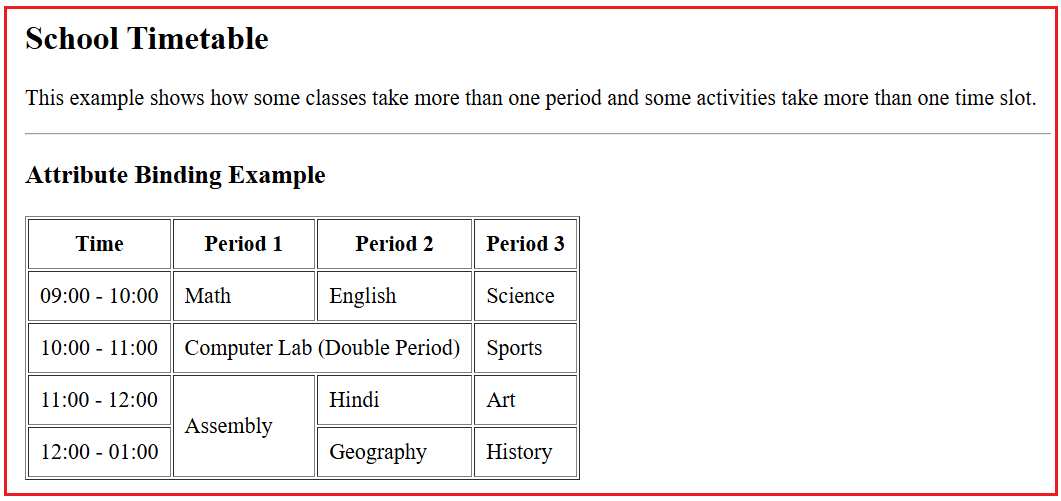
Imagine a school timetable:
- Some classes run continuously for two periods (like Computer Lab).
- Some activities take more than one time slot (like Morning Assembly).
In HTML tables, this is handled using:
- colspan → merge columns
- rowspan → merge rows
Since colspan and rowspan are HTML attributes, Angular must use Attribute Binding to dynamically control them.
Step 3: Update the Root Component (app.ts)
Open src/app/app.ts and copy-paste the following:
import { Component } from '@angular/core';

@Component({
  selector: 'app-root',
  templateUrl: './app.html',
})
export class App {

  // Computer Lab takes TWO periods (columns)
  periodsInMorning: number = 2;

  // Assembly takes TWO time slots (rows)
  assemblyRowSpan: number = 2;
}
Explanation
- These values normally come from a database or API
- We store them in the component
- Angular will use these values to control the table layout
Step 4: Update the Root Template (app.html)
Open src/app/app.html and copy-paste the following:
<h2>School Timetable</h2>

<p>
  This example shows how some classes take more than one period
  and some activities take more than one time slot.
</p>

<hr />

<h3>Attribute Binding Example</h3>

<table border="1" cellpadding="8">

  <!-- Table Header -->
  <tr>
    <th>Time</th>
    <th>Period 1</th>
    <th>Period 2</th>
    <th>Period 3</th>
  </tr>

  <!-- Normal class row -->
  <tr>
    <td>09:00 - 10:00</td>
    <td>Math</td>
    <td>English</td>
    <td>Science</td>
  </tr>

  <!-- Computer Lab takes two periods -->
  <tr>
    <td>10:00 - 11:00</td>

    <!--
      Attribute Binding:
      periodsInMorning = 2
      So Angular writes: colspan="2"
    -->
    <td [attr.colspan]="periodsInMorning">
      Computer Lab (Double Period)
    </td>

    <td>Sports</td>
  </tr>

  <!-- Assembly takes two rows -->
  <tr>
    <td>11:00 - 12:00</td>

    <!--
      Attribute Binding:
      assemblyRowSpan = 2
      So Angular writes: rowspan="2"
    -->
    <td [attr.rowspan]="assemblyRowSpan">
      Assembly
    </td>

    <td>Hindi</td>
    <td>Art</td>
  </tr>

  <!-- Second row under Assembly -->
  <tr>
    <td>12:00 - 01:00</td>

    <!-- No Assembly cell here because it already spans -->
    <td>Geography</td>
    <td>History</td>
  </tr>

</table>
Output:
Property vs Attribute Binding in Angular:
Angular works with the browser in two different layers: the DOM (JavaScript layer) and the HTML (markup layer). Property Binding and Attribute Binding exist because these two layers behave differently. Understanding this difference is the key to understanding why Property Binding and Attribute Binding both exist.
Property Binding – What It Really Means
Property Binding is used when Angular needs to update a DOM property of an element. A DOM property is something that exists after the browser has parsed HTML and created a JavaScript object for each element. These properties usually control behaviour or state.
Examples of what property binding controls conceptually:
- Whether a button is disabled
- What value does an input field holds
- Whether a checkbox is checked
- Which image URL does an <img> element uses
In simple words, Property Binding tells Angular to talk to JavaScript, not HTML. Angular updates the element’s behaviour by assigning values directly to its JavaScript properties.
Attribute Binding – What It Really Means
Attribute Binding is used when Angular needs to update an HTML attribute. HTML attributes are part of the markup itself. They are read by the browser while deciding structure, layout, meaning, or metadata, not behaviour.
Examples of what attribute binding controls conceptually:
- How many columns or rows should a table cell span
- Extra information stored in data-* attributes
- Metadata or descriptive information attached to elements
In simple words, Attribute Binding tells Angular to talk to HTML, not JavaScript. Angular sets or removes attributes so the browser can interpret them correctly during layout and rendering.
Why Property Binding Cannot Replace Attribute Binding?
Not every HTML attribute becomes a DOM property.
Some attributes:
- Exist only in HTML
- Are used only while calculating the layout
- Are not exposed as JavaScript properties
When Angular tries to use Property Binding for such attributes:
- Angular does not throw an error
- The browser simply ignores the value
- The UI behaves incorrectly
This is why Angular provides Attribute Binding as a separate mechanism.
Conclusion: Why Attribute Binding Matters in Angular?
Angular Attribute Binding plays a crucial role in building accessible, structured, and professional applications. While interpolation displays text and property-binding controls’ behaviour, attribute binding fills the gap by handling HTML attributes that Angular cannot treat as properties. It is especially important for:
- Tables
- Metadata
- Conditional attributes
Once you understand Interpolation, Property Binding, and Attribute Binding, you’ve mastered the core foundation of Angular template binding. In the next article, I will discuss Angular Class Binding with examples. I would like to have your feedback. Please post your feedback, questions, or comments about this article.

About the Author: Pranaya Rout
Pranaya Rout has published more than 3,000 articles in his 11-year career. Pranaya Rout has very good experience with Microsoft Technologies, Including C#, VB, ASP.NET MVC, ASP.NET Web API, EF, EF Core, ADO.NET, LINQ, SQL Server, MYSQL, Oracle, ASP.NET Core, Cloud Computing, Microservices, Design Patterns and still learning new technologies.
Want to understand Angular Attribute Binding with a real example?
This topic becomes much clearer when you see it applied in a real UI scenario. In this video, I explain Angular Attribute Data Binding step by step, showing how [attr.*] works for attributes like colspan, rowspan, and accessibility attributes, and why attribute binding is different from property binding.
If you’re learning Angular fundamentals or want to avoid common binding mistakes, this video will greatly improve your understanding.
👉 Watch the full video here:
https://youtu.be/RwDDn3ldCIQ