
Back to: Microservices using ASP.NET Core Web API Tutorials
ASP.NET Core Web API Versioning
When we build and publish an ASP.NET Core Web API, different clients begin consuming it. These clients may be Angular or React applications, mobile apps, desktop applications, third-party systems, or internal microservices. Once these consumers start relying on the API contract, carelessly changing it becomes risky because existing clients may stop working or behave unexpectedly.
That is exactly where API Versioning becomes important. API Versioning allows us to evolve our API in a controlled way. Instead of changing the existing contract and breaking existing clients, we can keep the older version available to existing clients and introduce a newer version for new clients. In other words, versioning helps us improve the API without forcing every consumer to migrate immediately.
What Is ASP.NET Core Web API Versioning?
ASP.NET Core Web API Versioning is a technique that allows a single API to expose multiple versions, such as v1, v2, v3, and so on. Each version represents a contract that clients can depend on. Older clients may continue using the older contract, while newer clients can use the improved contract. This means the API can evolve without breaking all existing consumers.
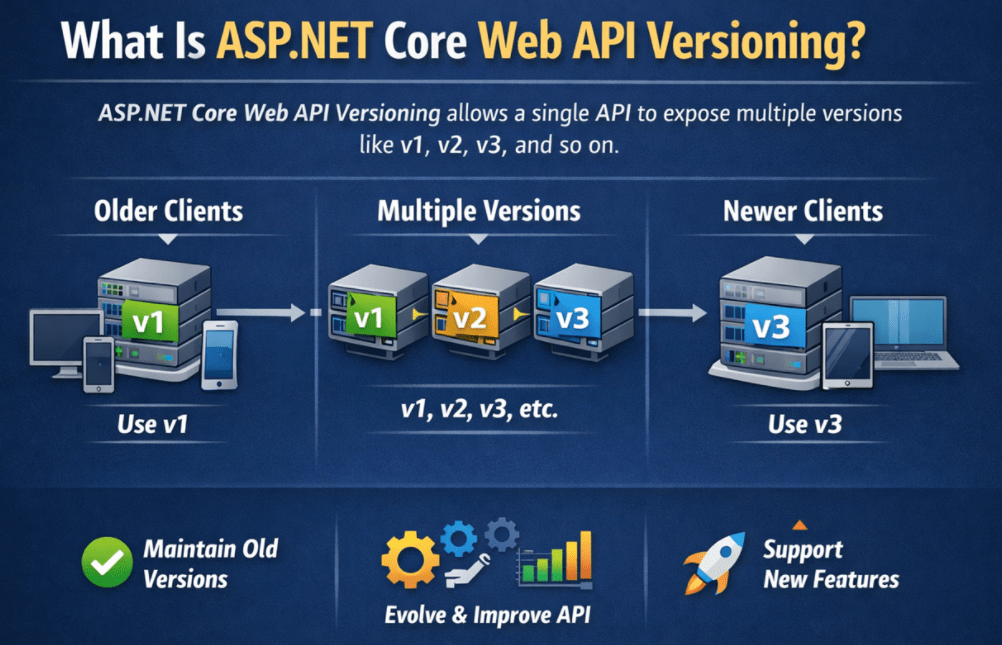
In simple terms, API versioning helps us achieve three things:
- Existing clients continue to work
- New clients can use improved functionality and contracts
- The API can evolve safely over time without breaking existing integrations
This is why versioning becomes very important in real-time enterprise applications, public APIs, mobile backends, and microservice ecosystems.
API Contract vs Internal Implementation
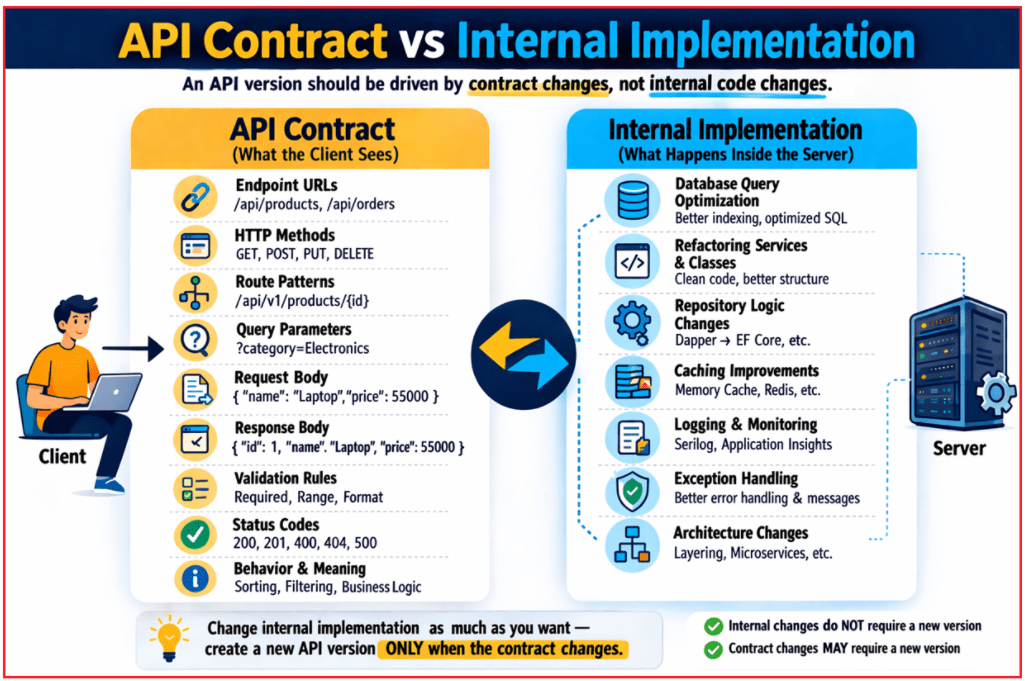
An API version should be driven by contract changes, not by internal code changes.
What is an API Contract?
The API contract is what the client sees and depends on, such as:
- Endpoint URLs
- HTTP methods
- Route patterns
- Query parameters
- Request body structure
- Response body structure
- Validation rules
- Status codes
- Meaning and Behavior of the endpoint
What is internal implementation?
Internal implementation is what happens inside the server, such as:
- Database query optimization
- Refactoring service classes
- Improving logging
- Changing repository logic
- Caching improvements
- Better exception handling
- Changing internal architecture
These internal improvements usually do not require a new API version if the client-facing contract remains compatible. So, we should create a new version only when the contract changes in a way that can affect consumers. For a better understanding, please have a look at the following image.
Why Do We Need API Versioning?
Let us understand this with a practical example. Suppose today you release a simple Web API endpoint:
- GET /api/products
It returns:
{
  "Id": 1,
  "Name": "Laptop"
}
After some time, the business asks for changes such as:
- Add Price
- Add Category
- Rename Name to ProductName
- Change validation rules
- Make some fields mandatory
- Remove some old fields
If you modify the existing API contract directly, older clients may stop working.
For example:
- A mobile app already published in the Play Store may still expect the old response format
- A third-party integration may still depend on Name
- A legacy internal application may still send the old request body
- A frontend deployed in production may not yet be updated to handle the new contract
So, versioning is needed because:
- Business requirements change
- Clients update at different speeds
- Integrations may not be under your control
- Changing contracts carelessly can break production systems
In simple words, API Versioning means maintaining multiple versions of an API contract so that older clients continue to work while newer clients can adopt the improved version.
When Should We Create a New API Version?
We generally create a new API version when we introduce a breaking change. A very practical rule is this: If an existing client must change its code to continue working correctly, the change probably requires a new API version. For a better understanding, please have a look at the following image.

What Is a Breaking Change?
A breaking change is any change that may force an existing client to modify its code.
Common Examples of Breaking Changes
These changes can break existing clients:
- Renaming a response property
- Removing a response property
- Changing the data type of a field
- Changing request body structure
- Making an optional field mandatory
- Changing validation rules in a way that rejects older requests
- Changing the route structure in a way that old clients no longer match it
- Changing the status code behavior in a way that clients depend on
- Returning a completely different response model
- Changing authentication requirements unexpectedly
Example
Suppose Version 1 returns:
{
  "Id": 1,
  "Name": "Laptop"
}
Now in Version 2, you rename Name to ProductName:
{
  "Id": 1,
  "ProductName": "Laptop"
}
This is a breaking change because older clients are still looking for Name.
What Is a Non-Breaking Change?
A non-breaking change is one that does not require existing clients to update immediately.
Common Examples of Non-Breaking Changes
These usually do not require a new version if implemented carefully:
- Adding a new optional response field
- Adding a new optional query parameter
- Improving internal performance
- Fixing internal bugs without changing the contract
- Improving logging, tracing, or caching
- Changing internal database logic while keeping the same API behavior
For example, changing this:
{
  "Id": 1,
  "Name": "Laptop"
}
to this:
{
  "Id": 1,
  "Name": "Laptop",
  "Price": 55000
}
may be non-breaking if existing clients safely ignore unknown fields.
Important Note: Even something that looks non-breaking can still break some strict clients. For example, adding a new response field is usually considered safe, but a poorly written client that strictly validates the response shape may fail (due to strict schema validation, strict JSON deserialization, or exact response contract assumptions). So, backward compatibility should always be evaluated carefully.
API Version Lifecycle
In real-world systems, API versions go through a lifecycle. Understanding this lifecycle is important because API versioning is not only about releasing new versions but also about properly managing older versions so existing clients are not suddenly affected. For a better understanding, please have a look at the following image.
Steps:
- Version Introduced: A new API version is released and documented for consumers. At this stage, developers publish the new contract, explain how to use it, and make it available to client applications.
- Version Adopted: After the version is released, clients start integrating it into their applications. Some consumers may adopt it immediately, while others may continue using an older version until they are ready to upgrade.
- Newer Version Released: As business needs change, a newer version of the API may be introduced. This new version may include better response models, additional features, improved validation rules, or other contract changes.
- Older Version Deprecated: When a better version becomes available, the older version may be marked as deprecated. Deprecation does not mean the version stops working immediately. It only means that the version is still available for existing users, but it is no longer recommended for new development. This serves as a warning to consumers to plan to upgrade to the newer version.
- Migration Period: Once an API version is deprecated, consumers are usually given a transition period to migrate their applications. This is very important in real-world systems because clients may need time to update their code, test the changes, and deploy safely without breaking production systems.
- Sunset or Retirement: After sufficient notice and enough migration time, the deprecated version is eventually retired or removed. At this point, clients are expected to use the newer supported version. Retirement helps reduce maintenance overhead and allows the system to move forward without having to support outdated contracts forever.
Why This Lifecycle Matters?
This lifecycle is important because API versioning is not just about creating multiple versions. It is also about handling change responsibly. A good API lifecycle gives clients enough time to adapt, reduces the risk of breaking existing integrations, and helps organizations maintain their APIs in a controlled, professional, and predictable way.
Versioning Strategies Available in ASP.NET Core Web API
ASP.NET Core Web API supports multiple versioning mechanisms through the API Versioning library. The framework can read the requested version from the incoming HTTP request using different techniques.
The most common versioning mechanisms are:
- Query String Versioning. Example: /api/products?api-version=1.0
- Header Versioning (Custom Header). Example: api-version: 1.0
- Media Type Versioning (Content Negotiation). Example: Accept: application/json;v=1.0
- URL Path Versioning. Example: /api/v1.0/products
There is no universally perfect versioning strategy. The correct approach depends on:
- Who consumes the API
- Whether the API is public or internal
- How visible you want the version to be
- How easy do you want testing to be
- How mature the API consumers are
In general:
- Query String Versioning is easiest for learning and testing.
- Header Versioning keeps URLs clean but is less visible. Used in Internal APIs.
- Media Type Versioning is more HTTP-style but harder for beginners. Used when you prefer content negotiation.
- URL Path Versioning is easiest for public APIs.
Project Creation and Package Installation
Create a new ASP.NET Core Web API project named APIVersioningDemo.
While creating the project:
- Enable OpenAPI/Swagger support
- Use Controllers
- Keep HTTPS enabled
Then install the following NuGet packages:
- Install-Package Asp.Versioning.Mvc
- Install-Package Asp.Versioning.Mvc.ApiExplorer
Why These Packages?
- Asp.Versioning.Mvc: This package provides API versioning support for ASP.NET Core MVC and Web API applications.
- Asp.Versioning.Mvc.ApiExplorer: This package provides version-aware API Explorer support, which is very important for Swagger/OpenAPI integration.
Creating Models:
Create a Models folder.
Models/Product.cs
Create a class file named Product.cs within the Models folder, and copy-paste the following code.
namespace APIVersioningDemo.Models
{
    public class Product
    {
        public int Id { get; set; }

        // Common product name used by all API versions.
        public string Name { get; set; } = string.Empty;

        // Introduced for newer versions. V1 will ignore this field.
        public decimal? Price { get; set; }

        // Internal tracking field. Not exposed in V1 response.
        public DateTime CreatedOnUtc { get; set; } = DateTime.UtcNow;
    }
}
Models/ProductStore.cs
Create a class file named ProductStore.cs within the Models folder, and copy-paste the following code.
namespace APIVersioningDemo.Models
{
    public static class ProductStore
    {
        // Lock object to make add operations safer in this in-memory example.
        private static readonly object _lock = new();

        // Shared in-memory data source used by both V1 and V2 controllers.
        private static readonly List<Product> _products = new()
        {
            new Product { Id = 1, Name = "Laptop", Price = 55000, CreatedOnUtc = DateTime.UtcNow },
            new Product { Id = 2, Name = "Smartphone", Price = 25000, CreatedOnUtc = DateTime.UtcNow }
        };

        public static List<Product> GetAll()
        {
            // Returning ordered data makes API output more predictable.
            return _products.OrderBy(p => p.Id).ToList();
        }

        public static Product? GetById(int id)
        {
            return _products.FirstOrDefault(p => p.Id == id);
        }

        public static Product Add(Product product)
        {
            lock (_lock)
            {
                // Generate the next ID manually because we are not using a database here.
                product.Id = _products.Any() ? _products.Max(p => p.Id) + 1 : 1;
                product.CreatedOnUtc = DateTime.UtcNow;

                _products.Add(product);
                return product;
            }
        }
    }
}
Creating DTOs
In real applications, we should not expose our domain or entity models directly to API consumers. Instead, we use DTOs.
DTOs help us:
- Control what is exposed
- Shape version-specific responses
- Hide internal fields
- Apply version-wise validation rules
- Keep API contracts clean and stable
This becomes especially useful in API versioning because Version 1 and Version 2 may expose different contract shapes even if they use the same internal model.
Creating Version-Specific DTOs
Create a folder named DTOs. Inside it, create two subfolders:
- V1
- V2
DTOs/V1/ProductCreateRequestV1Dto.cs
Create a class file named ProductCreateRequestV1Dto.cs within the DTOs/V1 folder, and copy-paste the following code.
using System.ComponentModel.DataAnnotations;
namespace APIVersioningDemo.DTOs.V1
{
    public class ProductCreateRequestV1Dto
    {
        [Required(ErrorMessage = "Product name is required.")]
        [StringLength(100, MinimumLength = 2, ErrorMessage = "Product name must be between 2 and 100 characters.")]
        public string Name { get; set; } = string.Empty;
    }
}
DTOs/V1/ProductResponseV1Dto.cs
Create a class file named ProductResponseV1Dto.cs within the DTOs/V1 folder, and copy-paste the following code.
namespace APIVersioningDemo.DTOs.V1
{
    public class ProductResponseV1Dto
    {
        public int Id { get; set; }
        public string Name { get; set; } = string.Empty;
    }
}
DTOs/V2/ProductCreateRequestV2Dto.cs
Create a class file named ProductCreateRequestV2Dto.cs within the DTOs/V2 folder, and copy-paste the following code.
using System.ComponentModel.DataAnnotations;
namespace APIVersioningDemo.DTOs.V2
{
    public class ProductCreateRequestV2Dto
    {
        [Required(ErrorMessage = "Product name is required.")]
        [StringLength(100, MinimumLength = 2, ErrorMessage = "Product name must be between 2 and 100 characters.")]
        public string Name { get; set; } = string.Empty;

        [Range(typeof(decimal), "0.01", "99999999", ErrorMessage = "Price must be greater than zero.")]
        public decimal Price { get; set; }
    }
}
DTOs/V2/ProductResponseV2Dto.cs
Create a class file named ProductResponseV2Dto.cs within the DTOs/V2 folder, and copy-paste the following code.
namespace APIVersioningDemo.DTOs.V2
{
    public class ProductResponseV2Dto
    {
        public int Id { get; set; }
        public string Name { get; set; } = string.Empty;
        public decimal Price { get; set; }
    }
}
Important Attributes Used in ASP.NET Core Web API Versioning
The API Versioning library provides several important attributes.
- [ApiVersion(“1.0”)]: This tells ASP.NET Core that the controller or action belongs to API version 1.0.
- [ApiVersion(“2.0”)]: This tells ASP.NET Core that the controller or action belongs to API version 2.0.
- [MapToApiVersion(“1.0”)]: This is used on an action method to map that action specifically to version 1.0.
- [MapToApiVersion(“2.0”)]: This is used on an action method to map that action specifically to version 2.0.
- [ApiVersionNeutral]: This is used when an endpoint should not depend on any version, such as health check or status endpoints.
[ApiVersion] vs [MapToApiVersion]
In General:
- Use [ApiVersion(…)] at the controller level when the whole controller belongs to a version
- Use [MapToApiVersion(…)] at the action level when the same controller contains actions for multiple versions
Example:
- Separate Controller Per Version: Usually easier and cleaner when the versions are significantly different.
- Same controller with version-mapped actions: Useful when most actions are shared, and only a few actions differ by version.
So, [MapToApiVersion] is not always required. In a design where each controller is already dedicated to a single version, [ApiVersion] at the controller level is usually sufficient.
Versioning by Controller vs Versioning by Action
There are two common design styles.
Separate Controller Per Version
Example:
- ProductsV1Controller
- ProductsV2Controller
This approach is:
- Easier to understand
- Clearer for large version differences
Same Controller with Action Mapping
Example:
- One ProductsController
- Some actions are mapped to V1
- Some actions are mapped to V2
This approach is useful when:
- Most logic is shared
- Only a few actions differ
- You want less controller duplication
Version 1 Controller
Create a folder named V1 inside the Controllers folder.
Controllers/V1/ProductsV1Controller.cs
Create a class file named ProductsV1Controller.cs within the Controllers/V1 folder, and copy-paste the following code. The following code is self-explained, so please read the comment lines for a better understanding. The following controller will be used to test Query String, Header, and Media Type versioning, not URL Path versioning.
using Asp.Versioning;
using APIVersioningDemo.DTOs.V1;
using APIVersioningDemo.Models;
using Microsoft.AspNetCore.Mvc;

namespace APIVersioningDemo.Controllers.V1
{
    [ApiController]
    // Declares that this controller serves API Version 1.0.
    // Deprecated = true means Version 1 is still available,
    // but clients should plan to move to a newer version.
    [ApiVersion("1.0", Deprecated = true)]

    // Base Route used by this controller.
    // Since this example is using non-URL versioning styles
    // such as Query String, Header, or Media Type versioning,
    // the version is not part of the URL path here.
    [Route("api/products")]
    public class ProductsV1Controller : ControllerBase
    {
        // Handles GET: /api/products for API Version 1.0
        [HttpGet(Name = "GetProductsV1")]

        // Documents that this action returns HTTP 200 OK
        // along with a collection of ProductResponseV1Dto objects.
        [ProducesResponseType(typeof(IEnumerable<ProductResponseV1Dto>), StatusCodes.Status200OK)]
        public ActionResult<IEnumerable<ProductResponseV1Dto>> GetAll()
        {
            // Add deprecation-related response headers so API consumers know that V1 is still available
            // but should be replaced with a newer version.
            AddVersionDeprecationHeaders();

            // Fetch all products from the shared in-memory store
            // and shape them into the Version 1 response contract.
            // V1 only exposes Id and Name.
            var response = ProductStore.GetAll()
                .Select(product => new ProductResponseV1Dto
                {
                    Id = product.Id,
                    Name = product.Name
                })
                .ToList();

            // Return the transformed list with HTTP 200 OK.
            return Ok(response);
        }

        // Handles GET: /api/products/{id} for API Version 1.0
        [HttpGet("{id:int}", Name = "GetProductByIdV1")]

        // Documents that this action returns HTTP 200 OK
        // with a single ProductResponseV1Dto when the product exists.
        [ProducesResponseType(typeof(ProductResponseV1Dto), StatusCodes.Status200OK)]

        // Documents that this action returns HTTP 404 Not Found
        // when no product matches the supplied id.
        [ProducesResponseType(StatusCodes.Status404NotFound)]
        public ActionResult<ProductResponseV1Dto> GetById(int id)
        {
            // Add deprecation headers to remind clients that V1 is outdated.
            AddVersionDeprecationHeaders();

            // Look for the requested product by its Id.
            var product = ProductStore.GetById(id);

            // If no product is found, return 404 with a meaningful message.
            if (product is null)
            {
                return NotFound($"Product with Id {id} was not found.");
            }

            // Convert the internal Product model into the V1 DTO.
            // Notice that V1 does not expose Price.
            var response = new ProductResponseV1Dto
            {
                Id = product.Id,
                Name = product.Name
            };

            // Return the V1-shaped response with HTTP 200 OK.
            return Ok(response);
        }

        // Handles POST: /api/products for API Version 1.0
        [HttpPost]

        // Documents that this action returns HTTP 201 Created
        // along with the created V1 resource representation.
        [ProducesResponseType(typeof(ProductResponseV1Dto), StatusCodes.Status201Created)]

        // Documents that this action may return HTTP 400 Bad Request
        // if the incoming model fails validation.
        [ProducesResponseType(StatusCodes.Status400BadRequest)]
        public ActionResult<ProductResponseV1Dto> Create(ProductCreateRequestV1Dto request)
        {
            // Add deprecation headers so clients know that new development should move to V2.
            AddVersionDeprecationHeaders();

            // Because [ApiController] is applied at the controller level,
            // ASP.NET Core automatically validates the incoming DTO.
            // If validation fails, the framework returns 400 automatically
            // before this method body is executed.
            // So here we focus only on mapping and creation logic.

            // Map the incoming V1 request DTO to the internal Product model.
            // V1 accepts only Name, so Price is intentionally kept null.
            var product = new Product
            {
                Name = request.Name.Trim(),
                Price = null
            };

            // Store the new product in the shared in-memory data source.
            var createdProduct = ProductStore.Add(product);

            // Convert the created Product entity back into the V1 response DTO.
            var response = new ProductResponseV1Dto
            {
                Id = createdProduct.Id,
                Name = createdProduct.Name
            };

            // Return HTTP 201 Created.
            // CreatedAtRoute generates the Location header pointing to
            // the GetById route for the newly created product.
            return CreatedAtRoute(
                routeName: "GetProductByIdV1",
                routeValues: new { version = "1.0", id = createdProduct.Id },
                value: response);
        }

        private void AddVersionDeprecationHeaders()
        {
            // Warning header informs API consumers that this version is deprecated.
            // Status code 299 is commonly used for miscellaneous persistent warnings.
            Response.Headers["Warning"] = "299 - \"API v1 is deprecated. Please migrate to API v2.\"";

            // Sunset header tells consumers the planned retirement date of this version.
            // This helps client teams plan migration before support is removed.
            Response.Headers["Sunset"] = "Wed, 31 Dec 2026 23:59:59 GMT";
        }
    }
}
Version 2 Controller
Create a folder named V2 inside the Controllers folder.
Controllers/V2/ProductsV2Controller.cs
Create a class file named ProductsV2Controller.cs within the Controllers/V2 folder, and copy-paste the following code. The following code is self-explained, so please read the comment lines for a better understanding. The following controller will be used to test Query String, Header, and Media Type versioning, not URL Path versioning.
using Asp.Versioning;
using APIVersioningDemo.DTOs.V2;
using APIVersioningDemo.Models;
using Microsoft.AspNetCore.Mvc;

namespace APIVersioningDemo.Controllers.V2
{
    [ApiController]

    // Declares that this controller belongs to API Version 2.0.
    // Requests resolved to version 2.0 will be handled by this controller.
    [ApiVersion("2.0")]

    // Defines the base route for all actions in this controller.
    // Since this example is using non-URL versioning styles
    // such as Query String, Header, or Media Type versioning,
    // the version value is not included in the route template.
    [Route("api/products")]
    public class ProductsV2Controller : ControllerBase
    {
        // Handles GET: /api/products for API Version 2.0

        // Handles HTTP GET requests for fetching all products.
        // The Name property assigns a unique route name to this endpoint.
        // Route names are useful when generating URLs programmatically
        // from other actions using methods like CreatedAtRoute or Url.RouteUrl.
        // Here, "GetProductsV2" identifies this specific GET-all endpoint of Version 2.
        [HttpGet(Name = "GetProductsV2")]

        // Documents that this action returns HTTP 200 OK
        // with a collection of ProductResponseV2Dto objects.
        [ProducesResponseType(typeof(IEnumerable<ProductResponseV2Dto>), StatusCodes.Status200OK)]
        public ActionResult<IEnumerable<ProductResponseV2Dto>> GetAll()
        {
            // Fetch all products from the shared in-memory store
            // and transform them into the Version 2 response contract.
            // Unlike V1, V2 exposes Id, Name, and Price.
            var response = ProductStore.GetAll()
                .Select(product => new ProductResponseV2Dto
                {
                    Id = product.Id,
                    Name = product.Name,

                    // If Price is null in the underlying model,
                    // return 0 so that the V2 response always contains a valid decimal value.
                    Price = product.Price ?? 0
                })
                .ToList();

            // Return the Version 2 product list with HTTP 200 OK.
            return Ok(response);
        }

        // Handles GET: /api/products/{id} for API Version 2.0
        // Handles HTTP GET requests for fetching a single product by its Id.
        // "{id:int}" means this route expects an integer id value.
        // The Name property assigns a route name that can later be used
        // by CreatedAtRoute when returning a newly created resource.
        [HttpGet("{id:int}", Name = "GetProductByIdV2")]

        // Documents that this action returns HTTP 200 OK
        // with a ProductResponseV2Dto when the product exists.
        [ProducesResponseType(typeof(ProductResponseV2Dto), StatusCodes.Status200OK)]

        // Documents that this action returns HTTP 404 Not Found
        // when no product matches the given Id.
        [ProducesResponseType(StatusCodes.Status404NotFound)]
        public ActionResult<ProductResponseV2Dto> GetById(int id)
        {
            // Try to find the requested product from the store.
            var product = ProductStore.GetById(id);

            // If no matching product exists, return 404 Not Found.
            if (product is null)
            {
                return NotFound($"Product with Id {id} was not found.");
            }

            // Convert the internal Product model into the Version 2 response DTO.
            // V2 includes the Price field in its contract.
            var response = new ProductResponseV2Dto
            {
                Id = product.Id,
                Name = product.Name,

                // Ensure the response always returns a numeric Price value.
                Price = product.Price ?? 0
            };

            // Return the Version 2 response with HTTP 200 OK.
            return Ok(response);
        }

        // Handles POST: /api/products for API Version 2.0
        [HttpPost]

        // Documents that this action returns HTTP 201 Created
        // with the newly created ProductResponseV2Dto.
        [ProducesResponseType(typeof(ProductResponseV2Dto), StatusCodes.Status201Created)]

        // Documents that this action may return HTTP 400 Bad Request
        // when the incoming request fails validation.
        [ProducesResponseType(StatusCodes.Status400BadRequest)]
        public ActionResult<ProductResponseV2Dto> Create(ProductCreateRequestV2Dto request)
        {
            // Because [ApiController] is applied at the controller level,
            // ASP.NET Core automatically validates the incoming DTO.
            // If the request is invalid, the framework returns 400 Bad Request
            // before this action method executes.

            // Map the incoming Version 2 request DTO to the internal Product model.
            // Unlike V1, V2 accepts both Name and Price.
            var product = new Product
            {
                // Trim the Name value to remove unwanted leading/trailing spaces.
                Name = request.Name.Trim(),

                // Store the client-provided price because V2 supports it.
                Price = request.Price
            };

            // Save the new product into the shared in-memory store.
            var createdProduct = ProductStore.Add(product);

            // Convert the stored Product entity into the Version 2 response DTO.
            var response = new ProductResponseV2Dto
            {
                Id = createdProduct.Id,
                Name = createdProduct.Name,
                Price = createdProduct.Price ?? 0
            };

            // Return HTTP 201 Created.
            // CreatedAtRoute automatically generates the Location header
            // pointing to the GetById endpoint of the newly created product.
            // This is a REST-friendly way to return newly created resources.
            return CreatedAtRoute(
                routeName: "GetProductByIdV2",
                routeValues: new { version = "2.0", id = createdProduct.Id },
                value: response);
        }
    }
}
Version-Neutral Controller
Some endpoints are not part of the business contract versioning story. These are often infrastructure-oriented endpoints. Examples include:
- Health check endpoints
- Readiness endpoints
- Ping/Status endpoints
- Metadata endpoints
For such endpoints, it often makes sense to mark them as version-neutral.
Controllers/HealthController.cs
Create a class file named HealthController.cs within the Controllers folder, and copy-paste the following code.
using Asp.Versioning;
using Microsoft.AspNetCore.Mvc;
namespace APIVersioningDemo.Controllers
{
    [ApiController]

    // Marks this controller as version-neutral.
    // That means this endpoint does not belong to V1, V2, or any other specific API version.
    // It can be accessed without worrying about version selection.
    // This is commonly used for infrastructure endpoints such as health checks,
    // status checks, liveness probes, and readiness probes.
    [ApiVersionNeutral]

    // Defines the route for this controller.
    [Route("api/health")]
    public class HealthController : ControllerBase
    {
        // Handles HTTP GET requests sent to /api/health.
        // This action is typically used by developers, monitoring tools,
        // load balancers, or orchestration platforms to verify that the API is running.
        [HttpGet]
        public IActionResult Get()
        {
            // Return HTTP 200 OK with a simple JSON response
            // indicating that the API is healthy and accessible.
            return Ok(new
            {
                // Shows the current health state of the API.
                Status = "Healthy",

                // Provides an additional human-readable message.
                Message = "API is running successfully."
            });
        }
    }
}
Implementing Query String Versioning in ASP.NET Core Web API:
In Query String Versioning, the client sends the API version in the query string.
Examples:
- /api/products?api-version=1.0
- /api/products?api-version=2.0
Here, the route remains the same and only the query parameter changes. This approach is one of the easiest ways to learn API versioning because it is easy to test in a browser or with Postman.
Program.cs for Query String Versioning
Now, modify the Program.cs class as follows. The following code is self-explained, so please read the comment lines for a better understanding.
using Asp.Versioning;
namespace APIVersioningDemo
{
    public class Program
    {
        public static void Main(string[] args)
        {
            var builder = WebApplication.CreateBuilder(args);

            // Add controller support and keep JSON property names exactly as defined in C# models/DTOs.
            builder.Services.AddControllers()
                .AddJsonOptions(options =>
                {
                    options.JsonSerializerOptions.PropertyNamingPolicy = null;
                });

            // Register API versioning services.
            builder.Services.AddApiVersioning(options =>
            {
                // If the client does not send any version, the API will automatically use the default version.
                // This is helpful for backward compatibility.
                options.AssumeDefaultVersionWhenUnspecified = true;

                // Set the default API version to 1.0.
                options.DefaultApiVersion = new ApiVersion(1, 0);

                // Adds response headers such as:
                // api-supported-versions
                // api-deprecated-versions
                // These headers help clients know which versions are available and which are deprecated.
                options.ReportApiVersions = true;

                // Read the API version from the query string parameter named "api-version".
                // Example: /api/products?api-version=2.0
                options.ApiVersionReader = new QueryStringApiVersionReader("api-version");
            })
            .AddMvc();

            // Swagger/OpenAPI support
            builder.Services.AddEndpointsApiExplorer();
            builder.Services.AddSwaggerGen();

            var app = builder.Build();

            // Configure the HTTP request pipeline.
            if (app.Environment.IsDevelopment())
            {
                app.UseSwagger();
                app.UseSwaggerUI();
            }

            app.UseHttpsRedirection();

            app.UseAuthorization();

            app.MapControllers();

            app.Run();
        }
    }
}
Why Does AssumeDefaultVersionWhenUnspecified Matter?
We need to understand this option very clearly.
When set to true:
If the client does not specify a version, ASP.NET Core automatically uses the configured default version. This is useful when:
- You want backward compatibility
- You want a smoother client experience
- You do not want older consumers to fail immediately
When set to false:
If the client does not specify a version, the request is rejected because the API expects an explicit version. This is useful when:
- You want strict version awareness
- You want to avoid ambiguity
- You want every consumer to be explicit
So, it is a design decision about how strict your API should be.
How Query String Versioning Works?
Here:
- Both controllers use the same route: api/products
- Both controllers are decorated with different [ApiVersion(…)] attributes
- The versioning library reads the version from the query string
- Based on the requested version, ASP.NET Core selects the correct controller
So:
- GET /api/products?api-version=1.0 goes to ProductsV1Controller
- GET /api/products?api-version=2.0 goes to ProductsV2Controller
Testing API Endpoint using Postman:
GET Version 1
GET /api/products?api-version=1.0
Response: The server returns a list of products containing only the ID and Name.
Since V1 is deprecated, the response may also include headers such as:
- api-supported-versions
- api-deprecated-versions
- Warning
- Sunset
That is the practical way to inform clients that they should migrate.
GET Version 2
GET /api/products?api-version=2.0
Response: Version 2 returns the improved contract with the Price field.
POST Version 1 (Create product with Name only)
In V1, the request accepts only Name, and the response returns only Id and Name.
Request:
POST /api/products?api-version=1.0
Content-Type: application/json
{
  "Name": "Tablet"
}
POST Version 2 (Create product with Name and Price)
In V2, the API accepts both Name and Price, validates them, and returns the full response contract.
Request:
POST /api/products?api-version=2.0
Content-Type: application/json
{
  "Name": "Monitor",
  "Price": 350.0
}
Response: The server validates the product and adds it with the given price, returning full information.
When to Use Query String Versioning
Use this when:
- You want the easiest approach for learning and demonstrations
- You want quick and simple Postman testing
- Your API is mostly internal
- You do not want to change route templates
- You want version selection to be very obvious for QA or frontend teams
Drawbacks
Its drawbacks are:
- The version is not part of the route path
- Some teams feel it looks less clean for public APIs
- Clients may forget to send the query parameter
- It is less expressive than the URL-based versioning for public documentation
Implementing Header Versioning in ASP.NET Core Web API
In Header Versioning, the API version is sent through a custom HTTP header.
For example:
- GET /api/products
- api-version: 1.0
Or
- GET /api/products
- api-version: 2.0
Here, the URL remains exactly the same. Only the value of the request header changes.
Program.cs Change:
Now, modify the Program.cs class as follows:
using Asp.Versioning;
namespace APIVersioningDemo
{
    public class Program
    {
        public static void Main(string[] args)
        {
            var builder = WebApplication.CreateBuilder(args);

            // Add controller support and keep JSON property names exactly as defined in C# models/DTOs.
            builder.Services.AddControllers()
                .AddJsonOptions(options =>
                {
                    options.JsonSerializerOptions.PropertyNamingPolicy = null;
                });

            // Register API versioning services.
            builder.Services.AddApiVersioning(options =>
            {
                // If the client does not provide any version, the request should not be assumed automatically.
                // This is a good choice for header versioning because it forces clients to be explicit.
                options.AssumeDefaultVersionWhenUnspecified = false;

                // Set the default API version value.
                // This is still required even when version is mandatory.
                options.DefaultApiVersion = new ApiVersion(1, 0);

                // Add version information in the response headers.
                // Example:
                // api-supported-versions
                // api-deprecated-versions
                options.ReportApiVersions = true;

                // Read the version from the custom request header named "api-version".
                // Example: api-version: 2.0
                options.ApiVersionReader = new HeaderApiVersionReader("api-version");
            })
            .AddMvc();

            // Swagger/OpenAPI support
            builder.Services.AddEndpointsApiExplorer();
            builder.Services.AddSwaggerGen();

            var app = builder.Build();

            // Configure the HTTP request pipeline.
            if (app.Environment.IsDevelopment())
            {
                app.UseSwagger();
                app.UseSwaggerUI();
            }

            app.UseHttpsRedirection();

            app.UseAuthorization();

            app.MapControllers();

            app.Run();
        }
    }
}
How Header Versioning Works?
In this approach:
- The route remains the same for all versions
- The API version is sent through a header
- ASP.NET Core reads the header and selects the correct controller
So:
- If the client sends api-version: 1.0, the request goes to ProductsV1Controller
- If the client sends api-version: 2.0, the request goes to ProductsV2Controller
Test Header Versioning with Postman
Now, let us see how to test this in Postman.
GET Version 1
GET /api/products
Header: api-version: 1.0
GET Version 2
GET /api/products
Header: api-version: 2.0
POST Version 1
POST /api/products
Header: api-version: 1.0
Content-Type: application/json
{
  "Name": "Tablet"
}
POST Version 2
POST /api/products
Header: api-version: 2.0
Content-Type: application/json
{
  "Name": "Monitor",
  "Price": 350.0
}
Note: All requests use the same URL; only the header changes!
When to Use Header Versioning
Use this when:
- You want clean URLs
- You do not want version information in the route
- Your consumers are technical enough to send custom headers
- Your API is mostly internal
- You want version information and resource identity to remain separate
Drawbacks
The main drawback is that the version is not visible in the URL. Because of that:
- Manual testing becomes less obvious
- Developers may forget to send the header
- Beginners may think the endpoint is broken when the real issue is a missing header
Implementing Media Type Versioning in ASP.NET Core Web API:
In Media Type Versioning, the API version is sent through the Accept header.
For example:
- GET /api/products
- Accept: application/json;v=1.0
or
- GET /api/products
- Accept: application/json;v=2.0
Here, the route remains the same, but the client requests a specific API version through the media type parameter. This approach is based on content negotiation, in which the client tells the server which response representation it wants.
Program.cs Change:
Now, modify the Program.cs class as follows:
using Asp.Versioning;
namespace APIVersioningDemo
{
    public class Program
    {
        public static void Main(string[] args)
        {
            var builder = WebApplication.CreateBuilder(args);

            // Add controller support and keep JSON property names exactly as defined in C# models/DTOs.
            builder.Services.AddControllers()
                .AddJsonOptions(options =>
                {
                    options.JsonSerializerOptions.PropertyNamingPolicy = null;
                });

            // Register API versioning services.
            builder.Services.AddApiVersioning(options =>
            {
                // If the client does not provide any version, the request should not be assumed automatically.
                // This is a good choice for header versioning because it forces clients to be explicit.
                options.AssumeDefaultVersionWhenUnspecified = false;

                // Set the default API version value.
                // This is still required even when version is mandatory.
                options.DefaultApiVersion = new ApiVersion(1, 0);

                // Add version information in the response headers.
                // Example:
                // api-supported-versions
                // api-deprecated-versions
                options.ReportApiVersions = true;

                // Read the API version from the Accept header.
                // Example:
                // Accept: application/json;v=2.0
                options.ApiVersionReader = new MediaTypeApiVersionReader("v");
            })
            .AddMvc();

            // Swagger/OpenAPI support
            builder.Services.AddEndpointsApiExplorer();
            builder.Services.AddSwaggerGen();

            var app = builder.Build();

            // Configure the HTTP request pipeline.
            if (app.Environment.IsDevelopment())
            {
                app.UseSwagger();
                app.UseSwaggerUI();
            }

            app.UseHttpsRedirection();

            app.UseAuthorization();

            app.MapControllers();

            app.Run();
        }
    }
}
How Media Type Versioning Works?
In this approach:
- Both controllers use the same route
- The version is read from the Accept header
- ASP.NET Core selects the correct controller based on that version
So:
- Accept: application/json;v=1.0 goes to ProductsV1Controller
- Accept: application/json;v=2.0 goes to ProductsV2Controller
Testing Media Type Versioning with Postman
GET Version 1:
GET /api/products
Header: Accept: application/json;v=1.0
GET Version 2:
GET /api/products
Header: Accept: application/json;v=2.0
When to Use Media Type Versioning
Use this when:
- You want a more HTTP-style content negotiation approach
- Your API consumers are advanced enough to work comfortably with headers
- Your team wants to keep version information out of both the route and query string
- Your team is comfortable with slightly more advanced HTTP semantics
Drawbacks
Its biggest drawback is that it is the least beginner-friendly style.
Why?
- Many developers confuse Accept and Content-Type
- The version is not visible in the URL
- Manual testing is slightly harder
- Debugging missing or incorrect headers is more difficult
Implementing URL Path Versioning in ASP.NET Core Web API
In URL Path Versioning, the API version becomes part of the route itself.
Examples:
- GET /api/v1.0/products
- GET /api/v2.0/products
Here, the version is clearly visible in the URL. That is why this is one of the most common and practical versioning approaches in real-world APIs, especially public APIs.
The biggest advantage is clarity. Anyone looking at the URL can immediately understand which version is being called. That is why many teams prefer URL Path Versioning for:
- Public APIs
- Partner integrations
- External consumers
- Third-party systems
Program.cs Change:
Now, modify the Program.cs class as follows:
using Asp.Versioning;
namespace APIVersioningDemo
{
    public class Program
    {
        public static void Main(string[] args)
        {
            var builder = WebApplication.CreateBuilder(args);

            // Add controller support and keep JSON property names exactly as defined in C# models/DTOs.
            builder.Services.AddControllers()
                .AddJsonOptions(options =>
                {
                    options.JsonSerializerOptions.PropertyNamingPolicy = null;
                });

            // Register API versioning services.
            builder.Services.AddApiVersioning(options =>
            {
                // If the client does not provide any version, the request should not be assumed automatically.
                // This is a good choice for header versioning because it forces clients to be explicit.
                options.AssumeDefaultVersionWhenUnspecified = false;

                // Set the default API version value.
                // This is still required even when version is mandatory.
                options.DefaultApiVersion = new ApiVersion(1, 0);

                // Add version information in the response headers.
                // Example:
                // api-supported-versions
                // api-deprecated-versions
                options.ReportApiVersions = true;

                // Read the API version from the URL segment.
                // Example: /api/v1.0/products or /api/v2.0/products
                options.ApiVersionReader = new UrlSegmentApiVersionReader();
            })
            .AddMvc();

            // Swagger/OpenAPI support
            builder.Services.AddEndpointsApiExplorer();
            builder.Services.AddSwaggerGen();

            var app = builder.Build();

            // Configure the HTTP request pipeline.
            if (app.Environment.IsDevelopment())
            {
                app.UseSwagger();
                app.UseSwaggerUI();
            }

            app.UseHttpsRedirection();

            app.UseAuthorization();

            app.MapControllers();

            app.Run();
        }
    }
}
Controller Route for URL Path Versioning
This is a very important point. For URL Path Versioning, the route must include the version placeholder:
- [Route(“api/v{version:apiVersion}/products”)]
This tells ASP.NET Core that:
- v is a fixed character
- {version:apiVersion} is the version placeholder
- The framework should read the API version from that URL segment
Important Clarification
This route change is required only for URL Path Versioning.
It is not required for:
- Query String Versioning
- Header Versioning
- Media Type Versioning
Updated Route for V1 and V2 Controllers in URL Path Versioning
For URL segment versioning, update both controllers like this:
- [Route(“api/v{version:apiVersion}/products”)]
How URL Path Versioning Works?
In this approach:
- The version is part of the route
- ASP.NET Core reads the version from the URL
- The framework selects the correct controller automatically
So:
- /api/v1.0/products goes to ProductsV1Controller
- /api/v2.0/products goes to ProductsV2Controller
Testing URL Path Versioning with Postman
GET Version 1:
GET /api/v1.0/products
GET Version 2:
GET /api/v2.0/products
When to Use URL Path Versioning
Use this when:
- You want a very clear public API design
- Third-party clients or partners will consume the API
- You want the version to be visible in routes and documentation
- You want easy testing in Postman
- You want route-based separation between API contracts
This is one of the most common choices for public-facing APIs because it is simple, visible, and easy to explain.
Which Versioning Strategy Should You Choose?
There is no one perfect versioning strategy for every API. Choose based on the nature of the API and its consumers.
Choose Query String Versioning when:
- You want the easiest approach for learning.
- The API is mostly internal.
- You want quick Postman testing.
Choose URL Path Versioning when:
- The API is public.
- You want the version visible in the documentation.
- Third-party clients will consume the API.
Choose Header Versioning when:
- You want clean URLs.
- Your consumers are controlled and technical.
- Your API is mostly used internally.
Choose Media Type Versioning when:
- Your team prefers HTTP content negotiation style.
- Consumers are advanced.
- You want versioning hidden from the route and query string.
Why Does Swagger Show “Conflicting Method/Path Combination” Error?
Sometimes API versioning works perfectly in Postman, but Swagger throws an error like:
- Conflicting method/path combination
This usually happens when we use the same route for multiple API versions and Swagger tries to put all endpoints into a single OpenAPI document.
For example:
- GET /api/products for version 1
- GET /api/products for version 2
From our point of view, these are different because they belong to different API versions. But from Swagger’s default point of view, they look like the same HTTP method and the same route. So, Swagger thinks there is a conflict.
Why Normal Swagger Configuration Is Not Enough?
If we only register Swagger like this:
- builder.Services.AddSwaggerGen();
Swagger can generate API documentation, but it does not automatically know:
- Which endpoint belongs to version 1
- Which endpoint belongs to version 2
- How to generate separate Swagger documents per version
As a result, it may try to merge all versions into a single document, causing duplicate-looking routes and conflicts.
So, in a versioned API, we usually need three things:
- Asp.Versioning.Mvc.ApiExplorer
- A custom Swagger options class
- Version-aware Swagger UI setup
Add Swagger Helper Class
Create a folder named Swagger, then add a class named ConfigureSwaggerOptions.cs. This helper class creates a separate Swagger document for each discovered API version.
using Asp.Versioning.ApiExplorer;
using Microsoft.Extensions.Options;
using Microsoft.OpenApi.Models;
using Swashbuckle.AspNetCore.SwaggerGen;

namespace APIVersioningDemo.Swagger
{
    // This class is used to configure Swagger generation dynamically
    // based on the API versions discovered by ASP.NET Core API Versioning.
    // Instead of creating only one Swagger document for the whole API,
    // this class creates a separate Swagger document for each API version.
    public class ConfigureSwaggerOptions : IConfigureOptions<SwaggerGenOptions>
    {
        // Provides metadata about all discovered API versions,
        // such as version number, group name, and deprecation status.
        private readonly IApiVersionDescriptionProvider _provider;

        public ConfigureSwaggerOptions(IApiVersionDescriptionProvider provider)
        {
            // Store the injected API version description provider.
            // This provider is later used to loop through all available API versions
            // and generate a Swagger document for each one.
            _provider = provider;
        }

        public void Configure(SwaggerGenOptions options)
        {
            // Loop through all API version descriptions discovered by the framework.
            // For example, this may include v1, v2, v3, etc.
            foreach (var description in _provider.ApiVersionDescriptions)
            {
                // Register a separate Swagger/OpenAPI document for the current API version.
                // description.GroupName is commonly something like "v1" or "v2".
                options.SwaggerDoc(description.GroupName, new OpenApiInfo
                {
                    // Title displayed in the Swagger UI for this API document.
                    Title = "Products API",

                    // Version value shown in the generated Swagger document.
                    // Example: "1.0" or "2.0"
                    Version = description.ApiVersion.ToString(),

                    // Optional contact information shown in the Swagger document.
                    // This is useful in real-world APIs so consumers know whom to contact
                    // for support, clarification, or issue reporting.
                    Contact = new OpenApiContact
                    {
                        Name = "API Support Team",
                        Email = "support@yourcompany.com"
                    }
                });
            }
        }
    }
}
What does this Helper Class do?
This class creates a separate Swagger document for each API version. So instead of building one combined OpenAPI document, it builds:
- One document for v1
- One document for v2
- One document for every future version
That is what allows Swagger UI to display versioned API documentation properly. For example:
- /swagger/v1/swagger.json
- /swagger/v2/swagger.json
This clean separation prevents conflicts and makes documentation much easier to understand.
Program.cs for Versioned Swagger
Now modify Program.cs as follows. This example uses URL Path Versioning, which is the most common and easiest approach to demonstrate in Swagger because the version is visible in the route itself.
using APIVersioningDemo.Swagger;
using Asp.Versioning;
using Asp.Versioning.ApiExplorer;
using Microsoft.Extensions.Options;
using Swashbuckle.AspNetCore.SwaggerGen;

namespace APIVersioningDemo
{
    public class Program
    {
        public static void Main(string[] args)
        {
            var builder = WebApplication.CreateBuilder(args);

            // Register controller support.
            // AddJsonOptions is used here to keep JSON property names exactly the same
            // as they are defined in the C# DTOs/models.
            // For example, "Id" stays "Id" instead of being converted to "id".
            builder.Services.AddControllers()
                .AddJsonOptions(options =>
                {
                    options.JsonSerializerOptions.PropertyNamingPolicy = null;
                });

            // Register API Versioning services.
            builder.Services.AddApiVersioning(options =>
            {
                // Force clients to explicitly provide an API version in the request.
                // If a version is not supplied, the request will not automatically
                // fall back to the default version.
                options.AssumeDefaultVersionWhenUnspecified = false;

                // Define the default API version.
                // Even when clients must explicitly specify a version,
                // setting a default version is still considered a good practice.
                options.DefaultApiVersion = new ApiVersion(1, 0);

                // Add helpful version-related headers in API responses, such as:
                // - api-supported-versions
                // - api-deprecated-versions
                // These headers help API consumers understand which versions exist
                // and whether any version is deprecated.
                options.ReportApiVersions = true;

                // Tell ASP.NET Core to read the API version from the URL segment.
                // Example:
                // /api/v1.0/products
                // /api/v2.0/products
                options.ApiVersionReader = new UrlSegmentApiVersionReader();
            })
            .AddMvc() // Adds MVC-specific services required by the versioning library.
            .AddApiExplorer(options =>
            {
                // Controls how API version group names are formatted for Swagger.
                // "'v'VVV" typically produces values such as:
                // v1
                // v1.0
                // v2
                // depending on the configured version format.
                options.GroupNameFormat = "'v'VVV";

                // Replaces the {version:apiVersion} placeholder in route templates
                // with the actual API version value.
                options.SubstituteApiVersionInUrl = true;
            });

            // Register the custom Swagger configuration class.
            // This class creates a separate Swagger document for each API version,
            // such as one for v1 and another for v2.
            builder.Services.AddTransient<IConfigureOptions<SwaggerGenOptions>, ConfigureSwaggerOptions>();

            // Register Swagger/OpenAPI generator services.
            builder.Services.AddSwaggerGen();

            // Build the application after all required services have been registered.
            var app = builder.Build();

            // Configure middleware for the HTTP request pipeline.

            // Swagger is enabled only in Development environment
            if (app.Environment.IsDevelopment())
            {
                // Generate Swagger JSON documents.
                app.UseSwagger();

                // Resolve the version description provider from the DI container.
                // This provider gives access to all discovered API versions
                // so we can create one Swagger UI endpoint per version.
                var provider = app.Services.GetRequiredService<IApiVersionDescriptionProvider>();

                // Configure Swagger UI to display a separate Swagger endpoint
                // for each discovered API version.
                app.UseSwaggerUI(options =>
                {
                    // Register a Swagger JSON endpoint for each API version.
                    // Example:
                    // /swagger/v1/swagger.json
                    // /swagger/v2/swagger.json

                    foreach (var description in provider.ApiVersionDescriptions)
                    {
                        options.SwaggerEndpoint(
                            $"/swagger/{description.GroupName}/swagger.json",
                            $"Products API {description.GroupName.ToUpperInvariant()}");
                    }
                });
            }

            app.UseHttpsRedirection();
            app.UseAuthorization();
            app.MapControllers();

            app.Run();
        }
    }
}
Conclusion
ASP.NET Core Web API Versioning is one of the most important topics in API design because it solves a real production problem: how to improve an API without breaking existing consumers.
Without versioning, changing the API contract can cause mobile apps, frontend applications, third-party systems, and internal services to fail. With proper versioning, we can evolve the API safely, support both old and new consumers, and give client applications time to migrate.
Versioning is not just a technical feature. It is also a communication strategy, a contract-management strategy, and a long-term maintainability strategy. A well-versioned API is easier to support, easier to document, safer to evolve, and more professional in real-world enterprise development.
About the Author: Pranaya Rout
Pranaya Rout has published more than 3,000 articles in his 11-year career. Pranaya Rout has very good experience with Microsoft Technologies, Including C#, VB, ASP.NET MVC, ASP.NET Web API, EF, EF Core, ADO.NET, LINQ, SQL Server, MYSQL, Oracle, ASP.NET Core, Cloud Computing, Microservices, Design Patterns and still learning new technologies.
Want to understand ASP.NET Core Web API Versioning in a simple and practical way?
I’ve created a detailed video that explains everything step by step using real-time examples, including V1 and V2 implementations, breaking vs. non-breaking changes, and all versioning strategies such as Query, Header, Media Type, and URL versioning.
If you are serious about building production-ready APIs or preparing for interviews, this video will give you complete clarity.
👉 Watch the full video here:
https://youtu.be/LnPDUuaOUIE