
Back to: Microservices using ASP.NET Core Web API Tutorials
Ocelot API Gateway for ASP.NET Core Web API
In a microservices architecture with multiple backend services, such as User, Product, Order, Payment, and Notification, clients face challenges. Without a centralized entry point, clients must know multiple URLs, handle different authentication methods, and manage routing logic. This is where Ocelot, a lightweight and open-source API Gateway for .NET, comes into play.
What is Ocelot?
Ocelot is an Open-Source, Lightweight, .NET-Native API Gateway and Reverse Proxy built specifically for Microservices built using .NET Ecosystem. It sits in front of your Microservices and exposes a Single-Entry Point to Clients. It acts as a Reverse Proxy that accepts requests from clients, and forwards them to the appropriate Downstream Services (e.g., ProductService, OrderService). And also centralizes cross-cutting concerns such as Transforming, Authenticating, Rate-Limiting, Caching, Load-Balancing, so your individual microservices can stay focused on business logic.
Why Use Ocelot in ASP.NET Core Microservices?
In a microservices environment, we often have multiple backend services (e.g., UserService, ProductService, PaymentService). Without a gateway, clients would need to call each service directly, managing multiple URLs, authentication, and versioning. Ocelot eliminates this complexity by:
- Offering a Single Endpoint for all client interactions.
- Handling Routing, Aggregation, and Transformation.
- Acting as a Security Layer, ensuring consistent authentication and authorization.
- Seamlessly integrating with Service Discovery tools like Consul or Eureka for dynamic routing.
Key Features of Ocelot
- Routing: Forwards incoming requests to appropriate downstream microservices.
- Authentication & Authorization: Validates tokens and enforces access policies.
- Rate Limiting: Controls how many requests clients can make in a given time frame.
- Load Balancing: Distributes requests among multiple service instances.
- Caching: Reduces redundant backend calls by caching responses.
- Request Aggregation: Combines results from multiple microservices into one.
When Ocelot makes sense
- You are building microservices in ASP.NET Core and want a C#-first gateway.
- You prefer a Simple Configuration File approach (JSON) with a small runtime footprint.
- You need to start quickly, but still want Rate Limits, QoS, JWT, and Service Discovery options (e.g., with Consul/Kubernetes).
Step-by-Step Integration of Ocelot API Gateway in ASP.NET Core Web API
Let us proceed to a step-by-step guide to integrating the Ocelot API Gateway into an ASP.NET Core Web API project.
Create a new Gateway Project
- Open your solution in Visual Studio.
- Create a new solution folder named Gateway to keep the gateway isolated.
- Inside the folder, create a new ASP.NET Core Empty Project named APIGateway.
- This project will act as the entry point for all incoming client requests.
Add Ocelot Package
- Open the Package Manager Console in Visual Studio.
- Select the APIGateway project as the default project.
- Run the command: Install-Package Ocelot
- This installs all necessary Ocelot dependencies for reverse proxying and routing.
Add ocelot.json to the Project Root
- At the root of the APIGateway project, add a new file named ocelot.json.
- This JSON file defines all the routing rules, mapping upstream (client-facing) routes to downstream (internal microservice) routes.
- Set the file property Copy to Output Directory → Copy if newer.
Once you have created the ocelot.json file, copy and paste the following code.
{
  // Global configuration: Defines base settings for the entire Ocelot Gateway.
  "GlobalConfiguration": {
    // The external base URL of your API Gateway.
    // This is the single public entry point that external clients will use.
    // All requests from frontend or external APIs should go through this URL.
    // the Gateway will route it to the corresponding downstream microservice internally.
    "BaseUrl": "https://localhost:7047"
  },

  // Routes: Each entry defines how an incoming client request (Upstream)
  // should be forwarded to the correct backend microservice (Downstream).
  "Routes": [

    // USER SERVICE ROUTE
    {
      // The incoming URL pattern that clients use to access user-related APIs.
      // Example: GET https://localhost:7047/users/api/login → forwards to User microservice.
      "UpstreamPathTemplate": "/users/{everything}",

      // Allowed HTTP methods for this route.
      // Specifying them explicitly ensures better control and clarity.
      "UpstreamHttpMethod": [ "Get", "Post", "Put", "Delete", "Patch" ],

      // The internal path pattern used by the User microservice.
      // "/api/{everything}" means it will forward the same trailing path
      // to the UserService API (e.g., /api/login, /api/register, etc.).
      "DownstreamPathTemplate": "/api/{everything}",

      // The communication scheme used between Gateway and microservice.
      // Using HTTPS ensures encrypted communication internally.
      "DownstreamScheme": "https",

      // Host and port where the actual UserService is running.
      // This is not publicly accessible — it’s the private internal URL.
      "DownstreamHostAndPorts": [
        {
          "Host": "localhost",
          "Port": 7269
        }
      ]
    },

    //  PRODUCT SERVICE ROUTE
    {
      // Gateway route for all product-related endpoints.
      // Example: GET https://localhost:7047/products/list → forwards internally.
      "UpstreamPathTemplate": "/products/{everything}",
      "UpstreamHttpMethod": [ "Get", "Post", "Put", "Delete", "Patch" ],

      // Downstream path mapping to your ProductService API.
      "DownstreamPathTemplate": "/api/{everything}",
      "DownstreamScheme": "https",

      // The internal host and port for ProductService
      "DownstreamHostAndPorts": [
        {
          "Host": "localhost",
          "Port": 7234
        }
      ]
    },

    // ORDER SERVICE ROUTE
    {
      // Handles all requests related to orders (create, cancel, fetch, etc.).
      // Example: POST https://localhost:7047/orders/create → OrderService.
      "UpstreamPathTemplate": "/orders/{everything}",
      "UpstreamHttpMethod": [ "Get", "Post", "Put", "Delete", "Patch" ],

      // Downstream path mapping to your OrderService API.
      "DownstreamPathTemplate": "/api/{everything}",
      "DownstreamScheme": "https",

      // The internal host and port for OrderService
      "DownstreamHostAndPorts": [
        {
          "Host": "localhost",
          "Port": 7082
        }
      ]
    },

    // PAYMENT SERVICE ROUTE
    {
      // Routes payment-related API requests (initiate, confirm, refund, etc.)
      // Example: POST https://localhost:7047/payments/initiate → PaymentService.
      "UpstreamPathTemplate": "/payments/{everything}",
      "UpstreamHttpMethod": [ "Get", "Post", "Put", "Delete", "Patch" ],

      // Internal mapping for PaymentService APIs.
      "DownstreamPathTemplate": "/api/{everything}",
      "DownstreamScheme": "https",

      // PaymentService host and port.
      "DownstreamHostAndPorts": [
        {
          "Host": "localhost",
          "Port": 7154
        }
      ]
    },

    // NOTIFICATION SERVICE ROUTE
    {
      // Manages all notification-related APIs (send, fetch, status, etc.)
      // Example: POST https://localhost:7047/notifications/send → NotificationService.
      "UpstreamPathTemplate": "/notifications/{everything}",
      "UpstreamHttpMethod": [ "Get", "Post", "Put", "Delete", "Patch" ],

      // Downstream route for NotificationService.
      "DownstreamPathTemplate": "/api/{everything}",
      "DownstreamScheme": "https",

      // Internal endpoint for NotificationService.
      "DownstreamHostAndPorts": [
        {
          "Host": "localhost",
          "Port": 7192
        }
      ]
    }
  ]
}
Explanation:
- UpstreamPathTemplate → The public URL pattern clients will call (e.g., /users/login).
- DownstreamPathTemplate → The internal endpoint of the microservice (e.g., /api/login).
- DownstreamScheme → Defines if the downstream services use HTTP or HTTPS.
- DownstreamHostAndPorts → Defines the host and port of the target microservice.
- {everything} → Wildcard placeholder allowing flexible routing without explicitly defining every endpoint.
Note: Please update the PORT with the actual PORT number where your Microservices are running.
Register Ocelot in Program.cs
Modify the Program.cs file of the API Gateway, as shown below, to configure Ocelot:
using Ocelot.DependencyInjection;
using Ocelot.Middleware;
namespace APIGateway
{
    public class Program
    {
        public async static Task Main(string[] args)
        {
            var builder = WebApplication.CreateBuilder(args);

            // Load Ocelot Configuration
            // Ocelot uses a JSON file (ocelot.json) that defines all routes —
            // mapping between client-facing (Upstream) URLs and internal microservice (Downstream) URLs.
            //
            // optional:false  → ensures ocelot.json must exist; app won’t start without it.
            // reloadOnChange:true → allows automatic route updates during development
            //                       without restarting the API Gateway.
            builder.Configuration.AddJsonFile(
                "ocelot.json",
                optional: false,
                reloadOnChange: true
            );

            // Register Ocelot Services
            // This adds all required Ocelot services (middleware, configuration providers,
            // route matching, downstream request handling, etc.) to the DI container.
            //
            // Passing builder.Configuration allows Ocelot to access the ocelot.json content.
            builder.Services.AddOcelot(builder.Configuration);

            var app = builder.Build();

            app.UseHttpsRedirection();

            // Register Ocelot Middleware (Core Gateway Logic)
            // Ocelot middleware is the heart of the API Gateway.
            // It intercepts every incoming client request and:
            //   - Matches it to a configured route in ocelot.json
            //   - Forwards it to the corresponding downstream microservice
            //   - Returns the downstream response to the client
            // IMPORTANT: This MUST be the LAST middleware in the pipeline,
            // because once Ocelot handles a request, it won’t pass it to any subsequent middleware.
            await app.UseOcelot();

            app.Run();
        }
    }
}
What Happens Here:
- AddJsonFile → Loads your route definitions from ocelot.json.
- AddOcelot() → Registers the Ocelot services.
- UseOcelot() → Enables Ocelot’s request interception and routing logic (must be the last middleware).
Run and Test the API Gateway
Start your microservices and the API Gateway project. Example tests using Postman:
Login Endpoint with API Gateway
Method: POST
URL: https://localhost:7204/users/User/login
Request Body:
{
  "EmailOrUserName": "pranayakumar777@gmail.com",
  "Password": "Test@12345",
  "ClientId": "web"
}
Internally routes to → https://localhost:7269/api/user/login
Create Order Endpoint with API Gateway
Method: POST
URL: https://localhost:7047/orders/order
Header: Bearer <JWT Token>
Request Body:
{
  "UserId": "40112CDE-DE93-487E-B2C1-6B6BA8E5FE62",
  "PaymentMethod": "COD",
  "ShippingAddressId": "0fd56334-7fbb-4431-b727-4752ac9f051b",
  "BillingAddressId": "0fd56334-7fbb-4431-b727-4752ac9f051b",
  "Items": [
    {
      "ProductId": "E2F3D4C5-7A8B-4B23-8D9E-3C456789ABCD",
      "Quantity": 2
    },
    {
      "ProductId": "A4B5C6D7-9C0D-4D45-AF10-5E6789ABCDEF",
      "Quantity": 1
    }
  ]
}
Internally routes to → https://localhost:7082/api/order
Flow of Request Through Ocelot API Gateway in ASP.NET Core
The following diagram illustrates how client requests are routed and processed through the Ocelot API Gateway in an ASP.NET Core Microservices Architecture. Each step ensures that the client interacts with a single unified endpoint while the gateway manages routing to multiple backend services.
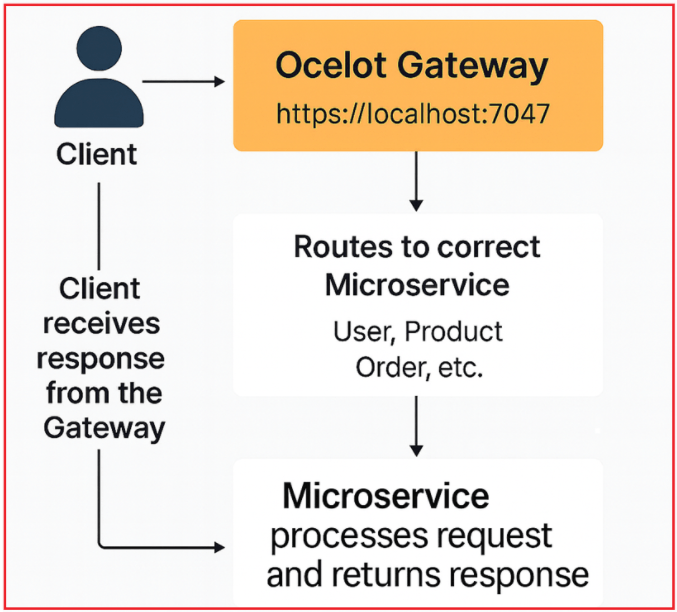
Client Sends Request
- The client (such as a web app, mobile app, or Postman) initiates a request to a single public URL, https://localhost:7047 (Ocelot Gateway).
- The client does not need to know where each microservice is hosted or which port it runs on.
Ocelot Gateway Receives the Request
- The Ocelot Gateway acts as the central entry point for all client interactions.
- It analyzes the incoming request based on the Upstream Path (for example, /users/login or /orders/create).
- Using the configuration from ocelot.json, Ocelot determines which microservice (User, Product, Order, etc.) should handle the request.
Routing to the Correct Microservice
- After matching the route, the gateway forwards the request to the appropriate microservice’s Downstream Path.
- Example:
-
- Client calls → https://localhost:7047/users/login
- Gateway routes internally → https://localhost:7082/api/User/login (UserService)
-
- Ocelot manages this routing transparently, so the client remains unaware of the downstream details.
Microservice Processes the Request
- The respective microservice (e.g., User, Product, or Order) receives the forwarded request.
- It performs business logic such as authentication, order creation, or product retrieval.
- Once processing is complete, the microservice sends a response (success or failure) back to the Ocelot Gateway.
Gateway Returns Response to Client
- Ocelot receives the downstream service’s response and forwards it back to the client.
- The client always communicates only with the gateway endpoint, ensuring consistency, security, and simplified client logic.
Conclusion
Integrating Ocelot API Gateway in an ASP.NET Core microservices system provides a centralized, maintainable, and secure entry point for all client interactions. Instead of managing multiple URLs, ports, and authentication flows, your clients can now communicate through one unified endpoint.
Ocelot not only simplifies request routing but also lays the foundation for advanced features such as authentication, rate limiting, caching, and service discovery, all configurable through its flexible JSON-based approach.
By following this setup, your API Gateway is now ready to handle requests efficiently while keeping your individual microservices clean, independent, and focused purely on business logic.