
Back to: Microservices using ASP.NET Core Web API Tutorials
Retry Using Polly in ASP.NET Core Web API
In a real-world ASP.NET Core Web API application, we often call external systems such as payment gateways, inventory services, email providers, third-party APIs, or other internal microservices. These external calls are not always reliable. Sometimes they fail, not because something is permanently wrong, but because of a temporary issue such as a short network interruption, a timeout, a service overload, or a brief server error.
In such cases, failing immediately is often not the best choice. If the problem lasts only for a second or two, trying the same operation again can solve the issue automatically. This is where the Retry resilience pattern becomes useful. Retry gives the application another chance to complete the operation successfully before returning an error to the user.
What Is Retry?
Retry means trying the same operation again when it fails due to a problem that is likely to be temporary. Instead of giving up on the very first failure, the application waits for a short time and then makes another attempt.
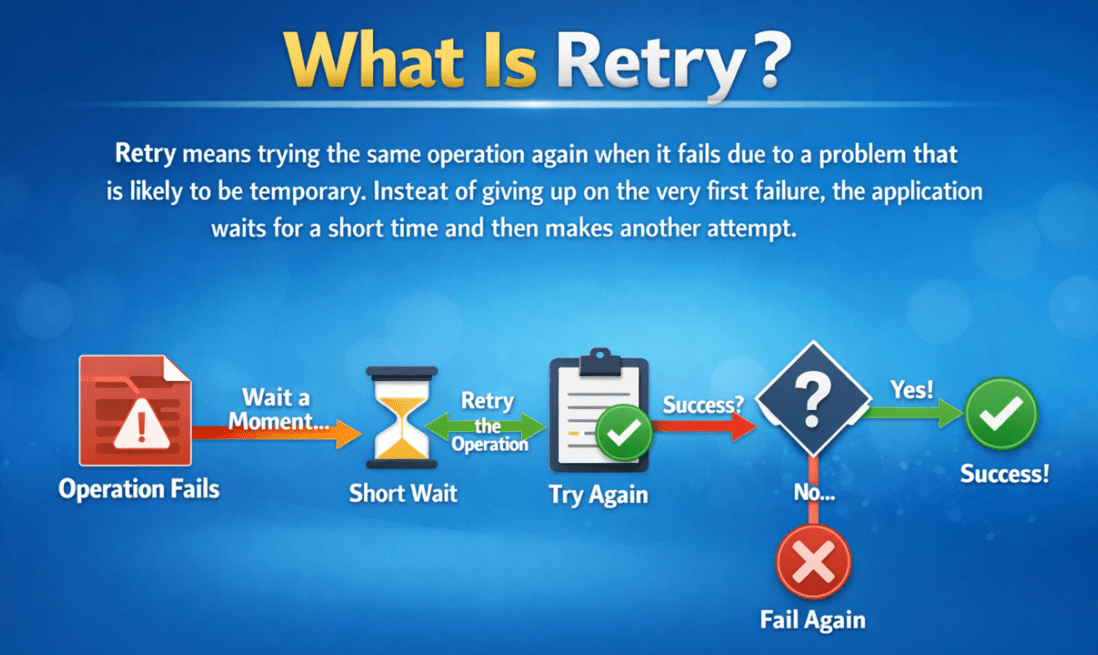
The basic idea is very simple:
- First attempt fails
- Wait for a short time
- Try again
- If needed, try a few more times
- If it still fails, then return the failure
So, Retry does not mean “keep trying forever.” It means retrying in a controlled way for a limited number of attempts.
Why is Retry Needed in ASP.NET Core Web API?
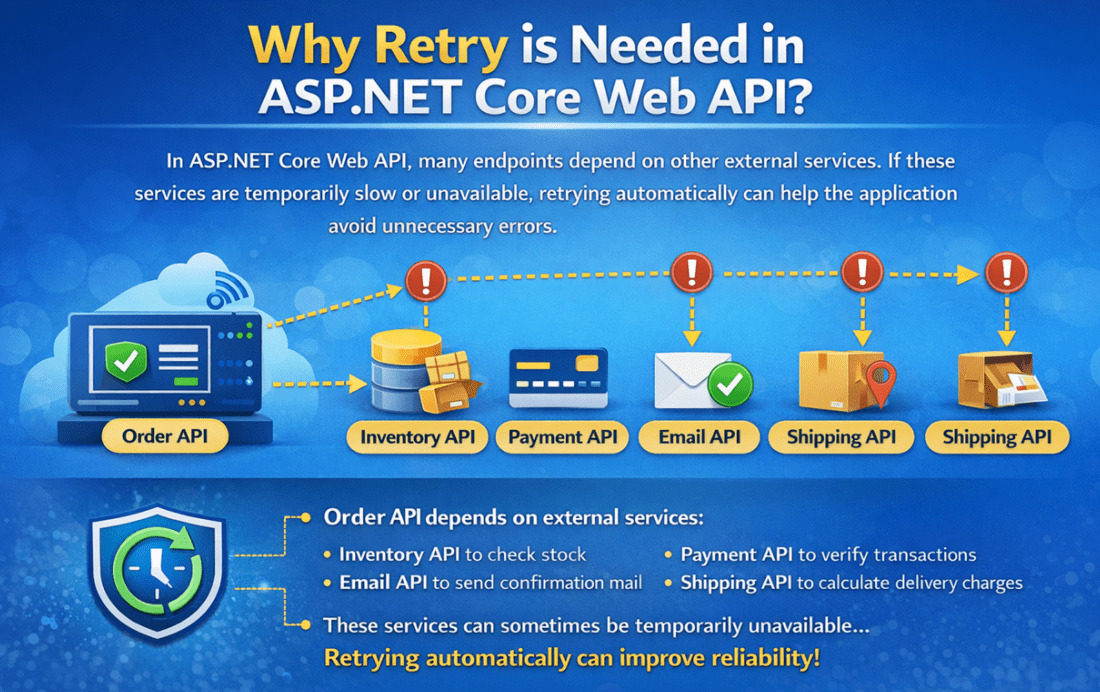
In ASP.NET Core Web API, many endpoints depend on other services. For example, your API may call:
- An Inventory API to check stock
- A Payment API to verify a transaction
- An Email API to send confirmation mail
- A Shipping API to calculate delivery charges
Now imagine your Order API calls the Inventory API before confirming an order. If the Inventory API is temporarily slow or unavailable for just 1 or 2 seconds, and your application fails immediately, the user may see an unnecessary error even though the service could have worked properly on the next attempt.
This creates a poor user experience. A small, temporary technical issue should not always become a visible failure for the end user.
That is why Retry is important. It helps the application handle Transient Failures automatically. A transient failure is a short-lived failure that may disappear if the same request is tried again after a small delay.
Real-Life Example
Suppose your Web API needs to call a Payment Verification API.
Here is what can happen:
- The first request fails because of a temporary network interruption
- Your application waits for 2 seconds
- It sends the same request again
- The second attempt succeeds
Without Retry:
- Your API would return an error immediately
- The user may think the payment verification failed
- Support issues may increase
With Retry:
- The temporary failure is handled automatically
- The second attempt succeeds
- The user gets a successful response without even knowing there was a small issue
This is why Retry is one of the most commonly used resilience patterns in modern APIs and microservices.
When Should We Retry and When Should We Not Retry?
For a better understanding, please have a look at the following image:

When Should You Retry?
Retry should be used only when the failure is likely to be temporary. In other words, retry is a good choice when there is a reasonable chance that the next attempt may succeed.
Good candidates for Retry include:
- Temporary network glitches
- Temporary DNS resolution issues
- 408 Request Timeout
- 429 Too Many Requests
- 5xx server errors, such as 500, 502, 503, and 504
- Short service overloads
- Temporary downstream service restarts
These failures are often short-lived. If you wait briefly and try again, the request may succeed.
When Should You Not Retry?
Retry is not the correct solution for every error. If the problem is permanent, retrying only wastes time and resources.
Bad candidates for Retry include:
- 400 Bad Request
- Validation errors
- Authentication failures
- Authorization failures
- Incorrect API key
- Invalid route or endpoint
- Business rule violations
- Duplicate submission scenarios
For example, if the client sends invalid input, retrying the same invalid request will not fix anything. The same is true for unauthorized access or a wrong API key. In such cases, the request will fail again for the same reason.
So:
- Retry only temporary technical failures.
- Do not retry permanent functional or business errors.
Important Note About POST Requests
Retries can be risky for non-idempotent operations such as POST requests. A non-idempotent operation means that repeating the same request may create a different result each time. For example:
- Creating duplicate orders
- Creating duplicate payments
- Inserting the same record twice
If a POST request is retried blindly, the application may accidentally perform the same action more than once.
That is why Retry must be used carefully for such operations. Before retrying a POST, we should make sure the operation is safe, or we should design the API in such a way that duplicate processing does not happen.
So:
- Retrying a GET is usually safer.
- Retrying a POST needs more care.
Why Polly?
Polly is a popular .NET library used to handle transient faults in a clean and structured way. Instead of writing manual retry logic again and again in different parts of the application, Polly allows us to define resilience strategies, such as Retry, in a consistent and reusable manner.
Without Polly, developers may end up writing a lot of custom code that uses try-catch blocks, counters, delays, and repeated logic. That approach becomes hard to manage, test, and maintain.
With Polly, we can:
- Define how many times to retry
- Define how long to wait between retries
- Decide which failures should be retried
- Centralize resilience behavior
- Keep business code clean and readable
So, Polly helps us build applications that are more reliable, maintainable, and production-ready.
In Polly, Retry is called a Reactive Resilience Strategy. This may sound a little advanced at first, but the meaning is simple. “Reactive” means Polly reacts after a failure happens. If an exception is thrown or a failure result is returned, Polly can retry the operation. It continues this only until:
- The operation succeeds, or
- The maximum retry attempts are reached, or
- The failure is of a type that should not be retried.
So, you can think of it like this:
- Polly watches the operation.
- If the failure looks temporary, Polly says, “Wait a little and try again.”
Real-Time Polly Example in ASP.NET Core Web API:
Now, let us understand Polly Retry with a simple real-time example. In this example, we are going to build two ASP.NET Core Web API projects within a single solution. The first project is InventoryServiceApi, and the second project is OrderServiceApi.
Project 1: InventoryService API
This will act like an external service or downstream API.
Its job is to:
- Maintain product stock using in-memory data
- Expose an endpoint to check stock by ProductId
- Sometimes, intentionally fail to simulate a temporary problem
This API will behave like a real external dependency that is not always stable.
Project 2: OrderService API
This API represents our main business API.
Its job is to:
- Receive order requests
- Call the InventoryService API to verify stock
- If stock is available, return success
- If InventoryService fails temporarily, use Polly-based retry to try again before giving up
This is where we will use Polly in an industry-standard way.
Real-Time Business Scenario
Imagine this real-world case:
- A customer places an order for a laptop through an Order API.
- Before confirming the order, the Order API must call the Inventory API to check whether stock is available.
But sometimes the Inventory API:
- Is temporarily overloaded
- Returns 503 Service Unavailable
- Times out
- Has a brief network glitch
These are transient failures. Polly Retry is perfect for these cases because retry re-executes an operation when it fails due to a handled exception or failure result, and stops when the retry limit is reached or the failure is not handled.
Step 1: Create the Solution and Projects
First, create a Blank Solution named PollyRetryDemoSolution. Then add the following two ASP.NET Core Web API projects to the solution:
- InventoryServiceApi
- OrderServiceApi
The InventoryServiceApi project will simulate the downstream service, while the OrderServiceApi project will act as the client-facing API that communicates with the inventory service.
Next, install the following NuGet package only in the OrderServiceApi project because this project makes the outbound HTTP call:
Install-Package Microsoft.Extensions.Http.Resilience
This package provides built-in support for resilience features such as Retry, Timeout, Circuit Breaker, and more. In this example, we will use it to configure the retry strategy for HttpClient.
Step 2: Build the InventoryService API
The InventoryServiceApi project acts as the downstream service in our example. Its job is to provide product stock information when requested by another API, such as the OrderServiceApi.
In this demo, the InventoryService performs the following tasks:
- Maintains product stock data in memory
- Exposes an endpoint to get stock details by ProductId
- Intentionally fails for the first two requests of a product
- Returns a successful response from the third request onward
This behavior helps us create a predictable transient failure scenario, which is required to test whether Polly Retry is working properly in the calling service.
Creating Models:
First, create a folder named Models.
Models/Product.cs
This model represents a single product inside the Inventory Service. It stores the basic inventory-related information, such as:
- ProductId → Unique identifier of the product
- ProductName → Name of the product
- AvailableStock → Current available quantity in stock
So, create a class file named Product.cs inside the Models folder and copy-paste the following code.
namespace InventoryServiceApi.Models
{
    public class Product
    {
        public int ProductId { get; set; }
        public string ProductName { get; set; } = string.Empty;
        public int AvailableStock { get; set; }
    }
}
Creating Repository Interface
Next, create a folder named Repositories.
Repositories/IInventoryRepository.cs
This interface defines the contract for inventory-related operations. It tells the application what operations are available, but it does not tell how those operations are implemented. That is the main purpose of an interface. It helps us separate the definition from the implementation, making the application more organized, flexible, and easier to maintain. So, create a class file named IInventoryRepository.cs inside the Repositories folder and copy-paste the following code.
using InventoryServiceApi.Models;
namespace InventoryServiceApi.Repositories
{
    public interface IInventoryRepository
    {
        // Returns all inventory items stored in memory
        IEnumerable<Product> GetAll();

        // Returns the inventory record of a specific product.
        // If the product does not exist, it returns null
        Product? GetByProductId(int productId);

        // Tracks how many times a particular product has been requested.
        // This is the key method that helps us simulate temporary failures
        int RegisterRequestAttempt(int productId);

        // Resets the attempt count for one specific product
        void ResetAttempts(int productId);

        // Clears all request-attempt tracking data
        void ResetAllAttempts();
    }
}
Repositories/InventoryRepository.cs
Now, let us implement the repository. This class is the in-memory implementation of IInventoryRepository.
It stores:
- A list of sample inventory items
- A thread-safe dictionary to track how many times each product has been requested
The most important role of this class is to support transient failure simulation. Whenever a request comes for a product, we increase its request count. Then, in the controller, we use that count to decide whether we should return a temporary failure or a successful response. So, create a class file named InventoryRepository.cs inside the Repositories folder and copy-paste the following code.
using InventoryServiceApi.Models;
using System.Collections.Concurrent;
namespace InventoryServiceApi.Repositories
{
    public class InventoryRepository : IInventoryRepository
    {
        // In-memory inventory data.
        // This list acts like a temporary database for our demo application.
        // Each InventoryItem object represents one product and its available stock.
        private readonly List<Product> _items = new List<Product>()
        {
            new Product { ProductId = 1, ProductName = "Laptop", AvailableStock = 10 },
            new Product { ProductId = 2, ProductName = "Keyboard", AvailableStock = 25 },
            new Product { ProductId = 3, ProductName = "Mouse", AvailableStock = 0 },
            new Product { ProductId = 4, ProductName = "Monitor", AvailableStock = 7 }
        };

        // Thread-safe dictionary used to track how many times each product has been requested.
        // ConcurrentDictionary<TKey, TValue> is a special dictionary designed for multi-threaded scenarios.
        // Here:
        //   Key   = ProductId (int)
        //   Value = Number of times that product has been requested (int)
        //
        // Example:
        //   ProductId 1 -> 1   means product 1 has been requested once
        //   ProductId 1 -> 2   means product 1 has been requested twice
        //
        // We use ConcurrentDictionary because multiple HTTP requests may come at the same time,
        // and this collection can safely handle concurrent read/write operations.
        private readonly ConcurrentDictionary<int, int> _requestAttempts = new();

        public IEnumerable<Product> GetAll()
        {
            // Return all in-memory inventory records.
            return _items;
        }

        public Product? GetByProductId(int productId)
        {
            // Search the in-memory list and return the matching product.
            // If no matching ProductId is found, FirstOrDefault returns null.
            return _items.FirstOrDefault(x => x.ProductId == productId);
        }

        // AddOrUpdate works like this:
        // 1. If the given ProductId does NOT already exist in the dictionary,
        //    it adds a new entry with value 1.
        // 2. If the given ProductId already exists,
        //    it updates the existing value by increasing the old value by 1.
        public int RegisterRequestAttempt(int productId)
        {
            // AddOrUpdate is used to either add a new entry or update an existing entry.
            // Syntax:
            return _requestAttempts.AddOrUpdate(
                productId,              // Key to search for in the dictionary
                1,                      // If the key does not exist, add it with value 1
                (_, oldValue) => oldValue + 1 // If the key already exists, increment its current value by 1
            );

            // Example:
            // First request for ProductId 1  -> stores 1
            // Second request for ProductId 1 -> updates to 2
            // Third request for ProductId 1  -> updates to 3
        }

        // TryRemove attempts to remove the entry for the given ProductId from the dictionary.
        public void ResetAttempts(int productId)
        {
            // Explanation:
            //   productId = the key we want to remove
            //   out _     = discard the removed value because we do not need it

            // If the key exists, it is removed successfully.
            // If the key does not exist, nothing happens.
            //
            // Example:
            //   If ProductId 1 has attempt count 3, this statement removes it completely.
            //   On the next request for ProductId 1, the count will start again from 1.
            _requestAttempts.TryRemove(productId, out _);

            // Note:
            //  - TryRemove normally returns the removed value through an out parameter
            //  - but we do not need that removed value here
            //  - so we discard it using _
        }

        // Clear removes all key-value pairs from the dictionary.
        public void ResetAllAttempts()
        {
            // After calling this method, the dictionary becomes empty.
            // That means all products will start again from attempt number 1
            // when they are requested next time.
            _requestAttempts.Clear();
        }
    }
}
Why are we using ConcurrentDictionary here?
We are using ConcurrentDictionary because it is thread-safe. In Web API applications, multiple requests can arrive simultaneously. If two or more requests try to update the same dictionary simultaneously, a normal dictionary may cause issues. ConcurrentDictionary handles that safely, so it is a better choice for this kind of shared in-memory tracking.
Creating Inventory Controller
Now, let us create the controller. This controller exposes the endpoints of the Inventory Service. Its responsibilities are:
- Return all inventory records
- Return one inventory record by ProductId
- Simulate transient failures for the first two requests
- Provide reset endpoints so testing becomes easy
So, create a class file named InventoryController.cs inside the Controllers folder and copy-paste the following code.
using InventoryServiceApi.Repositories;
using Microsoft.AspNetCore.Mvc;
namespace InventoryServiceApi.Controllers
{
    [ApiController]
    [Route("api/[controller]")]
    public class InventoryController : ControllerBase
    {
        // Repository used to access inventory data and request-attempt tracking logic
        private readonly IInventoryRepository _inventoryRepository;

        // Logger used to write informational and warning messages for debugging and monitoring
        private readonly ILogger<InventoryController> _logger;

        public InventoryController(
            IInventoryRepository inventoryRepository,
            ILogger<InventoryController> logger)
        {
            // Store the injected repository instance for later use inside action methods
            _inventoryRepository = inventoryRepository;

            // Store the injected logger instance for writing logs
            _logger = logger;
        }

        [HttpGet]
        public IActionResult GetAllInventory()
        {
            // Get all inventory records from the repository
            var items = _inventoryRepository.GetAll();

            // Return HTTP 200 OK with the complete inventory list
            return Ok(items);
        }

        [HttpGet("{productId}")]
        public IActionResult GetInventoryByProductId(int productId)
        {
            // Fetch the inventory item for the given ProductId
            var item = _inventoryRepository.GetByProductId(productId);

            // If no matching product is found, return HTTP 404 Not Found
            if (item is null)
            {
                return NotFound(new
                {
                    Message = $"No inventory record found for ProductId = {productId}."
                });
            }

            // Increase and get the current request-attempt count for this product
            // This is used to simulate transient failures for the first two requests
            int attemptNumber = _inventoryRepository.RegisterRequestAttempt(productId);

            // Write an informational log showing which product was requested
            // and how many times it has been requested so far
            _logger.LogInformation(
                "Inventory API called for ProductId {ProductId}. Attempt Number: {AttemptNumber}",
                productId,
                attemptNumber);

            // Intentionally simulate a temporary failure for the first two attempts
            // This helps us test whether Polly Retry in the calling API works correctly
            if (attemptNumber <= 2)
            {
                // Write a warning log because we are deliberately returning a temporary failure response
                _logger.LogWarning(
                    "Simulating temporary failure for ProductId {ProductId} on attempt {AttemptNumber}",
                    productId,
                    attemptNumber);

                // Return HTTP 503 Service Unavailable to represent a temporary downstream issue
                return StatusCode(StatusCodes.Status503ServiceUnavailable, new
                {
                    Message = "Temporary issue in InventoryService. Please retry.",
                    ProductId = productId,
                    AttemptNumber = attemptNumber
                });
            }

            // From the third attempt onward, return a successful response with stock details
            return Ok(new
            {
                ProductId = item.ProductId,
                ProductName = item.ProductName,
                AvailableStock = item.AvailableStock,

                // True if stock is greater than zero; otherwise false
                IsAvailable = item.AvailableStock > 0,

                // Current UTC time when the stock check was completed
                CheckedAtUtc = DateTime.UtcNow
            });
        }

        [HttpPost("reset/{productId}")]
        public IActionResult ResetAttempts(int productId)
        {
            // Reset the stored request-attempt count for the specified product
            // After reset, the next request for this product will again start from attempt 1
            _inventoryRepository.ResetAttempts(productId);

            // Return HTTP 200 OK with a confirmation message
            return Ok(new
            {
                Message = $"Request attempts reset successfully for ProductId = {productId}."
            });
        }

        [HttpPost("reset-all")]
        public IActionResult ResetAllAttempts()
        {
            // Reset request-attempt counts for all products
            // This is useful when we want to restart testing from a clean state
            _inventoryRepository.ResetAllAttempts();

            // Return HTTP 200 OK with a confirmation message
            return Ok(new
            {
                Message = "Request attempts reset successfully for all products."
            });
        }
    }
}
Program.cs for InventoryServiceApi
This file configures the services and middleware required by the InventoryServiceApi. Here, we register the repository in the dependency injection container, enable controller support, configure Swagger for testing, and set up the HTTP request pipeline. Please update the Program.cs class file as follows:
using InventoryServiceApi.Repositories;
namespace InventoryServiceApi
{
    public class Program
    {
        public static void Main(string[] args)
        {
            var builder = WebApplication.CreateBuilder(args);

            // Add controller support and keep JSON property names exactly as defined in C# models/DTOs.
            builder.Services.AddControllers()
                .AddJsonOptions(options =>
                {
                    options.JsonSerializerOptions.PropertyNamingPolicy = null;
                });

            builder.Services.AddEndpointsApiExplorer();
            builder.Services.AddSwaggerGen();

            // Register the repository as Singleton because we want one shared in-memory state
            builder.Services.AddSingleton<IInventoryRepository, InventoryRepository>();

            var app = builder.Build();

            // Configure the HTTP request pipeline.
            if (app.Environment.IsDevelopment())
            {
                app.UseSwagger();
                app.UseSwaggerUI();
            }

            app.UseHttpsRedirection();

            app.UseAuthorization();

            app.MapControllers();

            app.Run();
        }
    }
}
Step 3: Build the OrderService API
Now, let us build the OrderServiceApi, the main API for this example. This is the API that the client will call to place an order. But before confirming the order, this API must first communicate with the InventoryServiceApi to check whether the requested product is in stock. So, this project is responsible for the following:
- Receive order requests from the client
- Call the Inventory Service
- Verify product availability and stock quantity
- Use Polly Retry if the Inventory Service fails temporarily
- Return the final success or failure response to the client
This is the project where Polly is actually used. In simple terms, InventoryServiceApi simulates the problem, and OrderServiceApi handles it using Polly Retry.
Creating DTOs:
First, create a folder named DTOs. DTOs help us structure the data flowing in and out of the API. In this example, we need three DTOs:
- One DTO to receive the order request from the client
- One DTO to read the response coming from the InventoryService
- One DTO to send the final order result back to the client
This separation keeps the application clean and easy to understand.
DTOs/CreateOrderRequestDto.cs
This DTO represents the incoming order request sent by the client. It contains:
- ProductId → Which product the customer wants to order
- Quantity → How many units the customer wants
We are also using validation attributes here to ensure invalid values are automatically rejected. So, create a class file named CreateOrderRequestDto.cs inside the DTOs folder and copy-paste the following code.
using System.ComponentModel.DataAnnotations;
namespace OrderServiceApi.DTOs
{
    public class CreateOrderRequestDto
    {
        // ProductId must be greater than zero
        [Range(1, int.MaxValue, ErrorMessage = "ProductId must be greater than 0.")]
        public int ProductId { get; set; }

        // Ordered quantity must be greater than zero
        [Range(1, int.MaxValue, ErrorMessage = "Quantity must be greater than 0.")]
        public int Quantity { get; set; }
    }
}
DTOs/OrderResponseDto.cs
This DTO is returned from the OrderService API back to the client. It contains both technical and business-related information, such as:
- Whether the operation succeeded.
- What message should be shown.
- Whether an order ID was generated.
- Product and quantity details.
- Stock details captured during order processing.
So, create a class file named OrderResponseDto.cs inside the DTOs folder and copy-paste the following code.
namespace OrderServiceApi.DTOs
{
    public class OrderResponseDto
    {
        public int StatusCode { get; set; }
        public bool IsSuccess { get; set; }
        public string Message { get; set; } = string.Empty;
        public string? OrderId { get; set; }
        public int ProductId { get; set; }
        public int OrderedQuantity { get; set; }
        public int AvailableStock { get; set; }
        public DateTime ProcessedAtUtc { get; set; }
    }
}
DTOs/InventoryResponseDto.cs
This DTO represents the response returned by the InventoryServiceApi. Since OrderService calls another API, it needs a class that matches that API’s response structure. That is the purpose of this DTO. So, create a class file named InventoryResponseDto.cs inside the DTOs folder and copy-paste the following code.
namespace OrderServiceApi.DTOs
{
    public class InventoryResponseDto
    {
        // Product identifier returned by InventoryService
        public int ProductId { get; set; }

        // Product name returned by InventoryService
        public string ProductName { get; set; } = string.Empty;

        // Current stock available
        public int AvailableStock { get; set; }

        // Indicates whether the product is available
        public bool IsAvailable { get; set; }

        // Timestamp of stock verification
        public DateTime CheckedAtUtc { get; set; }
    }
}
Create Typed HttpClient
Create a folder named Clients.
Clients/InventoryApiClient.cs
This is the typed HTTP client that calls the InventoryServiceApi. In other words, this is the place where OrderService makes an HTTP call to another service.
Polly Retry will be applied around this HttpClient, so whenever this client faces a temporary failure from the InventoryService, the retry strategy will be triggered automatically. So, create a class file named InventoryApiClient.cs inside the Clients folder and copy-paste the following code.
using OrderServiceApi.DTOs;
using System.Net;
namespace OrderServiceApi.Clients
{
    public class InventoryApiClient
    {
        // HttpClient is used to send HTTP requests to the downstream InventoryService API
        private readonly HttpClient _httpClient;

        // Logger is used to record request flow, warnings, and failures for debugging and monitoring
        private readonly ILogger<InventoryApiClient> _logger;

        public InventoryApiClient(HttpClient httpClient, ILogger<InventoryApiClient> logger)
        {
            // Store the injected HttpClient instance.
            // This HttpClient is configured in Program.cs with the base URL of InventoryService
            // and the Polly retry pipeline.
            _httpClient = httpClient;

            // Store the injected logger instance for writing logs from this client
            _logger = logger;
        }

        public async Task<InventoryResponseDto?> GetInventoryByProductIdAsync(
            int productId)
        {
            // Write an informational log before calling the downstream InventoryService
            _logger.LogInformation(
                "Calling InventoryService for ProductId {ProductId}",
                productId);

            // Send an HTTP GET request to the InventoryService endpoint:
            // api/inventory/{productId}
            //
            // Example:
            // If productId = 1, the final request URL becomes:
            // https://localhost:7245/api/inventory/1
            //
            // The 'using' statement ensures the HttpResponseMessage object is disposed properly
            // after use, which helps release unmanaged resources.
            using HttpResponseMessage response =
                await _httpClient.GetAsync($"api/inventory/{productId}");

            // If InventoryService returns HTTP 404 Not Found,
            // it means the requested product does not exist in the inventory system.
            // This is treated as a normal business case, not as a temporary technical failure.
            // So, instead of throwing an exception, we simply return null.
            if (response.StatusCode == HttpStatusCode.NotFound)
            {
                _logger.LogWarning(
                    "InventoryService returned 404 for ProductId {ProductId}",
                    productId);

                return null;
            }

            // If the response status code is not successful (not in the 2xx range),
            // log the status code and response body for troubleshooting.
            //
            // Important:
            // Polly retry happens before the final response reaches this point.
            // So if the request failed temporarily, Polly may have already retried it.
            // If control reaches here with a failed response, it usually means:
            // - the response is still unsuccessful after retries, or
            // - the response is a non-success code that Polly does not retry.
            if (!response.IsSuccessStatusCode)
            {
                // Read the error response body as text so we can log the exact failure details
                string errorBody = await response.Content.ReadAsStringAsync();

                _logger.LogWarning(
                    "InventoryService returned status code {StatusCode} for ProductId {ProductId}. Body: {Body}",
                    (int)response.StatusCode,
                    productId,
                    errorBody);
            }

            // EnsureSuccessStatusCode throws an HttpRequestException if the response status code
            // is not successful (for example 400, 500, 503, etc.).
            //
            // In our example, if InventoryService keeps failing even after Polly retries,
            // this line throws the exception, which is then handled in OrderService.
            response.EnsureSuccessStatusCode();

            // Convert the successful JSON response body into an InventoryResponseDto object
            // and return it to the calling service.
            return await response.Content.ReadFromJsonAsync<InventoryResponseDto>();
        }
    }
}
Why this class?
Instead of writing HTTP call logic directly inside the service or controller, we isolate it in a typed client. This gives us several benefits:
- Cleaner code
- Better separation of concerns
- Easier testing
- Easier maintenance
- Centralized outbound API logic
Most importantly, Polly Retry is attached to this HttpClient, so resilience is applied automatically there.
Creating Services
Now, create a folder named Services. The service layer contains the business logic of the OrderService API. This means the controller will not directly make HTTP calls or write business rules. Instead, it will delegate the work to the service layer. This keeps the controller thin and the business logic properly organized.
Services/IOrderService.cs
This interface defines the order-processing contract. So, create a class file named IOrderService.cs inside the Services folder and copy-paste the following code
using OrderServiceApi.DTOs;
namespace OrderServiceApi.Services
{
    public interface IOrderService
    {
        // Places an order after checking stock through InventoryService
        Task<OrderResponseDto> PlaceOrderAsync(CreateOrderRequestDto request);
    }
}
Services/OrderService.cs
This class contains the main business logic of the OrderService API. It is responsible for:
- Receiving the order request.
- Calling InventoryService through the typed client.
- Checking whether the product exists.
- Checking whether enough stock is available.
- Returning success or failure.
- Handling final failure if the downstream service remains unavailable even after retries.
So, create a class file named OrderService.cs inside the Services folder and copy-paste the following code.
using OrderServiceApi.Clients;
using OrderServiceApi.DTOs;
namespace OrderServiceApi.Services
{
    public class OrderService : IOrderService
    {
        // Typed client used to call the downstream InventoryService API
        private readonly InventoryApiClient _inventoryApiClient;

        // Logger used to write success, warning, and error information for this service
        private readonly ILogger<OrderService> _logger;

        public OrderService(InventoryApiClient inventoryApiClient, ILogger<OrderService> logger)
        {
            // Store the injected InventoryApiClient instance
            _inventoryApiClient = inventoryApiClient;

            // Store the injected logger instance
            _logger = logger;
        }

        public async Task<OrderResponseDto> PlaceOrderAsync(CreateOrderRequestDto request)
        {
            try
            {
                // Call the downstream InventoryService to get stock details for the requested product.
                // Polly retry is already configured on the HttpClient used inside InventoryApiClient.
                // So if InventoryService fails temporarily, the HTTP call is retried automatically.
                var inventory = await _inventoryApiClient.GetInventoryByProductIdAsync(request.ProductId);

                // If the InventoryApiClient returns null, it means InventoryService responded with 404 Not Found.
                // In other words, the requested product does not exist in the inventory system.
                if (inventory is null)
                {
                    return new OrderResponseDto
                    {
                        // Return 404 because the requested product was not found
                        StatusCode = StatusCodes.Status404NotFound,

                        // Mark the operation as failed
                        IsSuccess = false,

                        // User-friendly message explaining the reason
                        Message = $"Product with ProductId {request.ProductId} was not found in InventoryService.",

                        // Include request details in the response
                        ProductId = request.ProductId,
                        OrderedQuantity = request.Quantity,

                        // Store the time when the order request was processed
                        ProcessedAtUtc = DateTime.UtcNow
                    };
                }

                // If the product exists but stock is not available, or available stock is less than
                // the requested quantity, then the order cannot be placed.
                if (!inventory.IsAvailable || inventory.AvailableStock < request.Quantity)
                {
                    return new OrderResponseDto
                    {
                        // Return 400 because the request is valid,
                        // but the business condition required to place the order is not satisfied
                        StatusCode = StatusCodes.Status400BadRequest,

                        // Mark the operation as failed
                        IsSuccess = false,

                        // User-friendly message explaining the reason
                        Message = "Order failed because sufficient stock is not available.",

                        // Include request and inventory details in the response
                        ProductId = request.ProductId,
                        OrderedQuantity = request.Quantity,
                        AvailableStock = inventory.AvailableStock,

                        // Store the time when the order request was processed
                        ProcessedAtUtc = DateTime.UtcNow
                    };
                }

                // Simulate successful order creation.
                // In a real application, this is where we would save the order into the database.
                // For demo purposes, we generate a sample order ID using a GUID.
                string orderId = $"ORD-{Guid.NewGuid().ToString("N")[..8].ToUpper()}";

                // Write a success log with order details
                _logger.LogInformation(
                    "Order placed successfully. OrderId: {OrderId}, ProductId: {ProductId}, Quantity: {Quantity}",
                    orderId,
                    request.ProductId,
                    request.Quantity);

                // Return a successful response with generated order details
                return new OrderResponseDto
                {
                    // Return 200 because the order was processed successfully
                    StatusCode = StatusCodes.Status200OK,

                    // Mark the operation as successful
                    IsSuccess = true,

                    // Success message
                    Message = "Order placed successfully.",

                    // Include generated order ID
                    OrderId = orderId,

                    // Include request and inventory details
                    ProductId = request.ProductId,
                    OrderedQuantity = request.Quantity,
                    AvailableStock = inventory.AvailableStock,

                    // Store the time when the order request was processed
                    ProcessedAtUtc = DateTime.UtcNow
                };
            }
            catch (HttpRequestException ex)
            {
                // This block executes when InventoryService still fails even after all Polly retry attempts are exhausted.
                // For example, if InventoryService keeps returning 503 Service Unavailable,
                // EnsureSuccessStatusCode() inside InventoryApiClient throws HttpRequestException.
                _logger.LogError(
                    ex,
                    "InventoryService could not be reached successfully after retry attempts for ProductId {ProductId}",
                    request.ProductId);

                return new OrderResponseDto
                {
                    // Return 503 because the downstream InventoryService is temporarily unavailable
                    StatusCode = StatusCodes.Status503ServiceUnavailable,

                    // Mark the operation as failed
                    IsSuccess = false,

                    // User-friendly message explaining the technical failure
                    Message = "Order could not be processed because InventoryService is temporarily unavailable.",

                    // Include request details in the response
                    ProductId = request.ProductId,
                    OrderedQuantity = request.Quantity,

                    // Store the time when the order request was processed
                    ProcessedAtUtc = DateTime.UtcNow
                };
            }
        }
    }
}
Creating Orders Controller
This controller receives the HTTP request from the client and delegates the actual processing to the service layer. So, create a class file named OrdersController.cs inside the Controllers folder and copy-paste the following code.
using Microsoft.AspNetCore.Mvc;
using OrderServiceApi.DTOs;
using OrderServiceApi.Services;
namespace OrderServiceApi.Controllers
{
    [ApiController]
    [Route("api/[controller]")]
    public class OrdersController : ControllerBase
    {
        // Service layer dependency used to handle the actual order-processing logic
        private readonly IOrderService _orderService;

        public OrdersController(IOrderService orderService)
        {
            // Store the injected service instance so it can be used inside action methods
            _orderService = orderService;
        }

        [HttpPost]
        public async Task<IActionResult> CreateOrder([FromBody] CreateOrderRequestDto request)
        {
            // Pass the incoming order request to the service layer.
            // The service handles product validation, inventory check,
            // retry-enabled downstream API call, and final response creation.
            OrderResponseDto result = await _orderService.PlaceOrderAsync(request);

            // Return the response using the HTTP status code provided by the service.
            // Example:
            // 200 -> Order placed successfully
            // 400 -> Insufficient stock
            // 404 -> Product not found
            // 503 -> InventoryService temporarily unavailable
            return StatusCode(result.StatusCode, result);
        }
    }
}
appsettings.json for OrderServiceApi
This file stores the base URL of the downstream InventoryService API. Update the appsettings.json file to include the correct InventoryService URL, as shown below.
{
  "InventoryService": {
    "BaseUrl": "https://localhost:7082/"
  },
  "Logging": {
    "LogLevel": {
      "Default": "Information",
      "Microsoft.AspNetCore": "Error",
      "System.Net.Http.HttpClient": "Error",
      "Microsoft.Extensions.Http.Resilience": "Error",
      "Polly": "Error"
    }
  },
  "AllowedHosts": "*"
}
Program.cs for OrderServiceApi
This is the most important configuration file of the OrderService API. Here we configure:
- Dependency Injection
- Swagger
- Typed HttpClient
- Polly Retry pipeline
This is where the resilience behavior is actually attached to the outbound HTTP call. So, update the Program.cs file as follows:
using Microsoft.Extensions.Http.Resilience;
using OrderServiceApi.Clients;
using OrderServiceApi.Services;
using Polly;
namespace OrderServiceApi
{
    public class Program
    {
        public static void Main(string[] args)
        {
            var builder = WebApplication.CreateBuilder(args);

            // Register controller support so the application can handle API requests.
            // Also, keep JSON property names exactly the same as defined in C# classes.
            // For example, ProductId will remain ProductId instead of becoming productId.
            builder.Services.AddControllers()
                .AddJsonOptions(options =>
                {
                    options.JsonSerializerOptions.PropertyNamingPolicy = null;
                });

            // Register services required for API metadata and Swagger/OpenAPI documentation.
            builder.Services.AddEndpointsApiExplorer();
            builder.Services.AddSwaggerGen();

            // Register the order service in the dependency injection container.
            // AddScoped means one service instance is created per HTTP request.
            builder.Services.AddScoped<IOrderService, OrderService>();

            // Register a typed HttpClient for InventoryApiClient.
            // This client will be used to call the downstream InventoryService API.
            builder.Services
                .AddHttpClient<InventoryApiClient>(client =>
                {
                    // Set the base URL of the downstream InventoryService.
                    // The value is read from appsettings.json:
                    // "InventoryService": { "BaseUrl": "https://localhost:7245/" }
                    client.BaseAddress = new Uri(builder.Configuration["InventoryService:BaseUrl"]!);
                })
                .AddResilienceHandler("inventory-retry-pipeline", pipeline =>
                {
                    // Add a retry strategy to the HttpClient pipeline.
                    // This means if the InventoryService fails temporarily,
                    // the same HTTP request can be retried automatically.
                    pipeline.AddRetry(new HttpRetryStrategyOptions
                    {
                        // Retry the failed request 2 more times after the initial attempt.
                        // So total attempts = 1 original attempt + 2 retries = 3 attempts.
                        MaxRetryAttempts = 2,

                        // Delay means how long Polly should wait before making the next retry attempt.
                        // Here, Polly waits for 2 seconds before retrying the failed request.
                        // Example:
                        // 1st call fails -> wait 2 seconds -> retry
                        Delay = TimeSpan.FromSeconds(2),

                        // BackoffType decides how the retry delay should behave when there are multiple retries.
                        //
                        // Exponential means the delay increases on each retry instead of staying the same.
                        // So, the first retry waits less time, and later retries may wait longer.
                        //
                        // Simple idea:
                        // Retry 1 -> small wait
                        // Retry 2 -> bigger wait
                        // Retry 3 -> even bigger wait
                        //
                        // This is useful because if the downstream service is temporarily overloaded,
                        // giving it a little more time on each retry increases the chance of recovery.
                        BackoffType = DelayBackoffType.Exponential,

                        // UseJitter adds a small random variation to the retry delay.
                        //
                        // Without jitter:
                        // If 100 requests fail at the same time, all 100 may retry after exactly 2 seconds.
                        // That can create another sudden spike of traffic on the downstream service.
                        //
                        // With jitter:
                        // Polly slightly randomizes the retry timing, so requests retry at slightly different moments.
                        // This reduces the chance of all failed requests hitting the server again together.
                        //
                        // In short:
                        // Delay = wait before retry
                        // BackoffType = how that wait changes over retries
                        // UseJitter = adds randomness to spread retries more safely
                        UseJitter = true,

                        // This callback runs each time Polly is about to perform a retry.
                        // We are using it here only for demo/debugging purpose so we can see
                        // retry activity in the console.
                        OnRetry = args =>
                        {
                            // Change console text color so retry messages are easy to identify.
                            Console.ForegroundColor = ConsoleColor.Yellow;

                            // Print the retry attempt number.
                            // args.AttemptNumber starts from 0, so we add 1 for human-readable output.
                            Console.WriteLine(
                                $"Polly retry executed in OrderService. Retry Attempt Number: {args.AttemptNumber + 1}");

                            // Reset the console color back to normal.
                            Console.ResetColor();

                            // This callback only writes to the console and does not perform any asynchronous work,
                            // so we return a completed ValueTask
                            return default;
                        }
                    });
                });

            var app = builder.Build();

            // Enable Swagger middleware only in Development environment.
            if (app.Environment.IsDevelopment())
            {
                app.UseSwagger();
                app.UseSwaggerUI();
            }

            app.UseHttpsRedirection();
            app.UseAuthorization();
            app.MapControllers();
            app.Run();
        }
    }
}
Testing the Order Create Endpoint
After completing both APIs, run the InventoryServiceApi and OrderServiceApi projects. First, make sure the InventoryService:BaseUrl in the OrderServiceApi points to the correct URL of the running InventoryServiceApi. Next, reset the inventory request counter so the test starts from a clean state. You can do this by calling the reset endpoint of the InventoryServiceApi.
Then send a POST request to the OrderServiceApi using the following endpoint:
/api/orders
Use the following request body:
{
  "ProductId": 1,
  "Quantity": 2
}
When this request is sent, the OrderServiceApi calls the InventoryServiceApi to check stock availability.
Since the InventoryServiceApi is intentionally designed to fail on the first two requests, the first call returns a 503 Service Unavailable response. Polly automatically retries the same request. The second call also fails, and Polly retries again. On the third attempt, the Inventory API returns a successful response.
Once the stock details are received, the OrderServiceApi checks whether sufficient stock is available. If stock is available, the order is processed, and a success response is returned.
A successful response will look like this:
{
  "StatusCode": 200,
  "IsSuccess": true,
  "Message": "Order placed successfully.",
  "OrderId": "ORD-9F2CD061",
  "ProductId": 1,
  "OrderedQuantity": 2,
  "AvailableStock": 10,
  "ProcessedAtUtc": "2026-04-09T09:52:36.3090965Z"
}
Conclusion
In this example, we built two ASP.NET Core Web APIs where the Order API calls the Inventory API and uses Polly Retry to handle temporary failures. The main result is simple: if the Inventory API fails temporarily, the Order API does not fail immediately. It retries the call and can still complete the order successfully. This makes the application more reliable, cleaner to maintain, and closer to how real production APIs should behave.
About the Author: Pranaya Rout
Pranaya Rout has published more than 3,000 articles in his 11-year career. Pranaya Rout has very good experience with Microsoft Technologies, Including C#, VB, ASP.NET MVC, ASP.NET Web API, EF, EF Core, ADO.NET, LINQ, SQL Server, MYSQL, Oracle, ASP.NET Core, Cloud Computing, Microservices, Design Patterns and still learning new technologies.
🎥 Want to See This in Action?
If you prefer learning with a real-time example, I’ve created a detailed video where I demonstrate how **Retry using Polly works in ASP.NET Core Web API** using a practical Order API and Inventory API scenario.
👉 Watch the complete video here:
https://youtu.be/F-yww8dflT0
In this video, you will clearly understand:
• What transient failures are
• When to use Retry and when NOT to use it
• How Polly automatically retries failed requests
• Real-world implementation with step-by-step explanation
This will help you build **more reliable and production-ready APIs**.
👉 Highly recommended if you want hands-on clarity along with the theory!