
Back to: Microservices using ASP.NET Core Web API Tutorials
Introduction to CI/CD Pipelines in .NET
When beginners start learning .NET development, they usually focus only on writing code in Visual Studio. They create Controllers, Models, Services, and APIs, run the application locally, and feel that the job is done. But in real-world software development, writing code is only one part of the work. After writing the code, we also need to build, test, publish, and deploy it to a server so users can access it.
This is where CI/CD becomes very important. CI/CD helps us automate the process of taking code from the developer’s machine to the live server. Instead of doing everything manually again and again, we create a proper workflow. That workflow makes the process faster, safer, more professional, and much easier to manage in real projects.
Why CI/CD?
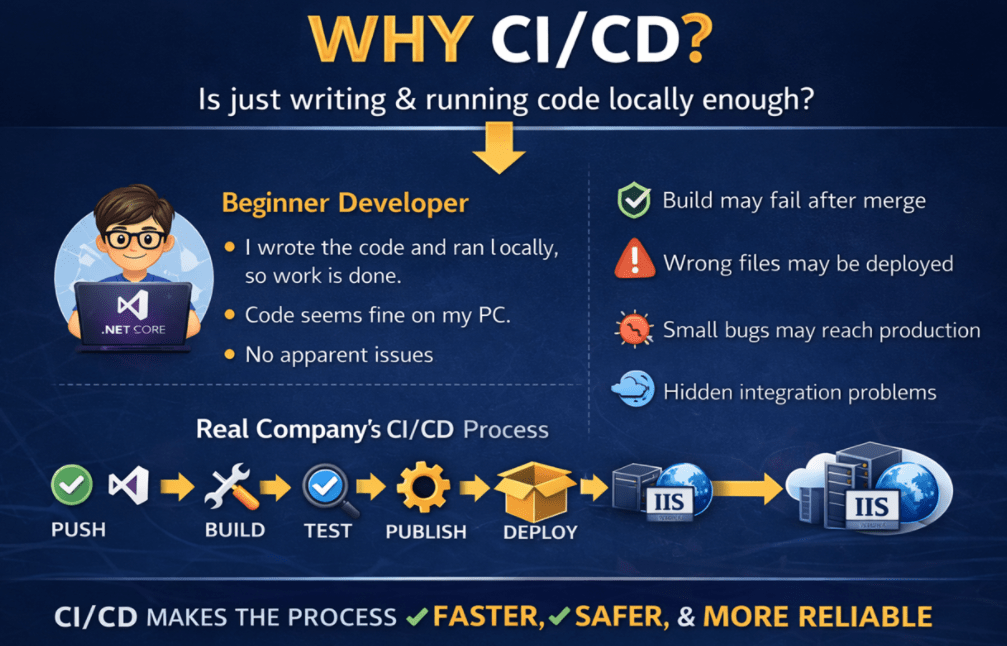
A beginner may think like this:
- I wrote the code, I ran it locally, and it is working. So, the work is finished.
But in a real company, that is not enough. The code must be pushed to a repository, checked properly, tested, published, and then deployed. If this process is not handled properly, many problems can happen. The application may fail on the server, the wrong files may be deployed, the build may fail after code is merged, or a small bug may reach production because nobody tested it properly. For a better understanding, please have a look at the following image.
A Simple Real-Time Analogy
Let us understand CI/CD with a simple Restaurant Analogy. Suppose a customer places an order in a restaurant.
The food is not served directly after the order is taken. First, the kitchen prepares it, checks whether all ingredients are available, cooks it, verifies the quality, packs it properly, and then sends it to the customer.
Software delivery works similarly.
- Writing code is like preparing the dish.
- Building the project is like checking whether everything is ready for cooking.
- Testing is like quality checking.
- Publishing is like packing the food.
- Deployment is like delivering it to the customer.
CI/CD helps automate this entire flow so that every order is handled in a standard, reliable way.
What is Continuous Integration (CI)?
Continuous Integration, or CI, is the practice of regularly adding code changes to a shared repository and automatically checking whether the project still works correctly. In simple language, whenever a developer writes code and pushes it to GitHub, the system should automatically verify important things such as:
- Is the code compiling properly?
- Are all required packages available?
- Is the project building successfully?
- Are the tests passing?
- Is the application still in a healthy state?
If these checks happen automatically whenever code changes are pushed, that is called Continuous Integration.
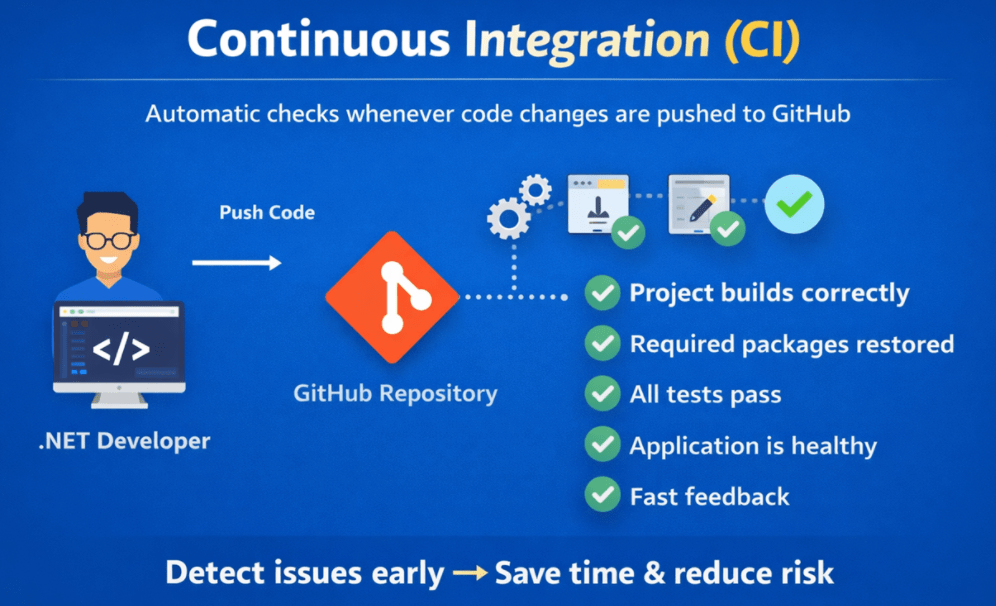
This is very important because in real projects, multiple developers may work on the same application. One developer may change a service class, another may update a model, and another may modify the configuration. Even if everything works on one person’s machine, the final combined code may fail. CI helps us catch those issues early.
Real-Time Example of CI in .NET
Suppose you are working on an ASP.NET Core Web API project. You make the following changes:
- Add a new controller
- Modify a DTO
- Update a service method
- Change validation logic
The project runs fine on your local machine.
Now you push the code to GitHub. At that moment, a CI pipeline can automatically do the following:
- Restore NuGet packages
- Build the solution
- Run unit tests
- Verify whether publishing is possible
If any of these steps fail, the pipeline stops and tells you that something is wrong. This is much better than discovering the issue later during deployment.
Why is CI important?
CI is important because it gives fast feedback. Instead of waiting until the last moment to discover a problem, the system tells us immediately. This saves time and reduces risk.
Without CI:
- Developers may push broken code
- Integration problems may stay hidden
- Bugs may travel to later stages
- Releases become stressful
With CI:
- Issues are caught early
- Code quality improves
- The project remains healthier
- The team becomes more confident
What is Continuous Delivery (CD)?
Continuous Delivery means that after the code is successfully built and tested, it is automatically prepared and kept ready for deployment. This means the application is always in a deployable state.
In simple words:
- CI checks whether the application is healthy.
- CD ensures the application is ready for release.
In a .NET project, this usually means that after the build and test steps complete successfully, the application is published and the deployment-ready output is generated.

Note: This does not always mean that deployment happens automatically. Sometimes the deployment is still triggered manually after approval. That is why you should understand that CD is more about deployment readiness than just deployment itself.
Real-Time Example of CD in .NET
Suppose your ASP.NET Core Web API has passed the CI steps. Now the system performs the publish step and creates the final output that can be deployed to IIS. That published output may include:
- Compiled application files
- Required dependencies
- Configuration-ready files
- Deployable package or artifact
The application is now ready to be moved to the server. That readiness is the main idea behind Continuous Delivery.
Difference Between Continuous Delivery and Continuous Deployment
These two terms confuse many beginners; let us understand them very clearly. For a better understanding, please have a look at the following image:
Continuous Delivery
In Continuous Delivery:
- Build happens automatically
- Tests are run automatically
- Publish Output is created automatically
- Application is kept ready for deployment
- Final production deployment may still require manual approval
Continuous Deployment
In Continuous Deployment:
- Build happens automatically
- Tests happen automatically
- Publish happens automatically
- Deployment also happens automatically without manual approval
So:
- Continuous Delivery says: Everything is ready. Deploy whenever you approve.
- Continuous Deployment says: Everything is ready, so deploy immediately.
Real-Time Understanding
In many real companies:
- Development or Test environment may use automatic deployment.
- The production environment may require manual approval before deployment.
That is why Continuous Delivery is more common in professional production setups.
Difference Between Manual Deployment and Automated Deployment
Let us understand what Manual Deployment, the problems associated with Manual deployment and how to overcome the problem with Automated Deployment.
Manual Deployment
In manual deployment, the developer performs all steps by hand. For example:
- Open the project in Visual Studio
- Build the project
- Publish the project
- Copy files to the server folder
- Stop the IIS site or app pool if needed
- Replace the old files
- Restart IIS
- Test the API manually
This approach may work for small projects, but it has many problems.
Problems with Manual Deployment
If you are going with the Manual Deployment approach, then you might face the following problems:
- Someone may forget a step
- Wrong files may be copied
- Debug output may be deployed instead of the release
- Configuration files may be missed
- Different developers may follow different steps
- Deployment becomes slow and error-prone
- Rollback becomes difficult
Now, let us understand how we can overcome the above problems with Automated Deployment, which is the recommended approach in today’s software development.
Automated Deployment
In Automated Deployment, the steps are defined once in a pipeline and then executed the same way every time. For example:
- Code is pushed to GitHub
- Pipeline starts automatically
- Build the project automatically
- Test run automatically
- Publish Output is created
- Deployment script copies files to IIS or any webserver where you host your application.
- IIS or the web server is restarted if required
- Post-deployment validation runs
This approach reduces human mistakes and creates consistency.
Why CI/CD is Important in ASP.NET Core Web API Projects
ASP.NET Core Web API projects are often used as the backend of web applications, mobile apps, admin panels, enterprise systems, and microservices. These applications usually change frequently because New Features, Fixes, and Updates are added regularly. If every change must be deployed manually, the process becomes painful.
CI/CD becomes important because it helps in the following ways:
- It automatically checks whether the code is valid.
- It reduces manual effort.
- It speeds up the release process.
- It creates confidence before deployment.
- It makes the development process more professional.
For a better understanding, please have a look at the following image.
Real-Time Scenario
Imagine your team is building an e-commerce Web API. One developer updates product logic. Another updates order processing. Another adds authentication changes. Now all these changes are merged into GitHub. Without CI/CD, the team may only discover issues at deployment time.
With CI/CD:
- The project builds automatically.
- Tests run automatically.
- Publish Output is generated.
- Deployment can happen in a standard way.
This makes the project much easier to maintain.
CI/CD End-to-End Flow: Code → GitHub → Build → Test → Publish → Deploy
This is the most important visualization in the CI/CD pipeline. Code → GitHub → Build → Test → Publish → Deploy. Let us proceed and understand the flow in detail.
Step-1: Code
Everything starts with code written in Visual Studio. This may include:
- Controllers
- Services
- Repositories
- Models
- DTOs
- Middleware
- Configuration
- Tests
Step-2: Git
Once the work is done, the developer commits the changes using Git. Git is a Version Control System that also serves as the Local Repository, helping track changes and preserve the project’s version history.
Step-3: GitHub
The code is pushed to GitHub. GitHub is a remote repository that also serves as the central repository where code is stored and shared between teams.
Step-4: Build
After the code is pushed to GitHub, the pipeline starts. The build step in the pipeline checks whether the project compiles successfully. If the project does not build, the pipeline fails immediately.
Step-5: Test
If the build succeeds, then automated tests run. This verifies that the application is still behaving correctly.
Step-6: Publish
If both the build and test pass, the application is published. In .NET, publishing means generating the final files needed for deployment.
Step-7: Deploy
The published files are then deployed to the target server, such as IIS or Microsoft Azure. After deployment, users can access the updated application.
Tools Used in Our CI/CD Setup
The main tools we will use in our CI/CD setup are Visual Studio, Git, GitHub, GitHub Actions, and IIS.
Visual Studio: Create, Write, Run, and Debug an Application
Visual Studio is where we create, write, run, and debug our ASP.NET Core Web API application. It is our primary development tool.
Git: Local Repository
Git is the Version Control System, which is a software that we need to install on our machine. It helps us manage source code changes using operations like:
- Commit
- Push
- Pull
- Branch
- Merge
GitHub: Remote Repository
GitHub is the Remote Repository where we host the project repository online. It is the place where developers push code and where automation workflows can start.
GitHub Actions: Automate the workflow
GitHub Actions is the automation tool in GitHub that is used to create CI/CD workflows. It can automatically:
- Restore Dependencies
- Build the Project
- Run Tests
- Publish Output
- Trigger Deployment Steps
IIS: Host the application
IIS is the server where we will host our ASP.NET Core Web API. Now, we use IIS as the final deployment target. Later, we will use Azure.
Common Real-Time Problems Solved by CI/CD
Some very common problems solved by CI/CD are:
- It works on my machine, but not on the server.
- Someone forgot to run tests.
- Wrong files were deployed.
- The project failed after the code merge.
- The deployment steps were different each time.
- A bug reached production because nobody checked properly.
- The team wasted too much time doing repeated manual work.
These are normal human mistakes in manual deployment. CI/CD reduces such problems by establishing a standardized automated workflow.
A Simple Real-Time .NET Example
Let us take a simple example. Suppose you are developing a Student Management Project using ASP.NET Core Web API. You make changes in:
- StudentController
- StudentService
- DTO classes
Then you push the code to GitHub.
Now the pipeline starts and performs these steps automatically:
- Restore packages
- Build the solution
- Run tests
- Publish the project
- Deploy to IIS
- Verify whether the API is responding
If something fails, the system tells you exactly where the issue happened. That is much better than deploying everything manually and discovering issues later.
Conclusion:
In this chapter, we understood the basic idea of CI/CD in a very practical way. We learned that software development does not end after writing code. The code must also be properly verified, packaged, and deployed. Continuous Integration helps us automatically validate code changes, while Continuous Delivery helps us keep the application ready for release.
We also understood the difference between Manual Deployment and Automated Deployment, why CI/CD is important in ASP.NET Core Web API projects, what the complete workflow looks like, which tools are involved, and what common problems CI/CD solves in real projects. This chapter builds the foundation for everything that comes next in the course.
About the Author: Pranaya Rout
Pranaya Rout has published more than 3,000 articles in his 11-year career. Pranaya Rout has very good experience with Microsoft Technologies, Including C#, VB, ASP.NET MVC, ASP.NET Web API, EF, EF Core, ADO.NET, LINQ, SQL Server, MYSQL, Oracle, ASP.NET Core, Cloud Computing, Microservices, Design Patterns and still learning new technologies.
Want to see how CI/CD actually works in a real .NET project?
Instead of just reading, watch the complete hands-on implementation where I show how code moves from GitHub to deployment using GitHub Actions and IIS.
👉 Click here to watch: https://youtu.be/tKBa4qPOOqA
This will make the entire concept crystal clear.