
Back to: Microservices using ASP.NET Core Web API Tutorials
Introduction to Source Code Management (SCM)
In software development, writing code is only one part of the job. The bigger challenge is Managing Code Changes Over Time, especially when multiple developers work on the same project. As applications grow, files are edited frequently, features are added, bugs are fixed, and improvements are made continuously. Without a proper system, managing these changes becomes extremely difficult and risky.
This is where Source Code Management (SCM) plays a crucial role. SCM provides a structured way to store, track, manage, and control source code changes, ensuring stability, accountability, and smooth collaboration throughout the software development lifecycle.
What is Source Code Management (SCM)?
Source Code Management (SCM) is a systematic approach used to manage, Track, and Control Changes made to source code throughout the software development lifecycle. In real-world software projects, code is never written once and left unchanged. It continuously evolves as new features are added, bugs are fixed, and improvements are made. SCM ensures this evolution occurs in a controlled, organized manner.
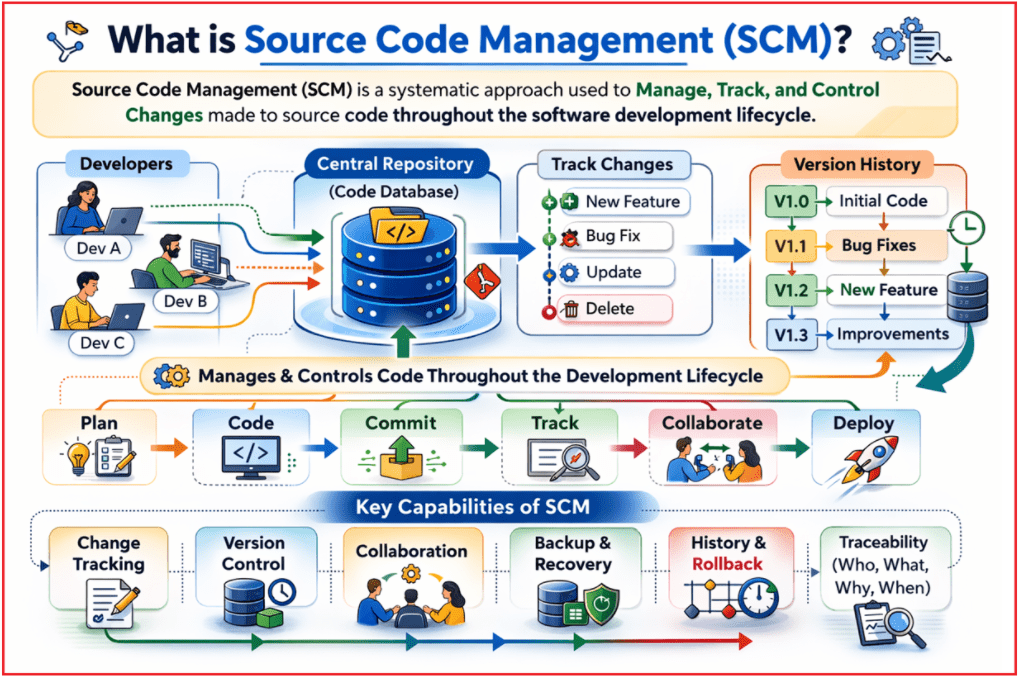
SCM acts as a Central Authority and History Keeper for source code. It maintains a complete record of how the codebase has changed over time, who made those changes, and why. This historical record is essential for understanding an application’s growth and maintaining long-term code quality.
SCM Ensures that:
- Every change made to the code is recorded
- Older versions of the code are safely preserved
- Multiple developers can work simultaneously
- Code integrity and consistency are maintained
- Developers can revert to earlier stable versions when needed
Why is SCM Needed in Software Development?
Software development is a Continuous, Incremental, and Collaborative Process. In real-world projects, code is not written once and finalized; it evolves constantly as new requirements come, bugs are fixed, performance is optimized, and existing code is refactored. Managing these frequent changes manually is unreliable, error-prone, and does not scale as the project or team grows.
Modern applications are usually developed by Multiple Developers, often working simultaneously and sometimes from different locations. Without a proper system, teams may resort to unsafe practices such as copying folders, renaming files with dates, or sharing code via email. These approaches quickly become messy and disorganized, making it difficult to identify the latest version, recover earlier code, or understand who made specific changes. SCM ensures that code changes are handled in a controlled and professional manner throughout the development lifecycle.
SCM is needed because it:
- Maintains a complete and reliable history of all code changes
- Allows developers to recover or roll back to earlier stable versions
- Prevents accidental loss or overwriting of code
- Enables multiple developers to work in parallel safely
- Provides traceability by recording who changed what and why
- Supports continuous development and frequent releases
In professional software development, SCM is not optional—it is a fundamental requirement for building stable, maintainable, and scalable applications.
What is Version Control?
Version Control is the Core Concept Behind Source Code Management (SCM). It refers to the process of Tracking, Managing, and maintaining multiple versions of source code files over time. Instead of treating code as a single, static set of files, version control treats it as an evolving timeline where every meaningful change is recorded and preserved.
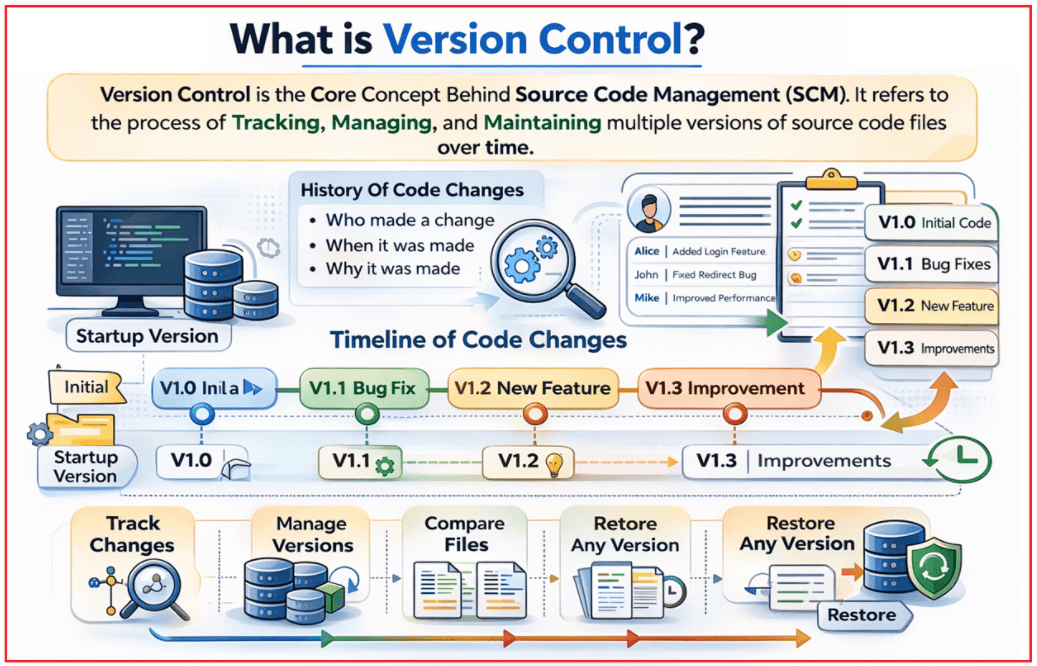
Conceptually, version control views source code as a timeline of changes. Each meaningful set of modifications is recorded as a new version, creating a stable snapshot of the project at a specific point in time. This allows developers to move backward or forward through the project’s history whenever needed.
Version control systems provide:
- A history of all code changes
- Metadata such as who made a change, when it was made, and why
- Tools to compare different versions of the same file
- The ability to restore any previous version safely
Difference Between File Backup and Version Control
File backup and version control may look similar because both involve storing copies of files. However, they serve fundamentally different purposes.
- File backup mainly focuses on recovery: It keeps copies of files so you can restore them if something is lost.
- Version control focuses on evolution and collaboration: It continuously tracks how the code changes over time and supports teamwork in a structured way.
Backups store files at certain points in time, but they usually don’t capture what changed, who changed it, and why. Version control systems record changes as a meaningful history, allow comparisons between versions, and provide safe mechanisms for rolling back and merging work from multiple developers.
Key Points to Remember:
- Backups store copies of files; version control tracks changes and versions
- Backup is mainly for recovery; version control is for change history + collaboration
- Backups don’t store context (author/reason); version control preserves intent and metadata
- Backups are manual or scheduled; version control is continuous as you work
- Backups are individual-focused; version control supports teamwork, merging, and conflict handling
- Version control allows easy comparison and rollback; backups usually do not
Backups save copies for recovery, while version control manages the full history of changes and enables safe collaboration.
What is Git?
Git is a Distributed Version Control System used to implement Source Code Management (SCM) in real-world software development. Distributed means every developer has a complete copy of the project and its full change history on their own machine. This design improves performance, increases reliability, and allows developers to work even without an internet connection. Developers can track changes locally and later share them with others via remote repositories.

Difference Between Push Changes and Pull Changes
- Push Changes means sending your local code changes from your system to a shared remote repository. After you commit your work locally, pushing makes those changes available to other team members, keeping everyone in sync with your updates.
- Pull Changes means bringing the latest code updates from the remote repository into your local system. It ensures that your local copy includes changes made by other developers, so you can work on the most recent, correct version of the project.
Key Points to Remember:
- Git is a Distributed Version Control System for managing code changes
- Every developer has the full repository history locally.
- Records project progress as snapshots (versions) and stores history efficiently.
- Supports offline work with fast local operations.
- Provides strong branching and merging for parallel development.
Git is a distributed version control system that tracks code history locally, supports branching/merging, and enables reliable teamwork.
What is a Distributed Version Control System?
A Distributed Version Control System (DVCS) is a version control model where every developer has a complete copy of the repository, including the full history of changes, on their own machine. Unlike centralized systems, there is no single point where the code exists; each local repository is fully functional and self-contained.
In a DVCS, developers work locally and independently, and only use a shared remote repository to exchange changes with others. This design makes development faster, safer, and more flexible, especially for teams working in parallel or from different locations.
What is a Git Repository?
A Git Repository is a Structured Storage System where Git manages a project’s source code along with its Complete Change History. It represents not only the current state of a project but also every state the project has gone through over time.
A repository contains all the information Git needs to track and manage the code, including files, commit history, branches, and configuration details.
A Git repository includes:
- Source code files
- Commit and version history
- Branch and merge information
- Configuration and metadata
Types of Git repositories:
- Local Repository: Exists on a developer’s machine and allows offline work
- Remote Repository: Hosted on a shared server to enable team collaboration
Once a project is placed inside a Git repository, Git can fully track, manage, and control all changes made to the code.
Difference Between Git and Git Repository:
Git and a Git Repository are closely related concepts in Source Code Management, but they are not the same. Git is the tool that performs version control operations, while a Git Repository is the storage structure where those operations are applied and recorded.
When we say Git, we’re talking about the tool/software – the version control system installed on our machine that provides commands like git init, git commit, git push, etc. It defines how version control works: branching, merging, storing snapshots, talking to remotes, and so on.
A Git repository, on the other hand, is the project’s storage area where Git keeps our files, history, commits, branches, and tags. Repositories can live locally on our system or remotely on services like GitHub. Git (the tool) operates on repositories; without a repository, Git has nothing to manage.
What They Are
- Git = the Distributed Version Control System (software + commands).
- Git repository = the data store that contains your project files and complete history.
Role in SCM
- Git provides all the operations: init, add, commit, branch, merge, push, pull, etc.
- A Git repository is the place where the results of those operations are saved (snapshots, commits, branches).
Location
- Git is installed once per machine (like any other program/CLI).
- Git repositories are per project – you can have many repos on the same machine (each folder with its own hidden .git directory).
Local vs Remote
- Git runs both for local work and when interacting with remote servers. A Git repository can be:
-
- Local repo on your laptop/PC.
- Remote repo hosted on platforms like GitHub / GitLab / Azure Repos.
-
Dependency Relationship
- You can install Git without any repositories yet—that just gives you the tool.
- You cannot have a Git repository that’s useful without Git itself—Git is what understands and manipulates that repository.
Analogy
- Git is like a photo-management app (with features like import, edit, and organize).
- A Git repository is like the photo library where all those photos and edits are stored.
Why Git Is Widely Used in the Industry?
Git has become the Industry Standard Version Control System because it aligns perfectly with real-world software development needs. Modern development requires fast iteration, frequent releases, and collaboration among multiple developers, and Git supports all of these without compromising stability or performance.
Organizations prefer Git because it scales smoothly from small projects to enterprise systems and works well with today’s development ecosystem. It supports distributed work, enables parallel development through branching and merging, and integrates easily with popular platforms and tools used in professional workflows.
Key Points to Remember:
- Free and open-source, making it accessible to everyone
- Scales well for both small and large projects
- Supports distributed development (work locally, share through remotes)
- Excellent support for parallel development using branches and merges
- Strong ecosystem and community support
- Integrates well with IDEs such as Visual Studio
Today, knowledge of Git is considered a fundamental skill for software developers and is expected in almost every development role.
Conclusion:
In conclusion, Source Code Management (SCM) is essential for building software in a safe, organized, and team-friendly way. It helps developers track every change, maintain a reliable history, recover earlier stable versions when needed, and collaborate confidently without losing work, making software development more stable and maintainable in the long run.
About the Author: Pranaya Rout
Pranaya Rout has published more than 3,000 articles in his 11-year career. Pranaya Rout has very good experience with Microsoft Technologies, Including C#, VB, ASP.NET MVC, ASP.NET Web API, EF, EF Core, ADO.NET, LINQ, SQL Server, MYSQL, Oracle, ASP.NET Core, Cloud Computing, Microservices, Design Patterns and still learning new technologies.
Watch the Complete Video Explanation
If you want a clear, practical understanding of Git Repositories in ASP.NET Core using Visual Studio, I’ve explained everything step by step in this video.
The video covers local vs remote repositories, how Visual Studio works with Git internally, and real-world best practices that every .NET developer should know before working on team projects.
👉 Watch the full video here: https://youtu.be/5vxY5f93mXM
This video is especially useful for beginners, students, or working professionals who want clarity without confusion.