
Back to: Microservices using ASP.NET Core Web API Tutorials
OData in ASP.NET Core Web API
In this Post, I will explain OData in ASP.NET Core Web API. Modern applications demand flexible, efficient, and standardized APIs that allow clients to query exactly the data they need—no more, no less. This is where OData (Open Data Protocol) plays an important role in ASP.NET Core applications.
What is OData?
OData (Open Data Protocol) is an open standard for building HTTP/REST-style APIs, allowing clients to request data exactly as needed. Normally, to support Filtering, Sorting, Paging, or Selecting Specific Fields, we may end up creating many different endpoints. With OData, clients can do these using Standard Query Options in the URL, making the API more flexible without creating multiple endpoints.
In simple terms, OData makes an API Smart and Query-Friendly. The API still returns data (typically JSON), but the client decides how much data to fetch, which fields to return, and how to order the results, all through the request URL. For a better understanding of OData, please see the following image.
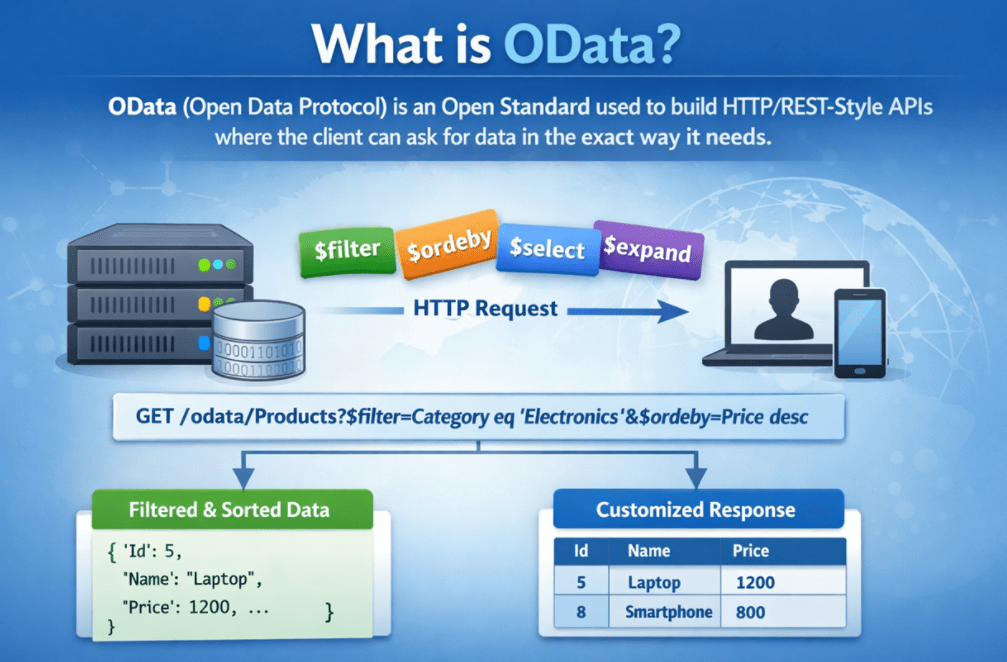
Key Points to Remember:
- OData is a protocol (a set of rules), not a framework.
- It works over HTTP and fits naturally with REST-style Web APIs.
- It allows clients to use URL Query Options to shape the response:
-
- Filter Data: $filter
- Sort Data: $orderby
- Paging: $top and $skip
- Select Specific Fields: $select
- Get Related Data (like joins): $expand
-
- It provides a Metadata Endpoint ($metadata) that helps clients understand the structure of our API data.
In simple terms, OData is a standard for building APIs that allow clients to query and shape data using the request URL.
Why Do We Need OData in ASP.NET Core Web API?
In ASP.NET Core Web API, we need OData because normal Web APIs usually return a fixed response. Whenever the UI team asks for small changes, like “filter by city”, “sort by name”, “return only Id and Name”, “load related data”, or “add paging”, developers often end up Adding New Endpoints or modifying existing code again and again. Over time, this creates too many APIs, repeated logic, and harder maintenance.
OData solves this by providing the client with a standard way to query and shape data using request URL parameters (for example: $filter, $orderby, $select, $expand, $top, $skip). That means one endpoint can support many query scenarios. For a better understanding of why we need OData in ASP.NET Core Web API, please see the following image.
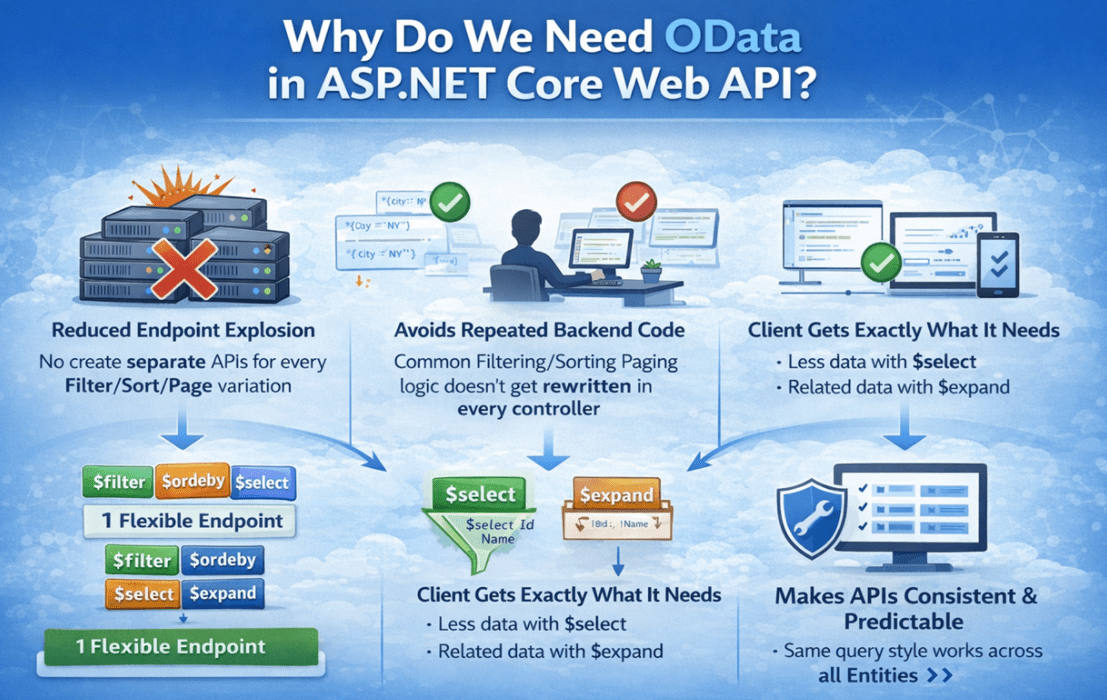
Key Points to Remember:
- Reduces Endpoint Explosion: No need to create separate APIs for every Filter/Sort/Page variation.
- Avoids Repeated Backend Code: Common Filtering/Sorting/Paging logic doesn’t get rewritten in every controller.
- Client Gets Exactly What It Needs:
-
- Less data with $select (Prevents Over-Fetching)
- Related data with $expand (Helps Avoid Multiple Calls)
-
- Makes APIs Consistent and Predictable: The same query rules apply across different Entities/Modules.
- Great For Data-Driven Apps: Ideal for Dashboards, Reports, Admin Panels, Analytics Screens, and enterprise systems where query needs change frequently.
- Improves Maintainability: Fewer Endpoints + Standardized Query Style = Easier to support and evolve.
So, in simple terms, we need OData in ASP.NET Core to build flexible APIs where a single endpoint can support multiple data query requirements without creating multiple separate APIs.
When Should We Use OData in ASP.NET Core Web API?
OData should be used when your API is Data-Centric and the client (UI, Mobile App, or Another System) needs Flexible Querying, such as Filtering, Sorting, Paging, Selecting Fields, and Expanding Related Data, without creating new endpoints for every new requirement. It is most helpful in real projects where screens like grids and reports keep changing, and multiple clients consume the same API in different ways.
Use OData When:
- Your endpoints are List/Search/Grid Based (Admin Panels, Dashboards, Reporting Pages).
- Clients need Dynamic Filtering, Sorting, Paging, and Field Selection.
- Multiple clients (Web, Mobile, BI Tools) need Different Query Combinations on the same data.
Avoid OData When:
- Your API is Very Simple, and responses are always fixed.
- Your endpoints are workflow and command-heavy (Place Order, Approve Payment, Submit Application), and the response shape must be tightly controlled.
In simple words: Use OData for Query-Heavy, data-browsing endpoints (grids/reports/dashboards), and avoid it for simple or workflow-based APIs.
Core Building Blocks of OData
OData is built on a well-defined Data Model called the Entity Data Model (EDM). This model describes the data the API exposes and its structure. Because of this model, OData can apply Filtering, Sorting, Paging, and Relationship Loading in a Consistent and Predictable Way.
To understand how OData works internally, it is important to understand its Core Building Blocks. For a better understanding of the Core Building Blocks of OData, please see the following image.

Entity Type
An Entity Type represents a single business object. It defines the structure of data, including properties and a unique key.
- Represents a single record
- Contains properties
- Must have a key
- Comparable to a model or entity class
Entity Set
An Entity Set is a collection of entities of the same type. It is what gets exposed as an endpoint in OData.
- Represents a collection
- Exposed through a URL
- Supports querying and navigation
- Comparable to a table or list
Complex Types
A Complex Type represents structured data that does not have its own identity. It cannot exist independently.
- Has no key
- Cannot be queried directly
- Used only as part of an entity
- Helps in structuring data cleanly
Navigation Properties
Navigation Properties define relationships between entities. They allow clients to navigate from one entity to related entities.
- Represent relationships
- Enable loading related data
- Support one-to-one and one-to-many relationships
- Used with $expand
EDM (Entity Data Model)
The Entity Data Model (EDM) is the blueprint of the OData service. It describes all entity types, relationships, and structures.
- Defines the shape of data
- Drives metadata generation
- Acts as a contract between the client and the server
- Enables query validation
In simple words, OData works on top of an EDM model, and its core building blocks (Entity Type, Entity Set, Complex Type, Navigation Properties) define what data is exposed and how clients can query it consistently.
OData Query Options
OData Query Options are Standardized Keywords that allow clients to control how data is returned from an API. These options always start with the $ symbol and are appended to the URL. Multiple query options can be combined using the & operator, making a single API endpoint powerful and flexible. For a better understanding of OData Query Options, please see the following image.
$filter – Filtering Data:
Used to return only records that match specific conditions.
- Example: /odata/Products?$filter=Price gt 100
- Supports comparison operators:
-
- eq – Equal to
- ne – Not equal to
- gt – Greater than
- ge – Greater than or equal to
- lt – Less than
- le – Less than or equal to
-
- Supports logical operators: and, or, not
- Supports functions like contains, startswith, endswith
- Reduces unnecessary data and improves performance
$orderby – Sorting Data:
Used to sort the result set by one or more fields.
- Example: /odata/Products?$orderby=Price desc
- Supports ascending and descending order
- Allows multi-column sorting. Example: /odata/Products?$orderby=IsActive desc, Price asc
- Keeps sorting logic out of backend code
$select – Choose Only Required Fields:
Used to return only selected properties in the response.
- Example: /odata/Products?$select=Id,Name,Price
- Prevents over-fetching
- Reduces payload size
- Improves response time, especially for list and grid screens
$expand – Load Related Data:
Used to include related entities using navigation properties.
- Example: /odata/Products?$expand=Images
- Supports nested selection: odata/Products?$select=Id,Name,Price&$expand=Images($select=Id,ImageUrl,IsPrimary)
- Reduces multiple API calls
- Must be controlled to avoid expensive queries
$top and $skip – Pagination:
Used to control how many records are returned and from where.
- $top = number of records to return
- $skip = number of records to skip
- Example: /odata/Products?$skip=10&$top=10
- Essential for large datasets and scalable APIs
$count – Total Number of Records:
Used to return the total number of matching records.
- Example: /odata/Products?$count=true
- Useful for pagination UI and result counts
- Often used with $top and $skip
Combining Query Options – Real Power of OData:
Multiple query options can be combined in a single request.
- Example: /odata/Products?$filter=Price gt 100&$orderby=Price desc&$top=10&$select=Id,Name,Price&$count=true
- One request handles filtering, sorting, paging, projection, and count
- Ideal for data grids, search screens, dashboards, and reports
- No backend code changes required.
In simple words, OData query options allow clients to filter, sort, page, select fields, and load related data using the URL, making a single API endpoint flexible and powerful.
OData Functions and Actions
OData supports more than just normal CRUD (Create, Read, Update, Delete). When we need to expose Custom Business Operation such as “Calculate Tax”, “Get Top-Selling Products”, “Approve an Order”, or “Bulk Cancel Orders”, OData provides two built-in ways to do it: Functions and Actions.
The key difference is simple: Functions are Read-Only (No Side Effects), while Actions can Change Data (Side Effects). Both are defined in the OData Model (EDM), so they are discoverable to clients and follow a consistent standard. For a better understanding of OData Functions and Actions, please have a look at the following image.
Functions (Read-only Operations)
- Used when the operation should NOT modify data.
- Safe for calculations, lookups, and derived results.
- No side effects (server state remains unchanged)
- Can accept parameters and return values
- Commonly called GET-style operations
Actions (Command Operations)
- Used when the operation can modify data.
- Best for workflows and commands such as approval, cancel, submit, and publish.
- May change server state (side effects allowed)
- Commonly called POST-style operations
In simple words: In OData, Functions are for read-only operations (no side effects), while Actions are for commands that can change data and update server state.
Is OData a Replacement for REST?
No, OData is not a replacement for REST. REST is a broad Architectural Style that defines how APIs should be designed (resources, URLs, HTTP verbs, stateless communication). OData operates within the REST/HTTP world and provides a standard, predictable way to query and shape data from resource endpoints.
A simple way to remember it is: REST decides “what the endpoint is”, while OData decides “how the client can query the data from that endpoint.” Many real projects use both REST endpoints for workflow actions (such as placing an order) and OData endpoints for query-heavy screens (such as searching and listing orders).
Key Points to Remember:
- REST = Architectural Style, OData = Protocol/Standard on top of HTTP for queryable data.
- OData follows REST Principles and uses the same HTTP verbs (GET, POST, PUT, DELETE).
- REST Provides Structure, and OData adds query capabilities such as $filter, $orderby, $select, $top, $skip, and $expand.
- You can mix REST and OData in the same ASP.NET Core application:
-
- Use REST for Actions/Workflows (e.g., PlaceOrder, ApprovePayment)
- Use OData for Data Browsing/Search Screens (e.g., ListProducts, SearchOrders)
-
So, in simple words, OData does not replace REST. It enhances REST APIs by adding a standardized way for clients to query and shape data through the URL.
Is OData Similar to GraphQL?
OData and GraphQL share a similar goal but differ in Approach. Both help clients avoid over-fetching (getting too much data) and under-fetching (requiring multiple calls) by allowing them to request the exact data shape they need.
The main difference is how the client sends the query. OData stays close to REST and uses Standard URL Query Options (such as $filter, $select, and $expand) on top of resource endpoints (such as/Products). GraphQL uses a Query Language (usually sent in the request body) and typically exposes a single endpoint, where the server resolves the query using resolvers.
Key Points to Remember:
- Same Goal, Different Style
-
- Both provide flexible data fetching and data shaping.
- Both can return only the needed fields and related data in one call.
-
- How Queries Are Written
-
- OData: URL-based options (e.g., $filter, $orderby, $select, $expand)
- GraphQL: Query document (fields + nested fields + arguments) sent to a GraphQL endpoint
-
- REST friendliness
-
- OData: Fits naturally into REST-style APIs and resource URLs
- GraphQL: Introduces a different API style (single endpoint + schema + resolvers)
-
- Caching & HTTP behaviour
-
- OData: Often uses GET, which is naturally cache-friendly.
- GraphQL: Commonly uses POST, so caching usually needs an extra strategy.
-
- Deciding which one to use
-
- Choose OData when you already have REST APIs and need powerful querying quickly.
- Choose GraphQL when you want maximum client-driven flexibility and can invest in schema + resolver design.
-
In simple words, OData and GraphQL solve the same problem of flexible data querying, but OData does it using REST-friendly URL queries, while GraphQL uses a separate query language and execution model.
OData provides a powerful and standardized way to build Data-Centric APIs in ASP.NET Core. By combining a strong data model (EDM), rich query options, and metadata, OData enables clients to request exactly the data they need while keeping APIs clean and maintainable. When used in the right scenarios—such as dashboards, reports, and admin panels—OData greatly reduces API complexity and improves long-term scalability, while still working seamlessly alongside traditional REST endpoints.
About the Author: Pranaya Rout
Pranaya Rout has published more than 3,000 articles in his 11-year career. Pranaya Rout has very good experience with Microsoft Technologies, Including C#, VB, ASP.NET MVC, ASP.NET Web API, EF, EF Core, ADO.NET, LINQ, SQL Server, MYSQL, Oracle, ASP.NET Core, Cloud Computing, Microservices, Design Patterns and still learning new technologies.
Video Tutorial Available:
If you want to understand OData in ASP.NET Core Web API with clear explanations and real-world scenarios, I’ve created a detailed video that walks you through the concepts step by step.
In this video, you’ll learn how to use $filter, $orderby, $select, $expand, paging, and counting to build flexible and queryable APIs for admin grids, dashboards, and enterprise applications.
👉 Watch the complete video here: https://youtu.be/SgBb0ioAalg