
Back to: Microservices using ASP.NET Core Web API Tutorials
CORS in ASP.NET Core Web API Microservices
In a typical Microservices-Based Architecture, the frontend application (Angular, React, or Vue) is hosted on one origin, while the backend APIs, usually exposed through an API Gateway, are hosted on a different origin. When a browser-based application tries to call these APIs using JavaScript (or jQuery AJAX), the browser’s security model automatically applies the Same-Origin Policy (SOP) and blocks cross-origin access by default.
CORS (Cross-Origin Resource Sharing) is the standardized mechanism that allows servers to explicitly tell the browser which cross-origin requests are safe. By configuring CORS correctly, backend services can safely expose APIs to browser-based clients while still respecting the browser’s built-in security rules.
What is the Same-Origin Policy (SOP)?
The Same-Origin Policy (SOP) is a fundamental security rule enforced by web browsers that defines how websites are isolated from one another within a user’s browser. It ensures that JavaScript code running on one website cannot freely access data from another website, even if both are open in the same browser session.

Every web page loaded in a browser is assigned an origin, which is determined by the strict combination of:
- Scheme (Protocol) – http or https
- Host (Domain) – such as example.com
- Port – such as 80, 443, or 4200
All three must match exactly for two URLs to be considered the same origin. If even one component differs, the browser treats them as different origins.
The primary purpose of SOP is to protect users. A user may be logged into sensitive systems such as banking portals, email accounts, or admin dashboards while browsing other websites. SOP prevents a malicious site from silently reading private data from those trusted sites using JavaScript.
Key idea to remember:
- SOP is enforced by the Browser.
- SOP protects user data inside the browser.
- SOP is not a Server-Side Security mechanism.
What SOP Restricts and Why That Matters?
SOP primarily restricts cross-origin data access from JavaScript, preventing one site from stealing or spying on another site’s protected information. By default, SOP prevents a page from:
- Reading Cross-Origin API responses (even if the request is sent and the server responds).
- Accessing Cross-Origin Cookies and Session-Protected context.
- Reading or Manipulating Cross-Origin DOM content.
- Accessing Cross-Origin browser storage like localStorage and sessionStorage.
Why this matters:
Without these restrictions, any random website could use your browser (where you are already logged in) to fetch and read sensitive information from other sites. A key point to remember is that SOP does not block HTTP requests. Instead, it blocks JavaScript from accessing the response data.
This means:
- The browser may successfully send a request
- The server may process it and return a response
- The network tab may show a 200 OK
- Yet JavaScript is still denied access to the response
SOP allows requests but controls who can see the response.
How Does Same-Origin Policy (SOP) Work?
When the browser loads a web page, it assigns that page an origin. From that moment on, the browser acts like a security guard: it allows the page’s JavaScript to freely interact with resources from the same origin, but restricts cross-origin access. Importantly, SOP often does not stop the HTTP request from being sent; it stops JavaScript from reading the response (or blocks the request entirely in preflight scenarios).
- Browser compares: Page Origin vs API Origin
- If the same → Response is accessible to JavaScript
- If different → Browser blocks JavaScript from accessing cross-origin response data
- SOP is enforced by browsers, not by servers
Let’s understand the scenarios with examples. For a better understanding, please refer to the following diagram.
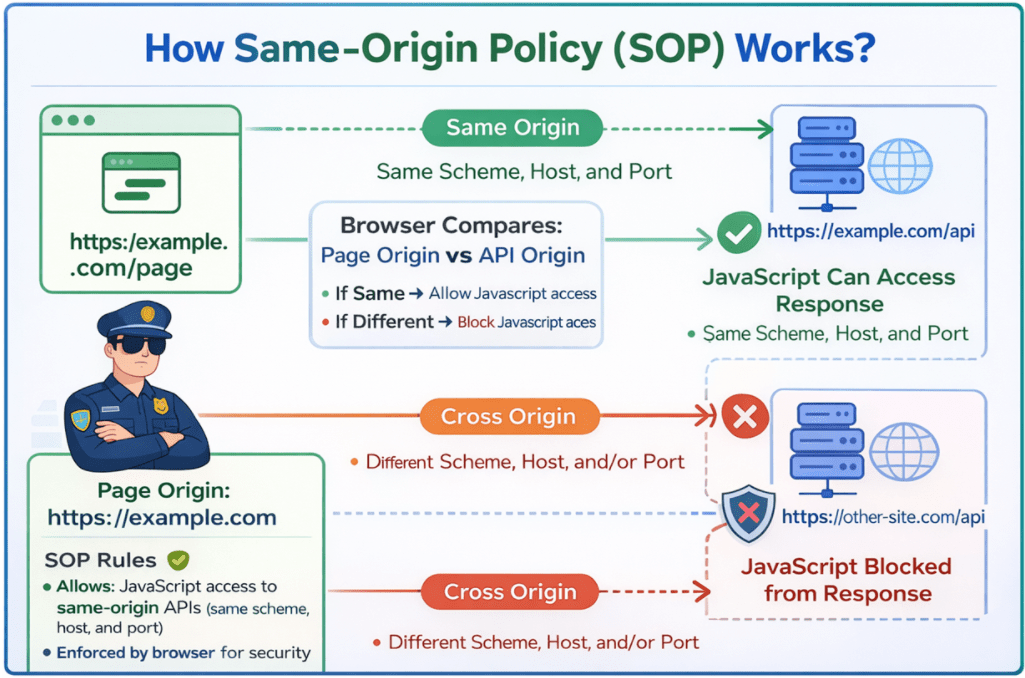
Same-Origin Request
- Client URL (Web Page): https://example.com/page
- Server URL (API): https://example.com/api
- Result: The AJAX request succeeds because both URLs share the same origin, i.e., the same protocol (https), domain (example.com), and port (default 443). No special permissions are needed.
Cross-Origin Request
- Client URL (web page): https://example.com
- Server URL (API): https://other-sie.com/api
- Result: The browser blocks the AJAX request because the origins (https://example.com vs. https://other-sie.com) are different.
What is CORS in ASP.NET Core Web API?
Cross-Origin Resource Sharing (CORS) is a standard, header-based mechanism that lets a server tell the web browser: It’s safe to share this response with JavaScript running on these approved origins. CORS works on top of SOP, not instead of it:
- SOP blocks Cross-Origin Access by Default (browser safety rule).
- CORS provides a controlled, rule-based exception when the server explicitly allows it.

Key CORS Headers
CORS is entirely driven by a small set of request/response headers. Missing or mismatched headers are the reason CORS randomly fails.
Request Headers (sent by the browser):
- Origin: Identifies the calling origin.
- Access-Control-Request-Method: Sent on preflight, tells the intended method.
- Access-Control-Request-Headers: Sent on preflight requests, specifies the intended request headers.
Response Headers (sent by the server):
- Access-Control-Allow-Origin: Which origin(s) can access the resource?
- Access-Control-Allow-Methods: Which HTTP methods are allowed?
- Access-Control-Allow-Headers: Which request headers are allowed (e.g., Authorization)?
- Access-Control-Max-Age: How long the browser can cache preflight permission?
By setting these headers on the server, CORS enables secure cross-origin requests. These headers instruct the browser on how to handle the cross-origin request.
How Does Cross-Origin Resource Sharing (CORS) Work?
When a client Web Application sends an AJAX request to a Web API hosted on a different origin, the process involves several steps that ensure the request is safe and adheres to the server’s CORS policy. For a better understanding, please have a look at the image below:
Step 1: Preflight Request (Initial Check)
Before sending the actual request, the browser sends a preflight request using the HTTP OPTIONS method to the target server. This preflight request includes information about the intended HTTP Method (e.g., GET, POST) and Headers (including custom headers) of the actual request.
- Purpose: This request asks the server whether the actual request is safe to send, including details about the HTTP method and headers the client intends to use.
- Server Response: The server evaluates the preflight request against its CORS policy and responds with CORS Headers such as Access-Control-Allow-Origin, Access-Control-Allow-Methods, Access-Control-Max-Age, and Access-Control-Allow-Headers to indicate permission.
- If Allowed: The browser proceeds to send the actual request.
- If Denied: The browser blocks the request.
Step 2: Actual Request
- After a positive preflight response, the browser sends the actual AJAX request (e.g., GET, POST) to the server.
- The server processes the request and returns a response (such as JSON or XML).
Step 3: Caching Preflight Results
- To improve performance, browsers cache the server’s response to the preflight request for a time defined by the Access-Control-Max-Age header.
- During this cache period, subsequent requests with the same method and headers skip the preflight step and send the actual request directly.
Why CORS Matters in ASP.NET Core Web API Microservices?
In microservices, CORS becomes important because our system is usually split across multiple domains/subdomains/ports. A frontend (Angular/React/Vue) often runs on one origin (like https://app.company.com) while the API entry point (Gateway) runs on another origin (like https://api.company.com). Since browsers enforce Same-Origin Policy, these calls are treated as cross-origin and will be blocked unless CORS is configured correctly.
CORS is not about whether our API is working. Our APIs can be perfectly healthy, but the browser will still block JavaScript from reading the response if CORS rules are missing or wrong. That’s why teams often face the confusing situation: It works in Postman but fails in the browser.
- Microservices commonly introduce More Origins: UI domain, Gateway domain, Identity domain, CDN domain, and multiple environments (dev/stage/prod).
- Modern SPAs usually send Authorization Headers (JWT) and Custom Headers (X-API-Key, X-Correlation-Id), which often trigger preflight (OPTIONS) requests.
- Without proper CORS, the UI fails, even though the backend services are running fine.
CORS at API Gateway vs Individual Services
CORS should be handled when the browser makes a request to our system. In microservices, the cleanest approach is usually to apply CORS at the API Gateway rather than configuring it in each microservice. This keeps internal services focused on business logic and keeps browser-specific rules at the edge.
CORS at the API Gateway (Recommended)
When CORS is configured at the API Gateway, the browser communicates with a single public endpoint, and the gateway manages cross-origin access consistently.
- Single Control Point: One place to define allowed Origins, Methods, and Headers.
- Consistency: Every route behaves the same for the browser.
- Easy Maintenance: We update the policy once rather than changing multiple services.
- Preflight Efficiency: The gateway can often respond to OPTIONS quickly without calling downstream services.
CORS on Individual Services (Only when needed)
This is used only when the browser can directly call multiple services (publicly exposed services). It is possible, but it increases complexity.
- Policy Duplication: Every service repeats the same rules.
- Configuration Drift: One service forgets to allow a header/method → UI breaks for only some endpoints.
- Larger attack surface: Each service becomes a browser-facing target.
- More Deployment Risk: Environment origins must be kept in sync across services.
When You Actually Need CORS?
We need CORS only in the specific scenario where JavaScript running inside a browser calls an API on a different origin and the browser must allow JavaScript to read the response (or pass preflight). CORS exists for browsers, not for APIs.
We need CORS when all of these are true:
- The client is a browser-based app.
- The browser runs JavaScript.
- The API is on a different origin (scheme/host/port differs).
- JavaScript must be able to read the response (and complete preflight if required).
We usually do NOT need CORS for:
- Service-to-service calls inside the microservices network.
- Backend server calls (scheduled jobs, workers, background services).
- Mobile apps.
- Postman/curl.
- UI and API served from the Same Origin.
Why CORS Applies to JavaScript but Not to Postman or Server-to-Server Calls?
CORS is enforced only by web browsers to protect users from untrusted JavaScript code running inside the browser. When JavaScript makes a cross-origin request, the browser checks CORS rules to decide whether the response can be accessed.
Postman and server-to-server calls do not require CORS because they do not run inside a browser and operate in trusted environments. Since there is no risk of cross-site data theft by browser scripts, the browser’s Same-Origin Policy and CORS rules do not apply. Simple rule: No browser, no JavaScript, no CORS.
Conclusion: Why CORS Matters in Microservices?
CORS is a browser security mechanism, not an API feature, and it is designed to safely enable cross-origin communication for JavaScript running in web browsers. In ASP.NET Core Web API microservices, where the frontend and backend usually run on different origins, understanding CORS is essential to avoid browser-side failures that occur even when APIs are healthy. By applying CORS correctly, preferably at the API Gateway, and knowing when it is actually required, you can build secure, predictable, and maintainable browser-to-API interactions in modern distributed systems.
About the Author: Pranaya Rout
Pranaya Rout has published more than 3,000 articles in his 11-year career. Pranaya Rout has very good experience with Microsoft Technologies, Including C#, VB, ASP.NET MVC, ASP.NET Web API, EF, EF Core, ADO.NET, LINQ, SQL Server, MYSQL, Oracle, ASP.NET Core, Cloud Computing, Microservices, Design Patterns and still learning new technologies.