
Back to: Microservices using ASP.NET Core Web API Tutorials
Implementing CQRS in ASP.NET Core Web API Microservices
In real-world systems, not all requests behave the same way. Some requests modify data (like creating or updating an order), while others only retrieve data (like viewing order details). Mixing both within the same service class results in unorganized code with multiple responsibilities.
Over time, this creates a service class that becomes extremely difficult to maintain. Even small changes can break unrelated sections, and performance tuning becomes harder because read operations typically require high speed while write operations require consistency and validation.
CQRS solves this by clearly separating the application flow into Commands (WRITE) and Queries (READ). This separation immediately improves maintainability, testability, and scalability.
Real-Time Example: Order Module in an E-Commerce System
In an e-commerce OrderService, writes are usually less frequent, but each write is business-critical and often coordinates with other services.
Write Side (Commands) – When Data Changes
- Create Order is a write operation because it creates a new state and usually triggers multiple steps. It may verify the user (UserService), validate the product/stock (ProductService), calculate price/discount/tax/shipping, persist the order and items, and start payment.
- Confirm Order is a write operation because it changes the order status. Typically, it checks payment status (PaymentService), ensures the order is still in a valid state (like Pending), then updates the status and notifies other services.
- Change Order Status (admin/system) is a write operation because it updates the order state and often writes a status-history record for audit. It also needs validation of allowed transitions (e.g., Pending → Shipped is valid, Delivered → Shipped is not).
Read Side (Queries) – when we just read data
Read operations primarily serve UI screens. They should be optimized for Filtering, Pagination, Projection to DTOs, and Speed. Typical read queries include:
- GetOrderById for the order details page.
- GetOrdersByUser for My Orders with pagination.
- GetOrders with filters for admin listing.
- GetOrderStatusHistory for the status timeline.
CQRS fits this module well because write operations are fewer but complex, while read operations are frequent and repeatedly called by the UI.
Implementing CQRS Pattern using MediatR in ASP.NET Core
Once we separate write and read operations conceptually, the next step is to implement them cleanly in code. Now, the next question is: How do we implement this cleanly in our .NET Order Service?
We will implement CQRS in .NET Core using the MediatR library. The MediatR acts like a Messaging Pipeline inside the application:
- We create a Command or Query class.
- We send it using _mediator.Send(…).
- MediatR finds the correct Handler.
- The handler executes logic and returns the result.
This removes direct dependencies between controllers and services, enabling a clean architecture. To understand CQRS clearly, we must first understand its three core building blocks: Command, Query, and Handler.
Command – Write Operations
A Command is a request to perform an action that changes the application state, like inserting, updating, or deleting data.
What a Command Contains
- Input data required to perform the operation
- Intent (what action should happen)
- No business logic
- Usually returns small output (status, id, success value, or sometimes a complex object)
- Immutable after creation
Real-Life Analogy
When you click Place Order on Amazon, you are giving the system an instruction to:
- Create an order
- Reduce stock
- Save transaction details
This is a Command.
Syntax: Creating a Command:
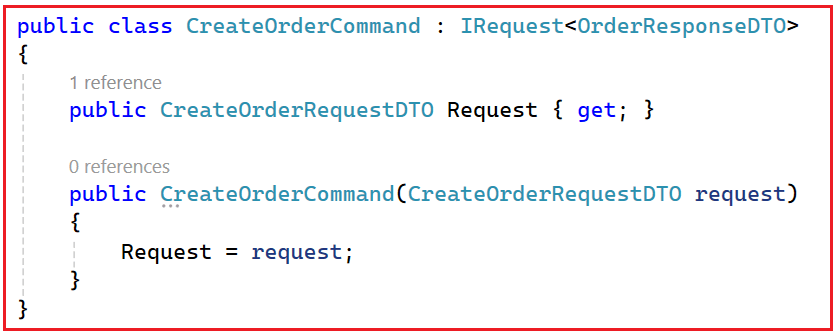
Syntax Explanation
- CreateOrderCommand → This is simply the command type. MediatR uses the type to locate the matching handler.
- IRequest<OrderResponseDTO> → This declares the expected return type for this command. It tells MediatR: when this command is handled successfully, the handler will return an OrderResponseDTO.
- Read-only Properties + Constructor: This is how we make the command immutable. The request data cannot be changed after creation, which prevents accidental side effects across layers.
Query – Read Operations
A Query represents a read request, like fetching an order, listing orders, or returning status history. A query should only retrieve and return data; it must not update anything.
What a Query contains
- Input parameters for the search
- No write operations
- Pure data retrieval
- Returns DTO(s) or a single object
Real-Life Analogy
When you click “Track My Order” on Amazon:
- The system fetches your order status.
- Nothing changes in the database.
This is a Query.
Query Syntax:
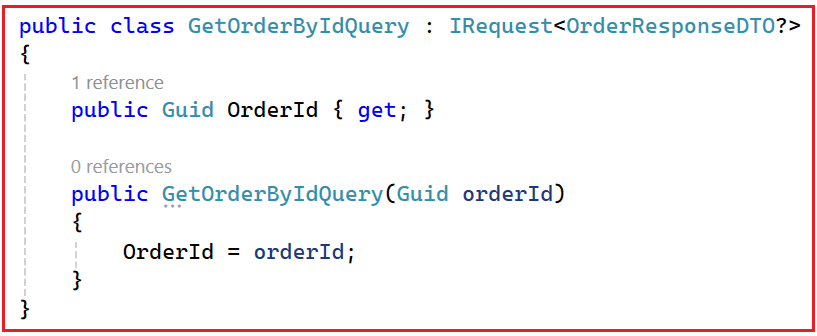
Syntax Explanation
- GetOrderByIdQuery: This is the query type. MediatR uses the type to locate the matching handler.
- IRequest<OrderResponseDTO?>: The ? indicates the order might not exist. Returning nullable is a clean way to reflect “not found” without exceptions for normal read scenarios.
- Minimal input: Queries should carry only what is needed for reading. Here, it is only OrderId. That keeps queries simple and predictable.
Handler – Where Logic Lives
Handlers are the heart of CQRS. Every Command or Query has its own dedicated Handler that contains the Actual Business Logic. This is where MediatR sends the request.
Command Handler (Write-Side Handler)
This handler processes a command and performs changes safely:
- Validates input and business rules
- Loads required entities/aggregates
- Applies domain logic (state changes)
- Saves changes (often using a transaction)
- May raise/publish events if needed
Command Handler Syntax:

Syntax Explanation
- IRequestHandler<CreateOrderCommand, OrderResponseDTO>: This is the MediatR contract. It literally means: I can handle CreateOrderCommand and I will return OrderResponseDTO.
- Handle(…): This is the method MediatR invokes. The parameter is your command object; the return is the response type you declared in IRequest<T>.
- CancellationToken: ASP.NET Core passes this through so long-running operations can be cancelled safely (client disconnect, timeouts). It’s best to pass it down to EF Core calls and HTTP client calls when possible.
Query Handler (Read-Side Handler)
This handler should be optimized for reading. It should focus on fast DB queries, mapping to DTOs, and returning results. It should avoid domain-state changes entirely. That “no state change” rule is what keeps CQRS clean and prevents accidental writes from read endpoints
Query Handler Syntax:
Syntax Explanation
- Only reads data—no modifications
- Maps entity → DTO
- Returns a clean response
How to Use IMediator to Send Commands & Queries
To execute a command/query, we should inject IMediator and call .Send(…) method. The MediatR will find the correct handler, invoke the Handle method, and return the result.
- Sending Command: await _mediator.Send(new CreateOrderCommand(request));
- Sending Query: await _mediator.Send(new GetOrderByIdQuery(orderId));
What MediatR Does Behind the Scenes
- Finds the correct handler
- Executes the handler’s logic by executing the Handle method
- Returns the result to the caller
- Manages dependency flow (no tight coupling)
- Enforces clean, testable architecture
For example, it matches:
- CreateOrderCommand → IRequestHandler<CreateOrderCommand, OrderResponseDTO>
- GetOrderByIdQuery → IRequestHandler<GetOrderByIdQuery, OrderResponseDTO?>
Then it runs the handler’s Handle method and returns the handler’s output.
Step 1 – Add MediatR to OrderService
The first step is to add the MediatR library to the projects where we will use it. We need MediatR in:
- OrderService.Application → because this is where we will define:
-
- Commands
- Queries
- Handlers (business logic)
-
- OrderService.API → because this is where we will register MediatR in the DI container (Program.cs).
Add NuGet Package using Package Manager Console
In both projects (OrderService.Application and OrderService.API), run the following command in the Package Manager Console:
- Install-Package MediatR
Step 2 – Define Order Commands (Write side)
First, create a folder named Orders within the OrderService.Application layer project. Then, add a subfolder named Commands within the Orders folder where we will create all our commands. The commands do not contain logic; they just describe what we want to do with strong types.
CreateOrderCommand.cs
This class represents the intent to create a new order in the system. It does not contain any business logic; instead, it carries all the data required to create an order, such as the order request details and the user’s access token. Keeping the command immutable after creation ensures that the write operation remains predictable and safe as it flows through MediatR to its handler. Create a class file named CreateOrderCommand.cs within the Orders/Commands folder, then copy-paste the following code into it.
using MediatR;
using OrderService.Application.DTOs.Order;

namespace OrderService.Application.Orders.Commands
{
    // CQRS Command:
    // Represents a "WRITE" operation (i.e., it changes system state).
    // This command encapsulates everything needed to create an order:
    // 1) The order creation request payload (CreateOrderRequestDTO)
    // 2) The AccessToken (so the handler can call other microservices securely if needed)

    // This is a CQRS Command that will be handled by a corresponding Command Handler.
    // - It does NOT contain business logic.
    // - It only carries the data required to perform the "Create Order" operation.
    // - MediatR will pass this object to a handler that implements:
    //     IRequestHandler<CreateOrderCommand, OrderResponseDTO>
    // - The handler will return an OrderResponseDTO as the result.
    public class CreateOrderCommand : IRequest<OrderResponseDTO>
    {
        // The payload sent from the API/client containing all
        // the necessary information to create an order (user, items, addresses, etc.).
        // This is read-only (only getter) so the command is immutable after creation,
        // which is a good CQRS practice (commands should not change after being created).
        public CreateOrderRequestDTO Request { get; }

        // JWT / access token of the current user.
        // - The command handler might need to call other microservices (UserService, ProductService, PaymentService)
        //   using the user's identity/authorization context.
        // - This keeps the handler self-sufficient without depending on HttpContext.
        public string AccessToken { get; }

        // Initializes a new instance of the CreateOrderCommand class.
        // Parameters:
        // request: The input DTO coming from the client, containing order details.
        // accessToken: The bearer token used for downstream service calls.
        public CreateOrderCommand(CreateOrderRequestDTO request, string accessToken)
        {
            // Ensure the request DTO is not null.
            // If it is null, the command is invalid because we cannot create an order without data.
            Request = request ?? throw new ArgumentNullException(nameof(request));

            // Ensure access token is not null.
            // If token is null, handler may fail when calling other services or validating the user.
            AccessToken = accessToken ?? throw new ArgumentNullException(nameof(accessToken));
        }
    }
}
ConfirmOrderCommand.cs
This class represents the intent to confirm an existing order after payment verification. It carries only the order identifier and the access token needed for downstream service calls. Its responsibility is limited to describing what should happen (confirm the order), not how it happens, which is handled entirely by the corresponding command handler. Create a class file named ConfirmOrderCommand.cs within the Orders/Commands folder, then copy-paste the following code into it.
using MediatR;
namespace OrderService.Application.Orders.Commands
{
    // CQRS Command:
    // Represents a "WRITE" operation because confirming an order changes the system state
    // (for example, OrderStatus changes from Pending -> Confirmed and events may be published).

    // What this command carries:
    // 1) OrderId     -> Which order should be confirmed
    // 2) AccessToken -> So the handler can securely call other microservices (Payment/User/etc.)
    //                  without depending on HttpContext inside the Application layer.

    // MediatR Flow:
    // - This command will be sent using: IMediator.Send(new ConfirmOrderCommand(...))
    // - MediatR will route it to a handler that implements:
    //     IRequestHandler<ConfirmOrderCommand, bool>
    // - The handler returns a bool:
    //     true  => order confirmed successfully
    //     false => confirmation failed (or you may throw exceptions for failures)
    public class ConfirmOrderCommand : IRequest<bool>
    {
        // The unique identifier of the order we want to confirm.
        // - The handler will:
        //   * Load the order from the database using this ID.
        //   * Validate that the order exists and is in "Pending" state.
        //   * Then confirm it if payment is successful.
        public Guid OrderId { get; }

        // JWT / access token of the current caller.
        // - Used by the handler to:
        //   * Call PaymentService to verify payment status.
        //   * Call UserService to fetch user details (for events/notifications).
        // - Passing this token into the command makes the handler self-contained,
        //   so it doesn't need direct access to HttpContext or other web-layer details.
        public string AccessToken { get; }

        // Constructor:
        // Creates a new ConfirmOrderCommand instance with the required data.
        // Parameters:
        // orderId     : The ID of the order that needs to be confirmed.
        // accessToken : The bearer token used for downstream service calls
        //               (PaymentService, UserService, etc.).
        public ConfirmOrderCommand(Guid orderId, string accessToken)
        {
            // Simply assign the order ID.
            OrderId = orderId;

            // Ensure access token is not null.
            // If token is null, handler may fail when calling other services or validating security context.
            AccessToken = accessToken ?? throw new ArgumentNullException(nameof(accessToken));
        }
    }
}
ChangeOrderStatusCommand.cs
This class represents the intent to change an order’s status, typically initiated by an admin or a system process. It wraps a request DTO that includes the new status, remarks, and actor information. The command itself remains logic-free and immutable, serving only as a structured message that expresses a state-change request. Create a class file named ChangeOrderStatusCommand.cs within the Orders/Commands folder, then copy-paste the following code into it.
using MediatR;
using OrderService.Application.DTOs.Order;

namespace OrderService.Application.Orders.Commands
{
    // CQRS Command:
    // Represents a "WRITE" operation that changes the status of an existing order.
    //
    // When is this used?
    // - When an admin or a system process wants to:
    //   * Move an order from Pending -> Shipped
    //   * Shipped -> Delivered
    //   * Pending/Confirmed -> Cancelled, etc.
    //
    // What does this command carry?
    // - A ChangeOrderStatusRequestDTO that contains:
    //   * OrderId       : Which order to update
    //   * NewStatus     : The new status (enum)
    //   * ChangedBy     : Who is performing the change (user/system)
    //   * Remarks       : Optional comments or reason
    //
    // IMPORTANT:
    // - This command does NOT contain business logic itself.
    // - It only represents the "intent" to change the status.
    // - MediatR will forward this to a handler that implements:
    //     IRequestHandler<ChangeOrderStatusCommand, ChangeOrderStatusResponseDTO>
    // - The handler will:
    //   * Validate the order
    //   * Apply the new status
    //   * Persist changes
    //   * And return a ChangeOrderStatusResponseDTO describing the outcome.
    public class ChangeOrderStatusCommand : IRequest<ChangeOrderStatusResponseDTO>
    {
        // The payload sent from the API/client containing the details required
        // to change the order status.
        // Typical fields inside ChangeOrderStatusRequestDTO might be:
        // - OrderId
        // - NewStatus
        // - Reason / Remarks
        // - UpdatedBy (optional)

        // The property is read-only (getter only), so once the command is created,
        // you cannot change the request inside it. This is a good CQRS practice:
        // commands should be immutable after creation.
        public ChangeOrderStatusRequestDTO Request { get; }

        // Constructor:
        // Creates a new ChangeOrderStatusCommand with the provided request DTO.
        // Parameters:
        // request : The DTO that contains all details required to change the order status.
        public ChangeOrderStatusCommand(ChangeOrderStatusRequestDTO request)
        {
            // Validate that the request is not null.
            // If the request is null, the command is invalid because we don't know:
            // - which order to update
            // - what status to set
            // - who is performing the change, etc.
            Request = request ?? throw new ArgumentNullException(nameof(request));
        }
    }
}
Step 3 – Implement Command Handlers
Now we will implement handlers that contain the business logic. First, add a subfolder named Handlers within the Orders folder, and then add another subfolder named Commands within the Orders/Handlers folder, where we will create all our handlers related to Commands.
CreateOrderCommandHandler.cs
This handler contains the full business workflow for order creation. It validates the user, checks product availability, builds the order aggregate, calculates pricing, persists data, initiates payment, and publishes integration events when required. This class is the central orchestration point for creating an order and clearly demonstrates why CQRS handlers are more than simple CRUD operations. Create a class file named CreateOrderCommandHandler.cs within the Orders/Handlers/Commands folder, then copy-paste the following code into it.
using AutoMapper;
using MediatR;
using Messaging.Common.Events;
using Messaging.Common.Models;
using Microsoft.Extensions.Configuration;
using Microsoft.Extensions.Logging;
using OrderService.Application.DTOs.Order;
using OrderService.Application.Orders.Commands;
using OrderService.Contracts.DTOs;
using OrderService.Contracts.Enums;
using OrderService.Contracts.ExternalServices;
using OrderService.Contracts.Messaging;
using OrderService.Domain.Entities;
using OrderService.Domain.Enums;
using OrderService.Domain.Repositories;
namespace OrderService.Application.Orders.Handlers.Commands
{
// CQRS Command Handler:
// Handles the CreateOrderCommand and returns an OrderResponseDTO.
// Business meaning:
// - This is the "WRITE" side operation that:
// 1) Validates user and addresses via User Microservice.
// 2) Validates product stock via Product Microservice.
// 3) Builds the Order aggregate with items, policies, and pricing.
// 4) Calculates discount, tax, shipping, and total.
// 5) Persists the Order in the database.
// 6) Initiates payment via Payment Microservice.
// 7) For COD:
// * Immediately publishes an OrderPlacedEvent to RabbitMQ so:
// - ProductService can reserve/reduce stock.
// - NotificationService can send order-confirmation messages.
// For Online payment:
// * Returns payment URL and keeps order in Pending state.
public class CreateOrderCommandHandler : IRequestHandler<CreateOrderCommand, OrderResponseDTO>
{
// Repository for reading/writing orders to the database.
private readonly IOrderRepository _orderRepository;
// User Microservice client:
// - Validate that user exists.
// - Manage addresses (save/update).
private readonly IUserServiceClient _userServiceClient;
// Product Microservice client:
// - Validate product stock.
// - Fetch latest product details (price, discount, etc.).
private readonly IProductServiceClient _productServiceClient;
// Payment Microservice client:
// - Initiate payment for NON-COD orders.
private readonly IPaymentServiceClient _paymentServiceClient;
// Master data repository:
// - Fetch cancellation and return policies.
// - Fetch discounts and tax rules.
private readonly IMasterDataRepository _masterDataRepository;
// AutoMapper:
// - Map Order entity -> OrderResponseDTO.
private readonly IMapper _mapper;
// Configuration:
// - Used for shipping configuration (free threshold, charges, etc.).
private readonly IConfiguration _configuration;
// Publisher for OrderPlacedEvent:
// - Sends integration events to RabbitMQ.
private readonly IOrderPlacedEventPublisher _publisher;
// Logger:
// - Used to log errors and diagnostics.
private readonly ILogger<CreateOrderCommandHandler> _logger;
// Constructor:
// All dependencies are injected via DI.
// Note: notificationServiceClient is injected but not stored in a field.
// You can later use it directly for synchronous notifications if needed.
public CreateOrderCommandHandler(
IOrderRepository orderRepository,
IUserServiceClient userServiceClient,
IProductServiceClient productServiceClient,
IPaymentServiceClient paymentServiceClient,
IMasterDataRepository masterDataRepository,
IMapper mapper,
IConfiguration configuration,
IOrderPlacedEventPublisher publisher,
ILogger<CreateOrderCommandHandler> logger)
{
_orderRepository = orderRepository ?? throw new ArgumentNullException(nameof(orderRepository));
_userServiceClient = userServiceClient ?? throw new ArgumentNullException(nameof(userServiceClient));
_productServiceClient = productServiceClient ?? throw new ArgumentNullException(nameof(productServiceClient));
_paymentServiceClient = paymentServiceClient ?? throw new ArgumentNullException(nameof(paymentServiceClient));
_masterDataRepository = masterDataRepository ?? throw new ArgumentNullException(nameof(masterDataRepository));
_mapper = mapper ?? throw new ArgumentNullException(nameof(mapper));
_configuration = configuration ?? throw new ArgumentNullException(nameof(configuration));
_publisher = publisher ?? throw new ArgumentNullException(nameof(publisher));
_logger = logger ?? throw new ArgumentNullException(nameof(logger));
}
// Handle method:
// This is the core logic for creating an order.
// High-level flow:
// 1) Validate basic request (non-null, has items).
// 2) Validate user existence in UserService.
// 3) Resolve shipping/billing address IDs (existing or newly created).
// 4) Validate product availability (stock check).
// 5) Fetch latest product details.
// 6) Build the Order + items (with policies).
// 7) Calculate discounts, tax, shipping, and total.
// 8) Persist the order via repository.
// 9) Initiate payment via PaymentService.
// 10) For COD:
// - Publish OrderPlacedEvent immediately.
// - Return Confirmed order DTO.
// For Online payment:
// - Return Pending order DTO + PaymentUrl.
public async Task<OrderResponseDTO> Handle(CreateOrderCommand command, CancellationToken cancellationToken)
{
// Extract the data from the command.
var request = command.Request;
var accessToken = command.AccessToken;
// 1. Basic validation of the incoming request.
if (request == null)
throw new ArgumentNullException(nameof(request));
// Ensure there is at least one order item.
if (request.Items == null || !request.Items.Any())
throw new ArgumentException("Order must have at least one item.");
// 2. Validate that the user exists in the User Microservice.
// - If user doesn't exist, we cannot proceed with the order.
var user = await _userServiceClient.GetUserByIdAsync(request.UserId, accessToken);
if (user == null)
throw new InvalidOperationException("User does not exist.");
// 3. Resolve Shipping Address ID:
// - If ShippingAddressId is provided, use it.
// - Otherwise, if ShippingAddress DTO is provided, save it via UserService and get its ID.
// - This ensures we always have a valid ShippingAddressId to store in the Order.
Guid? shippingAddressId = null;
if (request.ShippingAddressId != null)
{
// Use existing shipping address ID.
shippingAddressId = request.ShippingAddressId;
}
else if (request.ShippingAddress != null)
{
// Create/update shipping address in User Microservice and use the returned ID.
request.ShippingAddress.UserId = request.UserId;
shippingAddressId = await _userServiceClient.SaveOrUpdateAddressAsync(request.ShippingAddress, accessToken);
}
// 4. Resolve Billing Address ID:
// - Same logic as shipping address (existing ID or create new).
Guid? billingAddressId = null;
if (request.BillingAddressId != null)
{
billingAddressId = request.BillingAddressId;
}
else if (request.BillingAddress != null)
{
request.BillingAddress.UserId = request.UserId;
billingAddressId = await _userServiceClient.SaveOrUpdateAddressAsync(request.BillingAddress, accessToken);
}
// Ensure both addresses are present at this point.
if (shippingAddressId == null || billingAddressId == null)
throw new ArgumentException("Both ShippingAddressId and BillingAddressId must be provided or created.");
// 5. Validate product stock availability but DO NOT reduce stock yet.
// - This is just a pre-check; actual stock reduction will be done
// by ProductService when it consumes the OrderPlacedEvent.
var stockCheckRequests = request.Items.Select(i => new ProductStockVerificationRequestDTO
{
ProductId = i.ProductId,
Quantity = i.Quantity
}).ToList();
var stockValidation = await _productServiceClient.CheckProductsAvailabilityAsync(stockCheckRequests, accessToken);
if (stockValidation == null || stockValidation.Any(x => !x.IsValidProduct || !x.IsQuantityAvailable))
throw new InvalidOperationException("One or more products are invalid or out of stock.");
// 6. Retrieve the latest product info for accurate pricing/discount.
// - This ensures we don't rely on stale price data sent from the client.
var productIds = request.Items.Select(i => i.ProductId).ToList();
var products = await _productServiceClient.GetProductsByIdsAsync(productIds, accessToken);
if (products == null || products.Count != productIds.Count)
throw new InvalidOperationException("Failed to retrieve product details for all items.");
try
{
// 7. Fetch policy data from MasterData (if applicable).
int? cancellationPolicyId = null;
int? returnPolicyId = null;
var cancellationPolicy = await _masterDataRepository.GetActiveCancellationPolicyAsync();
if (cancellationPolicy != null)
cancellationPolicyId = cancellationPolicy.Id;
var returnPolicy = await _masterDataRepository.GetActiveReturnPolicyAsync();
if (returnPolicy != null)
returnPolicyId = returnPolicy.Id;
// 8. Prepare order identity and timestamps.
var orderId = Guid.NewGuid();
var orderNumber = GenerateOrderNumberFromGuid(orderId); // Human-friendly readable ID.
var now = DateTime.UtcNow;
// Determine initial order status based on payment method:
// - COD:
// * We treat it as Confirmed immediately.
// * Stock will be reduced after event is processed.
// - Online:
// * Start as Pending until payment is completed.
var initialStatus = request.PaymentMethod == PaymentMethodEnum.COD
? OrderStatusEnum.Confirmed
: OrderStatusEnum.Pending;
// 9. Create the Order entity (aggregate root).
var order = new Order
{
Id = orderId,
OrderNumber = orderNumber,
UserId = request.UserId,
ShippingAddressId = shippingAddressId.Value,
BillingAddressId = billingAddressId.Value,
PaymentMethod = request.PaymentMethod.ToString(),
OrderStatusId = (int)initialStatus,
CreatedAt = now,
OrderDate = now,
CancellationPolicyId = cancellationPolicyId,
ReturnPolicyId = returnPolicyId,
OrderItems = new List<OrderItem>()
};
// 10. Add OrderItems using fresh product data from ProductService.
foreach (var item in request.Items)
{
// Find matching product details.
var product = products.First(p => p.Id == item.ProductId);
order.OrderItems.Add(new OrderItem
{
Id = Guid.NewGuid(),
OrderId = order.Id,
ProductId = product.Id,
ProductName = product.Name,
PriceAtPurchase = product.Price,
DiscountedPrice = product.DiscountedPrice,
Quantity = item.Quantity,
ItemStatusId = (int)initialStatus
});
}
// 11. Calculate pricing (Subtotal, Discount, Tax, Shipping, Total).
// - SubTotalAmount: Sum of price * quantity, before discounts.
order.SubTotalAmount = Math.Round(
order.OrderItems.Sum(i => i.PriceAtPurchase * i.Quantity),
2,
MidpointRounding.AwayFromZero);
// - DiscountAmount: Product-level discounts + best order-level discount.
order.DiscountAmount = Math.Round(
await CalculateDiscountAmountAsync(order.OrderItems),
2,
MidpointRounding.AwayFromZero);
// - TaxAmount: Taxes applied on (Subtotal - Discount).
order.TaxAmount = Math.Round(
await CalculateTaxAmountAsync(order.SubTotalAmount - order.DiscountAmount),
2,
MidpointRounding.AwayFromZero);
// - ShippingCharges: Based on total after discount and config rules.
order.ShippingCharges = Math.Round(
CalculateShippingCharges(order.SubTotalAmount - order.DiscountAmount),
2,
MidpointRounding.AwayFromZero);
// - TotalAmount: Final amount the customer has to pay.
order.TotalAmount = Math.Round(
order.SubTotalAmount - order.DiscountAmount + order.TaxAmount + order.ShippingCharges,
2,
MidpointRounding.AwayFromZero);
// 12. Persist the Order in the database.
var addedOrder = await _orderRepository.AddAsync(order);
if (addedOrder == null)
throw new InvalidOperationException("Failed to create order.");
// 13. Initiate payment via Payment Microservice.
// - Even for COD, you might still record a "zero" or "COD" payment entry.
var paymentRequest = new CreatePaymentRequestDTO
{
OrderId = order.Id,
UserId = order.UserId,
Amount = order.TotalAmount,
PaymentMethod = request.PaymentMethod
};
var paymentResponse = await _paymentServiceClient.InitiatePaymentAsync(paymentRequest, accessToken);
if (paymentResponse == null)
throw new InvalidOperationException("Payment initiation failed.");
// 14. Behavior differs based on payment method:
// Case A: COD (Cash on Delivery)
// - Order is already marked as Confirmed.
// - We immediately publish OrderPlacedEvent so ProductService and NotificationService can act.
if (request.PaymentMethod == PaymentMethodEnum.COD)
{
#region Event Publishing to RabbitMQ
var orderPlacedEvent = new OrderPlacedEvent
{
OrderId = order.Id,
OrderNumber = order.OrderNumber,
UserId = order.UserId,
CustomerName = user.FullName,
CustomerEmail = user.Email,
PhoneNumber = user.PhoneNumber,
TotalAmount = order.TotalAmount,
CorrelationId = order.Id.ToString(),
Items = order.OrderItems.Select(i => new OrderLineItem
{
ProductId = i.ProductId,
Name = i.ProductName,
Quantity = i.Quantity,
UnitPrice = i.PriceAtPurchase
}).ToList()
};
// Publish integration event:
// - ProductService: Reserve/reduce stock.
// - NotificationService: Send order confirmation.
await _publisher.PublishOrderPlacedAsync(orderPlacedEvent);
#endregion
// Map Order -> OrderResponseDTO and adjust status/payment info for COD.
var orderDto = _mapper.Map<OrderResponseDTO>(order);
orderDto.OrderStatus = OrderStatusEnum.Confirmed;
orderDto.PaymentMethod = PaymentMethodEnum.COD;
orderDto.PaymentUrl = null; // No payment URL for COD.
return orderDto;
}
else
{
// Case B: Online Payment
// - Order is in Pending state.
// - We return the payment URL so the client can redirect the user to payment page.
var orderDto = _mapper.Map<OrderResponseDTO>(order);
orderDto.OrderStatus = OrderStatusEnum.Pending;
orderDto.PaymentMethod = request.PaymentMethod;
orderDto.PaymentUrl = paymentResponse.PaymentUrl;
return orderDto;
}
}
catch (Exception ex)
{
// Log the error with user context (UserId) for easier debugging.
_logger.LogError(ex, "Error while creating order for user {UserId}", command.Request.UserId);
// Re-throw the exception so upper layers (API, orchestrator, etc.) can handle it.
throw;
}
}
#region Private Helpers (moved from OrderService)
// Calculates total discount: product-level + best order-level discount.
// Product-level:
// - Based on difference between PriceAtPurchase and DiscountedPrice * Quantity.
// Order-level:
// - Based on active discounts configured in master data.
// - Applies the single "best" discount (highest percentage or amount).
private async Task<decimal> CalculateDiscountAmountAsync(IEnumerable<OrderItem> orderItems)
{
decimal productLevelDiscountTotal = 0m;
// Sum discounts applied on individual products (multiplied by quantity).
foreach (var item in orderItems)
{
productLevelDiscountTotal += (item.PriceAtPurchase - item.DiscountedPrice) * item.Quantity;
}
decimal orderLevelDiscount = 0m;
DateTime today = DateTime.UtcNow.Date;
// Retrieve currently active order-level discounts.
var activeOrderDiscounts = await _masterDataRepository.GetActiveDiscountsAsync(today);
// Select the best discount (simple rule: highest effective value).
var bestOrderDiscount = activeOrderDiscounts
.Where(d => d.IsActive && d.StartDate <= today && d.EndDate >= today)
.OrderByDescending(d => d.DiscountType == DiscountTypeEnum.Percentage
? d.DiscountPercentage ?? 0
: d.DiscountAmount ?? 0)
.FirstOrDefault();
if (bestOrderDiscount != null)
{
// Compute order subtotal AFTER product-level discounts (using DiscountedPrice).
decimal orderSubtotal = orderItems.Sum(i => i.DiscountedPrice * i.Quantity);
if (bestOrderDiscount.DiscountType == DiscountTypeEnum.Percentage &&
bestOrderDiscount.DiscountPercentage.HasValue)
{
// Percentage-based discount on orderSubtotal.
orderLevelDiscount = orderSubtotal * (bestOrderDiscount.DiscountPercentage.Value / 100m);
}
else if (bestOrderDiscount.DiscountType == DiscountTypeEnum.FixedAmount &&
bestOrderDiscount.DiscountAmount.HasValue)
{
// Fixed-amount discount (e.g., ₹200 off).
orderLevelDiscount = bestOrderDiscount.DiscountAmount.Value;
}
}
// Final discount = product-level discounts + best order-level discount.
return productLevelDiscountTotal + orderLevelDiscount;
}
// Calculates total tax based on active tax rules and the taxable amount.
// TaxableAmount:
// - Typically (Subtotal - Discount).
// Tax rules:
// - Fetched from master data.
// - Only active taxes within valid date range are applied.
private async Task<decimal> CalculateTaxAmountAsync(decimal taxableAmount)
{
decimal totalTax = 0m;
DateTime today = DateTime.UtcNow.Date;
var activeTaxes = await _masterDataRepository.GetActiveTaxesAsync(today);
foreach (var tax in activeTaxes)
{
// Apply only active taxes within valid date range.
if (tax.IsActive &&
(!tax.ValidTo.HasValue || tax.ValidTo >= today) &&
tax.ValidFrom <= today)
{
// In this example, we apply tax only to products.
if (tax.AppliesToProduct)
{
totalTax += taxableAmount * (tax.TaxPercentage / 100m);
}
}
}
return totalTax;
}
// Calculates shipping charges based on:
// - Whether shipping charge is enabled.
// - Free shipping threshold.
// - Flat shipping charge from configuration.
private decimal CalculateShippingCharges(decimal orderTotal)
{
bool isShippingAllowed = _configuration.GetValue<bool>("ShippingConfig:IsShippingChargeAllowed");
decimal freeShippingThreshold = _configuration.GetValue<decimal>("ShippingConfig:FreeShippingThreshold");
decimal shippingCharge = _configuration.GetValue<decimal>("ShippingConfig:ShippingCharge");
// If shipping charges are disabled, always return 0.
if (!isShippingAllowed)
return 0m;
// If the order total exceeds the free shipping threshold, no shipping charge.
if (orderTotal >= freeShippingThreshold)
return 0m;
// Otherwise, apply the configured flat shipping charge.
return shippingCharge;
}
// Generates a human-readable Order Number from a GUID.
// Format example:
// ORD20260110ABCDE123
// where:
// - "ORD" : Prefix.
// - "20260110" : Current date (yyyyMMdd).
// - "ABCDE123" : Last 8 characters of GUID (uppercase).
private string GenerateOrderNumberFromGuid(Guid orderId)
{
var prefix = "ORD";
var datePart = DateTime.UtcNow.ToString("yyyyMMdd");
// Get last 8 characters from GUID string (without dashes).
var guidString = orderId.ToString("N"); // N = digits only, no dashes.
var guidSuffix = guidString.Substring(guidString.Length - 8, 8).ToUpper();
return $"{prefix}{datePart}{guidSuffix}";
}
#endregion
}
}
ConfirmOrderCommandHandler.cs
This handler is responsible for safely confirming an order once payment is completed. It validates the order’s current state, verifies the payment status via the Payment microservice, updates the order status, and publishes an integration event for other services such as Product and Notification. All confirmation rules and side effects are centralized here. Create a class file named ConfirmOrderCommandHandler.cs within the Orders/Handlers/Commands folder, then copy-paste the following code into it.
using MediatR;
using Messaging.Common.Events;
using Messaging.Common.Models;
using Microsoft.Extensions.Logging;
using OrderService.Application.Orders.Commands;
using OrderService.Contracts.DTOs;
using OrderService.Contracts.Enums;
using OrderService.Contracts.ExternalServices;
using OrderService.Contracts.Messaging;
using OrderService.Domain.Repositories;

namespace OrderService.Application.Orders.Handlers.Commands
{
    // CQRS Command Handler:
    // Handles the ConfirmOrderCommand and returns a boolean indicating success.

    // Business meaning:
    // - This is the "WRITE" side operation that:
    //   1) Validates that an order is in a Pending state.
    //   2) Verifies payment status with the Payment Microservice.
    //   3) Updates the order status to Confirmed in the database.
    //   4) Publishes an OrderPlacedEvent to RabbitMQ so:
    //        - ProductService can reserve/reduce stock.
    //        - NotificationService can send email/SMS/notification to the user.

    // Why a handler (and not just a service method)?
    // - To implement CQRS with MediatR:
    //   * Controller/Service sends ConfirmOrderCommand.
    //   * MediatR routes it to this handler.
    //   * This handler performs the full confirmation process.
    public class ConfirmOrderCommandHandler : IRequestHandler<ConfirmOrderCommand, bool>
    {
        // Repository for accessing and updating Order data in the database.
        private readonly IOrderRepository _orderRepository;

        // Client for calling the Payment Microservice.
        // - Used to verify that the payment for this order is completed.
        private readonly IPaymentServiceClient _paymentServiceClient;

        // Client for calling the User Microservice.
        // - Used to fetch user details (name, email, phone) for event/notification.
        private readonly IUserServiceClient _userServiceClient;

        // Abstraction over RabbitMQ publisher for OrderPlacedEvent.
        // - Sends the integration event to the broker so other services can react.
        private readonly IOrderPlacedEventPublisher _publisher;

        // Logger for capturing errors and useful diagnostic information.
        private readonly ILogger<ConfirmOrderCommandHandler> _logger;

        // Constructor:
        // ------------
        // All dependencies are injected via DI.
        //
        // Parameters:
        // orderRepository       : For reading/updating orders.
        // paymentServiceClient  : For fetching payment status.
        // userServiceClient     : For fetching user details.
        // publisher             : For publishing OrderPlacedEvent to RabbitMQ.
        // logger                : For logging errors and debugging info.
        public ConfirmOrderCommandHandler(
            IOrderRepository orderRepository,
            IPaymentServiceClient paymentServiceClient,
            IUserServiceClient userServiceClient,
            IOrderPlacedEventPublisher publisher,
            ILogger<ConfirmOrderCommandHandler> logger)
        {
            _orderRepository = orderRepository ?? throw new ArgumentNullException(nameof(orderRepository));
            _paymentServiceClient = paymentServiceClient ?? throw new ArgumentNullException(nameof(paymentServiceClient));
            _userServiceClient = userServiceClient ?? throw new ArgumentNullException(nameof(userServiceClient));
            _publisher = publisher ?? throw new ArgumentNullException(nameof(publisher));
            _logger = logger ?? throw new ArgumentNullException(nameof(logger));
        }

        // Handle method:
        // --------------
        // This is the core logic executed when ConfirmOrderCommand is sent.
        //
        // Steps:
        // 1) Load order by ID.
        // 2) Ensure order is in Pending status.
        // 3) Verify payment info from PaymentService.
        // 4) Ensure payment is Completed.
        // 5) Fetch user details from UserService.
        // 6) Change order status to Confirmed in database.
        // 7) Publish OrderPlacedEvent to RabbitMQ.
        //
        // Returns:
        // - true  : if everything succeeds (including status update + event publishing).
        // - throws: if any validation or operation fails (exceptions are logged).
        public async Task<bool> Handle(ConfirmOrderCommand command, CancellationToken cancellationToken)
        {
            // Extract data from the command.
            var orderId = command.OrderId;
            var accessToken = command.AccessToken;

            // 1. Retrieve the order by its ID from the repository (database).
            //    If no order is found, something is wrong: either a bad ID or stale request.
            var order = await _orderRepository.GetByIdAsync(orderId);
            if (order == null)
                throw new KeyNotFoundException("Order not found.");

            // 2. Only allow confirmation if the order is still in Pending state.
            //    - This prevents:
            //      * Double confirmation.
            //      * Confirming orders that are cancelled or already shipped, etc.
            if (order.OrderStatusId != (int)Domain.Enums.OrderStatusEnum.Pending)
                throw new InvalidOperationException("Order is not in a pending state.");

            // 3. Call the Payment Microservice to fetch the latest payment info for this order.
            //    - We pass OrderId + AccessToken to ensure:
            //      * Correct payment record is loaded.
            //      * Authorization is respected by PaymentService.
            var paymentInfo = await _paymentServiceClient.GetPaymentInfoAsync(
                new PaymentInfoRequestDTO { OrderId = orderId }, accessToken);

            // If PaymentService returns null, we cannot safely confirm the order.
            if (paymentInfo == null)
                throw new InvalidOperationException("Payment information not found for this order.");

            // 4. Ensure payment was successfully completed before confirming the order.
            //    - Business rule: Online orders must only be confirmed if PaymentStatus == Completed.
            //    - If payment is Pending/Failed/Cancelled, we refuse to confirm.
            if (paymentInfo.PaymentStatus != PaymentStatusEnum.Completed)
                throw new InvalidOperationException("Payment is not successful.");

            // 5. Get the user details via User Microservice.
            //    - Needed for:
            //      * Filling event fields (CustomerName, Email, Phone).
            //      * NotificationService to send user-specific messages.
            var user = await _userServiceClient.GetUserByIdAsync(order.UserId, accessToken);
            if (user == null)
                throw new InvalidOperationException("User does not exist.");

            try
            {
                // 6. Change the order status in the database to "Confirmed".
                //    - Source: "PaymentService" (because confirmation is driven by payment success).
                //    - Remarks: For audit trail / order status history.
                bool statusChanged = await _orderRepository.ChangeOrderStatusAsync(
                    orderId,
                    Domain.Enums.OrderStatusEnum.Confirmed,
                    "PaymentService",
                    "Payment successful, order confirmed.");

                // If DB update failed, treat it as a hard failure.
                if (!statusChanged)
                    throw new InvalidOperationException("Failed to update order status.");

                // 7. Create the integration event payload that downstream services need.
                //    - ProductService will:
                //        * Reserve/reduce stock for each item.
                //    - NotificationService will:
                //        * Send confirmation email/SMS/app notification.
                var orderPlacedEvent = new OrderPlacedEvent
                {
                    OrderId = order.Id,
                    UserId = order.UserId,
                    CustomerName = user.FullName,
                    CustomerEmail = user.Email,
                    PhoneNumber = user.PhoneNumber,
                    TotalAmount = order.TotalAmount,
                    CorrelationId = order.Id.ToString(),
                    Items = order.OrderItems.Select(i => new OrderLineItem
                    {
                        ProductId = i.ProductId,
                        Name = i.ProductName,
                        Quantity = i.Quantity,
                        UnitPrice = i.PriceAtPurchase
                    }).ToList()
                };

                // 8. Publish the OrderPlacedEvent to RabbitMQ using the shared publisher.
                //    - Under the hood:
                //        * It sends the message to an exchange (e.g., "ecommerce.topic").
                //        * With a routing key (e.g., "order.placed").
                //    - Multiple services can subscribe to this event.
                await _publisher.PublishOrderPlacedAsync(orderPlacedEvent);

                // Everything succeeded: status updated + event published.
                return true;
            }
            catch (Exception ex)
            {
                // Log the exception with context (OrderId) to help with debugging.
                _logger.LogError(ex, "Error while confirming order {OrderId}", orderId);

                // Re-throw so upper layers (API, orchestrator, etc.) can handle it properly:
                // - Return appropriate HTTP status code.
                // - Trigger compensating actions if needed.
                throw;
            }
        }
    }
}
ChangeOrderStatusCommandHandler.cs
This handler manages controlled order state transitions such as Shipped, Delivered, or Cancelled. It validates the order’s existence, checks whether the transition is valid, updates the status, and records audit information. The handler ensures that invalid or duplicate status changes are prevented, keeping the order lifecycle consistent. Create a class file named ChangeOrderStatusCommandHandler.cs within the Orders/Handlers/Commands folder, then copy-paste the following code into it.
using MediatR;
using Microsoft.Extensions.Logging;
using OrderService.Application.DTOs.Order;
using OrderService.Application.Orders.Commands;
using OrderService.Domain.Enums;
using OrderService.Domain.Repositories;

namespace OrderService.Application.Orders.Handlers.Commands
{
    // CQRS Command Handler:
    // Handles the ChangeOrderStatusCommand and returns a ChangeOrderStatusResponseDTO.

    // Business meaning:
    // - This is the "WRITE" side operation that changes the status of an existing order.
    // - Typical use cases:
    //   * Admin marks an order as Shipped / Delivered / Cancelled.
    //   * System processes (e.g., scheduled jobs) update stale orders.

    // Key responsibilities:
    // - Validate that the order exists.
    // - Validate that the new status is different from the current status.
    // - Persist the new status and status history.
    // - Return a detailed result object describing what happened.
    public class ChangeOrderStatusCommandHandler :
        IRequestHandler<ChangeOrderStatusCommand, ChangeOrderStatusResponseDTO>
    {
        // Repository abstraction for accessing and updating orders in the database.
        private readonly IOrderRepository _orderRepository;

        // Logger to record errors and operational information.
        private readonly ILogger<ChangeOrderStatusCommandHandler> _logger;

        // Constructor:
        // Dependencies are injected via DI.
        // Parameters:
        // orderRepository : Used to load and update orders.
        // logger          : Used to log exceptions and important events.
        public ChangeOrderStatusCommandHandler(
            IOrderRepository orderRepository,
            ILogger<ChangeOrderStatusCommandHandler> logger)
        {
            _orderRepository = orderRepository ?? throw new ArgumentNullException(nameof(orderRepository));
            _logger = logger ?? throw new ArgumentNullException(nameof(logger));
        }

        // Handle method:
        // Executes when a ChangeOrderStatusCommand is sent through MediatR.
        // Steps:
        // 1) Build an initial response object based on the request.
        // 2) Fetch the order and validate its existence.
        // 3) Check current status vs. requested new status.
        // 4) If valid, update the status using the repository.
        // 5) Fill the response (Success/Error) and return it.

        // Returns:
        // - ChangeOrderStatusResponseDTO:
        //   * Contains OldStatus, NewStatus, ChangedBy, Remarks, ChangedAt, Success flag, ErrorMessage.
        public async Task<ChangeOrderStatusResponseDTO> Handle(
            ChangeOrderStatusCommand command,
            CancellationToken cancellationToken)
        {
            // 1. Extract the request DTO from the command.
            //    - The request has: OrderId, NewStatus, ChangedBy, Remarks, etc.
            var request = command.Request;

            // 2. Initialize the response with the basic info from the request.
            //    - We set Success = false by default and only flip it to true if everything goes well.
            var response = new ChangeOrderStatusResponseDTO
            {
                OrderId = request.OrderId,
                NewStatus = request.NewStatus,
                ChangedBy = request.ChangedBy,
                Remarks = request.Remarks,
                ChangedAt = DateTime.UtcNow,
                Success = false
            };

            try
            {
                // 3. Fetch the current order from the database.
                //    - We need the current status and to confirm the order actually exists.
                var order = await _orderRepository.GetByIdAsync(request.OrderId);
                if (order == null)
                {
                    // Order not found – we return a failure response with an appropriate message.
                    response.ErrorMessage = "Order not found.";
                    return response;
                }

                // 4. Capture the current status (old status) of the order.
                //    - This is useful for:
                //       * Returning in the response.
                //       * Logging/auditing.
                var oldStatus = (OrderStatusEnum)order.OrderStatusId;
                response.OldStatus = oldStatus;

                // 5. Prevent no-op updates:
                //    - If the order is already in the requested status, there's nothing to change.
                //    - We treat this as a failure (or a validation warning), not a success.
                if (oldStatus == request.NewStatus)
                {
                    response.ErrorMessage = "Order is already in the requested status.";
                    return response;
                }

                // 6. Attempt to change the status in the repository.
                //    - The repository should:
                //       * Update the Order table.
                //       * Optionally insert into an OrderStatusHistory table.
                bool statusChanged = await _orderRepository.ChangeOrderStatusAsync(
                    request.OrderId,
                    request.NewStatus,
                    request.ChangedBy ?? "System", // Fallback to "System" if ChangedBy is null.
                    request.Remarks);

                // If the repository reports failure, we return an error response.
                if (!statusChanged)
                {
                    response.ErrorMessage = "Failed to update order status.";
                    return response;
                }

                // 7. At this point, the status update succeeded.
                //    - Here is where you could trigger:
                //       * Notifications (email/SMS).
                //       * Domain events / integration events.
                //    - Mark the operation as successful.
                // TODO: Trigger notifications or other side-effects based on new status
                response.Success = true;
                return response;
            }
            catch (Exception ex)
            {
                // 8. If any unexpected exception occurs:
                //    - Log the error with context (OrderId).
                //    - Fill the response with an error message.
                //    - Return the response with Success = false.
                _logger.LogError(ex, "Error while changing order status for {OrderId}", request.OrderId);
                response.ErrorMessage = $"Exception: {ex.Message}";
                return response;
            }
        }
    }
}
Step 4 – Define Order Queries (Read side)
First, create a folder named Queries within the Orders folder where we will create all our Queries.
GetOrderByIdQuery.cs
This class represents a request to fetch the details of a single order using its unique identifier. It carries only the OrderId, making it lightweight and focused. The query does not modify any state and exists purely to retrieve data for display or further processing. Create a class file named GetOrderByIdQuery.cs within the Orders/Queries folder, then copy-paste the following code into it.
using MediatR;
using OrderService.Application.DTOs.Order;

namespace OrderService.Application.Orders.Queries
{
    // CQRS Query:
    // Represents a "READ" operation (it does NOT change system state).

    // When is this used?
    // - Whenever we want to fetch the details of a single order
    //   based on its unique identifier (OrderId).

    // What does this query carry?
    // - Only the OrderId, because that's all we need to look up the order.

    // How does MediatR use this?
    // - MediatR will send this query to a handler that implements:
    //     IRequestHandler<GetOrderByIdQuery, OrderResponseDTO?>
    // - The handler will:
    //     * Use OrderId to fetch the order from the repository/DB.
    //     * Map the entity to OrderResponseDTO.
    //     * Return:
    //         - an OrderResponseDTO if found
    //         - null if no order exists with this ID (hence the nullable type OrderResponseDTO?).
    public class GetOrderByIdQuery : IRequest<OrderResponseDTO?>
    {
        // The unique identifier of the order we want to retrieve.
        public Guid OrderId { get; }

        // Constructor:
        // Creates a new GetOrderByIdQuery with the specified order ID.
        // Parameters:
        // orderId : The ID of the order to fetch from the database.
        public GetOrderByIdQuery(Guid orderId)
        {
            // Store the provided order id.
            OrderId = orderId;
        }
    }
}
GetOrdersByUserQuery.cs
This class represents a request to fetch a paginated list of orders for a specific user. It includes user identification and pagination parameters, making it suitable for “My Orders” screens. The query is designed to support frequent UI access while remaining read-only and side-effect-free. Create a class file named GetOrdersByUserQuery.cs within the Orders/Queries folder, then copy-paste the following code into it.
using MediatR;
using OrderService.Application.DTOs.Common;
using OrderService.Application.DTOs.Order;

namespace OrderService.Application.Orders.Queries
{
    // CQRS Query:
    // Represents a "READ" operation to fetch a list of orders for a specific user,
    // with pagination support.

    // What does this query carry?
    // - UserId     : Whose orders we want.
    // - PageNumber : Which page of results we want.
    // - PageSize   : How many records per page.

    // What is returned?
    // - PaginatedResultDTO<OrderResponseDTO>
    //   * Items      : List of OrderResponseDTO for the requested page.
    //   * PageNumber : Current page index.
    //   * PageSize   : Size of each page.
    //   * TotalCount : Total number of orders for that user (for pagination UI).

    // How does MediatR use this?
    // - MediatR will send this query to a handler that implements:
    //     IRequestHandler<GetOrdersByUserQuery, PaginatedResultDTO<OrderResponseDTO>>
    // - The handler will:
    //     * Call the repository method (e.g., GetByUserIdAsync).
    //     * Apply pagination.
    //     * Map entities to OrderResponseDTO.
    //     * Wrap everything in a PaginatedResultDTO and return it.
    public class GetOrdersByUserQuery : IRequest<PaginatedResultDTO<OrderResponseDTO>>
    {
        // The unique identifier of the user whose orders we want to retrieve.
        // This is typically the "Owner" of the orders:
        public Guid UserId { get; }

        // PageNumber determines which "page" of data to fetch.
        // Example: PageNumber = 1 means the first page.
        public int PageNumber { get; }

        // PageSize determines how many orders to return per page.
        // Example: PageSize = 20 means return 20 orders per page.
        public int PageSize { get; }

        // Constructor:
        // Creates a new GetOrdersByUserQuery with user ID and pagination info.
        // Parameters:
        // userId     : The user whose orders we want to fetch.
        // pageNumber : Which page of results to fetch (defaults to 1).
        // pageSize   : How many records per page (defaults to 20).
        public GetOrdersByUserQuery(Guid userId, int pageNumber = 1, int pageSize = 20)
        {
            // Assign the user id.
            UserId = userId;

            // Defensive defaults:
            // - If pageNumber is 0 or negative, fallback to 1.
            //   This prevents invalid pagination inputs from causing issues in the handler or repository.
            PageNumber = pageNumber <= 0 ? 1 : pageNumber;

            // - If pageSize is 0 or negative, fallback to 20.
            //   This ensures we always have a reasonable page size.
            PageSize = pageSize <= 0 ? 20 : pageSize;
        }
    }
}
GetOrdersQuery.cs
This class represents a filtered, paginated order listing query, typically used by admin or back-office screens. It encapsulates flexible filtering criteria such as status, date range, search terms, and pagination. The query cleanly separates read concerns from write logic while supporting advanced search scenarios. Create a class file named GetOrdersQuery.cs within the Orders/Queries folder, then copy-paste the following code into it.
using MediatR;
using OrderService.Application.DTOs.Common;
using OrderService.Application.DTOs.Order;

namespace OrderService.Application.Orders.Queries
{
    // CQRS Query:
    // Represents a "READ" operation to fetch a paginated list of orders
    // using flexible filter criteria.

    // When is this used?
    // - In an admin "Order Management" screen:
    //   * Filter by status (Pending, Confirmed, Shipped, Cancelled, etc.)
    //   * Filter by date range (FromDate, ToDate)
    //   * Search by order number or keyword
    //   * Apply pagination (PageNumber, PageSize)

    // What does this query carry?
    // - A single object: OrderFilterRequestDTO (Filter)
    //   * Status       : Optional status filter
    //   * FromDate     : Optional start date
    //   * ToDate       : Optional end date
    //   * SearchTerm   : Optional search by order number / keyword
    //   * PageNumber   : Which page to return
    //   * PageSize     : How many records per page

    // What is returned?
    // - PaginatedResultDTO<OrderResponseDTO>, which includes:
    //   * Items      : List of matching orders (current page)
    //   * PageNumber : Current page index
    //   * PageSize   : Page size used
    //   * TotalCount : Total number of matching orders (for pagination UI)

    // How does MediatR use this?
    // - MediatR will send this query to a handler implementing:
    //     IRequestHandler<GetOrdersQuery, PaginatedResultDTO<OrderResponseDTO>>
    // - The handler will:
    //     * Read the Filter.
    //     * Call a repository method like GetOrdersWithFiltersAsync(...)
    //     * Map entities to OrderResponseDTO.
    //     * Wrap them in PaginatedResultDTO and return.
    public class GetOrdersQuery : IRequest<PaginatedResultDTO<OrderResponseDTO>>
    {
        // Encapsulates all filter criteria and pagination settings in a single DTO.
        public OrderFilterRequestDTO Filter { get; }

        // Constructor:
        // Creates a new GetOrdersQuery with the provided filter object.
        // Parameters:
        // filter : An OrderFilterRequestDTO containing all search and pagination parameters.
        public GetOrdersQuery(OrderFilterRequestDTO filter)
        {
            // Ensure the filter is not null.
            // If Filter is null, the handler would not know:
            // - what status to filter by (if any)
            // - what date range to apply
            // - which page to return, etc.
            // So we enforce non-null here to keep the query in a valid state.
            Filter = filter ?? throw new ArgumentNullException(nameof(filter));
        }
    }
}
GetOrderStatusHistoryQuery.cs
This class represents a request to retrieve the complete status timeline of an order. It carries only the OrderId and is used to display audit trails or tracking timelines. By isolating this functionality into a dedicated query, the system ensures that history retrieval remains optimized and read-only. Create a class file named GetOrderStatusHistoryQuery.cs within the Orders/Queries folder, then copy-paste the following code into it.
using MediatR;
using OrderService.Application.DTOs.Order;

namespace OrderService.Application.Orders.Queries
{
    // CQRS Query:
    // Represents a "READ" operation that retrieves the **status history**
    // (timeline of status changes) for a specific order.

    // When is this used?
    // - In an "Order Details" screen, where you want to show:
    //   * When the order was Created
    //   * When it was Confirmed
    //   * When it was Shipped / Delivered / Cancelled, etc.
    // - Useful for both:
    //   * Customers (tracking their order progress)
    //   * Admins / Support team (audit trail and troubleshooting).

    // What does this query carry?
    // - Only the OrderId, because:
    //   * The handler can use this ID to load all related status-history entries
    //     (from OrderStatusHistory table) from the database.

    // What does it return?
    // - A List<OrderStatusHistoryResponseDTO>
    //   * Each item typically contains:
    //       - OldStatus / NewStatus
    //       - ChangedBy
    //       - ChangedAt (timestamp)
    //       - Remarks / Reason

    // How does MediatR use this?
    // - MediatR will send this query to a handler that implements:
    //     IRequestHandler<GetOrderStatusHistoryQuery, List<OrderStatusHistoryResponseDTO>>
    // - The handler will:
    //     * Fetch status history from the repository using OrderId.
    //     * Map entities to OrderStatusHistoryResponseDTO.
    //     * Return the list.
    public class GetOrderStatusHistoryQuery : IRequest<List<OrderStatusHistoryResponseDTO>>
    {
        // The unique identifier of the order whose status history we want to retrieve.
        public Guid OrderId { get; }

        // Constructor:
        // Creates a new GetOrderStatusHistoryQuery with the given order ID.
        // Parameters:
        // orderId : The ID of the order whose history we want to load.
        public GetOrderStatusHistoryQuery(Guid orderId)
        {
            OrderId = orderId;
        }
    }
}
Step 5 – Implement Query Handlers
First, add a subfolder named Queries within the Orders/Handlers folder.
GetOrderByIdQueryHandler.cs
This handler retrieves a single order from the repository and maps it to a response DTO. It performs no state changes and focuses solely on efficient data retrieval and transformation, ensuring that domain entities are not exposed directly to API consumers. Create a class file named GetOrderByIdQueryHandler.cs within the Orders/Handlers/Queries folder, then copy-paste the following code into it.
using AutoMapper;
using MediatR;
using OrderService.Application.DTOs.Order;
using OrderService.Application.Orders.Queries;
using OrderService.Domain.Repositories;

namespace OrderService.Application.Orders.Handlers.Queries
{
    // CQRS Query Handler:
    // Handles the "GetOrderByIdQuery" and returns a single OrderResponseDTO (or null).

    // Responsibility of this handler:
    // - It is the "READ" side implementation for fetching an order by its ID.
    // - It:
    //   1) Receives the query (which contains only OrderId).
    //   2) Uses the repository to load the Order entity from the database.
    //   3) Maps the entity to OrderResponseDTO using AutoMapper.
    //   4) Returns the DTO (or null if no order is found).

    // Note:
    // - This class contains **only** read/query logic, no state changes.
    // - It implements MediatR's IRequestHandler<GetOrderByIdQuery, OrderResponseDTO?>:
    //     - TRequest  = GetOrderByIdQuery
    //     - TResponse = OrderResponseDTO? (nullable: might return null if not found)
    public class GetOrderByIdQueryHandler : IRequestHandler<GetOrderByIdQuery, OrderResponseDTO?>
    {
        // Repository abstraction for accessing Order data from the database.
        // - Hides the underlying data access (EF Core, Dapper, etc.).
        // - Provides methods like GetByIdAsync.
        private readonly IOrderRepository _orderRepository;

        // AutoMapper instance used to convert domain entities (Order)
        // into DTOs (OrderResponseDTO) that will be returned to the caller.
        private readonly IMapper _mapper;

        // Constructor:
        // Receives dependencies via Dependency Injection.
        // Parameters:
        // orderRepository : Used to retrieve order data from the database.
        // mapper          : Used to map Order entity -> OrderResponseDTO.
        public GetOrderByIdQueryHandler(IOrderRepository orderRepository, IMapper mapper)
        {
            // Ensure the dependencies are not null.
            // If they are null, something is wrong with the DI configuration.
            _orderRepository = orderRepository ?? throw new ArgumentNullException(nameof(orderRepository));
            _mapper = mapper ?? throw new ArgumentNullException(nameof(mapper));
        }

        // Handle method:
        // This is where the actual query processing happens.
        // Parameters:
        // query            : The GetOrderByIdQuery containing the OrderId to look up.
        // cancellationToken: Used to cancel the operation if the request is aborted (optional).

        // Returns:
        // - OrderResponseDTO? :
        //     * A fully populated DTO if the order exists.
        //     * null if no order was found with the given ID.
        public async Task<OrderResponseDTO?> Handle(GetOrderByIdQuery query, CancellationToken cancellationToken)
        {
            // 1. Use the repository to fetch the order entity by ID.
            //    - This is a pure read operation.
            var order = await _orderRepository.GetByIdAsync(query.OrderId);

            // 2. If no order is found, return null.
            //    - The caller (service/controller) can decide how to handle this:
            //      * return 404 Not Found
            //      * or some custom error response.
            if (order == null)
                return null;

            // 3. Map the domain entity to a DTO using AutoMapper.
            //    - This ensures that API consumers do not directly see domain entities.
            var orderDto = _mapper.Map<OrderResponseDTO>(order);

            // 4. Return the DTO to the caller.
            return orderDto;
        }
    }
}
GetOrdersByUserQueryHandler.cs
This handler fetches a user’s orders with pagination support. It reads data from the repository, maps entities to DTOs, and returns a paginated result structure suitable for UI rendering. Its design prioritizes performance and clarity for frequently accessed user-centric views. Create a class file named GetOrdersByUserQueryHandler.cs within the Orders/Handlers/Queries folder, then copy-paste the following code into it.
using AutoMapper;
using MediatR;
using OrderService.Application.DTOs.Common;
using OrderService.Application.DTOs.Order;
using OrderService.Application.Orders.Queries;
using OrderService.Domain.Repositories;

namespace OrderService.Application.Orders.Handlers.Queries
{
    // CQRS Query Handler:
    // Handles "GetOrdersByUserQuery" and returns a paginated list of orders
    // for a specific user.

    // Responsibility of this handler:
    // - This is the "READ" side for fetching a user's order history.
    // - It:
    //   1) Receives the query (which contains UserId, PageNumber, PageSize).
    //   2) Uses the repository to load the user's orders from the database.
    //   3) Maps the entities to OrderResponseDTO using AutoMapper.
    //   4) Wraps them in a PaginatedResultDTO and returns it.

    // MediatR contract:
    // - Implements IRequestHandler<GetOrdersByUserQuery, PaginatedResultDTO<OrderResponseDTO>>
    //   * TRequest  = GetOrdersByUserQuery
    //   * TResponse = PaginatedResultDTO<OrderResponseDTO>
    public class GetOrdersByUserQueryHandler :
        IRequestHandler<GetOrdersByUserQuery, PaginatedResultDTO<OrderResponseDTO>>
    {
        // Repository abstraction for retrieving orders from the database.
        // - Provides a method like GetByUserIdAsync(userId, pageNumber, pageSize).
        // - Hides the underlying data access implementation (EF Core, Dapper, etc.).
        private readonly IOrderRepository _orderRepository;

        // AutoMapper instance used to map domain entities (Order)
        // to DTOs (OrderResponseDTO) that are safe and convenient for API responses.
        private readonly IMapper _mapper;

        // Constructor:
        // Receives dependencies via Dependency Injection.
        // Parameters:
        // orderRepository : Used to fetch the user's orders from the data store.
        // mapper          : Used to map Order entities to OrderResponseDTO.
        public GetOrdersByUserQueryHandler(IOrderRepository orderRepository, IMapper mapper)
        {
            // Ensure the dependencies are properly injected.
            _orderRepository = orderRepository ?? throw new ArgumentNullException(nameof(orderRepository));
            _mapper = mapper ?? throw new ArgumentNullException(nameof(mapper));
        }

        // Handle method:
        // This is where the actual query processing logic lives.
        // Parameters:
        // query            : The GetOrdersByUserQuery containing UserId, PageNumber, and PageSize.
        // cancellationToken: Used to cancel the operation if the client aborts the request (optional).

        // Returns:
        // - PaginatedResultDTO<OrderResponseDTO> containing:
        //   * Items      : List of the user's orders for the requested page.
        //   * PageNumber : Which page we returned.
        //   * PageSize   : How many items per page.
        //   * TotalCount : Total number of orders fetched (for this simple implementation).
        public async Task<PaginatedResultDTO<OrderResponseDTO>> Handle(
            GetOrdersByUserQuery query,
            CancellationToken cancellationToken)
        {
            // 1. Retrieve the orders for the specified user with pagination.
            //    - The repository should apply skip/take based on pageNumber and pageSize.
            var orders = await _orderRepository.GetByUserIdAsync(
                query.UserId,
                query.PageNumber,
                query.PageSize);

            // 2. Map the list of domain entities (Order) to DTOs (OrderResponseDTO).
            //    - Keeps your API layer strongly typed and independent of persistence concerns.
            var orderDtos = _mapper.Map<List<OrderResponseDTO>>(orders);

            // 3. Determine the total count.
            //    - In this simple implementation, we use orders.Count.
            //    - In a real-world scenario, you might have:
            //      * A separate repository method that returns (Items, TotalCount)
            //        so TotalCount represents ALL matching records (not just current page).
            var totalCount = orders.Count;

            // 4. Wrap the DTO list and pagination metadata into PaginatedResultDTO.
            //    - This structure is very useful for building UI pagination controls.
            return new PaginatedResultDTO<OrderResponseDTO>
            {
                Items = orderDtos,
                PageNumber = query.PageNumber,
                PageSize = query.PageSize,
                TotalCount = totalCount
            };
        }
    }
}
GetOrdersQueryHandler.cs
This handler processes complex admin-side order searches. It applies filters, pagination, and search criteria at the repository level, maps the results to DTOs, and returns both data and the total count. The handler demonstrates how CQRS enables the creation of optimized, purpose-built read models. Create a class file named GetOrdersQueryHandler.cs within the Orders/Handlers/Queries folder, then copy-paste the following code into it.
using AutoMapper;
using MediatR;
using OrderService.Application.DTOs.Common;
using OrderService.Application.DTOs.Order;
using OrderService.Application.Orders.Queries;
using OrderService.Domain.Repositories;

namespace OrderService.Application.Orders.Handlers.Queries
{
    // CQRS Query Handler:
    // Handles the "GetOrdersQuery" and returns a paginated, filtered list of orders.

    // Responsibility of this handler:
    // - This is the "READ" side for the admin / back-office order listing.
    // - It:
    //   1) Receives a GetOrdersQuery which contains an OrderFilterRequestDTO (Filter).
    //   2) Uses the filter parameters (status, date range, search term, pagination) to query the repository.
    //   3) Maps the resulting Order entities to OrderResponseDTO.
    //   4) Wraps them in a PaginatedResultDTO and returns to the caller.

    // MediatR contract:
    // - Implements IRequestHandler<GetOrdersQuery, PaginatedResultDTO<OrderResponseDTO>>
    //   * TRequest  = GetOrdersQuery
    //   * TResponse = PaginatedResultDTO<OrderResponseDTO>
    public class GetOrdersQueryHandler :
        IRequestHandler<GetOrdersQuery, PaginatedResultDTO<OrderResponseDTO>>
    {
        // Repository abstraction to access order data in the database.
        // - Exposes a method GetOrdersWithFiltersAsync that:
        //   * Applies status filter
        //   * Applies date range filter
        //   * Applies search term filter (order number, etc.)
        //   * Applies pagination (pageNumber, pageSize)
        //   * Returns (orders, totalCount)
        private readonly IOrderRepository _orderRepository;

        // AutoMapper instance used to map domain entities (Order)
        // to DTOs (OrderResponseDTO) which are safe and convenient for the API layer.
        private readonly IMapper _mapper;

        // Constructor:
        // Injects the required dependencies via Dependency Injection.
        // Parameters:
        // orderRepository : Used to query orders based on supplied filter criteria.
        // mapper          : Used to convert Order entities to OrderResponseDTO.
        public GetOrdersQueryHandler(IOrderRepository orderRepository, IMapper mapper)
        {
            // Validate that dependencies are provided by the DI container.
            _orderRepository = orderRepository ?? throw new ArgumentNullException(nameof(orderRepository));
            _mapper = mapper ?? throw new ArgumentNullException(nameof(mapper));
        }

        // Handle method:
        // The core logic that executes when a GetOrdersQuery is sent through MediatR.
        // Parameters:
        // query            : Contains the Filter (OrderFilterRequestDTO) with search + pagination criteria.
        // cancellationToken: Used to cancel the operation if the request is aborted (optional).

        // Returns:
        // - PaginatedResultDTO<OrderResponseDTO> containing:
        //   * Items      : List of orders for the current page.
        //   * PageNumber : Current page number from the filter.
        //   * PageSize   : Page size from the filter.
        //   * TotalCount : Total number of orders that match the filter.
        public async Task<PaginatedResultDTO<OrderResponseDTO>> Handle(
            GetOrdersQuery query,
            CancellationToken cancellationToken)
        {
            // 1. Extract and validate the filter from the query.
            //    - The filter contains: Status, FromDate, ToDate, SearchTerm, PageNumber, PageSize, etc.
            //    - If filter is null, we cannot perform a filtered query, so we throw an exception.
            var filter = query.Filter ?? throw new ArgumentNullException(nameof(query.Filter));

            // 2. Call the repository to get orders that match the filter.
            //    - GetOrdersWithFiltersAsync returns a tuple:
            //        (orders: List<Order>, totalCount: int)
            //    - status         : Optional OrderStatusEnum filter.
            //    - fromDate/toDate: Optional date range to limit orders.
            //    - searchOrderNumber: Free-text search for order number / keyword.
            //    - pageNumber/pageSize: For pagination.
            var (orders, totalCount) = await _orderRepository.GetOrdersWithFiltersAsync(
                status: filter.Status,
                fromDate: filter.FromDate,
                toDate: filter.ToDate,
                searchOrderNumber: filter.SearchTerm,
                pageNumber: filter.PageNumber,
                pageSize: filter.PageSize);

            // 3. Map the list of Order entities to a list of OrderResponseDTO.
            //    - This decouples the API response model from the persistence model.
            //    - AutoMapper configuration must be set up to map Order -> OrderResponseDTO.
            var orderDtos = _mapper.Map<List<OrderResponseDTO>>(orders);

            // 4. Wrap the resulting DTO list and pagination info into PaginatedResultDTO.
            //    - This DTO is very convenient for building paged grids in the UI:
            //        * Items      : data for the current page
            //        * PageNumber : current page index
            //        * PageSize   : items per page
            //        * TotalCount : total records (used to compute total pages)
            return new PaginatedResultDTO<OrderResponseDTO>
            {
                Items = orderDtos,
                PageNumber = filter.PageNumber,
                PageSize = filter.PageSize,
                TotalCount = totalCount
            };
        }
    }
}
GetOrderStatusHistoryQueryHandler.cs
This handler retrieves and returns the full status change history for an order. It reads historical records from the database, maps them to response DTOs, and returns a clean timeline view. The handler ensures that audit and tracking data remain isolated from write logic. Create a class file named GetOrderStatusHistoryQueryHandler.cs within the Orders/Handlers/Queries folder, then copy-paste the following code into it.
using AutoMapper;
using MediatR;
using OrderService.Application.DTOs.Order;
using OrderService.Application.Orders.Queries;
using OrderService.Domain.Repositories;

namespace OrderService.Application.Orders.Handlers.Queries
{
    // CQRS Query Handler:
    // Handles the "GetOrderStatusHistoryQuery" and returns the full
    // status-change history for a specific order.

    // Responsibility of this handler:
    // - This is the "READ" side for the order's audit trail / timeline.
    // - It:
    //   1) Receives a GetOrderStatusHistoryQuery containing only OrderId.
    //   2) Uses the repository to load all status-history records for that order.
    //   3) Maps those records to OrderStatusHistoryResponseDTO using AutoMapper.
    //   4) Returns the list of DTOs to the caller.

    // MediatR contract:
    // - Implements IRequestHandler<GetOrderStatusHistoryQuery, List<OrderStatusHistoryResponseDTO>>
    //   * TRequest  = GetOrderStatusHistoryQuery
    //   * TResponse = List<OrderStatusHistoryResponseDTO>
    public class GetOrderStatusHistoryQueryHandler :
        IRequestHandler<GetOrderStatusHistoryQuery, List<OrderStatusHistoryResponseDTO>>
    {
        // Repository abstraction for accessing order data (and related status history)
        // from the database.
        // - Exposes GetOrderStatusHistoryAsync(orderId) which returns all status-change
        //   records for a given order.
        private readonly IOrderRepository _orderRepository;

        // AutoMapper instance used to map the domain status-history entities
        // to response DTOs (OrderStatusHistoryResponseDTO).
        private readonly IMapper _mapper;

        // Constructor:
        // Receives dependencies via Dependency Injection.
        // Parameters:
        // orderRepository : Used to fetch the status history from the data store.
        // mapper          : Used to map domain entities to DTOs.
        public GetOrderStatusHistoryQueryHandler(IOrderRepository orderRepository, IMapper mapper)
        {
            // Validate DI wiring: we must have a repository instance.
            _orderRepository = orderRepository ?? throw new ArgumentNullException(nameof(orderRepository));

            // Validate DI wiring: we must have an AutoMapper instance.
            _mapper = mapper ?? throw new ArgumentNullException(nameof(mapper));
        }

        // Handle method:
        // This is where the actual query logic is implemented.
        // Parameters:
        // query            : The GetOrderStatusHistoryQuery containing the OrderId.
        // cancellationToken: Used to cancel the operation if the client aborts (optional).

        // Returns:
        // - List<OrderStatusHistoryResponseDTO>:
        //   * Each item represents one status change (old status, new status, date, remarks, etc.).
        public async Task<List<OrderStatusHistoryResponseDTO>> Handle(
            GetOrderStatusHistoryQuery query,
            CancellationToken cancellationToken)
        {
            // 1. Retrieve the raw status history records from the repository
            //    based on the OrderId provided in the query.
            var history = await _orderRepository.GetOrderStatusHistoryAsync(query.OrderId);

            // 2. Map the domain entities to a list of DTOs.
            //    - This keeps your API contracts clean and independent from the persistence model.
            var historyDtos = _mapper.Map<List<OrderStatusHistoryResponseDTO>>(history);

            // 3. Return the DTO list back to the caller (service/controller).
            //    - The caller can use this to show an order's status timeline on the UI.
            return historyDtos;
        }
    }
}
Step 7 – Orders Controllers using MediatR
Please modify the OrderController as follows to use MediatR:
using MediatR;
using Microsoft.AspNetCore.Authorization;
using Microsoft.AspNetCore.Mvc;
using OrderService.API.DTOs;
using OrderService.Application.DTOs.Common;
using OrderService.Application.DTOs.Order;
using OrderService.Application.Orders.Commands;
using OrderService.Application.Orders.Queries;

namespace OrderService.API.Controllers
{
    [ApiController]
    [Route("api/[controller]")]
    public class OrderController : ControllerBase
    {
        private readonly IMediator _mediator;
        private readonly ILogger<OrderController> _logger;

        public OrderController(IMediator mediator, ILogger<OrderController> logger)
        {
            _mediator = mediator ?? throw new ArgumentNullException(nameof(mediator));
            _logger = logger ?? throw new ArgumentNullException(nameof(logger));
        }

        // CREATE ORDER  (WRITE → COMMAND)
        [Authorize]
        [HttpPost]
        public async Task<ActionResult<ApiResponse<OrderResponseDTO>>> CreateOrder(
            [FromBody] CreateOrderRequestDTO request)
        {
            _logger.LogInformation("CreateOrder request received for UserId: {UserId}", request.UserId);

            try
            {
                // Extract bearer token for downstream microservice calls
                var accessToken = Request.Headers["Authorization"]
                                     .ToString()
                                     .Replace("Bearer ", "");

                // Send Command to MediatR → CommandHandler will execute logic
                // MediatR routes it to CreateOrderCommandHandler
                var result = await _mediator.Send(new CreateOrderCommand(request, accessToken));

                _logger.LogInformation("Order created successfully for UserId: {UserId}", request.UserId);

                return Ok(ApiResponse<OrderResponseDTO>.SuccessResponse(
                    result, "Order placed successfully."));
            }
            catch (Exception ex)
            {
                _logger.LogError(ex, "Error occurred while creating order for UserId: {UserId}", request.UserId);

                return BadRequest(ApiResponse<OrderResponseDTO>.FailResponse(
                    "Order creation failed.",
                    new List<string> { ex.Message }));
            }
        }

        // CONFIRM ORDER  (WRITE → COMMAND)
        [HttpPost("confirm/{orderId}")]
        public async Task<ActionResult<ApiResponse<bool>>> ConfirmOrder(Guid orderId)
        {
            _logger.LogInformation("ConfirmOrder request received for OrderId: {OrderId}", orderId);

            try
            {
                // Read bearer token for payment service communication
                var accessToken = Request.Headers["Authorization"]
                                     .ToString()
                                     .Replace("Bearer ", "");

                // CQRS Command -> ConfirmOrderCommandHandler
                var isConfirmed = await _mediator.Send(new ConfirmOrderCommand(orderId, accessToken));

                if (!isConfirmed)
                {
                    _logger.LogWarning("Order confirmation failed for OrderId: {OrderId}", orderId);
                    return BadRequest(ApiResponse<bool>.FailResponse("Failed to confirm order."));
                }

                _logger.LogInformation("Order confirmed successfully. OrderId: {OrderId}", orderId);

                return Ok(ApiResponse<bool>.SuccessResponse(true, "Order confirmed successfully."));
            }
            catch (Exception ex)
            {
                _logger.LogError(ex, "Error occurred while confirming OrderId: {OrderId}", orderId);

                return BadRequest(ApiResponse<bool>.FailResponse(ex.Message));
            }
        }

        // CHANGE ORDER STATUS (WRITE → COMMAND)
        [HttpPut("change-status")]
        public async Task<ActionResult<ApiResponse<bool>>> ChangeOrderStatus(
            [FromBody] ChangeOrderStatusRequestDTO request)
        {
            _logger.LogInformation(
                "ChangeOrderStatus request received. OrderId: {OrderId}, NewStatus: {Status}",
                request.OrderId, request.NewStatus);

            try
            {
                // CQRS Command -> ChangeOrderStatusCommandHandler
                var result = await _mediator.Send(new ChangeOrderStatusCommand(request));

                if (!result.Success)
                {
                    _logger.LogWarning("Status change failed for OrderId: {OrderId}", request.OrderId);
                    return BadRequest(ApiResponse<bool>.FailResponse("Failed to change order status."));
                }

                _logger.LogInformation("Order status updated successfully. OrderId: {OrderId}", request.OrderId);

                return Ok(ApiResponse<bool>.SuccessResponse(true, "Order status updated successfully."));
            }
            catch (Exception ex)
            {
                _logger.LogError(ex,
                    "Error changing status for OrderId: {OrderId}", request.OrderId);

                return BadRequest(ApiResponse<bool>.FailResponse(
                    "Failed to change order status.",
                    new List<string> { ex.Message }));
            }
        }

        // GET ORDER BY ID  (READ → QUERY)
        [HttpGet("{orderId:guid}")]
        public async Task<ActionResult<ApiResponse<OrderResponseDTO>>> GetOrder(Guid orderId)
        {
            _logger.LogInformation("GetOrderById request received for OrderId: {OrderId}", orderId);

            try
            {
                // CQRS Query -> GetOrderByIdQueryHandler
                var result = await _mediator.Send(new GetOrderByIdQuery(orderId));

                if (result == null)
                {
                    _logger.LogWarning("Order not found. OrderId: {OrderId}", orderId);

                    return NotFound(ApiResponse<OrderResponseDTO>.FailResponse("Order not found."));
                }

                _logger.LogInformation("Order details retrieved successfully. OrderId: {OrderId}", orderId);

                return Ok(ApiResponse<OrderResponseDTO>.SuccessResponse(result));
            }
            catch (Exception ex)
            {
                _logger.LogError(ex, "Failed to fetch order. OrderId: {OrderId}", orderId);

                return BadRequest(ApiResponse<OrderResponseDTO>.FailResponse(
                    "Failed to fetch order.",
                    new List<string> { ex.Message }));
            }
        }

        // GET ORDERS BY USER WITH PAGINATION (READ → QUERY)
        [HttpGet("user/{userId}")]
        public async Task<ActionResult<ApiResponse<PaginatedResultDTO<OrderResponseDTO>>>>
            GetOrdersByUser(Guid userId, int pageNumber = 1, int pageSize = 20)
        {
            _logger.LogInformation(
                "GetOrdersByUser request received → UserId: {UserId}, Page: {Page}, Size: {PageSize}",
                userId, pageNumber, pageSize);

            try
            {
                // CQRS Query -> GetOrdersByUserQueryHandler
                var result = await _mediator.Send(
                    new GetOrdersByUserQuery(userId, pageNumber, pageSize));

                _logger.LogInformation("Orders fetched successfully for UserId: {UserId}", userId);

                return Ok(ApiResponse<PaginatedResultDTO<OrderResponseDTO>>.SuccessResponse(result));
            }
            catch (Exception ex)
            {
                _logger.LogError(ex,
                    "Error fetching orders for UserId: {UserId}", userId);

                return BadRequest(ApiResponse<PaginatedResultDTO<OrderResponseDTO>>.FailResponse(ex.Message));
            }
        }

        // FILTERED ORDERS QUERY (READ → QUERY)
        [HttpPost("filter")]
        public async Task<ActionResult<ApiResponse<PaginatedResultDTO<OrderResponseDTO>>>>
            GetOrders([FromBody] OrderFilterRequestDTO filter)
        {
            _logger.LogInformation("Filtered orders request received.");

            try
            {
                // CQRS Query -> GetOrdersQueryHandler
                var result = await _mediator.Send(new GetOrdersQuery(filter));

                _logger.LogInformation("Filtered orders retrieved successfully.");

                return Ok(ApiResponse<PaginatedResultDTO<OrderResponseDTO>>.SuccessResponse(result));
            }
            catch (Exception ex)
            {
                _logger.LogError(ex, "Failed to fetch filtered orders.");

                return BadRequest(ApiResponse<PaginatedResultDTO<OrderResponseDTO>>.FailResponse(
                    "Failed to fetch orders.",
                    new List<string> { ex.Message }));
            }
        }

        // ORDER STATUS HISTORY (READ → QUERY)
        [HttpGet("{orderId:guid}/status-history")]
        public async Task<ActionResult<ApiResponse<List<OrderStatusHistoryResponseDTO>>>>
            GetStatusHistory(Guid orderId)
        {
            _logger.LogInformation("GetOrderStatusHistory request received. OrderId: {OrderId}", orderId);

            try
            {
                // CQRS Query -> GetOrderStatusHistoryQueryHandler
                var result = await _mediator.Send(new GetOrderStatusHistoryQuery(orderId));

                _logger.LogInformation("Order status history retrieved for OrderId: {OrderId}", orderId);

                return Ok(ApiResponse<List<OrderStatusHistoryResponseDTO>>.SuccessResponse(result));
            }
            catch (Exception ex)
            {
                _logger.LogError(ex, "Failed to fetch status history for OrderId: {OrderId}", orderId);

                return BadRequest(ApiResponse<List<OrderStatusHistoryResponseDTO>>.FailResponse(
                    "Failed to fetch status history.",
                    new List<string> { ex.Message }));
            }
        }
    }
}
Step 8 – Register MediatR in OrderService.API
In Program.cs of OrderService.API, please add the following services:
// Register MediatR in the DI container.
// builder.Services : The dependency injection (DI) service collection
//                    used to register all application services.

// AddMediatR(...)  : Extension method that wires up MediatR so that:
//  - It can discover all our IRequest / IRequestHandler implementations.
//  - It can be injected as IMediator and used via _mediator.Send method.
builder.Services.AddMediatR(cfg =>
{
    // RegisterServicesFromAssembly(...):
    // Tells MediatR: "Scan this assembly for all MediatR handlers, requests, and behaviors."

    // typeof(CreateOrderCommand).Assembly:
    // - We take the assembly where CreateOrderCommand is defined.
    // - This is typically our "OrderService.Application" assembly.
    // - MediatR will scan this assembly and automatically register:
    //     * All IRequestHandler<,> implementations (command/query handlers)
    //     * Any MediatR pipeline behaviors in that assembly.

    // Why use a known type like CreateOrderCommand?
    // - It’s a simple way to reference the correct assembly without hardcoding the name.
    // - If later you move commands/handlers to another assembly, you just point to a type from that assembly.
    cfg.RegisterServicesFromAssembly(typeof(CreateOrderCommand).Assembly);
});
Run Consul in Development Mode
Please run the following command in the command prompt.
consul agent -dev -client=0.0.0.0 -ui -node=consul-dev
Note: Keep this command window open while working with your microservices. If you close it, Consul stops, and services cannot register or be discovered.
Open Consul UI
Once Consul is running, we can monitor everything from the browser. Open your browser and navigate to: http://localhost:8500
Run all Microservices:
Test the Order Endpoints:
In this CQRS implementation, each class has a single, clear responsibility. Commands describe write intentions, Queries describe read requests, and Handlers execute the business logic. MediatR connects all of them cleanly without tight coupling. This design makes the Order microservice easier to maintain, test, and scale in real enterprise systems.
About the Author: Pranaya Rout
Pranaya Rout has published more than 3,000 articles in his 11-year career. Pranaya Rout has very good experience with Microsoft Technologies, Including C#, VB, ASP.NET MVC, ASP.NET Web API, EF, EF Core, ADO.NET, LINQ, SQL Server, MYSQL, Oracle, ASP.NET Core, Cloud Computing, Microservices, Design Patterns and still learning new technologies.
🎥 Watch the Video on CQRS in ASP.NET Core Microservices!
Want to see CQRS in action using a real-world ASP.NET Core Microservices architecture? We’ve turned this tutorial into a full video walkthrough for better clarity and understanding.
Watch it here: https://www.youtube.com/watch?v=_UoUK4W61d4
✅ Learn how to separate Command and Query responsibilities
✅ Understand the benefits of scalable and maintainable design
✅ See real-time implementation using Clean Architecture principles
Don’t forget to Like, Comment, and Subscribe to our channel for more real-time .NET tutorials!