
Back to: Microservices using ASP.NET Core Web API Tutorials
CQRS in ASP.NET Core Web API Microservices
In this post, I will discuss CQRS in ASP.NET Core Web API. In real-world applications, especially in .NET Core Microservices, we repeatedly do two things: we write data (create/update/delete) and we read data (lists, search, dashboards, reports). Most beginners build everything using the same models and the same services for both reads and writes.
This works fine for small projects, but as the system grows, it often leads to slow screens, tangled code, and scaling difficulties, because read and write operations have very different needs. To handle this growth in a cleaner way, architects use CQRS (Command Query Responsibility Segregation), a pattern that separates write responsibilities (commands) from read responsibilities (queries), allowing each side to be designed and optimized for its specific purpose.
What is CQRS in ASP.NET Core?
CQRS stands for Command Query Responsibility Segregation. It is an Architecture/Design Pattern that says: Separate the logic that Changes Data (Commands) from the logic that Reads Data (Queries). For a better understanding, please have a look at the following diagram:
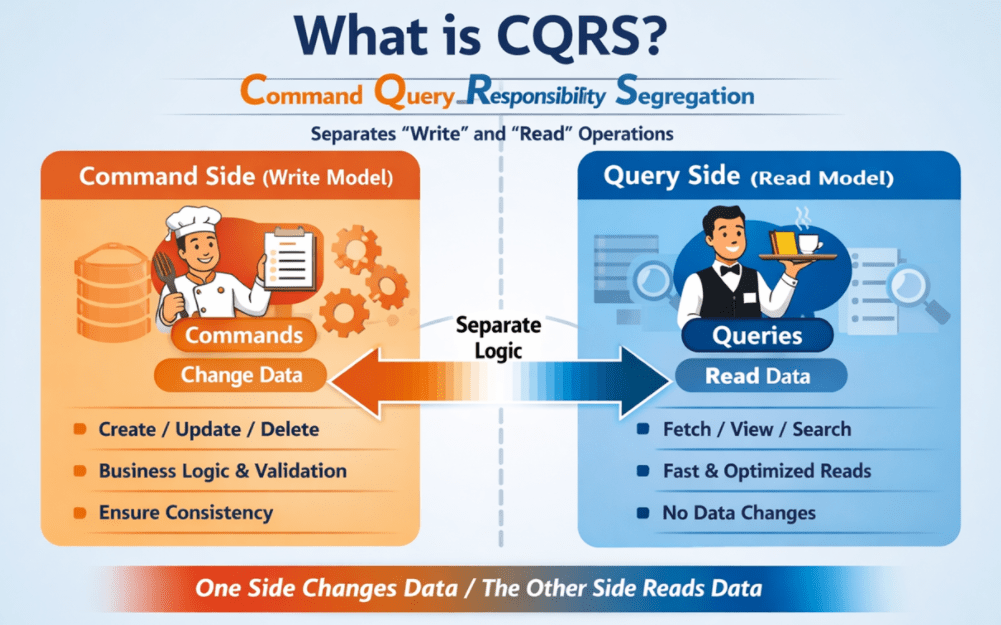
Let’s break it down in the simplest way:
Command
- An instruction that changes the system.
- Examples: CreateUser, PlaceOrder, UpdateProfile, DeleteProduct
- Commands modify data and usually return only a small result, like Success/Fail or an ID.
Query
- A request to get information
- Examples: GetUserDetails, ListOrders, SearchProducts, DashboardReport
- Queries only read data and must not change anything.
So, instead of one service/method/model doing everything (read + write), CQRS creates two separate pathways:
- Command Side (Write Model): Focuses on business rules, validation, consistency, and correct updates
- Query Side (Read Model): Focuses on fast reading, filtering, sorting, searching, and returning data in the exact shape the UI needs
Simple Analogy (restaurant)
Think of CQRS like a restaurant:
- Waiter = Query (Read)
-
- You ask the waiter: “Can I see the menu?” or “What is my total bill?”
- The waiter just gives you information. Nothing in the kitchen changes.
-
- Chef = Command (Write)
-
- You say: “Make one Masala Dosa and one Coffee.”
- The chef changes the state of the kitchen by preparing new food.
-
In the same way, in a CQRS-based system:
- Queries → Just Read Data, no changes.
- Commands → Modify Data (insert, update, delete).
In short, CQRS is a design pattern that separates read operations (queries) and write operations (commands) into distinct models and logic, allowing each side to remain simple, efficient, and easy to maintain. This separation makes applications cleaner, faster, and easier to scale, especially in large, microservice-based systems.
Why Do We Need CQRS in ASP.NET Core?
We need CQRS when an application grows so large that handling reads and writes together slows the system, makes it messy, and makes scaling hard. For a better understanding, please have a look at the following diagram:
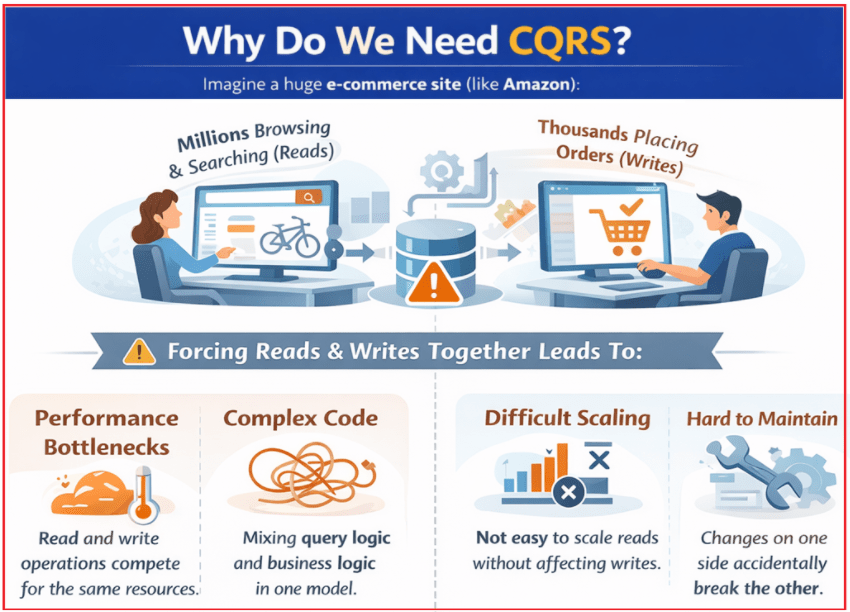
Think of a large e-commerce platform (like Amazon-style systems):
- Millions of users are constantly browsing products, searching, viewing dashboards → these are reads
- Fewer users are placing orders, updating profiles, writing reviews → these are writes
When the same services and models handle both reads and writes, problems start appearing:
- Services become too large and confusing because they contain both heavy query logic (filters, joins, reports) and strict write logic (validations, business rules, transactions).
- Performance suffers because read requests (which are most of the traffic) compete with write operations for the same resources.
- Scaling becomes difficult because you can’t scale reads separately from writes, even though reads usually need much more scaling.
- Changes become risky because modifying query logic for a new screen can accidentally affect write logic, and changing write rules can break or slow down reads.
- Maintenance and testing become harder because everything is mixed in one place.
CQRS solves this by separating responsibilities clearly:
- The Command side (Write) focuses on correctness, validation, and business rules.
- The Query side (Read) focuses on fast and flexible data retrieval (filters, sorting, caching, projections).
In One Line: We need CQRS when our application becomes too complex and too large to safely and efficiently handle reads and writes with the same logic.
CQRS helps us by giving:
- Clear separation of concerns
- Cleaner and more understandable code
- Better performance and scalability
- Easier testing and maintenance
Simple analogy
It’s like splitting a busy bank counter into two:
- one counter for deposits/withdrawals (writes, strict and slow)
- another counter for balance enquiries (reads, quick and frequent)
That separation makes the system cleaner, faster, easier to scale, and safer to change, which is exactly why we need CQRS.
CQRS Architecture:
For a better understanding of the CORS architecture, please refer to the diagram below.

The architecture has seven main components:
- Controllers
- MediatR
- Commands
- Command Handlers
- Queries
- Query Handlers
- Database
Component-1: Controllers – Entry Point of the System
Controllers are the starting point of every request.
- They receive HTTP requests from clients (e.g., UI, mobile app, Postman).
- Controllers do not contain business logic.
- Their only responsibility is to:
- Create a Command or a Query
- Send it to MediatR
Controllers do not talk directly to handlers or the database.
Component-2: MediatR – The Central Dispatcher (Middle Layer)
MediatR acts like a traffic controller or post office. What MediatR does:
- Receives a Command or Query from the controller
- Finds the Correct Handler
- Executes the handler
- Returns the result back to the controller
Important:
- Controllers do not know which handler executes the logic
- Handlers do not know who sent the request
This removes tight coupling and keeps the architecture clean.
Component-3: Commands – What Action Should Happen?
Commands represent write intentions. From the diagram:
- CreateOrderCommand
- UpdateOrderCommand
- DeleteOrderCommand
Key characteristics:
- Commands Change System State
- They describe what should be done, not how
- They usually return:
-
- Success / Failure
- Boolean
- Created or updated ID
-
Example Understanding: CreateOrderCommand clearly means create a new order.
Component-4: Command Handlers – Where Write Logic Lives
Command Handlers execute business logic for writes. From the diagram:
- CreateOrderCommandHandler
- UpdateOrderCommandHandler
- DeleteOrderCommandHandler
Responsibilities of a Command Handler:
- Validate input
- Apply business rules
- Modify entities
- Save changes to the database
- Publish events (if needed)
Important rule: One Command → One Handler → One Responsibility. This keeps write workflows clean and testable.
Component-5: Queries – Give Me Information
Queries represent read requests. From the diagram:
- GetOrderByIdQuery
- GetOrdersByUserQuery
- GetOrderListQuery
Key characteristics:
- Queries do not change data
- Queries only read and return data
- They return DTOs designed for UI/screens
Example understanding: GetOrdersByUserQuery clearly means fetch orders for a user
Component-6: Query Handlers – Optimized Read Logic
Query Handlers handle read-only operations. From the diagram:
- GetOrderByIdQueryHandler
- GetOrdersByUserQueryHandler
- GetOrderListQueryHandler
Responsibilities:
- Execute fast read queries
- Apply filtering, pagination, and sorting
- Map data to response DTOs
- Never update the database
Rule: Query Handlers must never modify state
Component-7: Database – Single Database, Two Paths
Important clarification from the diagram:
- There is only ONE database
- Both Commands and Queries use the same database
- CQRS here is about separating logic, not databases
Later (optional):
- The same architecture can support:
-
- Caching
- Read replicas
- Separate read DB
- But not mandatory.
-
CQRS vs CRUD: What’s the Difference?
Both CRUD and CQRS deal with reading and changing data, but they organize the system in very different ways.
CRUD (Create, Read, Update, Delete)
In the traditional CRUD approach:
- You usually use one model (entity) for both reads and writes
- You typically have one controller/service that contains methods like: Get, GetById, Post, Put, Delete
- Read and write logic stays tightly coupled (mixed in the same layer and often the same code flow)
Best for: small to medium applications, learning, and simple business rules.
CQRS (Command Query Responsibility Segregation)
In the CQRS approach:
- Commands handle writes (create/update/delete)
- Queries handle reads (get/search/list/report)
- You often use separate models:
-
- The Write model focuses on business rules, validation, and correctness
- The Read model focuses on speed, filtering, and UI-friendly data
-
- You typically use Command Handlers and Query Handlers (separate responsibilities)
- Sometimes (not always), reads and writes can even use different databases to scale independently
Best for: Large or complex systems, read-heavy applications, microservices, and high scalability needs.
The simplest way to remember
- CRUD: One road for everything (same model + same pipeline for read and write)
- CQRS: Two separate lanes
-
- One lane for heavy trucks (writes with validations and rules)
- One lane for fast cars (reads optimized for speed and UI needs)
-
That’s the core difference students should remember.
When Should You Use CQRS in ASP.NET Core Microservices?
You should use CQRS when your application becomes large enough that handling reads and writes with the same model and same logic starts creating performance, scaling, or maintenance problems. CQRS is powerful, but it adds structure and moving parts, so it should be used only when it gives clear benefits.
Good scenarios where CQRS makes strong sense
High read-to-write ratio (read-heavy systems)
- When most requests are reads (browsing, searching, dashboards, reports) and only a smaller portion are writes.
- Example: Product catalog browsing, hotel/flight search, admin dashboards, analytics/reporting screens.
Complex business rules on the write side
- When write operations are not simple “save data,” but involve workflows and strict rules.
- Example: Place order, approve loan, initiate refund, cancel booking, reserve stock—where validation and consistency matter a lot.
UI needs a different shape of data than the domain model
- The write model is designed for correctness and relationships, but the UI often wants flat, combined, or aggregated data.
- Example: “Order details with CustomerName, TotalAmount, LastPaymentDate” in one fast response.
CQRS allows a separate read model optimized for such screens.
You need to scale reads and writes differently
- If reads need caching, read replicas, or even a separate read database, while writes must remain strict and transactional. CQRS makes this separation easier and safer.
When CQRS is usually overkill (avoid it)
- Small, simple CRUD apps (basic admin panels, prototypes, MVPs)
- Straightforward queries and simple business rules
- Very small teams or early-stage development, where simplicity and speed matter more than advanced architecture
- When you cannot tolerate eventual consistency (in cases where every read must instantly reflect every write)
Rule of thumb (best practical advice): Start with CRUD for simplicity. Move to CQRS only when the system’s read load, write complexity, or scaling needs clearly justify the extra structure.
Understanding CQRS vs CRUD: Questions Every Student Asks
Student:
Sir, I already use several DTOs, such as CreateOrderDTO, UpdateOrderDTO, and OrderResponseDTO. Then why do people say CRUD is bad and CQRS is better?
Trainer:
First, remember this clearly: CRUD is not bad. CRUD is perfectly fine for many projects. Also, using different DTOs is a good practice—you are doing the right thing.
But DTOs and CQRS solve different problems.
Student:
Different problems? How?
Trainer:
- DTOs separate data shape.
- CQRS separates operations (actions).
So: DTOs = “What data?” and CQRS = “What action?”
Student:
I’m still confused. Can you give a simple example?
Trainer:
Sure. Look at a typical CRUD service:
- CreateOrder(CreateOrderDTO dto)
- UpdateOrder(UpdateOrderDTO dto)
- GetOrderById(id)
Now the problem: What does UpdateOrder() really mean?
Is it:
- Changing address?
- Confirming payment?
- Cancelling the order?
- Changing the status?
Even if you use a different DTO, the action’s intent remains unclear.
Student:
Oh! So, a DTO tells what data, but not exactly what action I am performing.
Trainer:
Exactly.
Student:
Then how does CQRS fix this?
Trainer:
CQRS makes the action explicit using clear names:
- ConfirmOrderCommand
- CancelOrderCommand
- ChangeOrderStatusCommand
- GetOrderByIdQuery
Just by reading the name, everyone knows:
- What action is happening
- Whether it is write (Command) or read (Query)
No guessing.
Student:
So CQRS is mainly about clarity?
Trainer:
Yes, clarity and control. CQRS answers this clearly: What exactly is the user trying to do? That’s very important in real systems where business actions become complex.
Student:
But CQRS creates many classes. Isn’t that overkill?
Trainer:
It can be overkill for small projects. But in real projects, one big service becomes difficult because:
- It becomes huge
- Debugging becomes harder
- Testing becomes harder
- Business rules become mixed with query logic
CQRS creates more files, but each file becomes small, focused, and easy to explain.
Student:
Does CQRS improve performance?
Trainer:
Not automatically. CQRS is not magic. If you use the same database and queries, you may not see any speed improvements. Performance improves only when you use CQRS along with things like:
- query optimization (projection, fewer joins)
- caching for read queries
- read replicas / separate read database
- different read models (for dashboards and lists)
So CQRS provides structure first, and later offers scaling options.
Student:
Then why do companies use CQRS in real projects?
Trainer:
Because real projects grow. Actions become complex:
- create order
- confirm order
- cancel order
- refund order
- change status with rules
- maintain status history
CQRS keeps these actions clean and isolated, so the code stays manageable even after 1–2 years.
Student:
So, should I always use CQRS?
Trainer:
No. Don’t use CQRS everywhere. Use CQRS only when the module has:
- complex workflows and business rules
- many different read screens (filters, lists, timelines, dashboards)
- frequent changes in requirements
Student:
When is CRUD + DTO enough?
Trainer:
CRUD + DTO is perfect when:
- The module is simple (basic master tables)
- Business rules are minimal
- few screens and few API variations
- small team/learning stage
Most student projects don’t need CQRS everywhere.
Student:
Can you summarize the difference in one line for interviews?
Trainer:
Yes:
DTOs separate data. CQRS separates actions (writes vs reads).
Student:
So, using DTOs does not mean I am using CQRS?
Trainer:
Correct. You can have:
- CRUD + DTOs (common and good)
- CQRS + DTOs (common for complex modules)
DTOs and CQRS are independent.
Summary:
CQRS (Command Query Responsibility Segregation) is not magic; it’s a simple but powerful idea: separate how you write data (commands) from how you read data (queries). This separation keeps the write side clean and rule-driven (validations, business logic, consistency), while allowing the read side to be fast and flexible (searching, filtering, dashboards, UI-friendly data).
CQRS is not needed for every small CRUD application, but when a system grows, especially in microservices with heavy read traffic and complex workflows, CQRS gives a clearer, more scalable, and more maintainable way to handle that growth.
About the Author: Pranaya Rout
Pranaya Rout has published more than 3,000 articles in his 11-year career. Pranaya Rout has very good experience with Microsoft Technologies, Including C#, VB, ASP.NET MVC, ASP.NET Web API, EF, EF Core, ADO.NET, LINQ, SQL Server, MYSQL, Oracle, ASP.NET Core, Cloud Computing, Microservices, Design Patterns and still learning new technologies.
🎥 Watch the Video on CQRS in ASP.NET Core Microservices!
Want to see CQRS in action using a real-world ASP.NET Core Microservices architecture? We’ve turned this tutorial into a full video walkthrough for better clarity and understanding.
Watch it here: https://www.youtube.com/watch?v=_UoUK4W61d4
✅ Learn how to separate Command and Query responsibilities
✅ Understand the benefits of scalable and maintainable design
✅ See real-time implementation using Clean Architecture principles
Don’t forget to Like, Comment, and Subscribe to our channel for more real-time .NET tutorials!