
Back to: Microservices using ASP.NET Core Web API Tutorials
gRPC in ASP.NET Core Web API Microservices
In this post, I will discuss gRPC in ASP.NET Core Web API. In today’s cloud-native world, most modern systems are built using Microservices Architecture, where a big application is split into many small services, such as Order, Payment, Product, and Notification. This makes development faster and scaling easier, but it also creates a new challenge:
- Microservices must communicate with each other constantly, and that communication must be fast and reliable.
Many teams start with REST APIs because REST is simple and widely understood. However, as the number of services grows and the amount of internal traffic increases, REST can start showing limitations, especially when you need:
- Low Latency: Requests get processed and returned very quickly, so services communicate with minimal delay.
- High Throughput: The system can handle a large number of requests per second without slowing down.
- Small Payload Sizes: Data is sent in a compact format, reducing bandwidth usage and speeding up transmission.
- Strongly-Typed Contracts: Client and server follow the same strict method and data definitions, reducing integration errors.
- Real-Time Streaming: Client and server can continuously send data back and forth over a single connection for live updates.
That’s where gRPC becomes valuable. gRPC is not meant to replace REST everywhere. Instead, it is a specialized, high-performance communication approach designed primarily for service-to-service calls within microservices. It helps internal calls run faster, more efficiently, and with fewer errors because both sides share a strict contract.
In this session, you will learn:
- What gRPC is
- Why it exists
- How it works internally (contract → code generation → client/server communication)
What is gRPC in ASP.NET Core?
gRPC (Google Remote Procedure Call) is a high-performance communication framework that allows one service to call another service as if it were calling a local method, even though the call is happening over the network.
Instead of building communication around:
- URLs
- Controllers
- JSON payloads
- REST endpoints
gRPC is built around:
- Methods
- Request/Response messages
- A Shared Contract (.proto)
So rather than saying:
- Call this URL and send JSON…
gRPC says:
- Call this method and send this strongly-typed request object.
So, from a developer’s perspective:
- We call a method
- Pass a strongly typed request object
- Receive a strongly typed response object
All networking, serialization, and transport details are handled automatically by the gRPC framework.
Why gRPC in ASP.NET Core Microservices?
In microservices, services communicate constantly:
- Order Service → Payment Service
- Order Service → Product Service
- User Service → Notification Service
Now imagine a single user request triggers 10–20 internal calls. If any call is slow or heavy, the entire application slows down, even if each microservice is perfectly written.
So, the real question becomes: How do we make internal service-to-service calls faster, smaller, and safer?
Common internal communication options in Microservices
- REST over HTTP/1.1 + JSON (Synchronous)
- Message Brokers (Kafka/RabbitMQ) (Asynchronous, Event-Based)
- gRPC over HTTP/2 + Protobuf (Synchronous + Streaming)
REST over HTTP/1.1 + JSON (good, but heavy for internal calls)
REST is human-friendly and easy to test, but for high-frequency internal calls, it can be costly because:
- JSON payloads are larger
- Parsing JSON is slower
- REST relies mostly on HTTP/1.1 patterns, which can be less efficient when many calls happen simultaneously
- API contracts are often documentation-based, which can create mismatches between client and server
So, REST is great for Public APIs, but inside microservices, it may become less efficient as traffic grows.
Message Brokers (Kafka/RabbitMQ) (excellent for async, not for direct query calls)
Message brokers are perfect when:
- You want asynchronous communication
- You want event-driven systems
- You don’t need immediate responses
Example: OrderPlaced event published → Notification Service consumes it later.
But message brokers are not ideal for simple request/response queries such as:
- Is stock available for Product X right now?
- Calculate shipping cost and return the result immediately.
For these direct calls, we need fast synchronous communication.
gRPC over HTTP/2 + Protobuf (built exactly for internal service calls)
gRPC is designed to solve the internal communication problem:
- HTTP/2 as the transport (fast, multiplexed)
- Protobuf as the message format (small binary)
- Strongly Typed Contracts (fewer mismatches, fewer bugs)
- Streaming Support (great for real-time scenarios)
So, in a .NET Core microservices system, gRPC becomes a high-performance internal RPC layer, especially between backend services where we don’t need human-readable payloads.
gRPC vs REST in ASP.NET Core Microservices
Think of REST and gRPC as two different tools, both useful in the right place.
REST is ideal when:
- You’re building public APIs
- You need browser compatibility
- Humans may interact with the API (developer tools, Postman)
- You’re modeling resources (CRUD operations)
- Simpler integration with third-party systems is required
REST Strengths:
- Universal support
- Easy debugging
- Human-readable JSON
- Works everywhere (web, mobile, external clients)
gRPC is ideal when:
- Services talk internally
- You want maximum performance
- You want strict contracts
- You need streaming
- You want lightweight payloads
- You want strongly typed method-based communication
gRPC Strengths:
- 10x smaller payloads (thanks to Protobuf)
- Very low latency
- Compiled contracts reduce errors
- Multiplexed streaming over HTTP/2
- Designed specifically for microservices
What most real-world systems do
Most mature architectures use both:
- REST/GraphQL at the edge: (client ↔ gateway) because it’s widely compatible
- gRPC internally: (gateway ↔ microservices/service ↔ service) because it’s fast and contract-safe
This approach gives the best of both worlds: compatibility outside, performance inside. This hybrid model is used by:
- Netflix
- Amazon
- Microsoft
- Uber
The Architecture of gRPC in ASP.NET Core
gRPC in .NET Core follows a Contract-First approach. This means we first write the contract (the .proto file), and from that contract, the framework generates:
- Strongly typed Server Code (Server Stub)
- Strongly typed Client Code (Client Stub)
These generated stubs communicate using:
- Protocol Buffers (Protobuf) → compact binary messages.
- HTTP/2 → fast network transport with multiplexing and streaming.
- Generated client/server stubs → strongly typed RPC methods. It means strongly typed method calls, like calling local methods.
Unlike REST (where we manually create controllers, build URLs, send JSON, handle request parsing, and map errors), gRPC hides most of these manual steps behind generated code and a runtime engine. For a better understanding, please have a look at the following diagram.
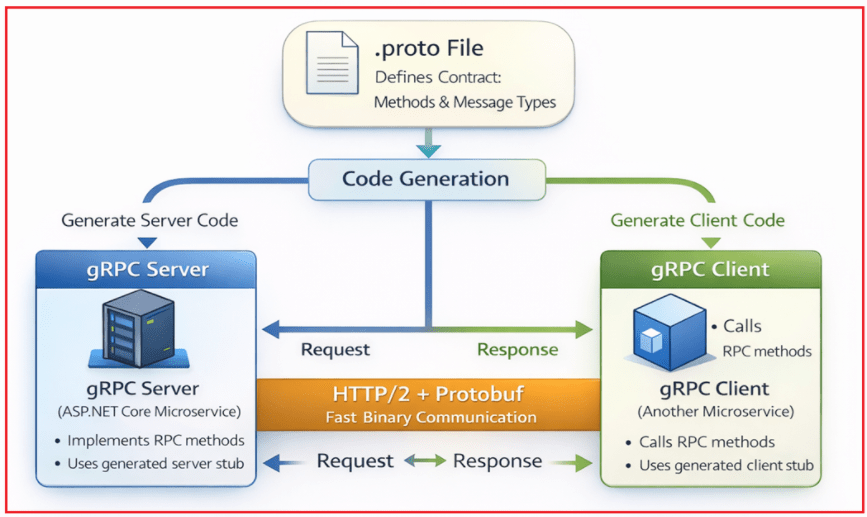
Below is a detailed explanation of each architectural component and how they work together as one pipeline.
1. The Protocol Buffers (.proto) File – The Contract and Source of Truth
The .proto file is the core building block of gRPC. You can think of it as:
- A blueprint.
- A communication agreement between the two microservices.
- A shared interface (technically).
- Or, like a class timetable, both the teacher and the student must follow (layman’s point of view).
It tells both microservices:
- Which methods exist? Example: GetOrder, MakePayment, CheckInventory
- What data will be sent? Example: OrderRequest, UserInfo, PaymentDetails
- What data will be returned? Example: OrderResponse, PaymentResponse, UserResponse
In simple words, both microservices follow the same instructions, so they never miscommunicate.
Why this is important
- Prevents mismatches in method names
- Prevents mismatches in data shapes
- Both sides always stay in sync
- Code is generated automatically from this file
- Encourages a clean, documented, and predictable communication pattern
From a Layman’s point of view, the Protocol Buffers (.proto) File is like a classroom timetable. Both the teacher and the students follow the same schedule to avoid confusion. It’s that simple, but extremely powerful.
Who defines the .proto file?
- You (the developer) define the .proto file.
- Usually created by the team owning the service (example: OrderService team).
- Other microservices consume it.
Where is the .proto file placed?
You can place it in:
- Inside the Server microservice project
- Inside a Shared Contracts/Proto project (recommended for microservices)
2. gRPC Code Generation – Creating Server Stubs and Client Proxies
Once the Protocol Buffers (.proto) File is created, we don’t need to manually write controllers or clients. .NET Core automatically generates the code for us.
Server-side Code Generation
The framework generates:
- A base class for your service
- Method signatures for each RPC
- Serialization/deserialization logic
- Communication handling code
You only override these methods to write your business logic.
Example:
public override Task<OrderResponse> GetOrder(OrderRequest request)
{
    // Your business logic
}
Where is the server code generated?
Inside your server microservice project, typically under: /obj/Debug/netX.0/Protos/
Client-side Code Generation
.NET also generates:
- A strongly typed client class
- Methods that match server RPC methods exactly
This means you don’t worry about:
- URLs
- HttpClient
- JSON
- Models mismatching
- Serialization
Example of calling a remote method: var response = await client.GetOrderAsync(request);
Where is the client code generated?
Inside the client microservice project (the one that consumes the server API), typically under: /obj/Debug/netX.0/Protos/
From a Layman’s point of view, using a gRPC is like using a TV remote. The remote has buttons, and pressing a button calls a method on your TV. You don’t have to think about how the signal travels.
3. The gRPC Server in ASP.NET Core
This is just a normal ASP.NET Core microservice configured for gRPC instead of controllers.
What the server does
- Listens for incoming gRPC calls
- Accepts Protobuf binary messages
- Converts them to C# objects
- Executes your business logic
- Converts the response back into binary
- Sends it over HTTP/2 to the client
From a Layman’s point of view, the gRPC server is like the actual teacher in a classroom. The students (clients) ask questions. The teacher listens, understands, thinks, and responds with answers.”
4. The gRPC Client in Microservices
Unlike REST, developers don’t manually build URLs or make HTTP requests. The client microservice uses the generated client-side code to call remote gRPC methods. The gRPC client:
- Opens an HTTP/2 connection
- Converts your method call into a Protobuf message
- Sends it to the server
- Waits for the response
- Converts the response into a C# object
To the developer, calling a remote service feels like calling a local method.
Example: var result = await client.MakePaymentAsync(request);
Key benefits
- No URLs.
- No JSON.
- No serialization code.
- No routing mistakes.
- Strong typing
- Faster and safer than REST
From Layman point of view: When you call a gRPC method, it feels like talking to someone standing next to you, even if they are far away.
5. HTTP/2 Transport Layer – The High-Speed Highway of gRPC
REST uses HTTP/1.1, which is older and text-based. gRPC uses HTTP/2, which brings the following key features:
- Multiplexing: Many calls over one single connection. Reducesthe overhead of connection creation.
- Binary messages: Smaller and much faster than JSON.
- Header compression: Reduces network load.
- Bidirectional streaming: The Client and server can continuously send data to each other
These features collectively make gRPC extremely fast and efficient.
From a Layman’s point of view, HTTP/1.1 is like a one-lane road. Only one car can move at a time. HTTP/2 is like a 10-lane express highway; many cars can move at the same time.
6. gRPC Runtime — The Internal Engine
This is the engine inside gRPC that developers rarely see but rely on every second.
What the runtime handles internally
- Opening/Closing Connection
- Reusing connections (pooling)
- Handling retries
- Deadlines (timeouts)
- Protobuf serialization/deserialization
- Routing requests
- Validating metadata (headers)
- Running interceptors (similar to middleware)
This is why gRPC is extremely reliable.
From a Layman’s point of view, you don’t see the engine of a car, but without it, the car won’t move. Similarly, the gRPC runtime keeps everything moving smoothly behind the scenes.”
Putting It All Together – Simple Summary
Here’s the entire pipeline in beginner language:
- Write a .proto file – Defines methods and message types
- .NET generates server and client code automatically
- The server implements business logic in the generated base class
- Client calls RPC methods as if they were local methods
- HTTP/2 carries the messages efficiently
- gRPC runtime handles everything in the background
Your microservices now communicate faster, more securely, and more efficiently than traditional REST.
gRPC Communication Types
One of the key strengths of gRPC is that it supports multiple communication patterns, not just simple request–response like REST. These communication types are defined directly in the .proto file, making them part of the service contract itself. gRPC supports four communication types, each designed for different microservice scenarios.
1. Unary RPC (Request–Response)
This is the most common and simplest communication type in gRPC.
How it works
- The client sends one request
- The server returns one response
- The connection is closed after the response
Comparison with REST
- Very similar to a REST API call
- But faster and strongly typed
Typical use cases
- Get order details
- Create payment
- Check product availability
This is the default choice for most service-to-service calls.
2. Server Streaming RPC
In server streaming, the client sends a single request, and the server sends multiple responses over time.
How it works
- Client sends a single request
- The server keeps sending a stream of responses
- Client reads responses as they arrive
Typical use cases
- Sending live order status updates
- Streaming logs or notifications
- Real-time monitoring data
Useful when the server has continuous or incremental data to send.
3. Client Streaming RPC
In client streaming, the client sends multiple requests, and the server responds once after receiving all data.
How it works
- Client opens a stream
- Client sends multiple messages
- Server processes all messages
- Server sends one final response
Typical use cases
- Uploading large datasets
- Bulk data submission
Useful when the client produces a lot of data, and the server needs to process it together.
4. Bidirectional Streaming RPC
Bidirectional streaming is the most powerful communication type in gRPC.
How it works
- Both client and server open streams
- Both can send messages independently and continuously
- Communication is fully asynchronous
Typical use cases
- Chat systems
- Real-time trading or pricing updates
- Live dashboards
- Collaborative applications
This enables true real-time communication between microservices.
Summary of gRPC Communication Types
- Unary RPC → One request, one response (REST-like)
- Server Streaming → One request, many responses
- Client Streaming → Many requests, one response
- Bidirectional Streaming → Many requests, many responses (real-time)
Benefits of gRPC in ASP.NET Core Microservices:
- Low Latency: gRPC reduces the time taken between sending a request and receiving a response by using binary serialization and HTTP/2’s efficient transport features.
- High Throughput: gRPC can handle a large number of requests per second thanks to its compact binary format and multiplexed connections, which minimize network and CPU overhead.
- Small Payload Sizes: Protocol Buffers serialize data into highly compact binary form, keeping message sizes much smaller than JSON and reducing bandwidth usage.
- Strongly-Typed Contracts: The .proto file enforces strict request and response structures, ensuring that both the client and the server use the same method signatures and data types at compile time.
- Real-Time Streaming: gRPC supports client, server, and bidirectional streaming, enabling continuous, real-time data exchange over a single HTTP/2 connection.
gRPC in ASP.NET Core Microservices offers a fast, efficient, and reliable way for services to communicate internally. By using a contract-first approach with Protocol Buffers, HTTP/2, and generated client/server code, gRPC ensures low latency, small payload sizes, and strongly typed communication. While REST is ideal for external APIs, gRPC is best suited for internal service-to-service communication where performance and scalability are critical.

About the Author: Pranaya Rout
Pranaya Rout has published more than 3,000 articles in his 11-year career. Pranaya Rout has very good experience with Microsoft Technologies, Including C#, VB, ASP.NET MVC, ASP.NET Web API, EF, EF Core, ADO.NET, LINQ, SQL Server, MYSQL, Oracle, ASP.NET Core, Cloud Computing, Microservices, Design Patterns and still learning new technologies.
🎥 Watch This Step-by-Step Tutorial on gRPC in ASP.NET Core Microservices
Want to learn how to implement high-performance internal communication between your microservices using gRPC? In this in-depth video, we cover everything from .proto contracts to real-time service-to-service communication in .NET Core.
▶️ Watch Now on YouTube: gRPC in ASP.NET Core Microservices
📌 Learn the real-world architecture, best practices, and how gRPC outperforms REST in internal microservices!